www.glcnetworks.com
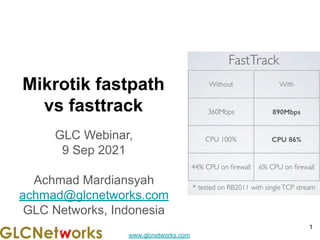
Mikrotik fastpath
vs fasttrack
GLC Webinar,
9 Sep 2021
Achmad Mardiansyah
achmad@glcnetworks.com
GLC Networks, Indonesia
1
www.glcnetworks.com
Agenda
● Introduction
● Review prerequisite knowledge
● fastpath
● fastrack
● Live practice
● Q & A
2
www.glcnetworks.com
introduction
3
www.glcnetworks.com
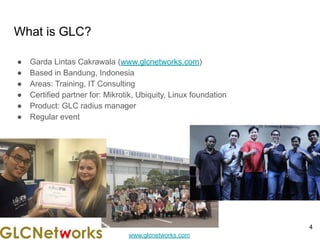
What is GLC?
● Garda Lintas Cakrawala (www.glcnetworks.com)
● Based in Bandung, Indonesia
● Areas: Training, IT Consulting
● Certified partner for: Mikrotik, Ubiquity, Linux foundation
● Product: GLC radius manager
● Regular event
4
www.glcnetworks.com
Trainer Introduction
● Name: Achmad Mardiansyah
● Base: bandung, Indonesia
● Linux user since 1999, mikrotik user since 2007, UBNT
2011
● Mikrotik Certified Trainer
(MTCNA/RE/WE/UME/INE/TCE/IPv6)
● Mikrotik/Linux Certified Consultant
● Website contributor: achmadjournal.com, mikrotik.tips,
asysadmin.tips
● More info:
http://au.linkedin.com/in/achmadmardiansyah
5
www.glcnetworks.com
Past experience
6
● 2021 (Congo DRC, Malaysia): network support,
radius/billing integration
● 2020 (Congo DRC, Malaysia): IOT integration,
network automation
● 2019, Congo (DRC): build a wireless ISP from
ground-up
● 2018, Malaysia: network revamp, develop billing
solution and integration, setup dynamic routing
● 2017, Libya (north africa): remote wireless migration
for a new Wireless ISP
● 2016, United Kingdom: workshop for wireless ISP,
migrating a bridged to routed network
www.glcnetworks.com
About GLC webinar?
● First webinar: january 1, 2010 (title:
tahun baru bersama solaris - new year
with solaris OS)
● As a sharing event with various topics:
linux, networking, wireless, database,
programming, etc
● Regular schedule
● Irregular schedule: as needed
● Checking schedule:
http://www.glcnetworks.com/schedule
● You are invited to be a presenter
○ No need to be an expert
○ This is a forum for sharing: knowledge,
experiences, information
7
www.glcnetworks.com
Please introduce yourself
● Your name
● Your company/university?
● Your networking experience?
● Your mikrotik experience?
● Your expectation from this course?
8
www.glcnetworks.com
Prerequisite
● This presentation some prerequisite knowledge
● We assume you already know:
○ Understand networking
○ Able to operate mikrotik device
○ Understand packetflow
○ Understand connection tracking
9
www.glcnetworks.com
Review prerequisite knowledge
10
www.glcnetworks.com
11
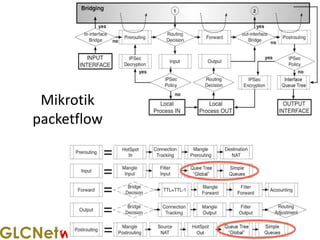
Mikrotik
packetflow
www.glcnetworks.com
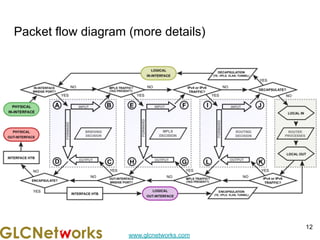
Packet flow diagram (more details)
12
www.glcnetworks.com
Firewall
13
www.glcnetworks.com
What is Mikrotik firewall?
● Is a feature to
○ Control network access (filter)
○ Modify network header (NAT)
○ Marking packet for further processing (mangle)
● Developed from linux
● Consist of 2 parts: matcher & action
● Executed sequentially
● Netadmin must understand the application’s characteristics in order to build a
matcher (e.g. browsing -> using TCP port 80)
14
www.glcnetworks.com
How firewall works?
● Setup matcher -> then action
● Mikrotik has lots of options for matcher
-> very flexible
● Matcher + Action = Firewall rule
● Rule is executed sequentially
15
www.glcnetworks.com
16
16
What's the
difference between
forward and input?
FORWARD
INPUT
www.glcnetworks.com
Mikrotik connection tracking
17
www.glcnetworks.com
What is connection?
A condition where a client is establishing communication to a server from
beginning until end.
Connection phase/type: New, Established, Related, Invalid
A connection usually is identified by:
● Pair of IP address (source and destination)
● Pair of port (source and destination). If it uses ports
Example: 10.10.10.10:283 -> 11.11.11.11:80
Note: Connection is not limited to TCP connection only. UDP and other protocols
can have a connection.
18
www.glcnetworks.com
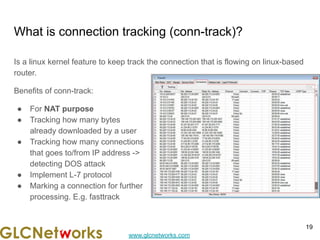
What is connection tracking (conn-track)?
Is a linux kernel feature to keep track the connection that is flowing on linux-based
router.
Benefits of conn-track:
● For NAT purpose
● Tracking how many bytes
already downloaded by a user
● Tracking how many connections
that goes to/from IP address ->
detecting DOS attack
● Implement L-7 protocol
● Marking a connection for further
processing. E.g. fasttrack
19
www.glcnetworks.com
Fastpath
20
www.glcnetworks.com
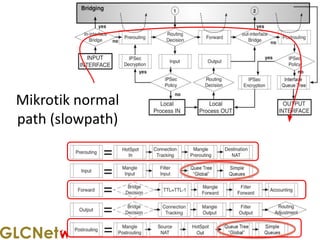
21
Mikrotik normal
path (slowpath)
www.glcnetworks.com
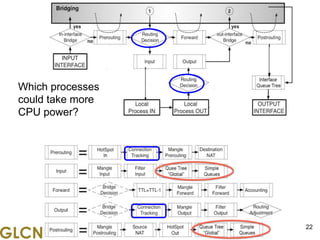
22
Which processes
could take more
CPU power?
www.glcnetworks.com
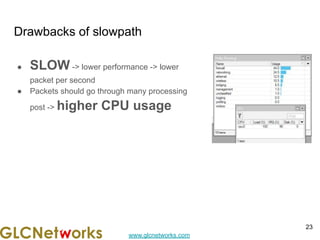
Drawbacks of slowpath
● SLOW -> lower performance -> lower
packet per second
● Packets should go through many processing
post -> higher CPU usage
23
www.glcnetworks.com
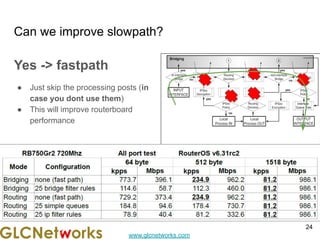
Can we improve slowpath?
Yes -> fastpath
● Just skip the processing posts (in
case you dont use them)
● This will improve routerboard
performance
24
www.glcnetworks.com
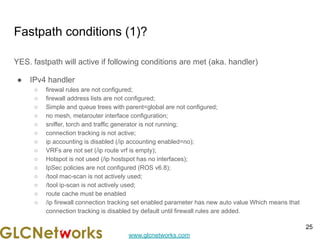
Fastpath conditions (1)?
YES. fastpath will active if following conditions are met (aka. handler)
● IPv4 handler
○ firewal rules are not configured;
○ firewall address lists are not configured;
○ Simple and queue trees with parent=global are not configured;
○ no mesh, metarouter interface configuration;
○ sniffer, torch and traffic generator is not running;
○ connection tracking is not active;
○ ip accounting is disabled (/ip accounting enabled=no);
○ VRFs are not set (/ip route vrf is empty);
○ Hotspot is not used (/ip hostspot has no interfaces);
○ IpSec policies are not configured (ROS v6.8);
○ /tool mac-scan is not actively used;
○ /tool ip-scan is not actively used;
○ route cache must be enabled
○ /ip firewall connection tracking set enabled parameter has new auto value Which means that
connection tracking is disabled by default until firewall rules are added.
25
www.glcnetworks.com
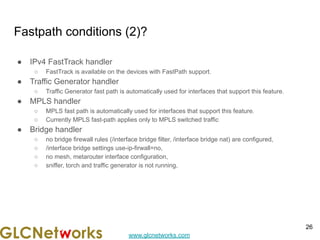
Fastpath conditions (2)?
● IPv4 FastTrack handler
○ FastTrack is available on the devices with FastPath support.
● Traffic Generator handler
○ Traffic Generator fast path is automatically used for interfaces that support this feature.
● MPLS handler
○ MPLS fast path is automatically used for interfaces that support this feature.
○ Currently MPLS fast-path applies only to MPLS switched traffic
● Bridge handler
○ no bridge firewall rules (/interface bridge filter, /interface bridge nat) are configured,
○ /interface bridge settings use-ip-firwall=no,
○ no mesh, metarouter interface configuration,
○ sniffer, torch and traffic generator is not running,
26
www.glcnetworks.com
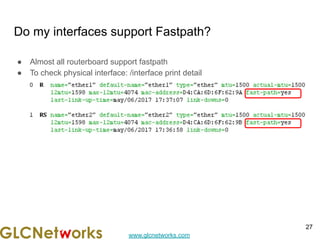
Do my interfaces support Fastpath?
● Almost all routerboard support fastpath
● To check physical interface: /interface print detail
27
www.glcnetworks.com
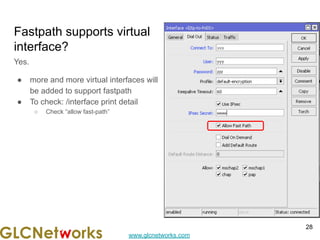
Fastpath supports virtual
interface?
Yes.
● more and more virtual interfaces will
be added to support fastpath
● To check: /interface print detail
○ Check “allow fast-path”
28
www.glcnetworks.com
How do i know the if
fastpath is active?
/ip settings print
29
www.glcnetworks.com
Fasttrack
30
www.glcnetworks.com
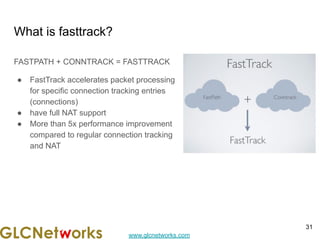
What is fasttrack?
FASTPATH + CONNTRACK = FASTTRACK
● FastTrack accelerates packet processing
for specific connection tracking entries
(connections)
● have full NAT support
● More than 5x performance improvement
compared to regular connection tracking
and NAT
31
www.glcnetworks.com
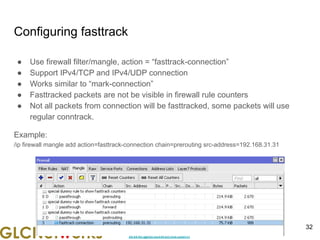
Configuring fasttrack
● Use firewall filter/mangle, action = “fasttrack-connection”
● Support IPv4/TCP and IPv4/UDP connection
● Works similar to “mark-connection”
● Fasttracked packets are not be visible in firewall rule counters
● Not all packets from connection will be fasttracked, some packets will use
regular conntrack.
Example:
/ip firewall mangle add action=fasttrack-connection chain=prerouting src-address=192.168.31.31
32
www.glcnetworks.com
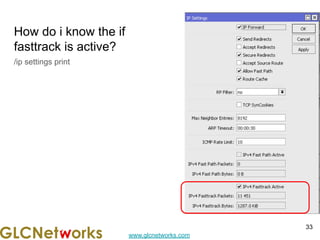
How do i know the if
fasttrack is active?
/ip settings print
33
www.glcnetworks.com
BEWARE of fasttrack!!
● Fasttrack will by-pass the packet-flow processing -> including queue. YOU
CANNOT QOS (queue_simple / queue_tree) the fasttrack
● Test your rule before implementation
● Know what you doing, just copy and paste.
● You really must understand the concepts of connection in RouterOS
34
www.glcnetworks.com
LIVE practice
35
www.glcnetworks.com
preparation
● SSH client
● SSH parameters
○ SSH address
○ SSH port
○ SSH username
○ SSH password
36
www.glcnetworks.com
Q & A
37
www.glcnetworks.com
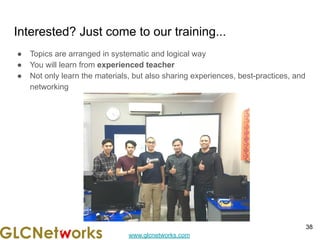
Interested? Just come to our training...
● Topics are arranged in systematic and logical way
● You will learn from experienced teacher
● Not only learn the materials, but also sharing experiences, best-practices, and
networking
38
www.glcnetworks.com
End of slides
● Thank you for your attention
● Please submit your feedback: http://bit.ly/glcfeedback
● Find our further event on our website : https://www.glcnetworks.com/en/
● Like our facebook page: https://www.facebook.com/glcnetworks
● Slide: https://www.slideshare.net/glcnetworks/
● Discord (bahasa indonesia): (https://discord.gg/6MZ3KUHHBX)
● Recording (youtube): https://www.youtube.com/c/GLCNetworks
● Stay tune with our schedule
● Any questions?
39

Mikrotik Fastpath vs Fasttrack

  • 1.
    www.glcnetworks.com Mikrotik fastpath vs fasttrack GLCWebinar, 9 Sep 2021 Achmad Mardiansyah achmad@glcnetworks.com GLC Networks, Indonesia 1
  • 2.
    www.glcnetworks.com Agenda ● Introduction ● Reviewprerequisite knowledge ● fastpath ● fastrack ● Live practice ● Q & A 2
  • 3.
  • 4.
    www.glcnetworks.com What is GLC? ●Garda Lintas Cakrawala (www.glcnetworks.com) ● Based in Bandung, Indonesia ● Areas: Training, IT Consulting ● Certified partner for: Mikrotik, Ubiquity, Linux foundation ● Product: GLC radius manager ● Regular event 4
  • 5.
    www.glcnetworks.com Trainer Introduction ● Name:Achmad Mardiansyah ● Base: bandung, Indonesia ● Linux user since 1999, mikrotik user since 2007, UBNT 2011 ● Mikrotik Certified Trainer (MTCNA/RE/WE/UME/INE/TCE/IPv6) ● Mikrotik/Linux Certified Consultant ● Website contributor: achmadjournal.com, mikrotik.tips, asysadmin.tips ● More info: http://au.linkedin.com/in/achmadmardiansyah 5
  • 6.
    www.glcnetworks.com Past experience 6 ● 2021(Congo DRC, Malaysia): network support, radius/billing integration ● 2020 (Congo DRC, Malaysia): IOT integration, network automation ● 2019, Congo (DRC): build a wireless ISP from ground-up ● 2018, Malaysia: network revamp, develop billing solution and integration, setup dynamic routing ● 2017, Libya (north africa): remote wireless migration for a new Wireless ISP ● 2016, United Kingdom: workshop for wireless ISP, migrating a bridged to routed network
  • 7.
    www.glcnetworks.com About GLC webinar? ●First webinar: january 1, 2010 (title: tahun baru bersama solaris - new year with solaris OS) ● As a sharing event with various topics: linux, networking, wireless, database, programming, etc ● Regular schedule ● Irregular schedule: as needed ● Checking schedule: http://www.glcnetworks.com/schedule ● You are invited to be a presenter ○ No need to be an expert ○ This is a forum for sharing: knowledge, experiences, information 7
  • 8.
    www.glcnetworks.com Please introduce yourself ●Your name ● Your company/university? ● Your networking experience? ● Your mikrotik experience? ● Your expectation from this course? 8
  • 9.
    www.glcnetworks.com Prerequisite ● This presentationsome prerequisite knowledge ● We assume you already know: ○ Understand networking ○ Able to operate mikrotik device ○ Understand packetflow ○ Understand connection tracking 9
  • 10.
  • 11.
  • 12.
  • 13.
  • 14.
    www.glcnetworks.com What is Mikrotikfirewall? ● Is a feature to ○ Control network access (filter) ○ Modify network header (NAT) ○ Marking packet for further processing (mangle) ● Developed from linux ● Consist of 2 parts: matcher & action ● Executed sequentially ● Netadmin must understand the application’s characteristics in order to build a matcher (e.g. browsing -> using TCP port 80) 14
  • 15.
    www.glcnetworks.com How firewall works? ●Setup matcher -> then action ● Mikrotik has lots of options for matcher -> very flexible ● Matcher + Action = Firewall rule ● Rule is executed sequentially 15
  • 16.
  • 17.
  • 18.
    www.glcnetworks.com What is connection? Acondition where a client is establishing communication to a server from beginning until end. Connection phase/type: New, Established, Related, Invalid A connection usually is identified by: ● Pair of IP address (source and destination) ● Pair of port (source and destination). If it uses ports Example: 10.10.10.10:283 -> 11.11.11.11:80 Note: Connection is not limited to TCP connection only. UDP and other protocols can have a connection. 18
  • 19.
    www.glcnetworks.com What is connectiontracking (conn-track)? Is a linux kernel feature to keep track the connection that is flowing on linux-based router. Benefits of conn-track: ● For NAT purpose ● Tracking how many bytes already downloaded by a user ● Tracking how many connections that goes to/from IP address -> detecting DOS attack ● Implement L-7 protocol ● Marking a connection for further processing. E.g. fasttrack 19
  • 20.
  • 21.
  • 22.
  • 23.
    www.glcnetworks.com Drawbacks of slowpath ●SLOW -> lower performance -> lower packet per second ● Packets should go through many processing post -> higher CPU usage 23
  • 24.
    www.glcnetworks.com Can we improveslowpath? Yes -> fastpath ● Just skip the processing posts (in case you dont use them) ● This will improve routerboard performance 24
  • 25.
    www.glcnetworks.com Fastpath conditions (1)? YES.fastpath will active if following conditions are met (aka. handler) ● IPv4 handler ○ firewal rules are not configured; ○ firewall address lists are not configured; ○ Simple and queue trees with parent=global are not configured; ○ no mesh, metarouter interface configuration; ○ sniffer, torch and traffic generator is not running; ○ connection tracking is not active; ○ ip accounting is disabled (/ip accounting enabled=no); ○ VRFs are not set (/ip route vrf is empty); ○ Hotspot is not used (/ip hostspot has no interfaces); ○ IpSec policies are not configured (ROS v6.8); ○ /tool mac-scan is not actively used; ○ /tool ip-scan is not actively used; ○ route cache must be enabled ○ /ip firewall connection tracking set enabled parameter has new auto value Which means that connection tracking is disabled by default until firewall rules are added. 25
  • 26.
    www.glcnetworks.com Fastpath conditions (2)? ●IPv4 FastTrack handler ○ FastTrack is available on the devices with FastPath support. ● Traffic Generator handler ○ Traffic Generator fast path is automatically used for interfaces that support this feature. ● MPLS handler ○ MPLS fast path is automatically used for interfaces that support this feature. ○ Currently MPLS fast-path applies only to MPLS switched traffic ● Bridge handler ○ no bridge firewall rules (/interface bridge filter, /interface bridge nat) are configured, ○ /interface bridge settings use-ip-firwall=no, ○ no mesh, metarouter interface configuration, ○ sniffer, torch and traffic generator is not running, 26
  • 27.
    www.glcnetworks.com Do my interfacessupport Fastpath? ● Almost all routerboard support fastpath ● To check physical interface: /interface print detail 27
  • 28.
    www.glcnetworks.com Fastpath supports virtual interface? Yes. ●more and more virtual interfaces will be added to support fastpath ● To check: /interface print detail ○ Check “allow fast-path” 28
  • 29.
    www.glcnetworks.com How do iknow the if fastpath is active? /ip settings print 29
  • 30.
  • 31.
    www.glcnetworks.com What is fasttrack? FASTPATH+ CONNTRACK = FASTTRACK ● FastTrack accelerates packet processing for specific connection tracking entries (connections) ● have full NAT support ● More than 5x performance improvement compared to regular connection tracking and NAT 31
  • 32.
    www.glcnetworks.com Configuring fasttrack ● Usefirewall filter/mangle, action = “fasttrack-connection” ● Support IPv4/TCP and IPv4/UDP connection ● Works similar to “mark-connection” ● Fasttracked packets are not be visible in firewall rule counters ● Not all packets from connection will be fasttracked, some packets will use regular conntrack. Example: /ip firewall mangle add action=fasttrack-connection chain=prerouting src-address=192.168.31.31 32
  • 33.
    www.glcnetworks.com How do iknow the if fasttrack is active? /ip settings print 33
  • 34.
    www.glcnetworks.com BEWARE of fasttrack!! ●Fasttrack will by-pass the packet-flow processing -> including queue. YOU CANNOT QOS (queue_simple / queue_tree) the fasttrack ● Test your rule before implementation ● Know what you doing, just copy and paste. ● You really must understand the concepts of connection in RouterOS 34
  • 35.
  • 36.
    www.glcnetworks.com preparation ● SSH client ●SSH parameters ○ SSH address ○ SSH port ○ SSH username ○ SSH password 36
  • 37.
  • 38.
    www.glcnetworks.com Interested? Just cometo our training... ● Topics are arranged in systematic and logical way ● You will learn from experienced teacher ● Not only learn the materials, but also sharing experiences, best-practices, and networking 38
  • 39.
    www.glcnetworks.com End of slides ●Thank you for your attention ● Please submit your feedback: http://bit.ly/glcfeedback ● Find our further event on our website : https://www.glcnetworks.com/en/ ● Like our facebook page: https://www.facebook.com/glcnetworks ● Slide: https://www.slideshare.net/glcnetworks/ ● Discord (bahasa indonesia): (https://discord.gg/6MZ3KUHHBX) ● Recording (youtube): https://www.youtube.com/c/GLCNetworks ● Stay tune with our schedule ● Any questions? 39