MICRO CONTROLLER AND MICRO PROCESSER 
PROJECT REPORT: 
Frequency meter 
Submitted to : 
Ma’am Maria 
Submitted by : 
Aroosa 
Sheher 
Sidra Ali
Objective: 
Measuring frequency is one of the prime requirements for many applications. The most 
obvious method of measuring frequency is using CRO (or now a days using DSO). But 
this instrument is not handheld or available with all the students or hobbyists at any 
time. It is actually laboratory instrument and not the portable one. Also it is costlier. Also 
conventional CRO does not give the direct frequency value read out. One has to first set 
the waveform then find time/division and finely calculate time period and frequency. So 
it’s a long process that takes time. Another way is use frequency counter that will give 
us direct digital readout of frequency. In this no need of first adjusting the waveform into 
screen then find time / division and then calculate time period and frequency such as 
CRO. Just apply the signal input and get the read out of frequency. That’s why 
frequency counters finding their own place in measuring instruments. 
Component Details: 
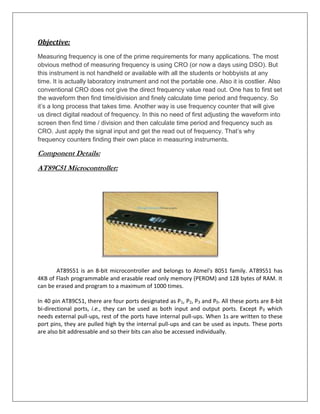
AT89C51 Microcontroller: 
AT89S51 is an 8-bit microcontroller and belongs to Atmel's 8051 family. AT89S51 has 
4KB of Flash programmable and erasable read only memory (PEROM) and 128 bytes of RAM. It 
can be erased and program to a maximum of 1000 times. 
In 40 pin AT89C51, there are four ports designated as P1, P2, P3 and P0. All these ports are 8-bit 
bi-directional ports, i.e., they can be used as both input and output ports. Except P0 which 
needs external pull-ups, rest of the ports have internal pull-ups. When 1s are written to these 
port pins, they are pulled high by the internal pull-ups and can be used as inputs. These ports 
are also bit addressable and so their bits can also be accessed individually.
LCD: 
LCD (Liquid Crystal Display) screen is an electronic display module and find a wide range of 
applications. A 16x2 LCD display is very basic module and is very commonly used in various 
devices and circuits.A 16x2 LCD means it can display 16 characters per line and there are 2 such 
lines. In this LCD each character is displayed in 5x7 pixel matrix. This LCD has two registers, 
namely, Command and Data. 
Crystal Oscilator 
Implementation on proteus:
CODE EXPLANATION: 
Our project consist of six functions : 
Description of each of the function is given below: 
 void delay(unsigned int time) 
 void One_Sec_Delay() 
 void lcd_initilize() 
 void lcd_command(unsigned char cmd) 
 void lcd_string(unsigned char str[]) 
 void lcd_int(unsigned int i)
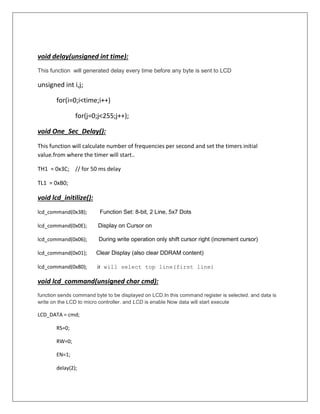
void delay(unsigned int time): 
This function will generated delay every time before any byte is sent to LCD 
unsigned int i,j; 
for(i=0;i<time;i++) 
for(j=0;j<255;j++); 
void One_Sec_Delay(): 
This function will calculate number of frequencies per second and set the timers initial 
value.from where the timer will start.. 
TH1 = 0x3C; // for 50 ms delay 
TL1 = 0xB0; 
void lcd_initilize(): 
lcd_command(0x38); Function Set: 8-bit, 2 Line, 5x7 Dots 
lcd_command(0x0E); Display on Cursor on 
lcd_command(0x06); During write operation only shift cursor right (increment cursor) 
lcd_command(0x01); Clear Display (also clear DDRAM content) 
lcd_command(0x80); it will select top line(first line) 
void lcd_command(unsigned char cmd): 
function sends command byte to be displayed on LCD.In this command register is selected. and data is 
write on the LCD to micro controller. and LCD is enable Now data will start execute 
LCD_DATA = cmd; 
RS=0; 
RW=0; 
EN=1; 
delay(2);
EN=0; 
void lcd_string(unsigned char str[]): 
for(i=0 ; str[i] ; i++) 
LCD_DATA=str[i]; 
RS=1; 
RW=0; 
EN=1; 
delay(1); 
EN=0; 
void lcd_int(unsigned int i): 
This function takes two arguments. It converts HEX numbers into decimal and then decimal to 
ASCII so that they can be displayed on screen . 
unsigned char ascii[6]; 
ascii[5] = 0; // = NULL 
ascii[4] = i % 10 | 0x30 ; i = i / 10; 
ascii[3] = i % 10 | 0x30 ; i = i / 10; 
ascii[2] = i % 10 | 0x30 ; i = i / 10; 
ascii[1] = i % 10 | 0x30 ; i = i / 10; 
ascii[0] = i % 10 | 0x30 ; i = i / 10; 
lcd_string(ascii);

SIMPLE Frequency METER using AT89c51

  • 1.
    MICRO CONTROLLER ANDMICRO PROCESSER PROJECT REPORT: Frequency meter Submitted to : Ma’am Maria Submitted by : Aroosa Sheher Sidra Ali
  • 2.
    Objective: Measuring frequencyis one of the prime requirements for many applications. The most obvious method of measuring frequency is using CRO (or now a days using DSO). But this instrument is not handheld or available with all the students or hobbyists at any time. It is actually laboratory instrument and not the portable one. Also it is costlier. Also conventional CRO does not give the direct frequency value read out. One has to first set the waveform then find time/division and finely calculate time period and frequency. So it’s a long process that takes time. Another way is use frequency counter that will give us direct digital readout of frequency. In this no need of first adjusting the waveform into screen then find time / division and then calculate time period and frequency such as CRO. Just apply the signal input and get the read out of frequency. That’s why frequency counters finding their own place in measuring instruments. Component Details: AT89C51 Microcontroller: AT89S51 is an 8-bit microcontroller and belongs to Atmel's 8051 family. AT89S51 has 4KB of Flash programmable and erasable read only memory (PEROM) and 128 bytes of RAM. It can be erased and program to a maximum of 1000 times. In 40 pin AT89C51, there are four ports designated as P1, P2, P3 and P0. All these ports are 8-bit bi-directional ports, i.e., they can be used as both input and output ports. Except P0 which needs external pull-ups, rest of the ports have internal pull-ups. When 1s are written to these port pins, they are pulled high by the internal pull-ups and can be used as inputs. These ports are also bit addressable and so their bits can also be accessed individually.
  • 3.
    LCD: LCD (LiquidCrystal Display) screen is an electronic display module and find a wide range of applications. A 16x2 LCD display is very basic module and is very commonly used in various devices and circuits.A 16x2 LCD means it can display 16 characters per line and there are 2 such lines. In this LCD each character is displayed in 5x7 pixel matrix. This LCD has two registers, namely, Command and Data. Crystal Oscilator Implementation on proteus:
  • 4.
    CODE EXPLANATION: Ourproject consist of six functions : Description of each of the function is given below:  void delay(unsigned int time)  void One_Sec_Delay()  void lcd_initilize()  void lcd_command(unsigned char cmd)  void lcd_string(unsigned char str[])  void lcd_int(unsigned int i)
  • 5.
    void delay(unsigned inttime): This function will generated delay every time before any byte is sent to LCD unsigned int i,j; for(i=0;i<time;i++) for(j=0;j<255;j++); void One_Sec_Delay(): This function will calculate number of frequencies per second and set the timers initial value.from where the timer will start.. TH1 = 0x3C; // for 50 ms delay TL1 = 0xB0; void lcd_initilize(): lcd_command(0x38); Function Set: 8-bit, 2 Line, 5x7 Dots lcd_command(0x0E); Display on Cursor on lcd_command(0x06); During write operation only shift cursor right (increment cursor) lcd_command(0x01); Clear Display (also clear DDRAM content) lcd_command(0x80); it will select top line(first line) void lcd_command(unsigned char cmd): function sends command byte to be displayed on LCD.In this command register is selected. and data is write on the LCD to micro controller. and LCD is enable Now data will start execute LCD_DATA = cmd; RS=0; RW=0; EN=1; delay(2);
  • 6.
    EN=0; void lcd_string(unsignedchar str[]): for(i=0 ; str[i] ; i++) LCD_DATA=str[i]; RS=1; RW=0; EN=1; delay(1); EN=0; void lcd_int(unsigned int i): This function takes two arguments. It converts HEX numbers into decimal and then decimal to ASCII so that they can be displayed on screen . unsigned char ascii[6]; ascii[5] = 0; // = NULL ascii[4] = i % 10 | 0x30 ; i = i / 10; ascii[3] = i % 10 | 0x30 ; i = i / 10; ascii[2] = i % 10 | 0x30 ; i = i / 10; ascii[1] = i % 10 | 0x30 ; i = i / 10; ascii[0] = i % 10 | 0x30 ; i = i / 10; lcd_string(ascii);