3ds Max 2015 Essentials
Chapter 13: Introduction to Lighting:
Interior Lighting
3ds Max topics covered in this
chapter include the following:
• Recognize 3ds Max lights
• Light a still life
• Select shadow types
• Create atmospheres and effects
• Utilize the Light Lister tool
2
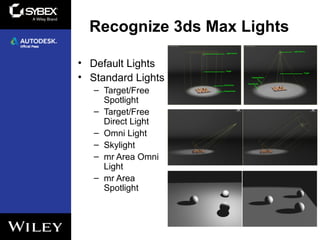
Recognize 3ds Max Lights
• Default Lights
• Standard Lights
– Target/Free
Spotlight
– Target/Free
Direct Light
– Omni Light
– Skylight
– mr Area Omni
Light
– mr Area
Spotlight
3
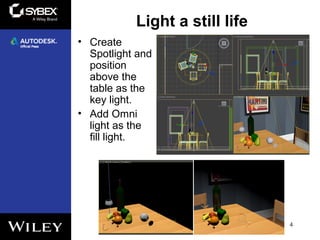
Light a still life
4
• Create
Spotlight and
position
above the
table as the
key light.
• Add Omni
light as the
fill light.
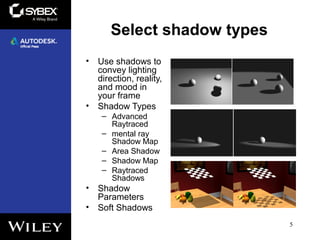
Select shadow types
• Use shadows to
convey lighting
direction, reality,
and mood in
your frame
• Shadow Types
– Advanced
Raytraced
– mental ray
Shadow Map
– Area Shadow
– Shadow Map
– Raytraced
Shadows
• Shadow
Parameters
• Soft Shadows
5
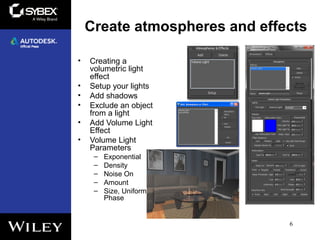
Create atmospheres and effects
• Creating a
volumetric light
effect
• Setup your lights
• Add shadows
• Exclude an object
from a light
• Add Volume Light
Effect
• Volume Light
Parameters
– Exponential
– Density
– Noise On
– Amount
– Size, Uniformity,
Phase
6
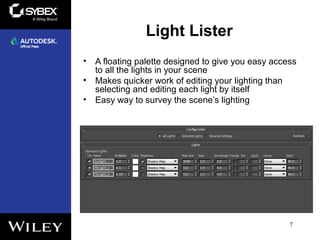
Light Lister
• A floating palette designed to give you easy access
to all the lights in your scene
• Makes quicker work of editing your lighting than
selecting and editing each light by itself
• Easy way to survey the scene’s lighting
7

Max2015 ch13

  • 1.
    3ds Max 2015Essentials Chapter 13: Introduction to Lighting: Interior Lighting
  • 2.
    3ds Max topicscovered in this chapter include the following: • Recognize 3ds Max lights • Light a still life • Select shadow types • Create atmospheres and effects • Utilize the Light Lister tool 2
  • 3.
    Recognize 3ds MaxLights • Default Lights • Standard Lights – Target/Free Spotlight – Target/Free Direct Light – Omni Light – Skylight – mr Area Omni Light – mr Area Spotlight 3
  • 4.
    Light a stilllife 4 • Create Spotlight and position above the table as the key light. • Add Omni light as the fill light.
  • 5.
    Select shadow types •Use shadows to convey lighting direction, reality, and mood in your frame • Shadow Types – Advanced Raytraced – mental ray Shadow Map – Area Shadow – Shadow Map – Raytraced Shadows • Shadow Parameters • Soft Shadows 5
  • 6.
    Create atmospheres andeffects • Creating a volumetric light effect • Setup your lights • Add shadows • Exclude an object from a light • Add Volume Light Effect • Volume Light Parameters – Exponential – Density – Noise On – Amount – Size, Uniformity, Phase 6
  • 7.
    Light Lister • Afloating palette designed to give you easy access to all the lights in your scene • Makes quicker work of editing your lighting than selecting and editing each light by itself • Easy way to survey the scene’s lighting 7