THE CAREER SEARCH
PROJECT
APPLYING FOR A JOB: CASE STUDY
If you hear about or find a job advertisement for your perfect job…
are you ready to apply?
Do you have a saved cover letter or resume?
This project will allow you to create or revise your cover letter and
resume so you are prepared to apply for your ideal job when it comes
your way.
APPLYING FOR A JOB: COVER
LETTER AND RÉSUMÉ
Cover Letter
Requirements:
•Not a template (use a blank word
document)
•Uses one of the following letter
formats: Block, Modified Block,
Semi-Block
•includes:
• Your Contact Information
• Employer Contact Information
• Salutation
• 3 Paragraphs
o 1st: Why you are writing, the position you are applying
for, how you found out about the job
o 2nd: How your qualification match the job you are
applying for
o 3rd:Your contact information and a thank you for being
considered
APPLYING FOR A JOB: COVER
LETTER AND RÉSUMÉ
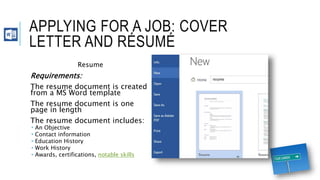
Resume
Requirements:
The resume document is created
from a MS Word template
The resume document is one
page in length
The resume document includes:
 An Objective
 Contact information
 Education History
 Work History
 Awards, certifications, notable skills
RESEARCHING A JOB: CASE STUDY
When searching for a job, do you have a desired salary?
Have you ever reviewed a job ad which listed the salary as an hourly
wage but you wanted to know what the monthly or annual salary is?
Using your knowledge of Microsoft Excel, you will create two tools to
help you evaluate a salary provided in a job ad.
RESEARCHING A JOB:
DOES THE JOB MEET MY SALARY
REQUIREMENTS?
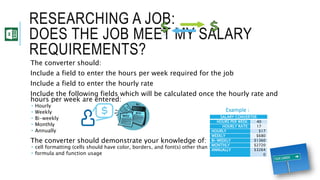
The converter should:
Include a field to enter the hours per week required for the job
Include a field to enter the hourly rate
Include the following fields which will be calculated once the hourly rate and
hours per week are entered:
 Hourly
 Weekly
 Bi-weekly
 Monthly
 Annually
The converter should demonstrate your knowledge of:
 cell formatting (cells should have color, borders, and font(s) other than the default font)
 formula and function usage
SALARY CONVERTER
HOURS PER WEEK: 40
HOURLY RATE: 17
HOURLY $17
WEEKLY $680
BI-WEEKLY $1360
MONTHLY $2720
ANNUALLY $3264
0
Example :
RESEARCHING A JOB:
DOES THE JOB MEET MY SALARY
REQUIREMENTS?
31000
31500
32000
32500
33000
33500
34000
34500
35000
35500
A N N U A L E A R N I N G D E S I R E D A N N U A L S A L A R Y
POSSIBLE SALARY VS. DESIRED SALARY
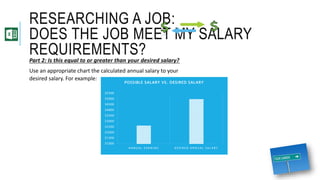
Part 2: Is this equal to or greater than your desired salary?
Use an appropriate chart the calculated annual salary to your
desired salary. For example:
RESEARCHING A JOB: CASE STUDY
How much do you know about your future career?
Using your research skills gather information about your ideal career.
You will present your findings to the class in an oral presentation
aided by a dynamic multimedia PowerPoint slideshow.
RESEARCHING A JOB: WHAT IS MY
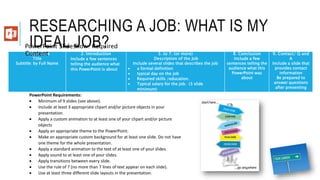
IDEAL JOB?1. Title Slide
Title
Subtitle: by Full Name
2. Introduction
Include a few sentences
telling the audience what
this PowerPoint is about
3. to 7. (or more)
Description of the Job
Include several slides that describes the job
 a formal definition
 typical day on the job
 Required skills /education.
 Typical salary for the job. (3 slide
minimum)
8. Conclusion
Include a few
sentences telling the
audience what this
PowerPoint was
about
9. Contact/ Q and
A
Include a slide that
provides contact
information
Be prepared to
answer questions
after presenting
PowerPoint Requirements:
 Minimum of 9 slides (see above).
 Include at least 3 appropriate clipart and/or picture objects in your
presentation.
 Apply a custom animation to at least one of your clipart and/or picture
objects
 Apply an appropriate theme to the PowerPoint.
 Make an appropriate custom background for at least one slide. Do not have
one theme for the whole presentation.
 Apply a standard animation to the text of at least one of your slides.
 Apply sound to at least one of your slides.
 Apply transitions between every slide.
 Use the rule of 7 (no more than 7 lines of text appear on each slide).
 Use at least three different slide layouts in the presentation.
PowerPoint Slideshow: Required
Content
RESEARCHING A JOB: WHAT IS MY
IDEAL JOB?
Presentation Requirements:
Maintain eye contact with the audience.
Speaks clearly and in appropriate volume to be understood by all.
Appropriate pace while presenting to the audience.
Know the subject and clearly present the topics to the audience. (Be prepared to
answer questions.)
Positive body language when you are a member of the audience.
Dress code requirements:
You must wear professional attire when giving your presentation. Dress as if you
are going on a professional job interview (No jeans, no sandals, no tight or
revealing clothes) If you are unsure about what to wear you can find guides for
professional attire on several internet websites.
APPLYING FOR A JOB: CASE STUDY
You are actively searching for a job.
Each day you acquire leads, submit your resume and cover letter and
wait to hear from employees.
You want a good system for keeping track of this process so you are
able to follow up with potential employers.
You will use your skills with MS Access to track your progress with
applying to several companies at once.
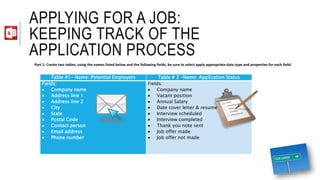
APPLYING FOR A JOB:
KEEPING TRACK OF THE
APPLICATION PROCESS
Table #1- Name: Potential Employers Table # 2 –Name: Application Status
Fields:
 Company name
 Address line 1
 Address line 2
 City
 State
 Postal Code
 Contact person
 Email address
 Phone number
Fields:
 Company name
 Vacant position
 Annual Salary
 Date cover letter & resume sent
 Interview scheduled
 Interview completed
 Thank you note sent
 Job offer made
 Job offer not made
Part 1: Create two tables, using the names listed below and the following fields, be sure to select apply appropriate data type and properties for each field:
APPLYING FOR A JOB:
KEEPING TRACK OF THE
APPLICATION PROCESSPart 2: Create a form for each table
Part 3: Find a minimum of 10 job ads that will supply the information
you need to enter data into the fields for each table. Enter the data.
Part 4: Using the print to .pdf feature. Print a report listing the vacant
positions with a listed salary that is $20,00 or more in ascending
order (if all the jobs have less than a $20,000 annual salary then run
a query using the value $10,000 instead)
Part 5: Create a query that displays the company name, contact
person, email address, and the vacant position.

The career search project

  • 1.
  • 2.
    APPLYING FOR AJOB: CASE STUDY If you hear about or find a job advertisement for your perfect job… are you ready to apply? Do you have a saved cover letter or resume? This project will allow you to create or revise your cover letter and resume so you are prepared to apply for your ideal job when it comes your way.
  • 3.
    APPLYING FOR AJOB: COVER LETTER AND RÉSUMÉ Cover Letter Requirements: •Not a template (use a blank word document) •Uses one of the following letter formats: Block, Modified Block, Semi-Block •includes: • Your Contact Information • Employer Contact Information • Salutation • 3 Paragraphs o 1st: Why you are writing, the position you are applying for, how you found out about the job o 2nd: How your qualification match the job you are applying for o 3rd:Your contact information and a thank you for being considered
  • 4.
    APPLYING FOR AJOB: COVER LETTER AND RÉSUMÉ Resume Requirements: The resume document is created from a MS Word template The resume document is one page in length The resume document includes:  An Objective  Contact information  Education History  Work History  Awards, certifications, notable skills
  • 5.
    RESEARCHING A JOB:CASE STUDY When searching for a job, do you have a desired salary? Have you ever reviewed a job ad which listed the salary as an hourly wage but you wanted to know what the monthly or annual salary is? Using your knowledge of Microsoft Excel, you will create two tools to help you evaluate a salary provided in a job ad.
  • 6.
    RESEARCHING A JOB: DOESTHE JOB MEET MY SALARY REQUIREMENTS? The converter should: Include a field to enter the hours per week required for the job Include a field to enter the hourly rate Include the following fields which will be calculated once the hourly rate and hours per week are entered:  Hourly  Weekly  Bi-weekly  Monthly  Annually The converter should demonstrate your knowledge of:  cell formatting (cells should have color, borders, and font(s) other than the default font)  formula and function usage SALARY CONVERTER HOURS PER WEEK: 40 HOURLY RATE: 17 HOURLY $17 WEEKLY $680 BI-WEEKLY $1360 MONTHLY $2720 ANNUALLY $3264 0 Example :
  • 7.
    RESEARCHING A JOB: DOESTHE JOB MEET MY SALARY REQUIREMENTS? 31000 31500 32000 32500 33000 33500 34000 34500 35000 35500 A N N U A L E A R N I N G D E S I R E D A N N U A L S A L A R Y POSSIBLE SALARY VS. DESIRED SALARY Part 2: Is this equal to or greater than your desired salary? Use an appropriate chart the calculated annual salary to your desired salary. For example:
  • 8.
    RESEARCHING A JOB:CASE STUDY How much do you know about your future career? Using your research skills gather information about your ideal career. You will present your findings to the class in an oral presentation aided by a dynamic multimedia PowerPoint slideshow.
  • 9.
    RESEARCHING A JOB:WHAT IS MY IDEAL JOB?1. Title Slide Title Subtitle: by Full Name 2. Introduction Include a few sentences telling the audience what this PowerPoint is about 3. to 7. (or more) Description of the Job Include several slides that describes the job  a formal definition  typical day on the job  Required skills /education.  Typical salary for the job. (3 slide minimum) 8. Conclusion Include a few sentences telling the audience what this PowerPoint was about 9. Contact/ Q and A Include a slide that provides contact information Be prepared to answer questions after presenting PowerPoint Requirements:  Minimum of 9 slides (see above).  Include at least 3 appropriate clipart and/or picture objects in your presentation.  Apply a custom animation to at least one of your clipart and/or picture objects  Apply an appropriate theme to the PowerPoint.  Make an appropriate custom background for at least one slide. Do not have one theme for the whole presentation.  Apply a standard animation to the text of at least one of your slides.  Apply sound to at least one of your slides.  Apply transitions between every slide.  Use the rule of 7 (no more than 7 lines of text appear on each slide).  Use at least three different slide layouts in the presentation. PowerPoint Slideshow: Required Content
  • 10.
    RESEARCHING A JOB:WHAT IS MY IDEAL JOB? Presentation Requirements: Maintain eye contact with the audience. Speaks clearly and in appropriate volume to be understood by all. Appropriate pace while presenting to the audience. Know the subject and clearly present the topics to the audience. (Be prepared to answer questions.) Positive body language when you are a member of the audience. Dress code requirements: You must wear professional attire when giving your presentation. Dress as if you are going on a professional job interview (No jeans, no sandals, no tight or revealing clothes) If you are unsure about what to wear you can find guides for professional attire on several internet websites.
  • 11.
    APPLYING FOR AJOB: CASE STUDY You are actively searching for a job. Each day you acquire leads, submit your resume and cover letter and wait to hear from employees. You want a good system for keeping track of this process so you are able to follow up with potential employers. You will use your skills with MS Access to track your progress with applying to several companies at once.
  • 12.
    APPLYING FOR AJOB: KEEPING TRACK OF THE APPLICATION PROCESS Table #1- Name: Potential Employers Table # 2 –Name: Application Status Fields:  Company name  Address line 1  Address line 2  City  State  Postal Code  Contact person  Email address  Phone number Fields:  Company name  Vacant position  Annual Salary  Date cover letter & resume sent  Interview scheduled  Interview completed  Thank you note sent  Job offer made  Job offer not made Part 1: Create two tables, using the names listed below and the following fields, be sure to select apply appropriate data type and properties for each field:
  • 13.
    APPLYING FOR AJOB: KEEPING TRACK OF THE APPLICATION PROCESSPart 2: Create a form for each table Part 3: Find a minimum of 10 job ads that will supply the information you need to enter data into the fields for each table. Enter the data. Part 4: Using the print to .pdf feature. Print a report listing the vacant positions with a listed salary that is $20,00 or more in ascending order (if all the jobs have less than a $20,000 annual salary then run a query using the value $10,000 instead) Part 5: Create a query that displays the company name, contact person, email address, and the vacant position.