3ds Max 2015 Essentials
Chapter 7: Character Poly Modeling
Part I
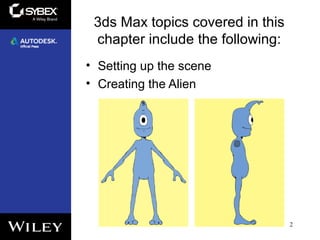
3ds Max topics covered in this
chapter include the following:
• Setting up the scene
• Creating the Alien
2
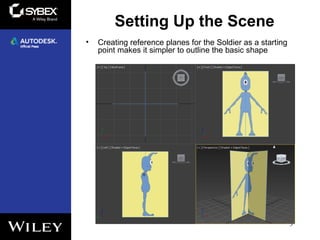
Setting Up the Scene
• Creating reference planes for the Soldier as a starting
point makes it simpler to outline the basic shape
3
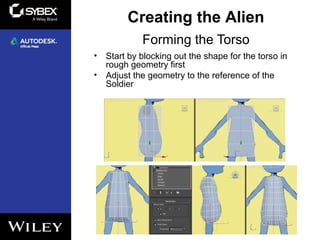
Forming the Torso
• Start by blocking out the shape for the torso in
rough geometry first
• Adjust the geometry to the reference of the
Soldier
4
Creating the Alien
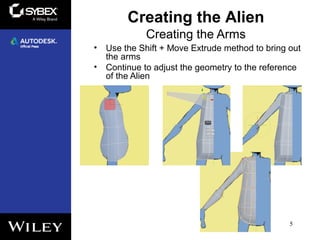
Creating the Arms
• Use the Shift + Move Extrude method to bring out
the arms
• Continue to adjust the geometry to the reference
of the Alien
5
Creating the Alien
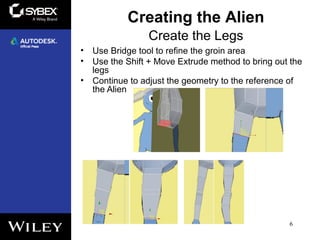
Create the Legs
• Use Bridge tool to refine the groin area
• Use the Shift + Move Extrude method to bring out the
legs
• Continue to adjust the geometry to the reference of
the Alien
6
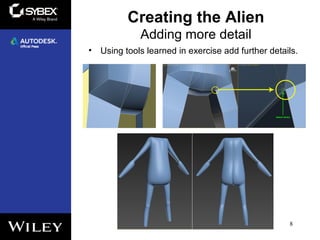
Creating the Alien
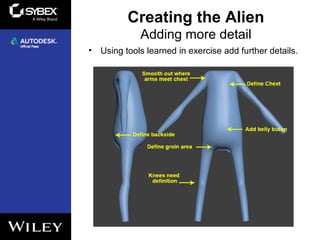
Adding more detail
• Using tools learned in exercise add further details.
7
Creating the Alien
Adding more detail
• Using tools learned in exercise add further details.
8
Creating the Alien
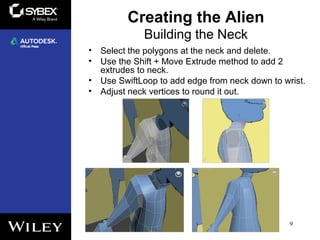
Building the Neck
• Select the polygons at the neck and delete.
• Use the Shift + Move Extrude method to add 2
extrudes to neck.
• Use SwiftLoop to add edge from neck down to wrist.
• Adjust neck vertices to round it out.
9
Creating the Alien
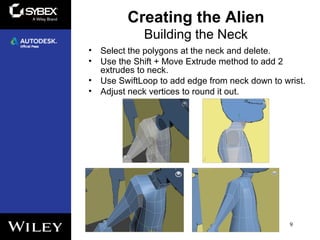
Building the Neck
• Select the polygons at the neck and delete.
• Use the Shift + Move Extrude method to add 2
extrudes to neck.
• Use SwiftLoop to add edge from neck down to wrist.
• Adjust neck vertices to round it out.
9
Creating the Alien

Max2015 ch07

  • 1.
    3ds Max 2015Essentials Chapter 7: Character Poly Modeling Part I
  • 2.
    3ds Max topicscovered in this chapter include the following: • Setting up the scene • Creating the Alien 2
  • 3.
    Setting Up theScene • Creating reference planes for the Soldier as a starting point makes it simpler to outline the basic shape 3
  • 4.
    Forming the Torso •Start by blocking out the shape for the torso in rough geometry first • Adjust the geometry to the reference of the Soldier 4 Creating the Alien
  • 5.
    Creating the Arms •Use the Shift + Move Extrude method to bring out the arms • Continue to adjust the geometry to the reference of the Alien 5 Creating the Alien
  • 6.
    Create the Legs •Use Bridge tool to refine the groin area • Use the Shift + Move Extrude method to bring out the legs • Continue to adjust the geometry to the reference of the Alien 6 Creating the Alien
  • 7.
    Adding more detail •Using tools learned in exercise add further details. 7 Creating the Alien
  • 8.
    Adding more detail •Using tools learned in exercise add further details. 8 Creating the Alien
  • 9.
    Building the Neck •Select the polygons at the neck and delete. • Use the Shift + Move Extrude method to add 2 extrudes to neck. • Use SwiftLoop to add edge from neck down to wrist. • Adjust neck vertices to round it out. 9 Creating the Alien
  • 10.
    Building the Neck •Select the polygons at the neck and delete. • Use the Shift + Move Extrude method to add 2 extrudes to neck. • Use SwiftLoop to add edge from neck down to wrist. • Adjust neck vertices to round it out. 9 Creating the Alien