Alert Logic Security-as-a-Service
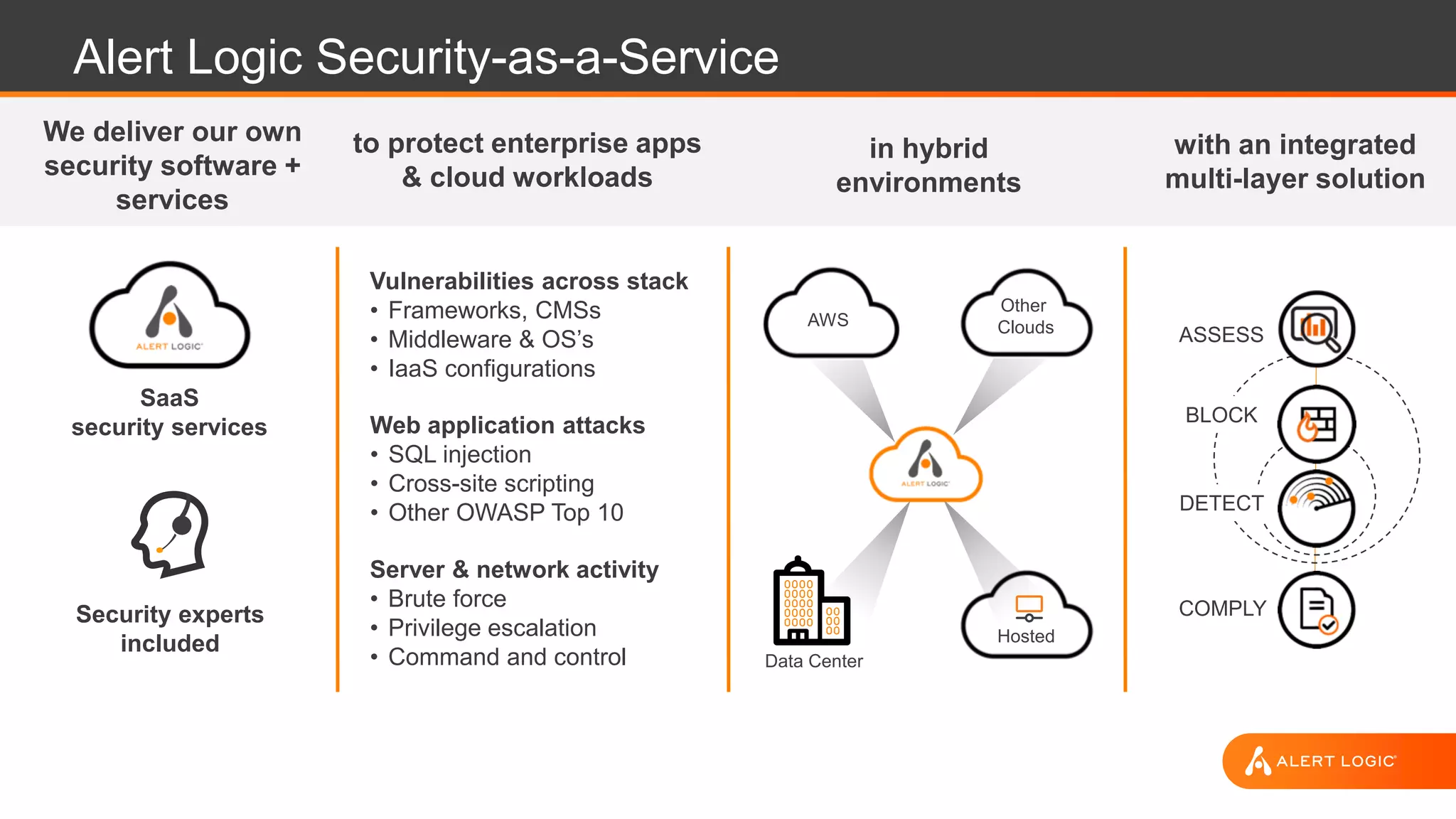
We deliver our own
security software +
services
in hybrid
environments
Hosted
Data Center
with an integrated
multi-layer solution
to protect enterprise apps
& cloud workloads
Web application attacks
• SQL injection
• Cross-site scripting
• Other OWASP Top 10
Server & network activity
• Brute force
• Privilege escalation
• Command and control
Vulnerabilities across stack
• Frameworks, CMSs
• Middleware & OS’s
• IaaS configurations
ASSESS
BLOCK
DETECT
COMPLYSecurity experts
included
SaaS
security services
AWS
Other
Clouds
SECURING YOUR AWS
ENVIRONMENT
STORAGE DB NETWORKCOMPUTE
Logical network segmentation
Perimeter security services
External DDoS, spoofing, and scanning prevented
Hardened hypervisor
System image library
Root access for customer
Secure coding and best practices
Software and virtual patching
Configuration management
Access management
Application-level attack monitoring
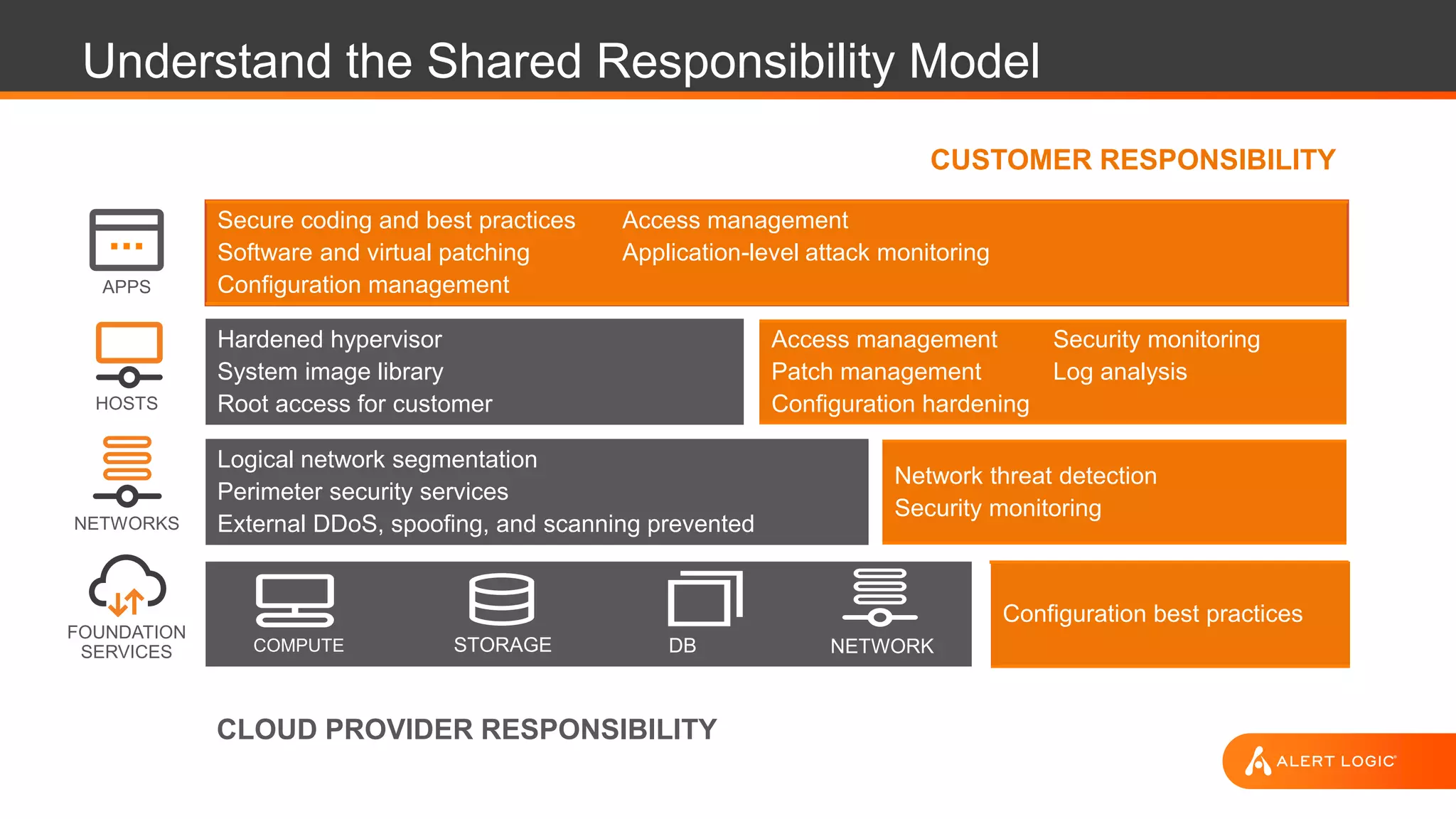
Understand the Shared Responsibility Model
Access management
Patch management
Configuration hardening
Security monitoring
Log analysis
Network threat detection
Security monitoring
Configuration best practices
CUSTOMER RESPONSIBILITY
APPS
CLOUD PROVIDER RESPONSIBILITY
FOUNDATION
SERVICES
HOSTS
NETWORKS
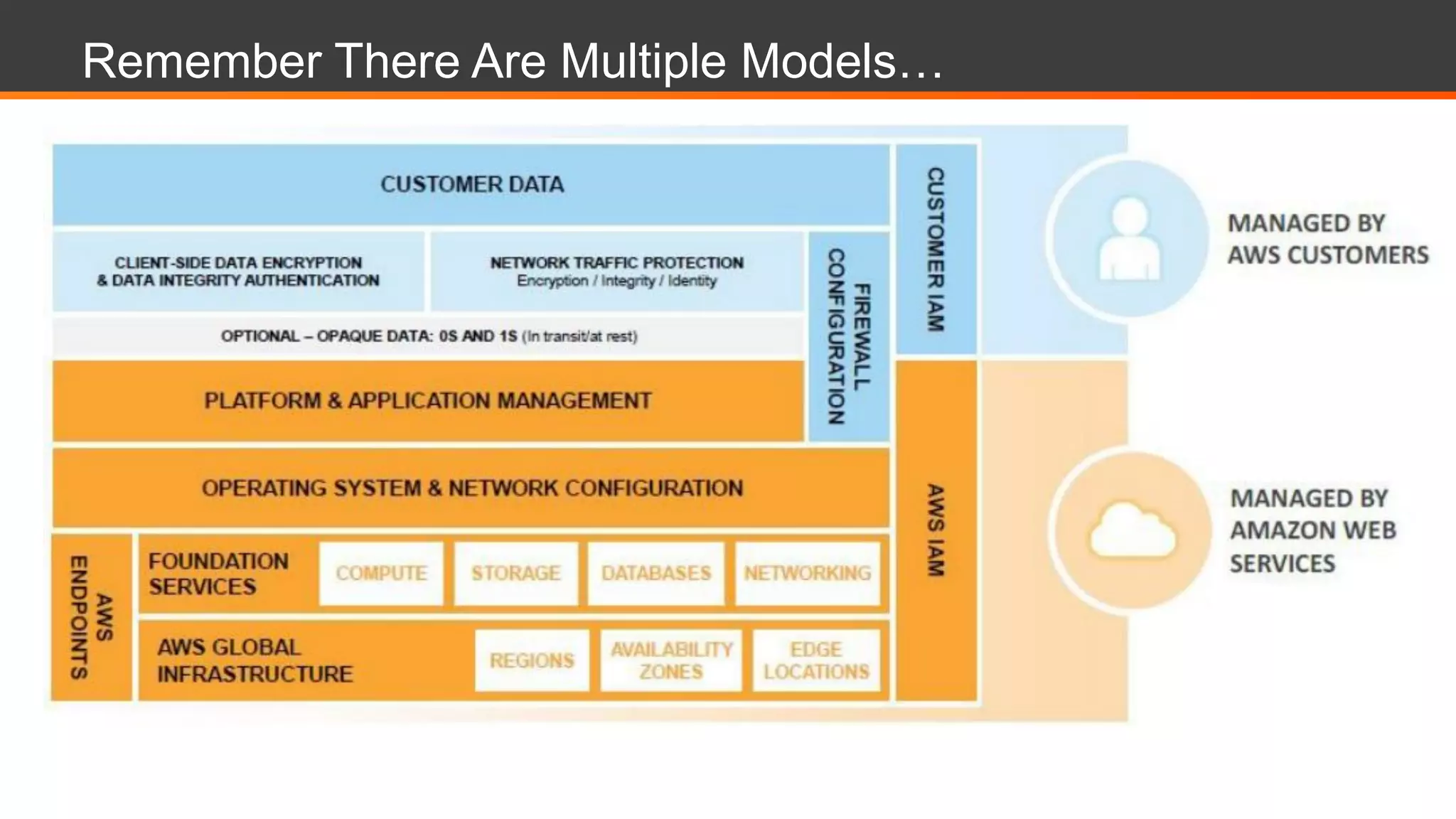
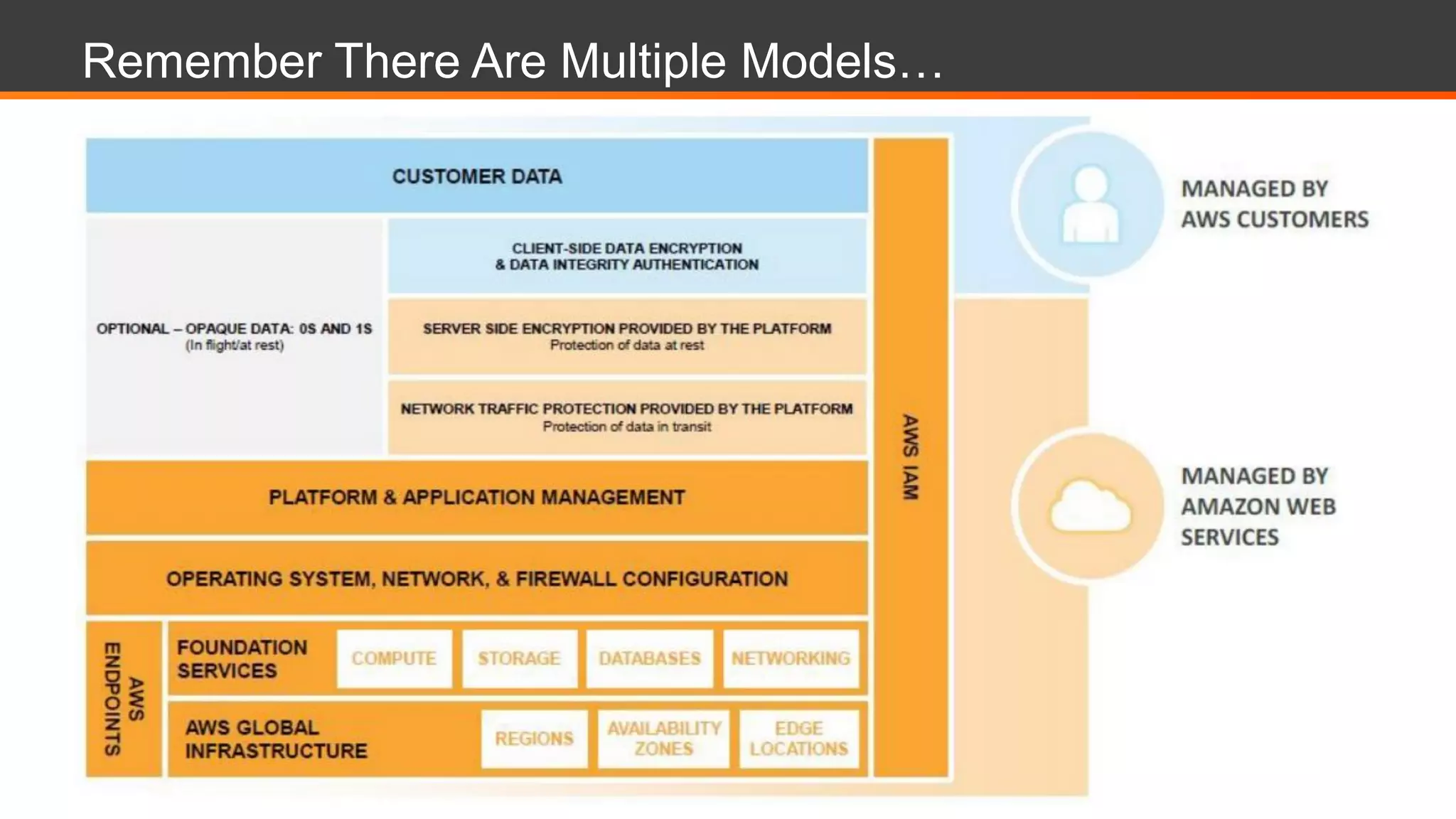
Remember There Are Multiple Models…
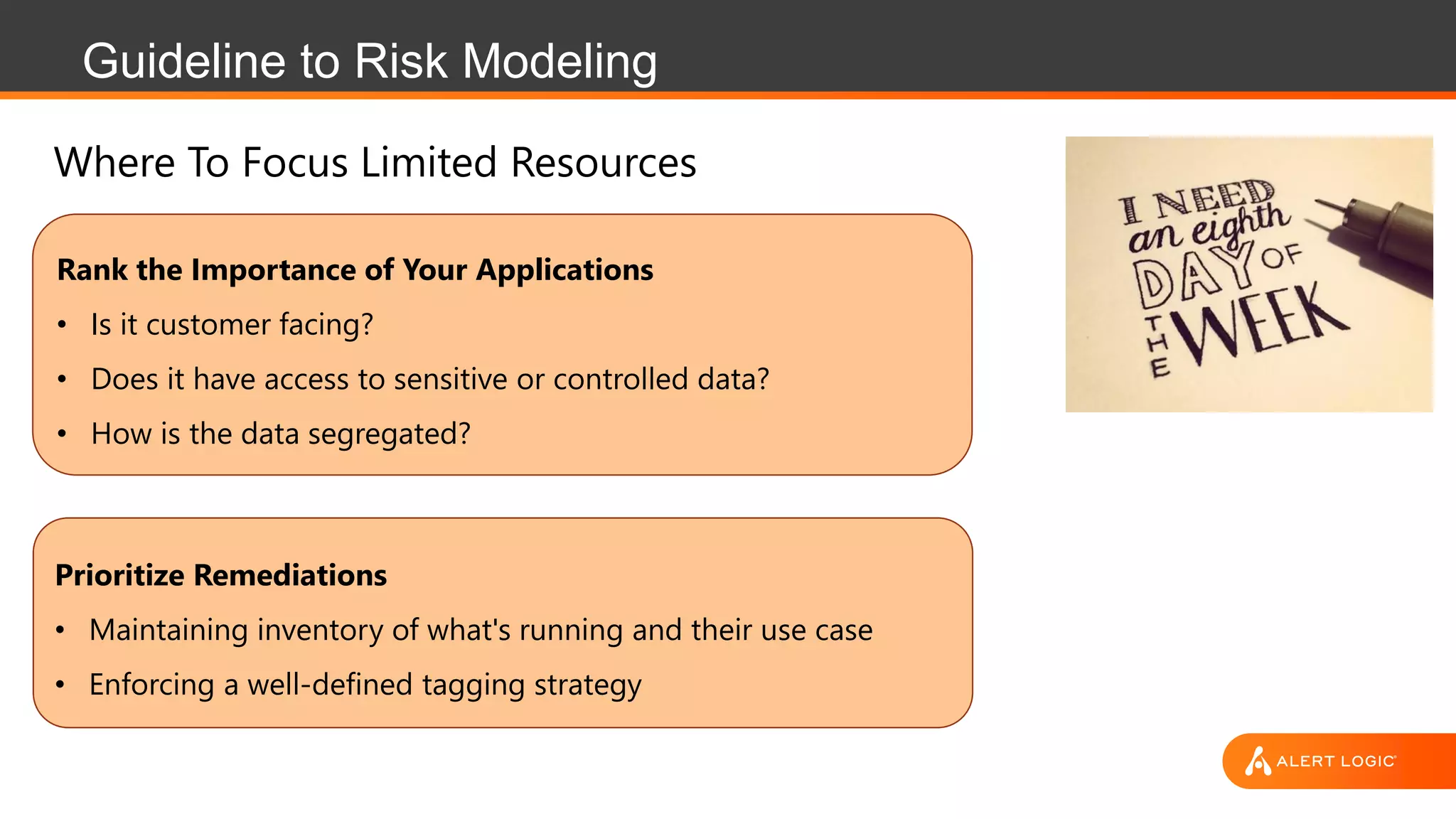
Guideline to Risk Modeling
Rank the Importance of Your Applications
• Is it customer facing?
• Does it have access to sensitive or controlled data?
• How is the data segregated?
Prioritize Remediations
• Maintaining inventory of what's running and their use case
• Enforcing a well-defined tagging strategy
Where To Focus Limited Resources
Best Practices to Securing Your AWS Account
• Lock down the root account
• Follow least privilege for IAM Users and Roles
• Ensure S3 ACLs and Bucket Policies are properly configured.
• Enable a strong password policy and MFA requirement for IAM users.
• Enable CloudTrail and AWS Config
• Leverage encryption for services that have KMS integration
• Not a one time activity – Continuously monitor for changes.
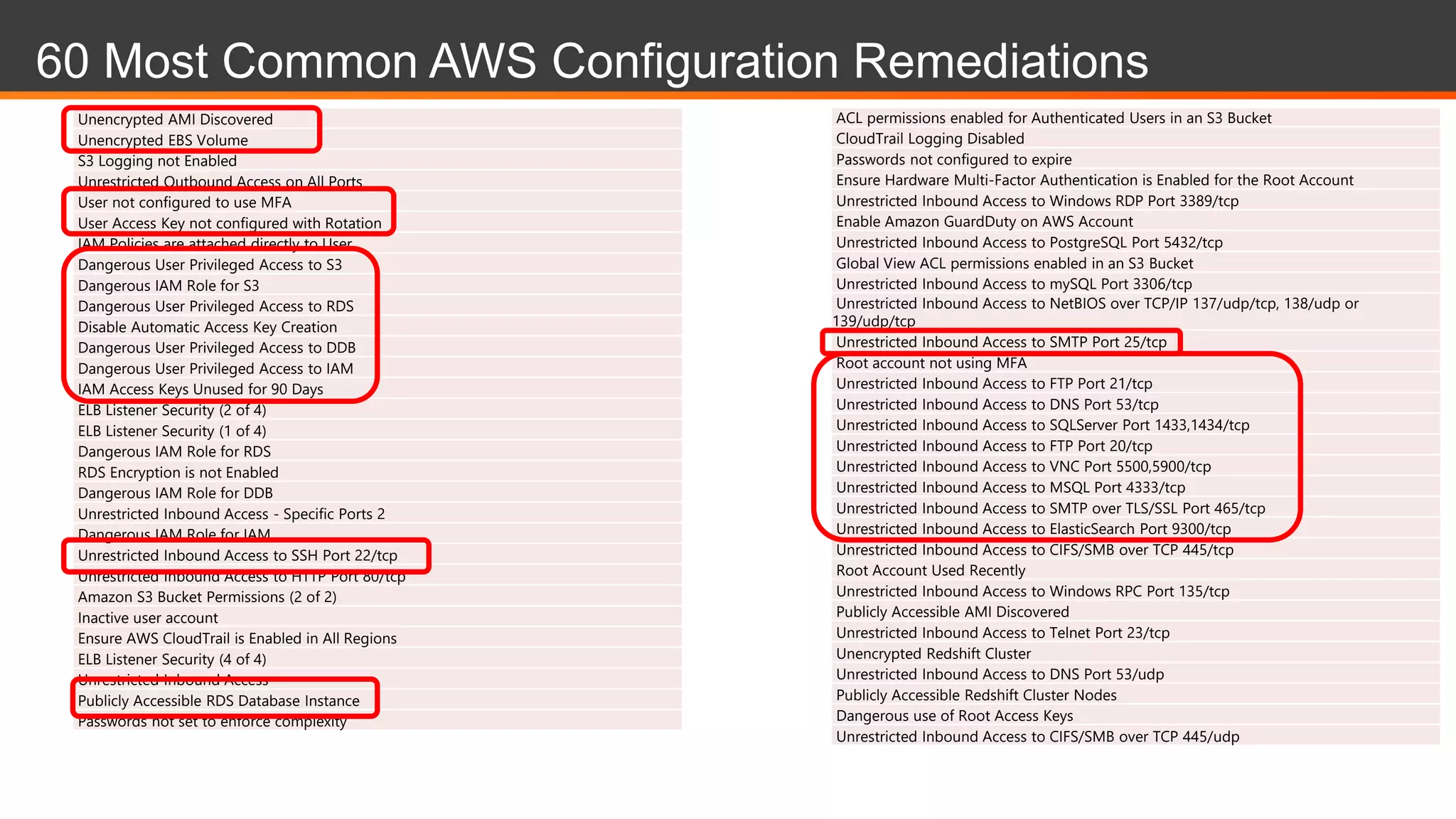
60 Most Common AWS Configuration Remediations
Unencrypted AMI Discovered
Unencrypted EBS Volume
S3 Logging not Enabled
Unrestricted Outbound Access on All Ports
User not configured to use MFA
User Access Key not configured with Rotation
IAM Policies are attached directly to User
Dangerous User Privileged Access to S3
Dangerous IAM Role for S3
Dangerous User Privileged Access to RDS
Disable Automatic Access Key Creation
Dangerous User Privileged Access to DDB
Dangerous User Privileged Access to IAM
IAM Access Keys Unused for 90 Days
ELB Listener Security (2 of 4)
ELB Listener Security (1 of 4)
Dangerous IAM Role for RDS
RDS Encryption is not Enabled
Dangerous IAM Role for DDB
Unrestricted Inbound Access - Specific Ports 2
Dangerous IAM Role for IAM
Unrestricted Inbound Access to SSH Port 22/tcp
Unrestricted Inbound Access to HTTP Port 80/tcp
Amazon S3 Bucket Permissions (2 of 2)
Inactive user account
Ensure AWS CloudTrail is Enabled in All Regions
ELB Listener Security (4 of 4)
Unrestricted Inbound Access
Publicly Accessible RDS Database Instance
Passwords not set to enforce complexity
ACL permissions enabled for Authenticated Users in an S3 Bucket
CloudTrail Logging Disabled
Passwords not configured to expire
Ensure Hardware Multi-Factor Authentication is Enabled for the Root Account
Unrestricted Inbound Access to Windows RDP Port 3389/tcp
Enable Amazon GuardDuty on AWS Account
Unrestricted Inbound Access to PostgreSQL Port 5432/tcp
Global View ACL permissions enabled in an S3 Bucket
Unrestricted Inbound Access to mySQL Port 3306/tcp
Unrestricted Inbound Access to NetBIOS over TCP/IP 137/udp/tcp, 138/udp or
139/udp/tcp
Unrestricted Inbound Access to SMTP Port 25/tcp
Root account not using MFA
Unrestricted Inbound Access to FTP Port 21/tcp
Unrestricted Inbound Access to DNS Port 53/tcp
Unrestricted Inbound Access to SQLServer Port 1433,1434/tcp
Unrestricted Inbound Access to FTP Port 20/tcp
Unrestricted Inbound Access to VNC Port 5500,5900/tcp
Unrestricted Inbound Access to MSQL Port 4333/tcp
Unrestricted Inbound Access to SMTP over TLS/SSL Port 465/tcp
Unrestricted Inbound Access to ElasticSearch Port 9300/tcp
Unrestricted Inbound Access to CIFS/SMB over TCP 445/tcp
Root Account Used Recently
Unrestricted Inbound Access to Windows RPC Port 135/tcp
Publicly Accessible AMI Discovered
Unrestricted Inbound Access to Telnet Port 23/tcp
Unencrypted Redshift Cluster
Unrestricted Inbound Access to DNS Port 53/udp
Publicly Accessible Redshift Cluster Nodes
Dangerous use of Root Access Keys
Unrestricted Inbound Access to CIFS/SMB over TCP 445/udp
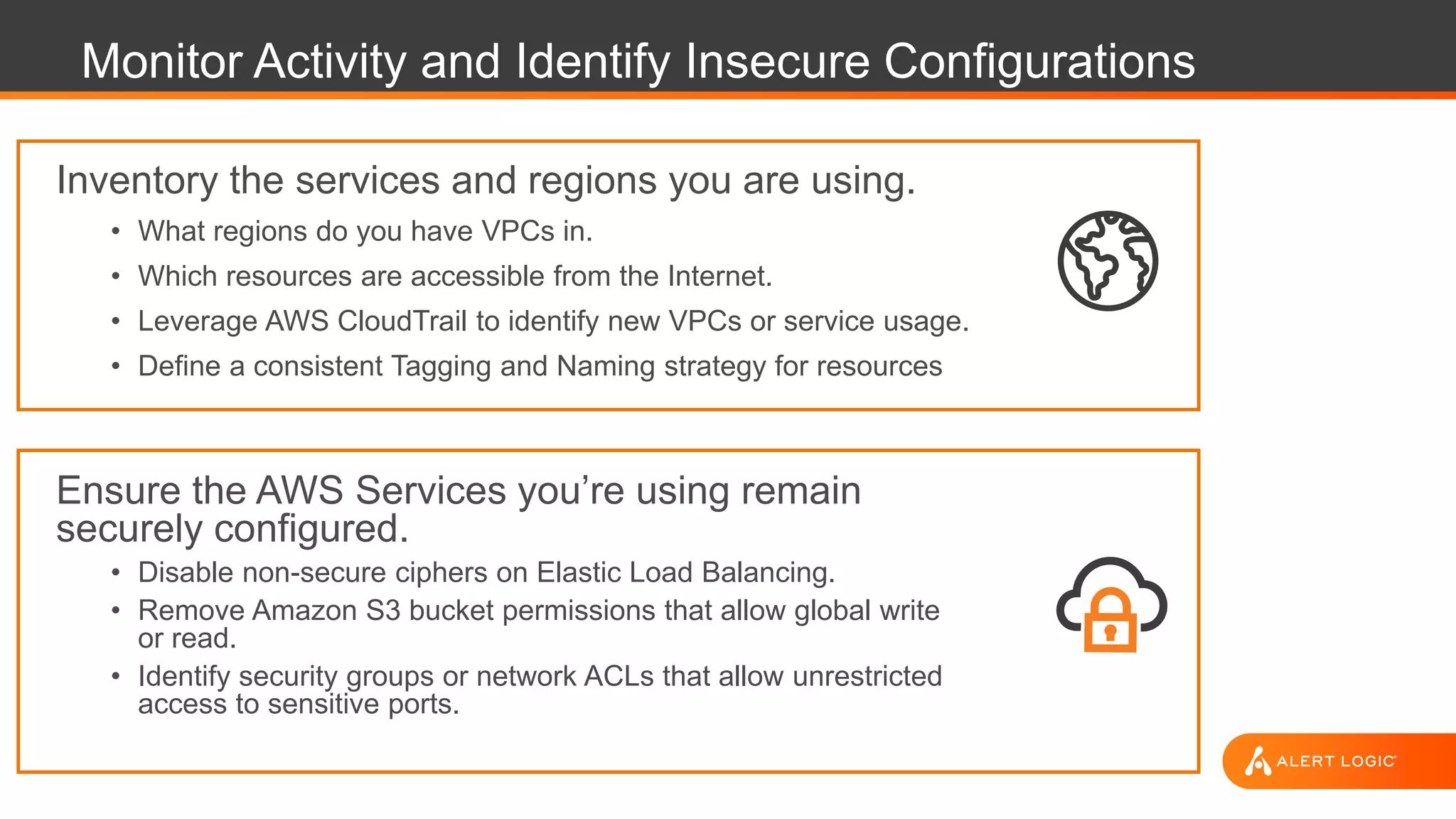
Monitor Activity and Identify Insecure Configurations
Inventory the services and regions you are using.
• What regions do you have VPCs in.
• Which resources are accessible from the Internet.
• Leverage AWS CloudTrail to identify new VPCs or service usage.
• Define a consistent Tagging and Naming strategy for resources
Ensure the AWS Services you’re using remain
securely configured.
• Disable non-secure ciphers on Elastic Load Balancing.
• Remove Amazon S3 bucket permissions that allow global write
or read.
• Identify security groups or network ACLs that allow unrestricted
access to sensitive ports.
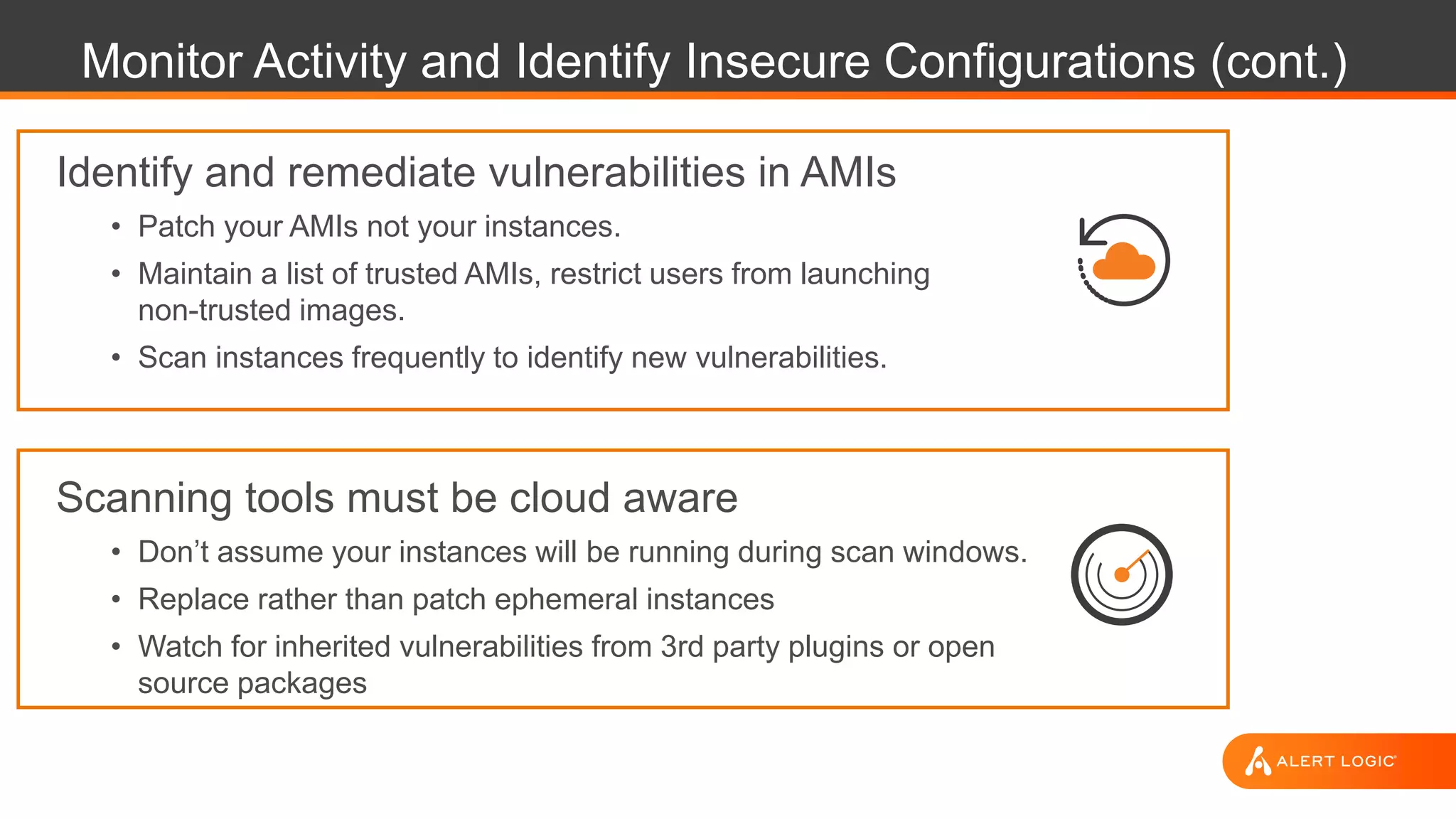
Monitor Activity and Identify Insecure Configurations (cont.)
Identify and remediate vulnerabilities in AMIs
• Patch your AMIs not your instances.
• Maintain a list of trusted AMIs, restrict users from launching
non-trusted images.
• Scan instances frequently to identify new vulnerabilities.
Scanning tools must be cloud aware
• Don’t assume your instances will be running during scan windows.
• Replace rather than patch ephemeral instances
• Watch for inherited vulnerabilities from 3rd party plugins or open
source packages
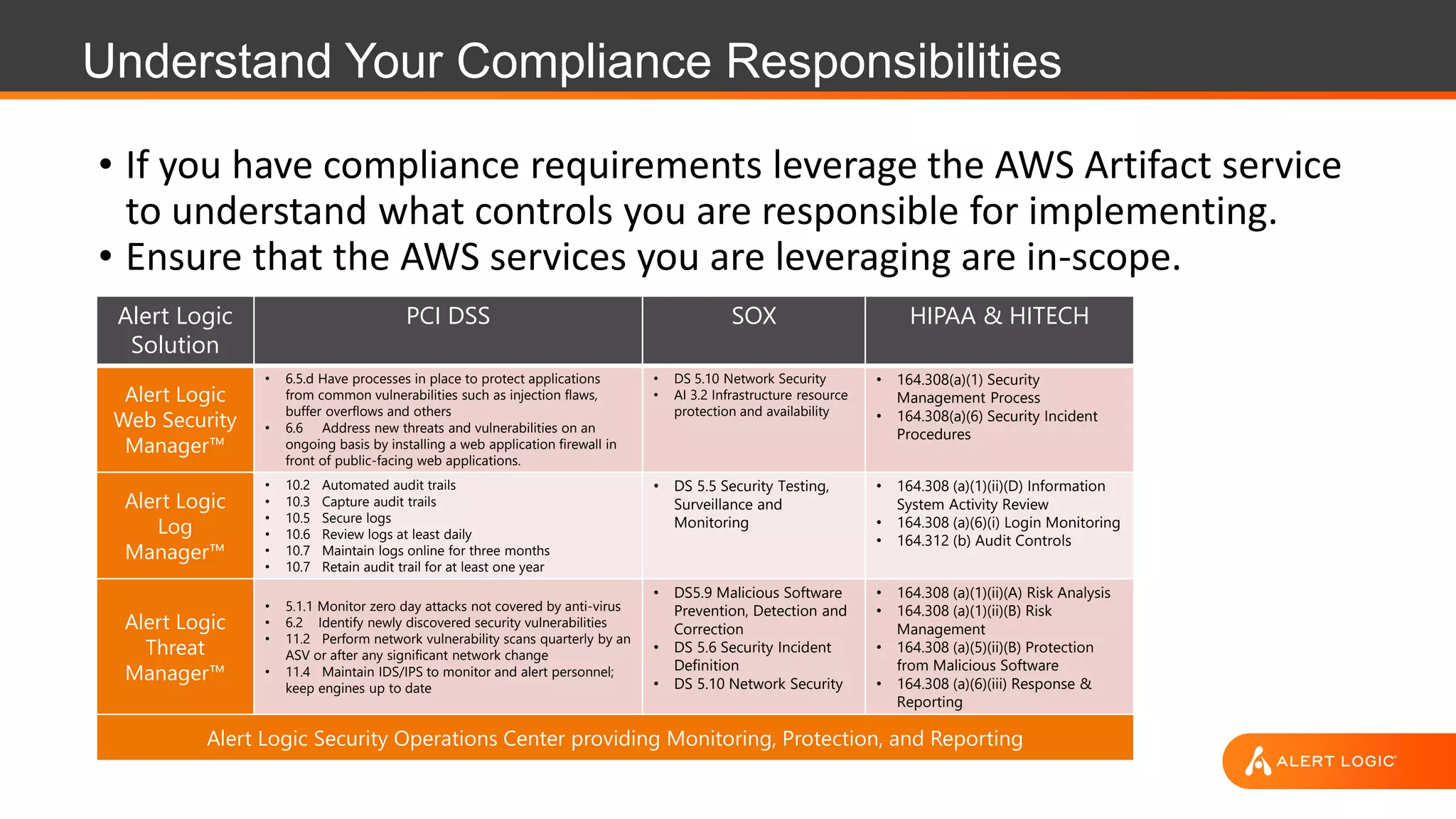
Understand Your Compliance Responsibilities
• If you have compliance requirements leverage the AWS Artifact service
to understand what controls you are responsible for implementing.
• Ensure that the AWS services you are leveraging are in-scope.
Alert Logic
Solution
PCI DSS SOX HIPAA & HITECH
Alert Logic
Web Security
Manager™
• 6.5.d Have processes in place to protect applications
from common vulnerabilities such as injection flaws,
buffer overflows and others
• 6.6 Address new threats and vulnerabilities on an
ongoing basis by installing a web application firewall in
front of public-facing web applications.
• DS 5.10 Network Security
• AI 3.2 Infrastructure resource
protection and availability
• 164.308(a)(1) Security
Management Process
• 164.308(a)(6) Security Incident
Procedures
Alert Logic
Log
Manager™
• 10.2 Automated audit trails
• 10.3 Capture audit trails
• 10.5 Secure logs
• 10.6 Review logs at least daily
• 10.7 Maintain logs online for three months
• 10.7 Retain audit trail for at least one year
• DS 5.5 Security Testing,
Surveillance and
Monitoring
• 164.308 (a)(1)(ii)(D) Information
System Activity Review
• 164.308 (a)(6)(i) Login Monitoring
• 164.312 (b) Audit Controls
Alert Logic
Threat
Manager™
• 5.1.1 Monitor zero day attacks not covered by anti-virus
• 6.2 Identify newly discovered security vulnerabilities
• 11.2 Perform network vulnerability scans quarterly by an
ASV or after any significant network change
• 11.4 Maintain IDS/IPS to monitor and alert personnel;
keep engines up to date
• DS5.9 Malicious Software
Prevention, Detection and
Correction
• DS 5.6 Security Incident
Definition
• DS 5.10 Network Security
• 164.308 (a)(1)(ii)(A) Risk Analysis
• 164.308 (a)(1)(ii)(B) Risk
Management
• 164.308 (a)(5)(ii)(B) Protection
from Malicious Software
• 164.308 (a)(6)(iii) Response &
Reporting
Alert Logic Security Operations Center providing Monitoring, Protection, and Reporting
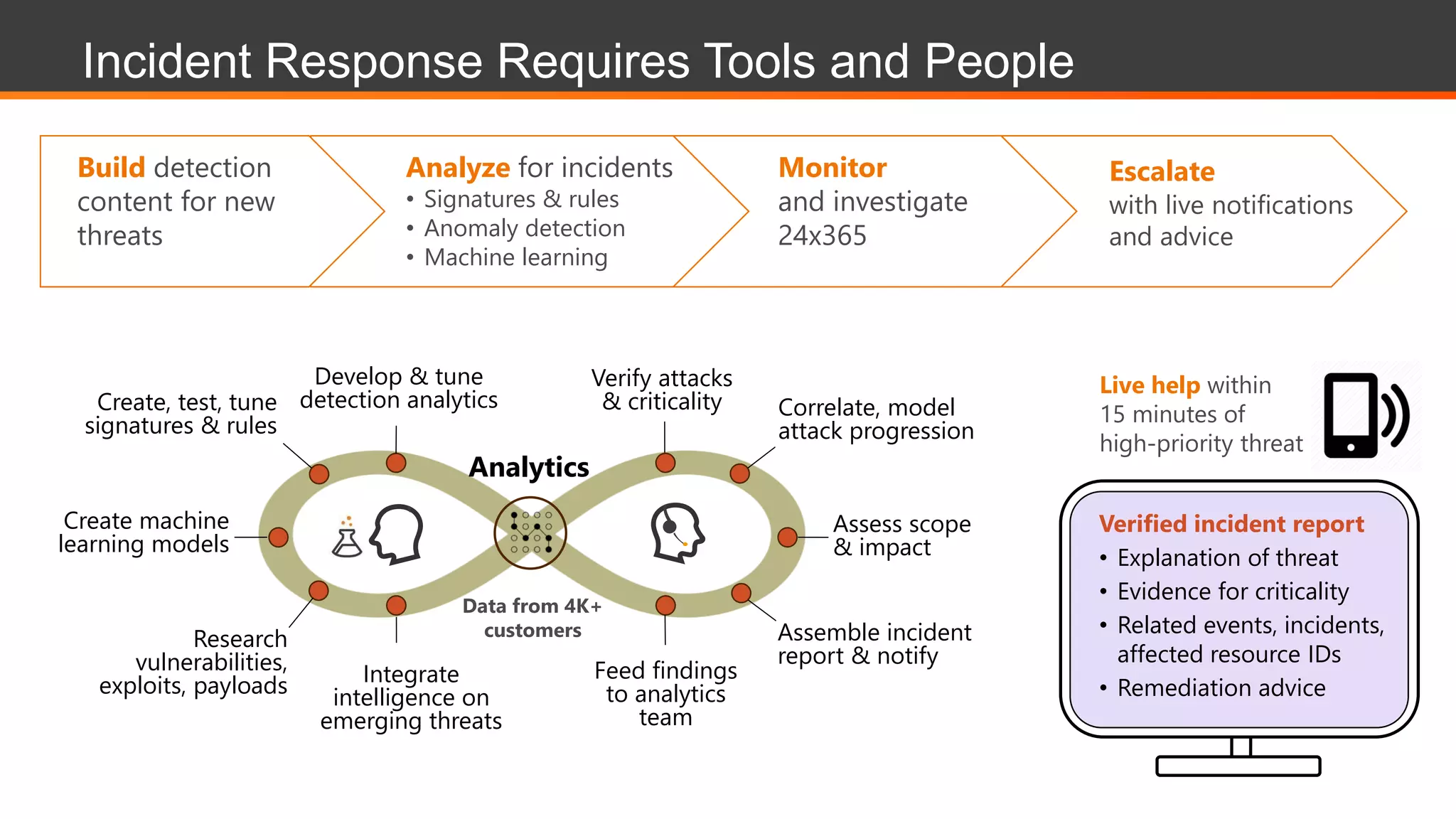
Create, test, tune
signatures & rules
Research
vulnerabilities,
exploits, payloads
Verify attacks
& criticality
Feed findings
to analytics
team
Correlate, model
attack progression
Develop & tune
detection analytics
Assemble incident
report & notify
Assess scope
& impact
Create machine
learning models
Integrate
intelligence on
emerging threats
Analytics
Verified incident report
• Explanation of threat
• Evidence for criticality
• Related events, incidents,
affected resource IDs
• Remediation advice
Live help within
15 minutes of
high-priority threat
Analyze for incidents
• Signatures & rules
• Anomaly detection
• Machine learning
Build detection
content for new
threats
Monitor
and investigate
24x365
Escalate
with live notifications
and advice
Data from 4K+
customers
Incident Response Requires Tools and People
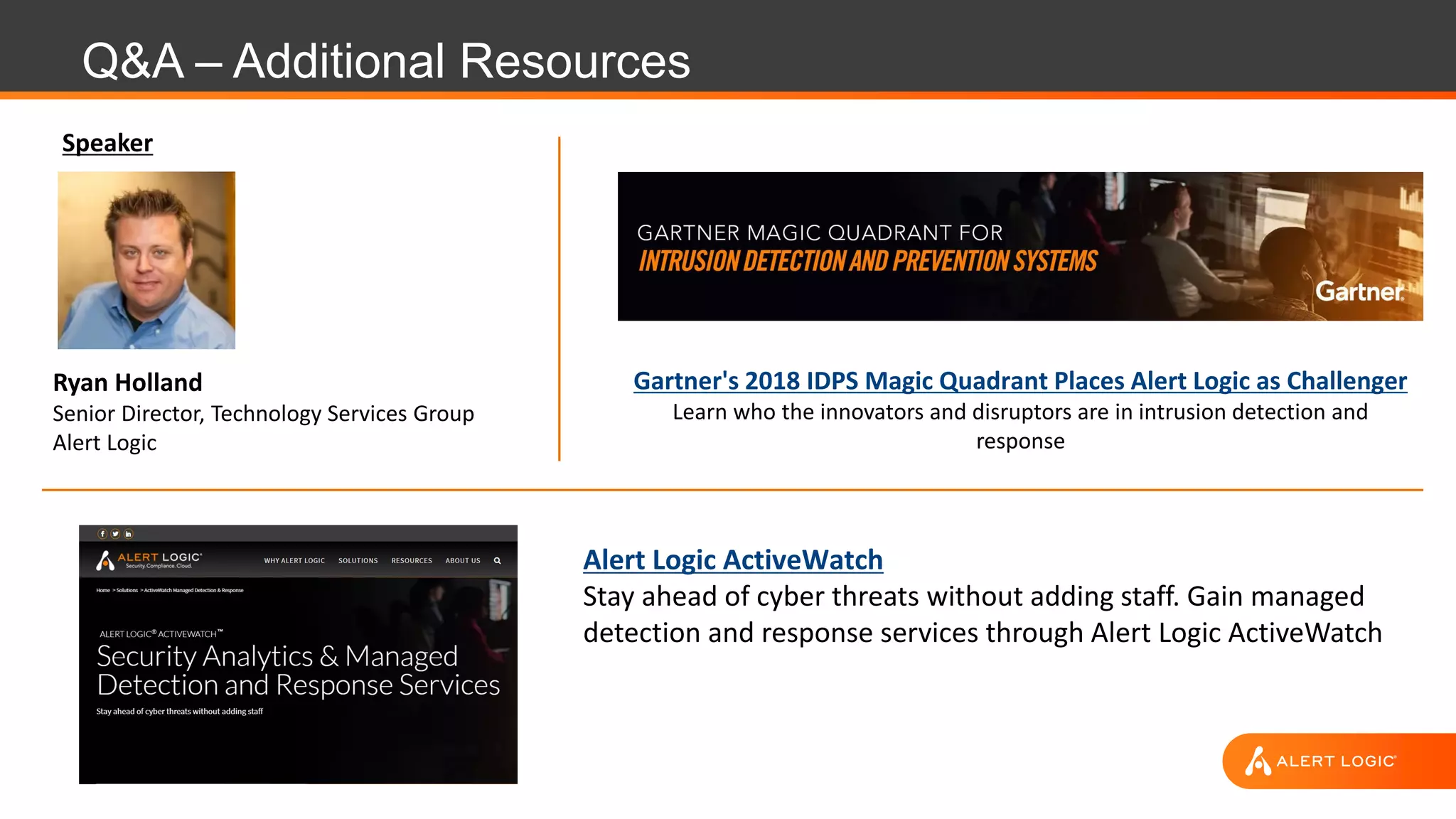
Q&A – Additional Resources
Ryan Holland
Senior Director, Technology Services Group
Alert Logic
Speaker
Alert Logic ActiveWatch
Stay ahead of cyber threats without adding staff. Gain managed
detection and response services through Alert Logic ActiveWatch
Gartner's 2018 IDPS Magic Quadrant Places Alert Logic as Challenger
Learn who the innovators and disruptors are in intrusion detection and
response
Thank you.

Managed Threat Detection and Response

  • 2.
    Alert Logic Security-as-a-Service Wedeliver our own security software + services in hybrid environments Hosted Data Center with an integrated multi-layer solution to protect enterprise apps & cloud workloads Web application attacks • SQL injection • Cross-site scripting • Other OWASP Top 10 Server & network activity • Brute force • Privilege escalation • Command and control Vulnerabilities across stack • Frameworks, CMSs • Middleware & OS’s • IaaS configurations ASSESS BLOCK DETECT COMPLYSecurity experts included SaaS security services AWS Other Clouds
  • 3.
  • 4.
    STORAGE DB NETWORKCOMPUTE Logicalnetwork segmentation Perimeter security services External DDoS, spoofing, and scanning prevented Hardened hypervisor System image library Root access for customer Secure coding and best practices Software and virtual patching Configuration management Access management Application-level attack monitoring Understand the Shared Responsibility Model Access management Patch management Configuration hardening Security monitoring Log analysis Network threat detection Security monitoring Configuration best practices CUSTOMER RESPONSIBILITY APPS CLOUD PROVIDER RESPONSIBILITY FOUNDATION SERVICES HOSTS NETWORKS
  • 5.
    Remember There AreMultiple Models…
  • 6.
    Remember There AreMultiple Models…
  • 7.
    Guideline to RiskModeling Rank the Importance of Your Applications • Is it customer facing? • Does it have access to sensitive or controlled data? • How is the data segregated? Prioritize Remediations • Maintaining inventory of what's running and their use case • Enforcing a well-defined tagging strategy Where To Focus Limited Resources
  • 8.
    Best Practices toSecuring Your AWS Account • Lock down the root account • Follow least privilege for IAM Users and Roles • Ensure S3 ACLs and Bucket Policies are properly configured. • Enable a strong password policy and MFA requirement for IAM users. • Enable CloudTrail and AWS Config • Leverage encryption for services that have KMS integration • Not a one time activity – Continuously monitor for changes.
  • 9.
    60 Most CommonAWS Configuration Remediations Unencrypted AMI Discovered Unencrypted EBS Volume S3 Logging not Enabled Unrestricted Outbound Access on All Ports User not configured to use MFA User Access Key not configured with Rotation IAM Policies are attached directly to User Dangerous User Privileged Access to S3 Dangerous IAM Role for S3 Dangerous User Privileged Access to RDS Disable Automatic Access Key Creation Dangerous User Privileged Access to DDB Dangerous User Privileged Access to IAM IAM Access Keys Unused for 90 Days ELB Listener Security (2 of 4) ELB Listener Security (1 of 4) Dangerous IAM Role for RDS RDS Encryption is not Enabled Dangerous IAM Role for DDB Unrestricted Inbound Access - Specific Ports 2 Dangerous IAM Role for IAM Unrestricted Inbound Access to SSH Port 22/tcp Unrestricted Inbound Access to HTTP Port 80/tcp Amazon S3 Bucket Permissions (2 of 2) Inactive user account Ensure AWS CloudTrail is Enabled in All Regions ELB Listener Security (4 of 4) Unrestricted Inbound Access Publicly Accessible RDS Database Instance Passwords not set to enforce complexity ACL permissions enabled for Authenticated Users in an S3 Bucket CloudTrail Logging Disabled Passwords not configured to expire Ensure Hardware Multi-Factor Authentication is Enabled for the Root Account Unrestricted Inbound Access to Windows RDP Port 3389/tcp Enable Amazon GuardDuty on AWS Account Unrestricted Inbound Access to PostgreSQL Port 5432/tcp Global View ACL permissions enabled in an S3 Bucket Unrestricted Inbound Access to mySQL Port 3306/tcp Unrestricted Inbound Access to NetBIOS over TCP/IP 137/udp/tcp, 138/udp or 139/udp/tcp Unrestricted Inbound Access to SMTP Port 25/tcp Root account not using MFA Unrestricted Inbound Access to FTP Port 21/tcp Unrestricted Inbound Access to DNS Port 53/tcp Unrestricted Inbound Access to SQLServer Port 1433,1434/tcp Unrestricted Inbound Access to FTP Port 20/tcp Unrestricted Inbound Access to VNC Port 5500,5900/tcp Unrestricted Inbound Access to MSQL Port 4333/tcp Unrestricted Inbound Access to SMTP over TLS/SSL Port 465/tcp Unrestricted Inbound Access to ElasticSearch Port 9300/tcp Unrestricted Inbound Access to CIFS/SMB over TCP 445/tcp Root Account Used Recently Unrestricted Inbound Access to Windows RPC Port 135/tcp Publicly Accessible AMI Discovered Unrestricted Inbound Access to Telnet Port 23/tcp Unencrypted Redshift Cluster Unrestricted Inbound Access to DNS Port 53/udp Publicly Accessible Redshift Cluster Nodes Dangerous use of Root Access Keys Unrestricted Inbound Access to CIFS/SMB over TCP 445/udp
  • 10.
    Monitor Activity andIdentify Insecure Configurations Inventory the services and regions you are using. • What regions do you have VPCs in. • Which resources are accessible from the Internet. • Leverage AWS CloudTrail to identify new VPCs or service usage. • Define a consistent Tagging and Naming strategy for resources Ensure the AWS Services you’re using remain securely configured. • Disable non-secure ciphers on Elastic Load Balancing. • Remove Amazon S3 bucket permissions that allow global write or read. • Identify security groups or network ACLs that allow unrestricted access to sensitive ports.
  • 11.
    Monitor Activity andIdentify Insecure Configurations (cont.) Identify and remediate vulnerabilities in AMIs • Patch your AMIs not your instances. • Maintain a list of trusted AMIs, restrict users from launching non-trusted images. • Scan instances frequently to identify new vulnerabilities. Scanning tools must be cloud aware • Don’t assume your instances will be running during scan windows. • Replace rather than patch ephemeral instances • Watch for inherited vulnerabilities from 3rd party plugins or open source packages
  • 12.
    Understand Your ComplianceResponsibilities • If you have compliance requirements leverage the AWS Artifact service to understand what controls you are responsible for implementing. • Ensure that the AWS services you are leveraging are in-scope. Alert Logic Solution PCI DSS SOX HIPAA & HITECH Alert Logic Web Security Manager™ • 6.5.d Have processes in place to protect applications from common vulnerabilities such as injection flaws, buffer overflows and others • 6.6 Address new threats and vulnerabilities on an ongoing basis by installing a web application firewall in front of public-facing web applications. • DS 5.10 Network Security • AI 3.2 Infrastructure resource protection and availability • 164.308(a)(1) Security Management Process • 164.308(a)(6) Security Incident Procedures Alert Logic Log Manager™ • 10.2 Automated audit trails • 10.3 Capture audit trails • 10.5 Secure logs • 10.6 Review logs at least daily • 10.7 Maintain logs online for three months • 10.7 Retain audit trail for at least one year • DS 5.5 Security Testing, Surveillance and Monitoring • 164.308 (a)(1)(ii)(D) Information System Activity Review • 164.308 (a)(6)(i) Login Monitoring • 164.312 (b) Audit Controls Alert Logic Threat Manager™ • 5.1.1 Monitor zero day attacks not covered by anti-virus • 6.2 Identify newly discovered security vulnerabilities • 11.2 Perform network vulnerability scans quarterly by an ASV or after any significant network change • 11.4 Maintain IDS/IPS to monitor and alert personnel; keep engines up to date • DS5.9 Malicious Software Prevention, Detection and Correction • DS 5.6 Security Incident Definition • DS 5.10 Network Security • 164.308 (a)(1)(ii)(A) Risk Analysis • 164.308 (a)(1)(ii)(B) Risk Management • 164.308 (a)(5)(ii)(B) Protection from Malicious Software • 164.308 (a)(6)(iii) Response & Reporting Alert Logic Security Operations Center providing Monitoring, Protection, and Reporting
  • 13.
    Create, test, tune signatures& rules Research vulnerabilities, exploits, payloads Verify attacks & criticality Feed findings to analytics team Correlate, model attack progression Develop & tune detection analytics Assemble incident report & notify Assess scope & impact Create machine learning models Integrate intelligence on emerging threats Analytics Verified incident report • Explanation of threat • Evidence for criticality • Related events, incidents, affected resource IDs • Remediation advice Live help within 15 minutes of high-priority threat Analyze for incidents • Signatures & rules • Anomaly detection • Machine learning Build detection content for new threats Monitor and investigate 24x365 Escalate with live notifications and advice Data from 4K+ customers Incident Response Requires Tools and People
  • 14.
    Q&A – AdditionalResources Ryan Holland Senior Director, Technology Services Group Alert Logic Speaker Alert Logic ActiveWatch Stay ahead of cyber threats without adding staff. Gain managed detection and response services through Alert Logic ActiveWatch Gartner's 2018 IDPS Magic Quadrant Places Alert Logic as Challenger Learn who the innovators and disruptors are in intrusion detection and response
  • 15.