SHARED SECURITY
RESPONSIBILITY IN AZURE
Speaker - %SPEAKERNAME%
Agenda
• Introductions
• Shared Responsibility in Azure
• Security Best Practices
• Alert Logic Solutions and Value
• Security Monitoring
• Log Analysis
• Vulnerability Scanning
• Network Threat Detection
• Security Monitoring
• Secure Coding and Best Practices
• Software and Virtual Patching
• Configuration Management
• Access Management (including multi-
factor authentication)
• Access Management
• Configuration Hardening
• Patch Management
• TLS/SSL Encryption
• Network Security
Configuration
• Web Application Firewall
• Vulnerability Scanning
• Application level attack monitoring
• Hypervisor Management
• System Image Library
• Root Access for Customers
• Managed Patching (PaaS, not IaaS)
• Logical Network Segmentation
• Perimeter Security Services
• External DDOS, spoofing, and
scanning monitored
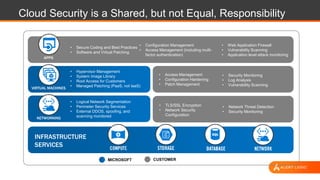
APPS
CUSTOMERMICROSOFT
VIRTUAL MACHINES
NETWORKING
INFRASTRUCTURE
SERVICES
Cloud Security is a Shared, but not Equal, Responsibility
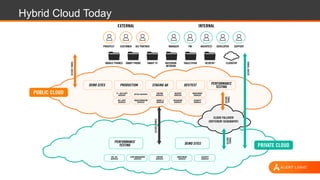
Hybrid Cloud Today
SECURITY
BEST PRACTICES
Best Practices for Security
• Understand the Cloud Providers Shared Responsibility Model
• Azure Network Security Best Practices
• Data Security and Access Management
• Secure your code
• Data Classification
• Adopt a patch management approach
• Review logs regularly
• Stay informed of the latest vulnerabilities that may affect you
• Know your adversaries
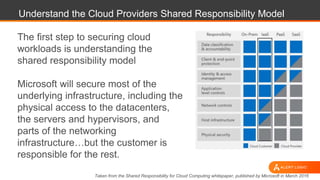
Understand the Cloud Providers Shared Responsibility Model
The first step to securing cloud
workloads is understanding the
shared responsibility model
Microsoft will secure most of the
underlying infrastructure, including the
physical access to the datacenters,
the servers and hypervisors, and
parts of the networking
infrastructure…but the customer is
responsible for the rest.
Taken from the Shared Responsibility for Cloud Computing whitepaper, published by Microsoft in March 2016
Azure Network Security Best Practices
• Logically segment subnets
• Control routing behavior
• Enable Forced Tunneling (e.g. forcing internet through on-
premise and/or DC)
• Use Virtual network appliances (e.g FW, IDS/IPS, AV, Web
Filtering, Application ELB)
• Deploy DMZs for security zoning
• Optimize uptime and performance
• Use global load balancing
• Disable RDP or SSH Access to Azure Virtual Machines
• Enable Azure Security Center
• Extend your datacenter into Azure
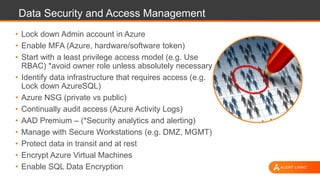
Data Security and Access Management
• Lock down Admin account in Azure
• Enable MFA (Azure, hardware/software token)
• Start with a least privilege access model (e.g. Use
RBAC) *avoid owner role unless absolutely necessary
• Identify data infrastructure that requires access (e.g.
Lock down AzureSQL)
• Azure NSG (private vs public)
• Continually audit access (Azure Activity Logs)
• AAD Premium – (*Security analytics and alerting)
• Manage with Secure Workstations (e.g. DMZ, MGMT)
• Protect data in transit and at rest
• Encrypt Azure Virtual Machines
• Enable SQL Data Encryption
Secure Your Code
• Test inputs that are open to the Internet
• Add delays to your code to confuse bots
• Use encryption when you can
• Test libraries
• Scan plugins
• Scan your code after every update
• Limit privileges
• Don’t store keys in code (e.g. secret keys)
• DevSecOps – Develop Security as Code
Data Classification
• Identify data repositories and mobile
backups
• Identify classification levels and
requirements
• Analyze data to determine classification
• Build Access Management policy around
classification
• Monitor file modifications and users
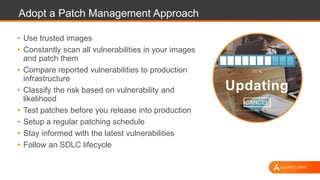
Adopt a Patch Management Approach
• Use trusted images
• Constantly scan all vulnerabilities in your images
and patch them
• Compare reported vulnerabilities to production
infrastructure
• Classify the risk based on vulnerability and
likelihood
• Test patches before you release into production
• Setup a regular patching schedule
• Stay informed with the latest vulnerabilities
• Follow an SDLC lifecycle
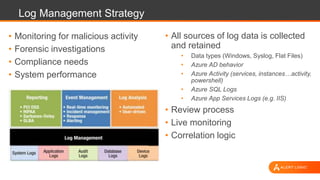
Log Management Strategy
• Monitoring for malicious activity
• Forensic investigations
• Compliance needs
• System performance
• All sources of log data is collected
and retained
• Data types (Windows, Syslog, Flat Files)
• Azure AD behavior
• Azure Activity (services, instances…activity,
powershell)
• Azure SQL Logs
• Azure App Services Logs (e.g. IIS)
• Review process
• Live monitoring
• Correlation logic
Stay Informed of the Latest Vulnerabilities
Websites to follow
• http://www.securityfocus.com
• http://www.exploit-db.com
• http://seclists.org/fulldisclosure/
• http://www.securitybloggersnetwork.com/
• http://cve.mitre.org/
• http://nvd.nist.gov/
• https://www.alertlogic.com/weekly-threat-report/
ALERT LOGIC
SOLUTIONS
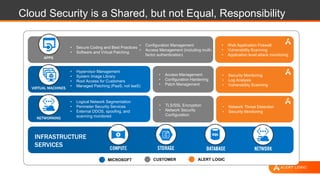
• Security Monitoring
• Log Analysis
• Vulnerability Scanning
• Network Threat Detection
• Security Monitoring
• Secure Coding and Best Practices
• Software and Virtual Patching
• Configuration Management
• Access Management (including multi-
factor authentication)
• Access Management
• Configuration Hardening
• Patch Management
• TLS/SSL Encryption
• Network Security
Configuration
• Web Application Firewall
• Vulnerability Scanning
• Application level attack monitoring
• Hypervisor Management
• System Image Library
• Root Access for Customers
• Managed Patching (PaaS, not IaaS)
• Logical Network Segmentation
• Perimeter Security Services
• External DDOS, spoofing, and
scanning monitored
APPS
CUSTOMER ALERT LOGICMICROSOFT
VIRTUAL MACHINES
NETWORKING
INFRASTRUCTURE
SERVICES
Cloud Security is a Shared, but not Equal, Responsibility
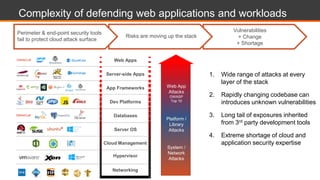
Vulnerabilities
+ Change
+ Shortage
Complexity of defending web applications and workloads
Risks are moving up the stack
1. Wide range of attacks at every
layer of the stack
2. Rapidly changing codebase can
introduces unknown vulnerabilities
3. Long tail of exposures inherited
from 3rd party development tools
4. Extreme shortage of cloud and
application security expertise
Web App
Attacks
OWASP
Top 10
Platform /
Library
Attacks
System /
Network
Attacks
Perimeter & end-point security tools
fail to protect cloud attack surface
Web Apps
Server-side Apps
App Frameworks
Dev Platforms
Server OS
Hypervisor
Databases
Networking
Cloud Management
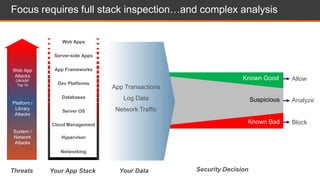
Block
Analyze
Allow
Your Data
Focus requires full stack inspection…and complex analysis
Known Good
Known Bad
Suspicious
Security DecisionYour App Stack
Web App
Attacks
OWASP
Top 10
Platform /
Library
Attacks
System /
Network
Attacks
Threats
App Transactions
Log Data
Network Traffic
Web Apps
Server-side Apps
App Frameworks
Dev Platforms
Server OS
Hypervisor
Databases
Networking
Cloud Management
Web App
Attacks
OWASP
Top 10
Platform /
Library
Attacks
System /
Network
Attacks
Web Apps
Server-side Apps
App Frameworks
Dev Platforms
Server OS
Hypervisor
Databases
Networking
Cloud Management
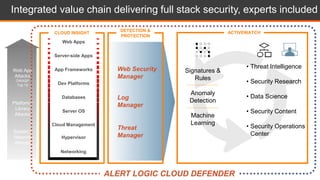
CLOUD INSIGHT
Signatures &
Rules
Anomaly
Detection
Machine
Learning
Integrated value chain delivering full stack security, experts included
• Threat Intelligence
• Security Research
• Data Science
• Security Content
• Security Operations
Center
ACTIVEWATCHDETECTION &
PROTECTION
Web Security
Manager
Log
Manager
Threat
Manager
ALERT LOGIC CLOUD DEFENDER
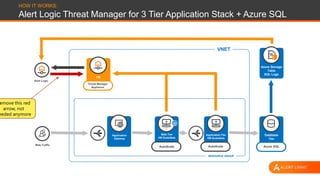
HOW IT WORKS:
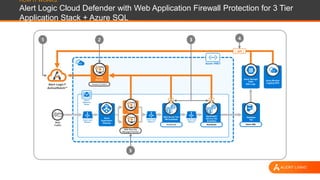
Alert Logic Threat Manager for 3 Tier Application Stack + Azure SQL
VNET
RESOURCE GROUP
Alert Logic
Web Traffic
Threat Manager
Appliance
AutoScale AutoScale Azure SQL
Database
Tier
Azure Storage
Table
SQL Logs
Application Tier
VM ScaleSets
Web Tier
VM ScaleSets
Application
Gateway
VM
emove this red
arrow, not
eeded anymore
Assess & Detect
Azure VNET
Virtual
Machine
Azure
Application
Gateway
Azure
Resource
Group
Alert Logic®
ActiveWatch™
Primary
Learner
Web Security
Manager Premier
Azure Load
Balancer
Azure Load
Balancer
Azure Load
Balancer
Web Server Tier
VM ScaleSets
AutoScale Azure SQL
Database
Tier
Azure Storage
Table
SQL Logs
Web
Traffic
Application
Service Tier
ScaleSets
AutoScale
32
5
1 4
Azure Monitor
Logging (API)
{ API }
HOW IT WORKS:
Alert Logic Cloud Defender with Web Application Firewall Protection for 3 Tier
Application Stack + Azure SQL
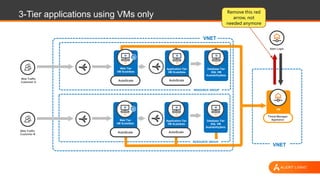
3-Tier applications using VMs only
VNET
RESOURCE GROUP
Web Traffic
Customer B
Alert Logic
Threat Manager
Appliance
VM
AutoScale
Application Tier
VM ScaleSets
AutoScale
Web Tier
VM ScaleSets
Database Tier
SQL VM
AvailabilitySets
VNET
RESOURCE GROUP
AutoScale
Application Tier
VM ScaleSets
AutoScale
Web Tier
VM ScaleSets
Database Tier
SQL VM
AvailabilitySets
Web Traffic
Customer A
Remove this red
arrow, not
needed anymore
To Follow our Research & Contact Information
Blog
https://www.alertlogtic.com/resources/blog
Newsletter
https://www.alertlogic.com/weekly-threat-report/
Cloud Security Report
https://www.alertlogic.com/resources/cloud-security-report/
Zero Day Magazine
https://www.alertlogic.com/zerodaymagazine/
Twitter
@AlertLogic For More Information on Alert Logic Solutions
www.alertlogic.com/solutions/platform/microsoft-
azure/
Thank you.

Shared Security Responsibility for the Azure Cloud

  • 1.
    SHARED SECURITY RESPONSIBILITY INAZURE Speaker - %SPEAKERNAME%
  • 2.
    Agenda • Introductions • SharedResponsibility in Azure • Security Best Practices • Alert Logic Solutions and Value
  • 3.
    • Security Monitoring •Log Analysis • Vulnerability Scanning • Network Threat Detection • Security Monitoring • Secure Coding and Best Practices • Software and Virtual Patching • Configuration Management • Access Management (including multi- factor authentication) • Access Management • Configuration Hardening • Patch Management • TLS/SSL Encryption • Network Security Configuration • Web Application Firewall • Vulnerability Scanning • Application level attack monitoring • Hypervisor Management • System Image Library • Root Access for Customers • Managed Patching (PaaS, not IaaS) • Logical Network Segmentation • Perimeter Security Services • External DDOS, spoofing, and scanning monitored APPS CUSTOMERMICROSOFT VIRTUAL MACHINES NETWORKING INFRASTRUCTURE SERVICES Cloud Security is a Shared, but not Equal, Responsibility
  • 4.
  • 5.
  • 6.
    Best Practices forSecurity • Understand the Cloud Providers Shared Responsibility Model • Azure Network Security Best Practices • Data Security and Access Management • Secure your code • Data Classification • Adopt a patch management approach • Review logs regularly • Stay informed of the latest vulnerabilities that may affect you • Know your adversaries
  • 7.
    Understand the CloudProviders Shared Responsibility Model The first step to securing cloud workloads is understanding the shared responsibility model Microsoft will secure most of the underlying infrastructure, including the physical access to the datacenters, the servers and hypervisors, and parts of the networking infrastructure…but the customer is responsible for the rest. Taken from the Shared Responsibility for Cloud Computing whitepaper, published by Microsoft in March 2016
  • 8.
    Azure Network SecurityBest Practices • Logically segment subnets • Control routing behavior • Enable Forced Tunneling (e.g. forcing internet through on- premise and/or DC) • Use Virtual network appliances (e.g FW, IDS/IPS, AV, Web Filtering, Application ELB) • Deploy DMZs for security zoning • Optimize uptime and performance • Use global load balancing • Disable RDP or SSH Access to Azure Virtual Machines • Enable Azure Security Center • Extend your datacenter into Azure
  • 9.
    Data Security andAccess Management • Lock down Admin account in Azure • Enable MFA (Azure, hardware/software token) • Start with a least privilege access model (e.g. Use RBAC) *avoid owner role unless absolutely necessary • Identify data infrastructure that requires access (e.g. Lock down AzureSQL) • Azure NSG (private vs public) • Continually audit access (Azure Activity Logs) • AAD Premium – (*Security analytics and alerting) • Manage with Secure Workstations (e.g. DMZ, MGMT) • Protect data in transit and at rest • Encrypt Azure Virtual Machines • Enable SQL Data Encryption
  • 10.
    Secure Your Code •Test inputs that are open to the Internet • Add delays to your code to confuse bots • Use encryption when you can • Test libraries • Scan plugins • Scan your code after every update • Limit privileges • Don’t store keys in code (e.g. secret keys) • DevSecOps – Develop Security as Code
  • 11.
    Data Classification • Identifydata repositories and mobile backups • Identify classification levels and requirements • Analyze data to determine classification • Build Access Management policy around classification • Monitor file modifications and users
  • 12.
    Adopt a PatchManagement Approach • Use trusted images • Constantly scan all vulnerabilities in your images and patch them • Compare reported vulnerabilities to production infrastructure • Classify the risk based on vulnerability and likelihood • Test patches before you release into production • Setup a regular patching schedule • Stay informed with the latest vulnerabilities • Follow an SDLC lifecycle
  • 13.
    Log Management Strategy •Monitoring for malicious activity • Forensic investigations • Compliance needs • System performance • All sources of log data is collected and retained • Data types (Windows, Syslog, Flat Files) • Azure AD behavior • Azure Activity (services, instances…activity, powershell) • Azure SQL Logs • Azure App Services Logs (e.g. IIS) • Review process • Live monitoring • Correlation logic
  • 14.
    Stay Informed ofthe Latest Vulnerabilities Websites to follow • http://www.securityfocus.com • http://www.exploit-db.com • http://seclists.org/fulldisclosure/ • http://www.securitybloggersnetwork.com/ • http://cve.mitre.org/ • http://nvd.nist.gov/ • https://www.alertlogic.com/weekly-threat-report/
  • 15.
  • 16.
    • Security Monitoring •Log Analysis • Vulnerability Scanning • Network Threat Detection • Security Monitoring • Secure Coding and Best Practices • Software and Virtual Patching • Configuration Management • Access Management (including multi- factor authentication) • Access Management • Configuration Hardening • Patch Management • TLS/SSL Encryption • Network Security Configuration • Web Application Firewall • Vulnerability Scanning • Application level attack monitoring • Hypervisor Management • System Image Library • Root Access for Customers • Managed Patching (PaaS, not IaaS) • Logical Network Segmentation • Perimeter Security Services • External DDOS, spoofing, and scanning monitored APPS CUSTOMER ALERT LOGICMICROSOFT VIRTUAL MACHINES NETWORKING INFRASTRUCTURE SERVICES Cloud Security is a Shared, but not Equal, Responsibility
  • 17.
    Vulnerabilities + Change + Shortage Complexityof defending web applications and workloads Risks are moving up the stack 1. Wide range of attacks at every layer of the stack 2. Rapidly changing codebase can introduces unknown vulnerabilities 3. Long tail of exposures inherited from 3rd party development tools 4. Extreme shortage of cloud and application security expertise Web App Attacks OWASP Top 10 Platform / Library Attacks System / Network Attacks Perimeter & end-point security tools fail to protect cloud attack surface Web Apps Server-side Apps App Frameworks Dev Platforms Server OS Hypervisor Databases Networking Cloud Management
  • 18.
    Block Analyze Allow Your Data Focus requiresfull stack inspection…and complex analysis Known Good Known Bad Suspicious Security DecisionYour App Stack Web App Attacks OWASP Top 10 Platform / Library Attacks System / Network Attacks Threats App Transactions Log Data Network Traffic Web Apps Server-side Apps App Frameworks Dev Platforms Server OS Hypervisor Databases Networking Cloud Management
  • 19.
    Web App Attacks OWASP Top 10 Platform/ Library Attacks System / Network Attacks Web Apps Server-side Apps App Frameworks Dev Platforms Server OS Hypervisor Databases Networking Cloud Management CLOUD INSIGHT Signatures & Rules Anomaly Detection Machine Learning Integrated value chain delivering full stack security, experts included • Threat Intelligence • Security Research • Data Science • Security Content • Security Operations Center ACTIVEWATCHDETECTION & PROTECTION Web Security Manager Log Manager Threat Manager ALERT LOGIC CLOUD DEFENDER
  • 20.
    HOW IT WORKS: AlertLogic Threat Manager for 3 Tier Application Stack + Azure SQL VNET RESOURCE GROUP Alert Logic Web Traffic Threat Manager Appliance AutoScale AutoScale Azure SQL Database Tier Azure Storage Table SQL Logs Application Tier VM ScaleSets Web Tier VM ScaleSets Application Gateway VM emove this red arrow, not eeded anymore
  • 21.
    Assess & Detect AzureVNET Virtual Machine Azure Application Gateway Azure Resource Group Alert Logic® ActiveWatch™ Primary Learner Web Security Manager Premier Azure Load Balancer Azure Load Balancer Azure Load Balancer Web Server Tier VM ScaleSets AutoScale Azure SQL Database Tier Azure Storage Table SQL Logs Web Traffic Application Service Tier ScaleSets AutoScale 32 5 1 4 Azure Monitor Logging (API) { API } HOW IT WORKS: Alert Logic Cloud Defender with Web Application Firewall Protection for 3 Tier Application Stack + Azure SQL
  • 22.
    3-Tier applications usingVMs only VNET RESOURCE GROUP Web Traffic Customer B Alert Logic Threat Manager Appliance VM AutoScale Application Tier VM ScaleSets AutoScale Web Tier VM ScaleSets Database Tier SQL VM AvailabilitySets VNET RESOURCE GROUP AutoScale Application Tier VM ScaleSets AutoScale Web Tier VM ScaleSets Database Tier SQL VM AvailabilitySets Web Traffic Customer A Remove this red arrow, not needed anymore
  • 23.
    To Follow ourResearch & Contact Information Blog https://www.alertlogtic.com/resources/blog Newsletter https://www.alertlogic.com/weekly-threat-report/ Cloud Security Report https://www.alertlogic.com/resources/cloud-security-report/ Zero Day Magazine https://www.alertlogic.com/zerodaymagazine/ Twitter @AlertLogic For More Information on Alert Logic Solutions www.alertlogic.com/solutions/platform/microsoft- azure/
  • 24.

Editor's Notes

  • #5 Talking Points The managing of environments that are traditional on-prem, private cloud, external users, internal users, all connecting in multiple infrastructures Reasons for adopting hybrid cloud, Lower cost of infrastructure, Shadow IT (Lines of business are moving there) and Aging datacenters
  • #7 Process section
  • #8 https://blogs.msdn.microsoft.com/azuresecurity/2016/04/18/what-does-shared-responsibility-in-the-cloud-mean/ - the image above is publicly posted on this website
  • #12 Classification
  • #14 User account behavior, system account behavior, network traffic flow baseline