

© 2018, Amazon Web Services, Inc. or its Affiliates. All rights reserved.
Ric Harvey, Technical Developer Evangelist
@ric__harvey
Deep Dive: AWS Security by Design
© 2018, Amazon Web Services, Inc. or its Affiliates. All rights reserved.
Security by design principles
• Implement a strong identity foundation
• Enable traceability
• Apply security at all layers
• Automate security best practices
• Protect data (in transit and at rest)
• Prepare for security events
https://aws.amazon.com/architecture/well-architected/
© 2018, Amazon Web Services, Inc. or its Affiliates. All rights reserved.© 2018, Amazon Web Services, Inc. or its Affiliates. All rights reserved.
Implement a strong identity foundation
© 2018, Amazon Web Services, Inc. or its Affiliates. All rights reserved.
Identity Access Management (IAM)
Ensure only authorized and authenticated users are able to
access resources:
• Define users, groups, services and roles
• Protect AWS credentials
• Use fine grained authorization/access control
© 2018, Amazon Web Services, Inc. or its Affiliates. All rights reserved.
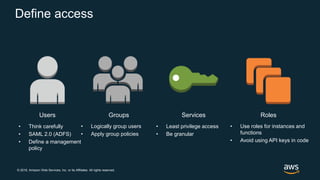
Define access
Users Groups Services Roles
• Think carefully
• SAML 2.0 (ADFS)
• Define a management
policy
• Logically group users
• Apply group policies
• Least privilege access
• Be granular
• Use roles for instances and
functions
• Avoid using API keys in code
© 2018, Amazon Web Services, Inc. or its Affiliates. All rights reserved.
Protecting AWS credentials
• Establish Less-privileged Users
• Enable MFA on the root account
• Consider federation
• Set a password policy
• MFA for users and/or certain operations (s3
delete)
• Avoid storing API Keys in source control
• Use temporary credentials via STS
© 2018, Amazon Web Services, Inc. or its Affiliates. All rights reserved.
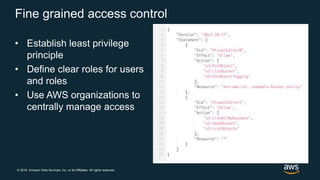
Fine grained access control
• Establish least privilege
principle
• Define clear roles for users
and roles
• Use AWS organizations to
centrally manage access
© 2018, Amazon Web Services, Inc. or its Affiliates. All rights reserved.
Resources
AWS IAM - https://aws.amazon.com/iam/
AWS STS - https://docs.aws.amazon.com/STS/latest/APIReference/Welcome.html
AWS Organizations - https://aws.amazon.com/organizations/
© 2018, Amazon Web Services, Inc. or its Affiliates. All rights reserved.© 2018, Amazon Web Services, Inc. or its Affiliates. All rights reserved.
Enable traceability
© 2018, Amazon Web Services, Inc. or its Affiliates. All rights reserved.
Detective controls
Identifying a potential security threat is essential for legal
compliance assurance, key areas in this are:
• Capture and analyze logs
• Integrate auditing controls with notifications and
workflow / Use your logs
© 2018, Amazon Web Services, Inc. or its Affiliates. All rights reserved.
Capture and analyze logs
Asset management
• Describe assets and instance programmatically
• No dependency on instance based agent
API driven log analysis
• Collect, filter and analyze with ease
• Automatically collect API calls with CloudTrail
• Use CloudWatch Logs or ElasticSearch with instances
© 2018, Amazon Web Services, Inc. or its Affiliates. All rights reserved.
Use your logs
Don’t just collect and store logs, analyze logs easily with
CloudWatch Events:
• Trigger notifications
• Automate responses with Lambda
• Integrate events with ticketing systems
© 2018, Amazon Web Services, Inc. or its Affiliates. All rights reserved.
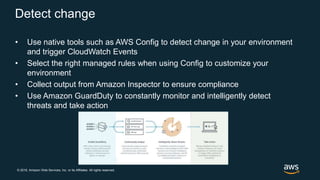
Detect change
• Use native tools such as AWS Config to detect change in your environment
and trigger CloudWatch Events
• Select the right managed rules when using Config to customize your
environment
• Collect output from Amazon Inspector to ensure compliance
• Use Amazon GuardDuty to constantly monitor and intelligently detect
threats and take action
© 2018, Amazon Web Services, Inc. or its Affiliates. All rights reserved.
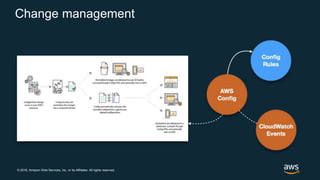
Change management
© 2018, Amazon Web Services, Inc. or its Affiliates. All rights reserved.
Resources
AWS Config – https://aws.amazon.com/config/
AWS Config Rules –
https://docs.aws.amazon.com/config/latest/developerguide/managed-rules-by-aws-
config.html
Amazon Inspector - https://aws.amazon.com/inspector/
Amazon ElasticSearch Service - https://aws.amazon.com/elasticsearch-service/
Amazon CloudWatch Logs - https://aws.amazon.com/cloudwatch/
Amazon Athena – https://aws.amazon.com/athena/
Amazon Glacier – https://aws.amazon.com/glacier/
AWS Lambda – https://aws.amazon.com/lambda/
© 2018, Amazon Web Services, Inc. or its Affiliates. All rights reserved.© 2018, Amazon Web Services, Inc. or its Affiliates. All rights reserved.
Apply security at all layers
© 2018, Amazon Web Services, Inc. or its Affiliates. All rights reserved.
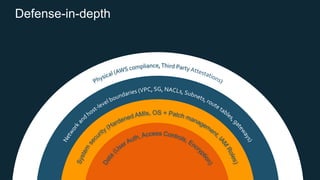
Defense-in-depth
© 2018, Amazon Web Services, Inc. or its Affiliates. All rights reserved.
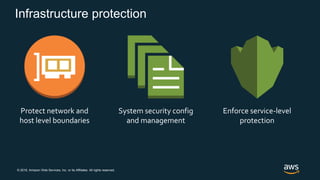
Infrastructure protection
Protect network and
host level boundaries
System security config
and management
Enforce service-level
protection
© 2018, Amazon Web Services, Inc. or its Affiliates. All rights reserved.
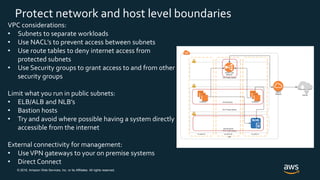
Protect network and host level boundaries
VPC considerations:
• Subnets to separate workloads
• Use NACL’s to prevent access between subnets
• Use route tables to deny internet access from
protected subnets
• Use Security groups to grant access to and from other
security groups
Limit what you run in public subnets:
• ELB/ALB and NLB’s
• Bastion hosts
• Try and avoid where possible having a system directly
accessible from the internet
External connectivity for management:
• UseVPN gateways to your on premise systems
• Direct Connect
© 2018, Amazon Web Services, Inc. or its Affiliates. All rights reserved.
System security config and management
OS based firewalls
CVE vulnerability scanners
Virus scanners
Remove unnecessary tools from OS
Remove direct access to machines – use EC2 system
manager
Amazon Inspector to scan OS and applications
© 2018, Amazon Web Services, Inc. or its Affiliates. All rights reserved.
Enforce service-level protection
• Use least privilege IAM policies
• Use fined grained controls within policies
• Use the right set of ConfigRules to ensure your policies
persist despite infrastructure changes in your
environment
• Look at service level permission (such as S3 bucket
policies)
• Use KMS and define admin and user access policies
© 2018, Amazon Web Services, Inc. or its Affiliates. All rights reserved.
Resources
Amazon VPC – https://aws.amazon.com/vpc/
AWS Direct Connect – https://aws.amazon.com/directconnect/
Amazon Inspector - https://aws.amazon.com/inspector/
AWS Config - https://aws.amazon.com/config/
© 2018, Amazon Web Services, Inc. or its Affiliates. All rights reserved.© 2018, Amazon Web Services, Inc. or its Affiliates. All rights reserved.
Automate security best practices
© 2018, Amazon Web Services, Inc. or its Affiliates. All rights reserved.
Ensure best practice
• Template everything (CloudFormation, Terraform, etc
etc)
• Utilise CI/CD pipelines
• Set custom AWS Config rules
• Amazon Inspector to detect vulnerabilities
• Automate response to non compliant infrastructure
© 2018, Amazon Web Services, Inc. or its Affiliates. All rights reserved.
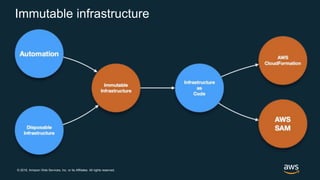
Immutable infrastructure
© 2018, Amazon Web Services, Inc. or its Affiliates. All rights reserved.
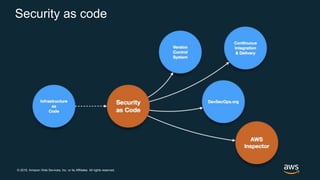
Security as code
© 2018, Amazon Web Services, Inc. or its Affiliates. All rights reserved.
Resources
Amazon VPC – https://aws.amazon.com/
AWS Systems Manager – https://aws.amazon.com/systems-manager/Amazon/
Inspector - https://aws.amazon.com/inspector/
AWS Config - https://aws.amazon.com/config/
AWS CloudFormation - https://aws.amazon.com/cloudformation/
AWS SAM - https://github.com/awslabs/serverless-application-model
AWS Pipeline - https://aws.amazon.com/codepipeline/
AWS KMS - https://aws.amazon.com/kms/
Terraform - https://www.terraform.io/
© 2018, Amazon Web Services, Inc. or its Affiliates. All rights reserved.© 2018, Amazon Web Services, Inc. or its Affiliates. All rights reserved.
Protect data (in transit and at rest)
© 2018, Amazon Web Services, Inc. or its Affiliates. All rights reserved.
Data classification
Start of by classifying data based on sensitivity:
• Public data = unencrypted, non-sensitive, available to everyone
• Critical data = encrypted, not directly accessible from the internet, requires
authorization and authentication
Use resource tags to help define the policy:
• “DataClassification=CRITICAL”
• Integrate access with IAM policies
Amazon Macie:
Macie can automatically discover, classify and protect sensitive data through machine
learning
© 2018, Amazon Web Services, Inc. or its Affiliates. All rights reserved.
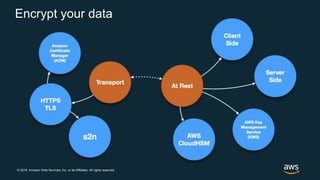
Encrypt your data
© 2018, Amazon Web Services, Inc. or its Affiliates. All rights reserved.
Data in transit
AWS endpoints are HTTPS,
but what can you do?
• VPN connectivity to VPC
• TLS application communication
• ELB or CloudFront with ACM
© 2018, Amazon Web Services, Inc. or its Affiliates. All rights reserved.
Data at rest
Inbuilt encryption
• S3: select KMS key on upload
• EBS and RDS snapshots: automatically encrypt data at rest
• DynamoDB: encrypt backups
Bring your own Key
Encrypt data locally before uploading
SSE-C (server side encryption with customer key)
Use Config Rules to ensure you are enabling server side encryption
© 2018, Amazon Web Services, Inc. or its Affiliates. All rights reserved.
Encryption and tokenization
Tokens allow you to represent data (credit card number) as a token.
Generate and Retrieve encrypted data from a toke store such as cloudHSM or
encrypt and store data in DynamoDB.
cloudHSM is PCI-DSS and FIPS compliant
© 2018, Amazon Web Services, Inc. or its Affiliates. All rights reserved.
Resources
AWS KMS - https://aws.amazon.com/kms/
Amazon Macie – https://aws.amazon.com/macie/
AWS Cloud HSM – https://aws.amazon.com/cloudhsm/
Amazon EBS – https://aws.amazon.com/ebs/
AWS Config - https://aws.amazon.com/config/
S2n - https://github.com/awslabs/s2n
© 2018, Amazon Web Services, Inc. or its Affiliates. All rights reserved.© 2018, Amazon Web Services, Inc. or its Affiliates. All rights reserved.
Prepare for security events
© 2018, Amazon Web Services, Inc. or its Affiliates. All rights reserved.
Incident response
“Even with a mature preventative and detective solution in
place, you should consider a mitigation plan”
© 2018, Amazon Web Services, Inc. or its Affiliates. All rights reserved.
Clean room
• Use Tags to quickly determine impact and escalate
• Get the right people access and on the call
• Use Cloud API’s to automate and isolate instances
• CloudFormation – recreate clean / update environments easily for
production or investigation purposes
© 2018, Amazon Web Services, Inc. or its Affiliates. All rights reserved.
Resources
AWS Well-Architected - https://aws.amazon.com/architecture/well-architected/
Security Pillar - https://d1.awsstatic.com/whitepapers/architecture/AWS-Security-
Pillar.pdf
© 2018, Amazon Web Services, Inc. or its Affiliates. All rights reserved.
Thank you!
Ric Harvey, Technical Developer Evangelist
@ric__harvey

Deep dive - AWS security by design

  • 1.
    © 2018, AmazonWeb Services, Inc. or its Affiliates. All rights reserved. Ric Harvey, Technical Developer Evangelist @ric__harvey Deep Dive: AWS Security by Design
  • 2.
    © 2018, AmazonWeb Services, Inc. or its Affiliates. All rights reserved. Security by design principles • Implement a strong identity foundation • Enable traceability • Apply security at all layers • Automate security best practices • Protect data (in transit and at rest) • Prepare for security events https://aws.amazon.com/architecture/well-architected/
  • 3.
    © 2018, AmazonWeb Services, Inc. or its Affiliates. All rights reserved.© 2018, Amazon Web Services, Inc. or its Affiliates. All rights reserved. Implement a strong identity foundation
  • 4.
    © 2018, AmazonWeb Services, Inc. or its Affiliates. All rights reserved. Identity Access Management (IAM) Ensure only authorized and authenticated users are able to access resources: • Define users, groups, services and roles • Protect AWS credentials • Use fine grained authorization/access control
  • 5.
    © 2018, AmazonWeb Services, Inc. or its Affiliates. All rights reserved. Define access Users Groups Services Roles • Think carefully • SAML 2.0 (ADFS) • Define a management policy • Logically group users • Apply group policies • Least privilege access • Be granular • Use roles for instances and functions • Avoid using API keys in code
  • 6.
    © 2018, AmazonWeb Services, Inc. or its Affiliates. All rights reserved. Protecting AWS credentials • Establish Less-privileged Users • Enable MFA on the root account • Consider federation • Set a password policy • MFA for users and/or certain operations (s3 delete) • Avoid storing API Keys in source control • Use temporary credentials via STS
  • 7.
    © 2018, AmazonWeb Services, Inc. or its Affiliates. All rights reserved. Fine grained access control • Establish least privilege principle • Define clear roles for users and roles • Use AWS organizations to centrally manage access
  • 8.
    © 2018, AmazonWeb Services, Inc. or its Affiliates. All rights reserved. Resources AWS IAM - https://aws.amazon.com/iam/ AWS STS - https://docs.aws.amazon.com/STS/latest/APIReference/Welcome.html AWS Organizations - https://aws.amazon.com/organizations/
  • 9.
    © 2018, AmazonWeb Services, Inc. or its Affiliates. All rights reserved.© 2018, Amazon Web Services, Inc. or its Affiliates. All rights reserved. Enable traceability
  • 10.
    © 2018, AmazonWeb Services, Inc. or its Affiliates. All rights reserved. Detective controls Identifying a potential security threat is essential for legal compliance assurance, key areas in this are: • Capture and analyze logs • Integrate auditing controls with notifications and workflow / Use your logs
  • 11.
    © 2018, AmazonWeb Services, Inc. or its Affiliates. All rights reserved. Capture and analyze logs Asset management • Describe assets and instance programmatically • No dependency on instance based agent API driven log analysis • Collect, filter and analyze with ease • Automatically collect API calls with CloudTrail • Use CloudWatch Logs or ElasticSearch with instances
  • 12.
    © 2018, AmazonWeb Services, Inc. or its Affiliates. All rights reserved. Use your logs Don’t just collect and store logs, analyze logs easily with CloudWatch Events: • Trigger notifications • Automate responses with Lambda • Integrate events with ticketing systems
  • 13.
    © 2018, AmazonWeb Services, Inc. or its Affiliates. All rights reserved. Detect change • Use native tools such as AWS Config to detect change in your environment and trigger CloudWatch Events • Select the right managed rules when using Config to customize your environment • Collect output from Amazon Inspector to ensure compliance • Use Amazon GuardDuty to constantly monitor and intelligently detect threats and take action
  • 14.
    © 2018, AmazonWeb Services, Inc. or its Affiliates. All rights reserved. Change management
  • 15.
    © 2018, AmazonWeb Services, Inc. or its Affiliates. All rights reserved. Resources AWS Config – https://aws.amazon.com/config/ AWS Config Rules – https://docs.aws.amazon.com/config/latest/developerguide/managed-rules-by-aws- config.html Amazon Inspector - https://aws.amazon.com/inspector/ Amazon ElasticSearch Service - https://aws.amazon.com/elasticsearch-service/ Amazon CloudWatch Logs - https://aws.amazon.com/cloudwatch/ Amazon Athena – https://aws.amazon.com/athena/ Amazon Glacier – https://aws.amazon.com/glacier/ AWS Lambda – https://aws.amazon.com/lambda/
  • 16.
    © 2018, AmazonWeb Services, Inc. or its Affiliates. All rights reserved.© 2018, Amazon Web Services, Inc. or its Affiliates. All rights reserved. Apply security at all layers
  • 17.
    © 2018, AmazonWeb Services, Inc. or its Affiliates. All rights reserved. Defense-in-depth
  • 18.
    © 2018, AmazonWeb Services, Inc. or its Affiliates. All rights reserved. Infrastructure protection Protect network and host level boundaries System security config and management Enforce service-level protection
  • 19.
    © 2018, AmazonWeb Services, Inc. or its Affiliates. All rights reserved. Protect network and host level boundaries VPC considerations: • Subnets to separate workloads • Use NACL’s to prevent access between subnets • Use route tables to deny internet access from protected subnets • Use Security groups to grant access to and from other security groups Limit what you run in public subnets: • ELB/ALB and NLB’s • Bastion hosts • Try and avoid where possible having a system directly accessible from the internet External connectivity for management: • UseVPN gateways to your on premise systems • Direct Connect
  • 20.
    © 2018, AmazonWeb Services, Inc. or its Affiliates. All rights reserved. System security config and management OS based firewalls CVE vulnerability scanners Virus scanners Remove unnecessary tools from OS Remove direct access to machines – use EC2 system manager Amazon Inspector to scan OS and applications
  • 21.
    © 2018, AmazonWeb Services, Inc. or its Affiliates. All rights reserved. Enforce service-level protection • Use least privilege IAM policies • Use fined grained controls within policies • Use the right set of ConfigRules to ensure your policies persist despite infrastructure changes in your environment • Look at service level permission (such as S3 bucket policies) • Use KMS and define admin and user access policies
  • 22.
    © 2018, AmazonWeb Services, Inc. or its Affiliates. All rights reserved. Resources Amazon VPC – https://aws.amazon.com/vpc/ AWS Direct Connect – https://aws.amazon.com/directconnect/ Amazon Inspector - https://aws.amazon.com/inspector/ AWS Config - https://aws.amazon.com/config/
  • 23.
    © 2018, AmazonWeb Services, Inc. or its Affiliates. All rights reserved.© 2018, Amazon Web Services, Inc. or its Affiliates. All rights reserved. Automate security best practices
  • 24.
    © 2018, AmazonWeb Services, Inc. or its Affiliates. All rights reserved. Ensure best practice • Template everything (CloudFormation, Terraform, etc etc) • Utilise CI/CD pipelines • Set custom AWS Config rules • Amazon Inspector to detect vulnerabilities • Automate response to non compliant infrastructure
  • 25.
    © 2018, AmazonWeb Services, Inc. or its Affiliates. All rights reserved. Immutable infrastructure
  • 26.
    © 2018, AmazonWeb Services, Inc. or its Affiliates. All rights reserved. Security as code
  • 27.
    © 2018, AmazonWeb Services, Inc. or its Affiliates. All rights reserved. Resources Amazon VPC – https://aws.amazon.com/ AWS Systems Manager – https://aws.amazon.com/systems-manager/Amazon/ Inspector - https://aws.amazon.com/inspector/ AWS Config - https://aws.amazon.com/config/ AWS CloudFormation - https://aws.amazon.com/cloudformation/ AWS SAM - https://github.com/awslabs/serverless-application-model AWS Pipeline - https://aws.amazon.com/codepipeline/ AWS KMS - https://aws.amazon.com/kms/ Terraform - https://www.terraform.io/
  • 28.
    © 2018, AmazonWeb Services, Inc. or its Affiliates. All rights reserved.© 2018, Amazon Web Services, Inc. or its Affiliates. All rights reserved. Protect data (in transit and at rest)
  • 29.
    © 2018, AmazonWeb Services, Inc. or its Affiliates. All rights reserved. Data classification Start of by classifying data based on sensitivity: • Public data = unencrypted, non-sensitive, available to everyone • Critical data = encrypted, not directly accessible from the internet, requires authorization and authentication Use resource tags to help define the policy: • “DataClassification=CRITICAL” • Integrate access with IAM policies Amazon Macie: Macie can automatically discover, classify and protect sensitive data through machine learning
  • 30.
    © 2018, AmazonWeb Services, Inc. or its Affiliates. All rights reserved. Encrypt your data
  • 31.
    © 2018, AmazonWeb Services, Inc. or its Affiliates. All rights reserved. Data in transit AWS endpoints are HTTPS, but what can you do? • VPN connectivity to VPC • TLS application communication • ELB or CloudFront with ACM
  • 32.
    © 2018, AmazonWeb Services, Inc. or its Affiliates. All rights reserved. Data at rest Inbuilt encryption • S3: select KMS key on upload • EBS and RDS snapshots: automatically encrypt data at rest • DynamoDB: encrypt backups Bring your own Key Encrypt data locally before uploading SSE-C (server side encryption with customer key) Use Config Rules to ensure you are enabling server side encryption
  • 33.
    © 2018, AmazonWeb Services, Inc. or its Affiliates. All rights reserved. Encryption and tokenization Tokens allow you to represent data (credit card number) as a token. Generate and Retrieve encrypted data from a toke store such as cloudHSM or encrypt and store data in DynamoDB. cloudHSM is PCI-DSS and FIPS compliant
  • 34.
    © 2018, AmazonWeb Services, Inc. or its Affiliates. All rights reserved. Resources AWS KMS - https://aws.amazon.com/kms/ Amazon Macie – https://aws.amazon.com/macie/ AWS Cloud HSM – https://aws.amazon.com/cloudhsm/ Amazon EBS – https://aws.amazon.com/ebs/ AWS Config - https://aws.amazon.com/config/ S2n - https://github.com/awslabs/s2n
  • 35.
    © 2018, AmazonWeb Services, Inc. or its Affiliates. All rights reserved.© 2018, Amazon Web Services, Inc. or its Affiliates. All rights reserved. Prepare for security events
  • 36.
    © 2018, AmazonWeb Services, Inc. or its Affiliates. All rights reserved. Incident response “Even with a mature preventative and detective solution in place, you should consider a mitigation plan”
  • 37.
    © 2018, AmazonWeb Services, Inc. or its Affiliates. All rights reserved. Clean room • Use Tags to quickly determine impact and escalate • Get the right people access and on the call • Use Cloud API’s to automate and isolate instances • CloudFormation – recreate clean / update environments easily for production or investigation purposes
  • 38.
    © 2018, AmazonWeb Services, Inc. or its Affiliates. All rights reserved. Resources AWS Well-Architected - https://aws.amazon.com/architecture/well-architected/ Security Pillar - https://d1.awsstatic.com/whitepapers/architecture/AWS-Security- Pillar.pdf
  • 39.
    © 2018, AmazonWeb Services, Inc. or its Affiliates. All rights reserved. Thank you! Ric Harvey, Technical Developer Evangelist @ric__harvey

Editor's Notes

  • #3 These are the foundation principles we should take into account when thinking about security in the cloud We are going to look at these 6 key areas in todays presentation. They are underpinned in the well architected “security pillar” URL to get more information.
  • #5 We are going to look at three main concepts today…….
  • #6 Think carefully about who needs access, consider using SAML and ADFS to integrate with your existing controls Remember to have a policy / procedure in place for new starters and leavers Create logical groups of users (admins, DBA’s, developers, billing etc) Apply policies to groups rather than individual users for easier management Only grant access to the services needed, we’ll cover fined grained access controls shortly Use roles for instances/funtions avoid baking in API keys to code which could be exposed in version control
  • #7 Tie AWS usage into your workforce lifecycle (starters and leavers procedures for granting and removing access) Enable MFA on the root account and remove API access key, use account only to provision less privileged account only when needed MFA for all user access to the console and also consider certain operations such as deleting from S3 can be required to have an MFA token entered which prevent accidental deletion Temporary API keys can be assigned to authenticated users via STS (many projects on github help users manage keys)
  • #8 Least privilege limits principle limits the the potential impact of inappropriate use, so to re-emphasize the importance of defining clear roles at the start of a project This first policies allows a user to have fill control of S3 (create, delete etc) The second policy is much more restricted with fine grained controls restricting what the user can do and even limiting to a specific bucket You can also consider using AWS organizations to centrally manage policies.
  • #12 Unlike in traditional DC where you need agents on every machine in the cloud aggregation is much easier due to two capabilities Cloud asset management is considered more accurate than using a CMDB (configuration management database) Push logs with traditional agents into cloudwatch or elasticsearch which are fully managed and/or easily scaled Amazon Athena can be used to identify logs such as cloud trail Archive logs into Glacier to reduce store costs for highly regulated industries that need to store logs for a long period of time, this can be managed by S3 life cycle policies
  • #13 Cloud watch provides a scaleable rules engine that can emit events when a pattern is matched. Using this you can use services such as SNS to send email alerts or push notifications to HTTP endpoints The rules engine can broker both native AWS event formats such as AWS Config rules and custom events you can generate yourself
  • #14 Its important to constantly monitor your environment for unauthorized change or systems that fall out of compliance. Using AWS Config you can detect changes in your infrastructure and record states. Making it easy to iterate new versions or role back to previous ones. Amazon Inspector allows you to detect vulnerabilities on instances such as CVE issues and unapplied updates, you can incorporate these logs into your work flow which can alert you when an instance may need attention Amazon GuardDuty monitors for unusual activity in your account, such as API calls that don’t fit your pattern of normal usage. In these events a detailed security report is delivered to the GuardDuty security console and a cloudwatch event is emmited allowing you to take action, and even triggered automated responses with Lambda
  • #18 Securing your systems can be considered in layer and you use these layers to protect your most valuable assets, your data. AWS looks physical security and host security of the hypervisor (refer to the share responsibility model) Customers have a wide range of tools protect on a network level, Sensible VPC design with subnets for public and private access, Routing to the internet and other subnets can be controller. Network access control lists can be applied (for example) only allow access from the application subnet to the db subnet on port 3306 and do not permit other ports or subnets in, treat this as a stateless firewall. Security groups (statefull firewall) is outside the OS and defines access rules into the instance, you can also define relationships between SG’s You should also harden you systems in the same way you would in your DC, look at key/password rotation policies, regular patch your OS and application stack and use IAM roles to grant access to other services so you don’t have to put API keys in code or on thehost. Finally your data should be subject to strict auth and access controls and when creating backups use encryption at rest, many services support this with KMS integration.
  • #19 Lets look at three ways of handling infrastructure protection in AWS
  • #20 VPC and subnet design Separate applications, public and db subnets for example Limit direct internet access ingress and egress NACLS and SG to control access VPN gateways or direct connect to access the VPC and machines within
  • #21 You traditional tools on your systems to ensure the security compliance Remove tools from the AMI’s (harden them) to prevent these tools being used against you Consider using EC2 systems manager Run Command / state manager / inventory / parameter store / patch manager to control your instances rather than allowing direct access from admins. This allows you to audit the work and also reliably and repeatedly deploy the same commands across your entire fleet
  • #25 Templating and automated CI/CD deployments can help ensure a consistent environment AWS Config custom rules to ensure continual compliance Use SNS and lambda to automatically respond to non compliant infrastructure
  • #26 If you design to have immutable / throw away infrastructure its easier update, test and then deploy to production using an automated pipeline This lets you define your infrastructure as code. The benefits of this is that its easy to recreate, update and deploy other versions of your infrastructure so that you can do testing and development in an environment that matches production. AWS Cloudformation allows you to define most AWS resources in code and deploy, update and manage the stack easily. SAM (serverless application model) allows you define serverless resources and can be integrated with cloudformation.
  • #27 Using these tools together you can start to automate your security pipeline. Lets take for an example an AMI running a web server (apache and php). We’ve defined this as a cloudformation template and deployed it. AWS inspector now detects theres an new version of Apache and the version we are running is a security risk. We trigger an automated event and patch the system. From this we create a new hardened AMI version using a CI/CD pipeline. We also update the cloudformation template with the new resource and store it in git for version control. Now when autoscale kicks in or we redeploy the stack we are using the new version from the start.
  • #31 Lots of options to give you full control and flexibility, from fully managed solutions to solutions where you bring your own key and encrypt data before its sent to AWS. s2n is the open source TLS implementation that’s now handling 100% of traffic for S3
  • #32 All AWS service endpoints are HTTPS When looking at connectivity for management or data transfer to and from your VPC consider using a VPN to secure communications If you have applications that send data between them You should use TLS to secure the connection. AWS Certificate Manager = ACM can generate , deploy and manage certs for you You can also secure external communications into you applications via ELB/ALB and CloudFront and use ACM to manage the certificate. It’s also possible to bring your own SSL cert and key to use.
  • #33 Multiple services support built in integration with AWS KMS
  • #34 Avoid storing unencrypted private data. Use tokenization systems such as cloudHSM (hardware security module) designed generate or bring your own keys. It has easy integration with applications using industry-standard APIs, such as PKCS#11, JavaCryptography Extensions (JCE), and Microsoft CryptoNG (CNG) libraries Its PCI-DSS and FIPS 140-2 Level 3 validated
  • #38 If you have tagged resource groups and data sensitivity in the detection of a breach you can quickly see the impact. Addition tags such as the owner of a service is also useful in this case to get the right people on a incident call for example You can use the API to automatically remove a potentially breach system from a Load balancer by changing the security group, auto scale should then replace the instance with a fresh one so your application isn’t affected. Cloudformation can be used to quickly recreate a new TRUSTED environment.