Agenda
- Introduction
- AWS Shared Responsibility Model
- AWS Data Security
- AWS Servers Security
- AWS Applications Security
- Security Best Practice
1
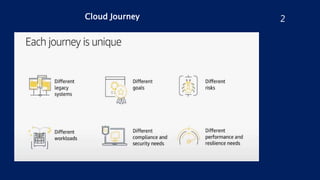
Cloud Journey 2
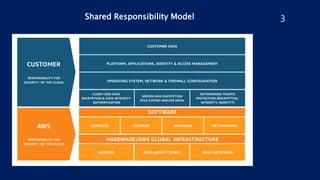
Shared Responsibility Model 3
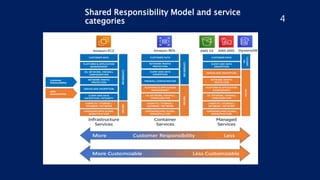
Shared Responsibility Model and service
categories 4
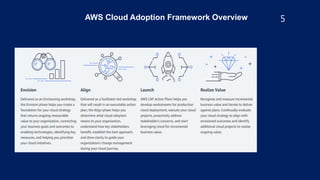
AWS Cloud Adoption Framework Overview 5
6
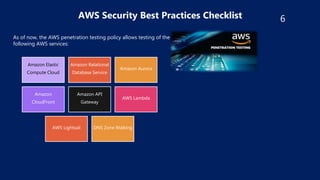
AWS Security Best Practices Checklist
Amazon Elastic
Compute Cloud
Amazon Relational
Database Service
Amazon Aurora
Amazon
CloudFront
Amazon API
Gateway
AWS Lambda
AWS Lightsail DNS Zone Walking
As of now, the AWS penetration testing policy allows testing of the
following AWS services:
7
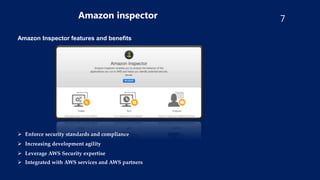
Amazon inspector
Amazon Inspector features and benefits
 Enforce security standards and compliance
 Increasing development agility
 Leverage AWS Security expertise
 Integrated with AWS services and AWS partners
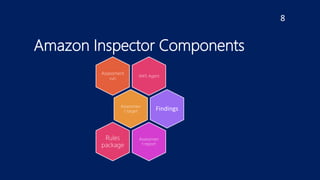
Amazon Inspector Components
8
AWS Agent
Assessment
run
Assessmen
t target Findings
Assessmen
t report
Rules
package
9
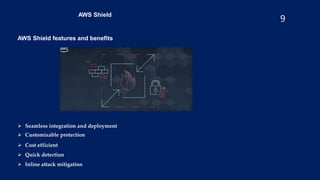
AWS Shield
AWS Shield features and benefits
 Seamless integration and deployment
 Customizable protection
 Cost efficient
 Quick detection
 Inline attack mitigation
10
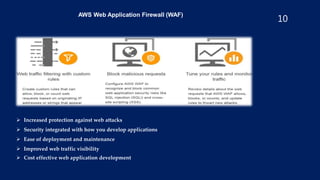
AWS Web Application Firewall (WAF)
 Increased protection against web attacks
 Security integrated with how you develop applications
 Ease of deployment and maintenance
 Improved web traffic visibility
 Cost effective web application development
11
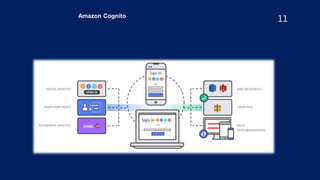
Amazon Cognito
12
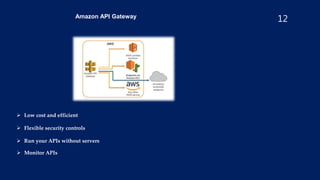
Amazon API Gateway
 Low cost and efficient
 Flexible security controls
 Run your APIs without servers
 Monitor APIs
AWS Security
Best Practices
Checklist
(IAM)
• Avoid using AWS root account user access keys as it gives
full access to all resources
• Make sure MFA authentication is enabled for the root
account to provide two-factor authentication
• Assign individual IAM users with necessary permissions to
enable login ensure User Accounts also have MFA
authentication
• IAM Access Keys must be rotated at periodic intervals
• Ensure a strong password policy for users
• Assign permissions to users based on User Groups, instead
of individual IAM users
• Provide access to a resource through IAM Roles
• Grant least access while creating IAM Policies, needed to
perform the necessary actions
• Attach IAM Policies to Groups or Roles on creation
• If required, conditions can be defined for Policies under
which access is granted to a resource
• Get rid of unnecessary IAM credentials, those with are
inactive or unused use IAM Roles to grant access to
applications on EC2 Instances
13
AWS Security
Best Practices
Checklist (S3)
•Ensure S3 buckets are not publicly accessible (public read or
write
permissions)
•Make use of object-level or bucket-level permissions in addition
to IAM policies to grant access to resources
•Enable MFA Delete to prevent accidental deletion of buckets
•Consider encryption of stored data, which can be done in two
ways
server-side and client-side encryption
•Enable encryption of inbound and outbound data traffic,
through SSL
endpoints
•Configure S3 lifecycle management through rule-based actions
and
use versioning to store and retrieve multiple versions of an
object in
a bucket, to deal with accidental deletions
•Ensure S3 access logging is enabled
•Constantly audit and monitor S3 buckets using CloudWatch 14
AWS Security
Best Practices
Checklist
(EC2, VPC &
EBS)
•Ensure data and disk volumes in EBS are encrypted with AES-
256, the
industry standard algorithm
•Restrict access to instances from limited IP ranges using Security
Groups
limit the range of open ports on EC2 security groups, to prevent
exposure to vulnerabilities
•Ensure ELBs have a valid security group attached to it
•Monitor and optimize default security groups, as they allow
unrestricted access for inbound and outbound traffic
•Ensure restricted inbound access to SSH, FTP, SMTP, MySQL,
PostgreSQL, MongoDB, MSSQL, CIFS, etc; to required entities
only
•Use IAM roles to grant access to EC2, instead of access keys for
temporary requirements
•If you’re using IAM user access keys for long term permissions,
ensure
that you don’t embed the keys directly into code, generate different
keys for different applications, rotate your access keys, use MFA
authentication and decommission unused key pairs.
•Enable and activate your VPC flow logs to record inbound and
outbound
traffic in your VPC for better monitoring and early diagnosis
•Delete unused Virtual Private Gateways and VPC Internet
Gateways
•Make sure that no VPC endpoints are exposed, by checking the
principal
value in the policy
•Ensure no ACLs allow unrestricted inbound or outbound access
15
AWS Security
Best Practices
Checklist
(CloudTrail)
•Ensure CloudTrail is activated across all regions, and for global
services like IAM, STS, etc
•It is recommended to log to a centralized S3 bucket
•Make sure both CloudTrail itself and CloudTrail logging are
enable
for all regions
•Ensure CloudTrail log file integrity validation is enabled
•Ensure CloudTrail log files are encrypted
16
20
AWS Security Best Practices Checklist
RDS
•Ensure RDS security groups do not allow unrestricted access
•Ensure encryption of the RDS instances and snapshots, using AES-256 level encryption
•Protect data in transit to RDS through SSL endpoints
•Monitor control to RDS using AWS KMS and Customer Managed Keys
•Ensure RDS database instances and snapshots are not publicly accessible
•Enable the auto minor upgrade feature for RDS
21
AWS Security Best Practices Checklist
Redshift “
•Enable require_ssl parameter in all Redshift clusters to minimize risk for encryption of
data in transit for Redshift, and to connect your SQL client with your cluster
•Enable Redshift Cluster encryption
•Ensure Redshift user activity logging is enabled
•Ensure Redshift encryption with KMS Customer Managed Keys
•It is recommended that Redshift clusters are launched within a VPC for better control
•Ensure that the Redshift clusters are not publicly accessible
22
VPC Security Best Practices
•Plan Your VPC before You Create It
•Choose the Highest CIDR Block
•Unique IP Address Range
•Leave the Default VPC Alone
•Design for Region Expansion
•Tier Your Subnets
•Follow the Least Privilege Principle
•Keep Most Resources in the Private Subnet
23
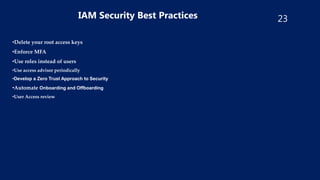
IAM Security Best Practices
•Delete your root access keys
•Enforce MFA
•Use roles instead of users
•Use access advisor periodically
•Develop a Zero Trust Approach to Security
•Automate Onboarding and Offboarding
•User Access review
24
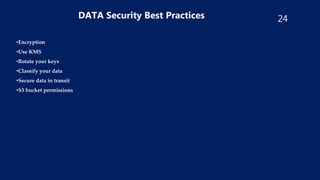
DATA Security Best Practices
•Encryption
•Use KMS
•Rotate your keys
•Classify your data
•Secure data in transit
•S3 bucket permissions
25
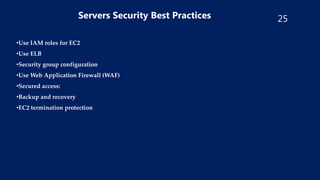
Servers Security Best Practices
•Use IAM roles for EC2
•Use ELB
•Security group configuration
•Use Web Application Firewall (WAF)
•Secured access:
•Backup and recovery
•EC2 termination protection
26
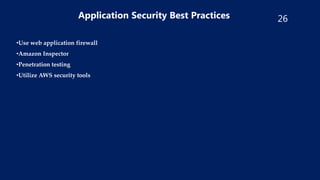
Application Security Best Practices
•Use web application firewall
•Amazon Inspector
•Penetration testing
•Utilize AWS security tools
27
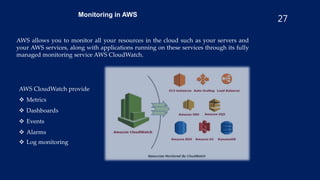
Monitoring in AWS
AWS allows you to monitor all your resources in the cloud such as your servers and
your AWS services, along with applications running on these services through its fully
managed monitoring service AWS CloudWatch.
AWS CloudWatch provide
 Metrics
 Dashboards
 Events
 Alarms
 Log monitoring
28
AWS
Well
Architected
Framework
29
AWS
Security
Building
Blocks

AWS Security

  • 1.
    Agenda - Introduction - AWSShared Responsibility Model - AWS Data Security - AWS Servers Security - AWS Applications Security - Security Best Practice 1
  • 2.
  • 3.
  • 4.
    Shared Responsibility Modeland service categories 4
  • 5.
    AWS Cloud AdoptionFramework Overview 5
  • 6.
    6 AWS Security BestPractices Checklist Amazon Elastic Compute Cloud Amazon Relational Database Service Amazon Aurora Amazon CloudFront Amazon API Gateway AWS Lambda AWS Lightsail DNS Zone Walking As of now, the AWS penetration testing policy allows testing of the following AWS services:
  • 7.
    7 Amazon inspector Amazon Inspectorfeatures and benefits  Enforce security standards and compliance  Increasing development agility  Leverage AWS Security expertise  Integrated with AWS services and AWS partners
  • 8.
    Amazon Inspector Components 8 AWSAgent Assessment run Assessmen t target Findings Assessmen t report Rules package
  • 9.
    9 AWS Shield AWS Shieldfeatures and benefits  Seamless integration and deployment  Customizable protection  Cost efficient  Quick detection  Inline attack mitigation
  • 10.
    10 AWS Web ApplicationFirewall (WAF)  Increased protection against web attacks  Security integrated with how you develop applications  Ease of deployment and maintenance  Improved web traffic visibility  Cost effective web application development
  • 11.
  • 12.
    12 Amazon API Gateway Low cost and efficient  Flexible security controls  Run your APIs without servers  Monitor APIs
  • 13.
    AWS Security Best Practices Checklist (IAM) •Avoid using AWS root account user access keys as it gives full access to all resources • Make sure MFA authentication is enabled for the root account to provide two-factor authentication • Assign individual IAM users with necessary permissions to enable login ensure User Accounts also have MFA authentication • IAM Access Keys must be rotated at periodic intervals • Ensure a strong password policy for users • Assign permissions to users based on User Groups, instead of individual IAM users • Provide access to a resource through IAM Roles • Grant least access while creating IAM Policies, needed to perform the necessary actions • Attach IAM Policies to Groups or Roles on creation • If required, conditions can be defined for Policies under which access is granted to a resource • Get rid of unnecessary IAM credentials, those with are inactive or unused use IAM Roles to grant access to applications on EC2 Instances 13
  • 14.
    AWS Security Best Practices Checklist(S3) •Ensure S3 buckets are not publicly accessible (public read or write permissions) •Make use of object-level or bucket-level permissions in addition to IAM policies to grant access to resources •Enable MFA Delete to prevent accidental deletion of buckets •Consider encryption of stored data, which can be done in two ways server-side and client-side encryption •Enable encryption of inbound and outbound data traffic, through SSL endpoints •Configure S3 lifecycle management through rule-based actions and use versioning to store and retrieve multiple versions of an object in a bucket, to deal with accidental deletions •Ensure S3 access logging is enabled •Constantly audit and monitor S3 buckets using CloudWatch 14
  • 15.
    AWS Security Best Practices Checklist (EC2,VPC & EBS) •Ensure data and disk volumes in EBS are encrypted with AES- 256, the industry standard algorithm •Restrict access to instances from limited IP ranges using Security Groups limit the range of open ports on EC2 security groups, to prevent exposure to vulnerabilities •Ensure ELBs have a valid security group attached to it •Monitor and optimize default security groups, as they allow unrestricted access for inbound and outbound traffic •Ensure restricted inbound access to SSH, FTP, SMTP, MySQL, PostgreSQL, MongoDB, MSSQL, CIFS, etc; to required entities only •Use IAM roles to grant access to EC2, instead of access keys for temporary requirements •If you’re using IAM user access keys for long term permissions, ensure that you don’t embed the keys directly into code, generate different keys for different applications, rotate your access keys, use MFA authentication and decommission unused key pairs. •Enable and activate your VPC flow logs to record inbound and outbound traffic in your VPC for better monitoring and early diagnosis •Delete unused Virtual Private Gateways and VPC Internet Gateways •Make sure that no VPC endpoints are exposed, by checking the principal value in the policy •Ensure no ACLs allow unrestricted inbound or outbound access 15
  • 16.
    AWS Security Best Practices Checklist (CloudTrail) •EnsureCloudTrail is activated across all regions, and for global services like IAM, STS, etc •It is recommended to log to a centralized S3 bucket •Make sure both CloudTrail itself and CloudTrail logging are enable for all regions •Ensure CloudTrail log file integrity validation is enabled •Ensure CloudTrail log files are encrypted 16
  • 17.
    20 AWS Security BestPractices Checklist RDS •Ensure RDS security groups do not allow unrestricted access •Ensure encryption of the RDS instances and snapshots, using AES-256 level encryption •Protect data in transit to RDS through SSL endpoints •Monitor control to RDS using AWS KMS and Customer Managed Keys •Ensure RDS database instances and snapshots are not publicly accessible •Enable the auto minor upgrade feature for RDS
  • 18.
    21 AWS Security BestPractices Checklist Redshift “ •Enable require_ssl parameter in all Redshift clusters to minimize risk for encryption of data in transit for Redshift, and to connect your SQL client with your cluster •Enable Redshift Cluster encryption •Ensure Redshift user activity logging is enabled •Ensure Redshift encryption with KMS Customer Managed Keys •It is recommended that Redshift clusters are launched within a VPC for better control •Ensure that the Redshift clusters are not publicly accessible
  • 19.
    22 VPC Security BestPractices •Plan Your VPC before You Create It •Choose the Highest CIDR Block •Unique IP Address Range •Leave the Default VPC Alone •Design for Region Expansion •Tier Your Subnets •Follow the Least Privilege Principle •Keep Most Resources in the Private Subnet
  • 20.
    23 IAM Security BestPractices •Delete your root access keys •Enforce MFA •Use roles instead of users •Use access advisor periodically •Develop a Zero Trust Approach to Security •Automate Onboarding and Offboarding •User Access review
  • 21.
    24 DATA Security BestPractices •Encryption •Use KMS •Rotate your keys •Classify your data •Secure data in transit •S3 bucket permissions
  • 22.
    25 Servers Security BestPractices •Use IAM roles for EC2 •Use ELB •Security group configuration •Use Web Application Firewall (WAF) •Secured access: •Backup and recovery •EC2 termination protection
  • 23.
    26 Application Security BestPractices •Use web application firewall •Amazon Inspector •Penetration testing •Utilize AWS security tools
  • 24.
    27 Monitoring in AWS AWSallows you to monitor all your resources in the cloud such as your servers and your AWS services, along with applications running on these services through its fully managed monitoring service AWS CloudWatch. AWS CloudWatch provide  Metrics  Dashboards  Events  Alarms  Log monitoring
  • 25.
  • 26.