Unit 9 – Tables Presentation   2 Web  Programming
Objectives At the end of this presentation, you will be able to Format the table by providing enough spaces between cells and text Align the table in the browser window Add background colour and images to the cells and the table
  Cellspacing and Cellpadding Cellspacing and Cellpadding are attribute of the <TABLE>. Cellspacing specifies the space between the cells in a table in pixels.   Cellpadding specifies the space between the edge of a cell and text contained in it.
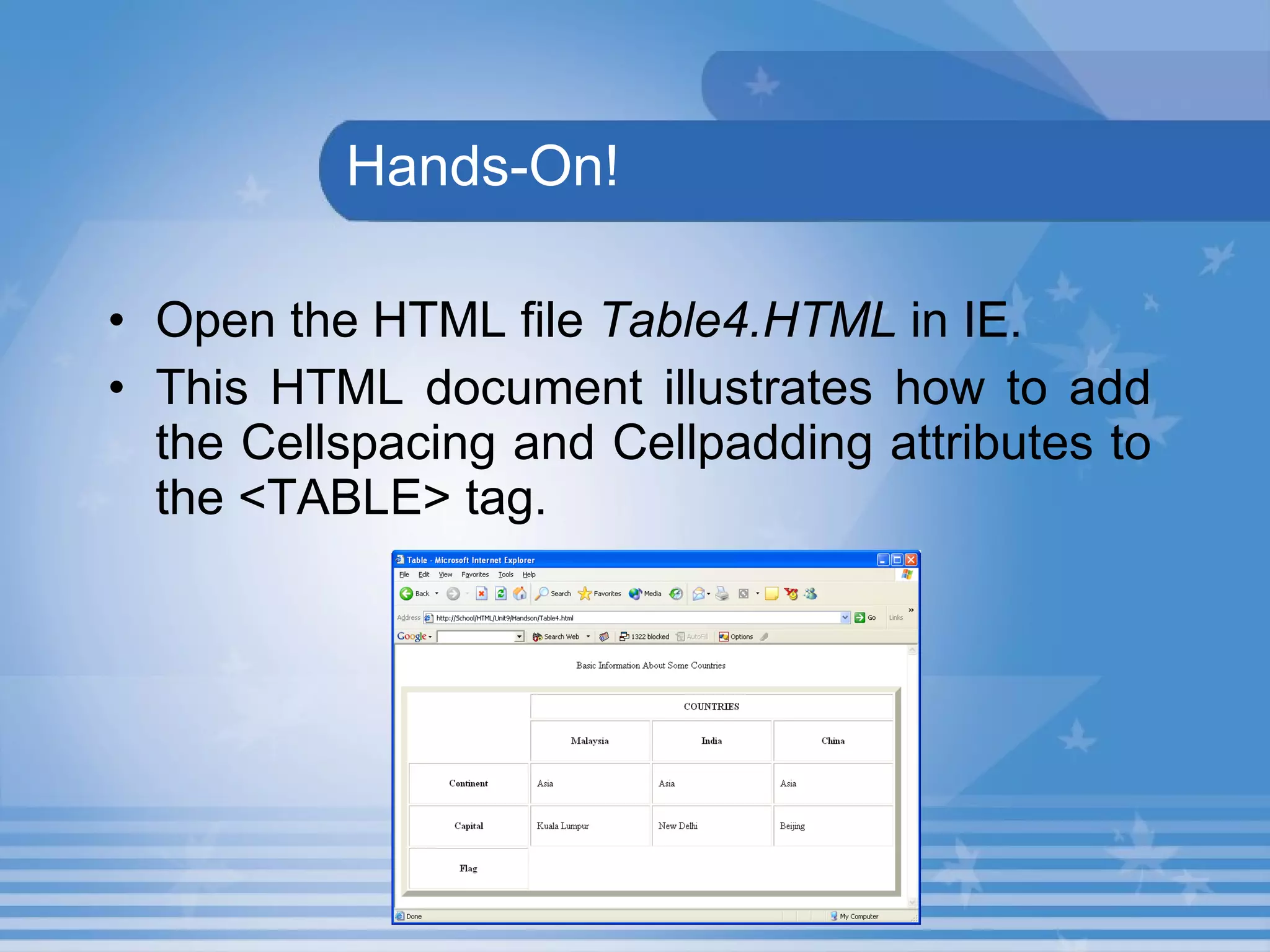
  Hands-On! Open the HTML file  Table4.HTML  in IE. This HTML document illustrates how to add the Cellspacing and Cellpadding attributes to the <TABLE> tag.
Cell Background An image can be set as a background of a cell in a table. Background attribute used to set an image as a background for a cell in a table.
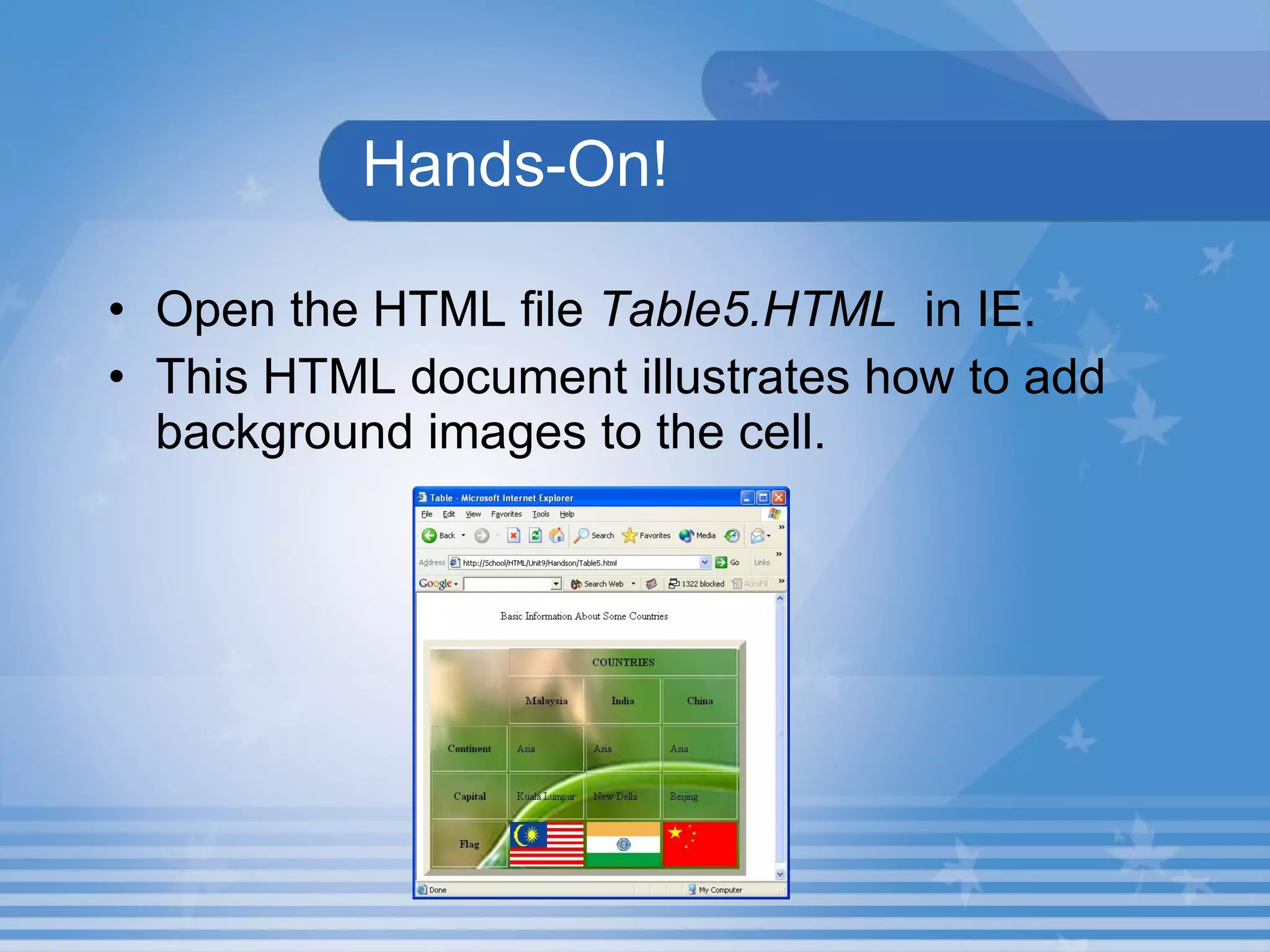
Hands-On! Open the HTML file  Table5.HTML   in IE. This HTML document illustrates how to add background images to the cell.
Some More Attributes Align attribute Used to align the table Style attribute Used to set the font colour and font size
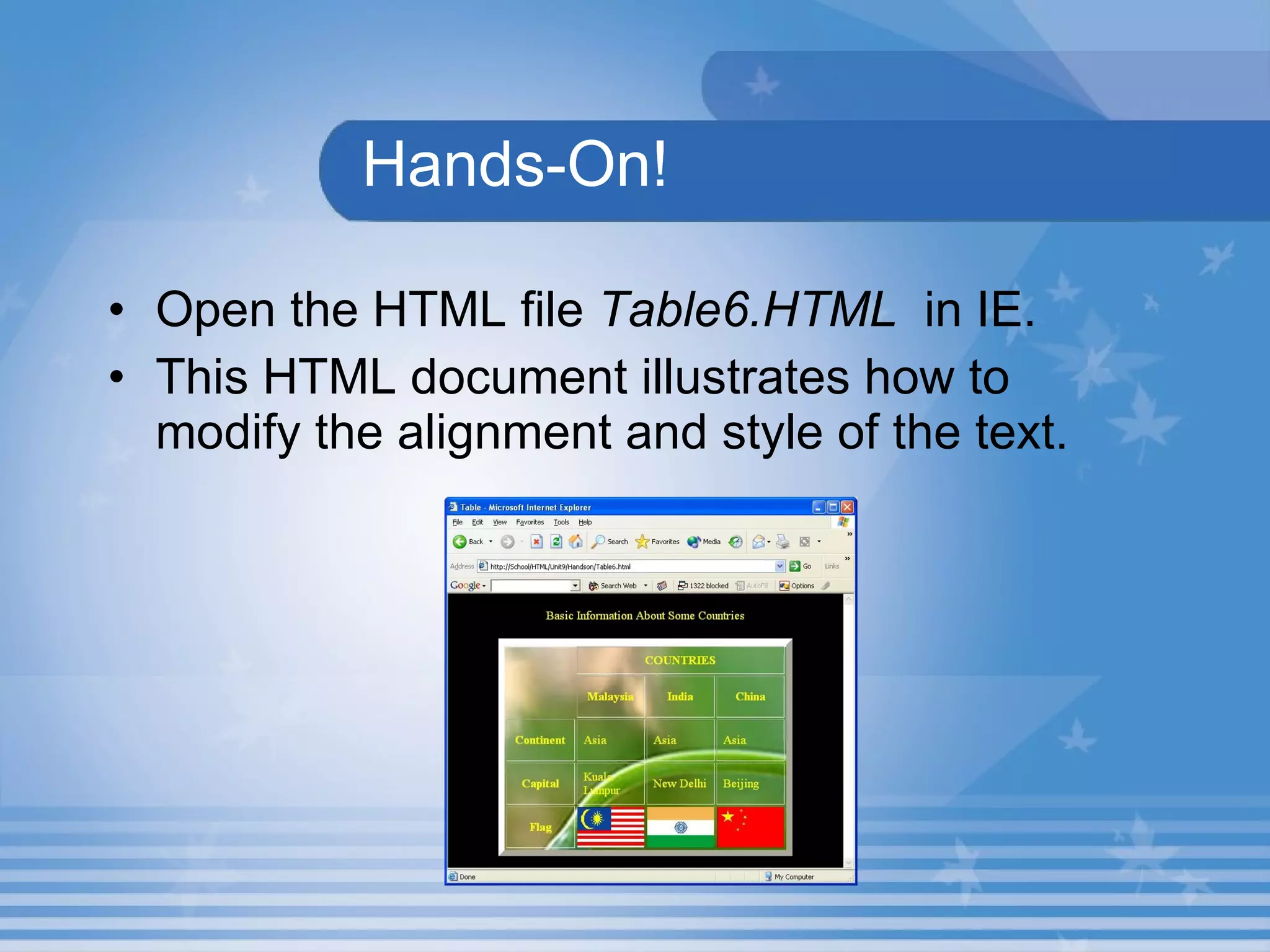
Hands-On! Open the HTML file  Table6.HTML   in IE. This HTML document illustrates how to modify the alignment and style of the text.
  Lab Exercise  6. Open D9_3.html in Internet Explorer.  Name the attribute which is used to set the background image of the table. Identify the attribute which is used to change the text colour of the table element. Locate the attribute which is used to make text to centre alignment.
  Lab Exercise   Open D9_3.html in Internet.  View the source code in the Notepad.  Change the background picture as Climate1.jpg.  Change the text colour to blue. Change the text alignment of MAX TEMP and MIN TEMP to right.
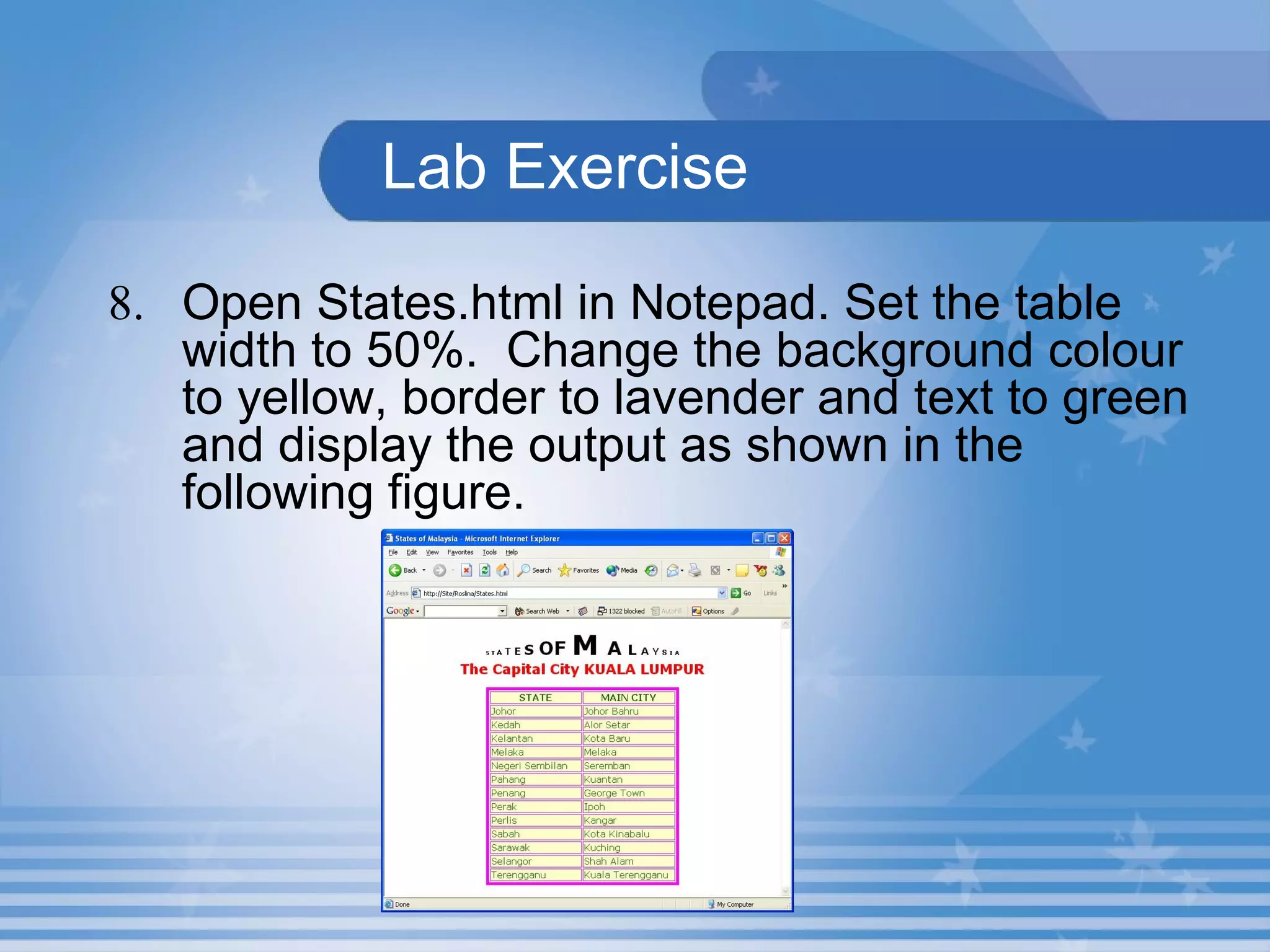
  Lab Exercise 8. Open States.html in Notepad. Set the table width to 50%.  Change the background colour to yellow, border to lavender and text to green and display the output as shown in the following figure.
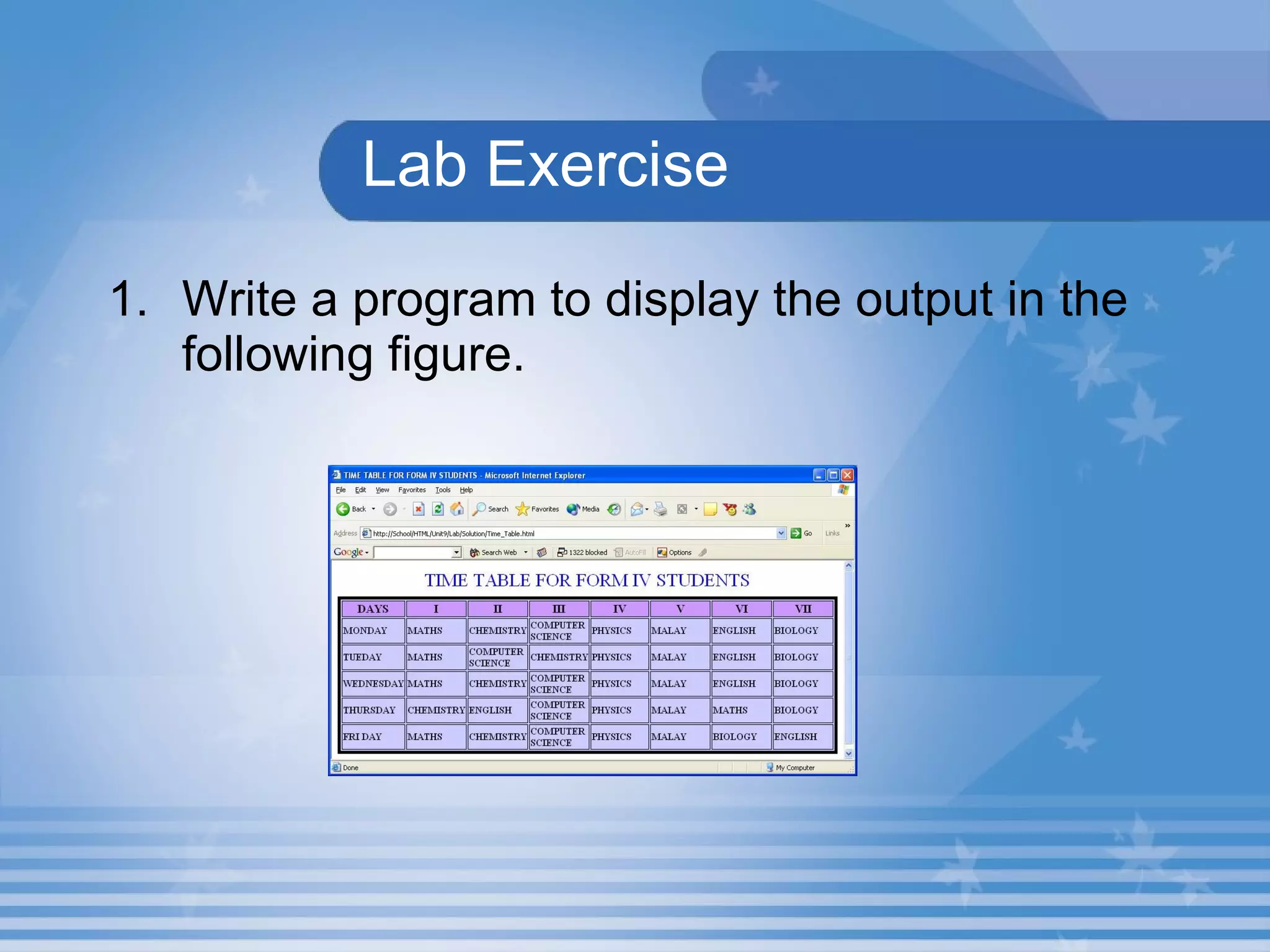
Lab Exercise Write a program to display the output in the following figure.
Lab Exercise 10. Open D9_4.html in Internet.  Name the attribute which is used to merge the adjacent column cell in the source code D9_4.html? Identify the attribute which is used to merge the adjacent row cell in the source code D9_4.html? Locate the attribute which is used to set vertical alignment of the cell Average in the source code D9_4.html? Name the attribute which is used to change the background colour of the cell in the source code D9_4.html?
Lab Exercise  11. Open D9_4.html in Internet Explorer.  View the source code in the Notepad. Change the vertical alignment top to N/A cell. Change the background colour of the ABSENT cell to Yellow.
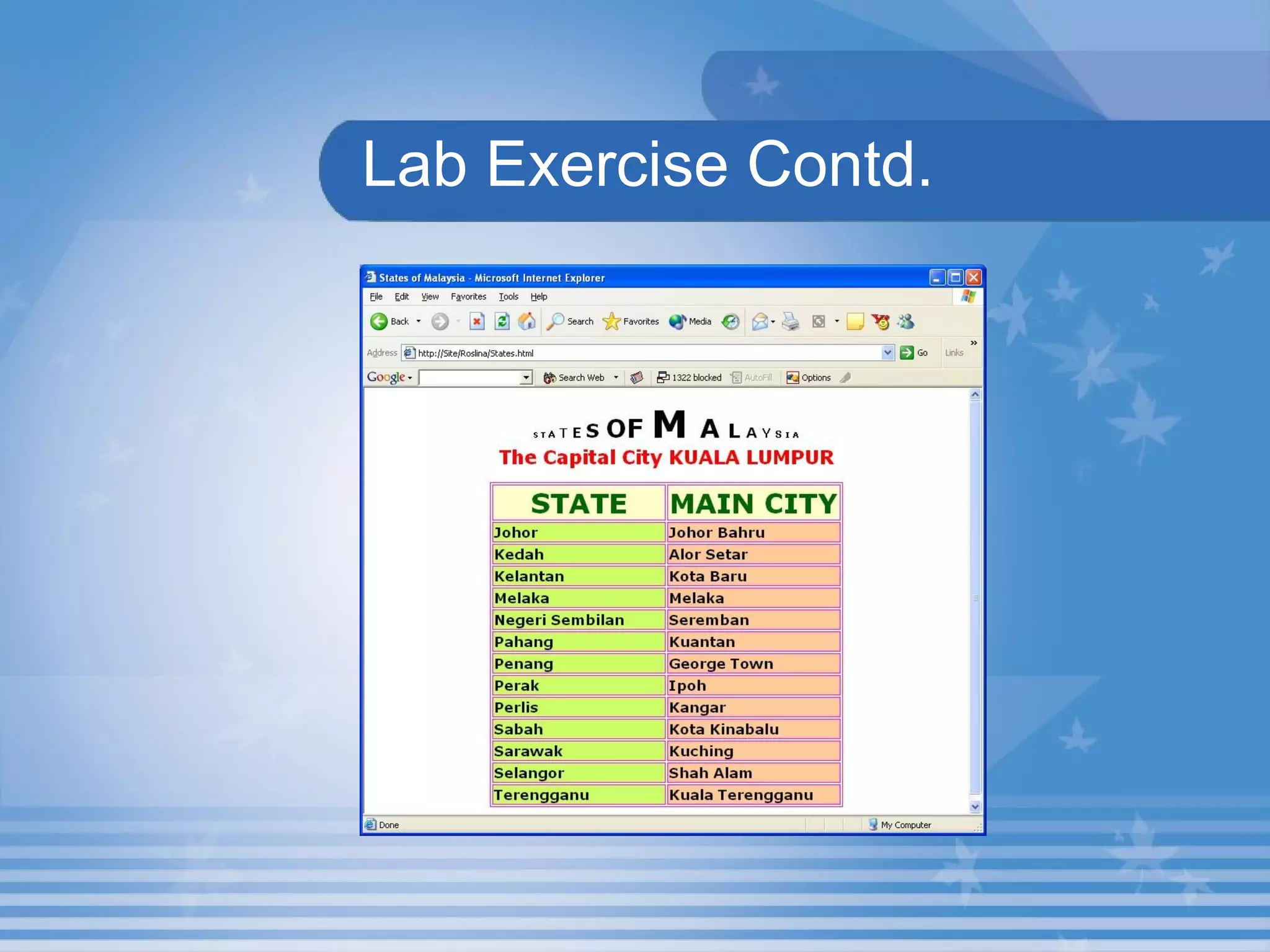
Lab Exercise  Open States.html that you have created under the folder in your name in C:. Change the table heading font size to 35 and apply the font-weight to bold. Increase the font size to 18 and apply the text style to bold.  Change the background colour for state column to green, main city column to orange and display the output as shown in the following figure.
Lab Exercise Contd.
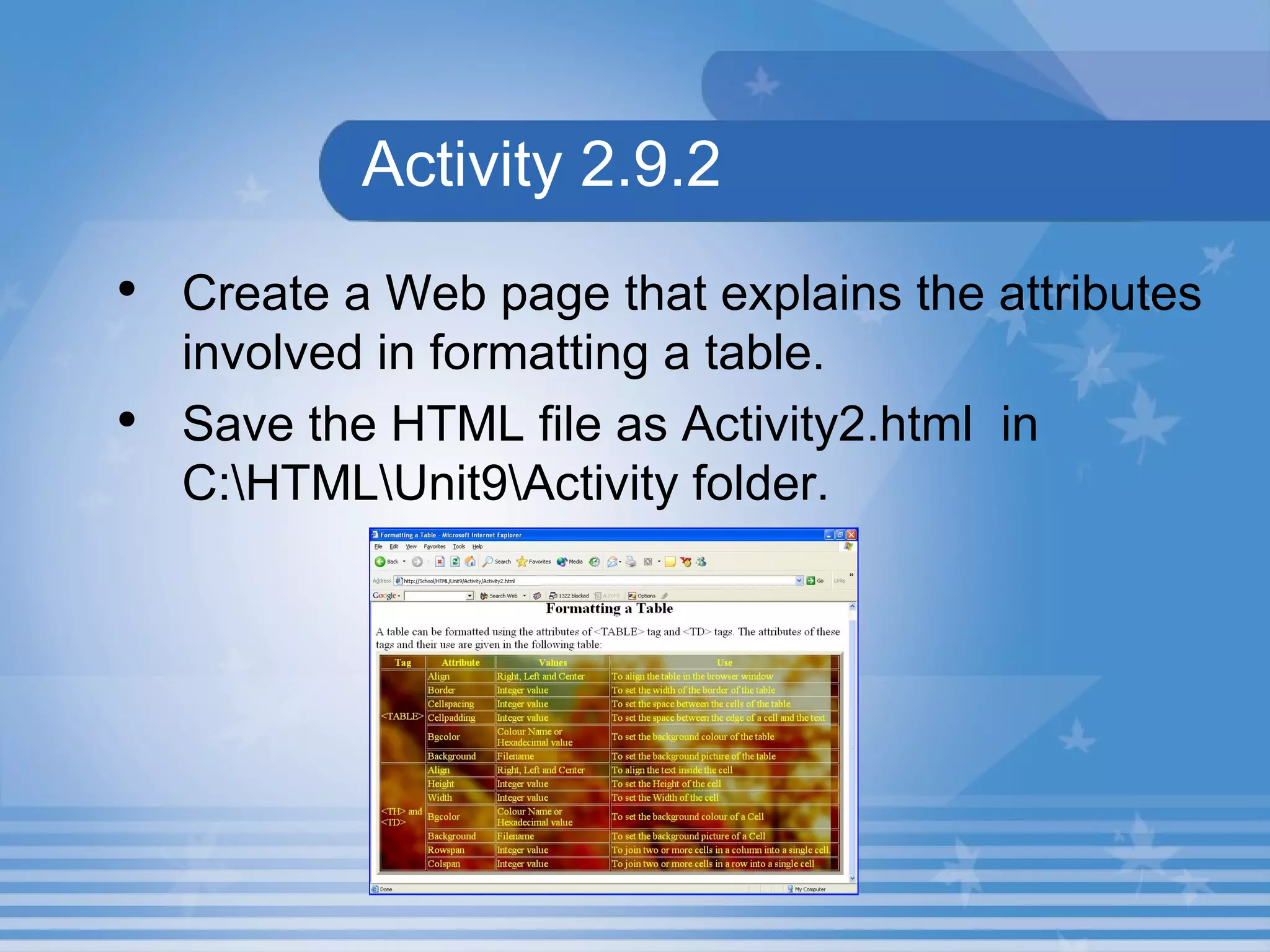
Activity 2.9.2 Create a Web page that explains the attributes involved in formatting a table. Save the HTML file as Activity2.html  in C:\HTML\Unit9\Activity folder.
Summary In this presentation, you learnt the following: The  Cellspacing  attribute of the  <TABLE>  tag specifies the space between the cells in a table in pixels. The Background attribute of the <TH> tag or <TD> tag can be used to set an image as a background for a cell in a table. The table can be aligned to the left, centre or right in the browser window using the Align attribute of the <TABLE> tag.
Assignment What is the use of Cellpadding and Cellspacing attributes? How will you set an image as the background of a cell?

M02 un09 p02

  • 1.
    Unit 9 –Tables Presentation 2 Web Programming
  • 2.
    Objectives At theend of this presentation, you will be able to Format the table by providing enough spaces between cells and text Align the table in the browser window Add background colour and images to the cells and the table
  • 3.
    Cellspacingand Cellpadding Cellspacing and Cellpadding are attribute of the <TABLE>. Cellspacing specifies the space between the cells in a table in pixels. Cellpadding specifies the space between the edge of a cell and text contained in it.
  • 4.
    Hands-On!Open the HTML file Table4.HTML in IE. This HTML document illustrates how to add the Cellspacing and Cellpadding attributes to the <TABLE> tag.
  • 5.
    Cell Background Animage can be set as a background of a cell in a table. Background attribute used to set an image as a background for a cell in a table.
  • 6.
    Hands-On! Open theHTML file Table5.HTML in IE. This HTML document illustrates how to add background images to the cell.
  • 7.
    Some More AttributesAlign attribute Used to align the table Style attribute Used to set the font colour and font size
  • 8.
    Hands-On! Open theHTML file Table6.HTML in IE. This HTML document illustrates how to modify the alignment and style of the text.
  • 9.
    LabExercise 6. Open D9_3.html in Internet Explorer. Name the attribute which is used to set the background image of the table. Identify the attribute which is used to change the text colour of the table element. Locate the attribute which is used to make text to centre alignment.
  • 10.
    LabExercise Open D9_3.html in Internet. View the source code in the Notepad. Change the background picture as Climate1.jpg. Change the text colour to blue. Change the text alignment of MAX TEMP and MIN TEMP to right.
  • 11.
    LabExercise 8. Open States.html in Notepad. Set the table width to 50%. Change the background colour to yellow, border to lavender and text to green and display the output as shown in the following figure.
  • 12.
    Lab Exercise Writea program to display the output in the following figure.
  • 13.
    Lab Exercise 10.Open D9_4.html in Internet. Name the attribute which is used to merge the adjacent column cell in the source code D9_4.html? Identify the attribute which is used to merge the adjacent row cell in the source code D9_4.html? Locate the attribute which is used to set vertical alignment of the cell Average in the source code D9_4.html? Name the attribute which is used to change the background colour of the cell in the source code D9_4.html?
  • 14.
    Lab Exercise 11. Open D9_4.html in Internet Explorer. View the source code in the Notepad. Change the vertical alignment top to N/A cell. Change the background colour of the ABSENT cell to Yellow.
  • 15.
    Lab Exercise Open States.html that you have created under the folder in your name in C:. Change the table heading font size to 35 and apply the font-weight to bold. Increase the font size to 18 and apply the text style to bold. Change the background colour for state column to green, main city column to orange and display the output as shown in the following figure.
  • 16.
  • 17.
    Activity 2.9.2 Createa Web page that explains the attributes involved in formatting a table. Save the HTML file as Activity2.html in C:\HTML\Unit9\Activity folder.
  • 18.
    Summary In thispresentation, you learnt the following: The Cellspacing attribute of the <TABLE> tag specifies the space between the cells in a table in pixels. The Background attribute of the <TH> tag or <TD> tag can be used to set an image as a background for a cell in a table. The table can be aligned to the left, centre or right in the browser window using the Align attribute of the <TABLE> tag.
  • 19.
    Assignment What isthe use of Cellpadding and Cellspacing attributes? How will you set an image as the background of a cell?