Networked Learninghttp://www.thenetworkedlearner.comGoogle Earth TutorialsPart III – Layouts with Hard Rules and TablesHosts – Thomas Cooper, Alice BarrNetworked Learning 2009
Layouts with Hard RulesDivide elements on page with a hard rule.<hr> - places a line on the page<hr width=“#”> - can be used to adjust it to different widths.Networked Learning 2009
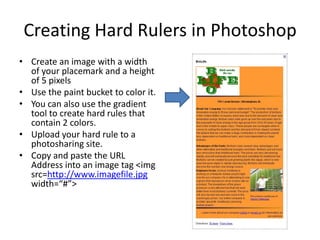
Creating Hard Rulers in PhotoshopCreate an image with a width of your placemark and a height of 5 pixelsUse the paint bucket to color it.  You can also use the gradient tool to create hard rules that contain 2 colors.Upload your hard rule to a photosharing site.Copy and paste the URL Address into an image tag <imgsrc=http://www.imagefile.jpg width=“#”>
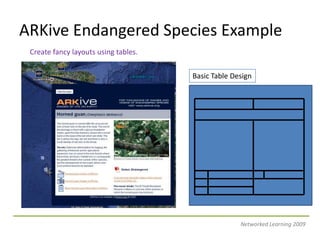
ARKive Endangered Species ExampleCreate fancy layouts using tables.Basic Table DesignNetworked Learning 2009
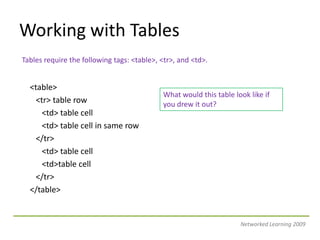
Working with TablesTables require the following tags: <table>, <tr>, and <td>.<table>  <tr> table row     <td> table cell     <td> table cell in same row   </tr>      <td> table cell      <td>table cell   </tr></table>What would this table look like if you drew it out?Networked Learning 2009
Major Table ElementsNot all HTML tags work in Google Earth, as it is based on KML.<table> - starts and ends a table<width=“#”> determines the width of the table<border=“#”> adds a border around table<cellspacing=“#”> add space between cells<cellpadding=“#”> adds space between text and cell border<bgcolor=“#hexcodenumber”>add color to a table, row or cell<tr> - table row<td> - table cell<colspan=“#”> spans a number of columns<rowspan=“#”> spans a number of rows<valign=“top> foces text and images to the top of a cellNetworked Learning 2009
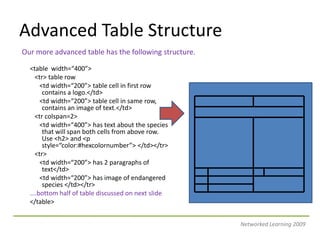
Advanced Table StructureOur more advanced table has the following structure.<table  width=“400”>  <tr> table row     <td width=“200”> table cell in first row contains a logo.</td>     <td width=“200”> table cell in same row, contains an image of text.</td>  <trcolspan=2>     <td width=“400”> has text about the species that will span both cells from above row.  Use <h2> and <p style=“color:#hexcolornumber”> </td></tr>  <tr>      <td width=“200”> has 2 paragraphs of text</td>      <td width=“200”> has image of endangered species </td></tr>….bottom half of table discussed on next slide</table>Networked Learning 2009
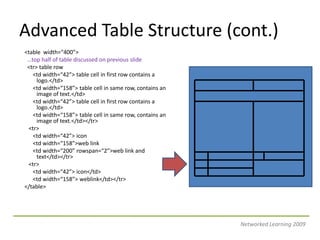
Advanced Table Structure (cont.)<table  width=“400”> …top half of table discussed on previous slide <tr> table row     <td width=“42”> table cell in first row contains a logo.</td>     <td width=“158”> table cell in same row, contains an image of text.</td><td width=“42”> table cell in first row contains a logo.</td>      <td width=“158”> table cell in same row, contains an image of text.</td></tr>  <tr>     <td width=“42”> icon     <td width=“158”>web link      <td width=“200” rowspan=“2”>web link and text</td></tr>  <tr>      <td width=“42”> icon</td>      <td width=“158”> weblink</td></tr></table>Networked Learning 2009
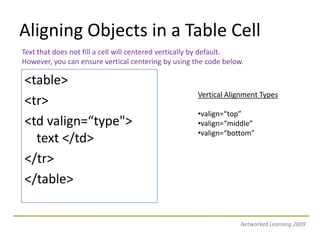
Aligning Objects in a Table CellText that does not fill a cell will centered vertically by default.However, you can ensure vertical centering by using the code below.<table><tr><td valign=“type"> text </td></tr></table>Vertical Alignment Typesvalign=“top”
valign=“middle”
valign=“bottom”Networked Learning 2009
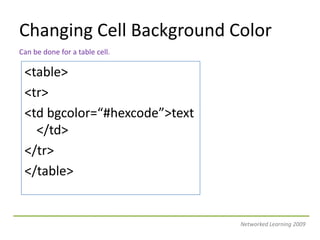
Adding Style to Your Text<p> text </p><p style=“color:#hexcode”> adds color to that text.</p><font color=“#hexcode”>text </font><a style=“color:#hexcode”> adds color to the web link text.Networked Learning 2009
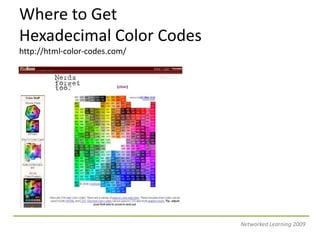
Where to Get Hexadecimal Color Codeshttp://html-color-codes.com/Networked Learning 2009
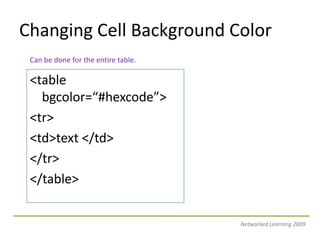
Changing Cell Background ColorCan be done for the entire table.<table bgcolor=“#hexcode”><tr><td>text </td></tr></table>Networked Learning 2009
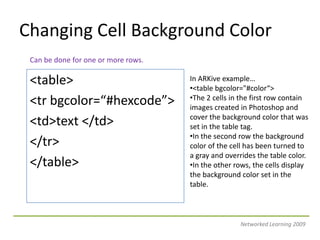
Changing Cell Background ColorCan be done for one or more rows.<table><trbgcolor=“#hexcode”><td>text </td></tr></table>In ARKive example…
The 2 cells in the first row contain images created in Photoshop and cover the background color that was set in the table tag.
In the second row the background color of the cell has been turned to a gray and overrides the table color.

Google Earth Tutorials Part III

  • 1.
    Networked Learninghttp://www.thenetworkedlearner.comGoogle EarthTutorialsPart III – Layouts with Hard Rules and TablesHosts – Thomas Cooper, Alice BarrNetworked Learning 2009
  • 2.
    Layouts with HardRulesDivide elements on page with a hard rule.<hr> - places a line on the page<hr width=“#”> - can be used to adjust it to different widths.Networked Learning 2009
  • 3.
    Creating Hard Rulersin PhotoshopCreate an image with a width of your placemark and a height of 5 pixelsUse the paint bucket to color it. You can also use the gradient tool to create hard rules that contain 2 colors.Upload your hard rule to a photosharing site.Copy and paste the URL Address into an image tag <imgsrc=http://www.imagefile.jpg width=“#”>
  • 4.
    ARKive Endangered SpeciesExampleCreate fancy layouts using tables.Basic Table DesignNetworked Learning 2009
  • 5.
    Working with TablesTablesrequire the following tags: <table>, <tr>, and <td>.<table> <tr> table row <td> table cell <td> table cell in same row </tr> <td> table cell <td>table cell </tr></table>What would this table look like if you drew it out?Networked Learning 2009
  • 6.
    Major Table ElementsNotall HTML tags work in Google Earth, as it is based on KML.<table> - starts and ends a table<width=“#”> determines the width of the table<border=“#”> adds a border around table<cellspacing=“#”> add space between cells<cellpadding=“#”> adds space between text and cell border<bgcolor=“#hexcodenumber”>add color to a table, row or cell<tr> - table row<td> - table cell<colspan=“#”> spans a number of columns<rowspan=“#”> spans a number of rows<valign=“top> foces text and images to the top of a cellNetworked Learning 2009
  • 7.
    Advanced Table StructureOurmore advanced table has the following structure.<table width=“400”> <tr> table row <td width=“200”> table cell in first row contains a logo.</td> <td width=“200”> table cell in same row, contains an image of text.</td> <trcolspan=2> <td width=“400”> has text about the species that will span both cells from above row. Use <h2> and <p style=“color:#hexcolornumber”> </td></tr> <tr> <td width=“200”> has 2 paragraphs of text</td> <td width=“200”> has image of endangered species </td></tr>….bottom half of table discussed on next slide</table>Networked Learning 2009
  • 8.
    Advanced Table Structure(cont.)<table width=“400”> …top half of table discussed on previous slide <tr> table row <td width=“42”> table cell in first row contains a logo.</td> <td width=“158”> table cell in same row, contains an image of text.</td><td width=“42”> table cell in first row contains a logo.</td> <td width=“158”> table cell in same row, contains an image of text.</td></tr> <tr> <td width=“42”> icon <td width=“158”>web link <td width=“200” rowspan=“2”>web link and text</td></tr> <tr> <td width=“42”> icon</td> <td width=“158”> weblink</td></tr></table>Networked Learning 2009
  • 9.
    Aligning Objects ina Table CellText that does not fill a cell will centered vertically by default.However, you can ensure vertical centering by using the code below.<table><tr><td valign=“type"> text </td></tr></table>Vertical Alignment Typesvalign=“top”
  • 10.
  • 11.
  • 12.
    Adding Style toYour Text<p> text </p><p style=“color:#hexcode”> adds color to that text.</p><font color=“#hexcode”>text </font><a style=“color:#hexcode”> adds color to the web link text.Networked Learning 2009
  • 13.
    Where to GetHexadecimal Color Codeshttp://html-color-codes.com/Networked Learning 2009
  • 14.
    Changing Cell BackgroundColorCan be done for the entire table.<table bgcolor=“#hexcode”><tr><td>text </td></tr></table>Networked Learning 2009
  • 15.
    Changing Cell BackgroundColorCan be done for one or more rows.<table><trbgcolor=“#hexcode”><td>text </td></tr></table>In ARKive example…
  • 16.
    The 2 cellsin the first row contain images created in Photoshop and cover the background color that was set in the table tag.
  • 17.
    In the secondrow the background color of the cell has been turned to a gray and overrides the table color.