Unit 9 – Tables Presentation   1 Web Programming
Revision Write how to add music to a Web page. Name the attributes of the <EMBED> tag. Write how to add movie to a Web page. Write how to add animation to a Web page.
Objectives At the end of this presentation, you will be able to Insert tables into your Web page Add caption, heading and border to your table Modify the rows and columns as per the need
  Tables Tables can be added to Web page. HTML provides tags to add tables into a Web page easily.
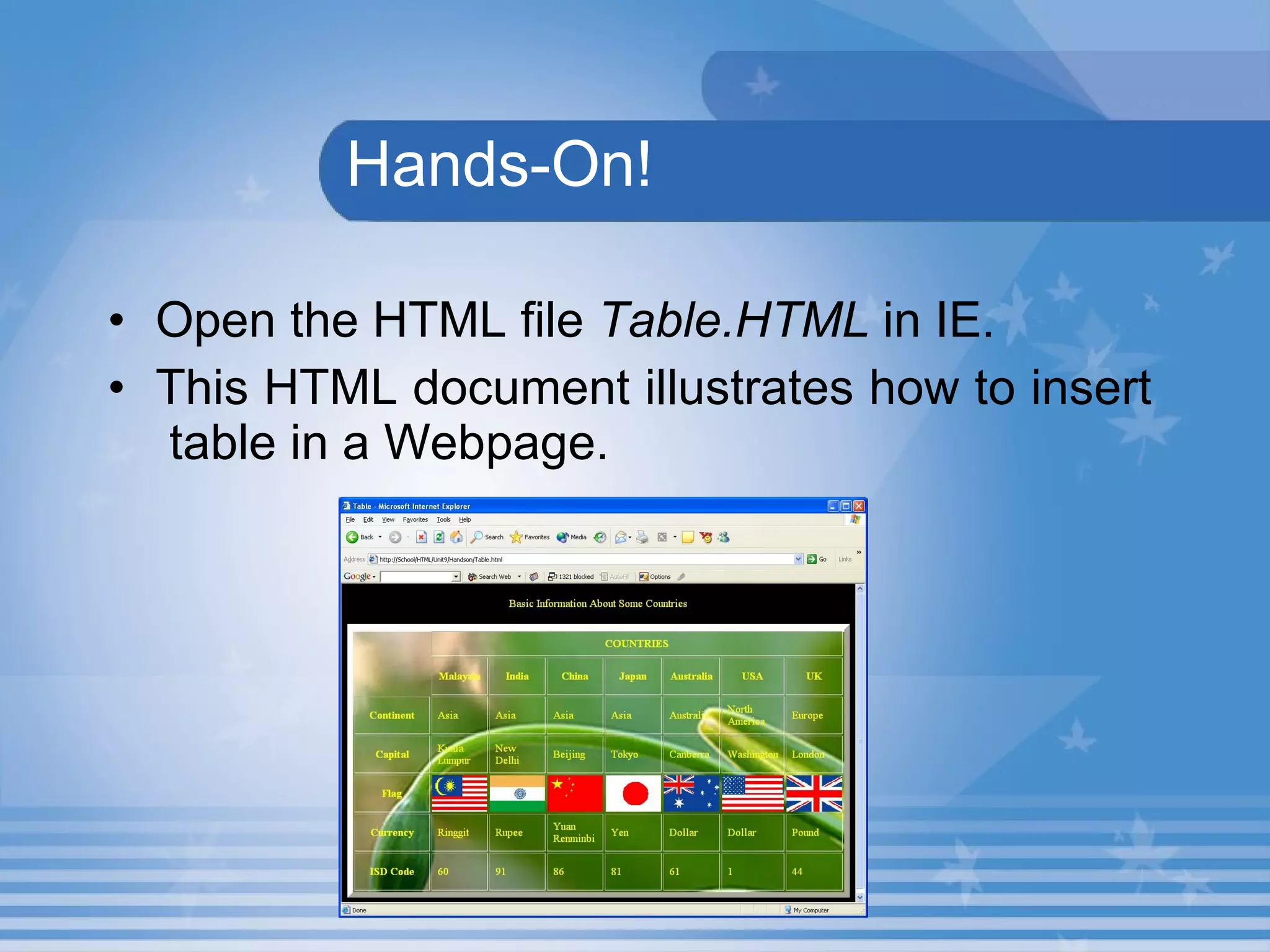
  Hands-On! Open the HTML file  Table.HTML  in IE. This HTML document illustrates how to insert  table in a Webpage.
Creating Table Table can be created using three tags. <TABLE>  tag is used to create table. <TR>  tag is used to insert a row in a table. <TD>  tag is used to insert a cell in the row.
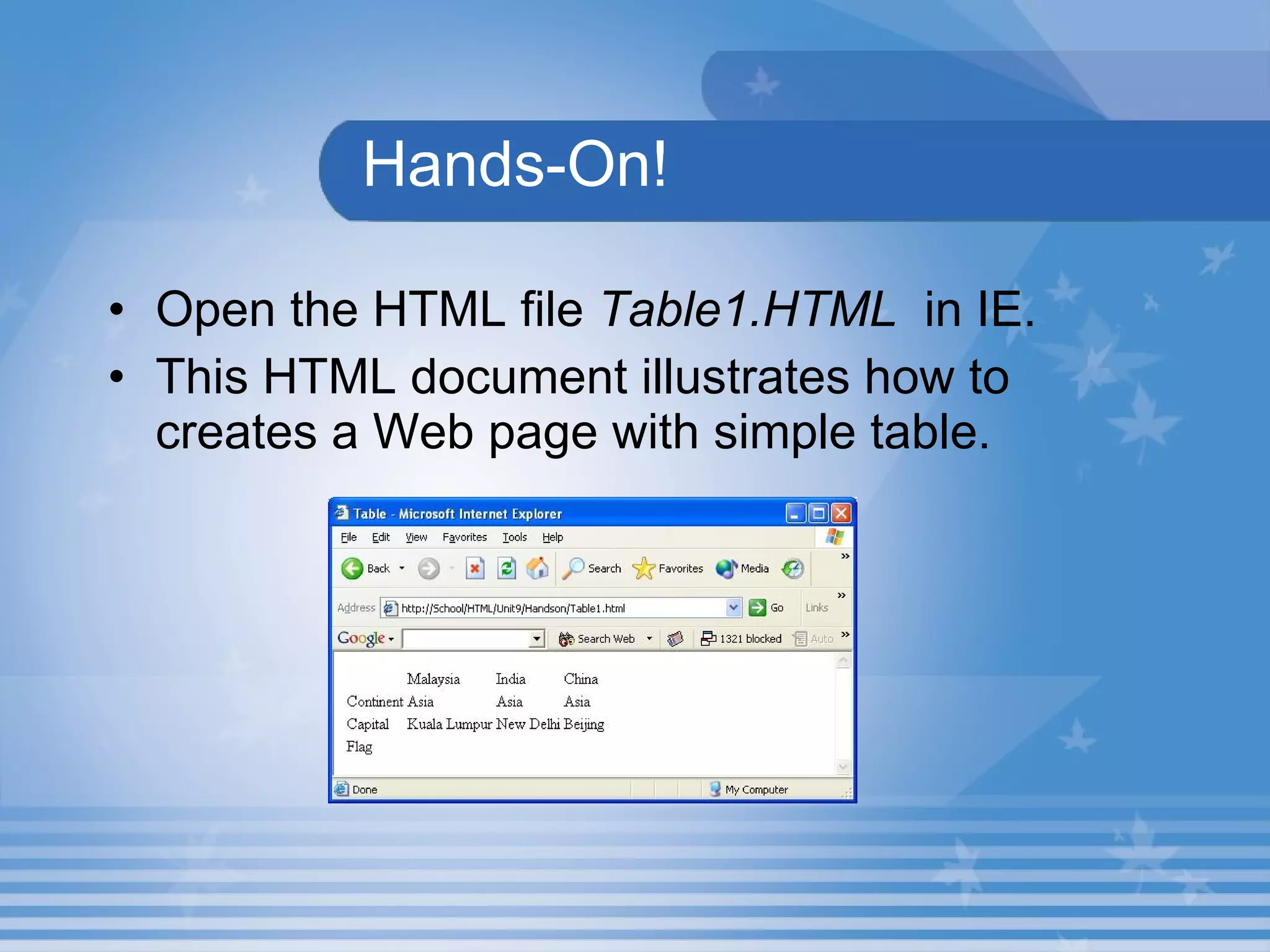
Hands-On! Open the HTML file  Table1.HTML   in IE. This HTML document illustrates how to creates a Web page with simple table.
Lab Exercise 1. Open D9_1.html in Internet Explorer.  Name the tag which is used to create the table in source code D9_1.html. Identify the tag which is used to display the comment with a table. Name the tag which is used to add a row into the table. Identify the tag which is used to add a data into the table.
Lab Exercise Contd. e. Locate the attribute which is used to set border for the table. f. Name the tag which is used to add a cell header.
  Lab Exercise  2. Open D9_1.html in Internet Explorer.  View the source code in the Notepad.  Change the border size to 5. Add one more row into the table. Add a data into the new row.
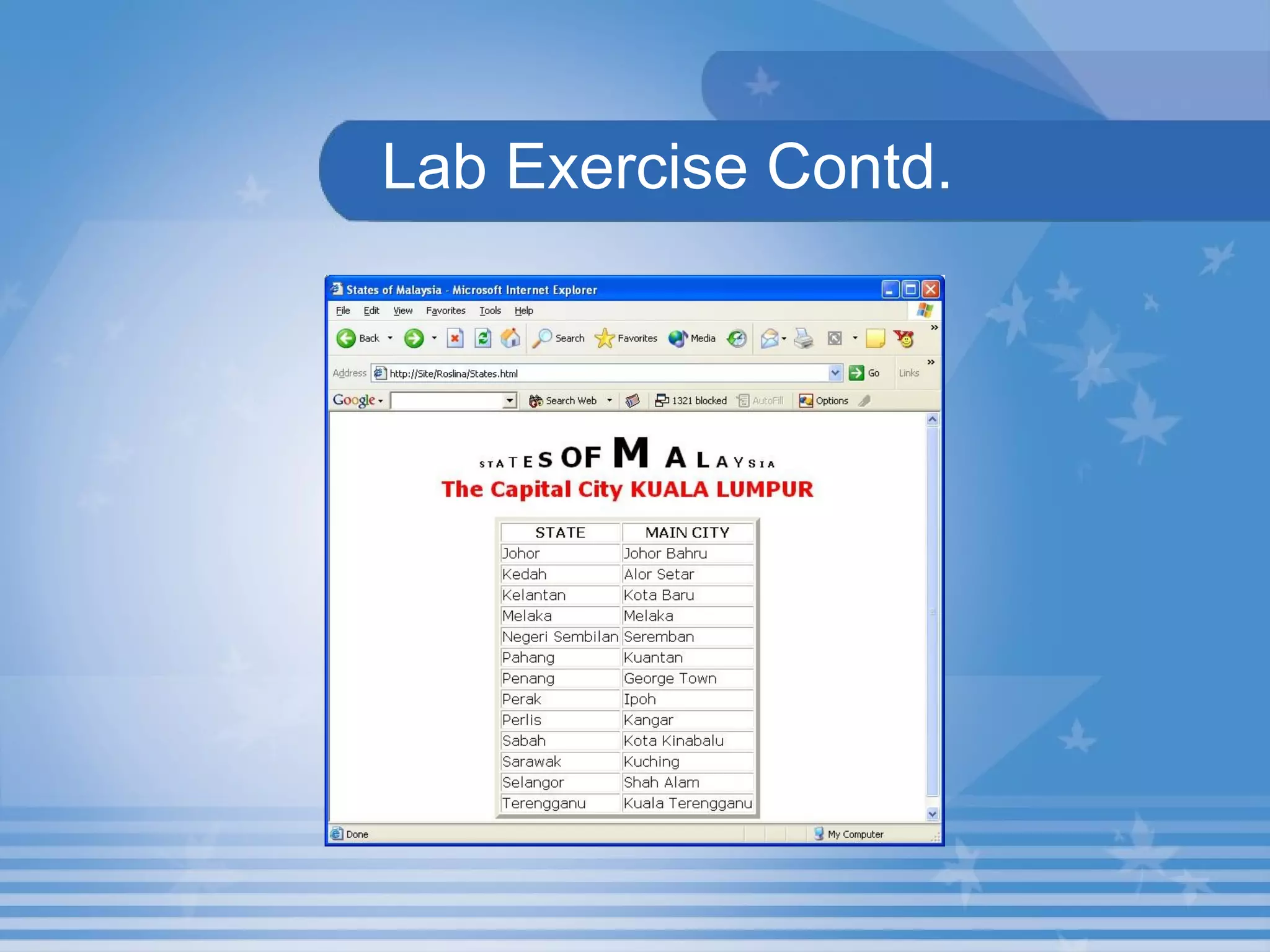
  Lab  Exercise   Open States.html that you have created under the folder in your name in C:  Modify the program and display the output as shown in the following figure using <TABLE> tag.
  Lab Exercise Contd.
Heading Tag <TH>  tag is used to display the heading. <TH>  stands for Table Heading.
Caption and Border <CAPTION>  tag is used to add a caption to a table. Border attribute of  <TABLE>  tag is used to add borders
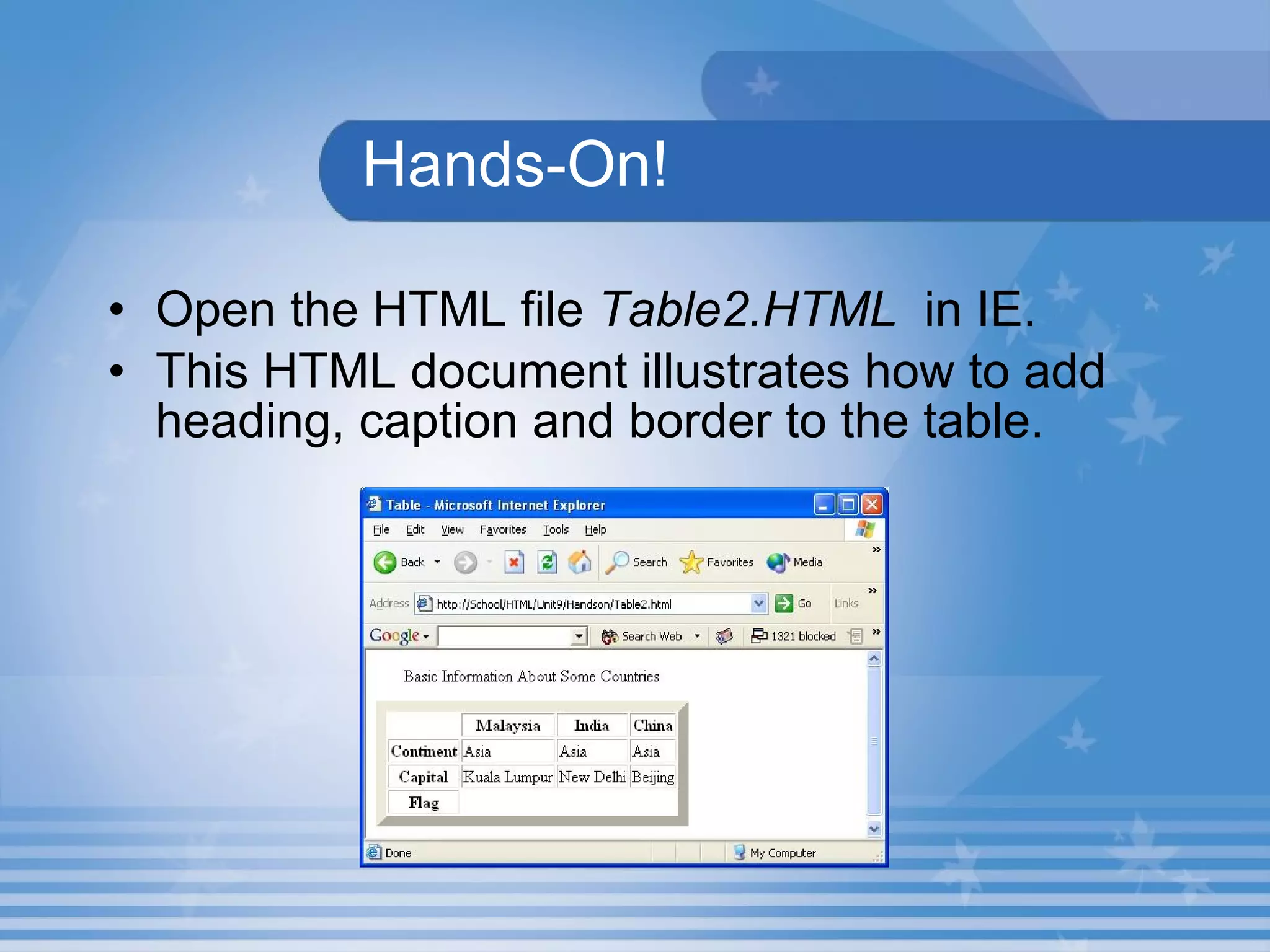
Hands-On! Open the HTML file  Table2.HTML   in IE. This HTML document illustrates how to add heading, caption and border to the table.
Lab Exercise 4. Open D9_2.html in Internet Explorer.  List out the attributes are in <TABLE> tag. Name the attribute which is used to set the width of the table. Locate the attribute which is used to display the text after the table.
Lab Exercise d. Identify the attribute which is used to change the background colour of the table in source code D9_2.html. e. Name the attribute which is used to change the border colour of the table in source code D9_2.html.
Lab Exercise  5. Open D9_2.html in Internet Explorer.  View the source code in the Notepad.  Set the caption attribute alignment to top. Change the background colour of the table  to yellow. d. Change the border colour of the table to  maroon.
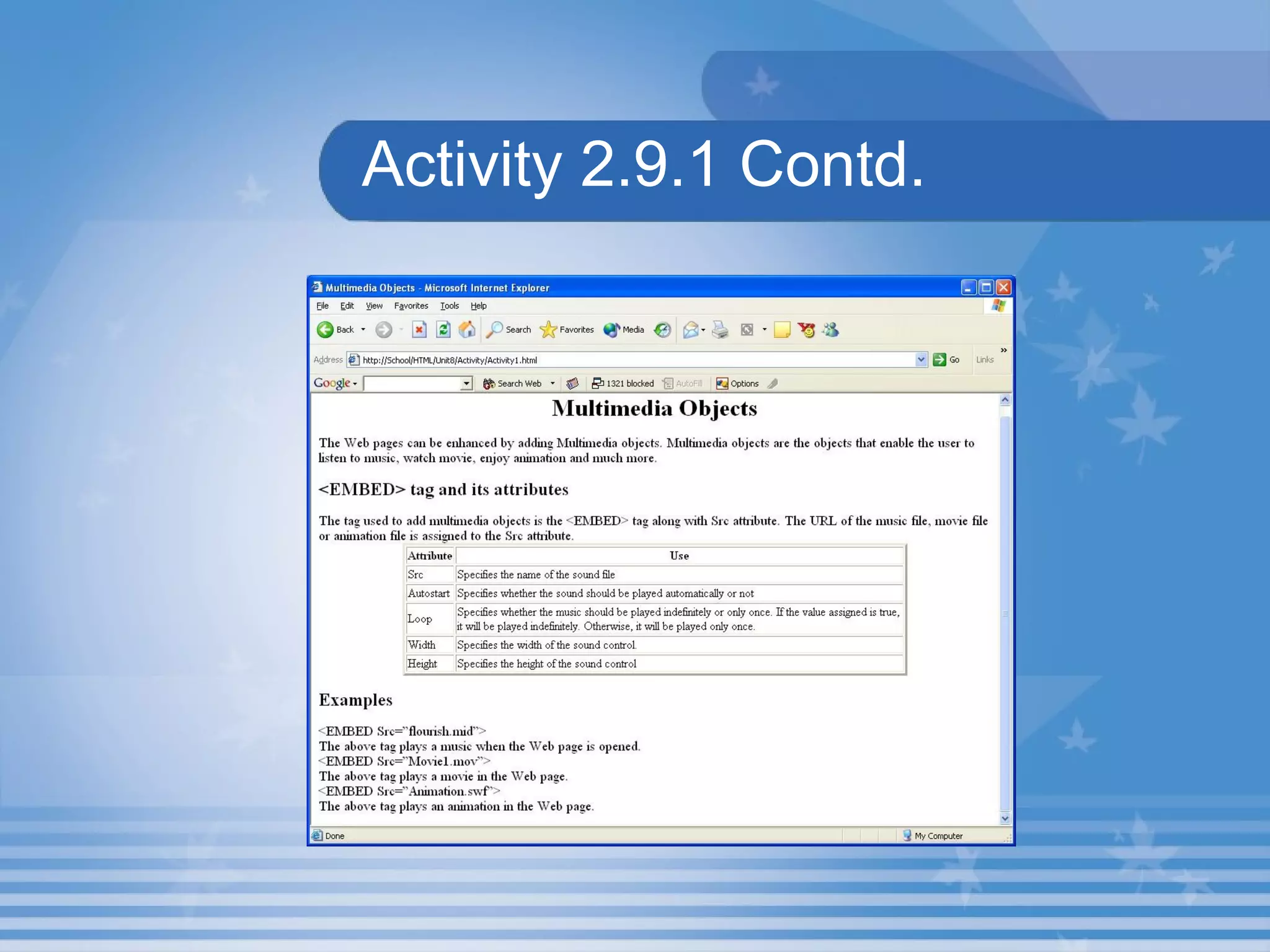
Activity 2.9.1 Create a Web page that explains how to add multimedia objects in a Web page  as shown in Figure. Save the HTML file as Activity1.html  in C:\HTML\Unit9\Activity folder.
Activity 2.9.1 Contd.
Rows and Columns Rowspan and Colspan attribute. Rowspan joins two or more cells in a column into a single cell. Colspan joins two or more cells in a row into a single cell .
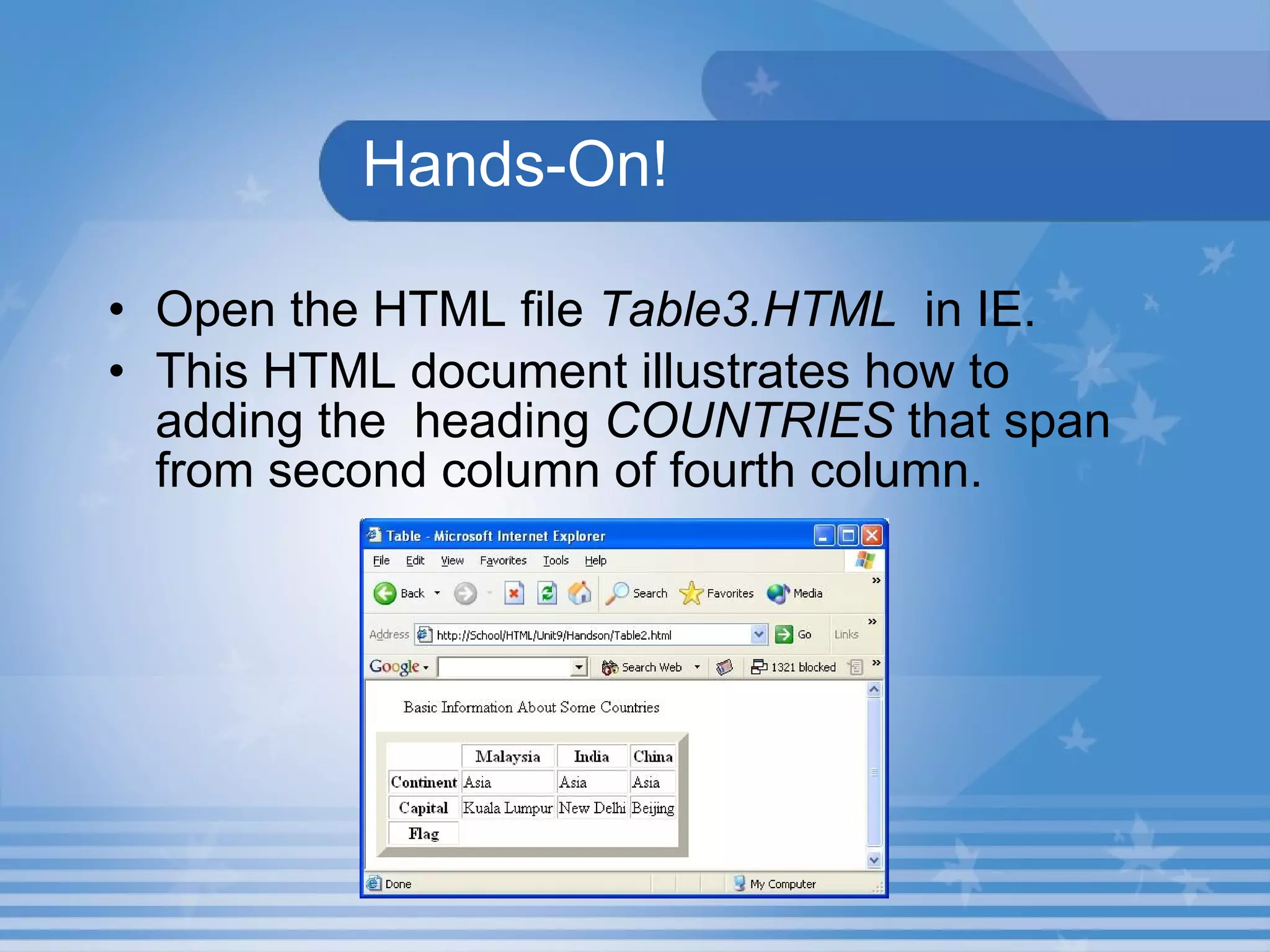
Hands-On! Open the HTML file  Table3.HTML   in IE. This HTML document illustrates how to adding the  heading  COUNTRIES  that span from second column of fourth column.
Summary In this presentation, you learnt the following: A simple table can be created using three tags namely  <TABLE> ,  <TR>  and  <TD> . The  <TH>  tag is used to display the headings in a table. The  <CAPTION>  tag is used to add a caption to a table.
Summary Two or more cells can be joined together using  Rowspan  and  Colspan  attributes of the  <TH>  and  <TD>  tags. The height of the cells in a row can be set using the Height attribute of the  <TH>  or  <TD>  tag.
Assignment Name that tags that are used to create a simple table? How will you add a caption to a table?

M02 un09 p01

  • 1.
    Unit 9 –Tables Presentation 1 Web Programming
  • 2.
    Revision Write howto add music to a Web page. Name the attributes of the <EMBED> tag. Write how to add movie to a Web page. Write how to add animation to a Web page.
  • 3.
    Objectives At theend of this presentation, you will be able to Insert tables into your Web page Add caption, heading and border to your table Modify the rows and columns as per the need
  • 4.
    TablesTables can be added to Web page. HTML provides tags to add tables into a Web page easily.
  • 5.
    Hands-On!Open the HTML file Table.HTML in IE. This HTML document illustrates how to insert table in a Webpage.
  • 6.
    Creating Table Tablecan be created using three tags. <TABLE> tag is used to create table. <TR> tag is used to insert a row in a table. <TD> tag is used to insert a cell in the row.
  • 7.
    Hands-On! Open theHTML file Table1.HTML in IE. This HTML document illustrates how to creates a Web page with simple table.
  • 8.
    Lab Exercise 1.Open D9_1.html in Internet Explorer. Name the tag which is used to create the table in source code D9_1.html. Identify the tag which is used to display the comment with a table. Name the tag which is used to add a row into the table. Identify the tag which is used to add a data into the table.
  • 9.
    Lab Exercise Contd.e. Locate the attribute which is used to set border for the table. f. Name the tag which is used to add a cell header.
  • 10.
    LabExercise 2. Open D9_1.html in Internet Explorer. View the source code in the Notepad. Change the border size to 5. Add one more row into the table. Add a data into the new row.
  • 11.
    Lab Exercise Open States.html that you have created under the folder in your name in C: Modify the program and display the output as shown in the following figure using <TABLE> tag.
  • 12.
    LabExercise Contd.
  • 13.
    Heading Tag <TH> tag is used to display the heading. <TH> stands for Table Heading.
  • 14.
    Caption and Border<CAPTION> tag is used to add a caption to a table. Border attribute of <TABLE> tag is used to add borders
  • 15.
    Hands-On! Open theHTML file Table2.HTML in IE. This HTML document illustrates how to add heading, caption and border to the table.
  • 16.
    Lab Exercise 4.Open D9_2.html in Internet Explorer. List out the attributes are in <TABLE> tag. Name the attribute which is used to set the width of the table. Locate the attribute which is used to display the text after the table.
  • 17.
    Lab Exercise d.Identify the attribute which is used to change the background colour of the table in source code D9_2.html. e. Name the attribute which is used to change the border colour of the table in source code D9_2.html.
  • 18.
    Lab Exercise 5. Open D9_2.html in Internet Explorer. View the source code in the Notepad. Set the caption attribute alignment to top. Change the background colour of the table to yellow. d. Change the border colour of the table to maroon.
  • 19.
    Activity 2.9.1 Createa Web page that explains how to add multimedia objects in a Web page as shown in Figure. Save the HTML file as Activity1.html in C:\HTML\Unit9\Activity folder.
  • 20.
  • 21.
    Rows and ColumnsRowspan and Colspan attribute. Rowspan joins two or more cells in a column into a single cell. Colspan joins two or more cells in a row into a single cell .
  • 22.
    Hands-On! Open theHTML file Table3.HTML in IE. This HTML document illustrates how to adding the heading COUNTRIES that span from second column of fourth column.
  • 23.
    Summary In thispresentation, you learnt the following: A simple table can be created using three tags namely <TABLE> , <TR> and <TD> . The <TH> tag is used to display the headings in a table. The <CAPTION> tag is used to add a caption to a table.
  • 24.
    Summary Two ormore cells can be joined together using Rowspan and Colspan attributes of the <TH> and <TD> tags. The height of the cells in a row can be set using the Height attribute of the <TH> or <TD> tag.
  • 25.
    Assignment Name thattags that are used to create a simple table? How will you add a caption to a table?