Unit 11 – Forms Presentation   1 Web Programming
Revision Define Frame. Name the different types of Framesets. Write the code segment to create a Web page with 2 vertical frames. Write the code segment to create a Web page with mixed frameset. Write the code segment to create a Web page with Inline Frame.
Objectives At the end of this presentation, you will be able to Add a Form to your Web page Add a Text Field to a Form Add a Radio Button to a Form Add a Text Area to a Form
  Forms Forms are a collection of controls. It allows to get input from user. Its like a container having elements called controls. A Form is added to a Web page using the  <FORM>  tag.
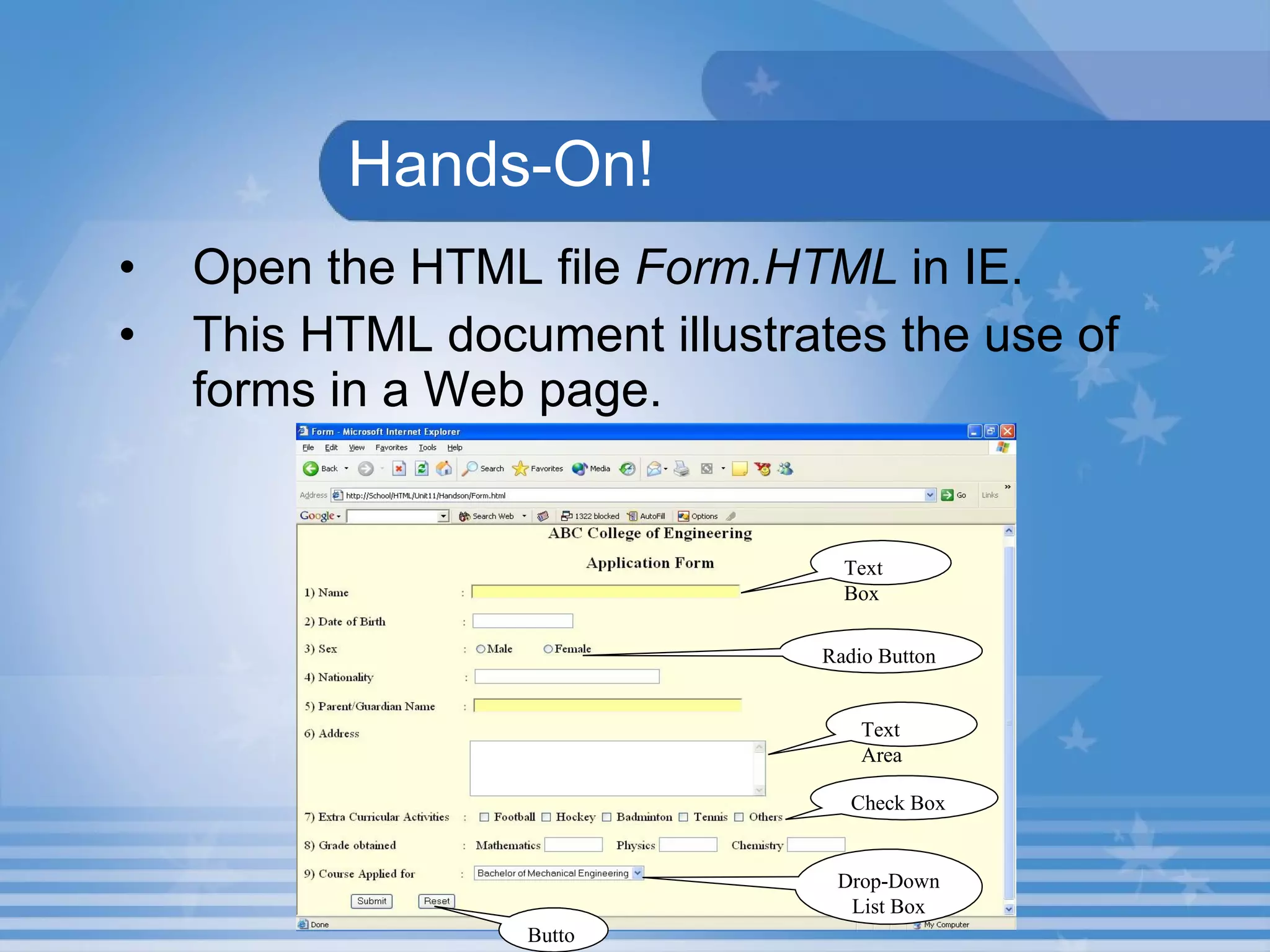
  Hands-On! Open the HTML file  Form.HTML  in IE. This HTML document illustrates the use of forms in a Web page. Text Box Radio Button Text Area Check Box Drop-Down List Box Button
  Form Attributes The  <FORM>  tag attributes are  Action  and  Method.   The  URL  of the program file that processes the data entered by the user is assigned to the  Action  attribute. Method attribute is used to specify how the information is to be sent to the URL.
Activity 2.11.1 Draw a form to enter your personal details (Bio-Data).
Working with Form Elements Controls can be added to the form using the  <INPUT>  tag along with Type attribute.  Type attribute is used to specify the type of the control. Name attribute is used to specify a name for the field.
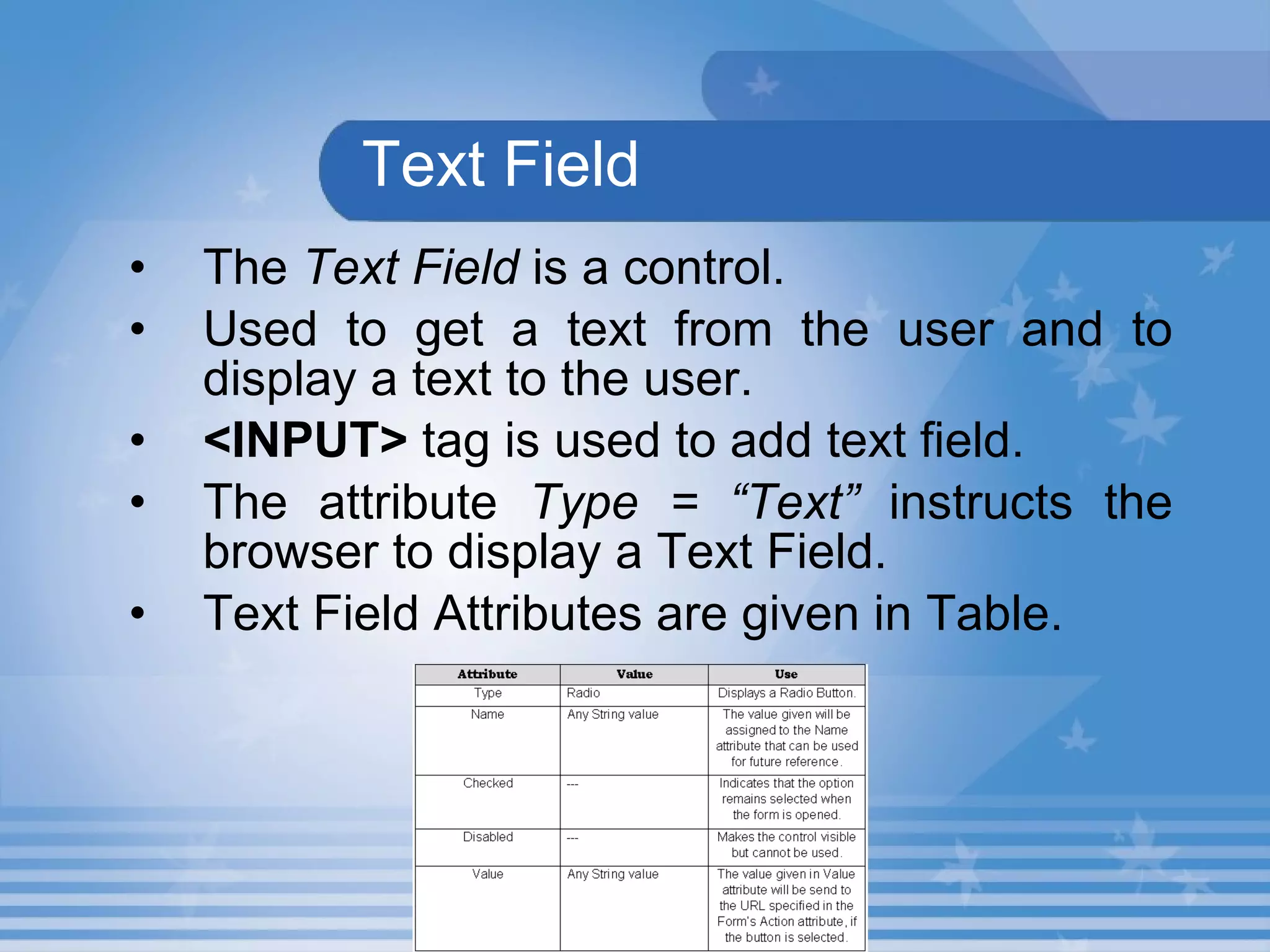
Text Field The  Text Field  is a control. Used to get a text from the user and to display a text to the user.   <INPUT>  tag is used to add text field.  The attribute  Type = “Text”  instructs the browser to display a Text Field.   Text Field Attributes are given in Table.
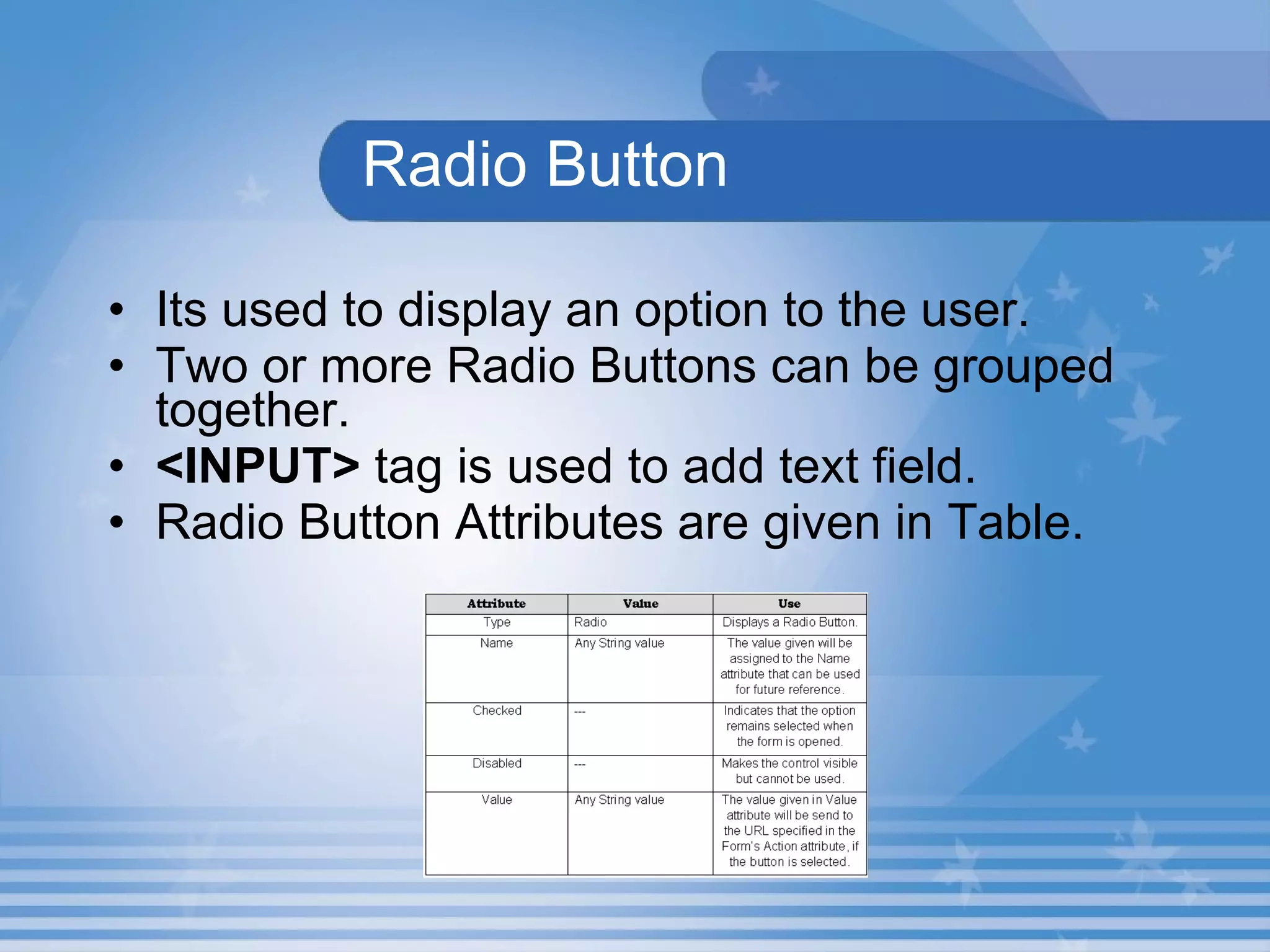
Radio Button Its used to display an option to the user. Two or more Radio Buttons can be grouped together. <INPUT>  tag is used to add text field. Radio Button Attributes are given in Table.
Text Area Used to get a text from the user and to display a text to the user. Text Area can accept or display more than one line of text.   <TEXTAREA>  tag is used to add textarea field.
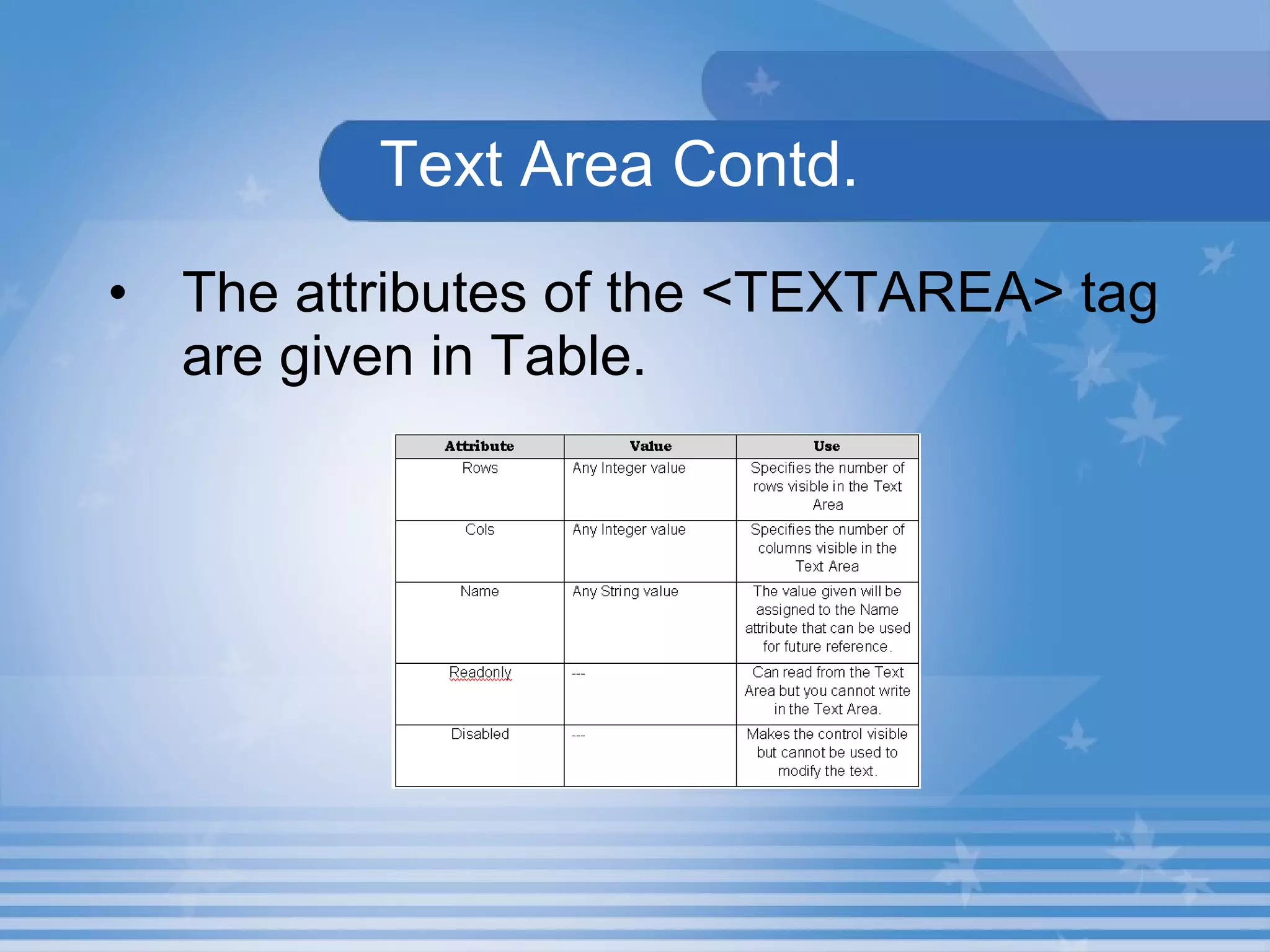
  Text Area Contd. The attributes of the <TEXTAREA> tag are given in Table.
  Lab Exercise   1.  Open D11_1.html in Internet Explorer.  Name attributes which are used in input tag. Identify the attribute which is used to specify the input type. Identify the attribute which is used to set the length of the text box.
  Lab Exercise Contd. d. Observe the difference between size and maxlength. e. Identify the tag which is allows to enter the multiline text entry. f. Name the attribute which are used in textarea.
  Lab Exercise   2.  Open D11_1.html in Internet Explorer.  View the source code in the Notepad.  Increase the size of the Name textbox to 10. Insert value into Name textbox and observe the difference. Change the Password textbox type to password.
  Lab Exercise Contd. e. Increase the no of columns of the  textarea to 40. f. Decrease the no of row of the textarea to 3.
Summary In this presentation, you learnt the following: The  Form  is like a container containing elements called controls.  Text Field, Check box, Radio button, Text area and Drop-down List box  are some of the controls used to get data from the user.  The  <FORM>  tag has two important attributes namely,  Action  and  Method.
Assignment Mention the use of  Action  and  Method  attributes of  <FORM>  tag. Name attributes which are use in  <TEXTAREA>  tag.

M02 un11 p01

  • 1.
    Unit 11 –Forms Presentation 1 Web Programming
  • 2.
    Revision Define Frame.Name the different types of Framesets. Write the code segment to create a Web page with 2 vertical frames. Write the code segment to create a Web page with mixed frameset. Write the code segment to create a Web page with Inline Frame.
  • 3.
    Objectives At theend of this presentation, you will be able to Add a Form to your Web page Add a Text Field to a Form Add a Radio Button to a Form Add a Text Area to a Form
  • 4.
    FormsForms are a collection of controls. It allows to get input from user. Its like a container having elements called controls. A Form is added to a Web page using the <FORM> tag.
  • 5.
    Hands-On!Open the HTML file Form.HTML in IE. This HTML document illustrates the use of forms in a Web page. Text Box Radio Button Text Area Check Box Drop-Down List Box Button
  • 6.
    FormAttributes The <FORM> tag attributes are Action and Method. The URL of the program file that processes the data entered by the user is assigned to the Action attribute. Method attribute is used to specify how the information is to be sent to the URL.
  • 7.
    Activity 2.11.1 Drawa form to enter your personal details (Bio-Data).
  • 8.
    Working with FormElements Controls can be added to the form using the <INPUT> tag along with Type attribute. Type attribute is used to specify the type of the control. Name attribute is used to specify a name for the field.
  • 9.
    Text Field The Text Field is a control. Used to get a text from the user and to display a text to the user. <INPUT> tag is used to add text field. The attribute Type = “Text” instructs the browser to display a Text Field. Text Field Attributes are given in Table.
  • 10.
    Radio Button Itsused to display an option to the user. Two or more Radio Buttons can be grouped together. <INPUT> tag is used to add text field. Radio Button Attributes are given in Table.
  • 11.
    Text Area Usedto get a text from the user and to display a text to the user. Text Area can accept or display more than one line of text. <TEXTAREA> tag is used to add textarea field.
  • 12.
    TextArea Contd. The attributes of the <TEXTAREA> tag are given in Table.
  • 13.
    LabExercise 1. Open D11_1.html in Internet Explorer. Name attributes which are used in input tag. Identify the attribute which is used to specify the input type. Identify the attribute which is used to set the length of the text box.
  • 14.
    LabExercise Contd. d. Observe the difference between size and maxlength. e. Identify the tag which is allows to enter the multiline text entry. f. Name the attribute which are used in textarea.
  • 15.
    LabExercise 2. Open D11_1.html in Internet Explorer. View the source code in the Notepad. Increase the size of the Name textbox to 10. Insert value into Name textbox and observe the difference. Change the Password textbox type to password.
  • 16.
    LabExercise Contd. e. Increase the no of columns of the textarea to 40. f. Decrease the no of row of the textarea to 3.
  • 17.
    Summary In thispresentation, you learnt the following: The Form is like a container containing elements called controls. Text Field, Check box, Radio button, Text area and Drop-down List box are some of the controls used to get data from the user. The <FORM> tag has two important attributes namely, Action and Method.
  • 18.
    Assignment Mention theuse of Action and Method attributes of <FORM> tag. Name attributes which are use in <TEXTAREA> tag.