Let’s Get You Noticed
How I Position My Clients As Business
Influencers
Presented by Dawn Raquel Jensen
Dawn Raquel Jensen
Social Media Speaker
Digital Marketing Coach
Social Business Trainer
Get Clear About
Who You Are
For The People
You Serve
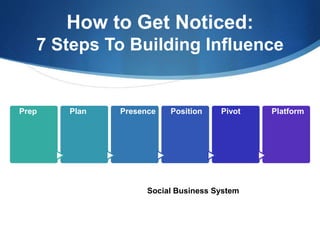
How to Get Noticed:
7 Steps To Building Influence
Prep Plan Presence Position Pivot Platform
Social Business System
Where Is Social Content
Focused?
What You Need to Know
Your 30,000 Foot View
Social Business
Branding
Building Content Authority
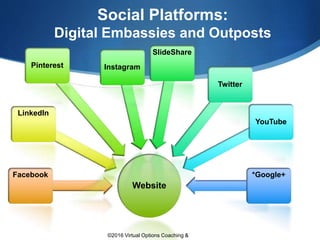
Social Platforms:
Digital Embassies and Outposts
Website
Facebook
LinkedIn
Pinterest Instagram
SlideShare
Twitter
YouTube
*Google+
©2016 Virtual Options Coaching &
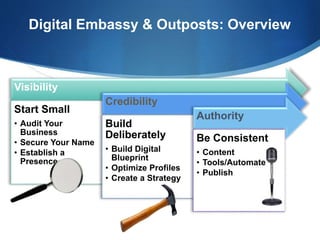
Digital Embassy & Outposts: Overview
Visibility
Start Small
‱ Audit Your
Business
‱ Secure Your Name
‱ Establish a
Presence
Credibility
Build
Deliberately
‱ Build Digital
Blueprint
‱ Optimize Profiles
‱ Create a Strategy
Authority
Be Consistent
‱ Content
‱ Tools/Automate
‱ Publish
Let Content Do The
Heavy Lifting
Choosing What Works for Your Business &
Industry
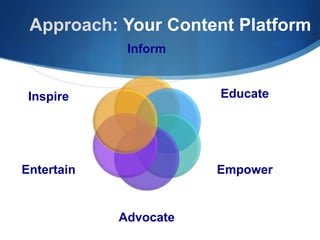
Approach: Your Content Platform
Inform
Educate
Empower
Advocate
Entertain
Inspire
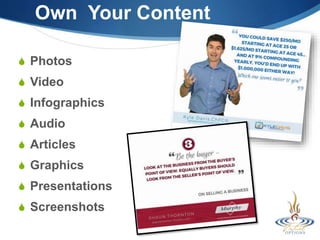
Own Your Content
 Photos
 Video
 Infographics
 Audio
 Articles
 Graphics
 Presentations
 Screenshots
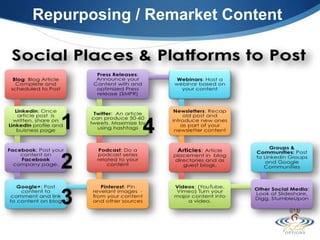
Repurposing / Remarket Content
1 4
3
2
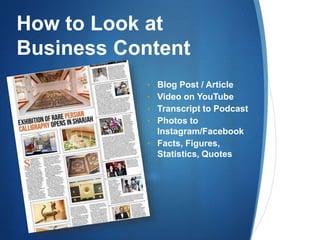
How to Look at
Business Content
‱ Blog Post / Article
‱ Video on YouTube
‱ Transcript to Podcast
‱ Photos to
Instagram/Facebook
‱ Facts, Figures,
Statistics, Quotes
RESOURCES
Customizing Business Content
Build a Resource Library
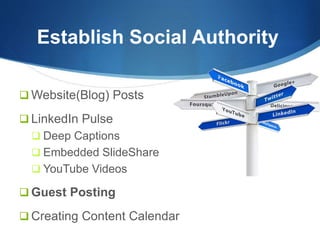
Establish Social Authority
 Website(Blog) Posts
 LinkedIn Pulse
 Deep Captions
 Embedded SlideShare
 YouTube Videos
 Guest Posting
 Creating Content Calendar
 LinkedIn
 Facebook
 Google
Ask for
Reviews & Testimonials
 Build Once. Identify Your RSS Feeds. Use
Content System.
 VirtualOptions.net
Have Content?
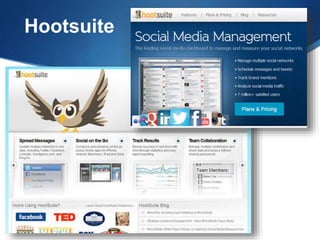
 Hootsuite.com
 Tweetdeck.com
 Bufferapp.com
 Postplanner.com
Let Technology Do the
Heavy Lifting
Social Business
Next Steps
1. Establish Your Social Content Map
2. Build Branded Content
3. Use Social Media / Social Content
Mgmt Tool
4. Ask for Reviews
5. Repurpose / Remarket What you
already have
6. Consistency is Key
Hootsuite
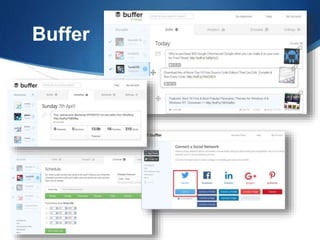
Buffer
1. ID Key Social Platforms
2. Create Posting
Schedule
To start off, it’s good to know
what the definition of “active” is.
In terms of posting it’s:
 2-3 x a day on Facebook
 5-10 x a day on Twitter
 1 x a day on LinkedIn
 1-2 x a day on Google+
 50-100 pins on Pinterest
 1-2 x a day on Instagram
Next Level
Use
Hashtags#
Every day you want to:
 Have conversations with
people on Twitter.
 Comment on blog posts
 Take part in discussions in
Facebook groups
 Comment on Instagram
photos
Questions?
Concerns?
Email : dawn@virtualoptions.net
Book: Calendly.com/dawnjensen
Build: Social Content System:
www.virtualoptions.net
http://www.virtualoptions.net
Let's Get You Noticed - Overview

Let's Get You Noticed - Overview

  • 1.
    Let’s Get YouNoticed How I Position My Clients As Business Influencers Presented by Dawn Raquel Jensen
  • 2.
    Dawn Raquel Jensen SocialMedia Speaker Digital Marketing Coach Social Business Trainer
  • 3.
    Get Clear About WhoYou Are For The People You Serve
  • 4.
    How to GetNoticed: 7 Steps To Building Influence Prep Plan Presence Position Pivot Platform Social Business System
  • 5.
    Where Is SocialContent Focused? What You Need to Know
  • 6.
  • 7.
  • 8.
    Social Platforms: Digital Embassiesand Outposts Website Facebook LinkedIn Pinterest Instagram SlideShare Twitter YouTube *Google+ ©2016 Virtual Options Coaching &
  • 9.
    Digital Embassy &Outposts: Overview Visibility Start Small ‱ Audit Your Business ‱ Secure Your Name ‱ Establish a Presence Credibility Build Deliberately ‱ Build Digital Blueprint ‱ Optimize Profiles ‱ Create a Strategy Authority Be Consistent ‱ Content ‱ Tools/Automate ‱ Publish
  • 11.
    Let Content DoThe Heavy Lifting Choosing What Works for Your Business & Industry
  • 12.
    Approach: Your ContentPlatform Inform Educate Empower Advocate Entertain Inspire
  • 13.
    Own Your Content Photos  Video  Infographics  Audio  Articles  Graphics  Presentations  Screenshots
  • 14.
    Repurposing / RemarketContent 1 4 3 2
  • 15.
    How to Lookat Business Content ‱ Blog Post / Article ‱ Video on YouTube ‱ Transcript to Podcast ‱ Photos to Instagram/Facebook ‱ Facts, Figures, Statistics, Quotes
  • 16.
  • 17.
    Establish Social Authority Website(Blog) Posts  LinkedIn Pulse  Deep Captions  Embedded SlideShare  YouTube Videos  Guest Posting  Creating Content Calendar
  • 18.
     LinkedIn  Facebook Google Ask for Reviews & Testimonials
  • 19.
     Build Once.Identify Your RSS Feeds. Use Content System.  VirtualOptions.net Have Content?  Hootsuite.com  Tweetdeck.com  Bufferapp.com  Postplanner.com Let Technology Do the Heavy Lifting
  • 20.
    Social Business Next Steps 1.Establish Your Social Content Map 2. Build Branded Content 3. Use Social Media / Social Content Mgmt Tool 4. Ask for Reviews 5. Repurpose / Remarket What you already have 6. Consistency is Key
  • 21.
  • 22.
  • 23.
    1. ID KeySocial Platforms 2. Create Posting Schedule To start off, it’s good to know what the definition of “active” is. In terms of posting it’s:  2-3 x a day on Facebook  5-10 x a day on Twitter  1 x a day on LinkedIn  1-2 x a day on Google+  50-100 pins on Pinterest  1-2 x a day on Instagram
  • 24.
    Next Level Use Hashtags# Every dayyou want to:  Have conversations with people on Twitter.  Comment on blog posts  Take part in discussions in Facebook groups  Comment on Instagram photos
  • 25.
    Questions? Concerns? Email : dawn@virtualoptions.net Book:Calendly.com/dawnjensen Build: Social Content System: www.virtualoptions.net
  • 26.

Editor's Notes

  • #3 Social Media Content for eCommerce Your Content: Become and Online Influencer Using Social Media How to  Social Content for eCommerce For most online entrepreneurs and course creators in particular, a lead magnet is some type of value that you give someone in exchange for an email address. These are all examples of types of lead magnets
 Toolkits/resource guides Free mini-course Checklists Handouts Downloads Worksheets Webinars Video series Podcast Video content
  • #14 Toolkits/resource guides Free mini-course Checklists Handouts Downloads Worksheets Webinars Video series Podcast Video content Data visualization — standalone charts and graphs (example) Comics — relevant comic strips or cartoons (example) Visual note-taking — casually-designed layout of ideas, typically text-heavy (example Screenshots — helpful images of your product or workflow