CLOUD COMPUTING
CLOUD SECURITY I
PROF. SOUMYA K. GHOSH
DEPARTMENT OF COMPUTER SCIENCE AND ENGINEERING
IIT KHARAGPUR
2
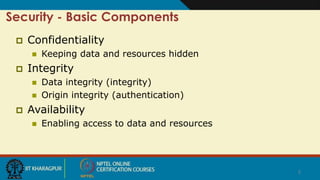
Security - Basic Components
 Confidentiality
 Keeping data and resources hidden
 Integrity
 Data integrity (integrity)
 Origin integrity (authentication)
 Availability
 Enabling access to data and resources
3
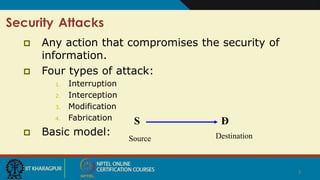
Security Attacks
 Any action that compromises the security of
information.
 Four types of attack:
1. Interruption
2. Interception
3. Modification
4. Fabrication
 Basic model:
D
Source Destination
S
4
Security Attacks (contd.)
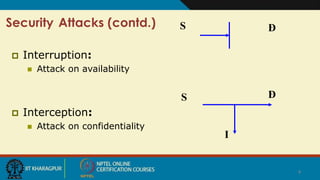
 Interruption:
 Attack on availability
 Interception:
 Attack on confidentiality
S D
S D
I
5
Security Attacks
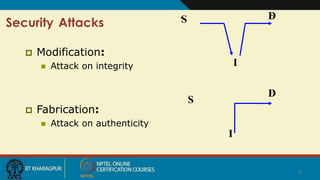
 Modification:
 Attack on integrity
 Fabrication:
 Attack on authenticity
S D
S
D
I
I
6
Classes of Threats
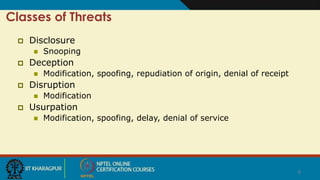
 Disclosure
 Snooping
 Deception
 Modification, spoofing, repudiation of origin, denial of receipt
 Disruption
 Modification
 Usurpation
 Modification, spoofing, delay, denial of service
7
Policies and Mechanisms
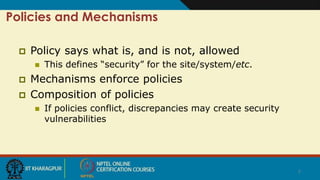
 Policy says what is, and is not, allowed
 This defines “security” for the site/system/etc.
 Mechanisms enforce policies
 Composition of policies
 If policies conflict, discrepancies may create security
vulnerabilities
8
Goals of Security
 Prevention
 Prevent attackers from violating security policy
 Detection
 Detect attackers’ violation of security policy
 Recovery
 Stop attack, assess and repair damage
 Continue to function correctly even if attack succeeds
9
Trust and Assumptions
 Underlie all aspects of security
 Policies
 Unambiguously partition system states
 Correctly capture security requirements
 Mechanisms
 Assumed to enforce policy
 Support mechanisms work correctly
10
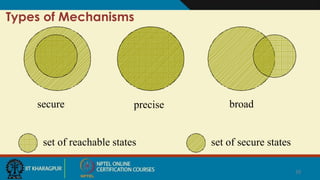
Types of Mechanisms
secure precise broad
set of reachable states set of secure states
11
Assurance
 Specification
 Requirements analysis
 Statement of desired functionality
 Design
 How system will meet specification
 Implementation
 Programs/systems that carry out design
12
Operational Issues
 Cost-Benefit Analysis
 Is it cheaper to prevent or recover?
 Risk Analysis
 Should we protect something?
 How much should we protect this thing?
 Laws and Customs
 Are desired security measures illegal?
 Will people do them?
13
Human Issues
 Organizational Problems
 Power and responsibility
 Financial benefits
 People problems
 Outsiders and insiders
 Social engineering
14
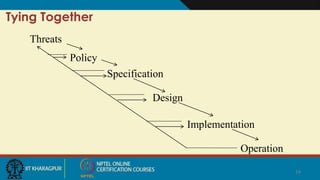
Tying Together
Threats
Policy
Specification
Design
Implementation
Operation
15
Passive and Active Attacks
 Passive attacks
 Obtain information that is being transmitted
(eavesdropping).
 Two types:
 Release of message contents:- It may be desirable to
prevent the opponent from learning the contents of the
transmission.
 Traffic analysis:- The opponent can determine the
location and identity of communicating hosts, and
observe the frequency and length of messages being
exchanged.
 Very difficult to detect.
16
 Active attacks
 Involve some modification of the data stream or the
creation of a false stream.
 Four categories:
 Masquerade:- One entity pretends to be a different entity.
 Replay:- Passive capture of a data unit and its subsequent
retransmission to produce an unauthorized effect.
 Modification:- Some portion of a legitimate message is
altered.
 Denial of service:- Prevents the normal use of
communication facilities.
17
Security Services
 Confidentiality (privacy)
 Authentication (who created or sent the data)
 Integrity (has not been altered)
 Non-repudiation (the order is final)
 Access control (prevent misuse of resources)
 Availability (permanence, non-erasure)
 Denial of Service Attacks
 Virus that deletes files
18
Role of Security
 A security infrastructure provides:
 Confidentiality – protection against loss of privacy
 Integrity – protection against data alteration/ corruption
 Availability – protection against denial of service
 Authentication – identification of legitimate users
 Authorization – determination of whether or not an
operation is allowed by a certain user
 Non-repudiation – ability to trace what happened, &
prevent denial of actions
 Safety – protection against tampering, damage & theft
19
Types of Attack
 Social engineering/phishing
 Physical break-ins, theft, and curb shopping
 Password attacks
 Buffer overflows
 Command injection
 Denial of service
 Exploitation of faulty application logic
 Snooping
 Packet manipulation or fabrication
 Backdoors
20
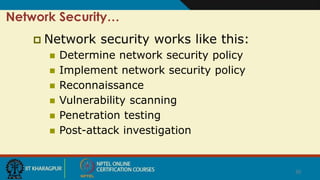
Network Security…
 Network security works like this:
 Determine network security policy
 Implement network security policy
 Reconnaissance
 Vulnerability scanning
 Penetration testing
 Post-attack investigation
21
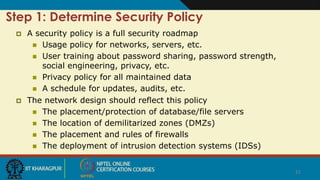
Step 1: Determine Security Policy
 A security policy is a full security roadmap
 Usage policy for networks, servers, etc.
 User training about password sharing, password strength,
social engineering, privacy, etc.
 Privacy policy for all maintained data
 A schedule for updates, audits, etc.
 The network design should reflect this policy
 The placement/protection of database/file servers
 The location of demilitarized zones (DMZs)
 The placement and rules of firewalls
 The deployment of intrusion detection systems (IDSs)
22
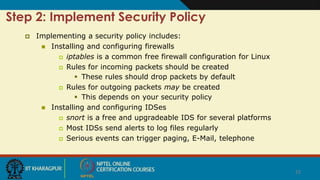
Step 2: Implement Security Policy
 Implementing a security policy includes:
 Installing and configuring firewalls
 iptables is a common free firewall configuration for Linux
 Rules for incoming packets should be created
 These rules should drop packets by default
 Rules for outgoing packets may be created
 This depends on your security policy
 Installing and configuring IDSes
 snort is a free and upgradeable IDS for several platforms
 Most IDSs send alerts to log files regularly
 Serious events can trigger paging, E-Mail, telephone
23
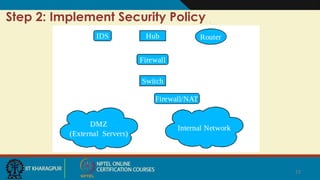
Step 2: Implement Security Policy
24
Step 2: Implement Security Policy
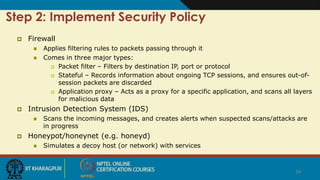
 Firewall
 Applies filtering rules to packets passing through it
 Comes in three major types:
 Packet filter – Filters by destination IP, port or protocol
 Stateful – Records information about ongoing TCP sessions, and ensures out-of-
session packets are discarded
 Application proxy – Acts as a proxy for a specific application, and scans all layers
for malicious data
 Intrusion Detection System (IDS)
 Scans the incoming messages, and creates alerts when suspected scans/attacks are
in progress
 Honeypot/honeynet (e.g. honeyd)
 Simulates a decoy host (or network) with services
25
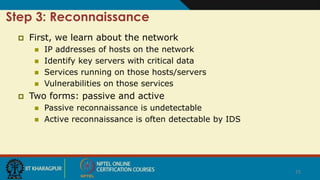
Step 3: Reconnaissance
 First, we learn about the network
 IP addresses of hosts on the network
 Identify key servers with critical data
 Services running on those hosts/servers
 Vulnerabilities on those services
 Two forms: passive and active
 Passive reconnaissance is undetectable
 Active reconnaissance is often detectable by IDS
26
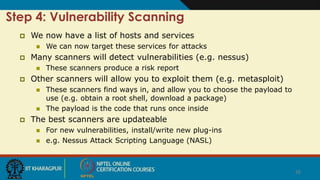
Step 4: Vulnerability Scanning
 We now have a list of hosts and services
 We can now target these services for attacks
 Many scanners will detect vulnerabilities (e.g. nessus)
 These scanners produce a risk report
 Other scanners will allow you to exploit them (e.g. metasploit)
 These scanners find ways in, and allow you to choose the payload to
use (e.g. obtain a root shell, download a package)
 The payload is the code that runs once inside
 The best scanners are updateable
 For new vulnerabilities, install/write new plug-ins
 e.g. Nessus Attack Scripting Language (NASL)
27
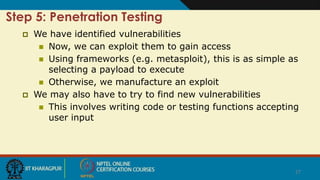
Step 5: Penetration Testing
 We have identified vulnerabilities
 Now, we can exploit them to gain access
 Using frameworks (e.g. metasploit), this is as simple as
selecting a payload to execute
 Otherwise, we manufacture an exploit
 We may also have to try to find new vulnerabilities
 This involves writing code or testing functions accepting
user input
28
Step 6: Post-Attack Investigation
 Forensics of Attacks
 This process is heavily guided by laws
 Also, this is normally done by a third party
 Retain chain of evidence
 The evidence in this case is the data on the host
 The log files of the compromised host hold the footsteps and
fingerprints of the attacker
 Every minute with that host must be accounted for
 For legal reasons, you should examine a low-level copy of the disk
and not modify the original
29
Thank You!

Lecture26 cc-security1

  • 1.
    CLOUD COMPUTING CLOUD SECURITYI PROF. SOUMYA K. GHOSH DEPARTMENT OF COMPUTER SCIENCE AND ENGINEERING IIT KHARAGPUR
  • 2.
    2 Security - BasicComponents  Confidentiality  Keeping data and resources hidden  Integrity  Data integrity (integrity)  Origin integrity (authentication)  Availability  Enabling access to data and resources
  • 3.
    3 Security Attacks  Anyaction that compromises the security of information.  Four types of attack: 1. Interruption 2. Interception 3. Modification 4. Fabrication  Basic model: D Source Destination S
  • 4.
    4 Security Attacks (contd.) Interruption:  Attack on availability  Interception:  Attack on confidentiality S D S D I
  • 5.
    5 Security Attacks  Modification: Attack on integrity  Fabrication:  Attack on authenticity S D S D I I
  • 6.
    6 Classes of Threats Disclosure  Snooping  Deception  Modification, spoofing, repudiation of origin, denial of receipt  Disruption  Modification  Usurpation  Modification, spoofing, delay, denial of service
  • 7.
    7 Policies and Mechanisms Policy says what is, and is not, allowed  This defines “security” for the site/system/etc.  Mechanisms enforce policies  Composition of policies  If policies conflict, discrepancies may create security vulnerabilities
  • 8.
    8 Goals of Security Prevention  Prevent attackers from violating security policy  Detection  Detect attackers’ violation of security policy  Recovery  Stop attack, assess and repair damage  Continue to function correctly even if attack succeeds
  • 9.
    9 Trust and Assumptions Underlie all aspects of security  Policies  Unambiguously partition system states  Correctly capture security requirements  Mechanisms  Assumed to enforce policy  Support mechanisms work correctly
  • 10.
    10 Types of Mechanisms secureprecise broad set of reachable states set of secure states
  • 11.
    11 Assurance  Specification  Requirementsanalysis  Statement of desired functionality  Design  How system will meet specification  Implementation  Programs/systems that carry out design
  • 12.
    12 Operational Issues  Cost-BenefitAnalysis  Is it cheaper to prevent or recover?  Risk Analysis  Should we protect something?  How much should we protect this thing?  Laws and Customs  Are desired security measures illegal?  Will people do them?
  • 13.
    13 Human Issues  OrganizationalProblems  Power and responsibility  Financial benefits  People problems  Outsiders and insiders  Social engineering
  • 14.
  • 15.
    15 Passive and ActiveAttacks  Passive attacks  Obtain information that is being transmitted (eavesdropping).  Two types:  Release of message contents:- It may be desirable to prevent the opponent from learning the contents of the transmission.  Traffic analysis:- The opponent can determine the location and identity of communicating hosts, and observe the frequency and length of messages being exchanged.  Very difficult to detect.
  • 16.
    16  Active attacks Involve some modification of the data stream or the creation of a false stream.  Four categories:  Masquerade:- One entity pretends to be a different entity.  Replay:- Passive capture of a data unit and its subsequent retransmission to produce an unauthorized effect.  Modification:- Some portion of a legitimate message is altered.  Denial of service:- Prevents the normal use of communication facilities.
  • 17.
    17 Security Services  Confidentiality(privacy)  Authentication (who created or sent the data)  Integrity (has not been altered)  Non-repudiation (the order is final)  Access control (prevent misuse of resources)  Availability (permanence, non-erasure)  Denial of Service Attacks  Virus that deletes files
  • 18.
    18 Role of Security A security infrastructure provides:  Confidentiality – protection against loss of privacy  Integrity – protection against data alteration/ corruption  Availability – protection against denial of service  Authentication – identification of legitimate users  Authorization – determination of whether or not an operation is allowed by a certain user  Non-repudiation – ability to trace what happened, & prevent denial of actions  Safety – protection against tampering, damage & theft
  • 19.
    19 Types of Attack Social engineering/phishing  Physical break-ins, theft, and curb shopping  Password attacks  Buffer overflows  Command injection  Denial of service  Exploitation of faulty application logic  Snooping  Packet manipulation or fabrication  Backdoors
  • 20.
    20 Network Security…  Networksecurity works like this:  Determine network security policy  Implement network security policy  Reconnaissance  Vulnerability scanning  Penetration testing  Post-attack investigation
  • 21.
    21 Step 1: DetermineSecurity Policy  A security policy is a full security roadmap  Usage policy for networks, servers, etc.  User training about password sharing, password strength, social engineering, privacy, etc.  Privacy policy for all maintained data  A schedule for updates, audits, etc.  The network design should reflect this policy  The placement/protection of database/file servers  The location of demilitarized zones (DMZs)  The placement and rules of firewalls  The deployment of intrusion detection systems (IDSs)
  • 22.
    22 Step 2: ImplementSecurity Policy  Implementing a security policy includes:  Installing and configuring firewalls  iptables is a common free firewall configuration for Linux  Rules for incoming packets should be created  These rules should drop packets by default  Rules for outgoing packets may be created  This depends on your security policy  Installing and configuring IDSes  snort is a free and upgradeable IDS for several platforms  Most IDSs send alerts to log files regularly  Serious events can trigger paging, E-Mail, telephone
  • 23.
    23 Step 2: ImplementSecurity Policy
  • 24.
    24 Step 2: ImplementSecurity Policy  Firewall  Applies filtering rules to packets passing through it  Comes in three major types:  Packet filter – Filters by destination IP, port or protocol  Stateful – Records information about ongoing TCP sessions, and ensures out-of- session packets are discarded  Application proxy – Acts as a proxy for a specific application, and scans all layers for malicious data  Intrusion Detection System (IDS)  Scans the incoming messages, and creates alerts when suspected scans/attacks are in progress  Honeypot/honeynet (e.g. honeyd)  Simulates a decoy host (or network) with services
  • 25.
    25 Step 3: Reconnaissance First, we learn about the network  IP addresses of hosts on the network  Identify key servers with critical data  Services running on those hosts/servers  Vulnerabilities on those services  Two forms: passive and active  Passive reconnaissance is undetectable  Active reconnaissance is often detectable by IDS
  • 26.
    26 Step 4: VulnerabilityScanning  We now have a list of hosts and services  We can now target these services for attacks  Many scanners will detect vulnerabilities (e.g. nessus)  These scanners produce a risk report  Other scanners will allow you to exploit them (e.g. metasploit)  These scanners find ways in, and allow you to choose the payload to use (e.g. obtain a root shell, download a package)  The payload is the code that runs once inside  The best scanners are updateable  For new vulnerabilities, install/write new plug-ins  e.g. Nessus Attack Scripting Language (NASL)
  • 27.
    27 Step 5: PenetrationTesting  We have identified vulnerabilities  Now, we can exploit them to gain access  Using frameworks (e.g. metasploit), this is as simple as selecting a payload to execute  Otherwise, we manufacture an exploit  We may also have to try to find new vulnerabilities  This involves writing code or testing functions accepting user input
  • 28.
    28 Step 6: Post-AttackInvestigation  Forensics of Attacks  This process is heavily guided by laws  Also, this is normally done by a third party  Retain chain of evidence  The evidence in this case is the data on the host  The log files of the compromised host hold the footsteps and fingerprints of the attacker  Every minute with that host must be accounted for  For legal reasons, you should examine a low-level copy of the disk and not modify the original
  • 29.