Information Security
CS 3002
Dr. Haroon Mahmood
Assistant Professor
NUCES Lahore
Disclaimer: The contents of these slides have been taken
from the book of Computer Security by William Stallings.
2
Information Security
Intrusion
 Attempt to break into or misuse a system
 Intruders may be from outside the network or legitimate
users of the network
 Three classes of intruders:
 Masquerader: an individual who is not authorized to use the
computer and who penetrate a system’s access controls to
exploit a legitimate user’s account. ( usually outside)
 Misfeasor: A legitimate user who access data, program, or
resources for which such access is not authorized , or who is
authorized for such access but misuses them. ( usually inside)
 Clandestine user: An individual who seizes supervisory control of
the system and uses this control to evade auditing and access
controls or to suppress audit collection.( can be either inside or
outside)
3
Information Security
Types of attacks using Intrusion
 Performing a remote root compromise of an e-mail server
 Defacing a Web server
 Guessing and Cracking passwords
 Copying a database containing credit card numbers
 Viewing sensitive data ( i.e. Payroll records and media
without authorizations)
 Running a packet sniffer on a workstation to capture
usernames and passwords
 Using an unattended, logged-in workstation without
permission
4
Information Security
Intrusion Detection System
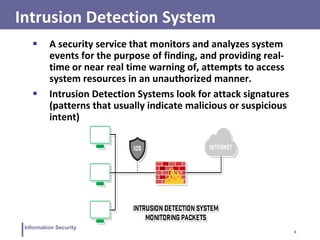
 A security service that monitors and analyzes system
events for the purpose of finding, and providing real-
time or near real time warning of, attempts to access
system resources in an unauthorized manner.
 Intrusion Detection Systems look for attack signatures
(patterns that usually indicate malicious or suspicious
intent)
5
Information Security
Components of an IDS
 An IDS comprises of three logical components:
 Sensors: sensors are responsible for collecting data ( i.e.
network packets, log files, and system call traces)
 Analyzers: analyzers receive inputs from one or more
sensors or from other analyzers. The analyzer is responsible
for determining if an intrusion has occurred.
 User Interface: it enables a user to view output from the
system or control behavior of the system. ( i.e. UI may
associate to a manager, director, or console component)
6
Information Security
Basic Principles of IDSs
1) If an intruder is detected quickly enough, the intruder can
be identified and ejected from the system before any
damage. Even if the detection is not that quick, sooner the
intrusion is detected, the less the amount of damage and
more quickly the recovery can be achieved.
2) An effective IDS can serve as a deterrent, thus acting to
prevent intrusion.
3) Intrusion detection enables the collection of information
about intrusion techniques that can be used to strengthen
intrusion prevention measures.
7
Information Security
Intrusion Detection System
 Different ways of classifying an IDS
 Anomaly based detection
 Misuse detection or signature based detection
 Hybrid detection
 Specification based detection
8
Information Security
Anomaly based detection
 At involves a collection of information about legitimate
user’s behavior over a period of time. Then, statistical tests
are applied to observe them.
 Anything distinct from the usual behavior is assumed to be
an intrusion activity.
 E.g flooding a host with lots of packet.
 The primary strength is its ability to recognize novel
attacks.
 Such IDS generate many false alarms and hence
compromise the effectiveness of the IDS.
9
Information Security
Signature based detection
 Involves an attempts to define a set of rules or attack
patterns that can be used to decide that a given behavior is
that of an intruder.
 The question of what information is relevant to an IDS
depends upon what it is trying to detect.
 E.g DNS, FTP etc.
 Most signature analysis systems are based simple pattern
matching algorithms. For example, the IDS simply looks for
a sub string within a stream of data carried by network
packets. When it finds this sub string (for example, the
``phf'' in ``GET /cgi-bin/phf?''), it identifies those network
packets as vehicles of an attack.
10
Information Security
Signature based detection
 Signature techniques detect intrusion by observing events
on system & apply rules to decide if activity is suspicious or
not.
Rule-based anomaly detection:
 analyze historical audit records to identify usage patterns &
auto-generate rules for them
 then observe current behavior & match against rules to see
if conforms
 like statistical anomaly detection does not require prior
knowledge of security flaws
 It requires to have a large database of rules to be effective.
11
Information Security
Specification-based intrusion detection
 The desirable behavior of a system is described through its
functionalities and through the security policy. Any
sequence of operations executed outside of the system’s
specifications is considered to be a security violation
 Use of manually specified program behavioral
specifications is the basis to detect attacks
 It has been proposed as a promising alternative that
combine the strengths of misuse detection (accurate
detection of known attacks) and anomaly detection (ability
to detect novel attacks)
 The development of the specifications is an expensive and
tedious process and specifications are often very difficult
to evaluate and verify.
12
Information Security
Effectiveness of an IDS
 Practically an intrusion detection system needs to detect a
substantial percentage of intrusions while keeping the
false alarms rate at acceptable level.
 if too few intrusions detected -> false security
 if too many false alarms -> ignore / waste time while
analyzing the false alarm
 Achieving this fate is very hard to achieve
 existing systems seem not to have a good record
13
Information Security
Types of IDS
 Intrusion Detection Systems ( IDSs) can be classified into:
 Host-based IDS:
Monitors the characteristics of a single host and the
events occurring within that host for suspicious activity.
 Network-based IDS:
Monitors network traffic for particular network segments
or devices and analyzes network, transport, and
application protocols to identify suspicious activity.
14
Information Security
Host/Applications based IDS
 The host operating system or the application logs in the
audit information.
 These audit information includes events like the use of
identification and authentication mechanisms (logins etc.) ,
file opens and program executions, admin activities etc.
 This audit is then analyzed to detect trails of intrusion.
15
Information Security
Drawbacks of the host based IDS
 The kind of information needed to be logged in is a matter
of experience.
 Unselective logging of messages may greatly increase the
audit and analysis burdens.
 Selective logging runs the risk that attack manifestations
could be missed.
16
Information Security
Strengths of the host based IDS
 Attack verification
 System specific activity
 Encrypted and switch environments
 Monitoring key components
 Near Real-Time detection and response
 No additional hardware
17
Information Security
Network based IDS
 A network-based IDS monitors traffic at selected points on
a network or interconnected set of networks.
 It examines the traffic packet by packet in real time or
close to real time in order to detect intrusion patterns.
 A filter is usually applied to determine which traffic will be
discarded or passed on to an attack recognition module.
This helps to filter out known un-malicious traffic.
18
Information Security
Strengths of Network based IDS
 Cost of ownership reduced
 Packet analysis
 Evidence removal
 Real time detection and response
 Malicious intent detection
 Complement and verification
 Operating system independence
19
Information Security
Honey Pots
 Decoy systems that designed to lure a potential attacker
away from critical systems
 An asset that solely exists to be attacked
 It could be an individual item, a system or entire network
 It could be a real system or emulated.
Purpose
 Divert an attacker from accessing critical systems
 Collect information about the attacker’s activity
 Good at detecting new or unknown threats
 Engage the attacker to stay on the system long enough for
administration to respond
20
Information Security
Deception Technology
● Honeypots are limited in scope
● it uses static decoys due to which adversary starts to understand
the decoys
● requires expensive resources to implement and maintain
Deception technology is a proactive cyber defense system
through the use of decoys to lure, detect and defend, without
the issues of scalability, skilled and available resources.
● Uses automated dynamic traps generated by AI
● Immediate alerts with minimum false positive rates.
● Deploy traps according to the behavioral patterns of the
hacker
● Provide detailed reports for post cyber defense
investigation
21
Information Security
Deception technology
 Decoy Files
 Used as a “marker”
 In case of an access, read, copy, or deletion, it serves as an
alert to monitors
 It could be anything: file, database, picture, email, account,
etc
 Normally used to deliver bogus information to attackers
 Honey net
 Collection of two or more honeypots/decoy devices
 Could be at the same location or distributed
 Managed by same entity
22
Information Security
Interaction level
It is the capability to mimic a real asset or object
 High – More Realistic that mimics real, legitimate
computer or device with applications, activity, and
changing content
 Needed for more hacker interaction, intent, etc.
 More involved setup and maintenance
 Low – Does very little to mimic real, legitimate device
 Usually just TCP/IP port advertising or basic logon prompts
 For early warning honeypots • Quicker setup, less ongoing
maintenance, less risk
 If you can actually logon to a decoy, then you’re at least at
Medium interaction
23
Information Security
Firewalls
24
Information Security
The Need for Firewalls
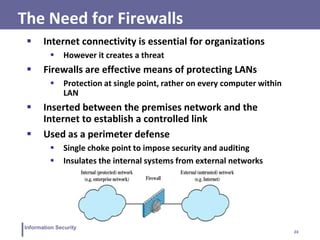
 Internet connectivity is essential for organizations
 However it creates a threat
 Firewalls are effective means of protecting LANs
 Protection at single point, rather on every computer within
LAN
 Inserted between the premises network and the
Internet to establish a controlled link
 Used as a perimeter defense
 Single choke point to impose security and auditing
 Insulates the internal systems from external networks
25
Information Security
Firewall Characteristics
Design Goals
 All traffic from inside to outside must pass through the
firewall
 Only authorized traffic as defined by the local security
policy will be allowed to pass
 The firewall itself is immune to penetration
General Techniques
 Service control, e.g. filter based on IP address, port number
 Direction control, e.g. to internal LAN, to external Internet
 User control, e.g. student vs faculty
 Behaviour control, e.g. filter email with spam
26
Information Security
Capabilities & Limitations
Capabilities
 Defines a single choke point
 Provides a location for monitoring security events
 Convenient platform for several Internet functions that are not security
related
 Can serve as platform for VPN end point
Limitations
 Cannot protect against attacks bypassing firewall
 May not protect fully against internal threats
 Improperly secured wireless LAN can be accessed from outside the
organization
 Laptop, phone, or USB drive may be infected outside the corporate
network then used internally
27
Information Security
Types of Firewalls
 Packet Filtering accepts/rejects packets based on protocol
headers
 Stateful Packet Inspection adds state information on what
happened previously to packet filtering firewall
 Application Proxy relay for application traffic
 Circuit-level Proxy relay for transport connections
 Normally a firewall is implemented on a router
 That router may perform other (non-)security functions,
e.g. VPN end-point, accounting, address and port
translation (NAT)
28
Information Security
Packet Filtering Firewall
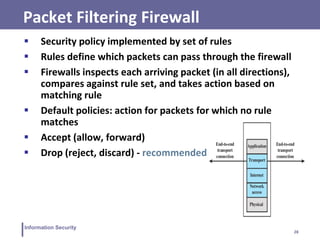
 Security policy implemented by set of rules
 Rules define which packets can pass through the firewall
 Firewalls inspects each arriving packet (in all directions),
compares against rule set, and takes action based on
matching rule
 Default policies: action for packets for which no rule
matches
 Accept (allow, forward)
 Drop (reject, discard) - recommended
29
Information Security
Packet Filtering Rules
Packet Information
 IP address: identifies host or network
 Port number: identifies server, e.g. web (80), email (25)
 Protocol number: identifies transport protocol, e.g. TCP or UDP
 Firewall interface: identifies immediate source/destination
 Other transport, network, data link packet header fields
Rules
 Conditions defined using packet information, direction
 Wildcards (*) support to match multiple values
 Actions typically accept or drop
 List of rules processed in order
30
Information Security
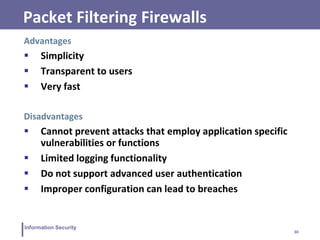
Packet Filtering Firewalls
Advantages
 Simplicity
 Transparent to users
 Very fast
Disadvantages
 Cannot prevent attacks that employ application specific
vulnerabilities or functions
 Limited logging functionality
 Do not support advanced user authentication
 Improper configuration can lead to breaches
31
Information Security
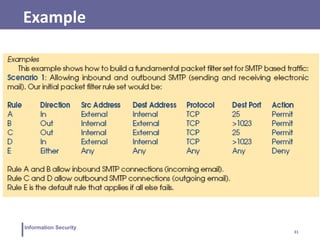
Example
32
Information Security
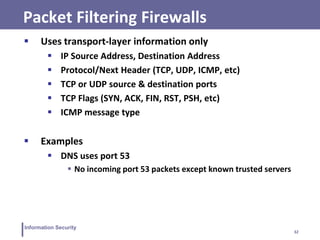
Packet Filtering Firewalls
 Uses transport-layer information only
 IP Source Address, Destination Address
 Protocol/Next Header (TCP, UDP, ICMP, etc)
 TCP or UDP source & destination ports
 TCP Flags (SYN, ACK, FIN, RST, PSH, etc)
 ICMP message type
 Examples
 DNS uses port 53
 No incoming port 53 packets except known trusted servers
33
Information Security
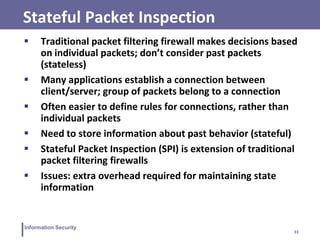
Stateful Packet Inspection
 Traditional packet filtering firewall makes decisions based
on individual packets; don’t consider past packets
(stateless)
 Many applications establish a connection between
client/server; group of packets belong to a connection
 Often easier to define rules for connections, rather than
individual packets
 Need to store information about past behavior (stateful)
 Stateful Packet Inspection (SPI) is extension of traditional
packet filtering firewalls
 Issues: extra overhead required for maintaining state
information
34
Information Security
Stateful Packet Inspection
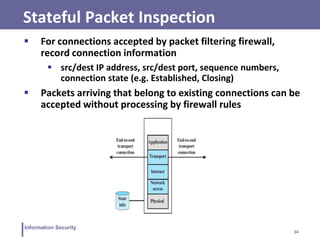
 For connections accepted by packet filtering firewall,
record connection information
 src/dest IP address, src/dest port, sequence numbers,
connection state (e.g. Established, Closing)
 Packets arriving that belong to existing connections can be
accepted without processing by firewall rules
35
Information Security
Application Proxy
 Also called Application-level Gateway
 Allows data into/out of a process based on that
process’ type
 Can act on a single computer or at the network layer
 e.g. allowing only HTTP traffic to a website
 Log access – attempted access and allowed access
 Tend to be more secure than packet filters
 Disadvantage is the additional processing
overhead on each connection
36
Information Security
Circuit-level Proxy Firewall
 Also called Circuit-level Gateway
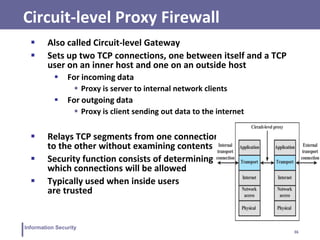
 Sets up two TCP connections, one between itself and a TCP
user on an inner host and one on an outside host
 For incoming data
 Proxy is server to internal network clients
 For outgoing data
 Proxy is client sending out data to the internet
 Relays TCP segments from one connection
to the other without examining contents
 Security function consists of determining
which connections will be allowed
 Typically used when inside users
are trusted
37
Information Security
Firewall Locations
 Firewalls can be located on hosts: end-users computers
and servers
 With large number of users, firewalls located on network
devices that interconnect internal and external networks
 Common to separate internal network into two zones:
1. Public-facing servers, e.g. web, email, DNS
2. End-user computers and internal servers, e.g. databases,
development web servers
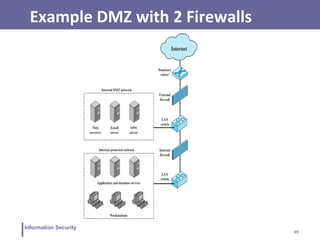
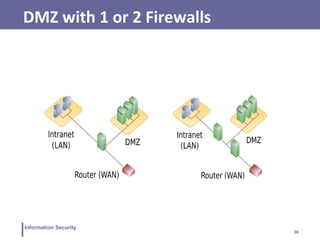
 Public-facing servers put in De-Militarized Zone (DMZ)
38
Information Security
DMZ with 1 or 2 Firewalls
39
Information Security
Example DMZ with 2 Firewalls
40
Information Security
Security Issues
 Complexity and human error: writing firewall rules that
implement the security policy is difficult for large networks
 Bypassing security policies using tunnels
 Bypassing firewalls using other networks (WiFi, mobile) or
devices (laptop, USB)
41
Information Security
Sandboxing
 The process of isolating a program on the hard drive in
order to minimize or eliminate the exposure to other apps
and critical system.
 Usually programs and applications interact with multiple
parts of operating system and use shared resources like
storage, memory and CPU sometimes causing conflicts.
 A malware if present can utilize such vulnerabilities to
cause a disaster.
 Sandboxing actually helps to reduce the impact that an
individual program will have on the system.
42
Information Security
Examples of Sandboxing
 Browser sandboxing
 Google and Opera run in their own sandboxes
 Other have option of selective sandboxing e.g. Mozilla
 Virtual Machines
 It is also called manual sandboxing to purposely configure
the system to sandbox and application.
 Virtual Box
 Vmware
 Windows Sandbox
 A temporary instance of host machine
43
Information Security
Penetration Testing
 Penetration testing is the process of evaluating the
strengths of all security controls on a computer system or
network.
 Penetration tests evaluate procedural, operational as well
as technological controls
 External vs. Internal
Penetration Testing can be performed from the viewpoint
of an external attacker or a malicious employee.
 Overt vs. Covert
Penetration Testing can be performed with or without the
knowledge of the IT department of the company being
tested.
44
Information Security
Penetration Testing
 Reconnaissance and Information Gathering
To discover as much information about a target (individual or
organization) as possible without actually making network contact with
said target
 Network Enumeration and Scanning
To discover existing networks owned by a target as well as live hosts
and services running on those hosts
 Vulnerability Testing and Exploitation
To check hosts for known vulnerabilities and to see if they are
exploitable, as well as to assess the potential severity of said
vulnerabilities
 Reporting
45
Information Security
Information Gathering
1. Find domain and sub-domain of the target
2. Find similar and parallel domain names
3. Web searches using advanced operators
4. Footprint the target using Shodan
5. Find the geographical location of company
6. List employees and their email addresses
7. Identify the key email addresses through email
harvesting
8. Find key personnel of the company
9. Browse social network websites to find information
about company and employees
10. Identify the types of network devices used in
organization
46
Information Security
11. Search the archive.org for old information about the
company
12. Examine the source code of web pages
13. Perform Whois lookup
14. Find IP addresses block allocated to organization
15. Find DNS records for domain
16. Perform reverse lookup
17. Perform DNS zone transfer
18. Draw a network diagram using traceroute analysis
Information Gathering
47
Information Security
Penetration testing types
 Black box
 little or no information is provided about the specified
target
 White box
 where almost all the information about the target is
provided
 Gray box
 some information is being provided and some hidden

IS - Firewall

  • 1.
    Information Security CS 3002 Dr.Haroon Mahmood Assistant Professor NUCES Lahore Disclaimer: The contents of these slides have been taken from the book of Computer Security by William Stallings.
  • 2.
    2 Information Security Intrusion  Attemptto break into or misuse a system  Intruders may be from outside the network or legitimate users of the network  Three classes of intruders:  Masquerader: an individual who is not authorized to use the computer and who penetrate a system’s access controls to exploit a legitimate user’s account. ( usually outside)  Misfeasor: A legitimate user who access data, program, or resources for which such access is not authorized , or who is authorized for such access but misuses them. ( usually inside)  Clandestine user: An individual who seizes supervisory control of the system and uses this control to evade auditing and access controls or to suppress audit collection.( can be either inside or outside)
  • 3.
    3 Information Security Types ofattacks using Intrusion  Performing a remote root compromise of an e-mail server  Defacing a Web server  Guessing and Cracking passwords  Copying a database containing credit card numbers  Viewing sensitive data ( i.e. Payroll records and media without authorizations)  Running a packet sniffer on a workstation to capture usernames and passwords  Using an unattended, logged-in workstation without permission
  • 4.
    4 Information Security Intrusion DetectionSystem  A security service that monitors and analyzes system events for the purpose of finding, and providing real- time or near real time warning of, attempts to access system resources in an unauthorized manner.  Intrusion Detection Systems look for attack signatures (patterns that usually indicate malicious or suspicious intent)
  • 5.
    5 Information Security Components ofan IDS  An IDS comprises of three logical components:  Sensors: sensors are responsible for collecting data ( i.e. network packets, log files, and system call traces)  Analyzers: analyzers receive inputs from one or more sensors or from other analyzers. The analyzer is responsible for determining if an intrusion has occurred.  User Interface: it enables a user to view output from the system or control behavior of the system. ( i.e. UI may associate to a manager, director, or console component)
  • 6.
    6 Information Security Basic Principlesof IDSs 1) If an intruder is detected quickly enough, the intruder can be identified and ejected from the system before any damage. Even if the detection is not that quick, sooner the intrusion is detected, the less the amount of damage and more quickly the recovery can be achieved. 2) An effective IDS can serve as a deterrent, thus acting to prevent intrusion. 3) Intrusion detection enables the collection of information about intrusion techniques that can be used to strengthen intrusion prevention measures.
  • 7.
    7 Information Security Intrusion DetectionSystem  Different ways of classifying an IDS  Anomaly based detection  Misuse detection or signature based detection  Hybrid detection  Specification based detection
  • 8.
    8 Information Security Anomaly baseddetection  At involves a collection of information about legitimate user’s behavior over a period of time. Then, statistical tests are applied to observe them.  Anything distinct from the usual behavior is assumed to be an intrusion activity.  E.g flooding a host with lots of packet.  The primary strength is its ability to recognize novel attacks.  Such IDS generate many false alarms and hence compromise the effectiveness of the IDS.
  • 9.
    9 Information Security Signature baseddetection  Involves an attempts to define a set of rules or attack patterns that can be used to decide that a given behavior is that of an intruder.  The question of what information is relevant to an IDS depends upon what it is trying to detect.  E.g DNS, FTP etc.  Most signature analysis systems are based simple pattern matching algorithms. For example, the IDS simply looks for a sub string within a stream of data carried by network packets. When it finds this sub string (for example, the ``phf'' in ``GET /cgi-bin/phf?''), it identifies those network packets as vehicles of an attack.
  • 10.
    10 Information Security Signature baseddetection  Signature techniques detect intrusion by observing events on system & apply rules to decide if activity is suspicious or not. Rule-based anomaly detection:  analyze historical audit records to identify usage patterns & auto-generate rules for them  then observe current behavior & match against rules to see if conforms  like statistical anomaly detection does not require prior knowledge of security flaws  It requires to have a large database of rules to be effective.
  • 11.
    11 Information Security Specification-based intrusiondetection  The desirable behavior of a system is described through its functionalities and through the security policy. Any sequence of operations executed outside of the system’s specifications is considered to be a security violation  Use of manually specified program behavioral specifications is the basis to detect attacks  It has been proposed as a promising alternative that combine the strengths of misuse detection (accurate detection of known attacks) and anomaly detection (ability to detect novel attacks)  The development of the specifications is an expensive and tedious process and specifications are often very difficult to evaluate and verify.
  • 12.
    12 Information Security Effectiveness ofan IDS  Practically an intrusion detection system needs to detect a substantial percentage of intrusions while keeping the false alarms rate at acceptable level.  if too few intrusions detected -> false security  if too many false alarms -> ignore / waste time while analyzing the false alarm  Achieving this fate is very hard to achieve  existing systems seem not to have a good record
  • 13.
    13 Information Security Types ofIDS  Intrusion Detection Systems ( IDSs) can be classified into:  Host-based IDS: Monitors the characteristics of a single host and the events occurring within that host for suspicious activity.  Network-based IDS: Monitors network traffic for particular network segments or devices and analyzes network, transport, and application protocols to identify suspicious activity.
  • 14.
    14 Information Security Host/Applications basedIDS  The host operating system or the application logs in the audit information.  These audit information includes events like the use of identification and authentication mechanisms (logins etc.) , file opens and program executions, admin activities etc.  This audit is then analyzed to detect trails of intrusion.
  • 15.
    15 Information Security Drawbacks ofthe host based IDS  The kind of information needed to be logged in is a matter of experience.  Unselective logging of messages may greatly increase the audit and analysis burdens.  Selective logging runs the risk that attack manifestations could be missed.
  • 16.
    16 Information Security Strengths ofthe host based IDS  Attack verification  System specific activity  Encrypted and switch environments  Monitoring key components  Near Real-Time detection and response  No additional hardware
  • 17.
    17 Information Security Network basedIDS  A network-based IDS monitors traffic at selected points on a network or interconnected set of networks.  It examines the traffic packet by packet in real time or close to real time in order to detect intrusion patterns.  A filter is usually applied to determine which traffic will be discarded or passed on to an attack recognition module. This helps to filter out known un-malicious traffic.
  • 18.
    18 Information Security Strengths ofNetwork based IDS  Cost of ownership reduced  Packet analysis  Evidence removal  Real time detection and response  Malicious intent detection  Complement and verification  Operating system independence
  • 19.
    19 Information Security Honey Pots Decoy systems that designed to lure a potential attacker away from critical systems  An asset that solely exists to be attacked  It could be an individual item, a system or entire network  It could be a real system or emulated. Purpose  Divert an attacker from accessing critical systems  Collect information about the attacker’s activity  Good at detecting new or unknown threats  Engage the attacker to stay on the system long enough for administration to respond
  • 20.
    20 Information Security Deception Technology ●Honeypots are limited in scope ● it uses static decoys due to which adversary starts to understand the decoys ● requires expensive resources to implement and maintain Deception technology is a proactive cyber defense system through the use of decoys to lure, detect and defend, without the issues of scalability, skilled and available resources. ● Uses automated dynamic traps generated by AI ● Immediate alerts with minimum false positive rates. ● Deploy traps according to the behavioral patterns of the hacker ● Provide detailed reports for post cyber defense investigation
  • 21.
    21 Information Security Deception technology Decoy Files  Used as a “marker”  In case of an access, read, copy, or deletion, it serves as an alert to monitors  It could be anything: file, database, picture, email, account, etc  Normally used to deliver bogus information to attackers  Honey net  Collection of two or more honeypots/decoy devices  Could be at the same location or distributed  Managed by same entity
  • 22.
    22 Information Security Interaction level Itis the capability to mimic a real asset or object  High – More Realistic that mimics real, legitimate computer or device with applications, activity, and changing content  Needed for more hacker interaction, intent, etc.  More involved setup and maintenance  Low – Does very little to mimic real, legitimate device  Usually just TCP/IP port advertising or basic logon prompts  For early warning honeypots • Quicker setup, less ongoing maintenance, less risk  If you can actually logon to a decoy, then you’re at least at Medium interaction
  • 23.
  • 24.
    24 Information Security The Needfor Firewalls  Internet connectivity is essential for organizations  However it creates a threat  Firewalls are effective means of protecting LANs  Protection at single point, rather on every computer within LAN  Inserted between the premises network and the Internet to establish a controlled link  Used as a perimeter defense  Single choke point to impose security and auditing  Insulates the internal systems from external networks
  • 25.
    25 Information Security Firewall Characteristics DesignGoals  All traffic from inside to outside must pass through the firewall  Only authorized traffic as defined by the local security policy will be allowed to pass  The firewall itself is immune to penetration General Techniques  Service control, e.g. filter based on IP address, port number  Direction control, e.g. to internal LAN, to external Internet  User control, e.g. student vs faculty  Behaviour control, e.g. filter email with spam
  • 26.
    26 Information Security Capabilities &Limitations Capabilities  Defines a single choke point  Provides a location for monitoring security events  Convenient platform for several Internet functions that are not security related  Can serve as platform for VPN end point Limitations  Cannot protect against attacks bypassing firewall  May not protect fully against internal threats  Improperly secured wireless LAN can be accessed from outside the organization  Laptop, phone, or USB drive may be infected outside the corporate network then used internally
  • 27.
    27 Information Security Types ofFirewalls  Packet Filtering accepts/rejects packets based on protocol headers  Stateful Packet Inspection adds state information on what happened previously to packet filtering firewall  Application Proxy relay for application traffic  Circuit-level Proxy relay for transport connections  Normally a firewall is implemented on a router  That router may perform other (non-)security functions, e.g. VPN end-point, accounting, address and port translation (NAT)
  • 28.
    28 Information Security Packet FilteringFirewall  Security policy implemented by set of rules  Rules define which packets can pass through the firewall  Firewalls inspects each arriving packet (in all directions), compares against rule set, and takes action based on matching rule  Default policies: action for packets for which no rule matches  Accept (allow, forward)  Drop (reject, discard) - recommended
  • 29.
    29 Information Security Packet FilteringRules Packet Information  IP address: identifies host or network  Port number: identifies server, e.g. web (80), email (25)  Protocol number: identifies transport protocol, e.g. TCP or UDP  Firewall interface: identifies immediate source/destination  Other transport, network, data link packet header fields Rules  Conditions defined using packet information, direction  Wildcards (*) support to match multiple values  Actions typically accept or drop  List of rules processed in order
  • 30.
    30 Information Security Packet FilteringFirewalls Advantages  Simplicity  Transparent to users  Very fast Disadvantages  Cannot prevent attacks that employ application specific vulnerabilities or functions  Limited logging functionality  Do not support advanced user authentication  Improper configuration can lead to breaches
  • 31.
  • 32.
    32 Information Security Packet FilteringFirewalls  Uses transport-layer information only  IP Source Address, Destination Address  Protocol/Next Header (TCP, UDP, ICMP, etc)  TCP or UDP source & destination ports  TCP Flags (SYN, ACK, FIN, RST, PSH, etc)  ICMP message type  Examples  DNS uses port 53  No incoming port 53 packets except known trusted servers
  • 33.
    33 Information Security Stateful PacketInspection  Traditional packet filtering firewall makes decisions based on individual packets; don’t consider past packets (stateless)  Many applications establish a connection between client/server; group of packets belong to a connection  Often easier to define rules for connections, rather than individual packets  Need to store information about past behavior (stateful)  Stateful Packet Inspection (SPI) is extension of traditional packet filtering firewalls  Issues: extra overhead required for maintaining state information
  • 34.
    34 Information Security Stateful PacketInspection  For connections accepted by packet filtering firewall, record connection information  src/dest IP address, src/dest port, sequence numbers, connection state (e.g. Established, Closing)  Packets arriving that belong to existing connections can be accepted without processing by firewall rules
  • 35.
    35 Information Security Application Proxy Also called Application-level Gateway  Allows data into/out of a process based on that process’ type  Can act on a single computer or at the network layer  e.g. allowing only HTTP traffic to a website  Log access – attempted access and allowed access  Tend to be more secure than packet filters  Disadvantage is the additional processing overhead on each connection
  • 36.
    36 Information Security Circuit-level ProxyFirewall  Also called Circuit-level Gateway  Sets up two TCP connections, one between itself and a TCP user on an inner host and one on an outside host  For incoming data  Proxy is server to internal network clients  For outgoing data  Proxy is client sending out data to the internet  Relays TCP segments from one connection to the other without examining contents  Security function consists of determining which connections will be allowed  Typically used when inside users are trusted
  • 37.
    37 Information Security Firewall Locations Firewalls can be located on hosts: end-users computers and servers  With large number of users, firewalls located on network devices that interconnect internal and external networks  Common to separate internal network into two zones: 1. Public-facing servers, e.g. web, email, DNS 2. End-user computers and internal servers, e.g. databases, development web servers  Public-facing servers put in De-Militarized Zone (DMZ)
  • 38.
  • 39.
  • 40.
    40 Information Security Security Issues Complexity and human error: writing firewall rules that implement the security policy is difficult for large networks  Bypassing security policies using tunnels  Bypassing firewalls using other networks (WiFi, mobile) or devices (laptop, USB)
  • 41.
    41 Information Security Sandboxing  Theprocess of isolating a program on the hard drive in order to minimize or eliminate the exposure to other apps and critical system.  Usually programs and applications interact with multiple parts of operating system and use shared resources like storage, memory and CPU sometimes causing conflicts.  A malware if present can utilize such vulnerabilities to cause a disaster.  Sandboxing actually helps to reduce the impact that an individual program will have on the system.
  • 42.
    42 Information Security Examples ofSandboxing  Browser sandboxing  Google and Opera run in their own sandboxes  Other have option of selective sandboxing e.g. Mozilla  Virtual Machines  It is also called manual sandboxing to purposely configure the system to sandbox and application.  Virtual Box  Vmware  Windows Sandbox  A temporary instance of host machine
  • 43.
    43 Information Security Penetration Testing Penetration testing is the process of evaluating the strengths of all security controls on a computer system or network.  Penetration tests evaluate procedural, operational as well as technological controls  External vs. Internal Penetration Testing can be performed from the viewpoint of an external attacker or a malicious employee.  Overt vs. Covert Penetration Testing can be performed with or without the knowledge of the IT department of the company being tested.
  • 44.
    44 Information Security Penetration Testing Reconnaissance and Information Gathering To discover as much information about a target (individual or organization) as possible without actually making network contact with said target  Network Enumeration and Scanning To discover existing networks owned by a target as well as live hosts and services running on those hosts  Vulnerability Testing and Exploitation To check hosts for known vulnerabilities and to see if they are exploitable, as well as to assess the potential severity of said vulnerabilities  Reporting
  • 45.
    45 Information Security Information Gathering 1.Find domain and sub-domain of the target 2. Find similar and parallel domain names 3. Web searches using advanced operators 4. Footprint the target using Shodan 5. Find the geographical location of company 6. List employees and their email addresses 7. Identify the key email addresses through email harvesting 8. Find key personnel of the company 9. Browse social network websites to find information about company and employees 10. Identify the types of network devices used in organization
  • 46.
    46 Information Security 11. Searchthe archive.org for old information about the company 12. Examine the source code of web pages 13. Perform Whois lookup 14. Find IP addresses block allocated to organization 15. Find DNS records for domain 16. Perform reverse lookup 17. Perform DNS zone transfer 18. Draw a network diagram using traceroute analysis Information Gathering
  • 47.
    47 Information Security Penetration testingtypes  Black box  little or no information is provided about the specified target  White box  where almost all the information about the target is provided  Gray box  some information is being provided and some hidden