1
CS 432/532
Computer and Network Security
Spring 2019
Albert Levi
levi@sabanciuniv.edu
FENS 1091, ext.9563
2
What is this course about?
This course is to discuss
– security needs
– security services
– security mechanisms and protocols
for data stored in computers and transmitted
across computer networks
3
What we will/won’t cover?
 We will cover
– security threats
– practical security issues (practice in labs)
– security protocols in use
– security protocols not in use
– securing computer systems
– introductory cryptography
 We will not cover
– advanced cryptography
– computer networks
– operating systems
– computers in general
– how to hack 
4
What security is about in
general?
 Security is about protection of assets
– D. Gollmann, Computer Security, Wiley
 Prevention
– take measures that prevent your assets from
being damaged (or stolen)
 Detection
– take measures so that you can detect when, how,
and by whom an asset has been damaged
 Reaction
– take measures so that you can recover your
assets
5
Real world example
 Prevention
– locks at doors, window bars, secure the walls
around the property, hire a guard
 Detection
– missing items, burglar alarms, closed circuit TV
 Reaction
– attack on burglar (not recommended ), call the
police, replace stolen items, make an insurance
claim
6
Internet shopping example
 Prevention
– encrypt your order and card number, enforce
merchants to do some extra checks, using PIN
even for Internet transactions, don’t send card
number via Internet
 Detection
– an unauthorized transaction appears on your
credit card statement
 Reaction
– complain, dispute, ask for a new card number, sue
(if you can find of course )
– Or, pay and forget (a glass of cold water) 
7
Information security in past & present
 Traditional Information Security
– keep the cabinets locked
– put them in a secure room
– human guards
– electronic surveillance systems
– in general: physical and administrative
mechanisms
 Modern World
– Data are in computers
– Computers are interconnected
Computer and Network Security
8
Terminology
 Computer Security
– 2 main focuses: Information and Computer itself
– tools and mechanisms to protect data in a computer
(actually an automated information system), even if
the computers/system are connected to a network
– tools and mechanisms to protect the information
system itself (hardware, software, firmware, *ware )
 Against?
– against hackers (intrusion)
– against viruses
– against denial of service attacks
– etc. (all types of malicious behavior)
9
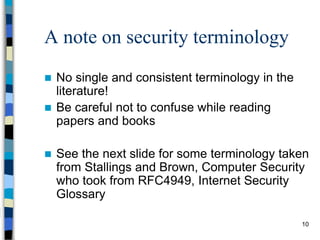
Terminology
 Network and Internet Security
– measures to prevent, detect, and correct security
violations that involve the transmission of
information in a network or interconnected networks
10
A note on security terminology
 No single and consistent terminology in the
literature!
 Be careful not to confuse while reading
papers and books
 See the next slide for some terminology taken
from Stallings and Brown, Computer Security
who took from RFC4949, Internet Security
Glossary
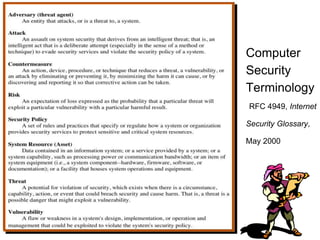
Computer
Security
Terminology
RFC 4949, Internet
Security Glossary,
May 2000
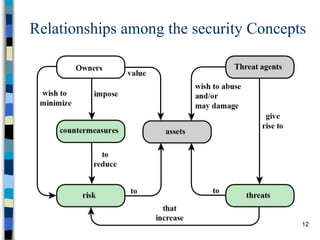
Relationships among the security Concepts
12
13
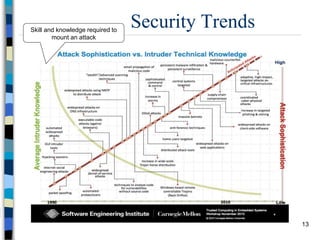
Security TrendsSkill and knowledge required to
mount an attack
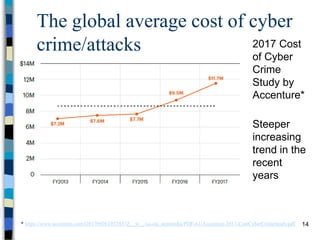
The global average cost of cyber
crime/attacks
14
2017 Cost
of Cyber
Crime
Study by
Accenture*
* https://www.accenture.com/t20170926T072837Z__w__/us-en/_acnmedia/PDF-61/Accenture-2017-CostCyberCrimeStudy.pdf
Steeper
increasing
trend in the
recent
years
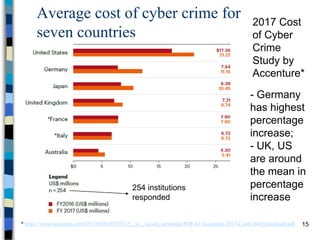
Average cost of cyber crime for
seven countries
15
2017 Cost
of Cyber
Crime
Study by
Accenture*
* https://www.accenture.com/t20170926T072837Z__w__/us-en/_acnmedia/PDF-61/Accenture-2017-CostCyberCrimeStudy.pdf
- Germany
has highest
percentage
increase;
- UK, US
are around
the mean in
percentage
increase
254 institutions
responded
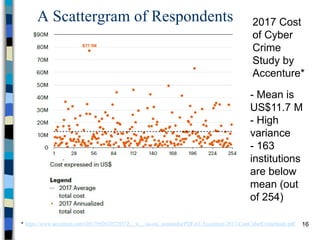
A Scattergram of Respondents
16
2017 Cost
of Cyber
Crime
Study by
Accenture*
* https://www.accenture.com/t20170926T072837Z__w__/us-en/_acnmedia/PDF-61/Accenture-2017-CostCyberCrimeStudy.pdf
- Mean is
US$11.7 M
- High
variance
- 163
institutions
are below
mean (out
of 254)
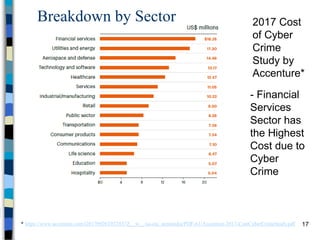
Breakdown by Sector
17
2017 Cost
of Cyber
Crime
Study by
Accenture*
* https://www.accenture.com/t20170926T072837Z__w__/us-en/_acnmedia/PDF-61/Accenture-2017-CostCyberCrimeStudy.pdf
- Financial
Services
Sector has
the Highest
Cost due to
Cyber
Crime
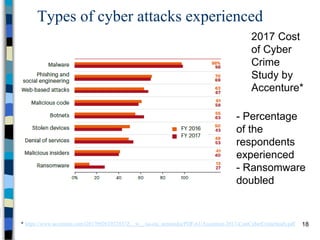
Types of cyber attacks experienced
18
2017 Cost
of Cyber
Crime
Study by
Accenture*
* https://www.accenture.com/t20170926T072837Z__w__/us-en/_acnmedia/PDF-61/Accenture-2017-CostCyberCrimeStudy.pdf
- Percentage
of the
respondents
experienced
- Ransomware
doubled
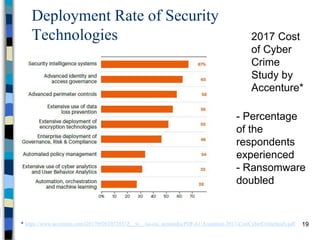
Deployment Rate of Security
Technologies
19
2017 Cost
of Cyber
Crime
Study by
Accenture*
* https://www.accenture.com/t20170926T072837Z__w__/us-en/_acnmedia/PDF-61/Accenture-2017-CostCyberCrimeStudy.pdf
- Percentage
of the
respondents
experienced
- Ransomware
doubled
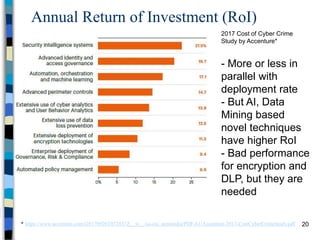
Annual Return of Investment (RoI)
20
2017 Cost of Cyber Crime
Study by Accenture*
* https://www.accenture.com/t20170926T072837Z__w__/us-en/_acnmedia/PDF-61/Accenture-2017-CostCyberCrimeStudy.pdf
- More or less in
parallel with
deployment rate
- But AI, Data
Mining based
novel techniques
have higher RoI
- Bad performance
for encryption and
DLP, but they are
needed
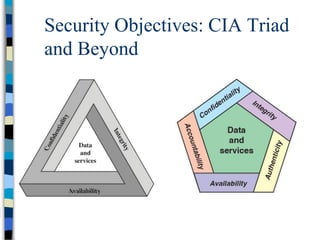
Security Objectives: CIA Triad
and Beyond
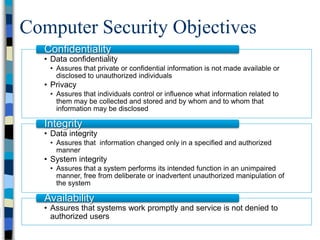
Computer Security Objectives
• Data confidentiality
• Assures that private or confidential information is not made available or
disclosed to unauthorized individuals
• Privacy
• Assures that individuals control or influence what information related to
them may be collected and stored and by whom and to whom that
information may be disclosed
Confidentiality
• Data integrity
• Assures that information changed only in a specified and authorized
manner
• System integrity
• Assures that a system performs its intended function in an unimpaired
manner, free from deliberate or inadvertent unauthorized manipulation of
the system
Integrity
• Assures that systems work promptly and service is not denied to
authorized users
Availability
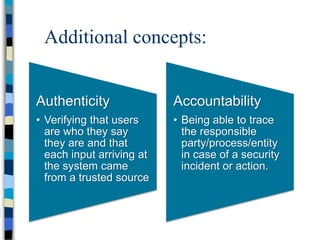
Additional concepts:
Authenticity
• Verifying that users
are who they say
they are and that
each input arriving at
the system came
from a trusted source
Accountability
• Being able to trace
the responsible
party/process/entity
in case of a security
incident or action.
24
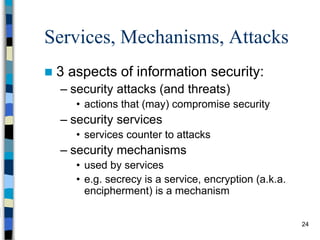
Services, Mechanisms, Attacks
 3 aspects of information security:
– security attacks (and threats)
• actions that (may) compromise security
– security services
• services counter to attacks
– security mechanisms
• used by services
• e.g. secrecy is a service, encryption (a.k.a.
encipherment) is a mechanism
25
Attacks
 Attacks on computer systems
– break-in to destroy information
– break-in to steal information
– blocking to operate properly
– malicious software
• wide spectrum of problems
 Source of attacks
– Insiders
– Outsiders
26
Attacks
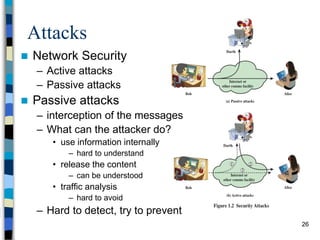
 Network Security
– Active attacks
– Passive attacks
 Passive attacks
– interception of the messages
– What can the attacker do?
• use information internally
– hard to understand
• release the content
– can be understood
• traffic analysis
– hard to avoid
– Hard to detect, try to prevent
27
Attacks
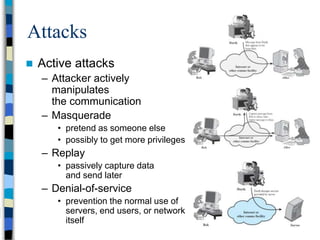
 Active attacks
– Attacker actively
manipulates
the communication
– Masquerade
• pretend as someone else
• possibly to get more privileges
– Replay
• passively capture data
and send later
– Denial-of-service
• prevention the normal use of
servers, end users, or network
itself
28
Attacks
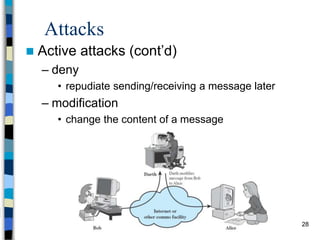
 Active attacks (cont’d)
– deny
• repudiate sending/receiving a message later
– modification
• change the content of a message
29
Security Services
 to prevent or detect attacks
 to enhance the security
 replicate functions of physical
documents
– e.g.
• have signatures, dates
• need protection from disclosure, tampering, or
destruction
• notarize
• record
30
Basic Security Services
 Authentication
– assurance that the communicating entity is the
one it claims to be
– peer entity authentication
• mutual confidence in the identities of the parties involved
in a connection
– Data-origin authentication
• assurance about the source of the received data
 Access Control
– prevention of the unauthorized use of a resource
– to achieve this, each entity trying to gain access
must first be identified and authenticated, so that
access rights can be tailored to the individual
31
Basic Security Services
 Data Confidentiality
– protection of data from unauthorized disclosure
(against eavesdropping)
– traffic flow confidentiality is one step ahead
• this requires that an attacker not be able to observe the
source and destination, frequency, length, or other
characteristics of the traffic on a communications facility
 Data Integrity
– assurance that data received are exactly as sent
by an authorized sender
– i.e. no modification, insertion, deletion, or replay
32
Basic Security Services
 Non-Repudiation
– protection against denial by one of the
parties in a communication
– Origin non-repudiation
• proof that the message was sent by the
specified party
– Destination non-repudiation
• proof that the message was received by the
specified party
33
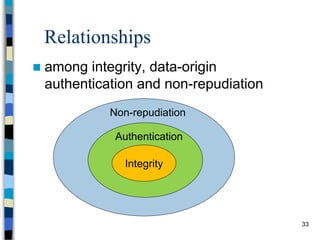
Relationships
 among integrity, data-origin
authentication and non-repudiation
Integrity
Authentication
Non-repudiation
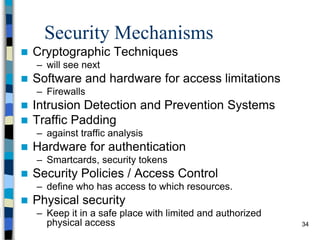
Security Mechanisms
 Cryptographic Techniques
– will see next
 Software and hardware for access limitations
– Firewalls
 Intrusion Detection and Prevention Systems
 Traffic Padding
– against traffic analysis
 Hardware for authentication
– Smartcards, security tokens
 Security Policies / Access Control
– define who has access to which resources.
 Physical security
– Keep it in a safe place with limited and authorized
physical access 34
35
Cryptographic Security Mechanisms
 Encryption (a.k.a. Encipherment)
– use of mathematical algorithms to
transform data into a form that is not
readily intelligible
• keys are involved
36
Cryptographic Security Mechanisms
 Message Digest
– similar to encryption, but one-way (recovery not
possible)
– generally no keys are used
 Digital Signatures and Message
Authentication Codes
– Data appended to, or a cryptographic
transformation of, a data unit to prove the source
and the integrity of the data
 Authentication Exchange
– ensure the identity of an entity by exchanging
some information
37
Security Mechanisms
 Notarization
– use of a trusted third party to assure certain
properties of a data exchange
 Timestamping
– inclusion of correct date and time within messages
38
And the Oscar goes to …
 On top of everything, the most
fundamental problem in security is
–SECURE KEY EXCHANGE
• mostly over an insecure channel
39
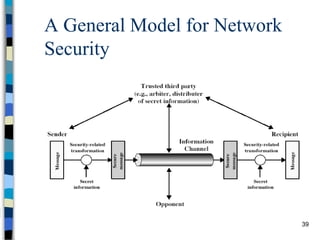
A General Model for Network
Security
40
Model for Network Security
 using this model requires us to:
– design a suitable algorithm for the security
transformation
– generate the secret information (keys) used by the
algorithm
– develop methods to distribute and share the
secret information
– specify a protocol enabling the principals to use
the transformation and secret information for a
security service
41
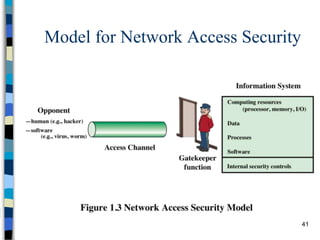
Model for Network Access Security
42
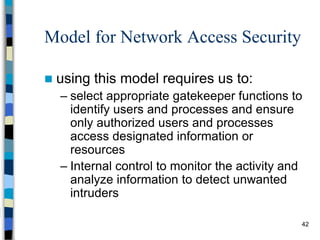
Model for Network Access Security
 using this model requires us to:
– select appropriate gatekeeper functions to
identify users and processes and ensure
only authorized users and processes
access designated information or
resources
– Internal control to monitor the activity and
analyze information to detect unwanted
intruders
43
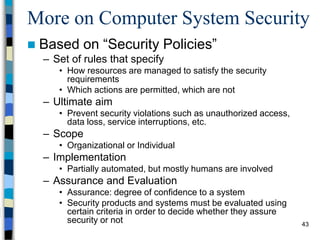
More on Computer System Security
 Based on “Security Policies”
– Set of rules that specify
• How resources are managed to satisfy the security
requirements
• Which actions are permitted, which are not
– Ultimate aim
• Prevent security violations such as unauthorized access,
data loss, service interruptions, etc.
– Scope
• Organizational or Individual
– Implementation
• Partially automated, but mostly humans are involved
– Assurance and Evaluation
• Assurance: degree of confidence to a system
• Security products and systems must be evaluated using
certain criteria in order to decide whether they assure
security or not
44
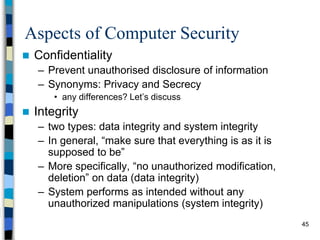
Aspects of Computer Security
 Mostly related to Operating Systems
 Similar to those discussed for Network
Security
– Confidentiality
– Integrity
– Availability
– Authenticity
– Accountability
– Dependability
45
Aspects of Computer Security
 Confidentiality
– Prevent unauthorised disclosure of information
– Synonyms: Privacy and Secrecy
• any differences? Let’s discuss
 Integrity
– two types: data integrity and system integrity
– In general, “make sure that everything is as it is
supposed to be”
– More specifically, “no unauthorized modification,
deletion” on data (data integrity)
– System performs as intended without any
unauthorized manipulations (system integrity)
46
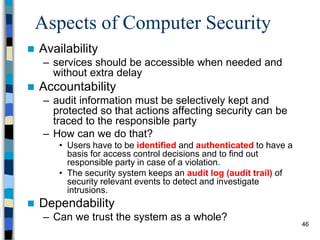
Aspects of Computer Security
 Availability
– services should be accessible when needed and
without extra delay
 Accountability
– audit information must be selectively kept and
protected so that actions affecting security can be
traced to the responsible party
– How can we do that?
• Users have to be identified and authenticated to have a
basis for access control decisions and to find out
responsible party in case of a violation.
• The security system keeps an audit log (audit trail) of
security relevant events to detect and investigate
intrusions.
 Dependability
– Can we trust the system as a whole?
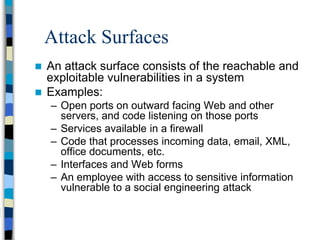
Attack Surfaces
 An attack surface consists of the reachable and
exploitable vulnerabilities in a system
 Examples:
– Open ports on outward facing Web and other
servers, and code listening on those ports
– Services available in a firewall
– Code that processes incoming data, email, XML,
office documents, etc.
– Interfaces and Web forms
– An employee with access to sensitive information
vulnerable to a social engineering attack
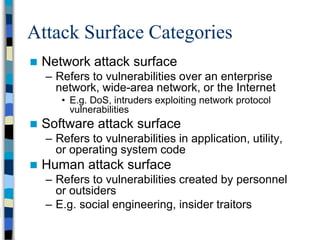
Attack Surface Categories
 Network attack surface
– Refers to vulnerabilities over an enterprise
network, wide-area network, or the Internet
• E.g. DoS, intruders exploiting network protocol
vulnerabilities
 Software attack surface
– Refers to vulnerabilities in application, utility,
or operating system code
 Human attack surface
– Refers to vulnerabilities created by personnel
or outsiders
– E.g. social engineering, insider traitors
49
Fundamental Dilemma of
Security
 “Security unaware users have specific
security requirements but no security
expertise.”
– from D. Gollmann
– Solution: level of security is given in predefined
classes specified in some common criteria
• Orange book (Trusted Computer System Evaluation
Criteria) is such a criteria
50
Fundamental Tradeoff
 Between security and ease-of-use
 Security may require clumsy and
inconvenient restrictions on users and
processes
“If security is an add-on that people have to do
something special to get, then most of the time they
will not get it”
Martin Hellman,
co-inventor of Public Key Cryptography
51
Good Enough Security
“Everything should be as secure as
necessary, but not securer”
Ravi Sandhu, “Good Enough Security”, IEEE Internet
Computing, January/February 2003, pp. 66- 68.
 Read the full article at
http://dx.doi.org/10.1109/MIC.2003.1167341
52
Some Other Security Facts
 Not as simple as it might first appear to the novice
 Must consider all potential attacks when designing a
system
 Generally yields complex and counterintuitive systems
 Battle of intelligent strategies between attacker and
admin
 Requires regular monitoring
 Not considered as a beneficial investment until a security
failure occurs
 Actually security investments must be considered as insurance
against attacks
 too often an afterthought
 Not only from investment point of view, but also from design
point of view

Network Security

  • 1.
    1 CS 432/532 Computer andNetwork Security Spring 2019 Albert Levi levi@sabanciuniv.edu FENS 1091, ext.9563
  • 2.
    2 What is thiscourse about? This course is to discuss – security needs – security services – security mechanisms and protocols for data stored in computers and transmitted across computer networks
  • 3.
    3 What we will/won’tcover?  We will cover – security threats – practical security issues (practice in labs) – security protocols in use – security protocols not in use – securing computer systems – introductory cryptography  We will not cover – advanced cryptography – computer networks – operating systems – computers in general – how to hack 
  • 4.
    4 What security isabout in general?  Security is about protection of assets – D. Gollmann, Computer Security, Wiley  Prevention – take measures that prevent your assets from being damaged (or stolen)  Detection – take measures so that you can detect when, how, and by whom an asset has been damaged  Reaction – take measures so that you can recover your assets
  • 5.
    5 Real world example Prevention – locks at doors, window bars, secure the walls around the property, hire a guard  Detection – missing items, burglar alarms, closed circuit TV  Reaction – attack on burglar (not recommended ), call the police, replace stolen items, make an insurance claim
  • 6.
    6 Internet shopping example Prevention – encrypt your order and card number, enforce merchants to do some extra checks, using PIN even for Internet transactions, don’t send card number via Internet  Detection – an unauthorized transaction appears on your credit card statement  Reaction – complain, dispute, ask for a new card number, sue (if you can find of course ) – Or, pay and forget (a glass of cold water) 
  • 7.
    7 Information security inpast & present  Traditional Information Security – keep the cabinets locked – put them in a secure room – human guards – electronic surveillance systems – in general: physical and administrative mechanisms  Modern World – Data are in computers – Computers are interconnected Computer and Network Security
  • 8.
    8 Terminology  Computer Security –2 main focuses: Information and Computer itself – tools and mechanisms to protect data in a computer (actually an automated information system), even if the computers/system are connected to a network – tools and mechanisms to protect the information system itself (hardware, software, firmware, *ware )  Against? – against hackers (intrusion) – against viruses – against denial of service attacks – etc. (all types of malicious behavior)
  • 9.
    9 Terminology  Network andInternet Security – measures to prevent, detect, and correct security violations that involve the transmission of information in a network or interconnected networks
  • 10.
    10 A note onsecurity terminology  No single and consistent terminology in the literature!  Be careful not to confuse while reading papers and books  See the next slide for some terminology taken from Stallings and Brown, Computer Security who took from RFC4949, Internet Security Glossary
  • 11.
  • 12.
    Relationships among thesecurity Concepts 12
  • 13.
    13 Security TrendsSkill andknowledge required to mount an attack
  • 14.
    The global averagecost of cyber crime/attacks 14 2017 Cost of Cyber Crime Study by Accenture* * https://www.accenture.com/t20170926T072837Z__w__/us-en/_acnmedia/PDF-61/Accenture-2017-CostCyberCrimeStudy.pdf Steeper increasing trend in the recent years
  • 15.
    Average cost ofcyber crime for seven countries 15 2017 Cost of Cyber Crime Study by Accenture* * https://www.accenture.com/t20170926T072837Z__w__/us-en/_acnmedia/PDF-61/Accenture-2017-CostCyberCrimeStudy.pdf - Germany has highest percentage increase; - UK, US are around the mean in percentage increase 254 institutions responded
  • 16.
    A Scattergram ofRespondents 16 2017 Cost of Cyber Crime Study by Accenture* * https://www.accenture.com/t20170926T072837Z__w__/us-en/_acnmedia/PDF-61/Accenture-2017-CostCyberCrimeStudy.pdf - Mean is US$11.7 M - High variance - 163 institutions are below mean (out of 254)
  • 17.
    Breakdown by Sector 17 2017Cost of Cyber Crime Study by Accenture* * https://www.accenture.com/t20170926T072837Z__w__/us-en/_acnmedia/PDF-61/Accenture-2017-CostCyberCrimeStudy.pdf - Financial Services Sector has the Highest Cost due to Cyber Crime
  • 18.
    Types of cyberattacks experienced 18 2017 Cost of Cyber Crime Study by Accenture* * https://www.accenture.com/t20170926T072837Z__w__/us-en/_acnmedia/PDF-61/Accenture-2017-CostCyberCrimeStudy.pdf - Percentage of the respondents experienced - Ransomware doubled
  • 19.
    Deployment Rate ofSecurity Technologies 19 2017 Cost of Cyber Crime Study by Accenture* * https://www.accenture.com/t20170926T072837Z__w__/us-en/_acnmedia/PDF-61/Accenture-2017-CostCyberCrimeStudy.pdf - Percentage of the respondents experienced - Ransomware doubled
  • 20.
    Annual Return ofInvestment (RoI) 20 2017 Cost of Cyber Crime Study by Accenture* * https://www.accenture.com/t20170926T072837Z__w__/us-en/_acnmedia/PDF-61/Accenture-2017-CostCyberCrimeStudy.pdf - More or less in parallel with deployment rate - But AI, Data Mining based novel techniques have higher RoI - Bad performance for encryption and DLP, but they are needed
  • 21.
    Security Objectives: CIATriad and Beyond
  • 22.
    Computer Security Objectives •Data confidentiality • Assures that private or confidential information is not made available or disclosed to unauthorized individuals • Privacy • Assures that individuals control or influence what information related to them may be collected and stored and by whom and to whom that information may be disclosed Confidentiality • Data integrity • Assures that information changed only in a specified and authorized manner • System integrity • Assures that a system performs its intended function in an unimpaired manner, free from deliberate or inadvertent unauthorized manipulation of the system Integrity • Assures that systems work promptly and service is not denied to authorized users Availability
  • 23.
    Additional concepts: Authenticity • Verifyingthat users are who they say they are and that each input arriving at the system came from a trusted source Accountability • Being able to trace the responsible party/process/entity in case of a security incident or action.
  • 24.
    24 Services, Mechanisms, Attacks 3 aspects of information security: – security attacks (and threats) • actions that (may) compromise security – security services • services counter to attacks – security mechanisms • used by services • e.g. secrecy is a service, encryption (a.k.a. encipherment) is a mechanism
  • 25.
    25 Attacks  Attacks oncomputer systems – break-in to destroy information – break-in to steal information – blocking to operate properly – malicious software • wide spectrum of problems  Source of attacks – Insiders – Outsiders
  • 26.
    26 Attacks  Network Security –Active attacks – Passive attacks  Passive attacks – interception of the messages – What can the attacker do? • use information internally – hard to understand • release the content – can be understood • traffic analysis – hard to avoid – Hard to detect, try to prevent
  • 27.
    27 Attacks  Active attacks –Attacker actively manipulates the communication – Masquerade • pretend as someone else • possibly to get more privileges – Replay • passively capture data and send later – Denial-of-service • prevention the normal use of servers, end users, or network itself
  • 28.
    28 Attacks  Active attacks(cont’d) – deny • repudiate sending/receiving a message later – modification • change the content of a message
  • 29.
    29 Security Services  toprevent or detect attacks  to enhance the security  replicate functions of physical documents – e.g. • have signatures, dates • need protection from disclosure, tampering, or destruction • notarize • record
  • 30.
    30 Basic Security Services Authentication – assurance that the communicating entity is the one it claims to be – peer entity authentication • mutual confidence in the identities of the parties involved in a connection – Data-origin authentication • assurance about the source of the received data  Access Control – prevention of the unauthorized use of a resource – to achieve this, each entity trying to gain access must first be identified and authenticated, so that access rights can be tailored to the individual
  • 31.
    31 Basic Security Services Data Confidentiality – protection of data from unauthorized disclosure (against eavesdropping) – traffic flow confidentiality is one step ahead • this requires that an attacker not be able to observe the source and destination, frequency, length, or other characteristics of the traffic on a communications facility  Data Integrity – assurance that data received are exactly as sent by an authorized sender – i.e. no modification, insertion, deletion, or replay
  • 32.
    32 Basic Security Services Non-Repudiation – protection against denial by one of the parties in a communication – Origin non-repudiation • proof that the message was sent by the specified party – Destination non-repudiation • proof that the message was received by the specified party
  • 33.
    33 Relationships  among integrity,data-origin authentication and non-repudiation Integrity Authentication Non-repudiation
  • 34.
    Security Mechanisms  CryptographicTechniques – will see next  Software and hardware for access limitations – Firewalls  Intrusion Detection and Prevention Systems  Traffic Padding – against traffic analysis  Hardware for authentication – Smartcards, security tokens  Security Policies / Access Control – define who has access to which resources.  Physical security – Keep it in a safe place with limited and authorized physical access 34
  • 35.
    35 Cryptographic Security Mechanisms Encryption (a.k.a. Encipherment) – use of mathematical algorithms to transform data into a form that is not readily intelligible • keys are involved
  • 36.
    36 Cryptographic Security Mechanisms Message Digest – similar to encryption, but one-way (recovery not possible) – generally no keys are used  Digital Signatures and Message Authentication Codes – Data appended to, or a cryptographic transformation of, a data unit to prove the source and the integrity of the data  Authentication Exchange – ensure the identity of an entity by exchanging some information
  • 37.
    37 Security Mechanisms  Notarization –use of a trusted third party to assure certain properties of a data exchange  Timestamping – inclusion of correct date and time within messages
  • 38.
    38 And the Oscargoes to …  On top of everything, the most fundamental problem in security is –SECURE KEY EXCHANGE • mostly over an insecure channel
  • 39.
    39 A General Modelfor Network Security
  • 40.
    40 Model for NetworkSecurity  using this model requires us to: – design a suitable algorithm for the security transformation – generate the secret information (keys) used by the algorithm – develop methods to distribute and share the secret information – specify a protocol enabling the principals to use the transformation and secret information for a security service
  • 41.
    41 Model for NetworkAccess Security
  • 42.
    42 Model for NetworkAccess Security  using this model requires us to: – select appropriate gatekeeper functions to identify users and processes and ensure only authorized users and processes access designated information or resources – Internal control to monitor the activity and analyze information to detect unwanted intruders
  • 43.
    43 More on ComputerSystem Security  Based on “Security Policies” – Set of rules that specify • How resources are managed to satisfy the security requirements • Which actions are permitted, which are not – Ultimate aim • Prevent security violations such as unauthorized access, data loss, service interruptions, etc. – Scope • Organizational or Individual – Implementation • Partially automated, but mostly humans are involved – Assurance and Evaluation • Assurance: degree of confidence to a system • Security products and systems must be evaluated using certain criteria in order to decide whether they assure security or not
  • 44.
    44 Aspects of ComputerSecurity  Mostly related to Operating Systems  Similar to those discussed for Network Security – Confidentiality – Integrity – Availability – Authenticity – Accountability – Dependability
  • 45.
    45 Aspects of ComputerSecurity  Confidentiality – Prevent unauthorised disclosure of information – Synonyms: Privacy and Secrecy • any differences? Let’s discuss  Integrity – two types: data integrity and system integrity – In general, “make sure that everything is as it is supposed to be” – More specifically, “no unauthorized modification, deletion” on data (data integrity) – System performs as intended without any unauthorized manipulations (system integrity)
  • 46.
    46 Aspects of ComputerSecurity  Availability – services should be accessible when needed and without extra delay  Accountability – audit information must be selectively kept and protected so that actions affecting security can be traced to the responsible party – How can we do that? • Users have to be identified and authenticated to have a basis for access control decisions and to find out responsible party in case of a violation. • The security system keeps an audit log (audit trail) of security relevant events to detect and investigate intrusions.  Dependability – Can we trust the system as a whole?
  • 47.
    Attack Surfaces  Anattack surface consists of the reachable and exploitable vulnerabilities in a system  Examples: – Open ports on outward facing Web and other servers, and code listening on those ports – Services available in a firewall – Code that processes incoming data, email, XML, office documents, etc. – Interfaces and Web forms – An employee with access to sensitive information vulnerable to a social engineering attack
  • 48.
    Attack Surface Categories Network attack surface – Refers to vulnerabilities over an enterprise network, wide-area network, or the Internet • E.g. DoS, intruders exploiting network protocol vulnerabilities  Software attack surface – Refers to vulnerabilities in application, utility, or operating system code  Human attack surface – Refers to vulnerabilities created by personnel or outsiders – E.g. social engineering, insider traitors
  • 49.
    49 Fundamental Dilemma of Security “Security unaware users have specific security requirements but no security expertise.” – from D. Gollmann – Solution: level of security is given in predefined classes specified in some common criteria • Orange book (Trusted Computer System Evaluation Criteria) is such a criteria
  • 50.
    50 Fundamental Tradeoff  Betweensecurity and ease-of-use  Security may require clumsy and inconvenient restrictions on users and processes “If security is an add-on that people have to do something special to get, then most of the time they will not get it” Martin Hellman, co-inventor of Public Key Cryptography
  • 51.
    51 Good Enough Security “Everythingshould be as secure as necessary, but not securer” Ravi Sandhu, “Good Enough Security”, IEEE Internet Computing, January/February 2003, pp. 66- 68.  Read the full article at http://dx.doi.org/10.1109/MIC.2003.1167341
  • 52.
    52 Some Other SecurityFacts  Not as simple as it might first appear to the novice  Must consider all potential attacks when designing a system  Generally yields complex and counterintuitive systems  Battle of intelligent strategies between attacker and admin  Requires regular monitoring  Not considered as a beneficial investment until a security failure occurs  Actually security investments must be considered as insurance against attacks  too often an afterthought  Not only from investment point of view, but also from design point of view