Web Technologies – CS 382
Shehzad Aslam
Lecture 6
1 Hr
 Creating Objects in JavaScript
 Introduction to Data formats & JSON
 Representing Objects in JSON
 Representing Arrays in JSON
 Nested Objects or Arrays in JSON
 Object is any real world thing having
properties and behaviors
 We are going to see only properties not
behaviors
var objectname = {
property: value,
property:value
};
var fish= {
name: “tuna”,
weight:150,
color: “black & gray”
};
To access properties
 Dot notation
Objectname.property;
fish.name
 Map (associative array,
dictionary, hash table)
notation
Objectname[“property”];
fish[“name”]
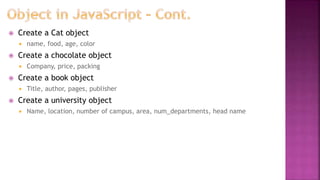
 Create a Cat object
 name, food, age, color
 Create a chocolate object
 Company, price, packing
 Create a book object
 Title, author, pages, publisher
 Create a university object
 Name, location, number of campus, area, num_departments, head name
 Index based
var arrayname= new Array();
//then use push method
OR
var counting= [1,2,3,4];
var name = [“Ali”, “Umer”];
Or
var a = [“This”, 23, “2@df”];
To access Elements
arrayname[index];
counting[2];
name[1];
a[2];
var subject= {
session: 2014,
subjects: [
“Web Technology”,
“OOAD”,
“Computer Networks”
],
level: 6
};
Or could be nested objects, nested arrays or
any combination of both
To access OOAD
subject.subjects[1]
OR
Subject[“subjects”][1]
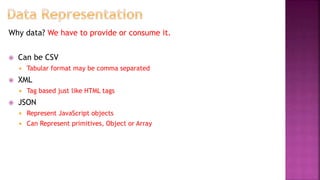
Why data? We have to provide or consume it.
 Can be CSV
 Tabular format may be comma separated
 XML
 Tag based just like HTML tags
 JSON
 Represent JavaScript objects
 Can Represent primitives, Object or Array
var counting= [1,2,3,4];
Will be
[
1,
2,
3,
4
]
var name = [“Ali”, “Umer”];
Will be
[
“Ali”,
“Umer”
]
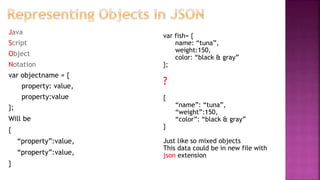
Java
Script
Object
Notation
var objectname = {
property: value,
property:value
};
Will be
{
“property”:value,
“property”:value,
}
var fish= {
name: “tuna”,
weight:150,
color: “black & gray”
};
?
{
“name”: “tuna”,
“weight”:150,
“color”: “black & gray”
}
Just like so mixed objects
This data could be in new file with
json extension
 Create a Cat object
 name, food, age, color
 Represent In JSON
 Create a chocolate object
 Company, price, packing
 Represent In JSON
 Create a book object
 Title, author, pages, publisher
 Represent In JSON
 Create a university object
 Name, location, number of campus, area, num_departments, head name
 Represent In JSON
 Create a list of subject objects
 Each subject has code, title, credit hours, and teacher
 Represent In JSON
 Represent University Department in JavaScript Object & in
JSON
 Name, Head Name, Started, Programs offered (array), total students, total
faculty
 Create a university object
 Name, location, number of campus, area, num_departments, head name
 University has 3 departments
 Department of Business Management
 Department of Pharmacy
 Department of Mathematics
 Each department has above information given in example
 Represent in JSON
 Represent RCET in one Object
 Departments (array)
 Each department having name, hod name, faculty list (each faculty name, qualification),
no of students in each session
 Cafeteria (array) with list of food items each item having category, served
weight and price
 Playgrounds (array) with description, area
 Hostels (array) with name, warden, rooms (array) with each room resident
name
 Represent your time table in one object
 JSON validator
 Use http://jsonlint.com/ to validate your json
 Practical usage will be in next Lecture

Lec 6

  • 1.
    Web Technologies –CS 382 Shehzad Aslam Lecture 6 1 Hr
  • 2.
     Creating Objectsin JavaScript  Introduction to Data formats & JSON  Representing Objects in JSON  Representing Arrays in JSON  Nested Objects or Arrays in JSON
  • 3.
     Object isany real world thing having properties and behaviors  We are going to see only properties not behaviors var objectname = { property: value, property:value }; var fish= { name: “tuna”, weight:150, color: “black & gray” }; To access properties  Dot notation Objectname.property; fish.name  Map (associative array, dictionary, hash table) notation Objectname[“property”]; fish[“name”]
  • 4.
     Create aCat object  name, food, age, color  Create a chocolate object  Company, price, packing  Create a book object  Title, author, pages, publisher  Create a university object  Name, location, number of campus, area, num_departments, head name
  • 5.
     Index based vararrayname= new Array(); //then use push method OR var counting= [1,2,3,4]; var name = [“Ali”, “Umer”]; Or var a = [“This”, 23, “2@df”]; To access Elements arrayname[index]; counting[2]; name[1]; a[2];
  • 6.
    var subject= { session:2014, subjects: [ “Web Technology”, “OOAD”, “Computer Networks” ], level: 6 }; Or could be nested objects, nested arrays or any combination of both To access OOAD subject.subjects[1] OR Subject[“subjects”][1]
  • 7.
    Why data? Wehave to provide or consume it.  Can be CSV  Tabular format may be comma separated  XML  Tag based just like HTML tags  JSON  Represent JavaScript objects  Can Represent primitives, Object or Array
  • 8.
    var counting= [1,2,3,4]; Willbe [ 1, 2, 3, 4 ] var name = [“Ali”, “Umer”]; Will be [ “Ali”, “Umer” ]
  • 9.
    Java Script Object Notation var objectname ={ property: value, property:value }; Will be { “property”:value, “property”:value, } var fish= { name: “tuna”, weight:150, color: “black & gray” }; ? { “name”: “tuna”, “weight”:150, “color”: “black & gray” } Just like so mixed objects This data could be in new file with json extension
  • 10.
     Create aCat object  name, food, age, color  Represent In JSON  Create a chocolate object  Company, price, packing  Represent In JSON  Create a book object  Title, author, pages, publisher  Represent In JSON  Create a university object  Name, location, number of campus, area, num_departments, head name  Represent In JSON  Create a list of subject objects  Each subject has code, title, credit hours, and teacher  Represent In JSON
  • 11.
     Represent UniversityDepartment in JavaScript Object & in JSON  Name, Head Name, Started, Programs offered (array), total students, total faculty  Create a university object  Name, location, number of campus, area, num_departments, head name  University has 3 departments  Department of Business Management  Department of Pharmacy  Department of Mathematics  Each department has above information given in example  Represent in JSON
  • 12.
     Represent RCETin one Object  Departments (array)  Each department having name, hod name, faculty list (each faculty name, qualification), no of students in each session  Cafeteria (array) with list of food items each item having category, served weight and price  Playgrounds (array) with description, area  Hostels (array) with name, warden, rooms (array) with each room resident name  Represent your time table in one object
  • 13.
     JSON validator Use http://jsonlint.com/ to validate your json  Practical usage will be in next Lecture