Jalal Miah
Dept. of CSE
CITY UNIVERSITY
FTP configuration in Packet Tracer
What is a file server?
A file server is a central server in a computer network that provides file systems or at least parts
of a file system to connected clients.File servers therefore offer users a central storage place for
files on internal data media, which is accessible to all authorized clients. Here, the server
administrator defines strict rules regarding which users have which access rights: For instance,
the configuration or file authorizations of the respective file system enable the admin to set
which files can be seen and opened by a certain user or user group, and whether data can only be
viewed or also added, edited, or deleted.
Let’s now do FTP configuration in Packet Tracer:
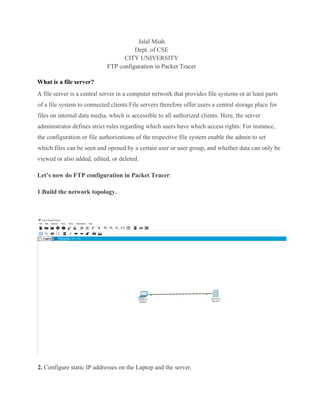
1.Build the network topology.
2. Configure static IP addresses on the Laptop and the server.
Laptop: IP address: 192.168.2.1Subnet Mask: 255.255.255.0
Server: IP address: 192.168.2.2 Subnet Mask: 255.255.255.0
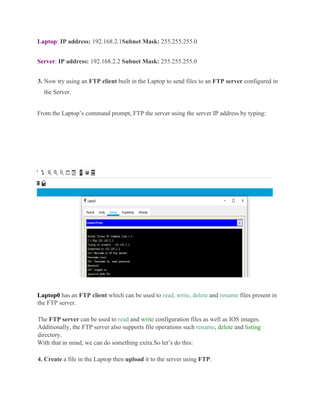
3. Now try using an FTP client built in the Laptop to send files to an FTP server configured in
the Server.
From the Laptop’s command prompt, FTP the server using the server IP address by typing:
Laptop0 has an FTP client which can be used to read, write, delete and rename files present in
the FTP server.
The FTP server can be used to read and write configuration files as well as IOS images.
Additionally, the FTP server also supports file operations such rename, delete and listing
directory.
With that in mind, we can do something extra.So let’s do this:
4. Create a file in the Laptop then upload it to the server using FTP.
To do this, open the Text Editor in the Laptop, create a file and give it your name of choice.
Type any text in the editor then save your file.e.g.jalal.txt.
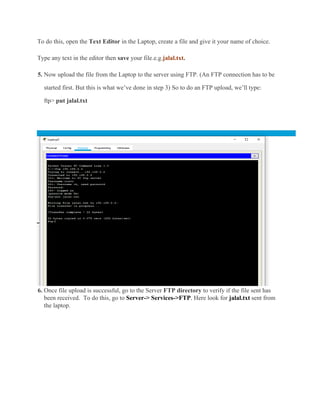
5. Now upload the file from the Laptop to the server using FTP. (An FTP connection has to be
started first. But this is what we’ve done in step 3) So to do an FTP upload, we’ll type:
ftp> put jalal.txt
6. Once file upload is successful, go to the Server FTP directory to verify if the file sent has
been received. To do this, go to Server-> Services->FTP. Here look for jalal.txt sent from
the laptop.
File server

File server

  • 1.
    Jalal Miah Dept. ofCSE CITY UNIVERSITY FTP configuration in Packet Tracer What is a file server? A file server is a central server in a computer network that provides file systems or at least parts of a file system to connected clients.File servers therefore offer users a central storage place for files on internal data media, which is accessible to all authorized clients. Here, the server administrator defines strict rules regarding which users have which access rights: For instance, the configuration or file authorizations of the respective file system enable the admin to set which files can be seen and opened by a certain user or user group, and whether data can only be viewed or also added, edited, or deleted. Let’s now do FTP configuration in Packet Tracer: 1.Build the network topology. 2. Configure static IP addresses on the Laptop and the server.
  • 2.
    Laptop: IP address:192.168.2.1Subnet Mask: 255.255.255.0 Server: IP address: 192.168.2.2 Subnet Mask: 255.255.255.0 3. Now try using an FTP client built in the Laptop to send files to an FTP server configured in the Server. From the Laptop’s command prompt, FTP the server using the server IP address by typing: Laptop0 has an FTP client which can be used to read, write, delete and rename files present in the FTP server. The FTP server can be used to read and write configuration files as well as IOS images. Additionally, the FTP server also supports file operations such rename, delete and listing directory. With that in mind, we can do something extra.So let’s do this: 4. Create a file in the Laptop then upload it to the server using FTP.
  • 3.
    To do this,open the Text Editor in the Laptop, create a file and give it your name of choice. Type any text in the editor then save your file.e.g.jalal.txt. 5. Now upload the file from the Laptop to the server using FTP. (An FTP connection has to be started first. But this is what we’ve done in step 3) So to do an FTP upload, we’ll type: ftp> put jalal.txt 6. Once file upload is successful, go to the Server FTP directory to verify if the file sent has been received. To do this, go to Server-> Services->FTP. Here look for jalal.txt sent from the laptop.