Web Technologies – CS 382
Shehzad Aslam
Lecture 7
2 Hr
 AJAX introduction
 Where t use AJAX
 Combining AJAX with JSON
 Review of JavaScript Object & JSON
 AJAX with simple JavaScript
 Asynchronous JavaScript and XML
 Technique for creating better, faster, and more interactive web applications
 Uses XHTML for content with DOM & JavaScript to display dynamic content
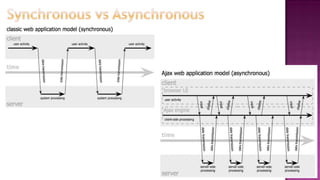
 Traditional Page is synchronous
 You submit form, hit enter and wait to be redirected to another page
 AJAX is Asynchronous
 Will make a background request and update the page, while you are doing other things in the
page
 Where to use
 Scroll a page, some of the contents will load after scroll (just like Google image search)
 Do chat, after certain time pull new contents
 Notifications, after certain time pull new notification
 Tell that you are active; after certain time ping server with some data
 When doing search, show hits; or provide some data, remaining will be filled
Use where you do not want to reload page
 Runs on browser not Server
 Not a language, can say a technique or Library
 Basically Designed for XML Response
 But can use any data format (plain text, XML, CSV, JSON, HTML etc)
 Behind the scene, HTTP request is sent
 Powerful use is in searching & forms submission, chat, notifications etc
 Real Examples
 Comments pull on youtube
 Search hints in Google or on some site
 Like option in Facebook
 Next posts pull on Facebook
 Cricket score updates
 … and much more
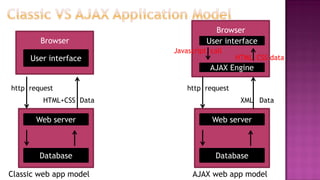
User interface
Browser
Database
Web server
http request
HTML+CSS Data
User interface
Browser
Database
Web server
http request
XML Data
AJAX Engine
Javascript call
HTML CSS data
Classic web app model AJAX web app model
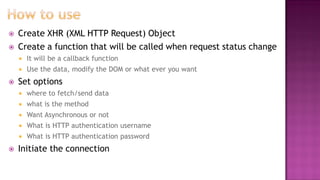
 Create XHR (XML HTTP Request) Object
 Create a function that will be called when request status change
 It will be a callback function
 Use the data, modify the DOM or what ever you want
 Set options
 where to fetch/send data
 what is the method
 Want Asynchronous or not
 What is HTTP authentication username
 What is HTTP authentication password
 Initiate the connection
var xhr = new XMLHttpRequest(); //object
//callback function
xhr.onreadystatechange = function () {
//check ready state
//check server response code, based on that use data or show error
};
//set request parameters
xhr.open(method, url, [asyn/synch, username, pwd]);
//e.g. xhr.open(“GET”, “http://uet.edy.pk”, true);
//call it on some event
xhr.send();
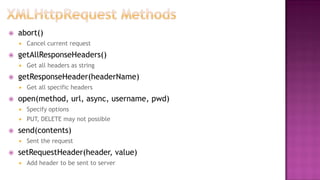
 abort()
 Cancel current request
 getAllResponseHeaders()
 Get all headers as string
 getResponseHeader(headerName)
 Get all specific headers
 open(method, url, async, username, pwd)
 Specify options
 PUT, DELETE may not possible
 send(contents)
 Sent the request
 setRequestHeader(header, value)
 Add header to be sent to server
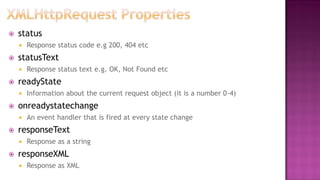
 status
 Response status code e.g 200, 404 etc
 statusText
 Response status text e.g. OK, Not Found etc
 readyState
 Information about the current request object (it is a number 0-4)
 onreadystatechange
 An event handler that is fired at every state change
 responseText
 Response as a string
 responseXML
 Response as XML
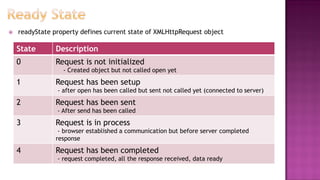
 readyState property defines current state of XMLHttpRequest object
State Description
0 Request is not initialized
- Created object but not called open yet
1 Request has been setup
- after open has been called but sent not called yet (connected to server)
2 Request has been sent
- After send has been called
3 Request is in process
- browser established a communication but before server completed
response
4 Request has been completed
- request completed, all the response received, data ready
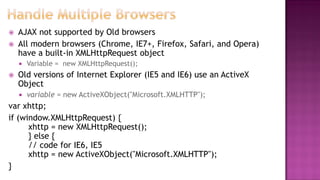
 AJAX not supported by Old browsers
 All modern browsers (Chrome, IE7+, Firefox, Safari, and Opera)
have a built-in XMLHttpRequest object
 Variable = new XMLHttpRequest();
 Old versions of Internet Explorer (IE5 and IE6) use an ActiveX
Object
 variable = new ActiveXObject("Microsoft.XMLHTTP");
var xhttp;
if (window.XMLHttpRequest) {
xhttp = new XMLHttpRequest();
} else {
// code for IE6, IE5
xhttp = new ActiveXObject("Microsoft.XMLHTTP");
}
var counting= [1,2,3,4];
Will be
[
1,
2,
3,
4
]
var name = [“Ali”, “Umer”];
Will be
[
“Ali”,
“Umer”
]
Java
Script
Object
Notation
var objectname = {
property: value,
property:value
};
Will be
{
“property”:value,
“property”:value,
}
var fish= {
name: “tuna”,
weight:150,
color: “black & gray”
};
?
{
“name”: “tuna”,
“weight”:150,
“color”: “black & gray”
}
Just like so mixed objects
This data could be in new file with
json extension
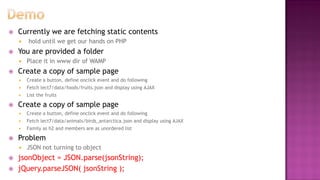
 Currently we are fetching static contents
 hold until we get our hands on PHP
 You are provided a folder
 Place it in www dir of WAMP
 Create a copy of sample page
 Create a button, define onclick event and do following
 Fetch lect7/data/foods/fruits.json and display using AJAX
 List the fruits
 Create a copy of sample page
 Create a button, define onclick event and do following
 Fetch lect7/data/animals/birds_antarctica.json and display using AJAX
 Family as h2 and members are as unordered list
 Problem
 JSON not turning to object
 jsonObject = JSON.parse(jsonString);
 jQuery.parseJSON( jsonString );
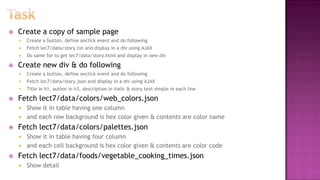
 Create a copy of sample page
 Create a button, define onclick event and do following
 Fetch lec7/data/story.txt and display in a div using AJAX
 Do same for to get lec7/data/story.html and display in new div
 Create new div & do following
 Create a button, define onclick event and do following
 Fetch lec7/data/story.json and display in a div using AJAX
 Title in h1, author in h3, description in italic & story text simple in each line
 Fetch lect7/data/colors/web_colors.json
 Show it in table having one column
 and each row background is hex color given & contents are color name
 Fetch lect7/data/colors/palettes.json
 Show it in table having four column
 and each cell background is hex color given & contents are color code
 Fetch lect7/data/foods/vegetable_cooking_times.json
 Show detail
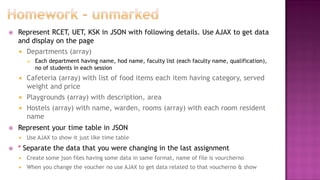
 Represent RCET, UET, KSK in JSON with following details. Use AJAX to get data
and display on the page
 Departments (array)
 Each department having name, hod name, faculty list (each faculty name, qualification),
no of students in each session
 Cafeteria (array) with list of food items each item having category, served
weight and price
 Playgrounds (array) with description, area
 Hostels (array) with name, warden, rooms (array) with each room resident
name
 Represent your time table in JSON
 Use AJAX to show it just like time table
 * Separate the data that you were changing in the last assignment
 Create some json files having some data in same format, name of file is vourcherno
 When you change the voucher no use AJAX to get data related to that voucherno & show
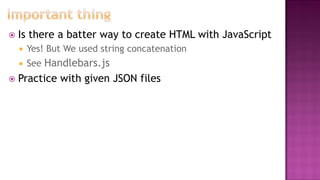
 Is there a batter way to create HTML with JavaScript
 Yes! But We used string concatenation
 See Handlebars.js
 Practice with given JSON files

Lec 7

  • 1.
    Web Technologies –CS 382 Shehzad Aslam Lecture 7 2 Hr
  • 2.
     AJAX introduction Where t use AJAX  Combining AJAX with JSON  Review of JavaScript Object & JSON  AJAX with simple JavaScript
  • 3.
     Asynchronous JavaScriptand XML  Technique for creating better, faster, and more interactive web applications  Uses XHTML for content with DOM & JavaScript to display dynamic content  Traditional Page is synchronous  You submit form, hit enter and wait to be redirected to another page  AJAX is Asynchronous  Will make a background request and update the page, while you are doing other things in the page  Where to use  Scroll a page, some of the contents will load after scroll (just like Google image search)  Do chat, after certain time pull new contents  Notifications, after certain time pull new notification  Tell that you are active; after certain time ping server with some data  When doing search, show hits; or provide some data, remaining will be filled Use where you do not want to reload page
  • 4.
     Runs onbrowser not Server  Not a language, can say a technique or Library  Basically Designed for XML Response  But can use any data format (plain text, XML, CSV, JSON, HTML etc)  Behind the scene, HTTP request is sent  Powerful use is in searching & forms submission, chat, notifications etc  Real Examples  Comments pull on youtube  Search hints in Google or on some site  Like option in Facebook  Next posts pull on Facebook  Cricket score updates  … and much more
  • 5.
    User interface Browser Database Web server httprequest HTML+CSS Data User interface Browser Database Web server http request XML Data AJAX Engine Javascript call HTML CSS data Classic web app model AJAX web app model
  • 7.
     Create XHR(XML HTTP Request) Object  Create a function that will be called when request status change  It will be a callback function  Use the data, modify the DOM or what ever you want  Set options  where to fetch/send data  what is the method  Want Asynchronous or not  What is HTTP authentication username  What is HTTP authentication password  Initiate the connection
  • 8.
    var xhr =new XMLHttpRequest(); //object //callback function xhr.onreadystatechange = function () { //check ready state //check server response code, based on that use data or show error }; //set request parameters xhr.open(method, url, [asyn/synch, username, pwd]); //e.g. xhr.open(“GET”, “http://uet.edy.pk”, true); //call it on some event xhr.send();
  • 9.
     abort()  Cancelcurrent request  getAllResponseHeaders()  Get all headers as string  getResponseHeader(headerName)  Get all specific headers  open(method, url, async, username, pwd)  Specify options  PUT, DELETE may not possible  send(contents)  Sent the request  setRequestHeader(header, value)  Add header to be sent to server
  • 10.
     status  Responsestatus code e.g 200, 404 etc  statusText  Response status text e.g. OK, Not Found etc  readyState  Information about the current request object (it is a number 0-4)  onreadystatechange  An event handler that is fired at every state change  responseText  Response as a string  responseXML  Response as XML
  • 11.
     readyState propertydefines current state of XMLHttpRequest object State Description 0 Request is not initialized - Created object but not called open yet 1 Request has been setup - after open has been called but sent not called yet (connected to server) 2 Request has been sent - After send has been called 3 Request is in process - browser established a communication but before server completed response 4 Request has been completed - request completed, all the response received, data ready
  • 12.
     AJAX notsupported by Old browsers  All modern browsers (Chrome, IE7+, Firefox, Safari, and Opera) have a built-in XMLHttpRequest object  Variable = new XMLHttpRequest();  Old versions of Internet Explorer (IE5 and IE6) use an ActiveX Object  variable = new ActiveXObject("Microsoft.XMLHTTP"); var xhttp; if (window.XMLHttpRequest) { xhttp = new XMLHttpRequest(); } else { // code for IE6, IE5 xhttp = new ActiveXObject("Microsoft.XMLHTTP"); }
  • 13.
    var counting= [1,2,3,4]; Willbe [ 1, 2, 3, 4 ] var name = [“Ali”, “Umer”]; Will be [ “Ali”, “Umer” ]
  • 14.
    Java Script Object Notation var objectname ={ property: value, property:value }; Will be { “property”:value, “property”:value, } var fish= { name: “tuna”, weight:150, color: “black & gray” }; ? { “name”: “tuna”, “weight”:150, “color”: “black & gray” } Just like so mixed objects This data could be in new file with json extension
  • 15.
     Currently weare fetching static contents  hold until we get our hands on PHP  You are provided a folder  Place it in www dir of WAMP  Create a copy of sample page  Create a button, define onclick event and do following  Fetch lect7/data/foods/fruits.json and display using AJAX  List the fruits  Create a copy of sample page  Create a button, define onclick event and do following  Fetch lect7/data/animals/birds_antarctica.json and display using AJAX  Family as h2 and members are as unordered list  Problem  JSON not turning to object  jsonObject = JSON.parse(jsonString);  jQuery.parseJSON( jsonString );
  • 16.
     Create acopy of sample page  Create a button, define onclick event and do following  Fetch lec7/data/story.txt and display in a div using AJAX  Do same for to get lec7/data/story.html and display in new div  Create new div & do following  Create a button, define onclick event and do following  Fetch lec7/data/story.json and display in a div using AJAX  Title in h1, author in h3, description in italic & story text simple in each line  Fetch lect7/data/colors/web_colors.json  Show it in table having one column  and each row background is hex color given & contents are color name  Fetch lect7/data/colors/palettes.json  Show it in table having four column  and each cell background is hex color given & contents are color code  Fetch lect7/data/foods/vegetable_cooking_times.json  Show detail
  • 17.
     Represent RCET,UET, KSK in JSON with following details. Use AJAX to get data and display on the page  Departments (array)  Each department having name, hod name, faculty list (each faculty name, qualification), no of students in each session  Cafeteria (array) with list of food items each item having category, served weight and price  Playgrounds (array) with description, area  Hostels (array) with name, warden, rooms (array) with each room resident name  Represent your time table in JSON  Use AJAX to show it just like time table  * Separate the data that you were changing in the last assignment  Create some json files having some data in same format, name of file is vourcherno  When you change the voucher no use AJAX to get data related to that voucherno & show
  • 18.
     Is therea batter way to create HTML with JavaScript  Yes! But We used string concatenation  See Handlebars.js  Practice with given JSON files