Chapter 8
Mail Server Basics
Linux OS Perspective
1
How the staff works
• E-Mail is a mechanism by which peoples send and
receive electronic message over the Internet.
• It gives us the ability to contact any person in the world
in a matter of seconds.
• With E-Mail, on can compose a message, attach any
necessary files, and send it to the recipient.
• The main components of an e-mail system that
facilitate sending and receiving of e-mails on Internet
are :
 An e-mail client
 An e-mail server (SMTP server)
 POP and IMAP servers.
2
An E-Mail Client
• If you use e-mails for online communication the
you would definitely be using an e-mail client.
• An e-mail client provides you with the following
capabilities:
 Provides a list of messages that people have sent to you.
Each entry in the list contains the name of sender, a
subject, a few words from the message body and the
time/date on which it was received.
 Provides the ability to read a complete message, reply to
it or forward it to other people.
 Provides the ability to compose a new message and send
it to the desired recipients.
 Delete a message.
3
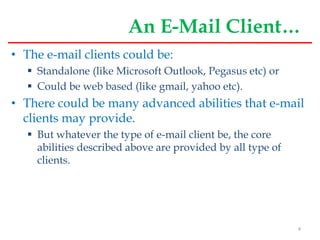
An E-Mail Client…
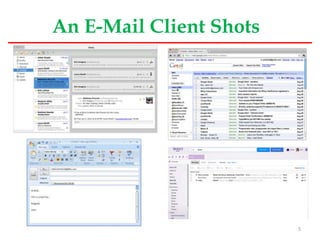
• The e-mail clients could be:
 Standalone (like Microsoft Outlook, Pegasus etc) or
 Could be web based (like gmail, yahoo etc).
• There could be many advanced abilities that e-mail
clients may provide.
 But whatever the type of e-mail client be, the core
abilities described above are provided by all type of
clients.
4
An E-Mail Client Shots
5
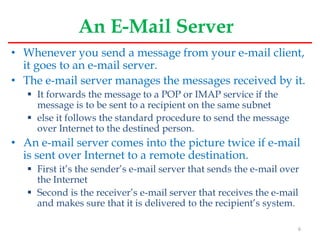
An E-Mail Server
• Whenever you send a message from your e-mail client,
it goes to an e-mail server.
• The e-mail server manages the messages received by it.
 It forwards the message to a POP or IMAP service if the
message is to be sent to a recipient on the same subnet
 else it follows the standard procedure to send the message
over Internet to the destined person.
• An e-mail server comes into the picture twice if e-mail
is sent over Internet to a remote destination.
 First it’s the sender’s e-mail server that sends the e-mail over
the Internet
 Second is the receiver’s e-mail server that receives the e-mail
and makes sure that it is delivered to the recipient’s system.
6
An E-Mail Server…
• On the other hand, an E-mail server comes into picture only once
when the recipient is on the same subnet.
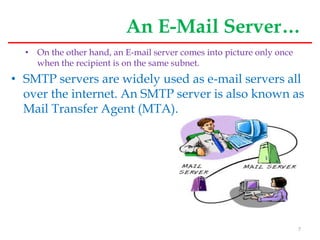
• SMTP servers are widely used as e-mail servers all
over the internet. An SMTP server is also known as
Mail Transfer Agent (MTA).
7
An E-Mail Server…
• The flow of e-mail on the Internet is managed by
the SMTP (Simple Mail Transfer Protocol).
• The SMTP server is simply a computer running
SMTP, and which acts more or less like the
postman.
8
What happens when once sends out E-Mail
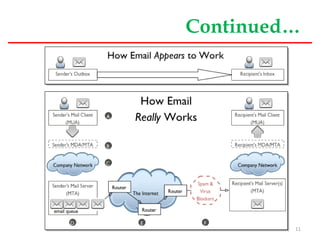
• Here is what happens when one sends out e-mail:
 Sender sends mail using mail client its address (e.g.
biyansa@ambou.edu.et) to a given recipient (e.g.
abebe@aau.edu.et).
In jargon, the e-mail client is called Message User Agent,
or MUA.
 The message is sent normally via port 25 to an SMTP
server (named for instance mail.ambou.edu.et)
The smtp server acts as a Message Transfer Agent or MTA.
Note that SMTP defines only the message's transmission, and
doesn't deal with its body content.
 Then, if the domain where your recipient has his account
is directly connected to the server, the email is
immediately delivered.
9
Continued…
 If it's not the case, the SMTP hands it to another incoming
server closer to the recipient.
These passages are called relays.
 If the receiving server is down or busy, one of the following
will happen:
The SMTP host simply drops the message to a backup
server: if none of them is available, the email is queued and
the delivery is retried periodically.
After a determined period, however, the message is
returned as undelivered.
 If there are no issues, however, the final segment is controlled
by POP, another protocol that picks up the email from the
receiving server and puts it into the recipient's inbox.
10
Continued…
11
POP and IMAP Servers
• These servers come into the picture when a
message is received by SMTP server and it needs to
be forwarded to the actual recipient.
• POP
 POP stands for Post Office Protocol.
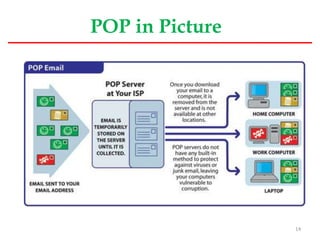
 A POP (or POP3) server in it’s simplest form stores the
messages for a particular user in a text file.
 The file for a particular user is appended with
information each time an e-mail is received by a POP
server.
12
Continued…
 A POP server requires the log-in credentials of a user
that are sent through e-mail client.
 Once a user is authenticated, the POP server provides
access to user’s e-mails.
 As with any client server architecture, the e-mail client
interacts with the POP server through a predefined set of
commands.
USER – For User-ID
PASS – For Password
LIST – Provide message list
DELE – To delete a message
QUIT – To end the interaction
 The e-mail client connects to port 110 on the server
where POP service is running.
13
POP in Picture
14
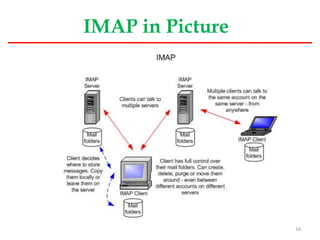
IMAP
• IMAP stands for Internet message access protocol.
• This protocol is also used to access e-mails but it is far more
capable than POP.
 One of the most prominent feature an IMAP server provides is the
central access to e-mails.
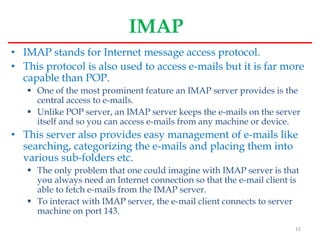
 Unlike POP server, an IMAP server keeps the e-mails on the server
itself and so you can access e-mails from any machine or device.
• This server also provides easy management of e-mails like
searching, categorizing the e-mails and placing them into
various sub-folders etc.
 The only problem that one could imagine with IMAP server is that
you always need an Internet connection so that the e-mail client is
able to fetch e-mails from the IMAP server.
 To interact with IMAP server, the e-mail client connects to server
machine on port 143.
15
IMAP in Picture
16
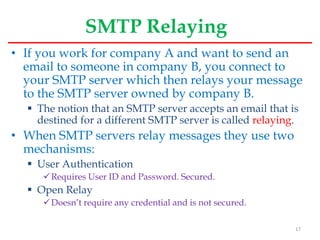
SMTP Relaying
• If you work for company A and want to send an
email to someone in company B, you connect to
your SMTP server which then relays your message
to the SMTP server owned by company B.
 The notion that an SMTP server accepts an email that is
destined for a different SMTP server is called relaying.
• When SMTP servers relay messages they use two
mechanisms:
 User Authentication
Requires User ID and Password. Secured.
 Open Relay
Doesn’t require any credential and is not secured.
17
Mail Administration Basics in Linux
• A linux system administrator can follow the
following basic configuration to configure mail
server:
 Set hostname for the machine
Edit the file /etc/hostname
Eg. mail.ambou.edu.et
 Set the time zone.
ln -sf /usr/share/zoneinfo/Africa/Addis Ababa /etc/localtime
 Configure /etc/hosts file
127.0.0.1 localhost.localdomain localhost
213.55.83154 mail.ambou.edu.et mail
18
Spam control and Filtering
• Spam is any kind of email that you don’t want and
that you didn’t sign up to receive.
 Some spam is annoying but harmless, but some might be
part of an identity theft scam or other kind of fraud.
• When one use e-mail, he/she can use different
mechanisms to deal with spammers using features
provided by e-mail clients:
 Use email software with built-in spam filtering.
 Add people you know to your safe sender list and
unwanted senders to your blocked list.
 Report junk mail. If you get an email message that looks
like spam or a phishing scam, report it.
19
Continued…
 Share your email address only with people you know.
 Look for pre-checked boxes.
 Read the privacy policy.
 Disguise your email address.
 Improve your computer's security.
20
Remote Administration & Mgmt
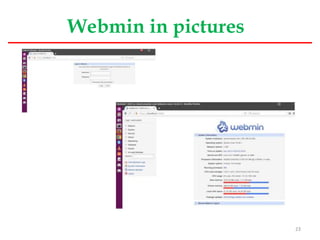
• Webmin
 Webmin is a program that simplifies the process of
managing a Linux or Unix system.
Normally you need to manually edit configuration files and run
commands to create accounts, set up a web server or manage
email forwarding.
 Webmin lets you perform these tasks through an easy to
use web interface, and automatically updates all of the
required configuration files for you.
 This makes the job of administering your system much
easier.
21
Continued…
• Some of the things that you can do with Webmin are:
 Create, edit and delete Unix accounts on your system.
 Export files and directories to other systems with the NFS protocol.
 Set up Disk Quotas to control how much space users can use up with
their files.
 Install, view and remove software packages in RPM and other
formats.
 Change your system's IP address, DNS Server settings and routing
configuration.
 Set up a Linux Firewall to protect your computer, or to give hosts on
an internal LAN access to the Internet.
 Create and configure virtual web servers for the Apache Webserver.
 Manage databases, tables and fields in a MySQL or PostgreSQL
Database Server.
 Share files with Windows systems by configuring Samba File
Sharing.
22
Webmin in pictures
23
SSH (Secured Shell)
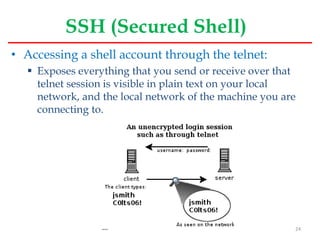
• Accessing a shell account through the telnet:
 Exposes everything that you send or receive over that
telnet session is visible in plain text on your local
network, and the local network of the machine you are
connecting to.
24
Continued…
• SSH was designed and created to provide the best
security when accessing another computer
remotely.
• Not only does it encrypt the session
 It also provides better authentication facilities, as well as
features like
secure file transfer,
X session forwarding,
port forwarding and more so that you can increase the security of
other protocols.
25

window server 2008 mail configuration

  • 1.
    Chapter 8 Mail ServerBasics Linux OS Perspective 1
  • 2.
    How the staffworks • E-Mail is a mechanism by which peoples send and receive electronic message over the Internet. • It gives us the ability to contact any person in the world in a matter of seconds. • With E-Mail, on can compose a message, attach any necessary files, and send it to the recipient. • The main components of an e-mail system that facilitate sending and receiving of e-mails on Internet are :  An e-mail client  An e-mail server (SMTP server)  POP and IMAP servers. 2
  • 3.
    An E-Mail Client •If you use e-mails for online communication the you would definitely be using an e-mail client. • An e-mail client provides you with the following capabilities:  Provides a list of messages that people have sent to you. Each entry in the list contains the name of sender, a subject, a few words from the message body and the time/date on which it was received.  Provides the ability to read a complete message, reply to it or forward it to other people.  Provides the ability to compose a new message and send it to the desired recipients.  Delete a message. 3
  • 4.
    An E-Mail Client… •The e-mail clients could be:  Standalone (like Microsoft Outlook, Pegasus etc) or  Could be web based (like gmail, yahoo etc). • There could be many advanced abilities that e-mail clients may provide.  But whatever the type of e-mail client be, the core abilities described above are provided by all type of clients. 4
  • 5.
  • 6.
    An E-Mail Server •Whenever you send a message from your e-mail client, it goes to an e-mail server. • The e-mail server manages the messages received by it.  It forwards the message to a POP or IMAP service if the message is to be sent to a recipient on the same subnet  else it follows the standard procedure to send the message over Internet to the destined person. • An e-mail server comes into the picture twice if e-mail is sent over Internet to a remote destination.  First it’s the sender’s e-mail server that sends the e-mail over the Internet  Second is the receiver’s e-mail server that receives the e-mail and makes sure that it is delivered to the recipient’s system. 6
  • 7.
    An E-Mail Server… •On the other hand, an E-mail server comes into picture only once when the recipient is on the same subnet. • SMTP servers are widely used as e-mail servers all over the internet. An SMTP server is also known as Mail Transfer Agent (MTA). 7
  • 8.
    An E-Mail Server… •The flow of e-mail on the Internet is managed by the SMTP (Simple Mail Transfer Protocol). • The SMTP server is simply a computer running SMTP, and which acts more or less like the postman. 8
  • 9.
    What happens whenonce sends out E-Mail • Here is what happens when one sends out e-mail:  Sender sends mail using mail client its address (e.g. biyansa@ambou.edu.et) to a given recipient (e.g. abebe@aau.edu.et). In jargon, the e-mail client is called Message User Agent, or MUA.  The message is sent normally via port 25 to an SMTP server (named for instance mail.ambou.edu.et) The smtp server acts as a Message Transfer Agent or MTA. Note that SMTP defines only the message's transmission, and doesn't deal with its body content.  Then, if the domain where your recipient has his account is directly connected to the server, the email is immediately delivered. 9
  • 10.
    Continued…  If it'snot the case, the SMTP hands it to another incoming server closer to the recipient. These passages are called relays.  If the receiving server is down or busy, one of the following will happen: The SMTP host simply drops the message to a backup server: if none of them is available, the email is queued and the delivery is retried periodically. After a determined period, however, the message is returned as undelivered.  If there are no issues, however, the final segment is controlled by POP, another protocol that picks up the email from the receiving server and puts it into the recipient's inbox. 10
  • 11.
  • 12.
    POP and IMAPServers • These servers come into the picture when a message is received by SMTP server and it needs to be forwarded to the actual recipient. • POP  POP stands for Post Office Protocol.  A POP (or POP3) server in it’s simplest form stores the messages for a particular user in a text file.  The file for a particular user is appended with information each time an e-mail is received by a POP server. 12
  • 13.
    Continued…  A POPserver requires the log-in credentials of a user that are sent through e-mail client.  Once a user is authenticated, the POP server provides access to user’s e-mails.  As with any client server architecture, the e-mail client interacts with the POP server through a predefined set of commands. USER – For User-ID PASS – For Password LIST – Provide message list DELE – To delete a message QUIT – To end the interaction  The e-mail client connects to port 110 on the server where POP service is running. 13
  • 14.
  • 15.
    IMAP • IMAP standsfor Internet message access protocol. • This protocol is also used to access e-mails but it is far more capable than POP.  One of the most prominent feature an IMAP server provides is the central access to e-mails.  Unlike POP server, an IMAP server keeps the e-mails on the server itself and so you can access e-mails from any machine or device. • This server also provides easy management of e-mails like searching, categorizing the e-mails and placing them into various sub-folders etc.  The only problem that one could imagine with IMAP server is that you always need an Internet connection so that the e-mail client is able to fetch e-mails from the IMAP server.  To interact with IMAP server, the e-mail client connects to server machine on port 143. 15
  • 16.
  • 17.
    SMTP Relaying • Ifyou work for company A and want to send an email to someone in company B, you connect to your SMTP server which then relays your message to the SMTP server owned by company B.  The notion that an SMTP server accepts an email that is destined for a different SMTP server is called relaying. • When SMTP servers relay messages they use two mechanisms:  User Authentication Requires User ID and Password. Secured.  Open Relay Doesn’t require any credential and is not secured. 17
  • 18.
    Mail Administration Basicsin Linux • A linux system administrator can follow the following basic configuration to configure mail server:  Set hostname for the machine Edit the file /etc/hostname Eg. mail.ambou.edu.et  Set the time zone. ln -sf /usr/share/zoneinfo/Africa/Addis Ababa /etc/localtime  Configure /etc/hosts file 127.0.0.1 localhost.localdomain localhost 213.55.83154 mail.ambou.edu.et mail 18
  • 19.
    Spam control andFiltering • Spam is any kind of email that you don’t want and that you didn’t sign up to receive.  Some spam is annoying but harmless, but some might be part of an identity theft scam or other kind of fraud. • When one use e-mail, he/she can use different mechanisms to deal with spammers using features provided by e-mail clients:  Use email software with built-in spam filtering.  Add people you know to your safe sender list and unwanted senders to your blocked list.  Report junk mail. If you get an email message that looks like spam or a phishing scam, report it. 19
  • 20.
    Continued…  Share youremail address only with people you know.  Look for pre-checked boxes.  Read the privacy policy.  Disguise your email address.  Improve your computer's security. 20
  • 21.
    Remote Administration &Mgmt • Webmin  Webmin is a program that simplifies the process of managing a Linux or Unix system. Normally you need to manually edit configuration files and run commands to create accounts, set up a web server or manage email forwarding.  Webmin lets you perform these tasks through an easy to use web interface, and automatically updates all of the required configuration files for you.  This makes the job of administering your system much easier. 21
  • 22.
    Continued… • Some ofthe things that you can do with Webmin are:  Create, edit and delete Unix accounts on your system.  Export files and directories to other systems with the NFS protocol.  Set up Disk Quotas to control how much space users can use up with their files.  Install, view and remove software packages in RPM and other formats.  Change your system's IP address, DNS Server settings and routing configuration.  Set up a Linux Firewall to protect your computer, or to give hosts on an internal LAN access to the Internet.  Create and configure virtual web servers for the Apache Webserver.  Manage databases, tables and fields in a MySQL or PostgreSQL Database Server.  Share files with Windows systems by configuring Samba File Sharing. 22
  • 23.
  • 24.
    SSH (Secured Shell) •Accessing a shell account through the telnet:  Exposes everything that you send or receive over that telnet session is visible in plain text on your local network, and the local network of the machine you are connecting to. 24
  • 25.
    Continued… • SSH wasdesigned and created to provide the best security when accessing another computer remotely. • Not only does it encrypt the session  It also provides better authentication facilities, as well as features like secure file transfer, X session forwarding, port forwarding and more so that you can increase the security of other protocols. 25