Presented By:-
Bhojak Rajendra
 Introduction
 History of E-mail
 Comparison With Postal Mail
 Uses of E-mail
 Structure of E-mail
 Architecture of E-mail
 User agent Message Transfer agent
 Message Access agent
 Electronic mail, often abbreviated as E-mail,
is a method of exchanging digital messages,
designed primarily for human use.
 E-mail systems are based on a store &
forward model in which E-mail server
systems accept, forward, deliver and store
messages on behalf of users, who only need
to connect to the e-mail infrastructure.
 The foundation for today's global Internet e-
mail service was created in the early
ARPANET
 Standards for encoding of messages were
proposed as early as, for example, in 1973
(RFC 561).
 An e-mail sent in the early 1970s looked very
similar to one sent on the Internet today.
 Network-based email was initially exchanged
on the ARPANET in extensions to the (FTP),
but is today carried by the (SMTP).
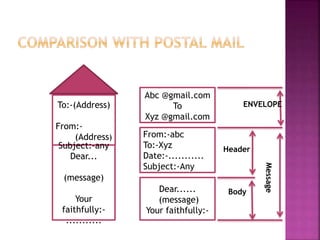
To:-(Address)
From:-
(Address)
Subject:-any
Dear...
(message)
Your
faithfully:-
...........
Abc @gmail.com
To
Xyz @gmail.com
From:-abc
To:-Xyz
Date:-...........
Subject:-Any
Dear......
(message)
Your faithfully:-
ENVELOPE
Header
Body
Message
 We can send a message anytime anywhere.
 We can send the same message to several
peoples at same time.
 We can forward the information to co-
workers without retyping it.
 We can send the messages around the world
as easily as to friend in the next cabin .
 We can save the time, E-mail is very fast,
usually taking no more time than a few
minutes to be received.
 We can mail Electronic documents and
recipients can then edit and return revised
versions.
 It is very fast as compare to postal mail.
 An electronic mail message consists of two
components
 Message header:-The message header contains
control information, including an originators email
address and one or more recipient addresses.
Usually additional information is added, such as a
subject header field.
 Message body:- which is the emails content.
 The message header should include at least the
following fields:
 From :-The e-m addresses, and optionally the
name of the : ail author or sender.
 To:- The e-mail address of the messages
recipient(s). Indicates primary recipients
(multiple allowed), for secondary recipients see
Cc: and Bcc.
 Bcc:- Blind carbon copy addresses added to the
SMTP ; delivery list but not (usually) listed in the
message data, remaining invisible to other
recipients.
 Cc: -Carbon copy Many e-mail clients will mark
e-mail in ; your inbox differently depending on
whether you are in the To:- or Cc:
 Date:- The local time and date when the
message was written, automatically attached
while sending.
 Subject:- A brief summary of the topic of
the message.
 Message-ID:- Also an automatically
generated field; used to prevent multiple
delivery .
 Attachment:- Attachment contain the name
of files . That you want to send. example a
world document.
 To deliver mail ,a system must use an
addressing system with unique addresses
 Address consist two parts :-
1. Local part
2. Domain name
 These are separated by @ sign.
 Like a postal address ,an email address
specifies the destination of electronic
message.
 An internet Email address look like this
Ex:-User name @domain name
 The user name is a unique name that
identified the recipient.
 The domain name in the address.
 many people can share the same
domain name.
 The first component of E-mail is user
agent(UA).
 It provide the services to user to make the
process of sending & receiving a message
easier.
 A UA is a software package(Program) that
composes, read, replies to and forward
messages.
 It also handles the Mailboxes.
User Agent
Reading
Message
Composing
Message
Handling
Message
Forwarding
Message
Replying
Message
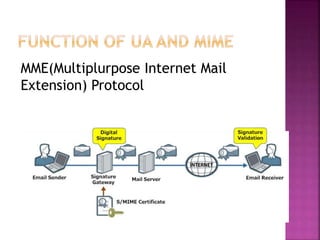
MME(Multiplurpose Internet Mail
Extension) Protocol
 The actual mail transfer is done through
MTA.
 To send mail , a system must have client
MTA.
 To receive mail ,a system must have
server MTA. The protocol that define the
MTA client & server in the internet is
called SMTP (simple mail transfer
protocols).
 SMTP define how commands & response
must be sent back & forth.
 The first and the second stages of mail
delivery use SMTP.
 SMTP is a PUSH protocols.
 On the other hand, the third stage needs
a pull protocol ; the client must pull
messages from the server . The direction
of the bulk data is from the server to the
client . At this stage Message Access Agent
is use.
 SMTP SMTP MAA Receiver Sender LAN or
WAN LAN or WAN Mail server INTERNET
 UA prepares the messages, creates the
envelopes, and puts the message in the
envelope.
 Mail address is like Xyz@domainname.
 Multipurpose Internet Mail Extensions (MIME)
allows the transfer of multimedia messages.
 MTA transfer the mail across internet, a LAN
or a WAN.
 SMTP uses commands and responses to the
transfer messages between an MTA client and
MTA server.
 Post Office Protocol, Version 3 (POP 3) and
Internet Mail Access Protocol.
 Version 4 (IMAP 4) are used for pulling
messages from a mail server.
 Data communications and networking by
Behrouz A.Forouzan (4th edition).
 http:/en.wikipedia.org/wiki/E-mail.
 Computer Networks, by A.S. Tanenbaum
 (4th Ed.)
Electronic mail

Electronic mail

  • 1.
  • 2.
     Introduction  Historyof E-mail  Comparison With Postal Mail  Uses of E-mail  Structure of E-mail  Architecture of E-mail  User agent Message Transfer agent  Message Access agent
  • 3.
     Electronic mail,often abbreviated as E-mail, is a method of exchanging digital messages, designed primarily for human use.  E-mail systems are based on a store & forward model in which E-mail server systems accept, forward, deliver and store messages on behalf of users, who only need to connect to the e-mail infrastructure.
  • 4.
     The foundationfor today's global Internet e- mail service was created in the early ARPANET  Standards for encoding of messages were proposed as early as, for example, in 1973 (RFC 561).  An e-mail sent in the early 1970s looked very similar to one sent on the Internet today.  Network-based email was initially exchanged on the ARPANET in extensions to the (FTP), but is today carried by the (SMTP).
  • 5.
  • 6.
     We cansend a message anytime anywhere.  We can send the same message to several peoples at same time.  We can forward the information to co- workers without retyping it.  We can send the messages around the world as easily as to friend in the next cabin .
  • 7.
     We cansave the time, E-mail is very fast, usually taking no more time than a few minutes to be received.  We can mail Electronic documents and recipients can then edit and return revised versions.  It is very fast as compare to postal mail.
  • 8.
     An electronicmail message consists of two components  Message header:-The message header contains control information, including an originators email address and one or more recipient addresses. Usually additional information is added, such as a subject header field.  Message body:- which is the emails content.
  • 9.
     The messageheader should include at least the following fields:  From :-The e-m addresses, and optionally the name of the : ail author or sender.  To:- The e-mail address of the messages recipient(s). Indicates primary recipients (multiple allowed), for secondary recipients see Cc: and Bcc.  Bcc:- Blind carbon copy addresses added to the SMTP ; delivery list but not (usually) listed in the message data, remaining invisible to other recipients.  Cc: -Carbon copy Many e-mail clients will mark e-mail in ; your inbox differently depending on whether you are in the To:- or Cc:
  • 10.
     Date:- Thelocal time and date when the message was written, automatically attached while sending.  Subject:- A brief summary of the topic of the message.  Message-ID:- Also an automatically generated field; used to prevent multiple delivery .  Attachment:- Attachment contain the name of files . That you want to send. example a world document.
  • 11.
     To delivermail ,a system must use an addressing system with unique addresses  Address consist two parts :- 1. Local part 2. Domain name  These are separated by @ sign.
  • 12.
     Like apostal address ,an email address specifies the destination of electronic message.  An internet Email address look like this Ex:-User name @domain name  The user name is a unique name that identified the recipient.  The domain name in the address.  many people can share the same domain name.
  • 13.
     The firstcomponent of E-mail is user agent(UA).  It provide the services to user to make the process of sending & receiving a message easier.  A UA is a software package(Program) that composes, read, replies to and forward messages.  It also handles the Mailboxes.
  • 14.
  • 15.
  • 16.
     The actualmail transfer is done through MTA.  To send mail , a system must have client MTA.  To receive mail ,a system must have server MTA. The protocol that define the MTA client & server in the internet is called SMTP (simple mail transfer protocols).  SMTP define how commands & response must be sent back & forth.
  • 17.
     The firstand the second stages of mail delivery use SMTP.  SMTP is a PUSH protocols.  On the other hand, the third stage needs a pull protocol ; the client must pull messages from the server . The direction of the bulk data is from the server to the client . At this stage Message Access Agent is use.  SMTP SMTP MAA Receiver Sender LAN or WAN LAN or WAN Mail server INTERNET
  • 19.
     UA preparesthe messages, creates the envelopes, and puts the message in the envelope.  Mail address is like Xyz@domainname.  Multipurpose Internet Mail Extensions (MIME) allows the transfer of multimedia messages.  MTA transfer the mail across internet, a LAN or a WAN.
  • 20.
     SMTP usescommands and responses to the transfer messages between an MTA client and MTA server.  Post Office Protocol, Version 3 (POP 3) and Internet Mail Access Protocol.  Version 4 (IMAP 4) are used for pulling messages from a mail server.
  • 21.
     Data communicationsand networking by Behrouz A.Forouzan (4th edition).  http:/en.wikipedia.org/wiki/E-mail.  Computer Networks, by A.S. Tanenbaum  (4th Ed.)