Introduction:
"What is GIS?" became a frequent asked question and according to this I have decided to post this blog. It's hard to
answer this question in a brief words or paragraphs but I will try to start from generalizated knowledge and try to
specify each point as I could.
Under the Umbrella of GIS (Geographic Information System) we are going to walk-through it's definition from different
perspective, GIS, Green Computing and finally case study to wrap up all of things together.
When you say GIS, you should recognize that you are adding "Where" to the application you are building, by where I
mean mapping, finding location, navigation and etc.
 Definition:
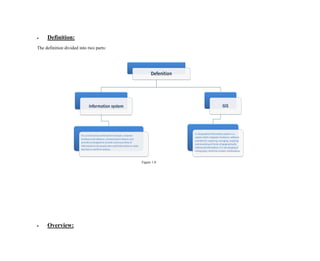
The definition divided into two parts:
Figure 1.0
 Overview:
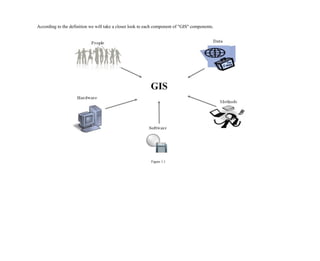
According to the definition we will take a closer look to each component of "GIS" components.
Figure 1.1
1. Hardware
It consists of the computer system on which the GIS software will run. The computer forms the backbone of
the GIS hardware, which gets it's input through the Scanner or a digitizer board. Scanner converts a picture into
a digital image for further processing. The output of scanner can be stored in many formats e.g. TIFF, BMP, JPG
etc. Printers and plotters are the most common output devices for a GIS hardware setup.
2. Software GIS
Software provides the functions and tools needed to store, analyze, and display geographic information. GIS software in
use is MapInfo, ARC/Info, AutoCAD Map, etc. The software available can be said to be application specific.
3. Data
Geographic data and related tabular data can be collected in-house. The digital map forms the basic data input for GIS.
Tabular data related to the map objects can also be attached to the digital data. A GIS will integrate spatial data
with other data resources and can even use a DBMS, used by most organization to maintain their data, to manage
spatial data.
4. People
GIS users range from technical specialists who design and maintain the system to those who use it to help them perform
their everyday work. The people who use GIS can be broadly classified into two classes. The CAD/GIS operator,
whose work is to vectorize the map objects. The use of this vectorized data to perform query, analysis or any other
work is the responsibility of a GIS engineer/user.
5. Method
And above all a successful GIS operates according to a well-designed plan and business rules, which are the models and
operating practices unique to each organization. There are various techniques used for map creation and further
usage for any project. The map creation can either be automated raster to vector creator or it can be manually
vectorized using the scanned images. The source of these digital maps can be either map prepared by any survey
agency or satellite imagery.
Phrases:
There are some phrases that good to know in GIS filed such as:
1. Cartography: Are the creation and the study of maps and charts, in old days they had to store information for a
long time because that information was needed for a long time. In modern cartography, the map has an increasing
number of functions. Besides being an artifact, a modern map is also an interface that gives people access to
information stored in the map and—beyond the map—in databases. But now a days by using new technologies and
sciences such as computer sciences, GIS, photogrammetric, remote sensing, geodesy, design, art, modeling, and
analysis techniques. all of these things ease the Cartography process. In other words (simply) it's the art of
delivering maps with correct data, colors and images that describe land marks.
The art and science of expressing graphically, usually through maps, the natural and social features of the
earth. [ESRI]
Relationship between GIS and Cartography:
Cartographic organizations and data publishers must be able to produce professional, standardized maps from their
libraries of data. GIS provides database-driven cartography that creates sophisticated, high-end cartographic
production tools and workflows allowing these agencies to more easily and efficiently create the products they
need.
GIS helps cartographic organizations do the following:
 Automate tasks and implement user-defined cartographic rules.
 Override cartographic conventions for individual preferences or requirements.
 Reduce map production costs.
 Produce a more flexible range of products.
 Achieve a higher throughput to meet publishing deadline.
2. Types of data:
GIS data can be divided into:
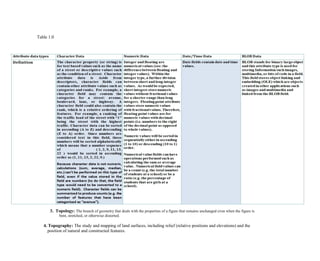
 Attribute Data: is information appended in tabular format to spatial features. Attribute data provides
characteristics about spatial data. Attribute data can be one of the five types as described in table 1.0.
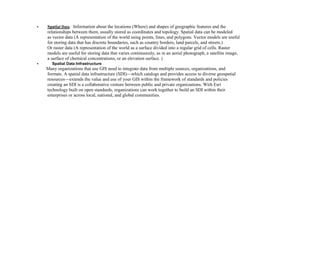
 Spatial Data: Information about the locations (Where) and shapes of geographic features and the
relationships between them, usually stored as coordinates and topology. Spatial data can be modeled
as vector data (A representation of the world using points, lines, and polygons. Vector models are useful
for storing data that has discrete boundaries, such as country borders, land parcels, and streets.)
Or raster data (A representation of the world as a surface divided into a regular grid of cells. Raster
models are useful for storing data that varies continuously, as in an aerial photograph, a satellite image,
a surface of chemical concentrations, or an elevation surface. )
 Spatial Data Infrastructure
Many organizations that use GIS need to integrate data from multiple sources, organizations, and
formats. A spatial data infrastructure (SDI)—which catalogs and provides access to diverse geospatial
resources—extends the value and use of your GIS within the framework of standards and policies
creating an SDI is a collaborative venture between public and private organizations. With Esri
technology built on open standards, organizations can work together to build an SDI within their
enterprises or across local, national, and global communities.
Table 1.0
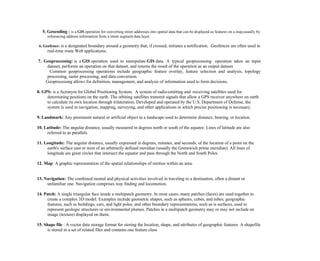
3. Topology: The branch of geometry that deals with the properties of a figure that remains unchanged even when the figure is
bent, stretched, or otherwise distorted.
4. Topography: The study and mapping of land surfaces, including relief (relative positions and elevations) and the
position of natural and constructed features.
5. Geocoding : is a GIS operation for converting street addresses into spatial data that can be displayed as features on a map,usually by
referencing address information from a street segment data layer.
6. Geofence: is a designated boundary around a geometry that, if crossed, initiates a notification. Geofences are often used in
real-time route Web applications.
7. Geoprocessing: is a GIS operation used to manipulate GIS data. A typical geoprocessing operation takes an input
dataset, performs an operation on that dataset, and returns the result of the operation as an output dataset.
Common geoprocessing operations include geographic feature overlay, feature selection and analysis, topology
processing, raster processing, and data conversion.
Geoprocessing allows for definition, management, and analysis of information used to form decisions.
8. GPS: is a Acronym for Global Positioning System. A system of radio-emitting and -receiving satellites used for
determining positions on the earth. The orbiting satellites transmit signals that allow a GPS receiver anywhere on earth
to calculate its own location through trilateration. Developed and operated by the U.S. Department of Defense, the
system is used in navigation, mapping, surveying, and other applications in which precise positioning is necessary.
9. Landmark: Any prominent natural or artificial object in a landscape used to determine distance, bearing, or location.
10. Latitude: The angular distance, usually measured in degrees north or south of the equator. Lines of latitude are also
referred to as parallels.
11. Longitude: The angular distance, usually expressed in degrees, minutes, and seconds, of the location of a point on the
earth's surface east or west of an arbitrarily defined meridian (usually the Greenwich prime meridian). All lines of
longitude are great circles that intersect the equator and pass through the North and South Poles.
12. Map: A graphic representation of the spatial relationships of entities within an area.
13. Navigation: The combined mental and physical activities involved in traveling to a destination, often a distant or
unfamiliar one. Navigation comprises way finding and locomotion.
14. Patch: A single triangular face inside a multipatch geometry. In most cases, many patches (faces) are used together to
create a complex 3D model. Examples include geometric shapes, such as spheres, cubes, and tubes; geographic
features, such as buildings, cars, and light poles; and other boundary representations, such as is surfaces, used to
represent geologic structures or environmental plumes. Patches in a multipatch geometry may or may not include an
image (texture) displayed on them.
15. Shape file : A vector data storage format for storing the location, shape, and attributes of geographic features. A shapefile
is stored in a set of related files and contains one feature class
 Benefits of GIS:
Geographic Information System is a powerful tool why I am saying that? because GIS solves spatial problems such as
opening a new restaurant or cafe it will solve the problem by knowing whether is a good place that will serve many
visitors or not. So if the answer is yes you will establish building the restaurant or cafe and you know that you will have
a good amount of visitors each day.
Also if the government wants to build a building for any purpose near to an oil well so by using the buffering method around
that oil well the measured distance should be calculated in order to stay in safe area.
So if you can answer a question such as
Who lives within a mile of library?
Where is camping prohibited?
Then you are absolutely know the powerful benefits of usage and advantages of GIS.
 Green Computing:
What is green computing?
Green computing is the environmentally responsible use of computers and related resources. Such practices include the implementation of
energy-efficient central processing units (CPUs), servers and peripherals as well as reduced resource consumption and proper disposal
of electronic waste (e-waste).
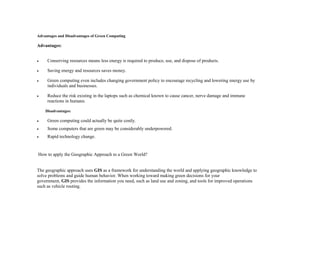
Advantages and Disadvantages of Green Computing
Advantages:
 Conserving resources means less energy is required to produce, use, and dispose of products.
 Saving energy and resources saves money.
 Green computing even includes changing government policy to encourage recycling and lowering energy use by
individuals and businesses.
 Reduce the risk existing in the laptops such as chemical known to cause cancer, nerve damage and immune
reactions in humans.
Disadvantages:
 Green computing could actually be quite costly.
 Some computers that are green may be considerably underpowered.
 Rapid technology change.
How to apply the Geographic Approach to a Green World?
The geographic approach uses GIS as a framework for understanding the world and applying geographic knowledge to
solve problems and guide human behavior. When working toward making green decisions for your
government, GIS provides the information you need, such as land use and zoning, and tools for improved operations
such as vehicle routing.
Five Ways to Go Green with GIS:
1. Alternative Energy:
With GIS, you can determine the best locations for harnessing alternative energy. Mapping resources, such as wind
and solar energy, supports governments and developers who want to invest in alternative fuel sources.
2. Green Spaces:
Carbon sequestering is an important part of maintaining a green community. GIS allows you to visualize existing
green spaces, analyze carbon emissions and sequestration, and make sound decisions about where to plant more
trees.
3. Public Outreach:
Citizens want to know about green government initiatives. With Web GIS, you can display maps that show the
progress of green practices and also resources such as recycling centers.
4. Community Planning:
Land use, zoning, and development are some of the most important factors to consider when creating a green
community. With GIS, you can analyze data related to many planning factors and determine the best way to
establish cost-effective, environmentally sensitive practices.
5. Logistics:
Vehicle emissions contribute to poor air quality. GIS provides you with tools to create efficient routes that minimize
carbon emissions while improving customer service.
Application:
ESRI's Green Infrastructure: is about identifying and connecting our most valuable landscapes before new development
begins.
What is Green Infrastructure?
Green infrastructure is a strategically planned and managed network of open spaces, watersheds, wildlife habitats,
parks, and other areas that deliver vital services and enrich local quality of life. Designing a national network of
interconnected landscapes is an ambitious vision placing green infrastructure at the heart of the planning and
decision making process.
What are you waiting for! Get started now
http://www.esri.com/about-esri/greeninfrastructure/guidance
 GIS Management:
Introduction:
To manage GIS project we should answer "what is GIS"?
Making decisions based on geography is basic to human thinking. "Where" we go, what will it shall be like, and what
shall we do when we get there are applied to the simple event of going to the store or to the major event of
launching a bathysphere into the ocean's depths. By understanding geography and people's relationship to location,
we can make informed decisions about the way we live on our planet. A geographic information system (GIS) is a
technological tool for comprehending geography and making intelligent decisions.
GIS organizes geographic data so that a person reading a map can select data necessary for specific project or task. A
thematic map has a table of contents that allows the reader to add layers of information to a basemap of real-world
locations. For example, a social analyst might use the base map of Eugene, Oregon, and select datasets from the
U.S. Census Bureau to add data layers to a map that shows residents' education levels, ages, and employment
status. With an ability to combine a variety of datasets in an in finite number of ways, GIS is a useful tool for
nearly every field of knowledge from archaeology to zoology.
A good GIS program is able to process geographic data from a variety of sources and integrate
it into a map project. Many countries have an abundance of geographic data for analysis, and
governments often make GIS data-sets publicly available. Map file databases often come included with GIS packages;
others can be obtained from both commercial vendors and government agencies. Some data is gathered in the field
by global positioning units that attach a location coordinate (latitude and longitude) to a feature such as a pump
station.
GIS maps are interactive. On the computer screen, map users can scan a GIS map in any direction, zoom in or out, and
change the nature of the information contained in the map. They can choose whether to see the roads, how many
roads to see, and how roads should be depicted. Then they can select what other items they wish to view alongside
these roads such as storm drains, gas lines, rare plants, or hospitals. Some GIS programs are designed to perform
sophisticated calculations for tracking storms or predicting erosion patterns. GIS applications can be embedded
into common activities such as verifying an address. From routinely performing work-related tasks to scientifically
exploring the complexities of our world, GIS gives people the geographic advantage to become more productive,
more aware, and more responsive citizens of planet Earth.
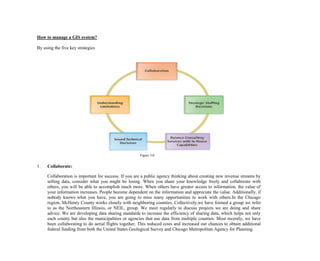
How to manage a GIS system?
By using the five key strategies
Figure 3.0
1. Collaborate:
Collaboration is important for success. If you are a public agency thinking about creating new revenue streams by
selling data, consider what you might be losing. When you share your knowledge freely and collaborate with
others, you will be able to accomplish much more. When others have greater access to information, the value of
your information increases. People become dependent on the information and appreciate the value. Additionally, if
nobody knows what you have, you are going to miss many opportunities to work with others.In the Chicago
region, McHenry County works closely with neighboring counties. Collectively,we have formed a group we refer
to as the Northeastern Illinois, or NEIL, group. We meet regularly to discuss projects we are doing and share
advice. We are developing data sharing standards to increase the efficiency of sharing data, which helps not only
each county but also the municipalities or agencies that use data from multiple counties. Most recently, we have
been collaborating to do aerial flights together. This reduced costs and increased our chances to obtain additional
federal funding from both the United States Geological Survey and Chicago Metropolitan Agency for Planning.
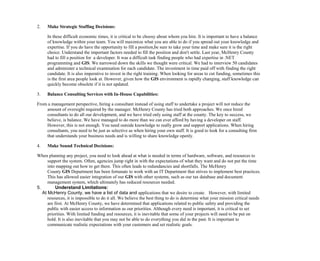
2. Make Strategic Staffing Decisions:
In these difficult economic times, it is critical to be choosy about whom you hire. It is important to have a balance
of knowledge within your team. You will maximize what you are able to do if you spread out your knowledge and
expertise. If you do have the opportunity to fill a position,be sure to take your time and make sure it is the right
choice. Understand the important factors needed to fill the position and don't settle. Last year, McHenry County
had to fill a position for a developer. It was a difficult task finding people who had expertise in .NET
programming and GIS. We narrowed down the skills we thought were critical. We had to interview 50 candidates
and administer a technical examination for each candidate. The investment in time paid off with finding the right
candidate. It is also imperative to invest in the right training. When looking for areas to cut funding, sometimes this
is the first area people look at. However, given how the GIS environment is rapidly changing, staff knowledge can
quickly become obsolete if it is not updated.
3. Balance Consulting Services with In-House Capabilities:
From a management perspective, hiring a consultant instead of using staff to undertake a project will not reduce the
amount of oversight required by the manager. McHenry County has tried both approaches. We once hired
consultants to do all our development, and we have tried only using staff at the county. The key to success, we
believe, is balance. We have managed to do more than we can ever afford by having a developer on staff.
However, this is not enough. You need outside knowledge to really grow and support applications. When hiring
consultants, you need to be just as selective as when hiring your own staff. It is good to look for a consulting firm
that understands your business needs and is willing to share knowledge openly.
4. Make Sound Technical Decisions:
When planning any project, you need to look ahead at what is needed in terms of hardware, software, and resources to
support the system. Often, agencies jump right in with the expectations of what they want and do not put the time
into mapping out how to get there. This often leads to redundancies and shortfalls. The McHenry
County GIS Department has been fortunate to work with an IT Department that strives to implement best practices.
This has allowed easier integration of our GIS with other systems, such as our tax database and document
management system, which ultimately has reduced resources needed.
5. Understand Limitations:
At McHenry County, we have a list of data and applications that we desire to create. However, with limited
resources, it is impossible to do it all. We believe the best thing to do is determine what your mission critical needs
are first. At McHenry County, we have determined that applications related to public safety and providing the
public with easier access to information as our priorities. Although every need is important, it is critical to set
priorities. With limited funding and resources, it is inevitable that some of your projects will need to be put on
hold. It is also inevitable that you may not be able to do everything you did in the past. It is important to
communicate realistic expectations with your customers and set realistic goals.
Thoughts on Technology Coordination:
When the challenges meet the technology coordination, the GIS professional must frequently assess which ideas
promote progress or achievement and which ideas could jeopardize systems and/or data integrity. With our ever-
growing technology, change comes rapidly and sometimes with little warning. It is little wonder that our customers
have a difficult time understanding our efforts and motives.
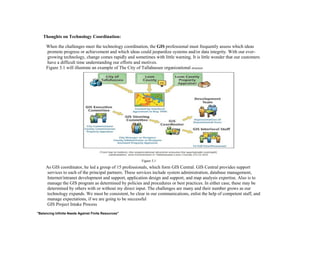
Figure 3.1 will illustrate an example of The City of Tallahassee organizational structure
Figure 3.1
As GIS coordinator, he led a group of 15 professionals, which form GIS Central. GIS Central provides support
services to each of the principal partners. These services include system administration, database management,
Internet/intranet development and support, application design and support, and map analysis expertise. Also is to
manage the GIS program as determined by policies and procedures or best practices. In either case, these may be
determined by others with or without my direct input. The challenges are many and their number grows as our
technology expands. We must be consistent, be clear in our communications, enlist the help of competent staff, and
manage expectations, if we are going to be successful
GIS Project Intake Process
"Balancing Infinite Needs Against Finite Resources"
Figure 3.2
Over the last two decades, the city's GIS has grown up in this innovative and eclectic environment. What started out
as a very specialized niche technology for land planning and utility mapping with a steep learning curve is now
essential to the daily workings and management of our city. Geospatial technologies play a part in almost
everything we do, from police, fire, and emergency management services vehicle routing to Web map viewers
serving up an array of neighborhood and business information. As elsewhere, there has been a strong and steady
increase in GIS usage and understanding throughout City of Austin departments over the past 20 years. The
corporate GIS function resides within the central IT department, Communications and Technology Management
(CTM). In the not too distant past, with our ever-increasing GIS appetite, we became victims of our own success.
And in our zeal to take full advantage of the benefits of the technology, GIS staff became overextended. We were
rolling out GIS applications and providing rich stores of spatial data and information, but we were also struggling
to keep up with demand. Simply adding more staff has not been an option for some time.
Project Intake Process Improvement
One of the strategies we employed to help us better focus our efforts and remain in alignment with the city's strategic
direction in a rapidly changing environment was to fine-tune our project intake process. The corporate GIS group
was not the only IT group suffering from overextended resources. Several CTM workgroups collaborated to help
evolve our current project intake process, still a work in progress. First things first: Have a plan. Strategic business
plans come with many names and in different forms; use whatever makes sense in your particular circumstance. If
you don't have a plan, get one. If you have a plan, use it. To stay on track, you have to know what track you are on.
Your project intake process should align the selection of projects with your strategic business plan. Optimizing
your project intake process is an iterative and continuous endeavor. The process starts with a project request.
Project requests must be tracked through the various review gates, not only for internal efficiency, but also to help
keep customers and stakeholders informed on the status of their project requests, a critical communication
component. Our tracking system, Electronic Technology Review and Coordination System (eTRACS), was
developed in-house to track all proposed projects through our project intake process and, at a very high level,
through project completion. All proposed projects, which are roughly estimated to be greater than 40 hours of work
and/or involve multiple work groups, are entered into the system by either a customer department IT single point of
contact or a CTM supervisor/manager. (Efforts deemed to be less than 40 hours go through the help desk process
and are tracked there.) Proposed projects then show up as pending and are reviewed weekly by the project intake
committee, made up of CTM managers. are categorized as either Run, Grow, or Transform based on strategic
impact. Run projects are core internal projects designed to keep the city's IT infrastructure functioning
and efficient. Run projects generally do not need to go through the business case and feasibility study review
gates. Grow projects enhance or improve existing processes and procedures within the city's IT infrastructure.
Transform projects are those that change existing processes and procedures or deliver new ones that provide an
advantage to the city in supplying services to citizens. All Grow and Transform projects go through the full intake
evaluation, which includes the development of a business case, a feasibility study, and a project charter.
Below is a sampling of the many questions these three review gates address:
o Business Case
1. What are the benefits to the City of Austin?
2. What are the risks and impacts?
3. What problem is this project trying to solve?
4. Does it align with the strategic business plan?
5. Feasibility Study
6. „What will it take to do it?
7. Can we do it?
8. Should we do it?
9. Project Charter
10. „Who is responsible?
11. What are the deliverables?
12. What is the timeline?
13. Where is the funding coming from?
The project intake committee decides to approve, decline, cancel, or put on hold each project based on the
information gathered during the intake evaluation. How these decisions are made will likely become more
formalized as we evolve the process.
o Data, data and data:
Drilling for data (Collecting data):
In this section we will be able to know the problem one can face during collecting data and how GPS softwares ease and
solves this problem.
GIS data and products are often time-consuming to create.Additionally, with the fast-growing use of some popular
geovisualization tools available on the web, many individuals are resorting to faster ways to create data through
estimation and approximation. Yet in examining its value to an organization,it is easier to prioritize the use of these
geovisualization tools and achieve a good balance between "guesstimation" and accuracy with the use of GPS
technology. As such, at the National Works Agency of Jamaica (NWA), a critical workflow of the GIS department
is to use GPS technology for mapping features, such as bridges and roads, and responding to other periodic
requests from technical staff. We therefore prepare our technical staff through GPS training to collect their relevant
data. Additionally, training sessions are available on request and may be carried out if an upcoming project
requires new road features to be mapped. GIS personnel will also accompany internal clients to work sites and
project areas. This approach not only facilitates quick access to mapped datasets but will also encourage on-site
training and exposure to in-house techniques and processes by all personnel involved. All datasets are downloaded
and stored to the GIS server at NWA's head office. Therefore, collected datasets can be considered as crude,
needing refinement into products and services to meet the requirements and issues of the organization.With the
influx of smartphones, collecting geospatial data is not only easier through mobility but also less time-consuming.
In fact,technical officers at NWA have been encouraged to download free GPS mapping software for their
BlackBerry phones to further assist in logging project area features. The beauty of this process is that the free
software creates files that are compatible with our in-house GIS applications. An obvious combination with great
possibilities.
o Refining Data
After finding or creating geospatial data, the GIS department defines how to use our data to best help/fix our customers'
challenges and satisfy the project planning requirements of NWA. As data providers, adopting this kind of service
thinking will allow us not to be superseded by more accessible web-based applications (Benson Reason, director,
live|work). Therefore, at NWA, we can categorically highlight the following processes that are undertaken to
develop our geospatial data into value-added services:
1. Customization
In some cases, where our customers are accustomed to only viewing base data as published hard-copy maps from other
government agencies, the service opportunity is to help them customize their use. This means enabling them to
transform existing information into their data with dynamic tools.
As we customize, clients get better results from their information, and we develop a deeper understanding of their
requirements, which helps to further refine the service. The GIS department developed an online web-based map
service called NWAEMAP.NWAEMAP simply enables customers to view, search, and create custom maps using
base data files published through the intranet-based application. It is unique in the way that it enables users to
easily adjust their search terms and refine their maps dynamically before printing. This simple customization
empowers the users to get exactly what they want, extremely quickly. It also allows them to explore the range of
data available. As the customers use the service, they build value through the repeated exchange of information.
2. Enrichment
Our technical clients have their own information that aids greatly in their workflows. This may be their GPS mapped
features, such as bridges, breakaways, and roadways.The approach, in this case, is to augment that information
with additional data to make our clients more effective in their job. As such, this kind of service is often about
aiding decision making or enabling customers to use more customized tools for increased productivity. In doing
this, our data is core to NWA's business processes and fits directly into several departments' workflows,since
pertinent and well-presented data enables critical business decisions to be made more quickly and with less risk.
3. Enabling
On the flip side, we also cater to users who are not geospatially technical. Their objectives require a customized solution
that is based on our existing in-house platforms. Such applications create value-added services using existing data
in a more cohesive and intelligent manner, therefore enabling them to collectively examine and analyze this
information. NWA GIS-LAMS satisfy these users' needs. This online GIS web application has taken accessible
geospatial land parcel data online to create a service that provides GIS functionalities to nontechnical users.
For NWA GIS-LAMS users, we realized that we needed to take geospatial data and refine it further by not only
improving access to the information but also helping customers employ it for ordinary uses.
urisa it's vision is to connects people and resources in the geospatial community, and has some resources about GIS in
management GIS Management Institute
Conclusion:
From the above we conclude that to manage a GIS project, a one should be aware of adding where to the current project,
how to interact with the map because map is interactive by zooming in and out. Can eliminate and filter to see
desired data in a map.
Also to use the five key strategies (Collaborate,Make Strategic Staffing Decisions,Balance Consulting Services with
In-House Capabilities,Make Sound Technical Decisions,Understand Limitations). How to manage and
coordinate limited resources according to their skills. The benefit of good communication between data
management team and (Development and technical support team) will result a good GIS application with
minimum errors that will save cost and time.The power of using data, what data is used to express what. Audit data
to visualize in map. Finally a GIS Manager/Coordinator you should be upgraded to the latest mapping software
and tools available in market. Be certified and ensure that all of these things covered under your budget.
 Case Study:
To summarize all of the above, all that we discussed in this post(booklet) I will analyze a GIS project running here in
Kuwait which is MCGS.
Problem:
First of all we should discuss the reason behind developing this application first of all we should know that Kuwait
University was established in October 1966 as separated and distributed campuses each campus in
different governorate which causes difficulties to expand the educational needs, the increasing numbers of students
and the number of cars parking. All of that explode to suggest building a multibillion-dollar to design and build
Sabah Al-Salem University City - Kuwait University from scratch.
Solution:
Gather all the distributed campuses in one place. The estimated area is about 490-hectare will combine six different
campuses, 16 colleges,dormitories, parking and supported facilities, The project is expected to be accomplished
by 2025 and with capacity to provide and deliver facilities to 40,000 full time-student.
In order to overcome variety of challenges including responding to difficult climate conditions, ensuring site
security, and meeting sustainability guidelines.
According to the master planning that were set to deliver Sabah Al-Salem University City - Kuwait
University,they chose to apply the geospatial concepts that contained in GIS courses to support the entire process
of designing, building,operating,and in order to support the provision of combining all the campuses of "Sabah
Al-Salem University City - Kuwait University" , they consult for a help to create a GIS implementation road
map.
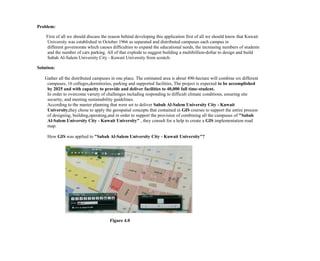
How GIS was applied to "Sabah Al-Salem University City - Kuwait University"?
Figure 4.0
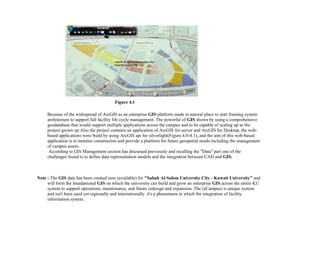
Figure 4.1
Because of the widespread of ArcGIS as an enterprise GIS platform made in natural place to start framing system
architecture to support full facility life cycle management. The powerful of GIS shown by using a comprehensive
geodatabase that would support multiple applications across the campus and to be capable of scaling up as the
project grown up.Also the project contains an application of ArcGIS for server and ArcGIS for Desktop, the web-
based applications were build by using ArcGIS api for silverlight(Figure 4.0-4.1), and the aim of this web-based
application is to monitor construction and provide a platform for future geospatial needs including the management
of campus assets.
According to GIS Management section has discussed previously and recalling the "Data" part one of the
challenges found is to define data representation models and the integration between CAD and GIS.
Note : The GIS data has been created now (available) for "Sabah Al-Salem University City - Kuwait University" and
will form the foundational GIS on which the university can build and grow an enterprise GIS across the entire KU
system to support operations, maintenance, and future redesign and expansion. The (eCampus) is unique system
and isn't been used yet regionally and internationally. it's a phenomena in which the integration of facility
information system.
Acknowledgment:
I would like to say thanks to y beloved family. A special thanks to my dad (Eng. Maher El-Safarini) that give a
chance to study a major that I have chosen. It was his idea to write a book about GIS but I have chosen to write this
post as a booklet to apply his desire. Thanks for advising me all this year.
Also I would like to thank people who said that I don't have experience in GIS field , even after I am computer
engineer graduate. There is a lot of engineering concepts are applied in GIS.
 References:
- http://www.slideshare.net/InnocentImmuna/getting-started-with-gis-51534914.
- http://www.spaceage.co.in/gis.php.
- http://www.environmentalscience.org/cartography.
- http://www.esri.com/esri-news/arcnews/fall14articles/challenges-to-cartography .
- http://www.esri.com/~/media/Files/Pdfs/library/bestpractices/what-is-gis.pdf.
- https://www.gislounge.com/attribute-data-types-gis/.
- http://support.esri.com/other-resources/gis-dictionary/term/
- Getting Started with GIS.
-
https://books.google.com.kw/books?id=uzAEBwAAQBAJ&dq=green+computing&hl=ar&sa=X&ved=0ahUKEw
jb4K0xIjOAhUqJcAKHdMTBg0Q6AEIHDAA
- http://www.esri.com/library/brochures/pdfs/gis-for-green-government.pdf
- http://www.esri.com/~/media/Files/Pdfs/library/bestpractices/managing-gis.pdf.
- http://www.esri.com/~/media/Files/Pdfs/library/ebooks/managing-gis-3.pdf.
- Geodesign - Case Studies in Regional and Urban Planning.

GIS in Nutshell

  • 1.
    Introduction: "What is GIS?"became a frequent asked question and according to this I have decided to post this blog. It's hard to answer this question in a brief words or paragraphs but I will try to start from generalizated knowledge and try to specify each point as I could. Under the Umbrella of GIS (Geographic Information System) we are going to walk-through it's definition from different perspective, GIS, Green Computing and finally case study to wrap up all of things together. When you say GIS, you should recognize that you are adding "Where" to the application you are building, by where I mean mapping, finding location, navigation and etc.
  • 2.
     Definition: The definitiondivided into two parts: Figure 1.0  Overview:
  • 3.
    According to thedefinition we will take a closer look to each component of "GIS" components. Figure 1.1
  • 4.
    1. Hardware It consistsof the computer system on which the GIS software will run. The computer forms the backbone of the GIS hardware, which gets it's input through the Scanner or a digitizer board. Scanner converts a picture into a digital image for further processing. The output of scanner can be stored in many formats e.g. TIFF, BMP, JPG etc. Printers and plotters are the most common output devices for a GIS hardware setup. 2. Software GIS Software provides the functions and tools needed to store, analyze, and display geographic information. GIS software in use is MapInfo, ARC/Info, AutoCAD Map, etc. The software available can be said to be application specific. 3. Data Geographic data and related tabular data can be collected in-house. The digital map forms the basic data input for GIS. Tabular data related to the map objects can also be attached to the digital data. A GIS will integrate spatial data with other data resources and can even use a DBMS, used by most organization to maintain their data, to manage spatial data. 4. People GIS users range from technical specialists who design and maintain the system to those who use it to help them perform their everyday work. The people who use GIS can be broadly classified into two classes. The CAD/GIS operator, whose work is to vectorize the map objects. The use of this vectorized data to perform query, analysis or any other work is the responsibility of a GIS engineer/user. 5. Method And above all a successful GIS operates according to a well-designed plan and business rules, which are the models and operating practices unique to each organization. There are various techniques used for map creation and further usage for any project. The map creation can either be automated raster to vector creator or it can be manually
  • 5.
    vectorized using thescanned images. The source of these digital maps can be either map prepared by any survey agency or satellite imagery. Phrases: There are some phrases that good to know in GIS filed such as: 1. Cartography: Are the creation and the study of maps and charts, in old days they had to store information for a long time because that information was needed for a long time. In modern cartography, the map has an increasing number of functions. Besides being an artifact, a modern map is also an interface that gives people access to information stored in the map and—beyond the map—in databases. But now a days by using new technologies and sciences such as computer sciences, GIS, photogrammetric, remote sensing, geodesy, design, art, modeling, and analysis techniques. all of these things ease the Cartography process. In other words (simply) it's the art of delivering maps with correct data, colors and images that describe land marks. The art and science of expressing graphically, usually through maps, the natural and social features of the earth. [ESRI] Relationship between GIS and Cartography: Cartographic organizations and data publishers must be able to produce professional, standardized maps from their libraries of data. GIS provides database-driven cartography that creates sophisticated, high-end cartographic production tools and workflows allowing these agencies to more easily and efficiently create the products they need. GIS helps cartographic organizations do the following:  Automate tasks and implement user-defined cartographic rules.  Override cartographic conventions for individual preferences or requirements.  Reduce map production costs.  Produce a more flexible range of products.  Achieve a higher throughput to meet publishing deadline. 2. Types of data: GIS data can be divided into:  Attribute Data: is information appended in tabular format to spatial features. Attribute data provides characteristics about spatial data. Attribute data can be one of the five types as described in table 1.0.
  • 6.
     Spatial Data:Information about the locations (Where) and shapes of geographic features and the relationships between them, usually stored as coordinates and topology. Spatial data can be modeled as vector data (A representation of the world using points, lines, and polygons. Vector models are useful for storing data that has discrete boundaries, such as country borders, land parcels, and streets.) Or raster data (A representation of the world as a surface divided into a regular grid of cells. Raster models are useful for storing data that varies continuously, as in an aerial photograph, a satellite image, a surface of chemical concentrations, or an elevation surface. )  Spatial Data Infrastructure Many organizations that use GIS need to integrate data from multiple sources, organizations, and formats. A spatial data infrastructure (SDI)—which catalogs and provides access to diverse geospatial resources—extends the value and use of your GIS within the framework of standards and policies creating an SDI is a collaborative venture between public and private organizations. With Esri technology built on open standards, organizations can work together to build an SDI within their enterprises or across local, national, and global communities.
  • 7.
    Table 1.0 3. Topology:The branch of geometry that deals with the properties of a figure that remains unchanged even when the figure is bent, stretched, or otherwise distorted. 4. Topography: The study and mapping of land surfaces, including relief (relative positions and elevations) and the position of natural and constructed features.
  • 8.
    5. Geocoding :is a GIS operation for converting street addresses into spatial data that can be displayed as features on a map,usually by referencing address information from a street segment data layer. 6. Geofence: is a designated boundary around a geometry that, if crossed, initiates a notification. Geofences are often used in real-time route Web applications. 7. Geoprocessing: is a GIS operation used to manipulate GIS data. A typical geoprocessing operation takes an input dataset, performs an operation on that dataset, and returns the result of the operation as an output dataset. Common geoprocessing operations include geographic feature overlay, feature selection and analysis, topology processing, raster processing, and data conversion. Geoprocessing allows for definition, management, and analysis of information used to form decisions. 8. GPS: is a Acronym for Global Positioning System. A system of radio-emitting and -receiving satellites used for determining positions on the earth. The orbiting satellites transmit signals that allow a GPS receiver anywhere on earth to calculate its own location through trilateration. Developed and operated by the U.S. Department of Defense, the system is used in navigation, mapping, surveying, and other applications in which precise positioning is necessary. 9. Landmark: Any prominent natural or artificial object in a landscape used to determine distance, bearing, or location. 10. Latitude: The angular distance, usually measured in degrees north or south of the equator. Lines of latitude are also referred to as parallels. 11. Longitude: The angular distance, usually expressed in degrees, minutes, and seconds, of the location of a point on the earth's surface east or west of an arbitrarily defined meridian (usually the Greenwich prime meridian). All lines of longitude are great circles that intersect the equator and pass through the North and South Poles. 12. Map: A graphic representation of the spatial relationships of entities within an area. 13. Navigation: The combined mental and physical activities involved in traveling to a destination, often a distant or unfamiliar one. Navigation comprises way finding and locomotion. 14. Patch: A single triangular face inside a multipatch geometry. In most cases, many patches (faces) are used together to create a complex 3D model. Examples include geometric shapes, such as spheres, cubes, and tubes; geographic features, such as buildings, cars, and light poles; and other boundary representations, such as is surfaces, used to represent geologic structures or environmental plumes. Patches in a multipatch geometry may or may not include an image (texture) displayed on them. 15. Shape file : A vector data storage format for storing the location, shape, and attributes of geographic features. A shapefile is stored in a set of related files and contains one feature class
  • 9.
     Benefits ofGIS: Geographic Information System is a powerful tool why I am saying that? because GIS solves spatial problems such as opening a new restaurant or cafe it will solve the problem by knowing whether is a good place that will serve many visitors or not. So if the answer is yes you will establish building the restaurant or cafe and you know that you will have a good amount of visitors each day. Also if the government wants to build a building for any purpose near to an oil well so by using the buffering method around that oil well the measured distance should be calculated in order to stay in safe area. So if you can answer a question such as Who lives within a mile of library? Where is camping prohibited? Then you are absolutely know the powerful benefits of usage and advantages of GIS.  Green Computing: What is green computing? Green computing is the environmentally responsible use of computers and related resources. Such practices include the implementation of energy-efficient central processing units (CPUs), servers and peripherals as well as reduced resource consumption and proper disposal of electronic waste (e-waste).
  • 10.
    Advantages and Disadvantagesof Green Computing Advantages:  Conserving resources means less energy is required to produce, use, and dispose of products.  Saving energy and resources saves money.  Green computing even includes changing government policy to encourage recycling and lowering energy use by individuals and businesses.  Reduce the risk existing in the laptops such as chemical known to cause cancer, nerve damage and immune reactions in humans. Disadvantages:  Green computing could actually be quite costly.  Some computers that are green may be considerably underpowered.  Rapid technology change. How to apply the Geographic Approach to a Green World? The geographic approach uses GIS as a framework for understanding the world and applying geographic knowledge to solve problems and guide human behavior. When working toward making green decisions for your government, GIS provides the information you need, such as land use and zoning, and tools for improved operations such as vehicle routing.
  • 11.
    Five Ways toGo Green with GIS: 1. Alternative Energy: With GIS, you can determine the best locations for harnessing alternative energy. Mapping resources, such as wind and solar energy, supports governments and developers who want to invest in alternative fuel sources. 2. Green Spaces: Carbon sequestering is an important part of maintaining a green community. GIS allows you to visualize existing green spaces, analyze carbon emissions and sequestration, and make sound decisions about where to plant more trees. 3. Public Outreach: Citizens want to know about green government initiatives. With Web GIS, you can display maps that show the progress of green practices and also resources such as recycling centers. 4. Community Planning: Land use, zoning, and development are some of the most important factors to consider when creating a green community. With GIS, you can analyze data related to many planning factors and determine the best way to establish cost-effective, environmentally sensitive practices. 5. Logistics: Vehicle emissions contribute to poor air quality. GIS provides you with tools to create efficient routes that minimize carbon emissions while improving customer service. Application: ESRI's Green Infrastructure: is about identifying and connecting our most valuable landscapes before new development begins. What is Green Infrastructure? Green infrastructure is a strategically planned and managed network of open spaces, watersheds, wildlife habitats, parks, and other areas that deliver vital services and enrich local quality of life. Designing a national network of interconnected landscapes is an ambitious vision placing green infrastructure at the heart of the planning and decision making process. What are you waiting for! Get started now
  • 12.
    http://www.esri.com/about-esri/greeninfrastructure/guidance  GIS Management: Introduction: Tomanage GIS project we should answer "what is GIS"? Making decisions based on geography is basic to human thinking. "Where" we go, what will it shall be like, and what shall we do when we get there are applied to the simple event of going to the store or to the major event of launching a bathysphere into the ocean's depths. By understanding geography and people's relationship to location, we can make informed decisions about the way we live on our planet. A geographic information system (GIS) is a technological tool for comprehending geography and making intelligent decisions. GIS organizes geographic data so that a person reading a map can select data necessary for specific project or task. A thematic map has a table of contents that allows the reader to add layers of information to a basemap of real-world locations. For example, a social analyst might use the base map of Eugene, Oregon, and select datasets from the U.S. Census Bureau to add data layers to a map that shows residents' education levels, ages, and employment status. With an ability to combine a variety of datasets in an in finite number of ways, GIS is a useful tool for nearly every field of knowledge from archaeology to zoology. A good GIS program is able to process geographic data from a variety of sources and integrate it into a map project. Many countries have an abundance of geographic data for analysis, and governments often make GIS data-sets publicly available. Map file databases often come included with GIS packages; others can be obtained from both commercial vendors and government agencies. Some data is gathered in the field by global positioning units that attach a location coordinate (latitude and longitude) to a feature such as a pump station. GIS maps are interactive. On the computer screen, map users can scan a GIS map in any direction, zoom in or out, and change the nature of the information contained in the map. They can choose whether to see the roads, how many roads to see, and how roads should be depicted. Then they can select what other items they wish to view alongside these roads such as storm drains, gas lines, rare plants, or hospitals. Some GIS programs are designed to perform sophisticated calculations for tracking storms or predicting erosion patterns. GIS applications can be embedded into common activities such as verifying an address. From routinely performing work-related tasks to scientifically exploring the complexities of our world, GIS gives people the geographic advantage to become more productive, more aware, and more responsive citizens of planet Earth.
  • 13.
    How to managea GIS system? By using the five key strategies Figure 3.0 1. Collaborate: Collaboration is important for success. If you are a public agency thinking about creating new revenue streams by selling data, consider what you might be losing. When you share your knowledge freely and collaborate with others, you will be able to accomplish much more. When others have greater access to information, the value of your information increases. People become dependent on the information and appreciate the value. Additionally, if nobody knows what you have, you are going to miss many opportunities to work with others.In the Chicago region, McHenry County works closely with neighboring counties. Collectively,we have formed a group we refer to as the Northeastern Illinois, or NEIL, group. We meet regularly to discuss projects we are doing and share advice. We are developing data sharing standards to increase the efficiency of sharing data, which helps not only each county but also the municipalities or agencies that use data from multiple counties. Most recently, we have been collaborating to do aerial flights together. This reduced costs and increased our chances to obtain additional federal funding from both the United States Geological Survey and Chicago Metropolitan Agency for Planning.
  • 14.
    2. Make StrategicStaffing Decisions: In these difficult economic times, it is critical to be choosy about whom you hire. It is important to have a balance of knowledge within your team. You will maximize what you are able to do if you spread out your knowledge and expertise. If you do have the opportunity to fill a position,be sure to take your time and make sure it is the right choice. Understand the important factors needed to fill the position and don't settle. Last year, McHenry County had to fill a position for a developer. It was a difficult task finding people who had expertise in .NET programming and GIS. We narrowed down the skills we thought were critical. We had to interview 50 candidates and administer a technical examination for each candidate. The investment in time paid off with finding the right candidate. It is also imperative to invest in the right training. When looking for areas to cut funding, sometimes this is the first area people look at. However, given how the GIS environment is rapidly changing, staff knowledge can quickly become obsolete if it is not updated. 3. Balance Consulting Services with In-House Capabilities: From a management perspective, hiring a consultant instead of using staff to undertake a project will not reduce the amount of oversight required by the manager. McHenry County has tried both approaches. We once hired consultants to do all our development, and we have tried only using staff at the county. The key to success, we believe, is balance. We have managed to do more than we can ever afford by having a developer on staff. However, this is not enough. You need outside knowledge to really grow and support applications. When hiring consultants, you need to be just as selective as when hiring your own staff. It is good to look for a consulting firm that understands your business needs and is willing to share knowledge openly. 4. Make Sound Technical Decisions: When planning any project, you need to look ahead at what is needed in terms of hardware, software, and resources to support the system. Often, agencies jump right in with the expectations of what they want and do not put the time into mapping out how to get there. This often leads to redundancies and shortfalls. The McHenry County GIS Department has been fortunate to work with an IT Department that strives to implement best practices. This has allowed easier integration of our GIS with other systems, such as our tax database and document management system, which ultimately has reduced resources needed. 5. Understand Limitations: At McHenry County, we have a list of data and applications that we desire to create. However, with limited resources, it is impossible to do it all. We believe the best thing to do is determine what your mission critical needs are first. At McHenry County, we have determined that applications related to public safety and providing the public with easier access to information as our priorities. Although every need is important, it is critical to set priorities. With limited funding and resources, it is inevitable that some of your projects will need to be put on hold. It is also inevitable that you may not be able to do everything you did in the past. It is important to communicate realistic expectations with your customers and set realistic goals.
  • 15.
    Thoughts on TechnologyCoordination: When the challenges meet the technology coordination, the GIS professional must frequently assess which ideas promote progress or achievement and which ideas could jeopardize systems and/or data integrity. With our ever- growing technology, change comes rapidly and sometimes with little warning. It is little wonder that our customers have a difficult time understanding our efforts and motives. Figure 3.1 will illustrate an example of The City of Tallahassee organizational structure Figure 3.1 As GIS coordinator, he led a group of 15 professionals, which form GIS Central. GIS Central provides support services to each of the principal partners. These services include system administration, database management, Internet/intranet development and support, application design and support, and map analysis expertise. Also is to manage the GIS program as determined by policies and procedures or best practices. In either case, these may be determined by others with or without my direct input. The challenges are many and their number grows as our technology expands. We must be consistent, be clear in our communications, enlist the help of competent staff, and manage expectations, if we are going to be successful GIS Project Intake Process "Balancing Infinite Needs Against Finite Resources"
  • 16.
    Figure 3.2 Over thelast two decades, the city's GIS has grown up in this innovative and eclectic environment. What started out as a very specialized niche technology for land planning and utility mapping with a steep learning curve is now essential to the daily workings and management of our city. Geospatial technologies play a part in almost everything we do, from police, fire, and emergency management services vehicle routing to Web map viewers serving up an array of neighborhood and business information. As elsewhere, there has been a strong and steady increase in GIS usage and understanding throughout City of Austin departments over the past 20 years. The corporate GIS function resides within the central IT department, Communications and Technology Management (CTM). In the not too distant past, with our ever-increasing GIS appetite, we became victims of our own success. And in our zeal to take full advantage of the benefits of the technology, GIS staff became overextended. We were rolling out GIS applications and providing rich stores of spatial data and information, but we were also struggling to keep up with demand. Simply adding more staff has not been an option for some time. Project Intake Process Improvement One of the strategies we employed to help us better focus our efforts and remain in alignment with the city's strategic direction in a rapidly changing environment was to fine-tune our project intake process. The corporate GIS group was not the only IT group suffering from overextended resources. Several CTM workgroups collaborated to help evolve our current project intake process, still a work in progress. First things first: Have a plan. Strategic business plans come with many names and in different forms; use whatever makes sense in your particular circumstance. If you don't have a plan, get one. If you have a plan, use it. To stay on track, you have to know what track you are on. Your project intake process should align the selection of projects with your strategic business plan. Optimizing your project intake process is an iterative and continuous endeavor. The process starts with a project request. Project requests must be tracked through the various review gates, not only for internal efficiency, but also to help keep customers and stakeholders informed on the status of their project requests, a critical communication component. Our tracking system, Electronic Technology Review and Coordination System (eTRACS), was developed in-house to track all proposed projects through our project intake process and, at a very high level, through project completion. All proposed projects, which are roughly estimated to be greater than 40 hours of work and/or involve multiple work groups, are entered into the system by either a customer department IT single point of contact or a CTM supervisor/manager. (Efforts deemed to be less than 40 hours go through the help desk process and are tracked there.) Proposed projects then show up as pending and are reviewed weekly by the project intake committee, made up of CTM managers. are categorized as either Run, Grow, or Transform based on strategic impact. Run projects are core internal projects designed to keep the city's IT infrastructure functioning and efficient. Run projects generally do not need to go through the business case and feasibility study review
  • 17.
    gates. Grow projectsenhance or improve existing processes and procedures within the city's IT infrastructure. Transform projects are those that change existing processes and procedures or deliver new ones that provide an advantage to the city in supplying services to citizens. All Grow and Transform projects go through the full intake evaluation, which includes the development of a business case, a feasibility study, and a project charter. Below is a sampling of the many questions these three review gates address: o Business Case 1. What are the benefits to the City of Austin? 2. What are the risks and impacts? 3. What problem is this project trying to solve? 4. Does it align with the strategic business plan? 5. Feasibility Study 6. „What will it take to do it? 7. Can we do it? 8. Should we do it? 9. Project Charter 10. „Who is responsible? 11. What are the deliverables? 12. What is the timeline? 13. Where is the funding coming from? The project intake committee decides to approve, decline, cancel, or put on hold each project based on the information gathered during the intake evaluation. How these decisions are made will likely become more formalized as we evolve the process. o Data, data and data: Drilling for data (Collecting data): In this section we will be able to know the problem one can face during collecting data and how GPS softwares ease and solves this problem. GIS data and products are often time-consuming to create.Additionally, with the fast-growing use of some popular geovisualization tools available on the web, many individuals are resorting to faster ways to create data through
  • 18.
    estimation and approximation.Yet in examining its value to an organization,it is easier to prioritize the use of these geovisualization tools and achieve a good balance between "guesstimation" and accuracy with the use of GPS technology. As such, at the National Works Agency of Jamaica (NWA), a critical workflow of the GIS department is to use GPS technology for mapping features, such as bridges and roads, and responding to other periodic requests from technical staff. We therefore prepare our technical staff through GPS training to collect their relevant data. Additionally, training sessions are available on request and may be carried out if an upcoming project requires new road features to be mapped. GIS personnel will also accompany internal clients to work sites and project areas. This approach not only facilitates quick access to mapped datasets but will also encourage on-site training and exposure to in-house techniques and processes by all personnel involved. All datasets are downloaded and stored to the GIS server at NWA's head office. Therefore, collected datasets can be considered as crude, needing refinement into products and services to meet the requirements and issues of the organization.With the influx of smartphones, collecting geospatial data is not only easier through mobility but also less time-consuming. In fact,technical officers at NWA have been encouraged to download free GPS mapping software for their BlackBerry phones to further assist in logging project area features. The beauty of this process is that the free software creates files that are compatible with our in-house GIS applications. An obvious combination with great possibilities. o Refining Data After finding or creating geospatial data, the GIS department defines how to use our data to best help/fix our customers' challenges and satisfy the project planning requirements of NWA. As data providers, adopting this kind of service thinking will allow us not to be superseded by more accessible web-based applications (Benson Reason, director, live|work). Therefore, at NWA, we can categorically highlight the following processes that are undertaken to develop our geospatial data into value-added services: 1. Customization In some cases, where our customers are accustomed to only viewing base data as published hard-copy maps from other government agencies, the service opportunity is to help them customize their use. This means enabling them to transform existing information into their data with dynamic tools. As we customize, clients get better results from their information, and we develop a deeper understanding of their requirements, which helps to further refine the service. The GIS department developed an online web-based map service called NWAEMAP.NWAEMAP simply enables customers to view, search, and create custom maps using base data files published through the intranet-based application. It is unique in the way that it enables users to easily adjust their search terms and refine their maps dynamically before printing. This simple customization empowers the users to get exactly what they want, extremely quickly. It also allows them to explore the range of data available. As the customers use the service, they build value through the repeated exchange of information. 2. Enrichment Our technical clients have their own information that aids greatly in their workflows. This may be their GPS mapped features, such as bridges, breakaways, and roadways.The approach, in this case, is to augment that information
  • 19.
    with additional datato make our clients more effective in their job. As such, this kind of service is often about aiding decision making or enabling customers to use more customized tools for increased productivity. In doing this, our data is core to NWA's business processes and fits directly into several departments' workflows,since pertinent and well-presented data enables critical business decisions to be made more quickly and with less risk. 3. Enabling On the flip side, we also cater to users who are not geospatially technical. Their objectives require a customized solution that is based on our existing in-house platforms. Such applications create value-added services using existing data in a more cohesive and intelligent manner, therefore enabling them to collectively examine and analyze this information. NWA GIS-LAMS satisfy these users' needs. This online GIS web application has taken accessible geospatial land parcel data online to create a service that provides GIS functionalities to nontechnical users. For NWA GIS-LAMS users, we realized that we needed to take geospatial data and refine it further by not only improving access to the information but also helping customers employ it for ordinary uses. urisa it's vision is to connects people and resources in the geospatial community, and has some resources about GIS in management GIS Management Institute Conclusion: From the above we conclude that to manage a GIS project, a one should be aware of adding where to the current project, how to interact with the map because map is interactive by zooming in and out. Can eliminate and filter to see desired data in a map. Also to use the five key strategies (Collaborate,Make Strategic Staffing Decisions,Balance Consulting Services with In-House Capabilities,Make Sound Technical Decisions,Understand Limitations). How to manage and coordinate limited resources according to their skills. The benefit of good communication between data management team and (Development and technical support team) will result a good GIS application with minimum errors that will save cost and time.The power of using data, what data is used to express what. Audit data to visualize in map. Finally a GIS Manager/Coordinator you should be upgraded to the latest mapping software and tools available in market. Be certified and ensure that all of these things covered under your budget.  Case Study: To summarize all of the above, all that we discussed in this post(booklet) I will analyze a GIS project running here in Kuwait which is MCGS.
  • 20.
    Problem: First of allwe should discuss the reason behind developing this application first of all we should know that Kuwait University was established in October 1966 as separated and distributed campuses each campus in different governorate which causes difficulties to expand the educational needs, the increasing numbers of students and the number of cars parking. All of that explode to suggest building a multibillion-dollar to design and build Sabah Al-Salem University City - Kuwait University from scratch. Solution: Gather all the distributed campuses in one place. The estimated area is about 490-hectare will combine six different campuses, 16 colleges,dormitories, parking and supported facilities, The project is expected to be accomplished by 2025 and with capacity to provide and deliver facilities to 40,000 full time-student. In order to overcome variety of challenges including responding to difficult climate conditions, ensuring site security, and meeting sustainability guidelines. According to the master planning that were set to deliver Sabah Al-Salem University City - Kuwait University,they chose to apply the geospatial concepts that contained in GIS courses to support the entire process of designing, building,operating,and in order to support the provision of combining all the campuses of "Sabah Al-Salem University City - Kuwait University" , they consult for a help to create a GIS implementation road map. How GIS was applied to "Sabah Al-Salem University City - Kuwait University"? Figure 4.0
  • 21.
    Figure 4.1 Because ofthe widespread of ArcGIS as an enterprise GIS platform made in natural place to start framing system architecture to support full facility life cycle management. The powerful of GIS shown by using a comprehensive geodatabase that would support multiple applications across the campus and to be capable of scaling up as the project grown up.Also the project contains an application of ArcGIS for server and ArcGIS for Desktop, the web- based applications were build by using ArcGIS api for silverlight(Figure 4.0-4.1), and the aim of this web-based application is to monitor construction and provide a platform for future geospatial needs including the management of campus assets. According to GIS Management section has discussed previously and recalling the "Data" part one of the challenges found is to define data representation models and the integration between CAD and GIS. Note : The GIS data has been created now (available) for "Sabah Al-Salem University City - Kuwait University" and will form the foundational GIS on which the university can build and grow an enterprise GIS across the entire KU system to support operations, maintenance, and future redesign and expansion. The (eCampus) is unique system and isn't been used yet regionally and internationally. it's a phenomena in which the integration of facility information system.
  • 22.
    Acknowledgment: I would liketo say thanks to y beloved family. A special thanks to my dad (Eng. Maher El-Safarini) that give a chance to study a major that I have chosen. It was his idea to write a book about GIS but I have chosen to write this post as a booklet to apply his desire. Thanks for advising me all this year. Also I would like to thank people who said that I don't have experience in GIS field , even after I am computer engineer graduate. There is a lot of engineering concepts are applied in GIS.  References: - http://www.slideshare.net/InnocentImmuna/getting-started-with-gis-51534914. - http://www.spaceage.co.in/gis.php. - http://www.environmentalscience.org/cartography. - http://www.esri.com/esri-news/arcnews/fall14articles/challenges-to-cartography . - http://www.esri.com/~/media/Files/Pdfs/library/bestpractices/what-is-gis.pdf. - https://www.gislounge.com/attribute-data-types-gis/. - http://support.esri.com/other-resources/gis-dictionary/term/ - Getting Started with GIS. - https://books.google.com.kw/books?id=uzAEBwAAQBAJ&dq=green+computing&hl=ar&sa=X&ved=0ahUKEw jb4K0xIjOAhUqJcAKHdMTBg0Q6AEIHDAA - http://www.esri.com/library/brochures/pdfs/gis-for-green-government.pdf - http://www.esri.com/~/media/Files/Pdfs/library/bestpractices/managing-gis.pdf. - http://www.esri.com/~/media/Files/Pdfs/library/ebooks/managing-gis-3.pdf. - Geodesign - Case Studies in Regional and Urban Planning.