



Office 365 Groups
Office Graph
Infrastructure
• Connecting teams thru modern experiences & enabling choice
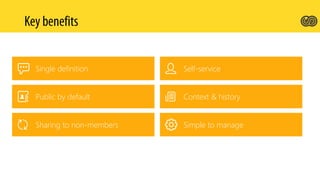
Public by default
Self-service
Sharing to non-members
Context & history
Single definition
Simple to manage
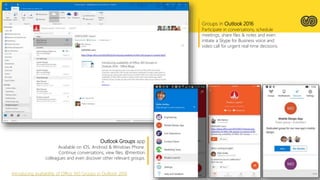
Groups in Outlook 2016
Participate in conversations, schedule
meetings, share files & notes and even
initiate a Skype for Business voice and
video call for urgent real-time decisions.
Outlook Groups app
Available on iOS, Android & Windows Phone.
Continue conversations, view files, @mention
colleagues and even discover other relevant groups.
Introducing availability of Office 365 Groups in Outlook 2016
Create a workspace to collaborate with your team.
Leverage the Groups collaboration &
communication capabilities to create
and review insights.
Groups in Power BI
Create new plans, organize & assign tasks, share
files, talk about what you’re working on, and get
updates on progress.
Integrated with Office 365 Groups, so all of the
conversations in Planner are available in Outlook
2016, Outlook on the web and the Outlook Groups
mobile app.
Introducing Office 365 Planner
Create Office 365 Groups for opportunities,
cases, accounts and all other entities.
Groups experiences are surfaced
in-context within CRM
Deploy Office 365 Groups







 Use PowerShell to manage Office 365 Groups & http://powershell.office.com/
Convert an Exchange distribution group to an Office 365 Group








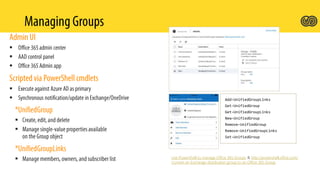
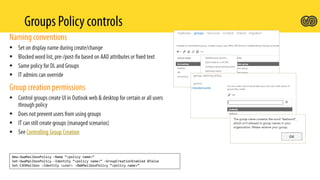
New-OwaMailboxPolicy –Name “<policy name>”
Set-OwaMailboxPolicy –Identity “<policy name>” –GroupCreationEnabled $false
Set-CASMailbox –Identity <user> -OWAMailboxPolicy “<policy name>”



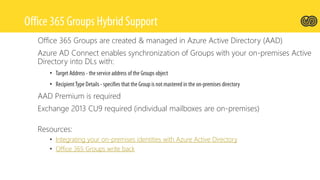
Office 365 Groups are created & managed in Azure Active Directory (AAD)
Azure AD Connect enables synchronization of Groups with your on-premises Active
Directory into DLs with:
•
•
AAD Premium is required
Exchange 2013 CU9 required (individual mailboxes are on-premises)
Resources:
• Integrating your on-premises identities with Azure Active Directory
• Office 365 Groups write back
•
•
•
Office 365 Planner and Office 365 Groups Deep Dive

Office 365 Planner and Office 365 Groups Deep Dive

  • 3.
    Office 365 Groups OfficeGraph Infrastructure • Connecting teams thru modern experiences & enabling choice
  • 4.
    Public by default Self-service Sharingto non-members Context & history Single definition Simple to manage
  • 6.
    Groups in Outlook2016 Participate in conversations, schedule meetings, share files & notes and even initiate a Skype for Business voice and video call for urgent real-time decisions. Outlook Groups app Available on iOS, Android & Windows Phone. Continue conversations, view files, @mention colleagues and even discover other relevant groups. Introducing availability of Office 365 Groups in Outlook 2016
  • 7.
    Create a workspaceto collaborate with your team. Leverage the Groups collaboration & communication capabilities to create and review insights. Groups in Power BI
  • 8.
    Create new plans,organize & assign tasks, share files, talk about what you’re working on, and get updates on progress. Integrated with Office 365 Groups, so all of the conversations in Planner are available in Outlook 2016, Outlook on the web and the Outlook Groups mobile app. Introducing Office 365 Planner
  • 9.
    Create Office 365Groups for opportunities, cases, accounts and all other entities. Groups experiences are surfaced in-context within CRM Deploy Office 365 Groups
  • 11.
            Use PowerShellto manage Office 365 Groups & http://powershell.office.com/ Convert an Exchange distribution group to an Office 365 Group
  • 12.
            New-OwaMailboxPolicy –Name “<policyname>” Set-OwaMailboxPolicy –Identity “<policy name>” –GroupCreationEnabled $false Set-CASMailbox –Identity <user> -OWAMailboxPolicy “<policy name>”
  • 13.
  • 14.
    Office 365 Groupsare created & managed in Azure Active Directory (AAD) Azure AD Connect enables synchronization of Groups with your on-premises Active Directory into DLs with: • • AAD Premium is required Exchange 2013 CU9 required (individual mailboxes are on-premises) Resources: • Integrating your on-premises identities with Azure Active Directory • Office 365 Groups write back
  • 17.

Editor's Notes

  • #2 http://spca-sessionvotings.azurewebsites.net/?sessioncode=3W2C
  • #16 tasks.office.com, https://support.office.com/en-us/article/Add-Microsoft-Planner-to-your-account-1843f004-8309-4ecd-9b35-17b77998b420?ui=en-US&rs=en-US&ad=US https://support.office.com/en-us/article/Microsoft-Planner-for-admins-9652e4c7-48e3-4dad-9e71-0c783ec3d0f8?ui=en-US&rs=en-US&ad=US
  • #19 http://spca-sessionvotings.azurewebsites.net/?sessioncode=3W2C Office 365 Planner and Office 365 Groups Deep Dive Martina Grom(MVP; Austria)