





















Office 365 Groups Deep Dive
Presented by: Knut Relbe-Moe
CTO, Knowledge People
Product Evangelist & Partner Manager Valo Intranet in Box
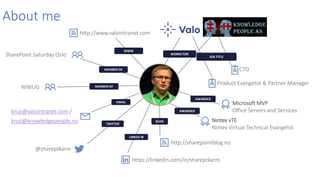
About me
BLOG
LINKED IN
TWITTER
EMAIL
MEMBER OF
MEMBER OF
WORKS FOR
JOB TITLE
Microsoft MVP
Office Servers and Services
Product Evangelist & Partner Manager
https://linkedin.com/in/shareptkarm
knut@valointranet.com /
knut@knowledgepeople.no
http://www.valointranet.com
@shareptkarm
NIWUG
AWARDED
AWARDED
Nintex vTE
Nintex Virtual Technical Evangelist
SharePoint Saturday Oslo
http://sharepointblog.no
WWW
CTO
Ready-to-go Modern
intranet on Office 365
and SharePoint
Valo
Blue Meteorite Ltd
Valo Intranet is a finalist in the best Intranet /
Extranet awards category
valointranet.com
Win Cool BB-8!!Valo
Take part in the
Raffle!
Visit our booth
Office 365: Complete Group Collaboration Solution
Addressing the unique needs and workstyle of each group
Groups
Move from task to task with cross
application group membership
Graph
Discover content and people with cross
application intelligence
Trust
Control on your terms with cross
application security & compliance
Email and
schedule
Call and meetCreate, share, find
content
Connect
across the org
Agenda
• Overview
• Administration
• Connectors
• Extensibility
• Advanced Topics
• Roadmap
THE WORLD HAS CHANGED
Brings together people, information, and apps across Office 365,
to enable better communication and collaboration.
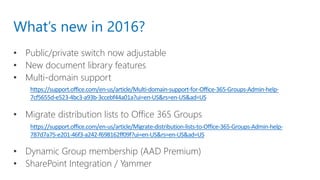
What’s new in 2016?
• Public/private switch now adjustable
• New document library features
• Multi-domain support
• Migrate distribution lists to Office 365 Groups
• Dynamic Group membership (AAD Premium)
• SharePoint Integration / Yammer
https://support.office.com/en-us/article/Migrate-distribution-lists-to-Office-365-Groups-Admin-help-
787d7a75-e201-46f3-a242-f698162ff09f?ui=en-US&rs=en-US&ad=US
https://support.office.com/en-us/article/Multi-domain-support-for-Office-365-Groups-Admin-help-
7cf5655d-e523-4bc3-a93b-3ccebf44a01a?ui=en-US&rs=en-US&ad=US
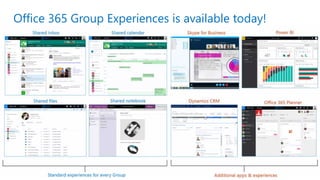
Office 365 Group Experiences is available today!
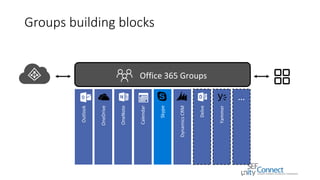
Groups building blocks
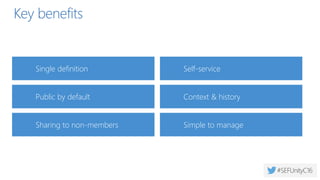
Public by default
Key benefits
Self-service
Sharing to non-members
Context & history
Single definition
Simple to manage
Office 365 Groups Overview
Administration
more
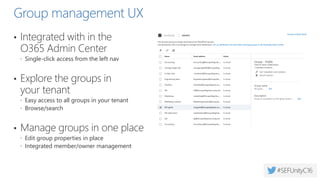
Group Management Experiences
Office 365 Admin Center
Office 365 Admin app
Azure AD Admin Portal
Exchange Admin console
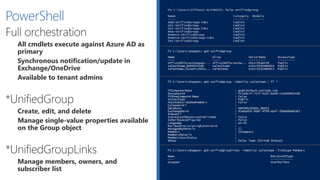
Execute against Azure AD as primary
Synchronous notification/update in Exchange/SP
*-UnifiedGroup / *-MsolGroup
*-UnifiedGroupLinks
*-MsolSettings
Use PowerShell to manage Office 365 Groups
> Get-UnifiedGroup #create/update/view groups and their settings
> Get-UnifiedGroupLinks #Manage members, owners, and subscriber list
> Get-MsolSettings #Manage tenant-wide group settings
Management UI
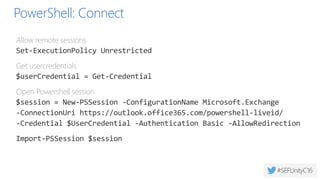
PowerShell: Connect
Allow remote sessions
Set-ExecutionPolicy Unrestricted
Get usercredentials
$userCredential = Get-Credential
Open Powershell session
$session = New-PSSession -ConfigurationName Microsoft.Exchange
-ConnectionUri https://outlook.office365.com/powershell-liveid/
-Credential $UserCredential -Authentication Basic -AllowRedirection
Import-PSSession $session
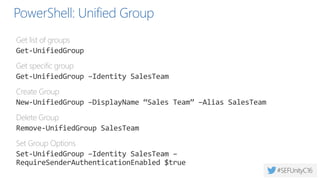
PowerShell: Unified Group
Get list of groups
Get-UnifiedGroup
Get specific group
Get-UnifiedGroup –Identity SalesTeam
Create Group
New-UnifiedGroup –DisplayName “Sales Team” –Alias SalesTeam
Delete Group
Remove-UnifiedGroup SalesTeam
Set Group Options
Set-UnifiedGroup –Identity SalesTeam –
RequireSenderAuthenticationEnabled $true
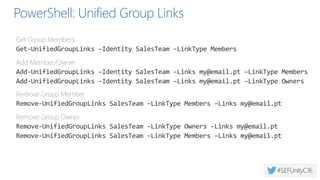
PowerShell: Unified Group Links
Get Group Members
Get-UnifiedGroupLinks –Identity SalesTeam –LinkType Members
Add Member/Owner
Add-UnifiedGroupLinks –Identity SalesTeam –Links my@email.pt –LinkType Members
Add-UnifiedGroupLinks –Identity SalesTeam –Links my@email.pt –LinkType Owners
Remove Group Member
Remove-UnifiedGroupLinks SalesTeam –LinkType Members –Links my@email.pt
Remove Group Owner
Remove-UnifiedGroupLinks SalesTeam –LinkType Owners –Links my@email.pt
Remove-UnifiedGroupLinks SalesTeam –LinkType Members –Links my@email.pt
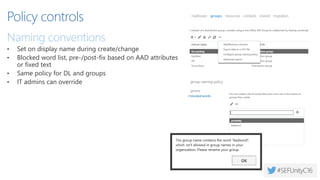
Policy controls
• Set on display name during create/change
• Blocked word list, pre-/post-fix based on AAD attributes
or fixed text
• Same policy for DL and groups
• IT admins can override
Naming policy
Set on display name during create/change
Blocked word list, pre-/post-fix based on AAD attributes
IT admins can override
New* the naming policy doesn’t apply to DLs synced from on-
prem
Will be replaced by AD policy in Fall 2016
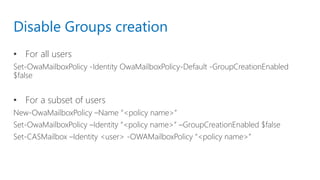
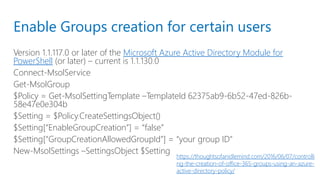
Group creation permissions
AD policy can restrict some users from creating groups anywhere
in O365
Does not prevent users from using groups
IT can still create groups
See Manage Group Creation for more
Dynamic membership
Defined in Azure AD Admin Portal
Directory Management
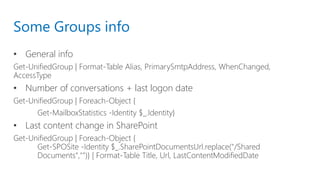
Some Groups info
• General info
Get-UnifiedGroup | Format-Table Alias, PrimarySmtpAddress, WhenChanged,
AccessType
• Number of conversations + last logon date
Get-UnifiedGroup | Foreach-Object {
Get-MailboxStatistics -Identity $_.Identity}
• Last content change in SharePoint
Get-UnifiedGroup | Foreach-Object {
Get-SPOSite -Identity $_.SharePointDocumentsUrl.replace("/Shared
Documents","")} | Format-Table Title, Url, LastContentModifiedDate
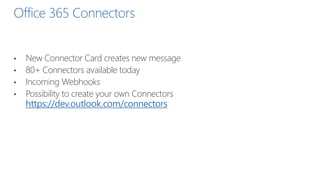
Office 365 Connectors
• New Connector Card creates new message
• 80+ Connectors available today
• Incoming Webhooks
• Possibility to create your own Connectors
https://dev.outlook.com/connectors
Security and Compliance
Now on iOS, Android
Admin Controls for Guest Access
Information Protection – Current Support
Current feature Scenario Old name
Supported on
Group Site?
Supported
on Group
Mailbox?
EDISCOVERY
eDiscovery case Hold
Ensure data is preserved for
investigation/active litigation
through eDiscovery
In-place Hold
Litigation Hold for EXO from EAC
In-place Hold for SPO from SPO eDiscovery center
In-Place Hold for EXO from SPO eDiscovery center
Yes - using the
group site URL
Yes - using
the group
mailbox
eDiscovery search
through Security and
Compliance center
Search for data in Groups for
litigation/investigation
eDiscovery search for EXO from EAC
eDiscovery search for EXO from SPO eDiscovery center
eDiscovery search for SPO from SPO eDiscovery center
Yes - using the
group site URL
Yes - using
the group
mailbox
PRESERVATION AND DELETION
Preservation policy
from Security and
Compliance Center
Ensure all data is preserved for legal,
regulatory and business continuity
needs.
In-place Hold
Litigation Hold for EXO from EAC
In-Place Hold for EXO from SPO eDiscovery center
In-place Hold for SPO from SPO eDiscovery center
Yes - using the
group site URL Not yet
Deletion policy from
Security and
Compliance Center
Reduce legal risk and/or data
lifecycle management by deleting
data after some interval
Retention policy in EXO
Site Deletion policy in SPO
Content type information management policy Not yet Not yet
Auditing
Reporting in the Azure AD
Admin Portal
Audit Log Search in O365
Admin Center
Get-UnifiedGroup
powershell
Extensibility
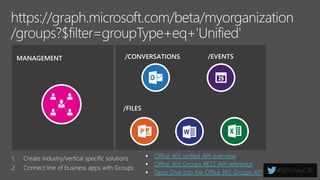
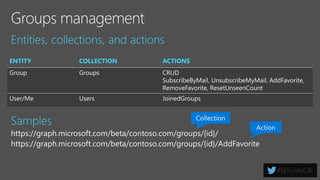
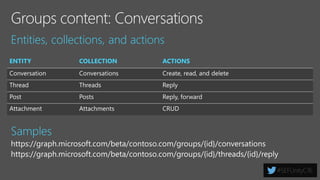
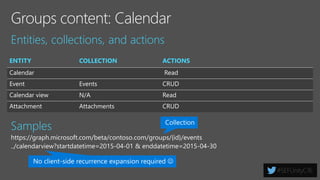
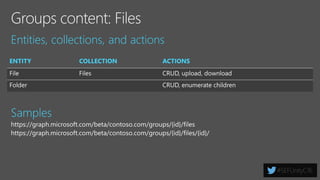
https://graph.microsoft.com/v1.0/groups
https://graph.microsoft.com/beta/groups
https://graph.microsoft.com/
USERS FILES MAIL CALENDARGROUPS
Insights and relationships from Office Graph
TASKS
https://graph.Microsoft.io
Microsoft Graph Highlights
• GA: /v1.0/groups
• Beta: /beta/groups
 See http://graph.microsoft.io for more info
• Single endpoint for group data
 Tasks
 OneNote
 OneDrive
 Mail
 Calendar
 Group management
• Webhook Notifications
 Receive notifications for group
conversations
• Favor MS Graph over AAD
Graph
 Closing functional gap with AAD
Graph
 New features targeting MS Graph
 New apps should use MS Graph
 AAD Graph remains for existing
apps
 Office 365 unified API overview
 Office 365 Groups REST API reference
 Deep Dive into the Office 365 Groups API
Valo brings your Office 365
groups to your intranet
Extensibility
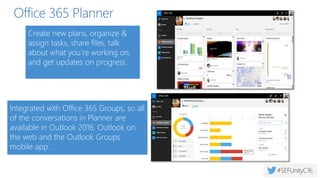
Office 365 Planner
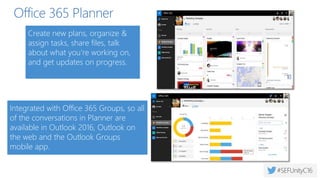
Integrated with Office 365 Groups, so all
of the conversations in Planner are
available in Outlook 2016, Outlook on
the web and the Outlook Groups
mobile app.
Create new plans, organize &
assign tasks, share files, talk
about what you’re working on,
and get updates on progress.
Hybrid Configuration
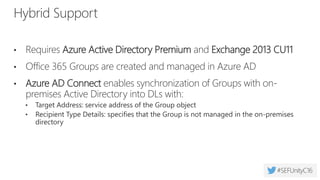
Target Address - the service address of the Groups object
Recipient Type Details - specifies that the Group is not mastered in the on-premises directory
AAD Connect, write-back enabled
Exchange 2013 CU11/2016 CU 1 –when individual mailboxes are on-premises
Configure Office 365 Groups with on-premises Exchange hybrid
Hybrid - UX
Groups appear in the GAL* (Requires writeback)
Access to group files (if licensed in SPO)
Access to the group notebook
Groups not shown in left nav
Group contact cards appear as DLs
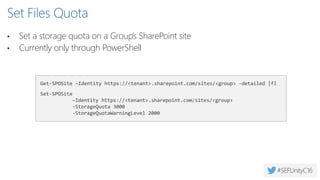
Set Files Quota
• Set a storage quota on a Group’s SharePoint site
• Currently only through PowerShell
Get-SPOSite –Identity https://<tenant>.sharepoint.com/sites/<group> -detailed |fl
Set-SPOSite
–Identity https://<tenant>.sharepoint.com/sites/<group>
-StorageQuota 3000
-StorageQuotaWarningLevel 2000
Requires Site Collection Storage Management setting for the tenant is switched to Manual
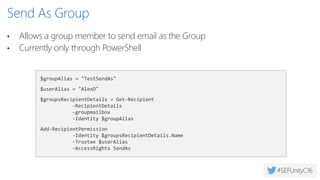
Send As Group
• Allows a group member to send email as the Group
• Currently only through PowerShell
$groupAlias = "TestSendAs"
$userAlias = "AlexD"
$groupsRecipientDetails = Get-Recipient
-RecipientDetails
-groupmailbox
-Identity $groupAlias
Add-RecipientPermission
-Identity $groupsRecipientDetails.Name
-Trustee $userAlias
-AccessRights SendAs
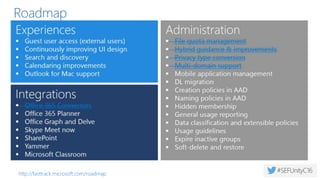
Roadmap
Office 365 Connectors
Microsoft Planner
Professional learning community groups Office
365 Groups + team sites integration
Guest user access (external users)
Calendaring improvements
Notifications improvements
Mobile improvements
Outlook Groups iPad app
Experiences
File quota management
Hybrid guidance & improvements
Privacy type conversion
Multi-domain support
Creation policies in AAD
Mobile application management
Data classification and extensible policies
Usage guidelines
Exchange Admin Center UI for upgrading DL to
Groups
Administration
Yammer
Planner: multi-assign, external user, mobile
Send As in Outlook on the web
Outlook for Mac support
Inbox tiered notifications
Single Groups files view
Search across Groups
Skype Meet Now
Continuously improving UI design
Naming policies in AAD
Hidden membership
General usage reporting
Preservation and deletion policies
Soft-delete and restore
Upgrade from nested, dynamic and hybrid DLs
to Groups
Improved hybrid experiences
aka.ms/O365g aka.ms/O365ng fasttrack.microsoft.com/office
fasttrack.office.com/roadmap aka.ms/Office365Groups
Key Resources
Next steps
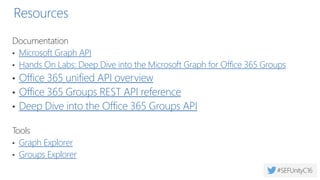
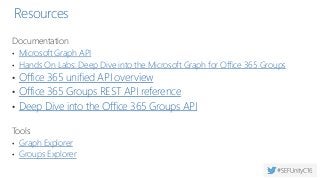
Resources
Documentation
• Microsoft Graph API
• Hands On Labs: Deep Dive into the Microsoft Graph for Office 365 Groups
• Office 365 unified API overview
• Office 365 Groups REST API reference
• Deep Dive into the Office 365 Groups API
Tools
• Graph Explorer
• Groups Explorer
http://techcommunity.microsoft.com
Knut Relbe-Moe
Product Evangelist & Partner Manager, Valo Intranet in a box
knut@valointranet.com
SEF Unity Connect 2016 Office 365 Groups

SEF Unity Connect 2016 Office 365 Groups

  • 1.
    Office 365 GroupsDeep Dive Presented by: Knut Relbe-Moe CTO, Knowledge People Product Evangelist & Partner Manager Valo Intranet in Box
  • 3.
    About me BLOG LINKED IN TWITTER EMAIL MEMBEROF MEMBER OF WORKS FOR JOB TITLE Microsoft MVP Office Servers and Services Product Evangelist & Partner Manager https://linkedin.com/in/shareptkarm knut@valointranet.com / knut@knowledgepeople.no http://www.valointranet.com @shareptkarm NIWUG AWARDED AWARDED Nintex vTE Nintex Virtual Technical Evangelist SharePoint Saturday Oslo http://sharepointblog.no WWW CTO
  • 4.
    Ready-to-go Modern intranet onOffice 365 and SharePoint Valo
  • 5.
  • 6.
    Valo Intranet isa finalist in the best Intranet / Extranet awards category valointranet.com
  • 7.
    Win Cool BB-8!!Valo Takepart in the Raffle! Visit our booth
  • 8.
    Office 365: CompleteGroup Collaboration Solution Addressing the unique needs and workstyle of each group Groups Move from task to task with cross application group membership Graph Discover content and people with cross application intelligence Trust Control on your terms with cross application security & compliance Email and schedule Call and meetCreate, share, find content Connect across the org
  • 9.
    Agenda • Overview • Administration •Connectors • Extensibility • Advanced Topics • Roadmap
  • 10.
  • 12.
    Brings together people,information, and apps across Office 365, to enable better communication and collaboration.
  • 13.
    What’s new in2016? • Public/private switch now adjustable • New document library features • Multi-domain support • Migrate distribution lists to Office 365 Groups • Dynamic Group membership (AAD Premium) • SharePoint Integration / Yammer https://support.office.com/en-us/article/Migrate-distribution-lists-to-Office-365-Groups-Admin-help- 787d7a75-e201-46f3-a242-f698162ff09f?ui=en-US&rs=en-US&ad=US https://support.office.com/en-us/article/Multi-domain-support-for-Office-365-Groups-Admin-help- 7cf5655d-e523-4bc3-a93b-3ccebf44a01a?ui=en-US&rs=en-US&ad=US
  • 14.
    Office 365 GroupExperiences is available today!
  • 15.
  • 16.
    Public by default Keybenefits Self-service Sharing to non-members Context & history Single definition Simple to manage
  • 17.
  • 19.
  • 20.
    Group Management Experiences Office365 Admin Center Office 365 Admin app Azure AD Admin Portal Exchange Admin console Execute against Azure AD as primary Synchronous notification/update in Exchange/SP *-UnifiedGroup / *-MsolGroup *-UnifiedGroupLinks *-MsolSettings Use PowerShell to manage Office 365 Groups > Get-UnifiedGroup #create/update/view groups and their settings > Get-UnifiedGroupLinks #Manage members, owners, and subscriber list > Get-MsolSettings #Manage tenant-wide group settings
  • 21.
  • 22.
    PowerShell: Connect Allow remotesessions Set-ExecutionPolicy Unrestricted Get usercredentials $userCredential = Get-Credential Open Powershell session $session = New-PSSession -ConfigurationName Microsoft.Exchange -ConnectionUri https://outlook.office365.com/powershell-liveid/ -Credential $UserCredential -Authentication Basic -AllowRedirection Import-PSSession $session
  • 23.
    PowerShell: Unified Group Getlist of groups Get-UnifiedGroup Get specific group Get-UnifiedGroup –Identity SalesTeam Create Group New-UnifiedGroup –DisplayName “Sales Team” –Alias SalesTeam Delete Group Remove-UnifiedGroup SalesTeam Set Group Options Set-UnifiedGroup –Identity SalesTeam – RequireSenderAuthenticationEnabled $true
  • 24.
    PowerShell: Unified GroupLinks Get Group Members Get-UnifiedGroupLinks –Identity SalesTeam –LinkType Members Add Member/Owner Add-UnifiedGroupLinks –Identity SalesTeam –Links my@email.pt –LinkType Members Add-UnifiedGroupLinks –Identity SalesTeam –Links my@email.pt –LinkType Owners Remove Group Member Remove-UnifiedGroupLinks SalesTeam –LinkType Members –Links my@email.pt Remove Group Owner Remove-UnifiedGroupLinks SalesTeam –LinkType Owners –Links my@email.pt Remove-UnifiedGroupLinks SalesTeam –LinkType Members –Links my@email.pt
  • 25.
    Policy controls • Seton display name during create/change • Blocked word list, pre-/post-fix based on AAD attributes or fixed text • Same policy for DL and groups • IT admins can override
  • 26.
    Naming policy Set ondisplay name during create/change Blocked word list, pre-/post-fix based on AAD attributes IT admins can override New* the naming policy doesn’t apply to DLs synced from on- prem Will be replaced by AD policy in Fall 2016 Group creation permissions AD policy can restrict some users from creating groups anywhere in O365 Does not prevent users from using groups IT can still create groups See Manage Group Creation for more Dynamic membership Defined in Azure AD Admin Portal Directory Management
  • 27.
    Some Groups info •General info Get-UnifiedGroup | Format-Table Alias, PrimarySmtpAddress, WhenChanged, AccessType • Number of conversations + last logon date Get-UnifiedGroup | Foreach-Object { Get-MailboxStatistics -Identity $_.Identity} • Last content change in SharePoint Get-UnifiedGroup | Foreach-Object { Get-SPOSite -Identity $_.SharePointDocumentsUrl.replace("/Shared Documents","")} | Format-Table Title, Url, LastContentModifiedDate
  • 29.
    Office 365 Connectors •New Connector Card creates new message • 80+ Connectors available today • Incoming Webhooks • Possibility to create your own Connectors https://dev.outlook.com/connectors
  • 31.
  • 32.
    Admin Controls forGuest Access
  • 33.
    Information Protection –Current Support Current feature Scenario Old name Supported on Group Site? Supported on Group Mailbox? EDISCOVERY eDiscovery case Hold Ensure data is preserved for investigation/active litigation through eDiscovery In-place Hold Litigation Hold for EXO from EAC In-place Hold for SPO from SPO eDiscovery center In-Place Hold for EXO from SPO eDiscovery center Yes - using the group site URL Yes - using the group mailbox eDiscovery search through Security and Compliance center Search for data in Groups for litigation/investigation eDiscovery search for EXO from EAC eDiscovery search for EXO from SPO eDiscovery center eDiscovery search for SPO from SPO eDiscovery center Yes - using the group site URL Yes - using the group mailbox PRESERVATION AND DELETION Preservation policy from Security and Compliance Center Ensure all data is preserved for legal, regulatory and business continuity needs. In-place Hold Litigation Hold for EXO from EAC In-Place Hold for EXO from SPO eDiscovery center In-place Hold for SPO from SPO eDiscovery center Yes - using the group site URL Not yet Deletion policy from Security and Compliance Center Reduce legal risk and/or data lifecycle management by deleting data after some interval Retention policy in EXO Site Deletion policy in SPO Content type information management policy Not yet Not yet
  • 34.
    Auditing Reporting in theAzure AD Admin Portal Audit Log Search in O365 Admin Center Get-UnifiedGroup powershell
  • 36.
    Extensibility https://graph.microsoft.com/v1.0/groups https://graph.microsoft.com/beta/groups https://graph.microsoft.com/ USERS FILES MAILCALENDARGROUPS Insights and relationships from Office Graph TASKS https://graph.Microsoft.io
  • 37.
    Microsoft Graph Highlights •GA: /v1.0/groups • Beta: /beta/groups  See http://graph.microsoft.io for more info • Single endpoint for group data  Tasks  OneNote  OneDrive  Mail  Calendar  Group management • Webhook Notifications  Receive notifications for group conversations • Favor MS Graph over AAD Graph  Closing functional gap with AAD Graph  New features targeting MS Graph  New apps should use MS Graph  AAD Graph remains for existing apps
  • 38.
     Office 365unified API overview  Office 365 Groups REST API reference  Deep Dive into the Office 365 Groups API
  • 44.
    Valo brings yourOffice 365 groups to your intranet
  • 45.
  • 47.
    Office 365 Planner Integratedwith Office 365 Groups, so all of the conversations in Planner are available in Outlook 2016, Outlook on the web and the Outlook Groups mobile app. Create new plans, organize & assign tasks, share files, talk about what you’re working on, and get updates on progress.
  • 49.
    Hybrid Configuration Target Address- the service address of the Groups object Recipient Type Details - specifies that the Group is not mastered in the on-premises directory AAD Connect, write-back enabled Exchange 2013 CU11/2016 CU 1 –when individual mailboxes are on-premises Configure Office 365 Groups with on-premises Exchange hybrid
  • 50.
    Hybrid - UX Groupsappear in the GAL* (Requires writeback) Access to group files (if licensed in SPO) Access to the group notebook Groups not shown in left nav Group contact cards appear as DLs
  • 51.
    Set Files Quota •Set a storage quota on a Group’s SharePoint site • Currently only through PowerShell Get-SPOSite –Identity https://<tenant>.sharepoint.com/sites/<group> -detailed |fl Set-SPOSite –Identity https://<tenant>.sharepoint.com/sites/<group> -StorageQuota 3000 -StorageQuotaWarningLevel 2000 Requires Site Collection Storage Management setting for the tenant is switched to Manual
  • 52.
    Send As Group •Allows a group member to send email as the Group • Currently only through PowerShell $groupAlias = "TestSendAs" $userAlias = "AlexD" $groupsRecipientDetails = Get-Recipient -RecipientDetails -groupmailbox -Identity $groupAlias Add-RecipientPermission -Identity $groupsRecipientDetails.Name -Trustee $userAlias -AccessRights SendAs
  • 54.
    Roadmap Office 365 Connectors MicrosoftPlanner Professional learning community groups Office 365 Groups + team sites integration Guest user access (external users) Calendaring improvements Notifications improvements Mobile improvements Outlook Groups iPad app Experiences File quota management Hybrid guidance & improvements Privacy type conversion Multi-domain support Creation policies in AAD Mobile application management Data classification and extensible policies Usage guidelines Exchange Admin Center UI for upgrading DL to Groups Administration Yammer Planner: multi-assign, external user, mobile Send As in Outlook on the web Outlook for Mac support Inbox tiered notifications Single Groups files view Search across Groups Skype Meet Now Continuously improving UI design Naming policies in AAD Hidden membership General usage reporting Preservation and deletion policies Soft-delete and restore Upgrade from nested, dynamic and hybrid DLs to Groups Improved hybrid experiences aka.ms/O365g aka.ms/O365ng fasttrack.microsoft.com/office fasttrack.office.com/roadmap aka.ms/Office365Groups Key Resources
  • 55.
  • 56.
    Resources Documentation • Microsoft GraphAPI • Hands On Labs: Deep Dive into the Microsoft Graph for Office 365 Groups • Office 365 unified API overview • Office 365 Groups REST API reference • Deep Dive into the Office 365 Groups API Tools • Graph Explorer • Groups Explorer
  • 57.
  • 58.
    Knut Relbe-Moe Product Evangelist& Partner Manager, Valo Intranet in a box knut@valointranet.com

Editor's Notes

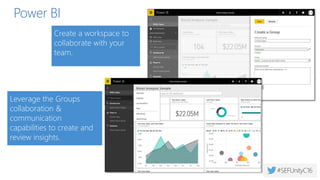
  • #9 How many of you are using Groups? Next year, everyone in this room’s hands go up.  We’re here to equip you to be an enabled customer. Office 365 Groups are a tool companies use to help their staff form teams and work across the suite using a suite of familiar tools with low friction. Groups users can form teams in Office 365 as easy as they form in real life and work seamlessly across the suite. After creating group, users will find familiar ease in communicating and coming together with email and calendar from Exchange. Users will find collaboration and control working together on files powered by SharePoint and the group’s site. Users will find their team online for easy meetings or quick calls in Skype for Business. And of that’s not enough, users will find the same team connects to their teams in planner, reports in power BI and tens of other third-party services through connectors. This is all made possible by Office 365 – the graph which powers connection and insights across apps, and the governance you expect and demand from Office 365.
  • #18 Demo the service. Demo’s are available at //BI
  • #21 Our goal in this session is to set you up to institute a pilot for Office 365 groups with the tools we’re going to give you in this session. If you’re already using Groups, you’ll learn about new tools to manage Groups. First, you need to know where to go to administer groups…. You’ll also find rich support for powershell to manage individual groups and policy across all groups.
  • #22 Demo the service. Demo’s are available at //BI
  • #27 When rolling out groups in your organization, you may want to enact policies to indicate which groups are created by users, or to use user properties to help create clusters of groups in the directory. Two features that help with this are naming policy and blocked words. Naming policy is enacted in Exchange Admin Center today…. Naming policy and blocked words today apply to the vastness of Groups created in Exchange and Outlook. Support for naming conventions for all groups on all endpoints is moving into the directory very soon – Vince will tell you more about that later. When running your pilot, you may want to control the rollout of group creation to users while you apply necessary polices. That’s possible easill yusing AD powershell… And sometimes you want to create large groups that don’t require ongoing management – like folks in a discipline….
  • #32 Office 365 groups adhere to your organization’s information protection concerns - Whether it’s in Outlook on a PC or on a mobile device, know that data in Groups conforms to your policies for access and sharing. Over the last few months, we’ve enabled the Outlook Groups mobile apps to support mobile app management through Intune and other management providers. Also, if a group needs to be made private, you can easily make that change at any time in the UI, admin settings, etc.
  • #34 In-place hold and preservation policy scenario also includes: Typically accomplished using 3rd party archives such as Enterprise Vault. For example SEC Rule 17a-4 states that many of the records, including communications that relate to the broker-dealer's business as such, must be retained for three years; All will support Groups as a first-class object in Fall 2016
  • #35 “But I’ve heard that there aren’t any compliance features for Groups!” Many critical capabilities exist today, and enhanced features are releasing in the coming months. What if you need to know who created which groups? What if you need to perform ediscovery against group content?
  • #46 Demo the service. Demo’s are available at //BI