WEBINAR
What Does Microsoft Teams Mean for Office 365?
Housekeeping
• Webinar is being recorded
• 45 minute session
• 15 minute Q&A session at the end
• Slides and recording will be available afterwards
• Send in your questions!
• Type your questions in the Go-to-Webinar Question Box on the right side of your
screen
Daniel Cohen-Dumani
@dcohendumani
Founder
and CEO
Background: 20+ Years of Expertise as
a Digital Workplace Architect
Interests: Productivity in
the Digital Workplace,
Work 2.0
Fun Fact: Daniel played
competitive Soccer and
Football in Switzerland
About Daniel
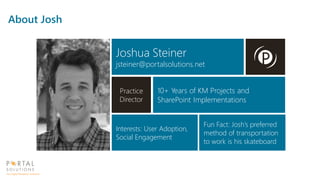
Joshua Steiner
jsteiner@portalsolutions.net
Practice
Director
10+ Years of KM Projects and
SharePoint Implementations
Interests: User Adoption,
Social Engagement
Fun Fact: Josh’s preferred
method of transportation
to work is his skateboard
About Josh
Poll
Are you using an Enterprise Chat tool today?
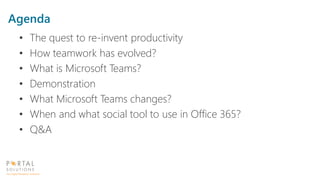
Agenda
• The quest to re-invent productivity
• How teamwork has evolved?
• What is Microsoft Teams?
• Demonstration
• What Microsoft Teams changes?
• When and what social tool to use in Office 365?
• Q&A
Technology is fast reshaping
our world and has the
potential to change
everything – people,
businesses, communities
and nations.”
“
Employees work on nearly 2x
the number of teams than they
did five years ago*
41% employees say mobile
business apps are changing the
way they work*
Information overload wastes
25% of employee time, costing
U.S. business $997B each year*
160M customer records leaked*
229 days to detect security
infiltration*
- Luis Alvarez, CEO, Global Services, BT
BT Global Services CIO report 2016: The Digital CIO * Multiple industry sources.
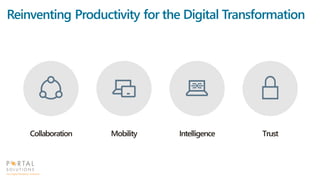
Reinventing Productivity for the Digital Transformation
9
Geographically Distributed
Need varied ways to connect across
locations and time-zones
Internal & External Team Members
Team members outside the firewall need
unfettered access
Multi-Generation Workforce
Different expectations and preferences
for tools
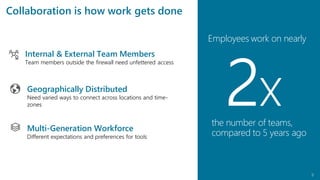
Geographically Distributed
Need varied ways to connect across locations and time-
zones
Internal & External Team Members
Team members outside the firewall need unfettered access
Multi-Generation Workforce
Different expectations and preferences for tools
Collaboration is how work gets done
Employees work on nearly
xthe number of teams,
compared to 5 years ago
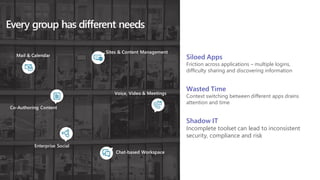
Every group has different needs
Co-Authoring Content
Chat-based Workspace
Sites & Content Management
Enterprise Social
Mail & Calendar
Voice, Video & Meetings
Wasted Time
Context switching between different apps drains
attention and time
Shadow IT
Incomplete toolset can lead to inconsistent
security, compliance and risk
Siloed Apps
Friction across applications – multiple logins,
difficulty sharing and discovering information
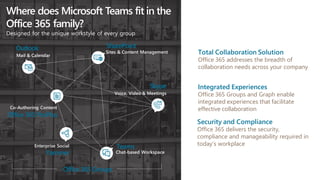
Where does Microsoft Teams fit in the
Office 365 family?
Designed for the unique workstyle of every group
SharePoint
Teams
Office 365 ProPlus
Yammer
Outlook
Skype
Sites & Content Management
Chat-based Workspace
Co-Authoring Content
Enterprise Social
Mail & Calendar
Voice, Video & Meetings
Office 365 Groups
Total Collaboration Solution
Office 365 addresses the breadth of
collaboration needs across your company
Integrated Experiences
Office 365 Groups and Graph enable
integrated experiences that facilitate
effective collaboration
Security and Compliance
Office 365 delivers the security,
compliance and manageability required in
today’s workplace
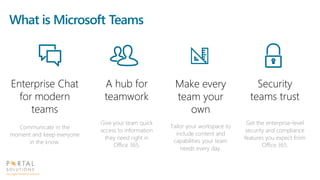
Enterprise Chat
for modern
teams
Communicate in the
moment and keep everyone
in the know.
Make every
team your
own
Tailor your workspace to
include content and
capabilities your team
needs every day.
A hub for
teamwork
Give your team quick
access to information
they need right in
Office 365.
What is Microsoft Teams
Security
teams trust
Get the enterprise-level
security and compliance
features you expect from
Office 365.
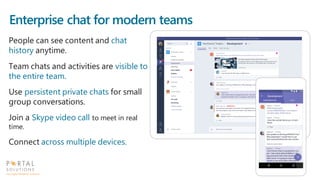
Enterprise chat for modern teams
People can see content and chat
history anytime.
Team chats and activities are visible to
the entire team.
Use persistent private chats for small
group conversations.
Join a Skype video call to meet in real
time.
Connect across multiple devices.
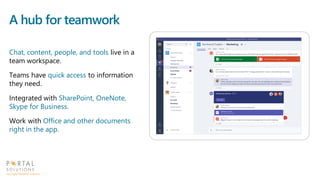
A hub for teamwork
Chat, content, people, and tools live in a
team workspace.
Teams have quick access to information
they need.
Integrated with SharePoint, OneNote,
Skype for Business.
Work with Office and other documents
right in the app.
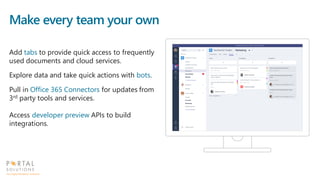
Make every team your own
Add tabs to provide quick access to frequently
used documents and cloud services.
Explore data and take quick actions with bots.
Pull in Office 365 Connectors for updates from
3rd party tools and services.
Access developer preview APIs to build
integrations.
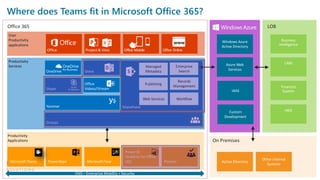
Productivity
Applications
Where does Teams fit in Microsoft Office 365?
Productivity
Services
User
Productivity
applications
Office
www
Office 365
On Premises
LOB
Managed
Metadata
Enterprise
Search
Publishing
Records
Management
WorkflowWeb Services
Demonstration
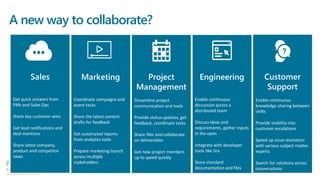
A new way to collaborate?
What does Microsoft Teams change?
• Makes us rethink collaboration and productivity
• Move email conversations to a better medium
• Increase visibility of external signals (CRM, ERP, other
systems)
• Increase team focus and reduce context switching
• Create a frame of reference on projects and teamwork
• Get people up-to-speed and keep people in the know
The Great Debate
Yammer vs. Teams vs. Groups
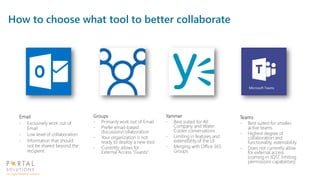
How to choose what tool to better collaborate
Email
- Exclusively work out of
Email
- Low level of collaboration
- Information that should
not be shared beyond the
recipient
Groups
- Primarily work out of Email
- Prefer email-based
discussion/collaboration
- Your organization is not
ready to deploy a new tool
- Currently allows for
External Access “Guests”
Yammer
- Best suited for All
Company and Water
Cooler conversations
- Limiting in features and
extensibility of the UI
- Merging with Office 365
Groups
Teams
- Best suited for smaller,
active teams
- Highest degree of
collaboration and
functionality, extensibility
- Does not currently allow
for external access
(coming in 1Q17, limiting
permissions capabilities)
What to watch for?
• Teams is still in Preview
• General availability in Q1 2017
• Teams is built on top of Office 365 Groups
• Note: Office Groups’ Conversations are separate from Teams’ Conversations/Chats
• Teams’ Files will show up in your Office 365 Groups’ Files
• We recommend choosing one chat engine or the other to avoid user confusion
• External Access
• Office 365 Groups recently shipped Guest Access
• Not currently available in Teams, but Coming Soon
• Should you migrate your conversations from another tool?
• If it isn't broke, don’t fix it
• No API available to this today
• Consider running in parallel until API/migration approach becomes available
• Teams Uses Skype Consumer Technology for Video and Audio
• You need to be logged in to Teams to respond to Audio/Video call
• Availability state presence is not synced between Teams and Skype
Poll
Do you plan to use or test Teams?
Q&A
Talk to us about our special 2-week
engagement offer. Our experts will:
- Assess & recommend best
communication strategy
- Roll out recommended
communication tool
- Train and Support
Next Steps
Thank you.
Contact Us For Details
http://www.portalsolutions.net/communication-tool-offer

Webinar: What Does Microsoft Teams Mean for Office 365?

  • 1.
    WEBINAR What Does MicrosoftTeams Mean for Office 365?
  • 2.
    Housekeeping • Webinar isbeing recorded • 45 minute session • 15 minute Q&A session at the end • Slides and recording will be available afterwards • Send in your questions! • Type your questions in the Go-to-Webinar Question Box on the right side of your screen
  • 3.
    Daniel Cohen-Dumani @dcohendumani Founder and CEO Background:20+ Years of Expertise as a Digital Workplace Architect Interests: Productivity in the Digital Workplace, Work 2.0 Fun Fact: Daniel played competitive Soccer and Football in Switzerland About Daniel
  • 4.
    Joshua Steiner jsteiner@portalsolutions.net Practice Director 10+ Yearsof KM Projects and SharePoint Implementations Interests: User Adoption, Social Engagement Fun Fact: Josh’s preferred method of transportation to work is his skateboard About Josh
  • 5.
    Poll Are you usingan Enterprise Chat tool today?
  • 6.
    Agenda • The questto re-invent productivity • How teamwork has evolved? • What is Microsoft Teams? • Demonstration • What Microsoft Teams changes? • When and what social tool to use in Office 365? • Q&A
  • 7.
    Technology is fastreshaping our world and has the potential to change everything – people, businesses, communities and nations.” “ Employees work on nearly 2x the number of teams than they did five years ago* 41% employees say mobile business apps are changing the way they work* Information overload wastes 25% of employee time, costing U.S. business $997B each year* 160M customer records leaked* 229 days to detect security infiltration* - Luis Alvarez, CEO, Global Services, BT BT Global Services CIO report 2016: The Digital CIO * Multiple industry sources.
  • 8.
    Reinventing Productivity forthe Digital Transformation
  • 9.
    9 Geographically Distributed Need variedways to connect across locations and time-zones Internal & External Team Members Team members outside the firewall need unfettered access Multi-Generation Workforce Different expectations and preferences for tools Geographically Distributed Need varied ways to connect across locations and time- zones Internal & External Team Members Team members outside the firewall need unfettered access Multi-Generation Workforce Different expectations and preferences for tools Collaboration is how work gets done Employees work on nearly xthe number of teams, compared to 5 years ago
  • 10.
    Every group hasdifferent needs Co-Authoring Content Chat-based Workspace Sites & Content Management Enterprise Social Mail & Calendar Voice, Video & Meetings Wasted Time Context switching between different apps drains attention and time Shadow IT Incomplete toolset can lead to inconsistent security, compliance and risk Siloed Apps Friction across applications – multiple logins, difficulty sharing and discovering information
  • 11.
    Where does MicrosoftTeams fit in the Office 365 family? Designed for the unique workstyle of every group SharePoint Teams Office 365 ProPlus Yammer Outlook Skype Sites & Content Management Chat-based Workspace Co-Authoring Content Enterprise Social Mail & Calendar Voice, Video & Meetings Office 365 Groups Total Collaboration Solution Office 365 addresses the breadth of collaboration needs across your company Integrated Experiences Office 365 Groups and Graph enable integrated experiences that facilitate effective collaboration Security and Compliance Office 365 delivers the security, compliance and manageability required in today’s workplace
  • 12.
    Enterprise Chat for modern teams Communicatein the moment and keep everyone in the know. Make every team your own Tailor your workspace to include content and capabilities your team needs every day. A hub for teamwork Give your team quick access to information they need right in Office 365. What is Microsoft Teams Security teams trust Get the enterprise-level security and compliance features you expect from Office 365.
  • 13.
    Enterprise chat formodern teams People can see content and chat history anytime. Team chats and activities are visible to the entire team. Use persistent private chats for small group conversations. Join a Skype video call to meet in real time. Connect across multiple devices.
  • 14.
    A hub forteamwork Chat, content, people, and tools live in a team workspace. Teams have quick access to information they need. Integrated with SharePoint, OneNote, Skype for Business. Work with Office and other documents right in the app.
  • 15.
    Make every teamyour own Add tabs to provide quick access to frequently used documents and cloud services. Explore data and take quick actions with bots. Pull in Office 365 Connectors for updates from 3rd party tools and services. Access developer preview APIs to build integrations.
  • 16.
    Productivity Applications Where does Teamsfit in Microsoft Office 365? Productivity Services User Productivity applications Office www Office 365 On Premises LOB Managed Metadata Enterprise Search Publishing Records Management WorkflowWeb Services
  • 17.
  • 18.
    A new wayto collaborate?
  • 19.
    What does MicrosoftTeams change? • Makes us rethink collaboration and productivity • Move email conversations to a better medium • Increase visibility of external signals (CRM, ERP, other systems) • Increase team focus and reduce context switching • Create a frame of reference on projects and teamwork • Get people up-to-speed and keep people in the know
  • 20.
    The Great Debate Yammervs. Teams vs. Groups
  • 21.
    How to choosewhat tool to better collaborate Email - Exclusively work out of Email - Low level of collaboration - Information that should not be shared beyond the recipient Groups - Primarily work out of Email - Prefer email-based discussion/collaboration - Your organization is not ready to deploy a new tool - Currently allows for External Access “Guests” Yammer - Best suited for All Company and Water Cooler conversations - Limiting in features and extensibility of the UI - Merging with Office 365 Groups Teams - Best suited for smaller, active teams - Highest degree of collaboration and functionality, extensibility - Does not currently allow for external access (coming in 1Q17, limiting permissions capabilities)
  • 22.
    What to watchfor? • Teams is still in Preview • General availability in Q1 2017 • Teams is built on top of Office 365 Groups • Note: Office Groups’ Conversations are separate from Teams’ Conversations/Chats • Teams’ Files will show up in your Office 365 Groups’ Files • We recommend choosing one chat engine or the other to avoid user confusion • External Access • Office 365 Groups recently shipped Guest Access • Not currently available in Teams, but Coming Soon • Should you migrate your conversations from another tool? • If it isn't broke, don’t fix it • No API available to this today • Consider running in parallel until API/migration approach becomes available • Teams Uses Skype Consumer Technology for Video and Audio • You need to be logged in to Teams to respond to Audio/Video call • Availability state presence is not synced between Teams and Skype
  • 23.
    Poll Do you planto use or test Teams?
  • 24.
  • 25.
    Talk to usabout our special 2-week engagement offer. Our experts will: - Assess & recommend best communication strategy - Roll out recommended communication tool - Train and Support Next Steps Thank you. Contact Us For Details http://www.portalsolutions.net/communication-tool-offer