Best Practices for Deploying
SharePoint End-to-End
What You Need To Know
By: Haniel Croitoru
Thank You!
Gold
Bronze
HANIEL
CROITORU
I’m passionate about process automation, and I work at .
LEAD CONSULTANT | OFFICE 365 MVP | SPEAKER
DEPLOYMENT METHODS
LEVERAGING POWERSHELL
CHOOSING WHAT TO USE
MY SECRET RECIPE
Strategy for deploying SharePoint
Online sites successfully in a
repeatable fashion using little effort
Deployments involve more than just code
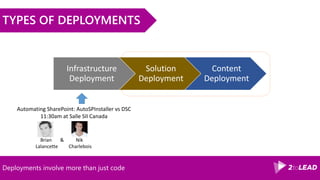
TYPES OF DEPLOYMENTS
Infrastructure
Deployment
Solution
Deployment
Content
Deployment
Brian & Nik
Lalancette Charlebois
Automating SharePoint: AutoSPInstaller vs DSC
11:30am at Salle SII Canada
Deployments involve more than just code
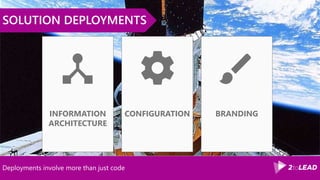
SOLUTION DEPLOYMENTS
BRANDINGCONFIGURATIONINFORMATION
ARCHITECTURE
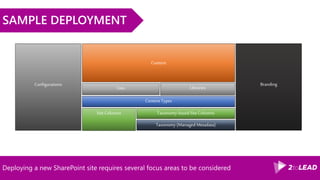
Deploying a new SharePoint site requires several focus areas to be considered
SAMPLE DEPLOYMENT
Content Types
Lists
Site Columns
Content
Configurations
Taxonomy (Managed Metadata)
Taxonomy-based Site Columns
Libraries
Branding
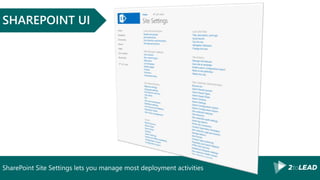
SharePoint Site Settings lets you manage most deployment activities
SHAREPOINT UI
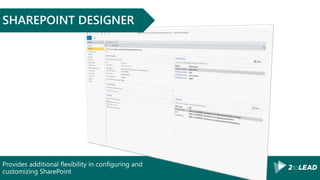
Provides additional flexibility in configuring and
customizing SharePoint
SHAREPOINT DESIGNER
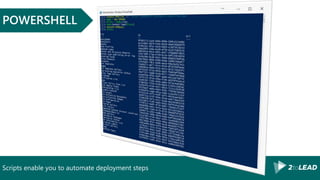
Scripts enable you to automate deployment steps
POWERSHELL
DEPLOYMENT METHODS
LEVERAGING POWERSHELL
CHOOSING WHAT TO USE
MY SECRET RECIPE
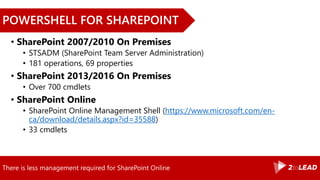
There is less management required for SharePoint Online
POWERSHELL FOR SHAREPOINT
• SharePoint 2007/2010 On Premises
• STSADM (SharePoint Team Server Administration)
• 181 operations, 69 properties
• SharePoint 2013/2016 On Premises
• Over 700 cmdlets
• SharePoint Online
• SharePoint Online Management Shell (https://www.microsoft.com/en-
ca/download/details.aspx?id=35588)
• 33 cmdlets
Scripting for SharePoint Online is more complex than for SharePoint On Premises
EXAMPLE: GET LIST ITEMS
C:> Get-SPList –url “http:/site/web” –List “Invoices” C:>$site = Get-SPOSite –Identity “http://site”
C:> $web = $site.Webs[“web”]
C:> $ctx.Load($list)
C:> $list = $web.List[“Invoices”]
C:> $ctx.ExecuteQuery()
Simplifies your SharePoint Online scripting
OFFICEDEV PNP POWERSHELL LIBRARY
• Over 160 cmdlets
• Encapsulates native SharePoint CSOM Library
• Available on both SharePoint 2013 and SharePoint Online
• Visit https://github.com/OfficeDev/PnP-PowerShell
Many scripts are transferrable between environments
OFFICEDEV PNP PROVISIONING ENGINE
• Built on OfficeDev Core libraries
• Available on SharePoint 2013, 2016 and Online
• Model the design of site columns, content types, list definitions,
composed looks, and pages
• Automates remote provisioning tasks
DEPLOYMENT METHODS
LEVERAGING POWERSHELL
CHOOSING WHAT TO USE
MY SECRET RECIPE
What are the factors you need to consider?
WHEN TO USE WHAT
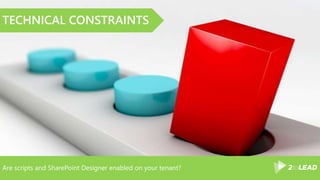
Are scripts and SharePoint Designer enabled on your tenant?
TECHNICAL CONSTRAINTS
How often are deployments performed? Weekly? Seldom?
FREQUENCY
Do deployments require few or many items to complete?
VOLUME
Are there many interdependent steps involved in the deployment?
COMPLEXITY
USER ACCESS & KNOWLEDGE
DEPLOYMENT METHODS
LEVERAGING POWERSHELL
CHOOSING WHAT TO USE
MY SECRET RECIPE
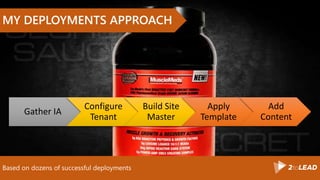
Based on dozens of successful deployments
MY DEPLOYMENTS APPROACH
Gather IA
Configure
Tenant
Build Site
Master
Apply
Template
Add
Content
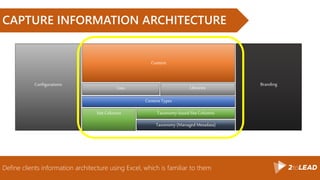
Define clients information architecture using Excel, which is familiar to them
CAPTURE INFORMATION ARCHITECTURE
Content Types
Lists
Site Columns
Content
Configurations
Taxonomy (Managed Metadata)
Taxonomy-based Site Columns
Libraries
Branding
Configurations are only required once per site, unless they are changing
CONFIGURE TENANT
Deployment templates can be used to quickly deploy new sites
BUILD A MASTER
Content cannot be deployed using templates and is added at the end of the process
ADD CONTENT
We work hard, we party hard! 
5h00 PM
3971 Ontario E
LEAD CONSULTANT | OFFICE 365 MVP | SPEAKER
Thank You!
Organizers, SponsorsandYouformaking
thispossible.
Message Me On LinkedIn or Email
linkedin.com/in/hanielcroitoru
haniel@2tolead.com
Download the full whitepapers at
http://www.whentousewhat.com
http://Office365Intranets.com

Best practices for deploying share point end to-end

  • 1.
    Best Practices forDeploying SharePoint End-to-End What You Need To Know By: Haniel Croitoru
  • 2.
  • 3.
    HANIEL CROITORU I’m passionate aboutprocess automation, and I work at . LEAD CONSULTANT | OFFICE 365 MVP | SPEAKER
  • 4.
  • 5.
    Strategy for deployingSharePoint Online sites successfully in a repeatable fashion using little effort
  • 6.
    Deployments involve morethan just code TYPES OF DEPLOYMENTS Infrastructure Deployment Solution Deployment Content Deployment Brian & Nik Lalancette Charlebois Automating SharePoint: AutoSPInstaller vs DSC 11:30am at Salle SII Canada
  • 7.
    Deployments involve morethan just code SOLUTION DEPLOYMENTS BRANDINGCONFIGURATIONINFORMATION ARCHITECTURE
  • 8.
    Deploying a newSharePoint site requires several focus areas to be considered SAMPLE DEPLOYMENT Content Types Lists Site Columns Content Configurations Taxonomy (Managed Metadata) Taxonomy-based Site Columns Libraries Branding
  • 9.
    SharePoint Site Settingslets you manage most deployment activities SHAREPOINT UI
  • 10.
    Provides additional flexibilityin configuring and customizing SharePoint SHAREPOINT DESIGNER
  • 11.
    Scripts enable youto automate deployment steps POWERSHELL
  • 12.
  • 13.
    There is lessmanagement required for SharePoint Online POWERSHELL FOR SHAREPOINT • SharePoint 2007/2010 On Premises • STSADM (SharePoint Team Server Administration) • 181 operations, 69 properties • SharePoint 2013/2016 On Premises • Over 700 cmdlets • SharePoint Online • SharePoint Online Management Shell (https://www.microsoft.com/en- ca/download/details.aspx?id=35588) • 33 cmdlets
  • 14.
    Scripting for SharePointOnline is more complex than for SharePoint On Premises EXAMPLE: GET LIST ITEMS C:> Get-SPList –url “http:/site/web” –List “Invoices” C:>$site = Get-SPOSite –Identity “http://site” C:> $web = $site.Webs[“web”] C:> $ctx.Load($list) C:> $list = $web.List[“Invoices”] C:> $ctx.ExecuteQuery()
  • 15.
    Simplifies your SharePointOnline scripting OFFICEDEV PNP POWERSHELL LIBRARY • Over 160 cmdlets • Encapsulates native SharePoint CSOM Library • Available on both SharePoint 2013 and SharePoint Online • Visit https://github.com/OfficeDev/PnP-PowerShell
  • 16.
    Many scripts aretransferrable between environments OFFICEDEV PNP PROVISIONING ENGINE • Built on OfficeDev Core libraries • Available on SharePoint 2013, 2016 and Online • Model the design of site columns, content types, list definitions, composed looks, and pages • Automates remote provisioning tasks
  • 17.
  • 18.
    What are thefactors you need to consider? WHEN TO USE WHAT
  • 19.
    Are scripts andSharePoint Designer enabled on your tenant? TECHNICAL CONSTRAINTS
  • 20.
    How often aredeployments performed? Weekly? Seldom? FREQUENCY
  • 21.
    Do deployments requirefew or many items to complete? VOLUME
  • 22.
    Are there manyinterdependent steps involved in the deployment? COMPLEXITY
  • 23.
    USER ACCESS &KNOWLEDGE
  • 24.
  • 25.
    Based on dozensof successful deployments MY DEPLOYMENTS APPROACH Gather IA Configure Tenant Build Site Master Apply Template Add Content
  • 26.
    Define clients informationarchitecture using Excel, which is familiar to them CAPTURE INFORMATION ARCHITECTURE Content Types Lists Site Columns Content Configurations Taxonomy (Managed Metadata) Taxonomy-based Site Columns Libraries Branding
  • 27.
    Configurations are onlyrequired once per site, unless they are changing CONFIGURE TENANT
  • 28.
    Deployment templates canbe used to quickly deploy new sites BUILD A MASTER
  • 29.
    Content cannot bedeployed using templates and is added at the end of the process ADD CONTENT
  • 30.
    We work hard,we party hard!  5h00 PM 3971 Ontario E
  • 31.
    LEAD CONSULTANT |OFFICE 365 MVP | SPEAKER Thank You! Organizers, SponsorsandYouformaking thispossible. Message Me On LinkedIn or Email linkedin.com/in/hanielcroitoru haniel@2tolead.com Download the full whitepapers at http://www.whentousewhat.com http://Office365Intranets.com

Editor's Notes

  • #8 Type of deployments IA Metadata Taxonomy Site structure Configuration Finite set of configurations Today, there are some limitations (e.g. User Property creation) Branding Content Different types have different needs IA – simple, but often high in volume (e.g. building term sets, site columns) Use square corners
  • #14 A large number of SharePoint on-prem cmdlets are for things not applicable in SharePoint Online Content database management Web application Central Administration configuration
  • #27 Through meetings with clients, define the IA and content Build out the taxonomy, fields, content types, lists, and views