P R E S E N T E D B Y G I N A M O N T G O M E R Y, V- T S P, M C S A , M C T S , M C P
J A N U A RY 2 0 1 7
J U M P S TA R T D I G I TA L
C O L L A B O R AT I O N
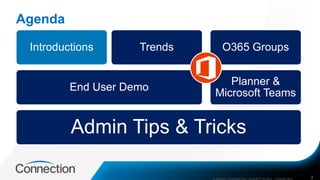
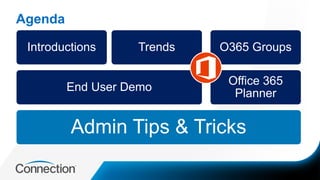
Agenda
COMPANY CONFIDENTIAL—SUBJECT TO NDA C000000-0616 2
Admin Tips & Tricks
End User Demo
Introductions Trends
Planner &
Microsoft Teams
O365 Groups
Introductions
3
www.ginamontgomery.com
@ginaMMontgomery
gina.montgomery@connection.com
b-gimon@microsoft.com
Gina Montgomery, V-TSP MCSA MCTS MCP
Connection – Sr. Director, Microsoft Cloud Services
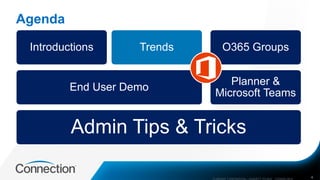
Agenda
COMPANY CONFIDENTIAL—SUBJECT TO NDA C000000-0616 4
Admin Tips & Tricks
End User Demo
Introductions Trends
Planner &
Microsoft Teams
O365 Groups
5COMPANY CONFIDENTIAL—SUBJECT TO NDA C000000-0616
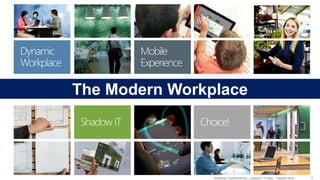
The Modern Workplace
Agenda
COMPANY CONFIDENTIAL—SUBJECT TO NDA C000000-0616 6
Admin Tips & Tricks
End User Demo
Introductions Trends
Office 365
Planner
O365 Groups
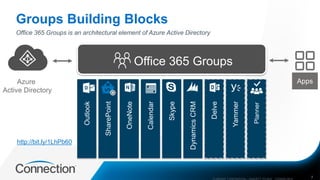
Groups Building Blocks
COMPANY CONFIDENTIAL—SUBJECT TO NDA C000000-0616 7
Office 365 Groups is an architectural element of Azure Active Directory
Azure
Active Directory
http://bit.ly/1LhPb60
Agenda
8
Admin Tips & Tricks
End User Demo
Introductions Trends
Office 365
Planner
O365 Groups
Agenda
9
Admin Tips & Tricks
End User Demo
Introductions Trends
Office 365
Planner
O365 Groups
Creating Plans and Tracking Tasks with Office 365 Planner
Put your plans in motion – build teams, share goals, and track progress
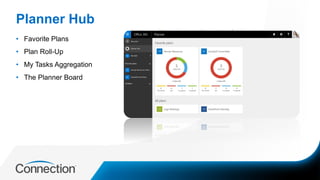
Planner Hub
• Favorite Plans
• Plan Roll-Up
• My Tasks Aggregation
• The Planner Board
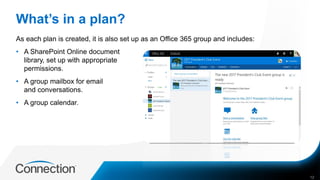
What’s in a plan?
As each plan is created, it is also set up as an Office 365 group and includes:
• A SharePoint Online document
library, set up with appropriate
permissions.
• A group mailbox for email
and conversations.
• A group calendar.
12
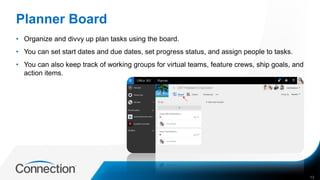
Planner Board
• Organize and divvy up plan tasks using the board.
• You can set start dates and due dates, set progress status, and assign people to tasks.
• You can also keep track of working groups for virtual teams, feature crews, ship goals, and
action items.
13
Get Granular with Plans
• Determine goals and overall plan start and due date.
• Define and order tasks with start and due dates.
• Decide who should work on those tasks.
• Check the availability of those people for the tasks.
• Gather or create the documents you will need to share with your team.
14
When you are done with a plan…
• When you delete a plan, you also delete its group and its conversations, its document
library, notebook, and other related information.
• If you really do want to delete your plan, consider creating an archive of your work by
copying the dashboard status and the text of conversations, and saving any related
documents – or whatever practices work best for you.
15
Office 365 Planner
End User Demo
Creating digital chat-based workspace
Have discussions – Collaborate – For today’s teams
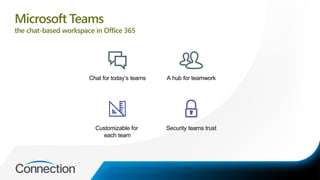
Security teams trust
Chat for today’s teams
Customizable for
each team
A hub for teamwork
Microsoft Teams
the chat-based workspace in Office 365
Chat Experience for Today’s Teams
• Microsoft has built a threaded, persistent chat scenario within Microsoft Teams.
• It allows for open group chats or private 1:1 chats.
• Built for today's teams it also allows users to show personality with GIFs, stickers, custom
memes and emojis.
• Skype for Business Online is integrated naturally and powers voice and video call
functionality from right within the Team Channels.
COMPANY CONFIDENTIAL—SUBJECT TO NDA C000000-0616 19
A Hub for Teamwork
• Microsoft Teams is also a new hub for teamwork.
• It's integrated with SharePoint Online, Power BI and Planner and is tied together by the
Office 365 Groups Service.
• The Microsoft Graph provides intelligence to the service as well.
• Word, Excel PowerPoint and OneNote are also built into Teams to make adoption even
easier.
• Search works well across files, chats and people.
COMPANY CONFIDENTIAL—SUBJECT TO NDA C000000-0616 20
A Customizable Experience for Each Team
• Users can create tailored channels inside each team.
• There is a concept of Tabs available within the channel where you can pin common
services like OneNote to the top of the channel.
• The Teams services can be extended with its open APIs and support of the Microsoft Bot
Framework as well.
COMPANY CONFIDENTIAL—SUBJECT TO NDA C000000-0616 21
Built-in security that teams trust
• Security is also built in that Teams can easily trust.
• Other popular security features that you've been using with Office 365 and Azure AD are
available in Teams.
• Data is encrypted at rest and in transit.
• Multi-factor authentication is available for another layer of protection.
• The Microsoft Teams service is served from Microsoft's global hyper-scale network and is
centrally managed as part of Office 365 Business and Enterprise plans.
COMPANY CONFIDENTIAL—SUBJECT TO NDA C000000-0616 22
Microsoft Teams Demo
Agenda
2
Admin Tips & Tricks
End User Demo
Introductions Trends
Office 365
Planner
O365 Groups
Step 1: Educate Users on Choices for Groups
Conversations for Groups can be in Outlook, Yammer, and now, Microsoft Teams.
Groups Conversations Choices
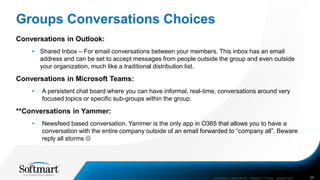
Conversations in Outlook:
• Shared Inbox – For email conversations between your members. This inbox has an email
address and can be set to accept messages from people outside the group and even outside
your organization, much like a traditional distribution list.
Conversations in Microsoft Teams:
• A persistent chat board where you can have informal, real-time, conversations around very
focused topics or specific sub-groups within the group.
**Conversations in Yammer:
• Newsfeed based conversation. Yammer is the only app in O365 that allows you to have a
conversation with the entire company outside of an email forwarded to “company all”. Beware
reply all storms 
COMPANY CONFIDENTIAL—SUBJECT TO NDA C000000-0616 26
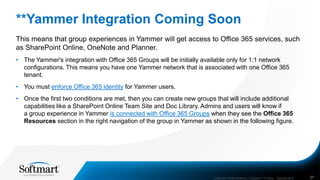
**Yammer Integration Coming Soon
This means that group experiences in Yammer will get access to Office 365 services, such
as SharePoint Online, OneNote and Planner.
• The Yammer's integration with Office 365 Groups will be initially available only for 1:1 network
configurations. This means you have one Yammer network that is associated with one Office 365
tenant.
• You must enforce Office 365 identity for Yammer users.
• Once the first two conditions are met, then you can create new groups that will include additional
capabilities like a SharePoint Online Team Site and Doc Library. Admins and users will know if
a group experience in Yammer is connected with Office 365 Groups when they see the Office 365
Resources section in the right navigation of the group in Yammer as shown in the following figure.
COMPANY CONFIDENTIAL—SUBJECT TO NDA C000000-0616 27
Step 2: Know Groups Limits
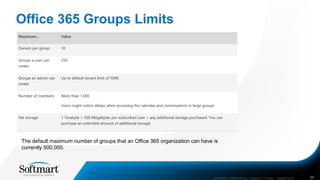
Office 365 Groups Limits
COMPANY CONFIDENTIAL—SUBJECT TO NDA C000000-0616 29
The default maximum number of groups that an Office 365 organization can have is
currently 500,000.
Step 3: Learn to Manage Groups
Learn to Manage Groups
• Add and remove group members in Outlook 2016 / Add and remove group members in
Outlook on the web
• Manage Group membership in the Office 365 admin center
• Use PowerShell to manage Office 365 Groups
• Assign a new owner to an orphaned group
• Migrate distribution lists to Office 365 Groups
• Guest access to Office 365 groups - Admin Help
COMPANY CONFIDENTIAL—SUBJECT TO NDA C000000-0616 31
Step 4: Learn O365 Groups Compliance,
Reporting and Governance Options
Compliance, Governance and Reporting
• Create a distribution group naming policy
• In-place eDiscovery in the Exchange admin center
• Create or remove an in-place legal hold
• Create a preservation policy
• Run a Content Search in the Office 365 Security & Compliance Center
• Introduction to IRM for email messages
• Office 365 Reports in the admin center - Office 365 groups
COMPANY CONFIDENTIAL—SUBJECT TO NDA C000000-0616 33
Step 5: Use the Resources for Admins
Resources for Admins
• Microsoft Support Documentation – O365 Groups
• Office 365 Roadmap
• Microsoft Teams Admin FAQ
35
Thank you!
36
www.ginamontgomery.com
@ginaMMontgomery
gina.montgomery@connection.com
b-gimon@microsoft.com
Gina Montgomery, V-TSP MCSA MCTS MCP
Connection – Sr. Director, Microsoft Cloud Services

Jump Start Digital Collaboration with Office 365 Groups

  • 1.
    P R ES E N T E D B Y G I N A M O N T G O M E R Y, V- T S P, M C S A , M C T S , M C P J A N U A RY 2 0 1 7 J U M P S TA R T D I G I TA L C O L L A B O R AT I O N
  • 2.
    Agenda COMPANY CONFIDENTIAL—SUBJECT TONDA C000000-0616 2 Admin Tips & Tricks End User Demo Introductions Trends Planner & Microsoft Teams O365 Groups
  • 3.
  • 4.
    Agenda COMPANY CONFIDENTIAL—SUBJECT TONDA C000000-0616 4 Admin Tips & Tricks End User Demo Introductions Trends Planner & Microsoft Teams O365 Groups
  • 5.
    5COMPANY CONFIDENTIAL—SUBJECT TONDA C000000-0616 The Modern Workplace
  • 6.
    Agenda COMPANY CONFIDENTIAL—SUBJECT TONDA C000000-0616 6 Admin Tips & Tricks End User Demo Introductions Trends Office 365 Planner O365 Groups
  • 7.
    Groups Building Blocks COMPANYCONFIDENTIAL—SUBJECT TO NDA C000000-0616 7 Office 365 Groups is an architectural element of Azure Active Directory Azure Active Directory http://bit.ly/1LhPb60
  • 8.
    Agenda 8 Admin Tips &Tricks End User Demo Introductions Trends Office 365 Planner O365 Groups
  • 9.
    Agenda 9 Admin Tips &Tricks End User Demo Introductions Trends Office 365 Planner O365 Groups
  • 10.
    Creating Plans andTracking Tasks with Office 365 Planner Put your plans in motion – build teams, share goals, and track progress
  • 11.
    Planner Hub • FavoritePlans • Plan Roll-Up • My Tasks Aggregation • The Planner Board
  • 12.
    What’s in aplan? As each plan is created, it is also set up as an Office 365 group and includes: • A SharePoint Online document library, set up with appropriate permissions. • A group mailbox for email and conversations. • A group calendar. 12
  • 13.
    Planner Board • Organizeand divvy up plan tasks using the board. • You can set start dates and due dates, set progress status, and assign people to tasks. • You can also keep track of working groups for virtual teams, feature crews, ship goals, and action items. 13
  • 14.
    Get Granular withPlans • Determine goals and overall plan start and due date. • Define and order tasks with start and due dates. • Decide who should work on those tasks. • Check the availability of those people for the tasks. • Gather or create the documents you will need to share with your team. 14
  • 15.
    When you aredone with a plan… • When you delete a plan, you also delete its group and its conversations, its document library, notebook, and other related information. • If you really do want to delete your plan, consider creating an archive of your work by copying the dashboard status and the text of conversations, and saving any related documents – or whatever practices work best for you. 15
  • 16.
  • 17.
    Creating digital chat-basedworkspace Have discussions – Collaborate – For today’s teams
  • 18.
    Security teams trust Chatfor today’s teams Customizable for each team A hub for teamwork Microsoft Teams the chat-based workspace in Office 365
  • 19.
    Chat Experience forToday’s Teams • Microsoft has built a threaded, persistent chat scenario within Microsoft Teams. • It allows for open group chats or private 1:1 chats. • Built for today's teams it also allows users to show personality with GIFs, stickers, custom memes and emojis. • Skype for Business Online is integrated naturally and powers voice and video call functionality from right within the Team Channels. COMPANY CONFIDENTIAL—SUBJECT TO NDA C000000-0616 19
  • 20.
    A Hub forTeamwork • Microsoft Teams is also a new hub for teamwork. • It's integrated with SharePoint Online, Power BI and Planner and is tied together by the Office 365 Groups Service. • The Microsoft Graph provides intelligence to the service as well. • Word, Excel PowerPoint and OneNote are also built into Teams to make adoption even easier. • Search works well across files, chats and people. COMPANY CONFIDENTIAL—SUBJECT TO NDA C000000-0616 20
  • 21.
    A Customizable Experiencefor Each Team • Users can create tailored channels inside each team. • There is a concept of Tabs available within the channel where you can pin common services like OneNote to the top of the channel. • The Teams services can be extended with its open APIs and support of the Microsoft Bot Framework as well. COMPANY CONFIDENTIAL—SUBJECT TO NDA C000000-0616 21
  • 22.
    Built-in security thatteams trust • Security is also built in that Teams can easily trust. • Other popular security features that you've been using with Office 365 and Azure AD are available in Teams. • Data is encrypted at rest and in transit. • Multi-factor authentication is available for another layer of protection. • The Microsoft Teams service is served from Microsoft's global hyper-scale network and is centrally managed as part of Office 365 Business and Enterprise plans. COMPANY CONFIDENTIAL—SUBJECT TO NDA C000000-0616 22
  • 23.
  • 24.
    Agenda 2 Admin Tips &Tricks End User Demo Introductions Trends Office 365 Planner O365 Groups
  • 25.
    Step 1: EducateUsers on Choices for Groups Conversations for Groups can be in Outlook, Yammer, and now, Microsoft Teams.
  • 26.
    Groups Conversations Choices Conversationsin Outlook: • Shared Inbox – For email conversations between your members. This inbox has an email address and can be set to accept messages from people outside the group and even outside your organization, much like a traditional distribution list. Conversations in Microsoft Teams: • A persistent chat board where you can have informal, real-time, conversations around very focused topics or specific sub-groups within the group. **Conversations in Yammer: • Newsfeed based conversation. Yammer is the only app in O365 that allows you to have a conversation with the entire company outside of an email forwarded to “company all”. Beware reply all storms  COMPANY CONFIDENTIAL—SUBJECT TO NDA C000000-0616 26
  • 27.
    **Yammer Integration ComingSoon This means that group experiences in Yammer will get access to Office 365 services, such as SharePoint Online, OneNote and Planner. • The Yammer's integration with Office 365 Groups will be initially available only for 1:1 network configurations. This means you have one Yammer network that is associated with one Office 365 tenant. • You must enforce Office 365 identity for Yammer users. • Once the first two conditions are met, then you can create new groups that will include additional capabilities like a SharePoint Online Team Site and Doc Library. Admins and users will know if a group experience in Yammer is connected with Office 365 Groups when they see the Office 365 Resources section in the right navigation of the group in Yammer as shown in the following figure. COMPANY CONFIDENTIAL—SUBJECT TO NDA C000000-0616 27
  • 28.
    Step 2: KnowGroups Limits
  • 29.
    Office 365 GroupsLimits COMPANY CONFIDENTIAL—SUBJECT TO NDA C000000-0616 29 The default maximum number of groups that an Office 365 organization can have is currently 500,000.
  • 30.
    Step 3: Learnto Manage Groups
  • 31.
    Learn to ManageGroups • Add and remove group members in Outlook 2016 / Add and remove group members in Outlook on the web • Manage Group membership in the Office 365 admin center • Use PowerShell to manage Office 365 Groups • Assign a new owner to an orphaned group • Migrate distribution lists to Office 365 Groups • Guest access to Office 365 groups - Admin Help COMPANY CONFIDENTIAL—SUBJECT TO NDA C000000-0616 31
  • 32.
    Step 4: LearnO365 Groups Compliance, Reporting and Governance Options
  • 33.
    Compliance, Governance andReporting • Create a distribution group naming policy • In-place eDiscovery in the Exchange admin center • Create or remove an in-place legal hold • Create a preservation policy • Run a Content Search in the Office 365 Security & Compliance Center • Introduction to IRM for email messages • Office 365 Reports in the admin center - Office 365 groups COMPANY CONFIDENTIAL—SUBJECT TO NDA C000000-0616 33
  • 34.
    Step 5: Usethe Resources for Admins
  • 35.
    Resources for Admins •Microsoft Support Documentation – O365 Groups • Office 365 Roadmap • Microsoft Teams Admin FAQ 35
  • 36.