Tata Kelola
Pengamanan
Perangkat Lunak
Tony Seno Hartono
National Technology Officer
Microsoft Indonesia
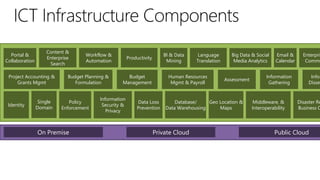
Portal &
Collaboration

Content &
Enterprise
Search

Project Accounting &
Grants Mgmt

Identity

Single
Domain

Workflow &
Automation

Budget Planning &
Formulation

Policy
Enforcement

On Premise

BI & Data
Mining

Productivity

Budget
Management

Information
Security &
Privacy

Language
Translation

Human Resources
Mgmt & Payroll

Data Loss
Prevention

Big Data & Social
Media Analytics

Assessment

Database/
Geo Location &
Data Warehousing
Maps

Private Cloud

Email &
Calendar

Information
Gathering

Middleware, &
Interoperability

Enterpris
Commu

Infor
Dissem

Disaster Re
Business C

Public Cloud
User and Device
Management in Microsoft
Tony Seno Hartono
National Technology Officer
Microsoft Indonesia
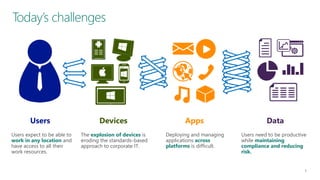
Today’s challenges

Users

Devices

Apps

Data

Users expect to be able to
work in any location and
have access to all their
work resources.

The explosion of devices is
eroding the standards-based
approach to corporate IT.

Deploying and managing
applications across
platforms is difficult.

Users need to be productive
while maintaining
compliance and reducing
risk.
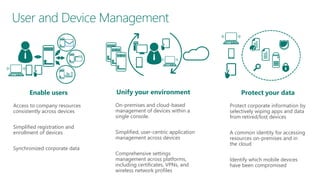
User and Device Management

Enable users
Access to company resources
consistently across devices
Simplified registration and
enrollment of devices
Synchronized corporate data

Unify your environment

Protect your data

On-premises and cloud-based
management of devices within a
single console.

Protect corporate information by
selectively wiping apps and data
from retired/lost devices

Simplified, user-centric application
management across devices

A common identity for accessing
resources on-premises and in
the cloud

Comprehensive settings
management across platforms,
including certificates, VPNs, and
wireless network profiles

Identify which mobile devices
have been compromised
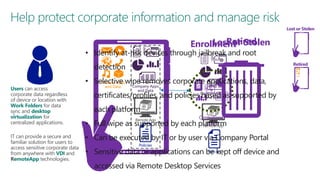
Help protect corporate information and manage risk
Lost or Stolen

Retired
Lost or
Enrollment Stolen

• Identify at-risk devices through jailbreak and root

Retired

detection
Users can access
corporate data regardless
of device or location with
Work Folders for data
sync and desktop
virtualization for
centralized applications.
IT can provide a secure and
familiar solution for users to
access sensitive corporate data
from anywhere with VDI and
RemoteApp technologies.

• Selective wipe removes corporate applications, data,
Personal Apps
and Data

Company Apps
and Data

certificates/profiles, and policies Company Apps supported by
based as
and Data
each platform
Remote App

Centralized

Data
• Full wipe as supported by each platform
Remote App

• Can be executed by IT or by user via Company Portal
Policies

Policies
• Sensitive data or applications can be kept off device and

accessed via Remote Desktop Services

Personal
Apps and
Data
Microsoft Security
Development Lifecycle
HEADLINES

How hackers allegedly
stole “unlimited”
amounts of cash US economy up to
Cybercrime costs from
banks in just a few hours
$140 billion annually, report says

Politics.co.uk [2013]

Ars Technica [2013]
Los Angeles Times [2013]

Malware burrows deep
into computer BIOS to
escape AV
The Register [September 2011]
Researchers have discovered one of the
first pieces ever used in the wild that
modifies the software on the motherboard
of infected computers to ensure the
infection can’t be easily eradicated…

Cyberspace changes
the fog of war

Universities face a
rising barrage of
cyberattacks
Ars Technica [2013]

Cyberattacks on the rise
against US corporations

Espionage malware
infects rafts of
governments,
industries around
the world

New York Times [2013]

Ars Technica [2013]

Forget carjacking, soon
it will be carhacking
The Sydney Morning Herald [2013]
Rising cyber security risks to drivers as
their cars become increasingly powered
by and connected to computers have
prompted the US auto-safety regulator to
start a new office focusing on the threat…
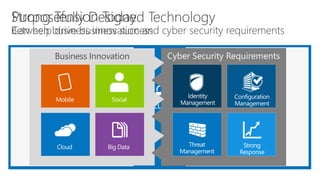
Business Innovation
Application Lifecycle
Management
Tony Seno Hartono
National Technology Officer, Microsoft Indonesia
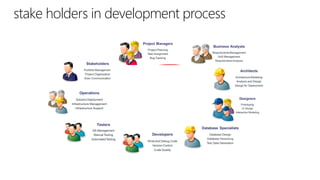
stake holders in development process
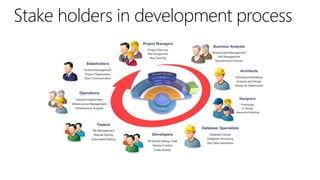
Stake holders in development process
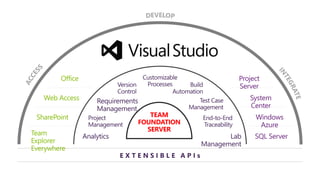
TEAM
FOUNDATION
SERVER
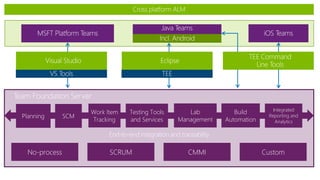
Planning

No-process

SCM

Work Item
Tracking

Testing Tools
and Services

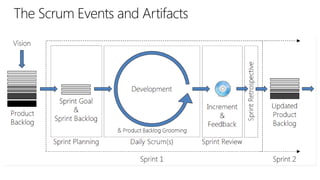
SCRUM

Lab
Management

CMMI

Build
Automation

Integrated
Reporting and
Analytics

Custom
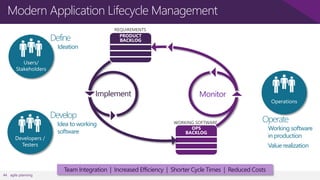
Modern Application Lifecycle Management
Define

Ideation

Implement

Develop

Idea to working
software

Monitor

Operate

Working software
in production

Value realization

44 agile planning

Team Integration | Increased Efficiency | Shorter Cycle Times | Reduced Costs
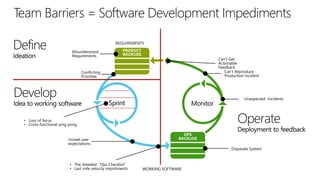
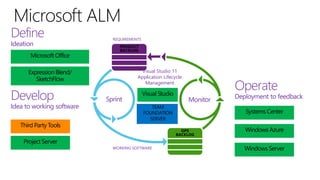
Define
Ideation

Microsoft Office

REQUIREMENTS
PRODUCT
BACKLOG

Visual Studio 11
Application Lifecycle
Management

Expression Blend/
SketchFlow

Develop

Idea to working software
Third Party Tools

Sprint

Visual Studio

Operate
Monitor

TEAM
FOUNDATION
SERVER

Systems Center
OPS
BACKLOG

Project Server
WORKING SOFTWARE

Deployment to feedback

Windows Azure
Windows Server
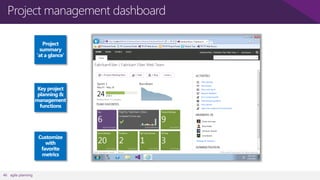
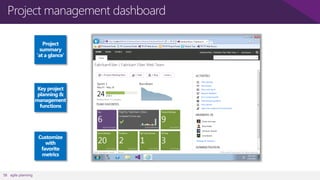
Project management dashboard

46 agile planning
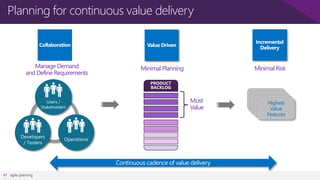
Planning for continuous value delivery

Manage Demand
and Define Requirements

Minimal Planning

Minimal Risk

Most
Value

Continuous cadence of value delivery
47 agile planning

Highest
Value
Features
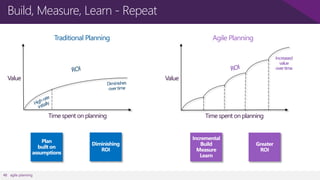
Build, Measure, Learn - Repeat
Traditional Planning

Agile Planning
Increased
value
over time

Value

Value

Time spent on planning

48 agile planning

Time spent on planning
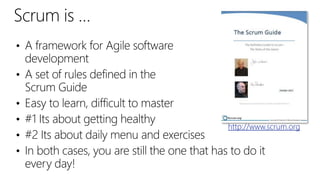
http://www.scrum.org
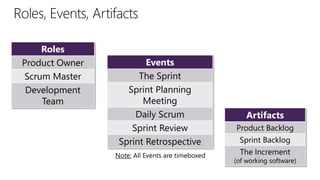
Roles
Product Owner
Scrum Master
Development
Team

Events
The Sprint
Sprint Planning
Meeting
Daily Scrum
Sprint Review
Sprint Retrospective
Note: All Events are timeboxed

Artifacts
Product Backlog
Sprint Backlog
The Increment

(of working software)
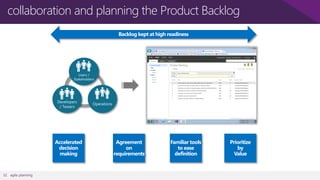
collaboration and planning the Product Backlog

52 agile planning
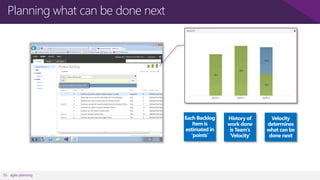
Planning what can be done next

53 agile planning
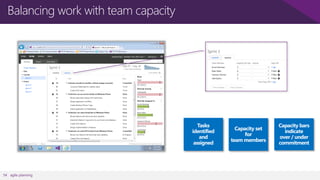
Balancing work with team capacity

54 agile planning
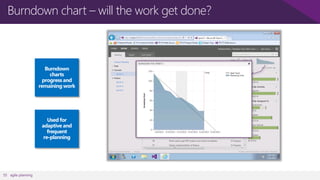
Burndown chart – will the work get done?

55 agile planning
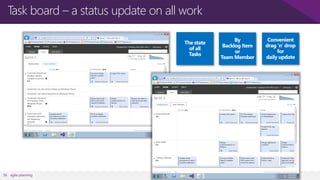
Task board – a status update on all work

56 agile planning
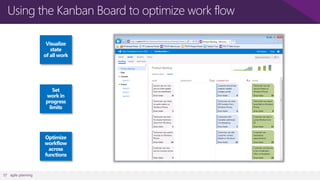
Using the Kanban Board to optimize work flow

57 agile planning
Project management dashboard

58 agile planning
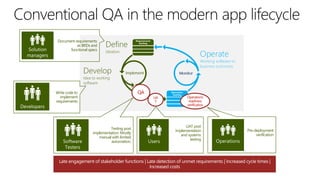
Document requirements
as BRDs and
functional specs

QA

Write code to
implement
requirements

UA
T

Testing post
implementation. Mostly
manual with limited
automation.

Operations
readiness
verification

UAT post
implementation
and systems
testing

Pre-deployment
verification
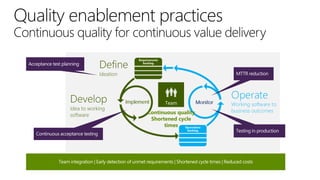
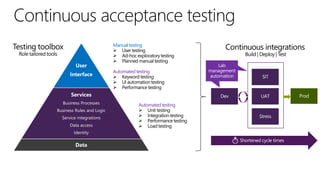
Continuous quality
Shortened cycle
times
Manual testing

User

Interface

Automated testing

Services
Business Processes
Business Rules and Logic
Service integrations
Data access
Identity

Data

Automated testing
Thank You

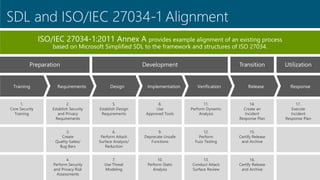
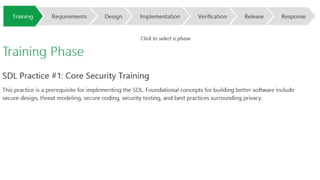
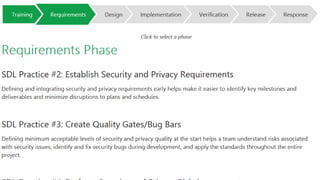
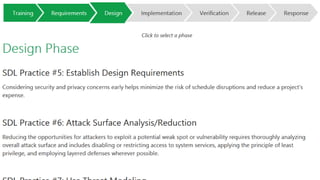
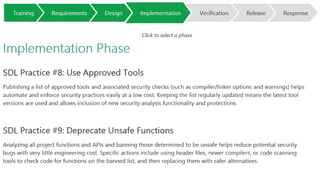
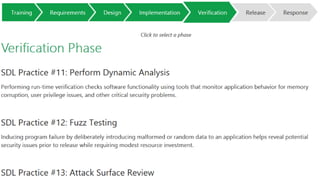
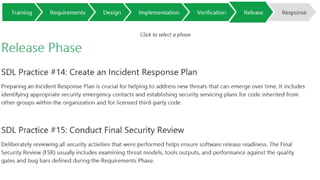
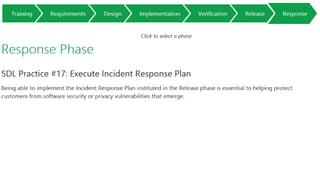
Security Development Life Cycle

  • 1.
    Tata Kelola Pengamanan Perangkat Lunak TonySeno Hartono National Technology Officer Microsoft Indonesia
  • 3.
    Portal & Collaboration Content & Enterprise Search ProjectAccounting & Grants Mgmt Identity Single Domain Workflow & Automation Budget Planning & Formulation Policy Enforcement On Premise BI & Data Mining Productivity Budget Management Information Security & Privacy Language Translation Human Resources Mgmt & Payroll Data Loss Prevention Big Data & Social Media Analytics Assessment Database/ Geo Location & Data Warehousing Maps Private Cloud Email & Calendar Information Gathering Middleware, & Interoperability Enterpris Commu Infor Dissem Disaster Re Business C Public Cloud
  • 4.
    User and Device Managementin Microsoft Tony Seno Hartono National Technology Officer Microsoft Indonesia
  • 5.
    Today’s challenges Users Devices Apps Data Users expectto be able to work in any location and have access to all their work resources. The explosion of devices is eroding the standards-based approach to corporate IT. Deploying and managing applications across platforms is difficult. Users need to be productive while maintaining compliance and reducing risk.
  • 6.
    User and DeviceManagement Enable users Access to company resources consistently across devices Simplified registration and enrollment of devices Synchronized corporate data Unify your environment Protect your data On-premises and cloud-based management of devices within a single console. Protect corporate information by selectively wiping apps and data from retired/lost devices Simplified, user-centric application management across devices A common identity for accessing resources on-premises and in the cloud Comprehensive settings management across platforms, including certificates, VPNs, and wireless network profiles Identify which mobile devices have been compromised
  • 7.
    Help protect corporateinformation and manage risk Lost or Stolen Retired Lost or Enrollment Stolen • Identify at-risk devices through jailbreak and root Retired detection Users can access corporate data regardless of device or location with Work Folders for data sync and desktop virtualization for centralized applications. IT can provide a secure and familiar solution for users to access sensitive corporate data from anywhere with VDI and RemoteApp technologies. • Selective wipe removes corporate applications, data, Personal Apps and Data Company Apps and Data certificates/profiles, and policies Company Apps supported by based as and Data each platform Remote App Centralized Data • Full wipe as supported by each platform Remote App • Can be executed by IT or by user via Company Portal Policies Policies • Sensitive data or applications can be kept off device and accessed via Remote Desktop Services Personal Apps and Data
  • 8.
  • 10.
    HEADLINES How hackers allegedly stole“unlimited” amounts of cash US economy up to Cybercrime costs from banks in just a few hours $140 billion annually, report says Politics.co.uk [2013] Ars Technica [2013] Los Angeles Times [2013] Malware burrows deep into computer BIOS to escape AV The Register [September 2011] Researchers have discovered one of the first pieces ever used in the wild that modifies the software on the motherboard of infected computers to ensure the infection can’t be easily eradicated… Cyberspace changes the fog of war Universities face a rising barrage of cyberattacks Ars Technica [2013] Cyberattacks on the rise against US corporations Espionage malware infects rafts of governments, industries around the world New York Times [2013] Ars Technica [2013] Forget carjacking, soon it will be carhacking The Sydney Morning Herald [2013] Rising cyber security risks to drivers as their cars become increasingly powered by and connected to computers have prompted the US auto-safety regulator to start a new office focusing on the threat…
  • 11.
  • 28.
    Application Lifecycle Management Tony SenoHartono National Technology Officer, Microsoft Indonesia
  • 29.
    stake holders indevelopment process
  • 30.
    Stake holders indevelopment process
  • 31.
  • 32.
    Planning No-process SCM Work Item Tracking Testing Tools andServices SCRUM Lab Management CMMI Build Automation Integrated Reporting and Analytics Custom
  • 34.
    Modern Application LifecycleManagement Define Ideation Implement Develop Idea to working software Monitor Operate Working software in production Value realization 44 agile planning Team Integration | Increased Efficiency | Shorter Cycle Times | Reduced Costs
  • 35.
    Define Ideation Microsoft Office REQUIREMENTS PRODUCT BACKLOG Visual Studio11 Application Lifecycle Management Expression Blend/ SketchFlow Develop Idea to working software Third Party Tools Sprint Visual Studio Operate Monitor TEAM FOUNDATION SERVER Systems Center OPS BACKLOG Project Server WORKING SOFTWARE Deployment to feedback Windows Azure Windows Server
  • 36.
  • 37.
    Planning for continuousvalue delivery Manage Demand and Define Requirements Minimal Planning Minimal Risk Most Value Continuous cadence of value delivery 47 agile planning Highest Value Features
  • 38.
    Build, Measure, Learn- Repeat Traditional Planning Agile Planning Increased value over time Value Value Time spent on planning 48 agile planning Time spent on planning
  • 39.
  • 40.
    Roles Product Owner Scrum Master Development Team Events TheSprint Sprint Planning Meeting Daily Scrum Sprint Review Sprint Retrospective Note: All Events are timeboxed Artifacts Product Backlog Sprint Backlog The Increment (of working software)
  • 42.
    collaboration and planningthe Product Backlog 52 agile planning
  • 43.
    Planning what canbe done next 53 agile planning
  • 44.
    Balancing work withteam capacity 54 agile planning
  • 45.
    Burndown chart –will the work get done? 55 agile planning
  • 46.
    Task board –a status update on all work 56 agile planning
  • 47.
    Using the KanbanBoard to optimize work flow 57 agile planning
  • 48.
  • 49.
    Document requirements as BRDsand functional specs QA Write code to implement requirements UA T Testing post implementation. Mostly manual with limited automation. Operations readiness verification UAT post implementation and systems testing Pre-deployment verification
  • 50.
  • 52.
    Manual testing User Interface Automated testing Services BusinessProcesses Business Rules and Logic Service integrations Data access Identity Data Automated testing
  • 53.