ADDIE
Analysis 
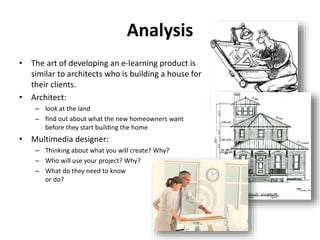
• The art of developing an e-learning product is 
similar to architects who is building a house for 
their clients. 
• Architect: 
– look at the land 
– find out about what the new homeowners want 
before they start building the home 
• Multimedia designer: 
– Thinking about what you will create? Why? 
– Who will use your project? Why? 
– What do they need to know 
or do?
Analysis
Analysis
Analysis 
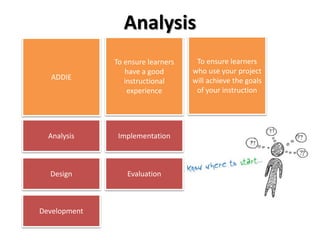
ADDIE 
To ensure learners 
have a good 
instructional 
experience 
To ensure learners 
who use your project 
will achieve the goals 
of your instruction 
Analysis 
Design 
Development 
Implementation 
Evaluation
Analysis 
Every instructional design project begins with 
Analysis
Analysis 
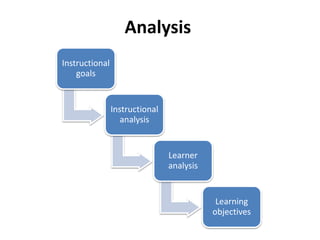
Instructional 
goals 
Instructional 
analysis 
Learner 
analysis 
Learning 
objectives
Instructional goals 
• This is the first step to determine what new information and skills you 
want your learners to have mastered when they have completed your 
product/e-learning tool 
• The instructional goals may be derived from: 
– A list of goal 
– Performance analysis 
– Needs assessment 
– Practical experience with learning difficulties faced by students and etc. 
• Talk to your client what he/she would like to learn 
• This can be met through interview 
• Example: Making pizza
Instructional goals 
• The course goals are broad statements of what the students will be able to 
do when they have completed the course 
• Goals can be lofty ideas, using words or phrases like "appreciates" or 
"shows leadership ability.“ 
• Example of a broad course goal: Students will gain a greater appreciation 
for traditional music. 
Task 1# : Analysis worksheet 1 
Task2#: Analysis worksheet 2
Instructional analysis 
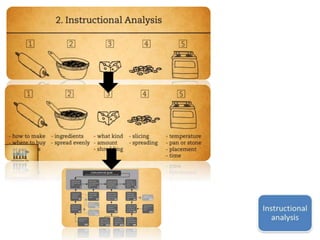
• Identify all the necessary steps to achieve the instructional goals 
– Example: Necessary steps in making pizza 
• Your instructional analysis provides the step-by-step instructions that take 
learners from start to finish 
• For learners, learning is a journey; they rely on you to provide them with 
an accurate set of directions. An instructional analysis ensures that the 
course will: 
– Cover all information and steps that learners will need to know 
– Exclude information that learners already know 
– Exclude information that learners don't need to know 
• The more accurate the instructional analysis, the easier the journey will be 
for the learners.
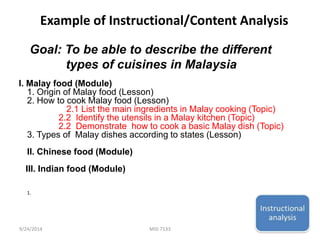
Example of Instructional/Content Analysis 
Goal: To be able to describe the different 
types of cuisines in Malaysia 
I. Malay food (Module) 
1. Origin of Malay food (Lesson) 
2. How to cook Malay food (Lesson) 
2.1 List the main ingredients in Malay cooking (Topic) 
2.2 Identify the utensils in a Malay kitchen (Topic) 
2.2 Demonstrate how to cook a basic Malay dish (Topic) 
3. Types of Malay dishes according to states (Lesson) 
II. Chinese food (Module) 
III. Indian food (Module) 
1. 
9/24/2014 MID 7133 12
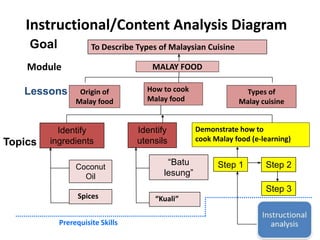
Instructional/Content Analysis Diagram 
To Describe Types of Malaysian Cuisine 
Module MALAY FOOD 
Identify 
ingredients 
Identify 
utensils 
Coconut 
Oil 
Goal 
Lessons 
Topics 
Step 1 Step 2 
Step 3 
Prerequisite Skills 
How to cook 
Malay food 
Types of 
Malay cuisine 
Spices 
“Batu 
lesung” 
“Kuali” 
Demonstrate how to 
cook Malay food (e-learning) 
Describe 
Malay Food 
Origin of 
Malay food
Instructional/Content Analysis Diagram
Instructional goals 
Task 3# : Conduct your own instructional/content analysis diagram
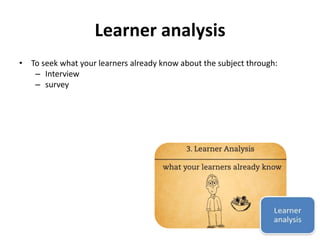
Learner analysis 
• To seek what your learners already know about the subject through: 
– Interview 
– survey
Learner analysis 
[Analyze learner and context] 
• To identify learners’ current skill, preferences and attitude 
• To identify characteristics of the instructional setting 
• To identify the setting in which the skills will eventually be used 
• To seek what your learners already know about the subject through: 
– Interview 
– survey 
Task4# : Analysis Worksheet 3 
Task5# : Analysis Worksheet 4
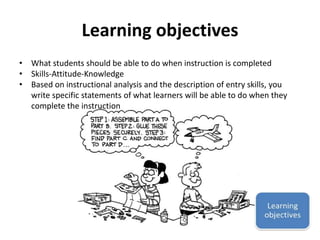
Learning objectives 
• What students should be able to do when instruction is completed 
• Skills-Attitude-Knowledge 
• Based on instructional analysis and the description of entry skills, you 
write specific statements of what learners will be able to do when they 
complete the instruction
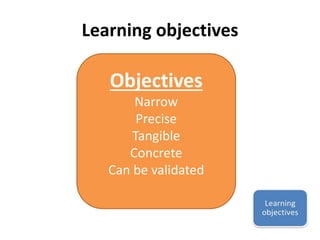
Learning objectives 
Objectives 
Narrow 
Precise 
Tangible 
Concrete 
Can be validated
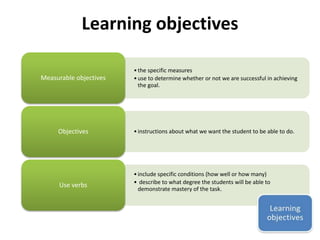
Learning objectives 
• the specific measures 
• use to determine whether or not we are successful in achieving 
the goal. 
Measurable objectives 
• instructions about what we want Objectives the student to be able to do. 
• include specific conditions (how well or how many) 
• describe to what degree the students will be able to 
demonstrate mastery of the task. 
Use verbs
Learning objectives 
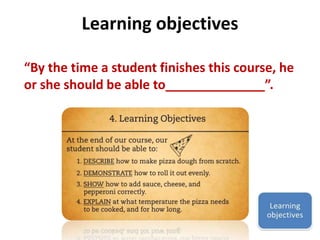
“By the time a student finishes this course, he 
or she should be able to______________”.
Learning objectives 
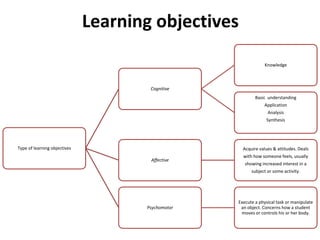
Type of learning objectives 
Cognitive 
Knowledge 
Basic understanding 
Application 
Analysis 
Synthesis 
Affective 
Acquire values & attitudes. Deals 
with how someone feels, usually 
showing increased interest in a 
subject or some activity. 
Psychomotor 
Execute a physical task or manipulate 
an object. Concerns how a student 
moves or controls his or her body.
Learning objectives 
“By the time a student finishes this course, he 
or she should be able to______________”. 
Task6# : Analysis Worksheet 6
Thank you
Design 
• In order for anything to be built properly, you need a blueprint and a plan to follow. Since course designers 
sometimes talk about a "design blueprint" or "course architecture", the metaphor and theme for this 
lesson is the blueprint. 
• All visible things are created twice: first, with a mental creation, and second, with the physical creation. 
The course design blueprint is the first, or mental creation, of your project. This includes your course map, 
lesson event strategies and treatments, graphical user interface design, assessment plan, and your 
storyboard. 
• Design is the second ADDIE phase. Every instructional design project benefits from careful planning during 
the Design Phase. Design Worksheet 12 is the main "blueprint" document in this lesson. It requires a lot of 
brainstorming and creative thinking to organize the chunks of a course. 
• The design process is partly art and partly following steps of a proven process. It is hard to teach and learn 
to design anything in a linear, step-by-step way. So, use the 6 Design worksheets over and over, even in a 
back and forth manner as you brainstorm. 
• Continue designing until you are satisfied that you see clearly how you will develop the course and 
produce the media in the physical creation steps of Lesson 3. If you do the design well, then the students 
who use your project will have a much better chance of achieving the goals of your instruction.
Develop 
• By the end of the ADDIE design phase, designers have a basic idea of the structure of the course. Next, it is time to 
actually start developing or constructing the materials of the actual instruction. This is like building a house as a 
person's dream home goes from seeing the blueprint to actually pouring the cement foundation and adding the 
structure of walls and roof. Then developers add the sheet rock, wring and plumbing to the building structure. 
Finally, they add the floors, molding, windows, and doors. 
• During the Develop Phase in Lesson 3, you will: 
• Develop all the materials for a prototype lesson or multimedia presentation 
• Create a file directory and store all files 
• Create a prototype lesson and compile or render your finished product 
• Check copyright permissions and list the credits 
• Use a production checklist to double check that everything looks and functions properly. 
• Be ready to go try it out on other machines! 
• 
The develop phase of ADDIE is usually the phase people think of when they think of doing a multimedia project. A 
lot of people just want to start with the Develop phase. If they do that, their final project may be interesting, cute, 
beautiful, or flashy - but it probably won't be instructional, too. This is why the ADDIE process asks you to spend 
time analyzing and planning to meet the needs of your audience. Then, there will be a good fit for all when you 
get to the Develop phase. 
• So, after many months of learning to Photoshop, PowerPoint, Flash and other multi-media tools, it is now time for 
you to use them to build your prototype!
Implementation 
• The day finally comes when the building construction is done on a new home. The contractors clean up their piles 
of rubble and get all the rooms in order for the transition of the new owners to take over. The homeowners begin 
moving in with boxes and furniture to try out their new home. They check to make sure everything is working 
properly. If there is a problem with the plumbing or the garage door, they call the builder to come back and fix it. 
• In a way, the same thing happens when you create a new course. Other people try it out for you. They check to 
make sure that the parts are working properly and it all looks OK to suit them. Usually there are some little things 
to fix. You take their suggestions and refine the course. 
• The Implementation Phase of the ADDIE model is usually interesting because other people may find some "bugs" 
in your media that you did not expect or even think of before. It is a time to be flexible because you do not know 
for sure if everything you planned on will actually work or not until it is put to the test. 
• As you ask a subject matter teacher or a few students to try out your prototype lesson, you sit with them and 
watch how they do it. Can they do what you had planned? Ask them questions and write down their answers as a 
guide to improving your project. Find out what is confusing to them, parts they would like you to fix, and what 
exactly they like about your work. 
• During the Implementation Phase in Lesson 4, you will: 
• Complete the lesson or project enough for people to try it out. Develop enough material to test at least one of 
your objectives. 
• Conduct an Alpha Test with a few people. 
• Revise and improve the course according to the suggestions, and this time, complete or polish all parts as much as 
possible. 
• Conduct a Beta Test with 5 or more people who are representatives of your target audience. 
•
Evaluation 
• As new homeowners start using the new home, friends and family often ask them how they like their new home. 
They expect to be satisfied and happy with it because the actual new home should match what they had dreamed 
and planned. They use it a while, check out the furnace, the dishwasher, the toilets - to make sure they all work 
and match their expectations and the building code requirements. The same thing happens with a new course. 
People try it out for a while to decide if it can be used for the goals and purposes for which it was created. If not, 
they may make minor adjustments and then continue using it again and again. 
• During the Evaluation Phase in Lesson 5, you will: 
• Conduct a final, overall evaluation of your course. 
• Collect data and summarize the responses. 
• Adjust the course design and parts of the media in your project as necessary. Clean up the project and make any 
final revisions. 
• Release the project. 
• Write your reflections and a summary of what you learned. 
• 
Evaluate your project as a whole. Some general questions to ask yourself: 
• Were the students able to pass my assessments ok as a result of taking my course? 
• What do people like best or least about the course? 
• What kinds of responses did you get when they rated parts of your work? 
• What did you learn from all this? 
• What did you like or not like about designing and creating your own course?
Resource 
• http://ocw.usu.edu/Other_Educational_Resou 
rces/intro-to-instructional-design/ 
resource91.html

ISD Lecture note 001

  • 1.
  • 2.
    Analysis • Theart of developing an e-learning product is similar to architects who is building a house for their clients. • Architect: – look at the land – find out about what the new homeowners want before they start building the home • Multimedia designer: – Thinking about what you will create? Why? – Who will use your project? Why? – What do they need to know or do?
  • 3.
  • 4.
  • 5.
    Analysis ADDIE Toensure learners have a good instructional experience To ensure learners who use your project will achieve the goals of your instruction Analysis Design Development Implementation Evaluation
  • 6.
    Analysis Every instructionaldesign project begins with Analysis
  • 7.
    Analysis Instructional goals Instructional analysis Learner analysis Learning objectives
  • 8.
    Instructional goals •This is the first step to determine what new information and skills you want your learners to have mastered when they have completed your product/e-learning tool • The instructional goals may be derived from: – A list of goal – Performance analysis – Needs assessment – Practical experience with learning difficulties faced by students and etc. • Talk to your client what he/she would like to learn • This can be met through interview • Example: Making pizza
  • 9.
    Instructional goals •The course goals are broad statements of what the students will be able to do when they have completed the course • Goals can be lofty ideas, using words or phrases like "appreciates" or "shows leadership ability.“ • Example of a broad course goal: Students will gain a greater appreciation for traditional music. Task 1# : Analysis worksheet 1 Task2#: Analysis worksheet 2
  • 10.
    Instructional analysis •Identify all the necessary steps to achieve the instructional goals – Example: Necessary steps in making pizza • Your instructional analysis provides the step-by-step instructions that take learners from start to finish • For learners, learning is a journey; they rely on you to provide them with an accurate set of directions. An instructional analysis ensures that the course will: – Cover all information and steps that learners will need to know – Exclude information that learners already know – Exclude information that learners don't need to know • The more accurate the instructional analysis, the easier the journey will be for the learners.
  • 12.
    Example of Instructional/ContentAnalysis Goal: To be able to describe the different types of cuisines in Malaysia I. Malay food (Module) 1. Origin of Malay food (Lesson) 2. How to cook Malay food (Lesson) 2.1 List the main ingredients in Malay cooking (Topic) 2.2 Identify the utensils in a Malay kitchen (Topic) 2.2 Demonstrate how to cook a basic Malay dish (Topic) 3. Types of Malay dishes according to states (Lesson) II. Chinese food (Module) III. Indian food (Module) 1. 9/24/2014 MID 7133 12
  • 13.
    Instructional/Content Analysis Diagram To Describe Types of Malaysian Cuisine Module MALAY FOOD Identify ingredients Identify utensils Coconut Oil Goal Lessons Topics Step 1 Step 2 Step 3 Prerequisite Skills How to cook Malay food Types of Malay cuisine Spices “Batu lesung” “Kuali” Demonstrate how to cook Malay food (e-learning) Describe Malay Food Origin of Malay food
  • 14.
  • 15.
    Instructional goals Task3# : Conduct your own instructional/content analysis diagram
  • 16.
    Learner analysis •To seek what your learners already know about the subject through: – Interview – survey
  • 17.
    Learner analysis [Analyzelearner and context] • To identify learners’ current skill, preferences and attitude • To identify characteristics of the instructional setting • To identify the setting in which the skills will eventually be used • To seek what your learners already know about the subject through: – Interview – survey Task4# : Analysis Worksheet 3 Task5# : Analysis Worksheet 4
  • 18.
    Learning objectives •What students should be able to do when instruction is completed • Skills-Attitude-Knowledge • Based on instructional analysis and the description of entry skills, you write specific statements of what learners will be able to do when they complete the instruction
  • 19.
    Learning objectives Objectives Narrow Precise Tangible Concrete Can be validated
  • 20.
    Learning objectives •the specific measures • use to determine whether or not we are successful in achieving the goal. Measurable objectives • instructions about what we want Objectives the student to be able to do. • include specific conditions (how well or how many) • describe to what degree the students will be able to demonstrate mastery of the task. Use verbs
  • 21.
    Learning objectives “Bythe time a student finishes this course, he or she should be able to______________”.
  • 22.
    Learning objectives Typeof learning objectives Cognitive Knowledge Basic understanding Application Analysis Synthesis Affective Acquire values & attitudes. Deals with how someone feels, usually showing increased interest in a subject or some activity. Psychomotor Execute a physical task or manipulate an object. Concerns how a student moves or controls his or her body.
  • 23.
    Learning objectives “Bythe time a student finishes this course, he or she should be able to______________”. Task6# : Analysis Worksheet 6
  • 24.
  • 25.
    Design • Inorder for anything to be built properly, you need a blueprint and a plan to follow. Since course designers sometimes talk about a "design blueprint" or "course architecture", the metaphor and theme for this lesson is the blueprint. • All visible things are created twice: first, with a mental creation, and second, with the physical creation. The course design blueprint is the first, or mental creation, of your project. This includes your course map, lesson event strategies and treatments, graphical user interface design, assessment plan, and your storyboard. • Design is the second ADDIE phase. Every instructional design project benefits from careful planning during the Design Phase. Design Worksheet 12 is the main "blueprint" document in this lesson. It requires a lot of brainstorming and creative thinking to organize the chunks of a course. • The design process is partly art and partly following steps of a proven process. It is hard to teach and learn to design anything in a linear, step-by-step way. So, use the 6 Design worksheets over and over, even in a back and forth manner as you brainstorm. • Continue designing until you are satisfied that you see clearly how you will develop the course and produce the media in the physical creation steps of Lesson 3. If you do the design well, then the students who use your project will have a much better chance of achieving the goals of your instruction.
  • 26.
    Develop • Bythe end of the ADDIE design phase, designers have a basic idea of the structure of the course. Next, it is time to actually start developing or constructing the materials of the actual instruction. This is like building a house as a person's dream home goes from seeing the blueprint to actually pouring the cement foundation and adding the structure of walls and roof. Then developers add the sheet rock, wring and plumbing to the building structure. Finally, they add the floors, molding, windows, and doors. • During the Develop Phase in Lesson 3, you will: • Develop all the materials for a prototype lesson or multimedia presentation • Create a file directory and store all files • Create a prototype lesson and compile or render your finished product • Check copyright permissions and list the credits • Use a production checklist to double check that everything looks and functions properly. • Be ready to go try it out on other machines! • The develop phase of ADDIE is usually the phase people think of when they think of doing a multimedia project. A lot of people just want to start with the Develop phase. If they do that, their final project may be interesting, cute, beautiful, or flashy - but it probably won't be instructional, too. This is why the ADDIE process asks you to spend time analyzing and planning to meet the needs of your audience. Then, there will be a good fit for all when you get to the Develop phase. • So, after many months of learning to Photoshop, PowerPoint, Flash and other multi-media tools, it is now time for you to use them to build your prototype!
  • 27.
    Implementation • Theday finally comes when the building construction is done on a new home. The contractors clean up their piles of rubble and get all the rooms in order for the transition of the new owners to take over. The homeowners begin moving in with boxes and furniture to try out their new home. They check to make sure everything is working properly. If there is a problem with the plumbing or the garage door, they call the builder to come back and fix it. • In a way, the same thing happens when you create a new course. Other people try it out for you. They check to make sure that the parts are working properly and it all looks OK to suit them. Usually there are some little things to fix. You take their suggestions and refine the course. • The Implementation Phase of the ADDIE model is usually interesting because other people may find some "bugs" in your media that you did not expect or even think of before. It is a time to be flexible because you do not know for sure if everything you planned on will actually work or not until it is put to the test. • As you ask a subject matter teacher or a few students to try out your prototype lesson, you sit with them and watch how they do it. Can they do what you had planned? Ask them questions and write down their answers as a guide to improving your project. Find out what is confusing to them, parts they would like you to fix, and what exactly they like about your work. • During the Implementation Phase in Lesson 4, you will: • Complete the lesson or project enough for people to try it out. Develop enough material to test at least one of your objectives. • Conduct an Alpha Test with a few people. • Revise and improve the course according to the suggestions, and this time, complete or polish all parts as much as possible. • Conduct a Beta Test with 5 or more people who are representatives of your target audience. •
  • 28.
    Evaluation • Asnew homeowners start using the new home, friends and family often ask them how they like their new home. They expect to be satisfied and happy with it because the actual new home should match what they had dreamed and planned. They use it a while, check out the furnace, the dishwasher, the toilets - to make sure they all work and match their expectations and the building code requirements. The same thing happens with a new course. People try it out for a while to decide if it can be used for the goals and purposes for which it was created. If not, they may make minor adjustments and then continue using it again and again. • During the Evaluation Phase in Lesson 5, you will: • Conduct a final, overall evaluation of your course. • Collect data and summarize the responses. • Adjust the course design and parts of the media in your project as necessary. Clean up the project and make any final revisions. • Release the project. • Write your reflections and a summary of what you learned. • Evaluate your project as a whole. Some general questions to ask yourself: • Were the students able to pass my assessments ok as a result of taking my course? • What do people like best or least about the course? • What kinds of responses did you get when they rated parts of your work? • What did you learn from all this? • What did you like or not like about designing and creating your own course?
  • 29.
    Resource • http://ocw.usu.edu/Other_Educational_Resou rces/intro-to-instructional-design/ resource91.html