Introduction to Virtualization
Running a foreign OS on your Macintosh


                                   Dean Franklin
Virtualization Pros and Cons
 Pros                            Cons
   Run multiple operating         Performance
   systems simultaneously
                                  Performance
   Can ease the transition for
   switchers                      Performance

   More convenient than
   rebooting

   Less disk space dedicated
   to the guest OS
Virtualization Products
 VMWare Fusion 3
    www.vmware.com/products/fusion

 Parallels Desktop 5
   www.parallels.com

 CodeWeavers Crossover Mac
   www.codeweavers.com/products/cxmac

 Sun xVM VirtualBox
   www.virtualbox.org
VMWare Fusion 3
VMWare is a virtualization pioneer
Extensive guest OS support
  Apple OS X Server
  Microsoft Windows and MS-DOS

  Linux

  Google Chrome OS

  FreeBSD/OpenBSD

  Sun Solaris

  Novell Netware and Open Enterprise Server
VMWare Fusion 3 Features
Run Boot Camp partition as a virtual machine (VM)
Migrate existing PC to a VM
Import Parallels or Microsoft Virtual PC VM
Unity View
Shared folders
Mirrored folders
Virtual Appliance Marketplace
Parallels Desktop 5
 First virtualization product for Macintosh computers
 Extensive guest OS support
   Apple OS X Server
   Microsoft Windows and MS-DOS

   Linux

   Google Chrome OS

   FreeBSD/OpenBSD

   Sun Solaris

   OS/2 Warp
Parallels Desktop 5 Features
 Run Boot Camp partition    Modality View
 as a VM
                            MacLook
 Migrate existing PC to a
                            Shared folders
 VM
                            Mirrored folders
 Import VMWare VM
                            iPhone App
 Coherence View
                            Parallels Virtual
 Crystal View
                            Appliances Directory
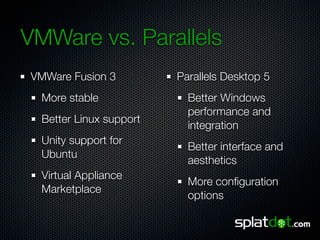
VMWare vs. Parallels
VMWare Fusion 3          Parallels Desktop 5
  More stable              Better Windows
                           performance and
  Better Linux support
                           integration
  Unity support for
                           Better interface and
  Ubuntu
                           aesthetics
  Virtual Appliance
                           More configuration
  Marketplace
                           options
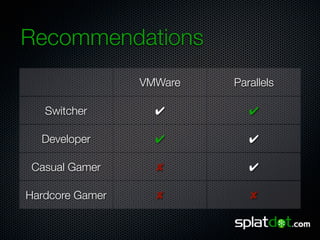
Recommendations
                 VMWare   Parallels

   Switcher        ✔         ✔

  Developer        ✔         ✔

 Casual Gamer      ✘         ✔

Hardcore Gamer     ✘         ✘
Contact
Dean Franklin
dean@splatdot.com
Twitter @jdfrankl or @SplatDot
www.linkedin.com/in/jdeanfranklin

Introduction to Virtualization

  • 1.
    Introduction to Virtualization Runninga foreign OS on your Macintosh Dean Franklin
  • 2.
    Virtualization Pros andCons Pros Cons Run multiple operating Performance systems simultaneously Performance Can ease the transition for switchers Performance More convenient than rebooting Less disk space dedicated to the guest OS
  • 3.
    Virtualization Products VMWareFusion 3 www.vmware.com/products/fusion Parallels Desktop 5 www.parallels.com CodeWeavers Crossover Mac www.codeweavers.com/products/cxmac Sun xVM VirtualBox www.virtualbox.org
  • 4.
    VMWare Fusion 3 VMWareis a virtualization pioneer Extensive guest OS support Apple OS X Server Microsoft Windows and MS-DOS Linux Google Chrome OS FreeBSD/OpenBSD Sun Solaris Novell Netware and Open Enterprise Server
  • 5.
    VMWare Fusion 3Features Run Boot Camp partition as a virtual machine (VM) Migrate existing PC to a VM Import Parallels or Microsoft Virtual PC VM Unity View Shared folders Mirrored folders Virtual Appliance Marketplace
  • 6.
    Parallels Desktop 5 First virtualization product for Macintosh computers Extensive guest OS support Apple OS X Server Microsoft Windows and MS-DOS Linux Google Chrome OS FreeBSD/OpenBSD Sun Solaris OS/2 Warp
  • 7.
    Parallels Desktop 5Features Run Boot Camp partition Modality View as a VM MacLook Migrate existing PC to a Shared folders VM Mirrored folders Import VMWare VM iPhone App Coherence View Parallels Virtual Crystal View Appliances Directory
  • 8.
    VMWare vs. Parallels VMWareFusion 3 Parallels Desktop 5 More stable Better Windows performance and Better Linux support integration Unity support for Better interface and Ubuntu aesthetics Virtual Appliance More configuration Marketplace options
  • 9.
    Recommendations VMWare Parallels Switcher ✔ ✔ Developer ✔ ✔ Casual Gamer ✘ ✔ Hardcore Gamer ✘ ✘
  • 10.
    Contact Dean Franklin dean@splatdot.com Twitter @jdfranklor @SplatDot www.linkedin.com/in/jdeanfranklin

Editor's Notes

  • #3 Having multiples operating systems on one PC is a time and cost saver for software development and quality assurance. It can ease the transition for switchers in two ways: 1) Provides easy access to familiar programs. 2) Saves money on software licensing by continuing to use Windows versions of expensive software. Boot Camp requires a dedicated partition, while virtualization software allows the use of a “virtual” partition.
  • #4 VMWare and Parallels both retail for $79.99. Crossover Mac is $39.95 for the standard version and $69.95 for the pro version. VirtualBox is free.
  • #5 VMWare was founded in 1998 and delivered its first product - VMWare Workstation - in 1999. VMWare Fusion was released in 2007. Supports more than 140 operating systems (many of these are Linux variants though). Supports every version of Windows from Windows 3.1 through Windows 7. Supports every major Linux distribution - Red Hat, Ubuntu, SuSE, etc.
  • #6 Booting into Windows from Boot Camp offers the best performance but being able to run it as a VM gives you the flexibility to starts Windows without rebooting the Mac when you don’t need the extra performance. Migrating an existing PC is a great feature for switchers. Unity offers a “seamless” Windows experience by hiding the Windows desktop and putting the applications in the OS X desktop - however, the Unity view does not hide the Windows task bar. Unity is supposed to work with Ubuntu 9.10 but I have not tested it. Shared folders allow you to share files between the host and guest OS. Mirrored folders allow you to map folders like My Documents to the host OS. The Virtual Appliance Marketplace offers pre-built virtual appliances - both free and commercial - that are ready to download and run.
  • #7 First version of Parallels shipped in 2006. Also supports every version of Windows from Windows 3.1 through Windows 7 and every major Linux distribution.
  • #8 Coherence offers a “seamless” Windows experience by hiding the Windows desktop, including the taskbar, and putting the applications in the OS X desktop - Parallels was the first product to offer such a feature. Crystal offers even more “seamless” operation by hiding more components - in reality there is little difference between Coherence and Crystal Modality is a window view that floats on top of the other windows and is transparent when inactive MacLook makes your Windows applications look like OS X applications The free iPhone app allows you to start, stop or view virtual machines The Virtual Appliance Directory also offers pre-built appliances, ready to download and run
  • #9 VMWare’s Virtual Applience Marketplace has 1,346 appliances, of which 564 are operating systems. Parallels Virtual Appliances Directory has 87 appliances, of which 17 are operating systems.
  • #10 Both Parallels and VMWare are excellent products. The competition between the two products has been good for Mac users. Either product would work well for most users, the only exception being gamers. Games with moderate hardware/performance requirements run acceptably under Parallels, but not VMWare. Games with extreme hardware/performance requirements do not run well in a virtualized environment.