Introduction To
Hyper-V 2012 R2
Agenda
• Virtualization..??
• Why Virtualization..??
• Hyper Visor
• Types of Hyper Visor
• Hyper V History
• Demonstration
Virtualization..??
• In Computer Science, Virtualization
refers to the act of creating a virtual
version of something.
• Virtualization is way to run multiple
operating systems and user applications
on the same hardware
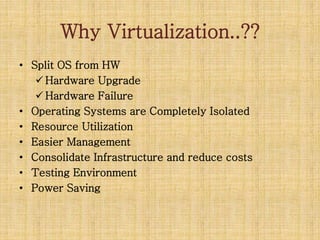
Why Virtualization..??
• Split OS from HW
 Hardware Upgrade
 Hardware Failure
• Operating Systems are Completely Isolated
• Resource Utilization
• Easier Management
• Consolidate Infrastructure and reduce costs
• Testing Environment
• Power Saving
Hyper Visor
• Hypervisor (or VMM – Virtual Machine
Monitor)
Is a software layer that allows several
virtual machines to run on a physical
machine.
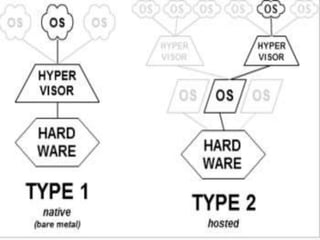
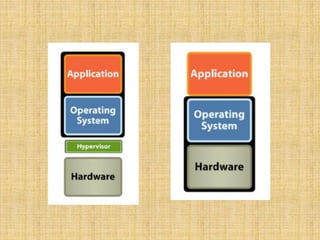
Type 1 Hyper Visor
• Interacts directly with hardware that is
being virtualized.
• Independent from the operating
system.
• boots before the operating system
(OS)
Type 2 Hyper Visor
• sits on top of an operating system.
• relies heavily on the operating system.
• It cannot boot until the operating system is
already up and running.
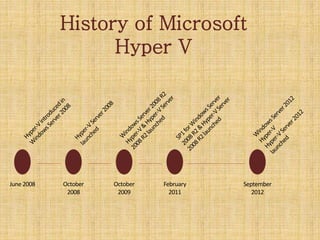
History of Microsoft
Hyper V
June2008 October
2008
October
2009
February
2011
September
2012
Lets Demo

virtualization (Hyper-V)

  • 1.
  • 2.
    Agenda • Virtualization..?? • WhyVirtualization..?? • Hyper Visor • Types of Hyper Visor • Hyper V History • Demonstration
  • 3.
    Virtualization..?? • In ComputerScience, Virtualization refers to the act of creating a virtual version of something. • Virtualization is way to run multiple operating systems and user applications on the same hardware
  • 7.
    Why Virtualization..?? • SplitOS from HW  Hardware Upgrade  Hardware Failure • Operating Systems are Completely Isolated • Resource Utilization • Easier Management • Consolidate Infrastructure and reduce costs • Testing Environment • Power Saving
  • 8.
    Hyper Visor • Hypervisor(or VMM – Virtual Machine Monitor) Is a software layer that allows several virtual machines to run on a physical machine.
  • 9.
    Type 1 HyperVisor • Interacts directly with hardware that is being virtualized. • Independent from the operating system. • boots before the operating system (OS)
  • 10.
    Type 2 HyperVisor • sits on top of an operating system. • relies heavily on the operating system. • It cannot boot until the operating system is already up and running.
  • 13.
    History of Microsoft HyperV June2008 October 2008 October 2009 February 2011 September 2012
  • 14.