www.gslab.com
Amit Agarwal
Date – 18th July, 2016
Virtualization -101 A Deep Dive
About Me
• 4 years of experience working with Virtualization Products.
• VMware Certified Associate and Professional – DataCenter Virtualization.
• Contributor to the book – Mastering vSphere PowerCLI.
• Active member of VMware Community and VMware user group(VMUGs).
• Working with GSLab for the past 1 year in Cloudgenix Project as Senior QA.
www.gslab.com 2
Agenda
• The basic principles and technology of virtualization
• Anatomy of Hypervisor (ESXi)
• Anatomy of a virtual machine
• vCenter usage and some advance vSphere features
• vNetworking concepts
• A brief on vSphere powerCLI Scripting and Usage
www.gslab.com 3
Virtualization : Basic Building Blocks
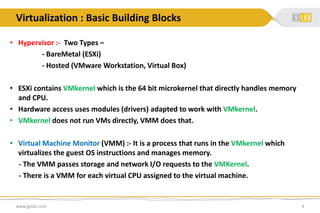
• Hypervisor :- Two Types –
- BareMetal (ESXi)
- Hosted (VMware Workstation, Virtual Box)
• ESXi contains VMkernel which is the 64 bit microkernel that directly handles memory
and CPU.
• Hardware access uses modules (drivers) adapted to work with VMkernel.
• VMkernel does not run VMs directly, VMM does that.
• Virtual Machine Monitor (VMM) :- It is a process that runs in the VMkernel which
virtualizes the guest OS instructions and manages memory.
- The VMM passes storage and network I/O requests to the VMKernel.
- There is a VMM for each virtual CPU assigned to the virtual machine.
www.gslab.com 4
Virtualization : Basic Building Blocks
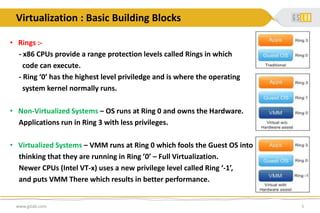
• Rings :-
- x86 CPUs provide a range protection levels called Rings in which
code can execute.
- Ring ‘0’ has the highest level priviledge and is where the operating
system kernel normally runs.
• Non-Virtualized Systems – OS runs at Ring 0 and owns the Hardware.
Applications run in Ring 3 with less privileges.
• Virtualized Systems – VMM runs at Ring 0 which fools the Guest OS into
thinking that they are running in Ring ’0’ – Full Virtualization.
Newer CPUs (Intel VT-x) uses a new privilege level called Ring ‘-1’,
and puts VMM There which results in better performance.
www.gslab.com 5
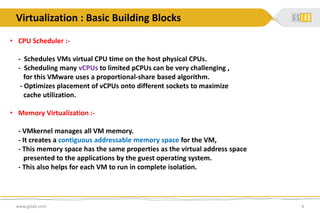
• CPU Scheduler :-
- Schedules VMs virtual CPU time on the host physical CPUs.
- Scheduling many vCPUs to limited pCPUs can be very challenging ,
for this VMware uses a proportional-share based algorithm.
- Optimizes placement of vCPUs onto different sockets to maximize
cache utilization.
• Memory Virtualization :-
- VMkernel manages all VM memory.
- It creates a contiguous addressable memory space for the VM,
- This memory space has the same properties as the virtual address space
presented to the applications by the guest operating system.
- This also helps for each VM to run in complete isolation.
www.gslab.com 6
Virtualization : Basic Building Blocks
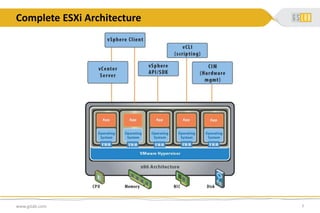
Complete ESXi Architecture
www.gslab.com 7
Anatomy of a Virtual Machine
www.gslab.com 8
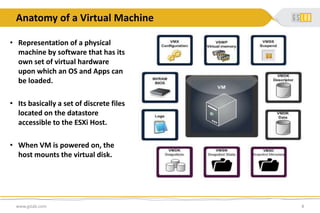
• Representation of a physical
machine by software that has its
own set of virtual hardware
upon which an OS and Apps can
be loaded.
• Its basically a set of discrete files
located on the datastore
accessible to the ESXi Host.
• When VM is powered on, the
host mounts the virtual disk.
vCenter – What is it?
www.gslab.com 9
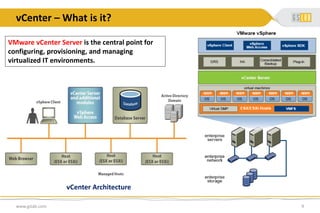
VMware vCenter Server is the central point for
configuring, provisioning, and managing
virtualized IT environments.
vCenter Architecture
vCenter – Do I really need it?
www.gslab.com 10
• Use vCenter Server to centrally manage your hosts and virtual machines instead of
logging directly in to each host.
• It inherits thr group roles from AD, hence provide ease in Access Control.
• Many Advance vSphere features are only supported in vCenter like –
- vMotion
- High Availability
- Fault Tolerance
- DRS
• It allows us to use the inventory views to organize inventory objects(Storage,
Networks, templates etc) in a meaningful way.
Advance features – vMotion
www.gslab.com 11
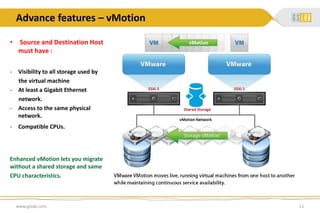
• Source and Destination Host
must have :
- Visibility to all storage used by
the virtual machine
- At least a Gigabit Ethernet
network.
- Access to the same physical
network.
- Compatible CPUs.
Enhanced vMotion lets you migrate
without a shared storage and same
CPU characteristics.
Advance features – High Availability (HA)
www.gslab.com 12
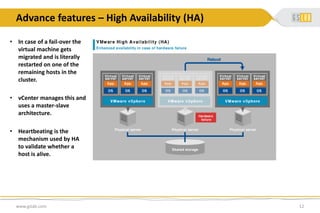
• In case of a fail-over the
virtual machine gets
migrated and is literally
restarted on one of the
remaining hosts in the
cluster.
• vCenter manages this and
uses a master-slave
architecture.
• Heartbeating is the
mechanism used by HA
to validate whether a
host is alive.
Nested Virtualization
www.gslab.com 13
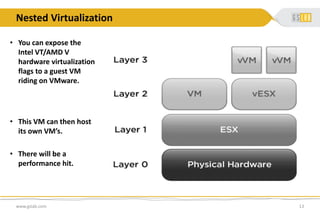
• You can expose the
Intel VT/AMD V
hardware virtualization
flags to a guest VM
riding on VMware.
• This VM can then host
its own VM’s.
• There will be a
performance hit.
www.gslab.com
vNetworking
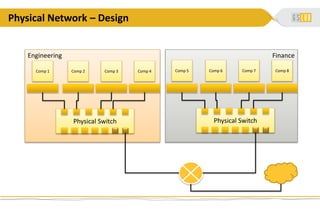
FinanceEngineering
Physical Network – Design
Comp 2 Comp 3 Comp 4Comp 1
Physical Switch
Comp 6 Comp 7 Comp 8Comp 5
Physical Switch
FinanceEngineering
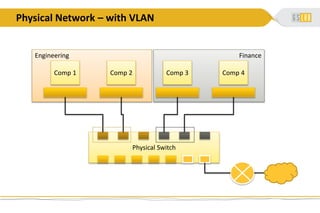
Physical Network – with VLAN
Comp 2 Comp 3 Comp 4Comp 1
Physical Switch
Components in vNetworking
www.gslab.com 17
Components in vNetworking
www.gslab.com 18
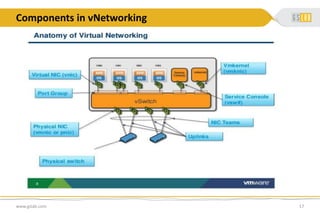
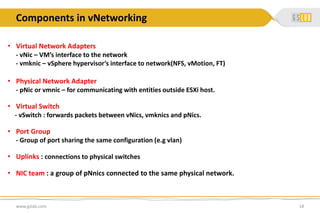
• Virtual Network Adapters
- vNic – VM’s interface to the network
- vmknic – vSphere hypervisor’s interface to network(NFS, vMotion, FT)
• Physical Network Adapter
- pNic or vmnic – for communicating with entities outside ESXi host.
• Virtual Switch
- vSwitch : forwards packets between vNics, vmknics and pNics.
• Port Group
- Group of port sharing the same configuration (e.g vlan)
• Uplinks : connections to physical switches
• NIC team : a group of pNnics connected to the same physical network.
HOST 2 (ESX)HOST 1 (ESX)
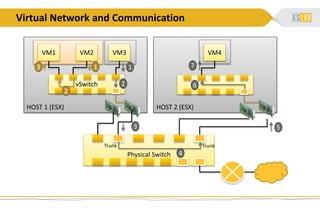
Virtual Network and Communication
VM1 VM2 VM4
vSwitch
Physical Switch
3
2
1
VM3
1
2
4
3 5
6
7
Trunk Trunk
Physical Switch vs Virtual Switch
Similarities -
• Maintains MAC Address tables.
• Lookup each frame’s destination MAC upon arrival.
• Forward frames to one or more ports.
• Avoid unnecessary deliveries.
Differences -
• Cannot connect to virtual switch together.
• As a result of this they do not require Spanning Tree Protocol.
• Forwarding table data is unique to each virtual switch.
www.gslab.com 20
vSphere Distributed Switch - vDS
www.gslab.com 21
• Centrally managed, Datacenter-wide switch
• Enhanced network monitoring and troubleshooting (RSPAN &
ERSPAN, SNMPv3.0)
• Maintain Network runtime state of VMs as they move across
HOSTs (Network vMotion)
• Here we will have:
DV Port Group - offer additional features - administrators can define
not just outbound traffic shaping, but inbound traffic shaping as well,
DV Uplink
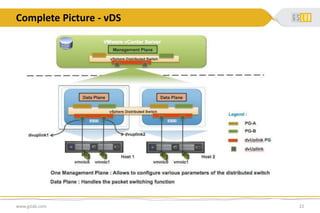
Complete Picture - vDS
www.gslab.com 22
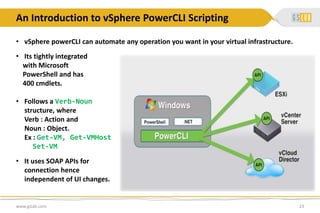
An Introduction to vSphere PowerCLI Scripting
• vSphere powerCLI can automate any operation you want in your virtual infrastructure.
• Its tightly integrated
with Microsoft
PowerShell and has
400 cmdlets.
• Follows a Verb-Noun
structure, where
Verb : Action and
Noun : Object.
Ex : Get-VM, Get-VMHost
Set-VM
• It uses SOAP APIs for
connection hence
independent of UI changes.
www.gslab.com 23
www.gslab.com
Thank you vMuch 
Go Virtualize...!!

Virtualization 101 - DeepDive

  • 1.
    www.gslab.com Amit Agarwal Date –18th July, 2016 Virtualization -101 A Deep Dive
  • 2.
    About Me • 4years of experience working with Virtualization Products. • VMware Certified Associate and Professional – DataCenter Virtualization. • Contributor to the book – Mastering vSphere PowerCLI. • Active member of VMware Community and VMware user group(VMUGs). • Working with GSLab for the past 1 year in Cloudgenix Project as Senior QA. www.gslab.com 2
  • 3.
    Agenda • The basicprinciples and technology of virtualization • Anatomy of Hypervisor (ESXi) • Anatomy of a virtual machine • vCenter usage and some advance vSphere features • vNetworking concepts • A brief on vSphere powerCLI Scripting and Usage www.gslab.com 3
  • 4.
    Virtualization : BasicBuilding Blocks • Hypervisor :- Two Types – - BareMetal (ESXi) - Hosted (VMware Workstation, Virtual Box) • ESXi contains VMkernel which is the 64 bit microkernel that directly handles memory and CPU. • Hardware access uses modules (drivers) adapted to work with VMkernel. • VMkernel does not run VMs directly, VMM does that. • Virtual Machine Monitor (VMM) :- It is a process that runs in the VMkernel which virtualizes the guest OS instructions and manages memory. - The VMM passes storage and network I/O requests to the VMKernel. - There is a VMM for each virtual CPU assigned to the virtual machine. www.gslab.com 4
  • 5.
    Virtualization : BasicBuilding Blocks • Rings :- - x86 CPUs provide a range protection levels called Rings in which code can execute. - Ring ‘0’ has the highest level priviledge and is where the operating system kernel normally runs. • Non-Virtualized Systems – OS runs at Ring 0 and owns the Hardware. Applications run in Ring 3 with less privileges. • Virtualized Systems – VMM runs at Ring 0 which fools the Guest OS into thinking that they are running in Ring ’0’ – Full Virtualization. Newer CPUs (Intel VT-x) uses a new privilege level called Ring ‘-1’, and puts VMM There which results in better performance. www.gslab.com 5
  • 6.
    • CPU Scheduler:- - Schedules VMs virtual CPU time on the host physical CPUs. - Scheduling many vCPUs to limited pCPUs can be very challenging , for this VMware uses a proportional-share based algorithm. - Optimizes placement of vCPUs onto different sockets to maximize cache utilization. • Memory Virtualization :- - VMkernel manages all VM memory. - It creates a contiguous addressable memory space for the VM, - This memory space has the same properties as the virtual address space presented to the applications by the guest operating system. - This also helps for each VM to run in complete isolation. www.gslab.com 6 Virtualization : Basic Building Blocks
  • 7.
  • 8.
    Anatomy of aVirtual Machine www.gslab.com 8 • Representation of a physical machine by software that has its own set of virtual hardware upon which an OS and Apps can be loaded. • Its basically a set of discrete files located on the datastore accessible to the ESXi Host. • When VM is powered on, the host mounts the virtual disk.
  • 9.
    vCenter – Whatis it? www.gslab.com 9 VMware vCenter Server is the central point for configuring, provisioning, and managing virtualized IT environments. vCenter Architecture
  • 10.
    vCenter – DoI really need it? www.gslab.com 10 • Use vCenter Server to centrally manage your hosts and virtual machines instead of logging directly in to each host. • It inherits thr group roles from AD, hence provide ease in Access Control. • Many Advance vSphere features are only supported in vCenter like – - vMotion - High Availability - Fault Tolerance - DRS • It allows us to use the inventory views to organize inventory objects(Storage, Networks, templates etc) in a meaningful way.
  • 11.
    Advance features –vMotion www.gslab.com 11 • Source and Destination Host must have : - Visibility to all storage used by the virtual machine - At least a Gigabit Ethernet network. - Access to the same physical network. - Compatible CPUs. Enhanced vMotion lets you migrate without a shared storage and same CPU characteristics.
  • 12.
    Advance features –High Availability (HA) www.gslab.com 12 • In case of a fail-over the virtual machine gets migrated and is literally restarted on one of the remaining hosts in the cluster. • vCenter manages this and uses a master-slave architecture. • Heartbeating is the mechanism used by HA to validate whether a host is alive.
  • 13.
    Nested Virtualization www.gslab.com 13 •You can expose the Intel VT/AMD V hardware virtualization flags to a guest VM riding on VMware. • This VM can then host its own VM’s. • There will be a performance hit.
  • 14.
  • 15.
    FinanceEngineering Physical Network –Design Comp 2 Comp 3 Comp 4Comp 1 Physical Switch Comp 6 Comp 7 Comp 8Comp 5 Physical Switch
  • 16.
    FinanceEngineering Physical Network –with VLAN Comp 2 Comp 3 Comp 4Comp 1 Physical Switch
  • 17.
  • 18.
    Components in vNetworking www.gslab.com18 • Virtual Network Adapters - vNic – VM’s interface to the network - vmknic – vSphere hypervisor’s interface to network(NFS, vMotion, FT) • Physical Network Adapter - pNic or vmnic – for communicating with entities outside ESXi host. • Virtual Switch - vSwitch : forwards packets between vNics, vmknics and pNics. • Port Group - Group of port sharing the same configuration (e.g vlan) • Uplinks : connections to physical switches • NIC team : a group of pNnics connected to the same physical network.
  • 19.
    HOST 2 (ESX)HOST1 (ESX) Virtual Network and Communication VM1 VM2 VM4 vSwitch Physical Switch 3 2 1 VM3 1 2 4 3 5 6 7 Trunk Trunk
  • 20.
    Physical Switch vsVirtual Switch Similarities - • Maintains MAC Address tables. • Lookup each frame’s destination MAC upon arrival. • Forward frames to one or more ports. • Avoid unnecessary deliveries. Differences - • Cannot connect to virtual switch together. • As a result of this they do not require Spanning Tree Protocol. • Forwarding table data is unique to each virtual switch. www.gslab.com 20
  • 21.
    vSphere Distributed Switch- vDS www.gslab.com 21 • Centrally managed, Datacenter-wide switch • Enhanced network monitoring and troubleshooting (RSPAN & ERSPAN, SNMPv3.0) • Maintain Network runtime state of VMs as they move across HOSTs (Network vMotion) • Here we will have: DV Port Group - offer additional features - administrators can define not just outbound traffic shaping, but inbound traffic shaping as well, DV Uplink
  • 22.
    Complete Picture -vDS www.gslab.com 22
  • 23.
    An Introduction tovSphere PowerCLI Scripting • vSphere powerCLI can automate any operation you want in your virtual infrastructure. • Its tightly integrated with Microsoft PowerShell and has 400 cmdlets. • Follows a Verb-Noun structure, where Verb : Action and Noun : Object. Ex : Get-VM, Get-VMHost Set-VM • It uses SOAP APIs for connection hence independent of UI changes. www.gslab.com 23
  • 24.
    www.gslab.com Thank you vMuch Go Virtualize...!!