Contents
 Introduction
 Virtualization Architecture.
 Virtualization Techniques .
 Full Virtualization.
What is?
Types
Challenge
Binary Translation
Advantage & Disadvantage
Application
 Implementation of hosted full virtualization by Oracle
VM Virtual Box.
 Conclusion.
Introduction
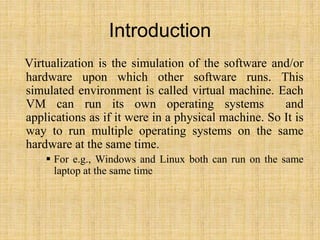
Virtualization is the simulation of the software and/or
hardware upon which other software runs. This
simulated environment is called virtual machine. Each
VM can run its own operating systems and
applications as if it were in a physical machine. So It is
way to run multiple operating systems on the same
hardware at the same time.
 For e.g., Windows and Linux both can run on the same
laptop at the same time
Virtualization Architecture
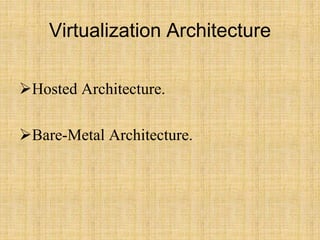
Hosted Architecture.
Bare-Metal Architecture.
Hosted Architecture
 In this architecture, host operating system is first
installed.
 A piece of software called a hypervisor or virtual
machine monitor (VMM) is installed on top of the host
OS.
 It allows users to run various guest operating systems
within their own application windows.
• Eg. VMware Workstation, Oracle Virtual Box , Microsoft
Virtual PC.
Hosted Architecture
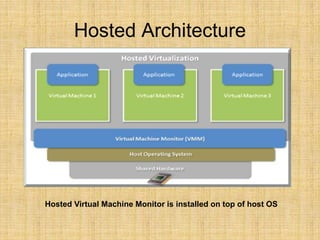
Hosted Virtual Machine Monitor is installed on top of host OS
Hosted Architecture( Pros & Cons)
Advantage
ease of installation and configuration.
Unmodified Host OS & Guest OS.
run on a wide variety of pc.
Disadvantage
performance degradation.
lack of support for real-time operating systems.
Bare-Metal Architecture
• In this architecture, type1 hypervisor or VMM is
installed on the bare hardware.
• VMM communicates directly with system hardware
rather than relying on a host operating system.
– E.g: VMWARE ESX, VMWARE ESXi, Microsoft Hyper-V.
Bare-Metal Architecture
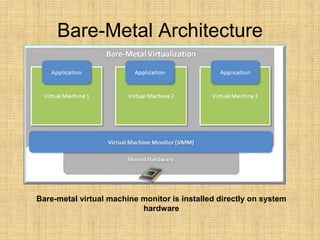
Bare-metal virtual machine monitor is installed directly on system
hardware
Bare-Metal Architecture (Pros &
Cons)
Advantages
Improved I/O Performance.
Support Real Time OS.
Disadvantage
Difficult to install & Configure.
Depends upon hardware platform.
Virtualization Techniques
Software Virtualization
Full Virtualization using binary translation.
Para Virtualization or OS assisted Virtualization.
Hardware Assisted Virtualization.
FULL VIRTUALIZATION
(What is ?)
• It is a virtualization technique used to provide a
virtual machine environment which is a complete
simulation of the underlying hardware.
• All operating systems and applications which
can run natively on the hardware can also be
run in the virtual machine.
• The guest OS need not be modified.
• Guest OS do not aware the existence of VM.
• Each VM is independent of each other.
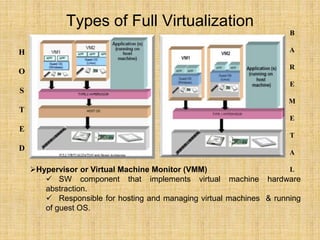
Types of Full Virtualization
Hypervisor or Virtual Machine Monitor (VMM)
 SW component that implements virtual machine hardware
abstraction.
 Responsible for hosting and managing virtual machines & running
of guest OS.
H
O
S
T
E
D
B
A
R
E
M
E
T
A
L
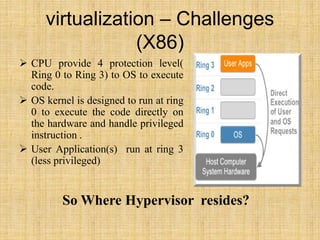
virtualization – Challenges
(X86)
 CPU provide 4 protection level(
Ring 0 to Ring 3) to OS to execute
code.
 OS kernel is designed to run at ring
0 to execute the code directly on
the hardware and handle privileged
instruction .
 User Application(s) run at ring 3
(less privileged)
So Where Hypervisor resides?
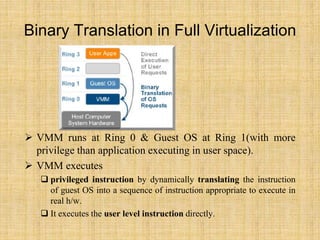
Binary Translation in Full Virtualization
 VMM runs at Ring 0 & Guest OS at Ring 1(with more
privilege than application executing in user space).
 VMM executes
 privileged instruction by dynamically translating the instruction
of guest OS into a sequence of instruction appropriate to execute in
real h/w.
 It executes the user level instruction directly.
Full Virtualization – Advantages &
Disadvantage
Advantage
 Secure
 The emulation layer isolates VMs from the host OS & other
application (s).
 Total VM portability
 The emulating h/w interface & guest Os forms a standard
package that can be ported & run in any platform.
 Run unmodified OS
 Guest OS do not aware of being virtualized.
Disadvantage
– Performance degradation in hosted full virtualization.
– Hardware dependency in bare-metal full virtualization.
Application of Full Virtualization
 Hosted Full Virtualization is used for Desktop
Virtualization.
Eg: Microsoft Virtual PC & Oracle VM Virtual Box.
 Bare-Metal Full Virtualization is used for Server
Virtualization.
Microsoft Hyper-V and VMware ESX Server.
 Server Virtualization is used in Cloud Computing.
Implementation of Full virtualization
(Hosted Architecture)
Platform
Hardware
oIntel® Core™2 Duo CPU
o2 GB RAM
o160 GB HDD
Software
•Windows 7 as Host OS.
•Windows XP & LINUX as Guest OS.
•Oracle VM Virtual Box.
Implementation of Full virtualization
(Hosted Architecture)
Step1: Install Microsoft Virtual PC ( type2 Hypervisor).
Step2: Create VM1 with winxp (sp2) as guest OS &
VM2 with Linux as guest OS.
Step3: Install your desired application on guest OS
Conclusion
The future of enterprise IT management will be based
on virtual computing. Intel® VT makes it possible to
maximize computer utilization while minimizing all
associated overheads of management, power
consumption, maintenance and physical space.
Virtualization also allows the industry to run business
with fewer machine and at reduced cost while
providing the infrastructure to meet customer needs.

Virtualization basics

  • 2.
    Contents  Introduction  VirtualizationArchitecture.  Virtualization Techniques .  Full Virtualization. What is? Types Challenge Binary Translation Advantage & Disadvantage Application  Implementation of hosted full virtualization by Oracle VM Virtual Box.  Conclusion.
  • 3.
    Introduction Virtualization is thesimulation of the software and/or hardware upon which other software runs. This simulated environment is called virtual machine. Each VM can run its own operating systems and applications as if it were in a physical machine. So It is way to run multiple operating systems on the same hardware at the same time.  For e.g., Windows and Linux both can run on the same laptop at the same time
  • 4.
  • 5.
    Hosted Architecture  Inthis architecture, host operating system is first installed.  A piece of software called a hypervisor or virtual machine monitor (VMM) is installed on top of the host OS.  It allows users to run various guest operating systems within their own application windows. • Eg. VMware Workstation, Oracle Virtual Box , Microsoft Virtual PC.
  • 6.
    Hosted Architecture Hosted VirtualMachine Monitor is installed on top of host OS
  • 7.
    Hosted Architecture( Pros& Cons) Advantage ease of installation and configuration. Unmodified Host OS & Guest OS. run on a wide variety of pc. Disadvantage performance degradation. lack of support for real-time operating systems.
  • 8.
    Bare-Metal Architecture • Inthis architecture, type1 hypervisor or VMM is installed on the bare hardware. • VMM communicates directly with system hardware rather than relying on a host operating system. – E.g: VMWARE ESX, VMWARE ESXi, Microsoft Hyper-V.
  • 9.
    Bare-Metal Architecture Bare-metal virtualmachine monitor is installed directly on system hardware
  • 10.
    Bare-Metal Architecture (Pros& Cons) Advantages Improved I/O Performance. Support Real Time OS. Disadvantage Difficult to install & Configure. Depends upon hardware platform.
  • 11.
    Virtualization Techniques Software Virtualization FullVirtualization using binary translation. Para Virtualization or OS assisted Virtualization. Hardware Assisted Virtualization.
  • 12.
    FULL VIRTUALIZATION (What is?) • It is a virtualization technique used to provide a virtual machine environment which is a complete simulation of the underlying hardware. • All operating systems and applications which can run natively on the hardware can also be run in the virtual machine. • The guest OS need not be modified. • Guest OS do not aware the existence of VM. • Each VM is independent of each other.
  • 13.
    Types of FullVirtualization Hypervisor or Virtual Machine Monitor (VMM)  SW component that implements virtual machine hardware abstraction.  Responsible for hosting and managing virtual machines & running of guest OS. H O S T E D B A R E M E T A L
  • 14.
    virtualization – Challenges (X86) CPU provide 4 protection level( Ring 0 to Ring 3) to OS to execute code.  OS kernel is designed to run at ring 0 to execute the code directly on the hardware and handle privileged instruction .  User Application(s) run at ring 3 (less privileged) So Where Hypervisor resides?
  • 15.
    Binary Translation inFull Virtualization  VMM runs at Ring 0 & Guest OS at Ring 1(with more privilege than application executing in user space).  VMM executes  privileged instruction by dynamically translating the instruction of guest OS into a sequence of instruction appropriate to execute in real h/w.  It executes the user level instruction directly.
  • 16.
    Full Virtualization –Advantages & Disadvantage Advantage  Secure  The emulation layer isolates VMs from the host OS & other application (s).  Total VM portability  The emulating h/w interface & guest Os forms a standard package that can be ported & run in any platform.  Run unmodified OS  Guest OS do not aware of being virtualized. Disadvantage – Performance degradation in hosted full virtualization. – Hardware dependency in bare-metal full virtualization.
  • 17.
    Application of FullVirtualization  Hosted Full Virtualization is used for Desktop Virtualization. Eg: Microsoft Virtual PC & Oracle VM Virtual Box.  Bare-Metal Full Virtualization is used for Server Virtualization. Microsoft Hyper-V and VMware ESX Server.  Server Virtualization is used in Cloud Computing.
  • 18.
    Implementation of Fullvirtualization (Hosted Architecture) Platform Hardware oIntel® Core™2 Duo CPU o2 GB RAM o160 GB HDD Software •Windows 7 as Host OS. •Windows XP & LINUX as Guest OS. •Oracle VM Virtual Box.
  • 19.
    Implementation of Fullvirtualization (Hosted Architecture) Step1: Install Microsoft Virtual PC ( type2 Hypervisor). Step2: Create VM1 with winxp (sp2) as guest OS & VM2 with Linux as guest OS. Step3: Install your desired application on guest OS
  • 20.
    Conclusion The future ofenterprise IT management will be based on virtual computing. Intel® VT makes it possible to maximize computer utilization while minimizing all associated overheads of management, power consumption, maintenance and physical space. Virtualization also allows the industry to run business with fewer machine and at reduced cost while providing the infrastructure to meet customer needs.