Royal University of Bhutan
Jigme Namgyel Engineering College
Department of Civil Engineering & Surveying
Resourced By : Phurba Tamang
Designation: Associate lecturer
Department of Civil Engineering and Surveying
Jigme Namgyel Engineering College
Basic STAAD. Pro Training
“Structural Analysis & Designing Programme/Software”
STAAD. Pro
CONTENT DELIVERY
PRESENTATION
A
YOUR CONTENT
s STAAD.Pro?
ons of STAAD
ilities of STAAD
B
%
es
er:
workspace (GUI)
commands
e IS Codes
ailing
columns, slabs,
Staad.Pro
le Residential Building
on
rface
(2D)
C
C
D
%
TEXT
%
TEXT
MID-TERM REVIEW, 2017
Introduction
Resourced By: Phurba Tamang, Associate Lecturer, JNEC
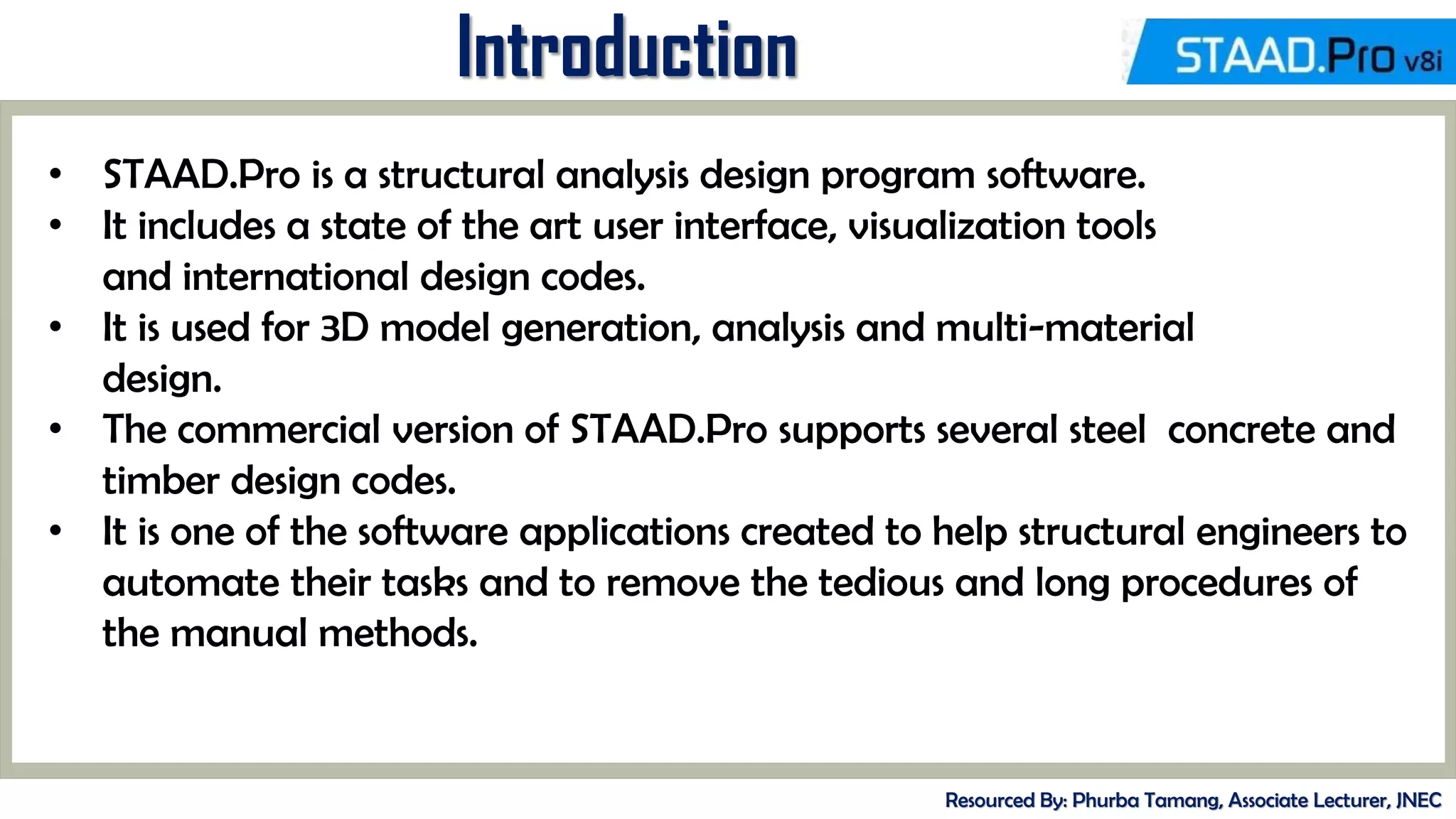
• STAAD.Pro is a structural analysis design program software.
• It includes a state of the art user interface, visualization tools
and international design codes.
• It is used for 3D model generation, analysis and multi-material
design.
• The commercial version of STAAD.Pro supports several steel concrete and
timber design codes.
• It is one of the software applications created to help structural engineers to
automate their tasks and to remove the tedious and long procedures of
the manual methods.
MID-TERM REVIEW, 2017
History of STAAD. Pro
Resourced By: Phurba Tamang, Associate Lecturer, JNEC
• STAAD.Pro was originally developed by Research Engineers International
in Yorba Linda, CA.
• In late 2005, Research Engineer International was boughtby Bentley
Systems
MID-TERM REVIEW, 2017
History of STAAD. Pro
Resourced By: Phurba Tamang, Associate Lecturer, JNEC
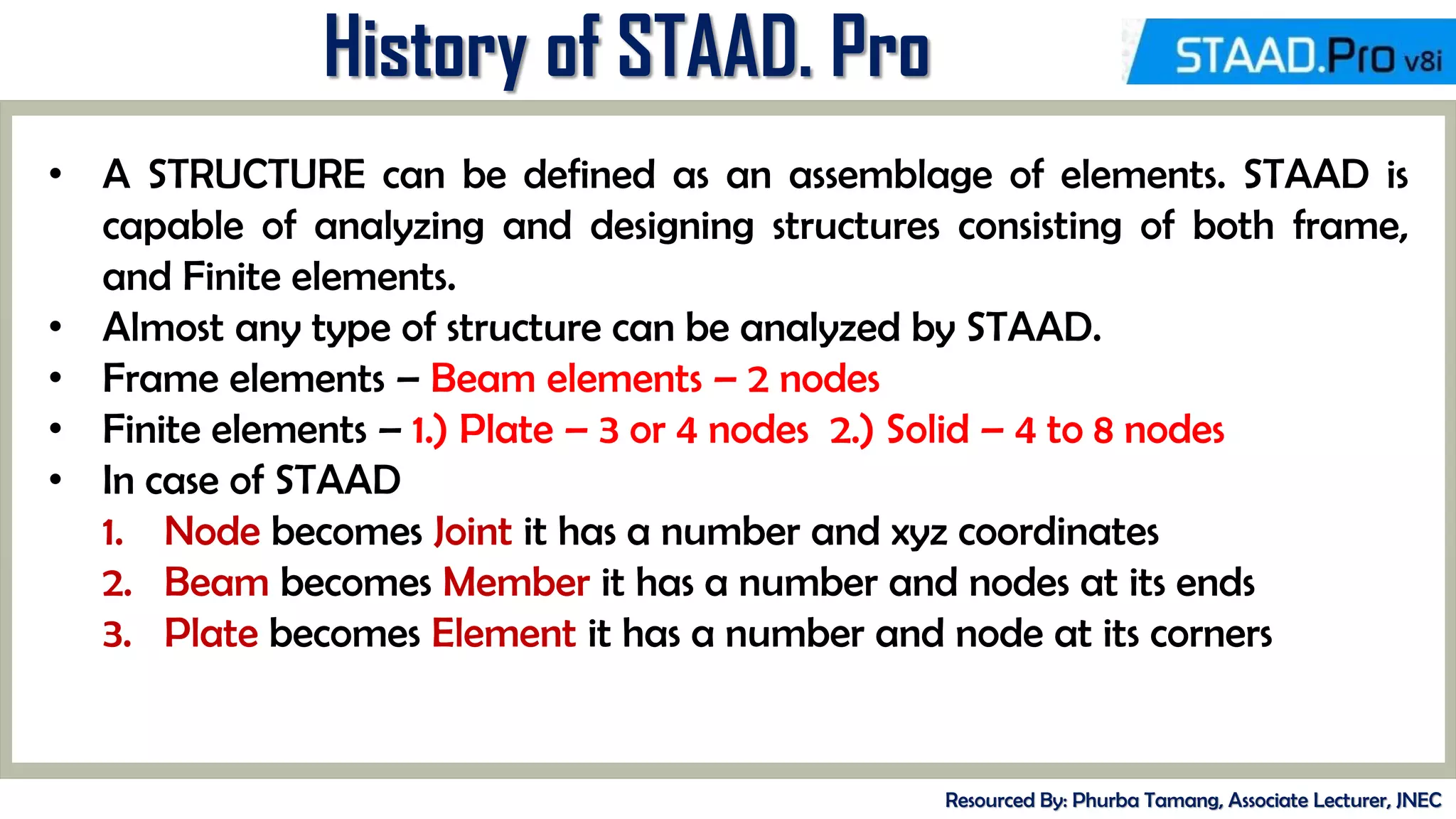
• A STRUCTURE can be defined as an assemblage of elements. STAAD is
capable of analyzing and designing structures consisting of both frame,
and Finite elements.
• Almost any type of structure can be analyzed by STAAD.
• Frame elements – Beam elements – 2 nodes
• Finite elements – 1.) Plate – 3 or 4 nodes 2.) Solid – 4 to 8 nodes
• In case of STAAD
1. Node becomes Joint it has a number and xyz coordinates
2. Beam becomes Member it has a number and nodes at its ends
3. Plate becomes Element it has a number and node at its corners
MID-TERM REVIEW, 2017
Types of Structure
Resourced By: Phurba Tamang, Associate Lecturer, JNEC
• A TRUSS structure consists of truss members which can have only axial
member forces and no bending in the members.
• A PLANE structure is bound by a global X-Y coordinate system with loads
in the same plane.
• A SPACE structure, which is a three dimensional framed structure with
loads applied in any plane, is the most general.
• A FLOOR structure is a two or three dimensional structure having no horizontal (global
X or Z) movement of the structure [FX, FZ & MY are restrained at every joint]. The
floor framing (in global X-Z plane) of a building is an ideal example of a FLOOR
structure. Columns can also be modelled with the floor in a FLOOR structure as long as
the structure has no horizontal loading. If there is any horizontal load, it must be
analyzed as a SPACE structure.
MID-TERM REVIEW, 2017
Versions of STAAD. Pro
Resourced By: Phurba Tamang, Associate Lecturer, JNEC
MID-TERM REVIEW, 2017
Getting Started
Resourced By: Phurba Tamang, Associate Lecturer, JNEC
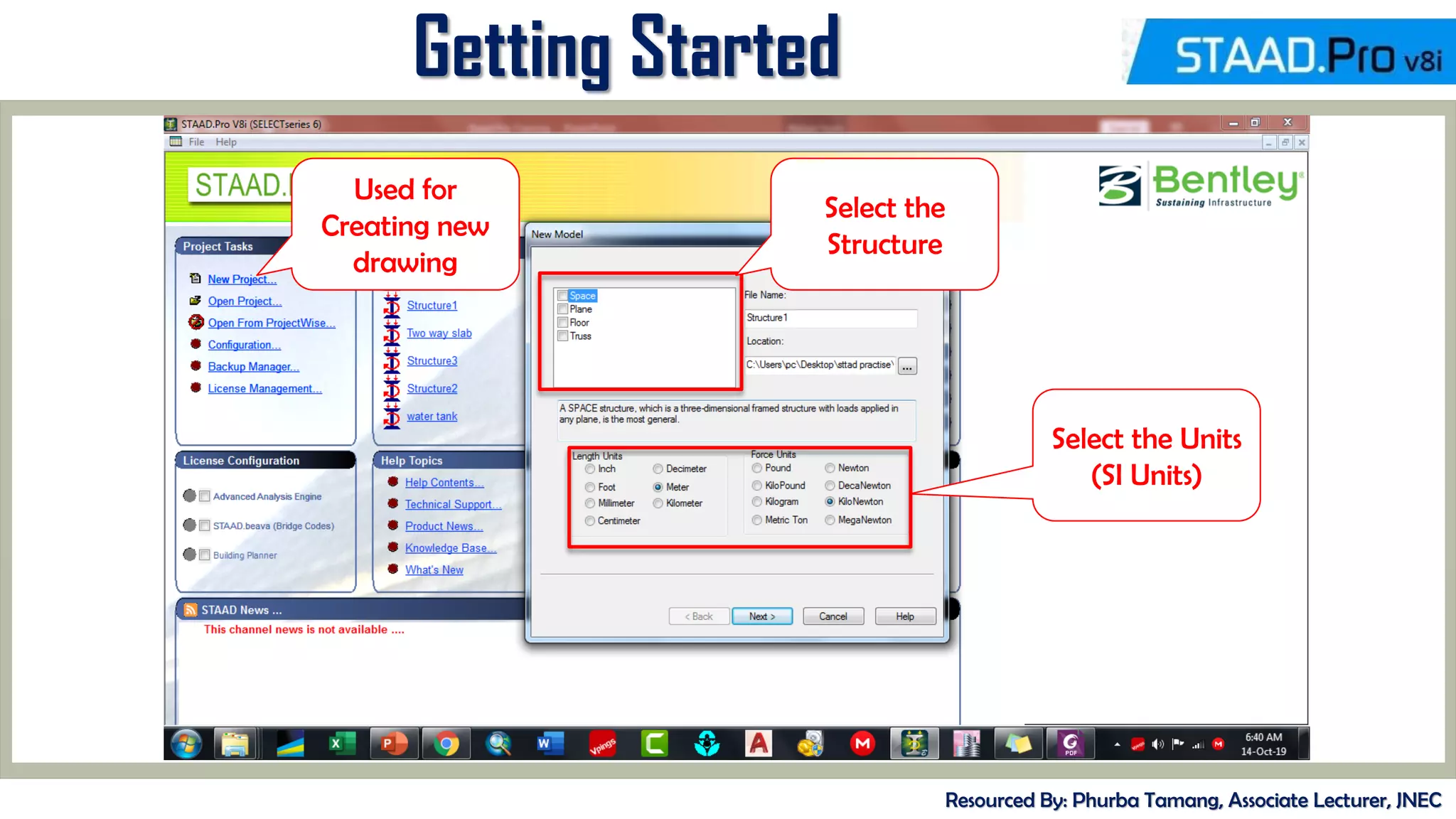
Used for
Creating new
drawing
Select the
Structure
Select the Units
(SI Units)
MID-TERM REVIEW, 2017
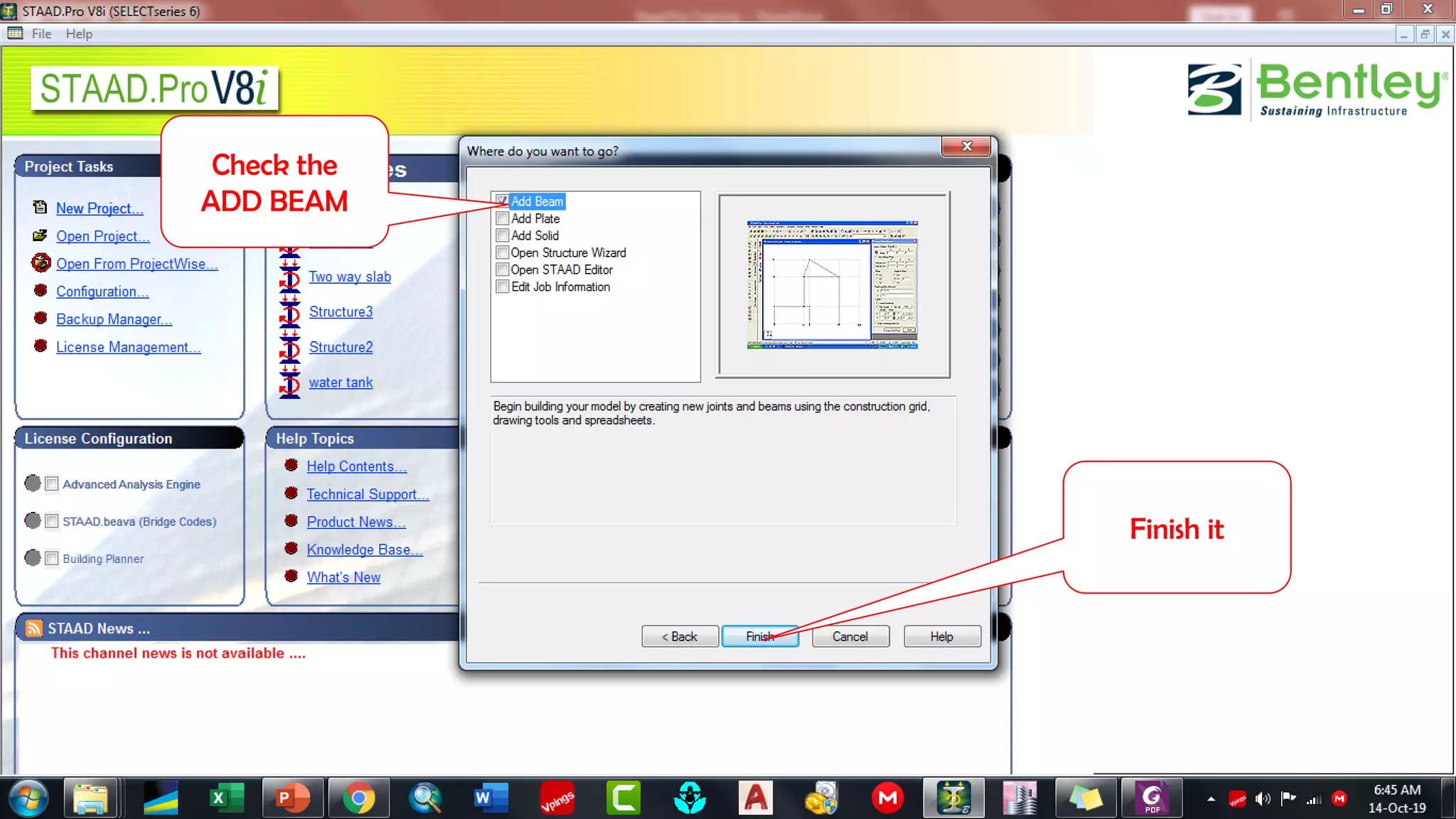
Check the
ADD BEAM
Finish it
MID-TERM REVIEW, 2017
Resourced By: Phurba Tamang, Associate Lecturer, JNEC
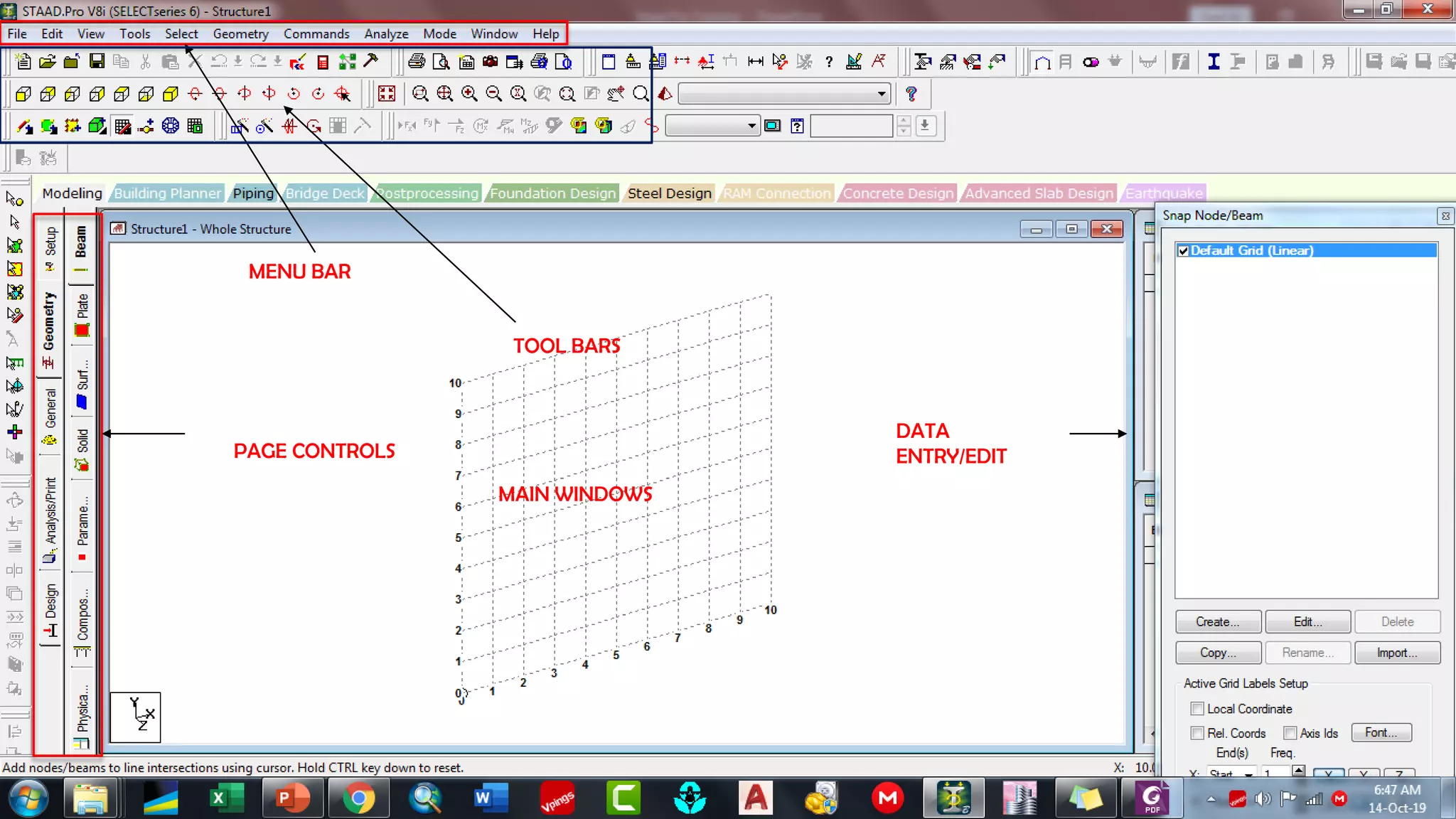
MENU BAR
TOOL BARS
MAIN WINDOWS
PAGE CONTROLS
DATA
ENTRY/EDIT
MID-TERM REVIEW, 2017
Resourced By: Phurba Tamang, Associate Lecturer, JNEC
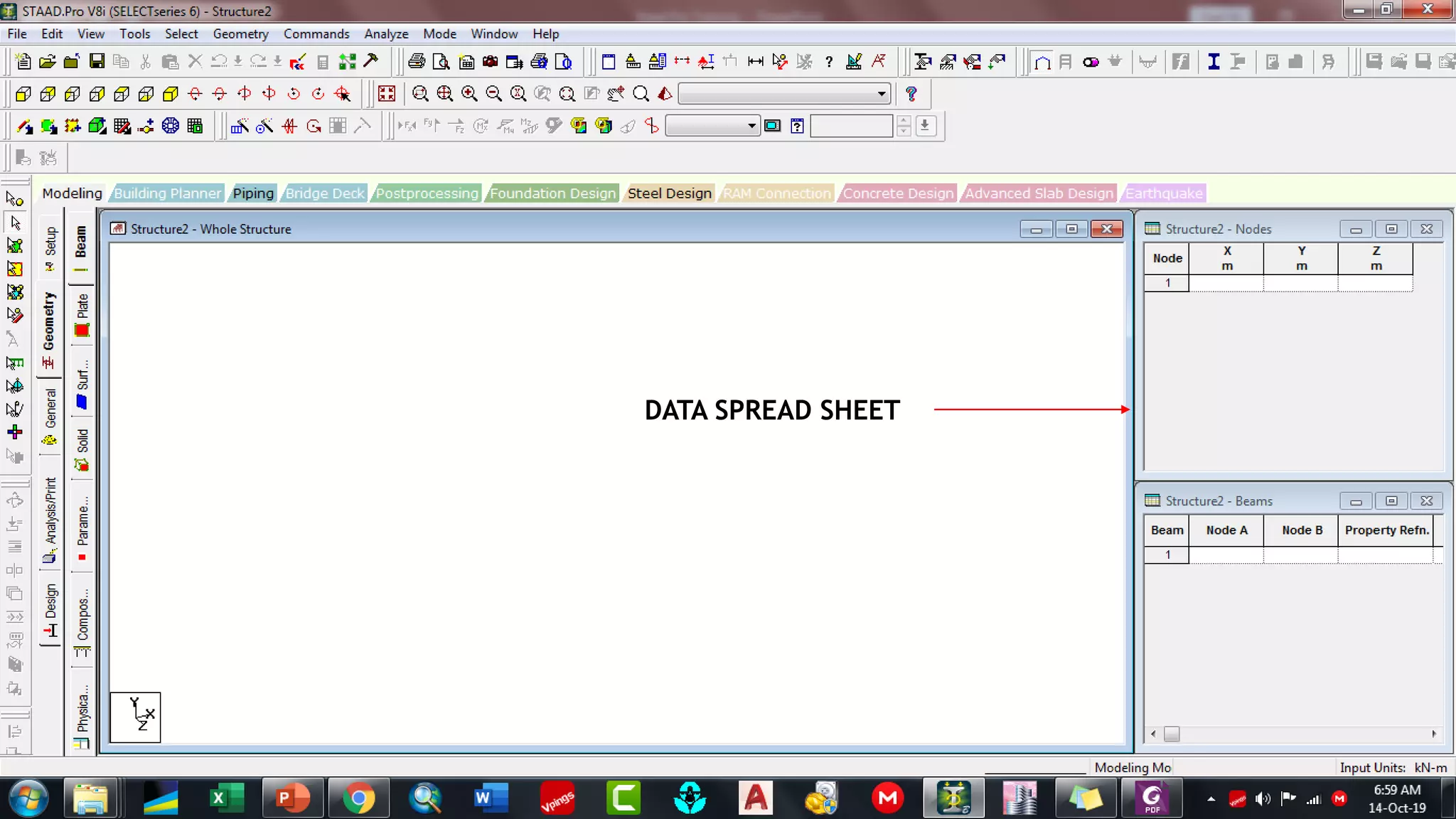
DATA SPREAD SHEET
MID-TERM REVIEW, 2017
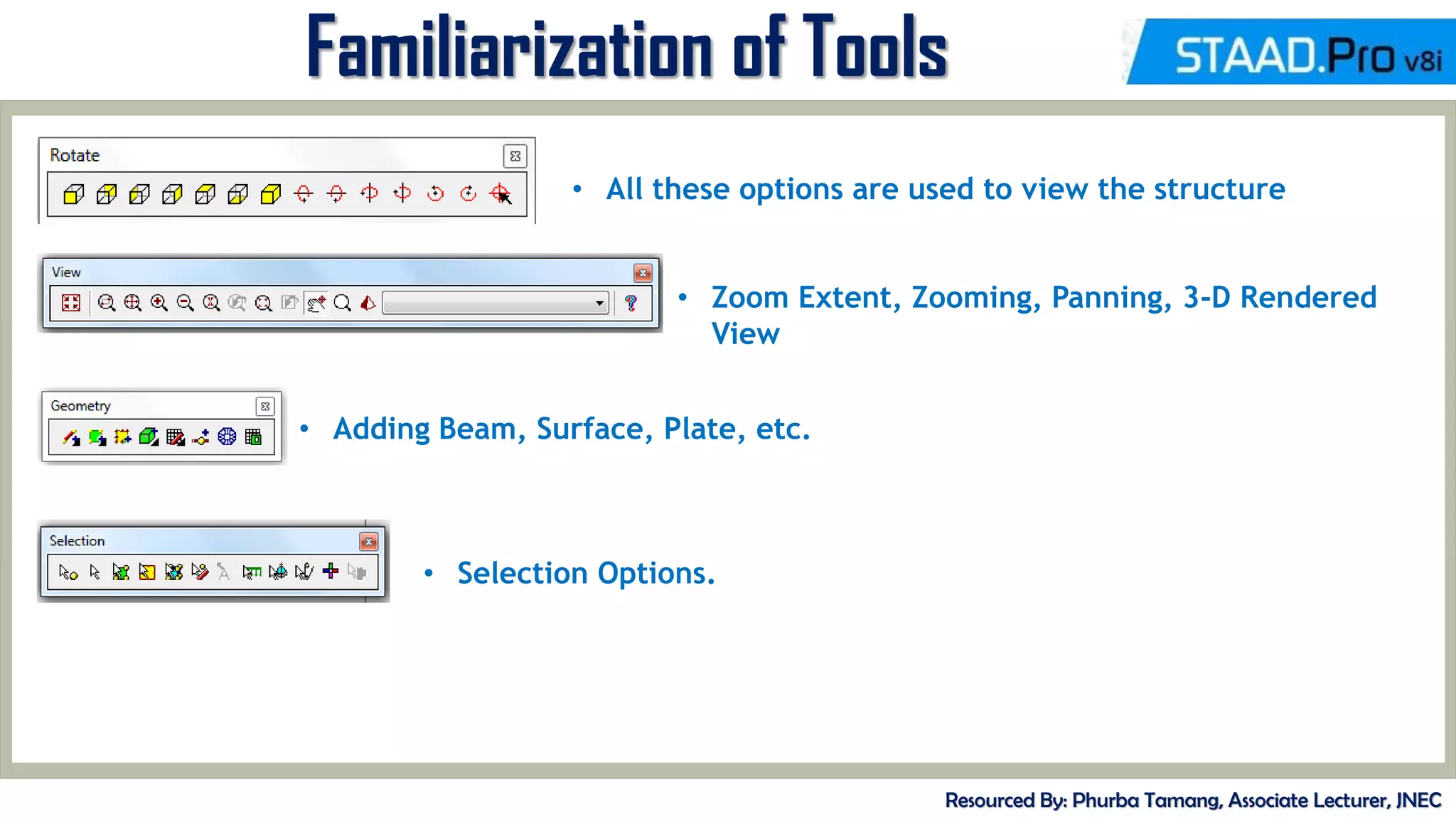
Familiarization of Tools
Resourced By: Phurba Tamang, Associate Lecturer, JNEC
• All these options are used to view the structure
• Zoom Extent, Zooming, Panning, 3-D Rendered
View
• Adding Beam, Surface, Plate, etc.
• Selection Options.
MID-TERM REVIEW, 2017
Model Generation
Resourced By: Phurba Tamang, Associate Lecturer, JNEC
• There are basically 3 methods of generating a model
1. Snap node method
2. Coordinate method
3. Copy paste method
• Out of these three methods most commonly used is copy paste method
• By using these three methods a structure of any geometry can be created
• STAAD.Pro also contains a command wizard which is its library of
structures such as frames , trusses are present which can be merged with
the STAAD.Pro model
MID-TERM REVIEW, 2017
Exercise
Resourced By: Phurba Tamang, Associate Lecturer, JNEC
• Create two Nodes at 10 m distance and add a beam. Add fixed supports
at both the ends. Exert a point load of 10 kN at the midspan. Analyse the
beam for Shear Force, Bending Moment, Deflection, etc.
• Create Framed Structure with following coordinates.
Node 1 ( 0,0), Node 2 (0, 3), Node 3 ( 3, 3), Node 4 (3,0)
Analyse the frame with Uniformly Distributed Load of 5 kN/m distributed
completely over the top frame. Provide Fixed Boths at both the ends
MID-TERM REVIEW, 2017
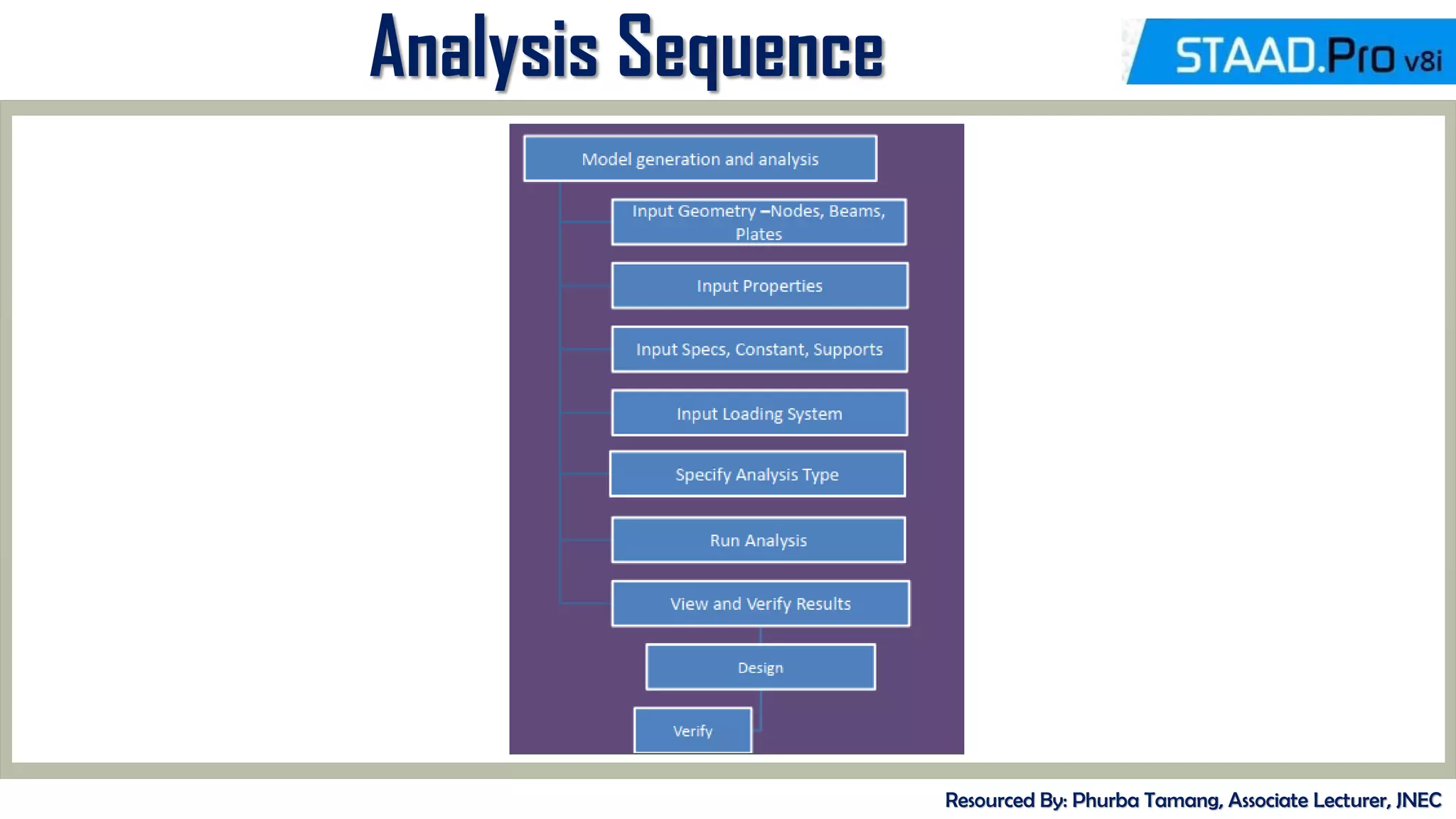
Analysis Sequence
Resourced By: Phurba Tamang, Associate Lecturer, JNEC
MID-TERM REVIEW, 2017
Exercise
Resourced By: Phurba Tamang, Associate Lecturer, JNEC
• Create two Nodes at 10 m distance and add a beam. Add fixed supports
at both the ends. Exert a point load of 10 kN at the midspan. Analyse the
beam for Shear Force, Bending Moment, Deflection, etc.
Way forward
1. Create a member connecting two nodes. ( use may use any method).
2. Assign Fixed Supports
3. Assign Material Properties.
4. Define a Live Load and Assign.
5. Analyse the member.
MID-TERM REVIEW, 2017
Defining Property
Resourced By: Phurba Tamang, Associate Lecturer, JNEC
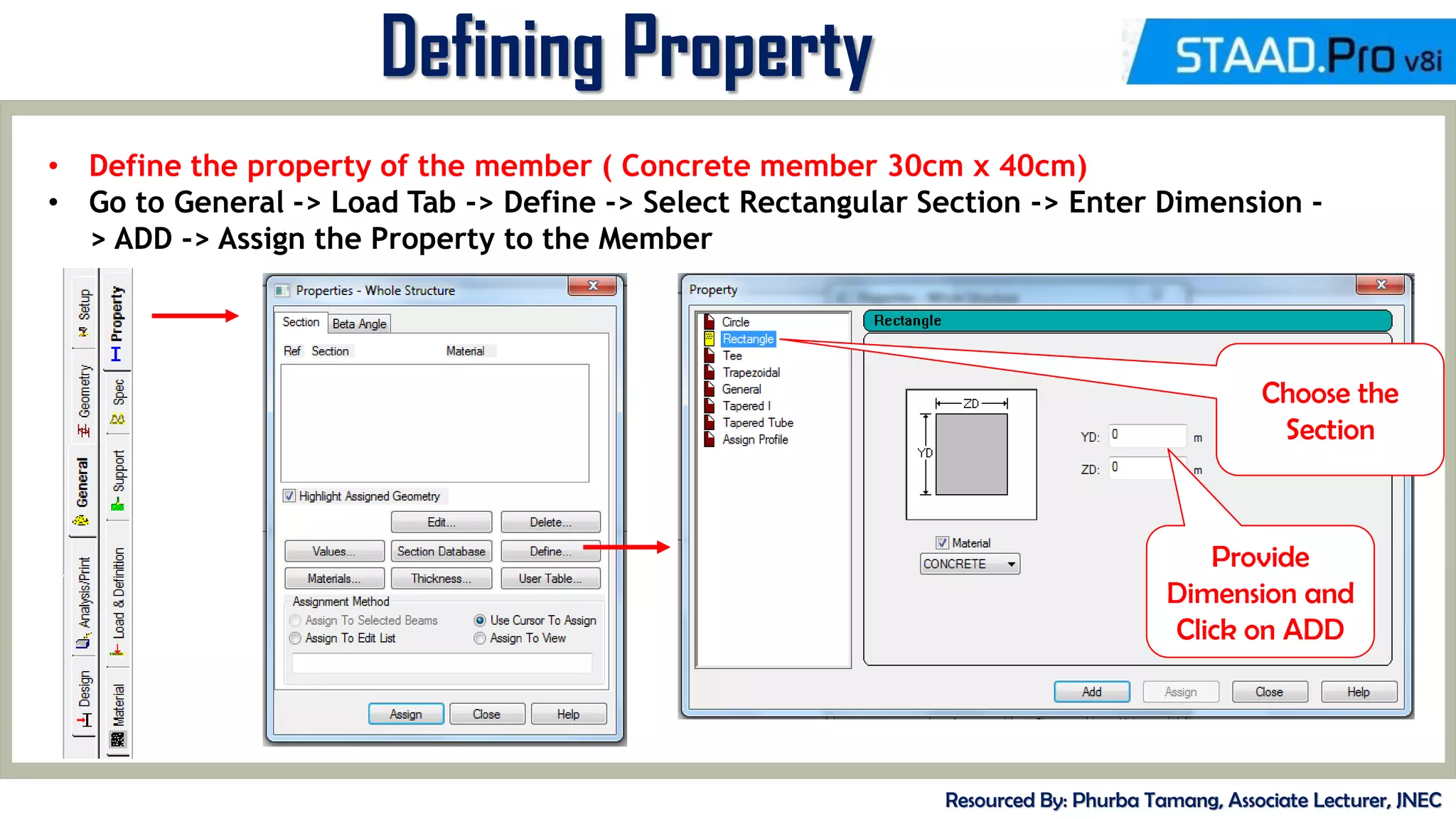
• Define the property of the member ( Concrete member 30cm x 40cm)
• Go to General -> Load Tab -> Define -> Select Rectangular Section -> Enter Dimension -
> ADD -> Assign the Property to the Member
Choose the
Section
Provide
Dimension and
Click on ADD
MID-TERM REVIEW, 2017
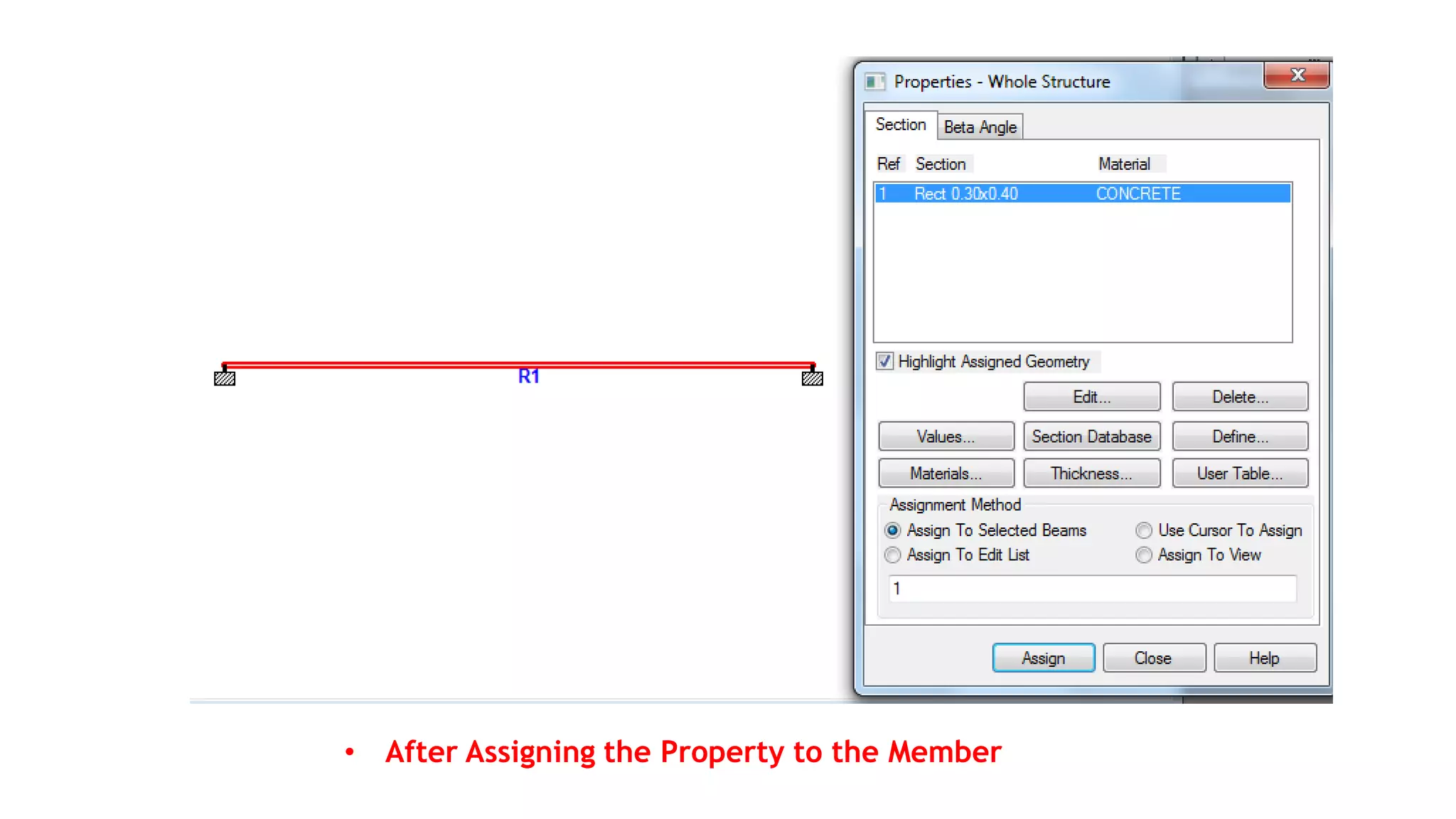
• After Assigning the Property to the Member
MID-TERM REVIEW, 2017
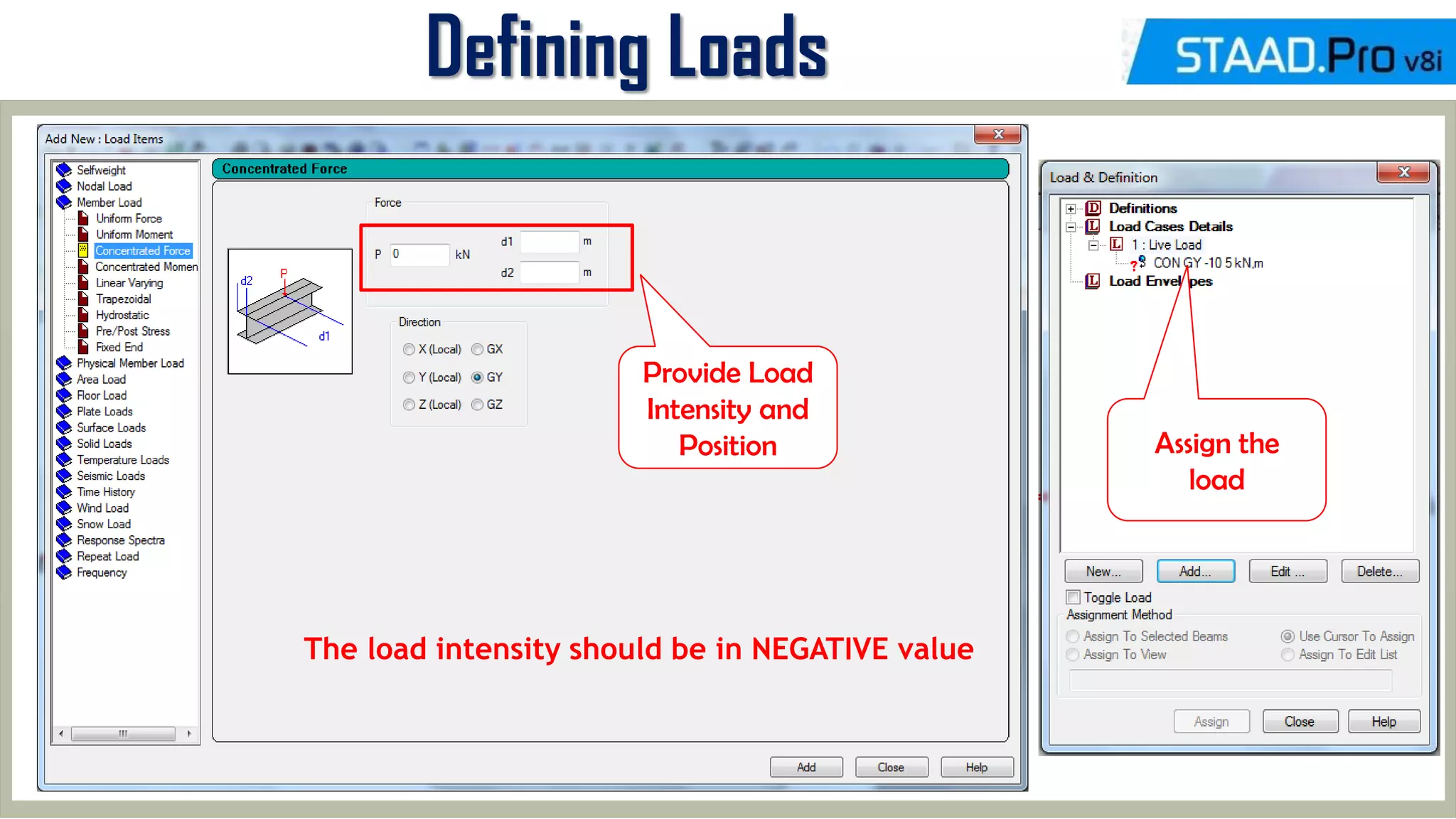
Defining Loads
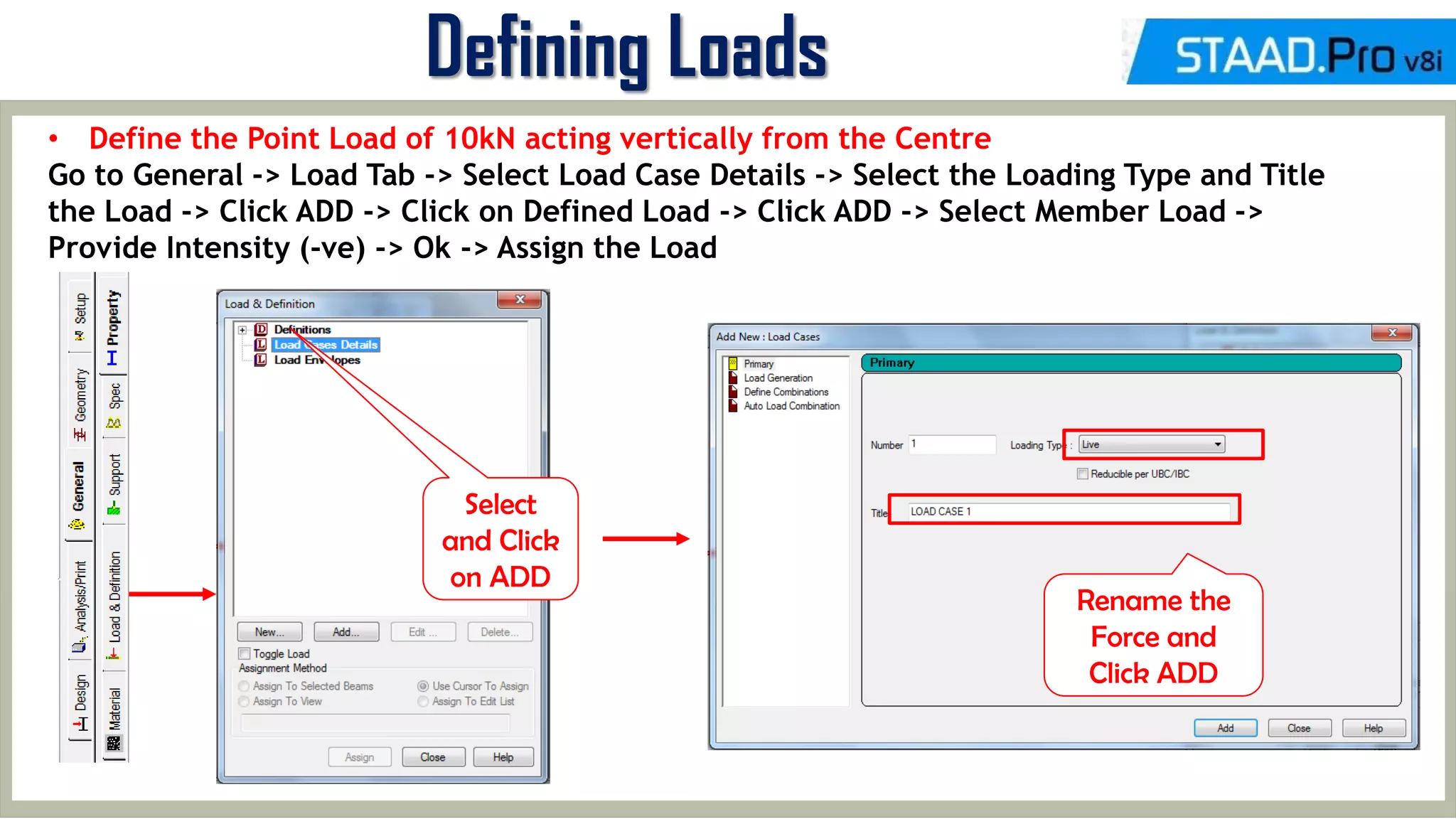
• Define the Point Load of 10kN acting vertically from the Centre
Go to General -> Load Tab -> Select Load Case Details -> Select the Loading Type and Title
the Load -> Click ADD -> Click on Defined Load -> Click ADD -> Select Member Load ->
Provide Intensity (-ve) -> Ok -> Assign the Load
Select
and Click
on ADD
Rename the
Force and
Click ADD
MID-TERM REVIEW, 2017
Defining Loads
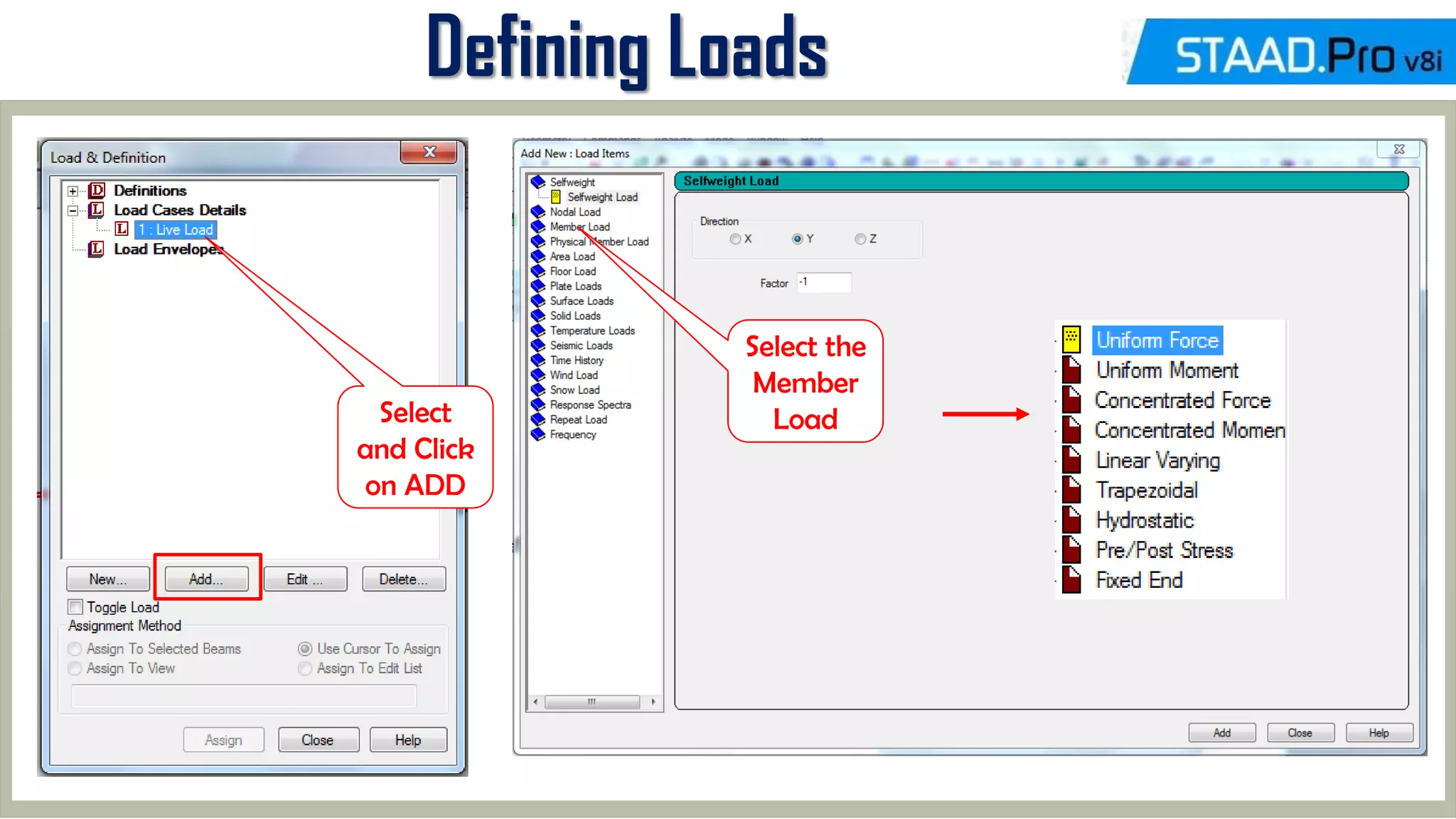
Select
and Click
on ADD
Select the
Member
Load
MID-TERM REVIEW, 2017
Defining Loads
Provide Load
Intensity and
Position
The load intensity should be in NEGATIVE value
Assign the
load
MID-TERM REVIEW, 2017
Exercise
Resourced By: Phurba Tamang, Associate Lecturer, JNEC
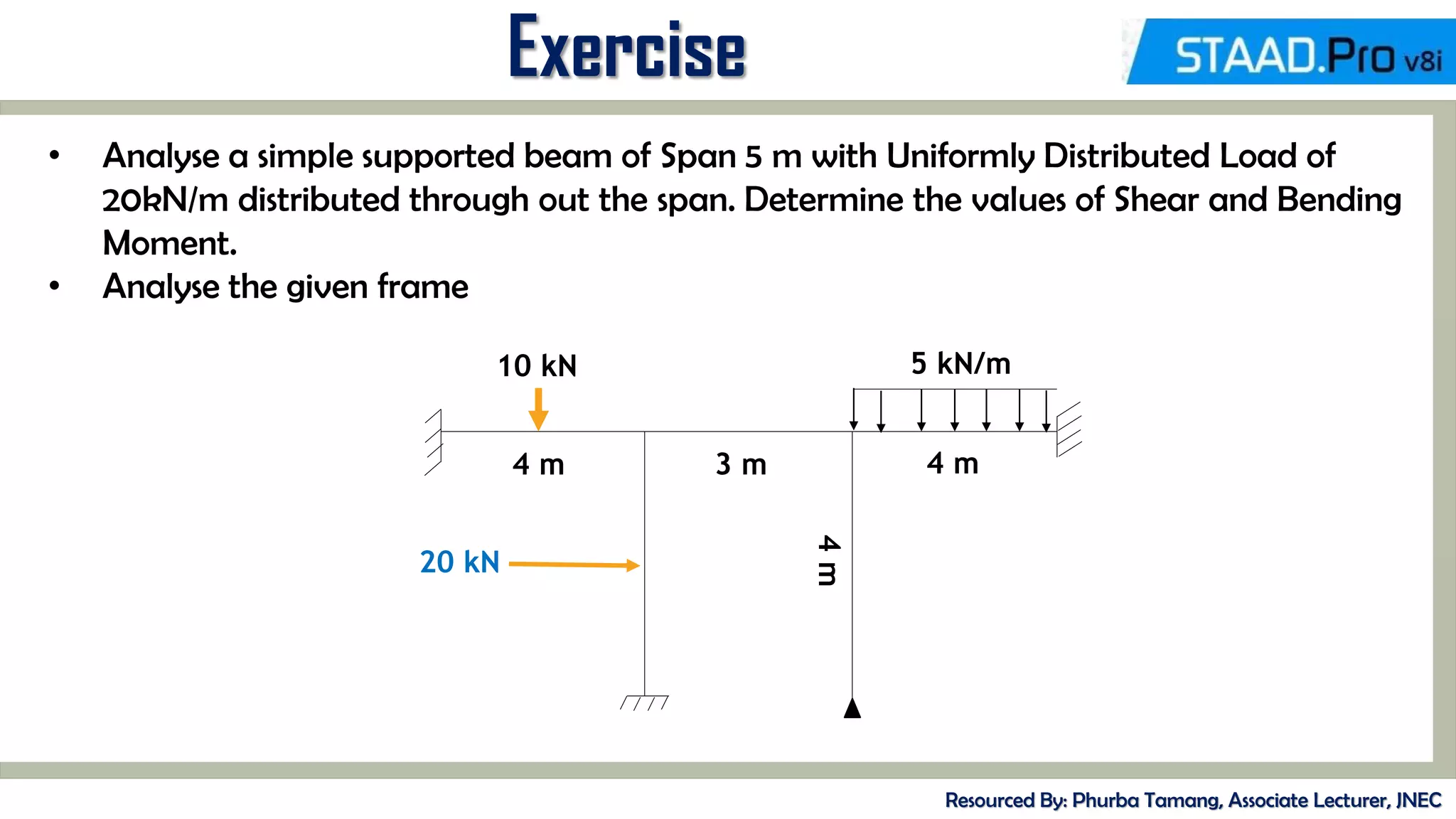
• Analyse a simple supported beam of Span 5 m with Uniformly Distributed Load of
20kN/m distributed through out the span. Determine the values of Shear and Bending
Moment.
• Analyse the given frame
20 kN
10 kN 5 kN/m
3 m
4 m 4 m
4
m
MID-TERM REVIEW, 2017
Introduction to Translational Repeat
Resourced By: Phurba Tamang, Associate Lecturer, JNEC
Methodology:
Create a Node-> Translating the Node with Link Steps
To access the Command -> Geometry -> Translational Repeat
Creating geometry Using only Translation Repeat
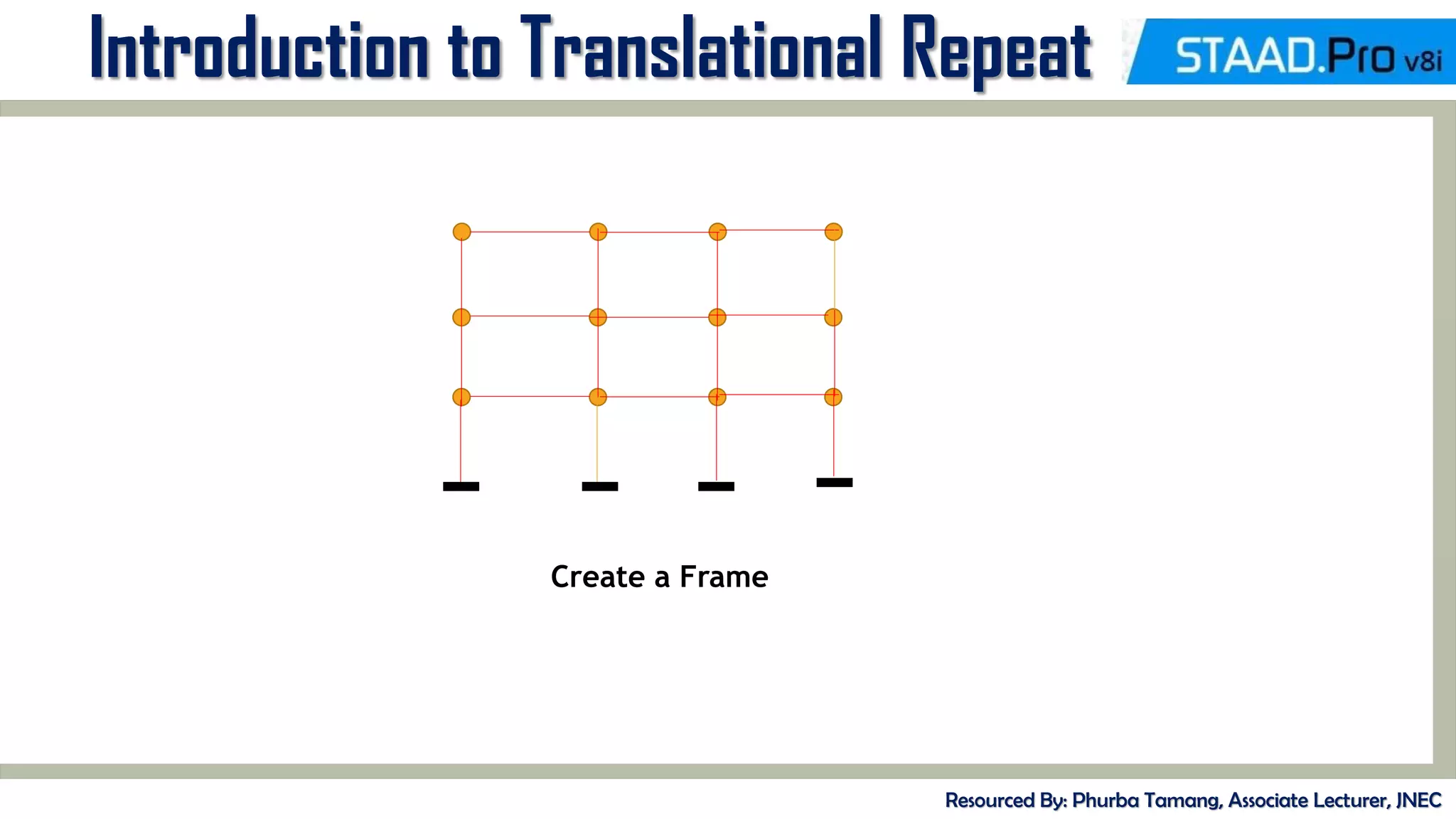
• Create continuous beam of 4m, 5m, 3m span with pinned support.
• Create 2D- G+3 storied building frame 3 bays spaced at 5 m. The height of
the frame is 12 m.
MID-TERM REVIEW, 2017
Introduction to Translational Repeat
Resourced By: Phurba Tamang, Associate Lecturer, JNEC
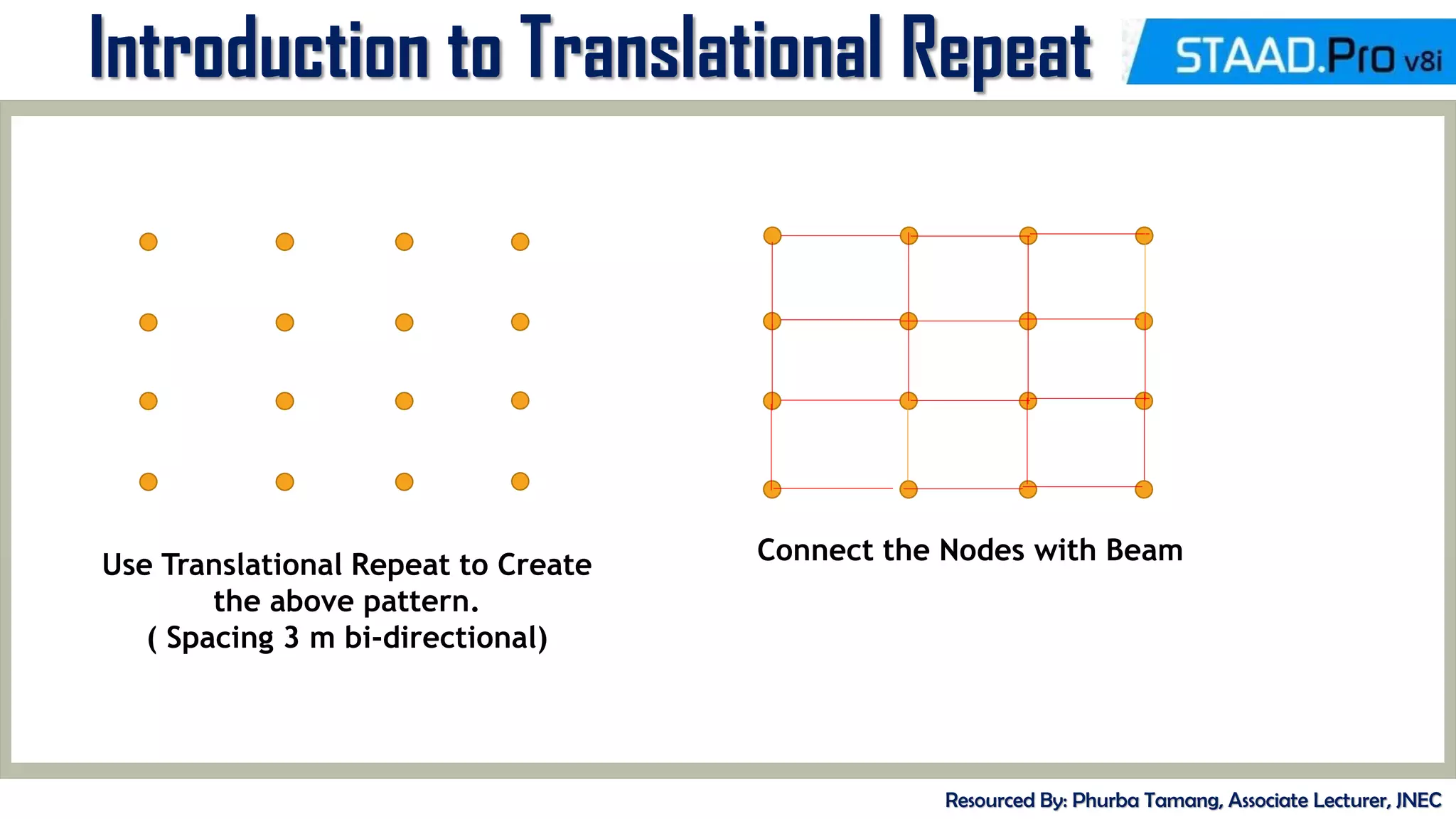
Use Translational Repeat to Create
the above pattern.
( Spacing 3 m bi-directional)
Connect the Nodes with Beam
MID-TERM REVIEW, 2017
Introduction to Translational Repeat
Resourced By: Phurba Tamang, Associate Lecturer, JNEC
Create a Frame
Code References
Resourced By: Phurba Tamang, Associate Lecturer, JNEC
• IS 456 – Reinforced Concrete Design
• IS 800 – Steel Design
• IS 802 – Transmission Tower ( I to III )
• IS 875 – Dead Load ( Part I )
• IS 875 – Live Load ( Part II )
• IS 875 – Wind Load ( Part III )
• IS 875 – Snow Load (Part IV )
• IS 875 – Special Load (Part V )
• IRC 6,18,21 – Bridge Design
Code References
Resourced By: Phurba Tamang, Associate Lecturer, JNEC
IS 1893:2002/2005 Criteria for Earthquake Resistant Design of Structures
• Part 1: General provisions and Buildings
• Part 2: Liquid Retaining Tanks – Elevated and Ground Supported
• Part 3 : Bridges and Retaining Walls
• Part 4 : Industrial Structures Including Stack Like Structures
• Part 5 : Dams and Embankments
Load Combination
Resourced By: Phurba Tamang, Associate Lecturer, JNEC
Load Combination as per IS 456
• 1.5 ( DL + IL )
• 1.5 ( DL + WL)
• 1.2 ( DL + IL + WL)
Note: While considering Earthquake Loading, substitute EL for WL
Limit state is a condition just before collapse. A structure designed by limit state should
give proper strength and serviceability throughout its life. In limit state method, the limit
state of collapse deals with the safety of structure and limit state of serviceability deals
with the durability of structure.
Unit Weight
Resourced By: Phurba Tamang, Associate Lecturer, JNEC
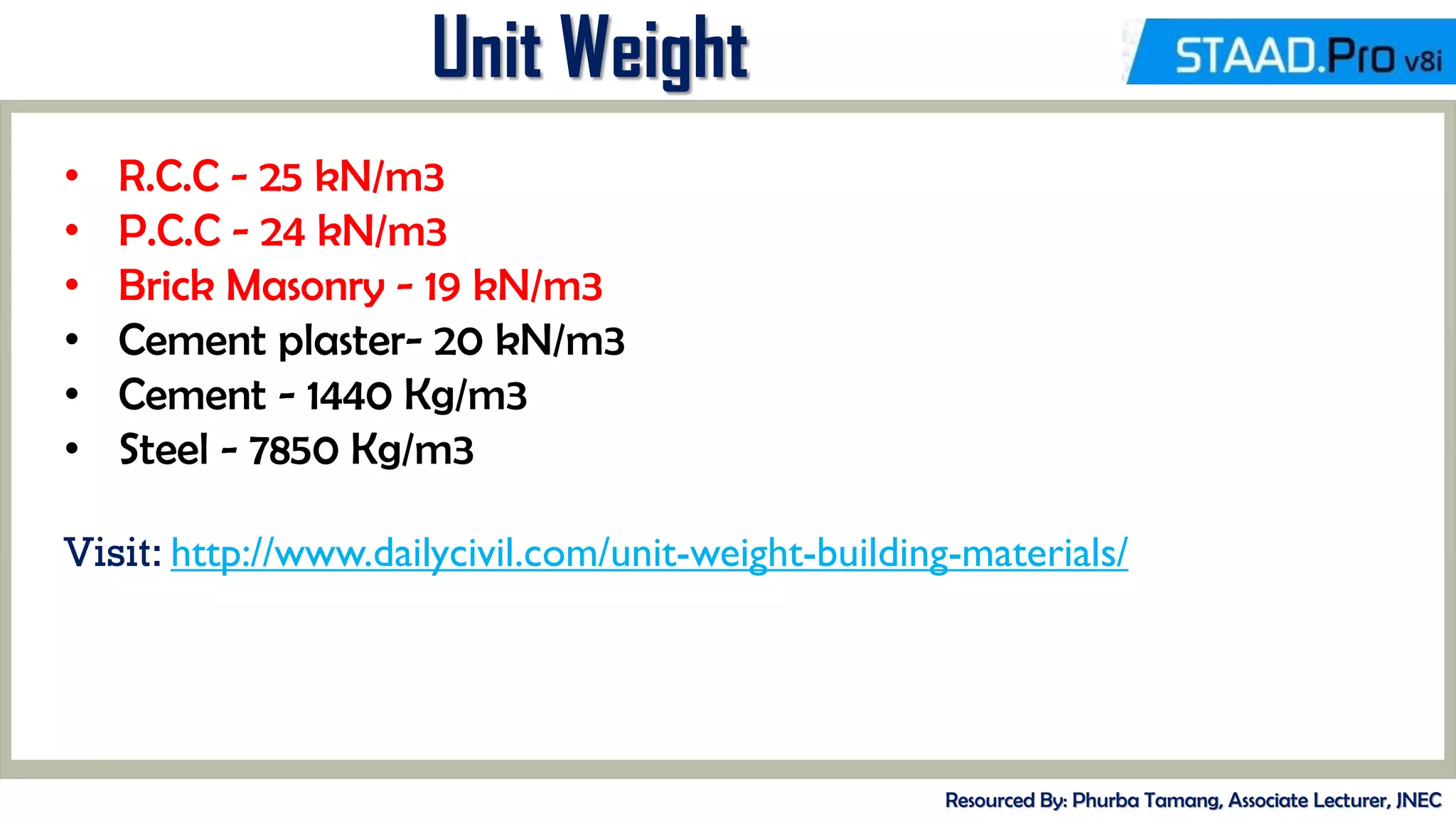
• R.C.C - 25 kN/m3
• P.C.C - 24 kN/m3
• Brick Masonry - 19 kN/m3
• Cement plaster- 20 kN/m3
• Cement - 1440 Kg/m3
• Steel - 7850 Kg/m3
Visit: http://www.dailycivil.com/unit-weight-building-materials/
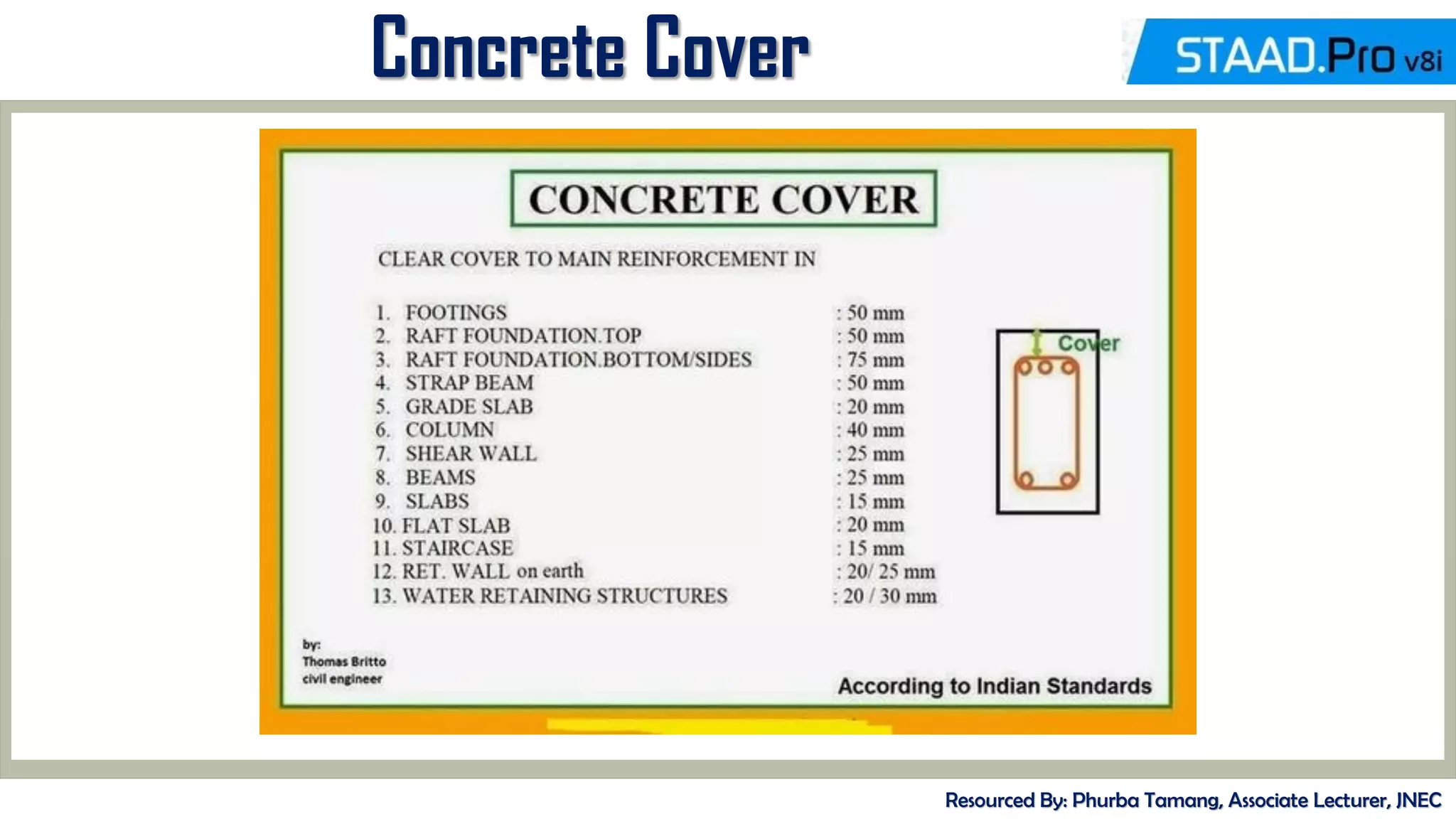
Concrete Cover
Resourced By: Phurba Tamang, Associate Lecturer, JNEC
Dead Loads
Resourced By: Phurba Tamang, Associate Lecturer, JNEC
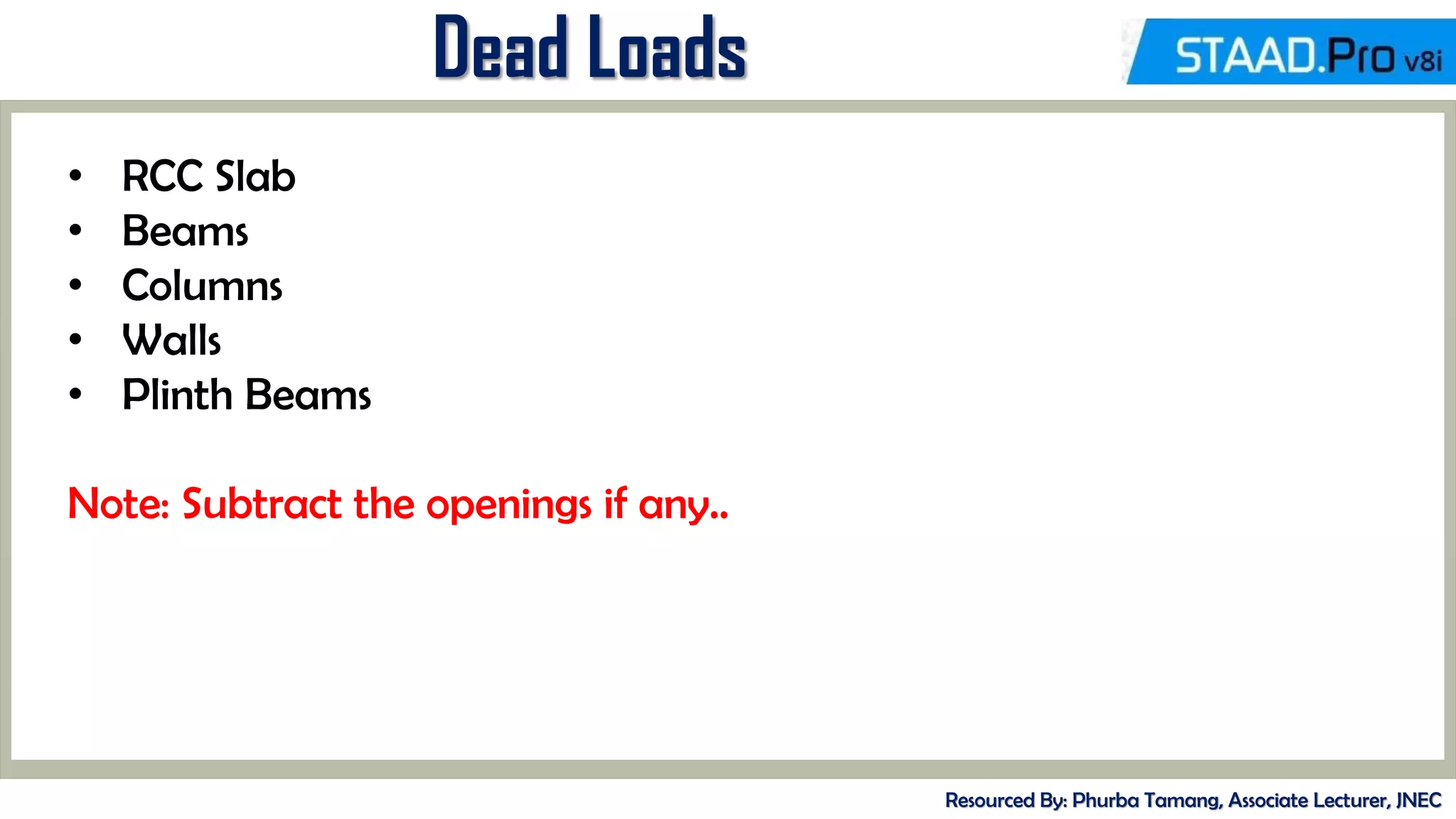
• RCC Slab
• Beams
• Columns
• Walls
• Plinth Beams
Note: Subtract the openings if any..
Live/Imposed Loads
Resourced By: Phurba Tamang, Associate Lecturer, JNEC
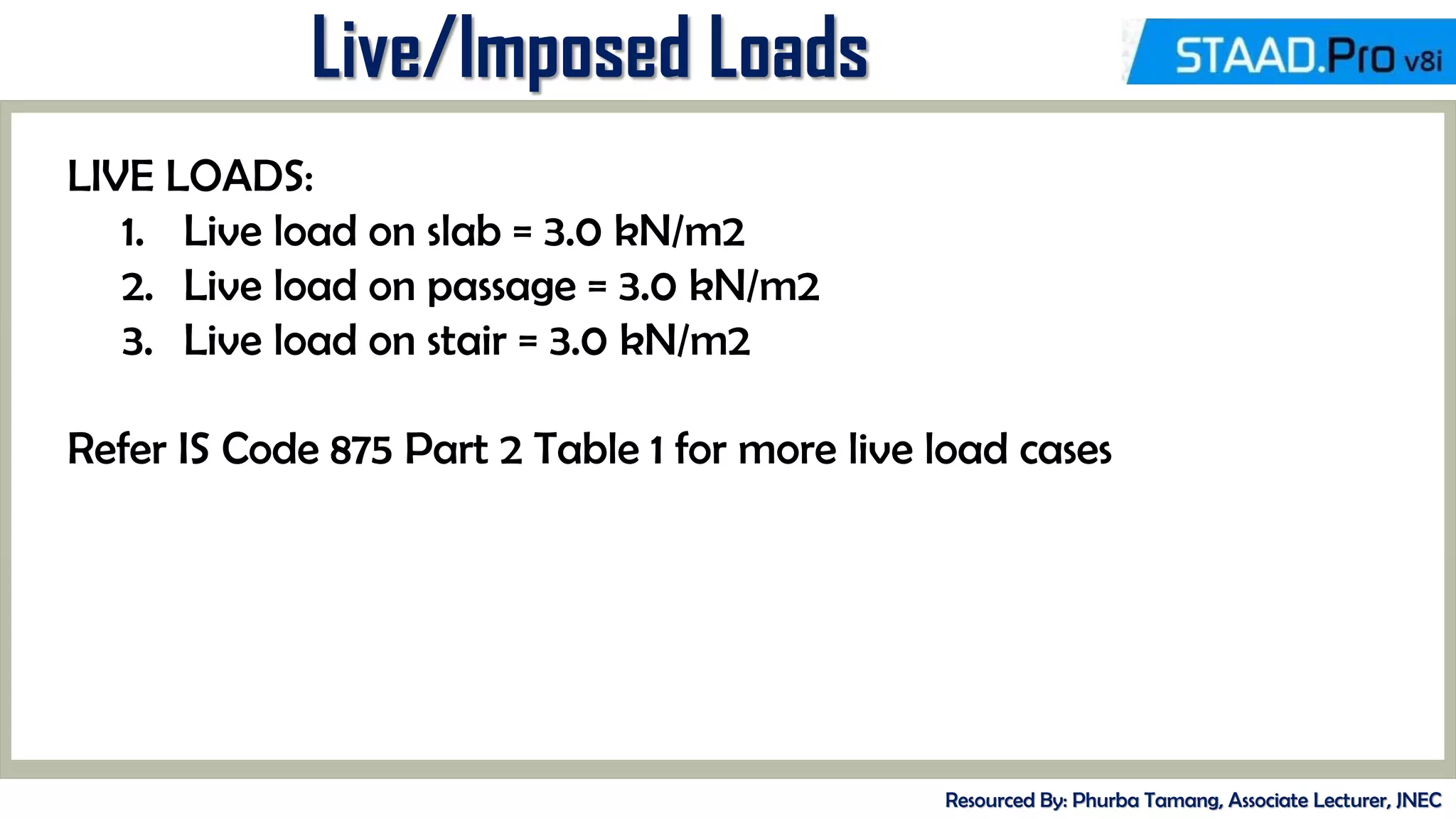
LIVE LOADS:
1. Live load on slab = 3.0 kN/m2
2. Live load on passage = 3.0 kN/m2
3. Live load on stair = 3.0 kN/m2
Refer IS Code 875 Part 2 Table 1 for more live load cases
Seismic Load
Resourced By: Phurba Tamang, Associate Lecturer, JNEC
Seismic Load is applied accordance to IS Code 1893:2000 ( Part I )
For Bhutan: Seismic Zone IV or V
Damping Ratio: 5 % (0.05)
Assign other parameters as per the instructions provided below
Defining Seismic Load
Resourced By: Phurba Tamang, Associate Lecturer, JNEC
Select
Definition and
Click ADD
Select the IS
1893-
2002/2005
and Click on
Generate
Note: Include I893 part 4 if the
structure is an industrial building, if not
keep it unchecked
Wind Load
Resourced By: Phurba Tamang, Associate Lecturer, JNEC
• Wind Load is considered for Structures having height >10 m
• Wind Intensity should be calculated manually for more accuracy.
• Intensity and Exposure are applied in the directions as required
• General Directions include + X , - X and + Z and - Z
Note: Wind Load and Seismic Load are not used together in any load
combination
MID-TERM REVIEW, 2017

Introduction to StaadPro

  • 2.
    Royal University ofBhutan Jigme Namgyel Engineering College Department of Civil Engineering & Surveying Resourced By : Phurba Tamang Designation: Associate lecturer Department of Civil Engineering and Surveying Jigme Namgyel Engineering College Basic STAAD. Pro Training “Structural Analysis & Designing Programme/Software” STAAD. Pro
  • 3.
    CONTENT DELIVERY PRESENTATION A YOUR CONTENT sSTAAD.Pro? ons of STAAD ilities of STAAD B % es er: workspace (GUI) commands e IS Codes ailing columns, slabs, Staad.Pro le Residential Building on rface (2D) C C D % TEXT % TEXT
  • 4.
    MID-TERM REVIEW, 2017 Introduction ResourcedBy: Phurba Tamang, Associate Lecturer, JNEC • STAAD.Pro is a structural analysis design program software. • It includes a state of the art user interface, visualization tools and international design codes. • It is used for 3D model generation, analysis and multi-material design. • The commercial version of STAAD.Pro supports several steel concrete and timber design codes. • It is one of the software applications created to help structural engineers to automate their tasks and to remove the tedious and long procedures of the manual methods.
  • 5.
    MID-TERM REVIEW, 2017 Historyof STAAD. Pro Resourced By: Phurba Tamang, Associate Lecturer, JNEC • STAAD.Pro was originally developed by Research Engineers International in Yorba Linda, CA. • In late 2005, Research Engineer International was boughtby Bentley Systems
  • 6.
    MID-TERM REVIEW, 2017 Historyof STAAD. Pro Resourced By: Phurba Tamang, Associate Lecturer, JNEC • A STRUCTURE can be defined as an assemblage of elements. STAAD is capable of analyzing and designing structures consisting of both frame, and Finite elements. • Almost any type of structure can be analyzed by STAAD. • Frame elements – Beam elements – 2 nodes • Finite elements – 1.) Plate – 3 or 4 nodes 2.) Solid – 4 to 8 nodes • In case of STAAD 1. Node becomes Joint it has a number and xyz coordinates 2. Beam becomes Member it has a number and nodes at its ends 3. Plate becomes Element it has a number and node at its corners
  • 7.
    MID-TERM REVIEW, 2017 Typesof Structure Resourced By: Phurba Tamang, Associate Lecturer, JNEC • A TRUSS structure consists of truss members which can have only axial member forces and no bending in the members. • A PLANE structure is bound by a global X-Y coordinate system with loads in the same plane. • A SPACE structure, which is a three dimensional framed structure with loads applied in any plane, is the most general. • A FLOOR structure is a two or three dimensional structure having no horizontal (global X or Z) movement of the structure [FX, FZ & MY are restrained at every joint]. The floor framing (in global X-Z plane) of a building is an ideal example of a FLOOR structure. Columns can also be modelled with the floor in a FLOOR structure as long as the structure has no horizontal loading. If there is any horizontal load, it must be analyzed as a SPACE structure.
  • 8.
    MID-TERM REVIEW, 2017 Versionsof STAAD. Pro Resourced By: Phurba Tamang, Associate Lecturer, JNEC
  • 9.
    MID-TERM REVIEW, 2017 GettingStarted Resourced By: Phurba Tamang, Associate Lecturer, JNEC Used for Creating new drawing Select the Structure Select the Units (SI Units)
  • 10.
    MID-TERM REVIEW, 2017 Checkthe ADD BEAM Finish it
  • 11.
    MID-TERM REVIEW, 2017 ResourcedBy: Phurba Tamang, Associate Lecturer, JNEC MENU BAR TOOL BARS MAIN WINDOWS PAGE CONTROLS DATA ENTRY/EDIT
  • 12.
    MID-TERM REVIEW, 2017 ResourcedBy: Phurba Tamang, Associate Lecturer, JNEC DATA SPREAD SHEET
  • 13.
    MID-TERM REVIEW, 2017 Familiarizationof Tools Resourced By: Phurba Tamang, Associate Lecturer, JNEC • All these options are used to view the structure • Zoom Extent, Zooming, Panning, 3-D Rendered View • Adding Beam, Surface, Plate, etc. • Selection Options.
  • 14.
    MID-TERM REVIEW, 2017 ModelGeneration Resourced By: Phurba Tamang, Associate Lecturer, JNEC • There are basically 3 methods of generating a model 1. Snap node method 2. Coordinate method 3. Copy paste method • Out of these three methods most commonly used is copy paste method • By using these three methods a structure of any geometry can be created • STAAD.Pro also contains a command wizard which is its library of structures such as frames , trusses are present which can be merged with the STAAD.Pro model
  • 15.
    MID-TERM REVIEW, 2017 Exercise ResourcedBy: Phurba Tamang, Associate Lecturer, JNEC • Create two Nodes at 10 m distance and add a beam. Add fixed supports at both the ends. Exert a point load of 10 kN at the midspan. Analyse the beam for Shear Force, Bending Moment, Deflection, etc. • Create Framed Structure with following coordinates. Node 1 ( 0,0), Node 2 (0, 3), Node 3 ( 3, 3), Node 4 (3,0) Analyse the frame with Uniformly Distributed Load of 5 kN/m distributed completely over the top frame. Provide Fixed Boths at both the ends
  • 16.
    MID-TERM REVIEW, 2017 AnalysisSequence Resourced By: Phurba Tamang, Associate Lecturer, JNEC
  • 17.
    MID-TERM REVIEW, 2017 Exercise ResourcedBy: Phurba Tamang, Associate Lecturer, JNEC • Create two Nodes at 10 m distance and add a beam. Add fixed supports at both the ends. Exert a point load of 10 kN at the midspan. Analyse the beam for Shear Force, Bending Moment, Deflection, etc. Way forward 1. Create a member connecting two nodes. ( use may use any method). 2. Assign Fixed Supports 3. Assign Material Properties. 4. Define a Live Load and Assign. 5. Analyse the member.
  • 18.
    MID-TERM REVIEW, 2017 DefiningProperty Resourced By: Phurba Tamang, Associate Lecturer, JNEC • Define the property of the member ( Concrete member 30cm x 40cm) • Go to General -> Load Tab -> Define -> Select Rectangular Section -> Enter Dimension - > ADD -> Assign the Property to the Member Choose the Section Provide Dimension and Click on ADD
  • 19.
    MID-TERM REVIEW, 2017 •After Assigning the Property to the Member
  • 20.
    MID-TERM REVIEW, 2017 DefiningLoads • Define the Point Load of 10kN acting vertically from the Centre Go to General -> Load Tab -> Select Load Case Details -> Select the Loading Type and Title the Load -> Click ADD -> Click on Defined Load -> Click ADD -> Select Member Load -> Provide Intensity (-ve) -> Ok -> Assign the Load Select and Click on ADD Rename the Force and Click ADD
  • 21.
    MID-TERM REVIEW, 2017 DefiningLoads Select and Click on ADD Select the Member Load
  • 22.
    MID-TERM REVIEW, 2017 DefiningLoads Provide Load Intensity and Position The load intensity should be in NEGATIVE value Assign the load
  • 23.
    MID-TERM REVIEW, 2017 Exercise ResourcedBy: Phurba Tamang, Associate Lecturer, JNEC • Analyse a simple supported beam of Span 5 m with Uniformly Distributed Load of 20kN/m distributed through out the span. Determine the values of Shear and Bending Moment. • Analyse the given frame 20 kN 10 kN 5 kN/m 3 m 4 m 4 m 4 m
  • 24.
    MID-TERM REVIEW, 2017 Introductionto Translational Repeat Resourced By: Phurba Tamang, Associate Lecturer, JNEC Methodology: Create a Node-> Translating the Node with Link Steps To access the Command -> Geometry -> Translational Repeat Creating geometry Using only Translation Repeat • Create continuous beam of 4m, 5m, 3m span with pinned support. • Create 2D- G+3 storied building frame 3 bays spaced at 5 m. The height of the frame is 12 m.
  • 25.
    MID-TERM REVIEW, 2017 Introductionto Translational Repeat Resourced By: Phurba Tamang, Associate Lecturer, JNEC Use Translational Repeat to Create the above pattern. ( Spacing 3 m bi-directional) Connect the Nodes with Beam
  • 26.
    MID-TERM REVIEW, 2017 Introductionto Translational Repeat Resourced By: Phurba Tamang, Associate Lecturer, JNEC Create a Frame
  • 27.
    Code References Resourced By:Phurba Tamang, Associate Lecturer, JNEC • IS 456 – Reinforced Concrete Design • IS 800 – Steel Design • IS 802 – Transmission Tower ( I to III ) • IS 875 – Dead Load ( Part I ) • IS 875 – Live Load ( Part II ) • IS 875 – Wind Load ( Part III ) • IS 875 – Snow Load (Part IV ) • IS 875 – Special Load (Part V ) • IRC 6,18,21 – Bridge Design
  • 28.
    Code References Resourced By:Phurba Tamang, Associate Lecturer, JNEC IS 1893:2002/2005 Criteria for Earthquake Resistant Design of Structures • Part 1: General provisions and Buildings • Part 2: Liquid Retaining Tanks – Elevated and Ground Supported • Part 3 : Bridges and Retaining Walls • Part 4 : Industrial Structures Including Stack Like Structures • Part 5 : Dams and Embankments
  • 29.
    Load Combination Resourced By:Phurba Tamang, Associate Lecturer, JNEC Load Combination as per IS 456 • 1.5 ( DL + IL ) • 1.5 ( DL + WL) • 1.2 ( DL + IL + WL) Note: While considering Earthquake Loading, substitute EL for WL Limit state is a condition just before collapse. A structure designed by limit state should give proper strength and serviceability throughout its life. In limit state method, the limit state of collapse deals with the safety of structure and limit state of serviceability deals with the durability of structure.
  • 30.
    Unit Weight Resourced By:Phurba Tamang, Associate Lecturer, JNEC • R.C.C - 25 kN/m3 • P.C.C - 24 kN/m3 • Brick Masonry - 19 kN/m3 • Cement plaster- 20 kN/m3 • Cement - 1440 Kg/m3 • Steel - 7850 Kg/m3 Visit: http://www.dailycivil.com/unit-weight-building-materials/
  • 31.
    Concrete Cover Resourced By:Phurba Tamang, Associate Lecturer, JNEC
  • 32.
    Dead Loads Resourced By:Phurba Tamang, Associate Lecturer, JNEC • RCC Slab • Beams • Columns • Walls • Plinth Beams Note: Subtract the openings if any..
  • 33.
    Live/Imposed Loads Resourced By:Phurba Tamang, Associate Lecturer, JNEC LIVE LOADS: 1. Live load on slab = 3.0 kN/m2 2. Live load on passage = 3.0 kN/m2 3. Live load on stair = 3.0 kN/m2 Refer IS Code 875 Part 2 Table 1 for more live load cases
  • 34.
    Seismic Load Resourced By:Phurba Tamang, Associate Lecturer, JNEC Seismic Load is applied accordance to IS Code 1893:2000 ( Part I ) For Bhutan: Seismic Zone IV or V Damping Ratio: 5 % (0.05) Assign other parameters as per the instructions provided below
  • 35.
    Defining Seismic Load ResourcedBy: Phurba Tamang, Associate Lecturer, JNEC Select Definition and Click ADD Select the IS 1893- 2002/2005 and Click on Generate Note: Include I893 part 4 if the structure is an industrial building, if not keep it unchecked
  • 36.
    Wind Load Resourced By:Phurba Tamang, Associate Lecturer, JNEC • Wind Load is considered for Structures having height >10 m • Wind Intensity should be calculated manually for more accuracy. • Intensity and Exposure are applied in the directions as required • General Directions include + X , - X and + Z and - Z Note: Wind Load and Seismic Load are not used together in any load combination
  • 37.