Introduction
to Kanban
RoniC. Thomas
1. What’s wrong with the currentsystem?
2. History of Kanban
3. What isKanban?
4. Why Kanban?
5. Kanban Practices

6. Creating your firstboard
7. Kanban Principles
8. How is Scrum different fromKanban?
Agenda
− Burnout
− Frequent bugs on production
− Complaints about productivity
− Low throughput
− Leads to vaguesprint planning
− Too much work stuffed into one sprint
− Unidentified bottlenecks
What’s wrong with the current system?
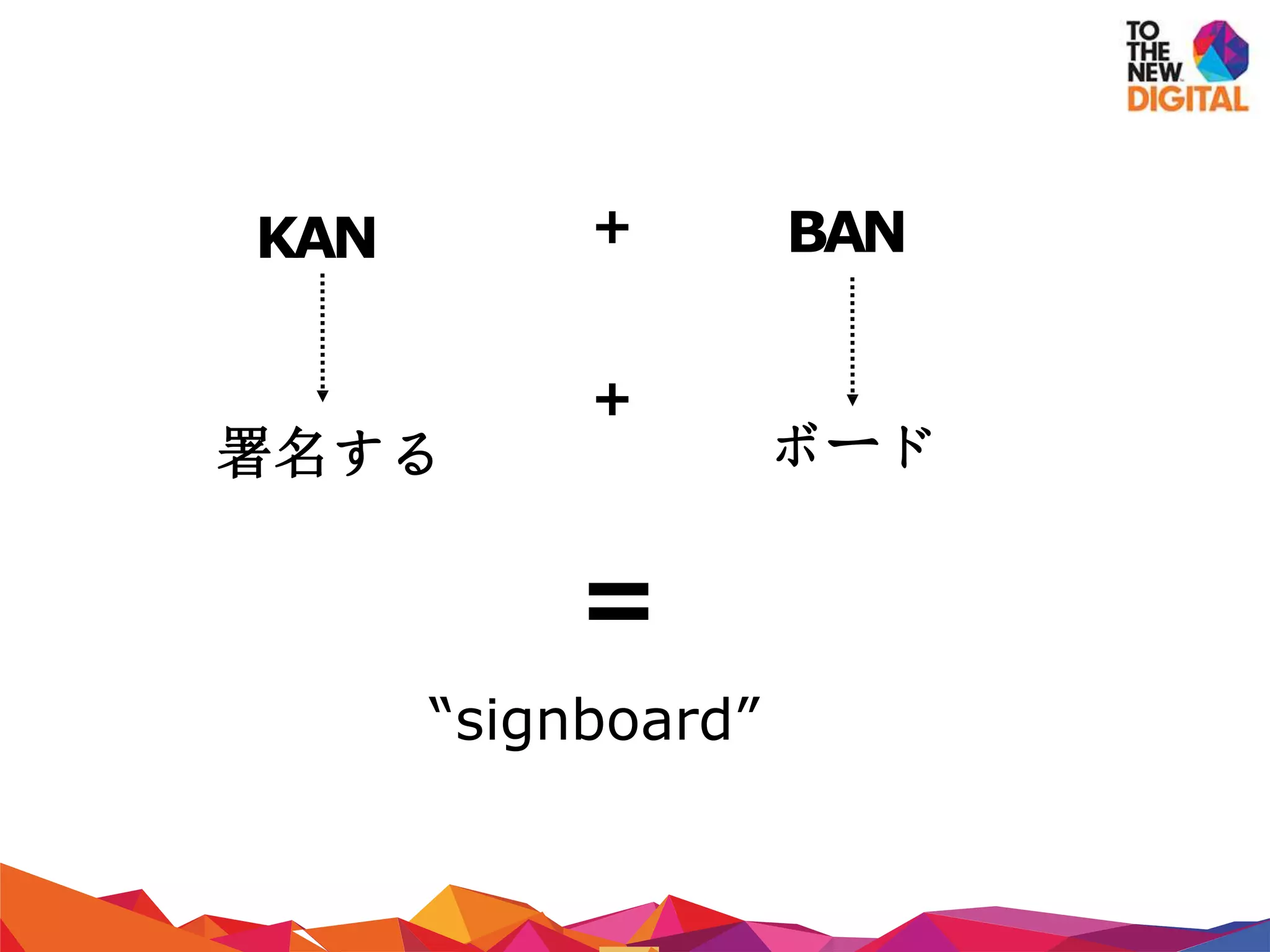
KAN BAN
署名する ボード
+
+
=
“signboard”
− Developed by Taichi Ohno at Toyota in 1940's
− Designed after the shelf-stocking techniques used by supermarkets
− Demand controlled system where replenishment happened based on
market conditions
− Based on a pull based system rather than a push based one
− Use of visual signals was essential to the system
History of Kanban
− Scheduling system used in manufacturing to help companies improve
their production process
− Adopted by software co's for JITdelivery without burdening
developers
− “The Kanban Method” for software dev pioneered by David J.
Anderson
− WIP limited pull system which exposes system problemsthrough
visualization
What is Kanban?
− In its simplest form, a kanban system consists of a big board with story
cards
− Board represents the state of the project at any point
− Different from other visualizations –implements WIPlimits
− Tries to limit the amount of work at any stage
− Easy identification of bottlenecks in system through visual boards
− Aims atminimizing waste states
What is Kanban? (contd.)
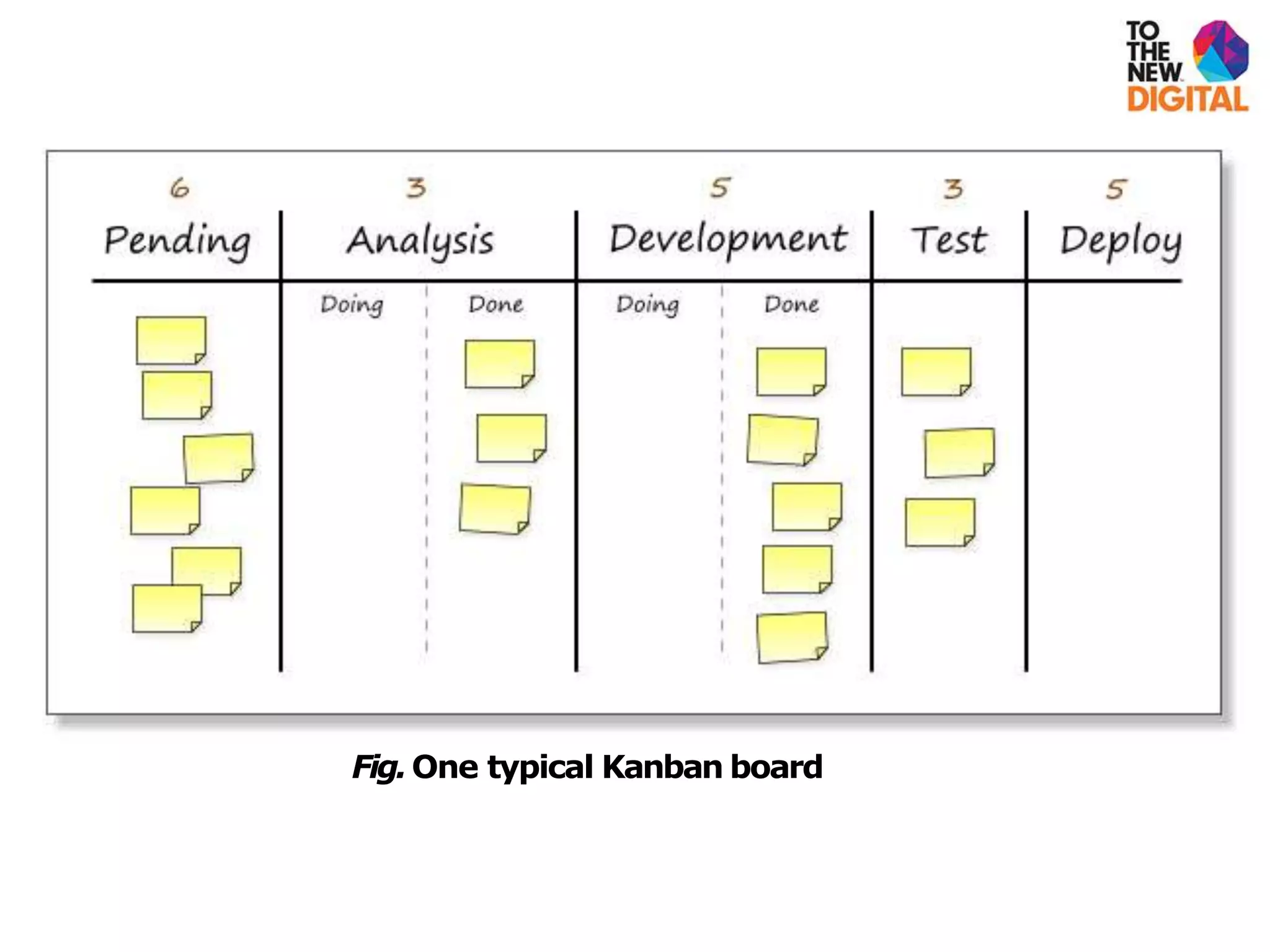
Fig.One typical Kanban board
… because …
− it helps in visualising the system and expose problems
− it allows us to evaluate the impacts of process changes
− it allows us to identify bottlenecks and alleviate them
− it allows us to establish trust in theprocess
− it helps us to maintain a sustainable pace with a sustainable
throughput
− you need to relax and Kanban advocates just that!
But why Kanban?
TheKanban
Practices
− Workflow is inherently invisible
− Visualization is core toKanban
− Enables people to take a quick look at the state of the workflow
− Use of story cards can be used
− Development process is dividedinto columns
− Each task is specified on a story card
− Essentially cards move along the board to show workflow
Visualize
− Apply limits on WIP in each phase of development
− Isthe basis for implementing a pull based system
− Work is pulled into the next phase once capacity is available
− Improves quality by giving greater focus to fewer tasks
− Also reduces lead time for work by reducing the number of concerns
for the developer
Limit WIP
− Because maximum utilization ofresources is not desirable contraryto
popular belief
− Brings in slack into the system –creates a more conducive work
process
− Get the most important things done, one by one, with a clear focus
− Things get done faster, better than before, leading to lesser rework
Limit WIP (contd.)
− Workflow should be closely monitored
− Measurements must be made to identify problems in the system
− Leads to better understanding of the system and helps inmaking
educated improvements
− Helps identify the positive and negative impact of changes
introduced in thesystem
Manage flow
− All policies related to workflow management should be explicit
− For eg. WIP limits, basic workflow, rejection/acceptance flow,
definition of donenessetc.
− Helps in providing a basis for process improvement based on statistics
− Allows for a more rational approach to process improvement by
logical reasoning
Make policies explicit
− Through the use of scientific models
− Popular models: Theory ofConstraints (TOC)
− Use of models allows a team to make predictions about a change
− The expected and actual result can then be used effectively to improve
the process
− This approach leads to learning both at individual and organizational
level
Improve Collaboratively
Thingsyou need:
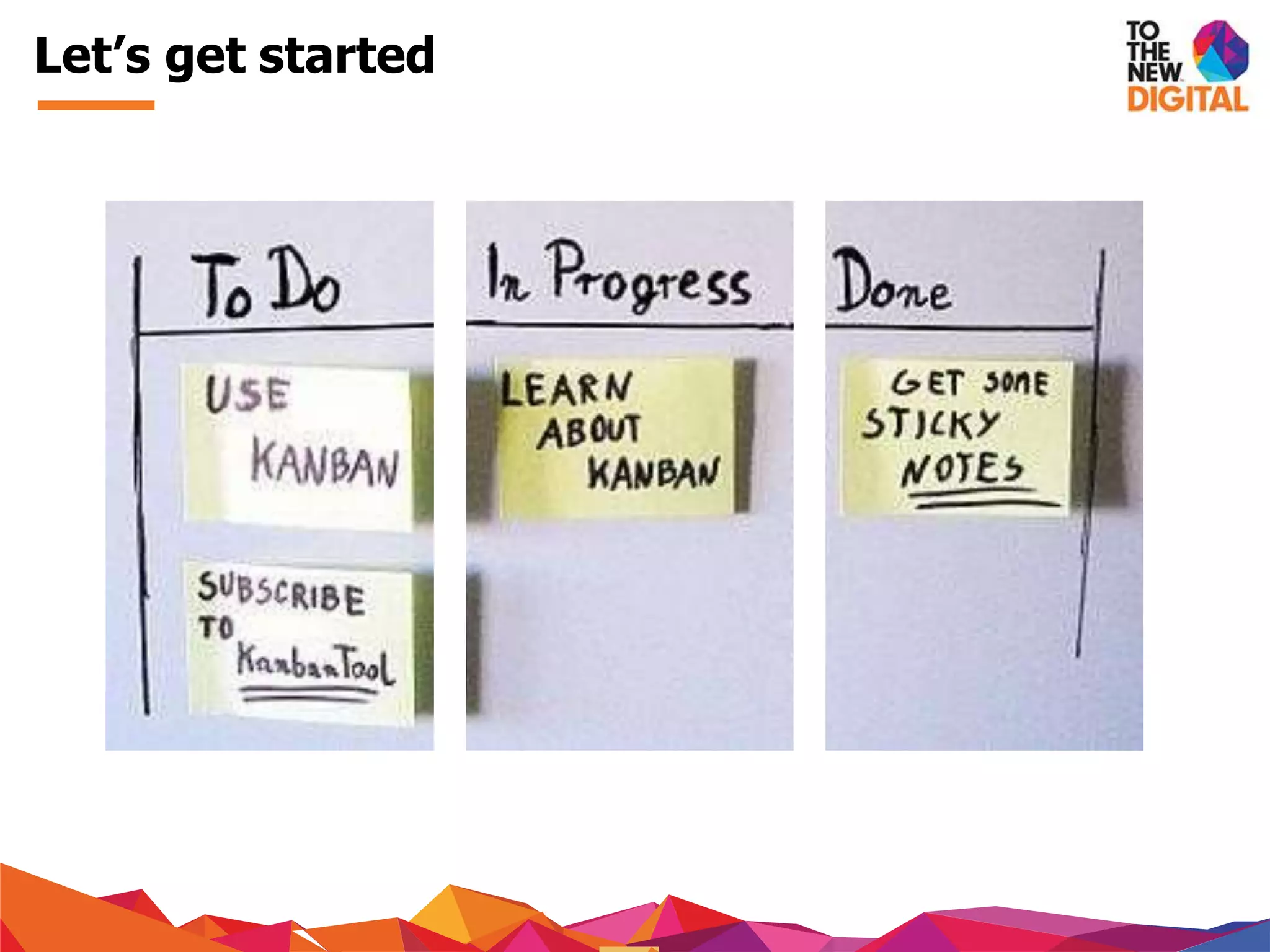
− A board
− Lots of Post-it notes (preferably of different colors)
− And lots of commitment (very important)
− The next slides!
Getting Started
Importantterms:
− Lead Time –time taken from request of feature to its completion
− Cycle Time –time taken to finish the task
− Throughput –essentially refers to productivity. Defined as the amount
of work delivered in a time frame
− WIP Limit Value Stream –this refers essentially to yourdevelopment
process
− Swarm(ing) –collaboration on a problem
And some terms...
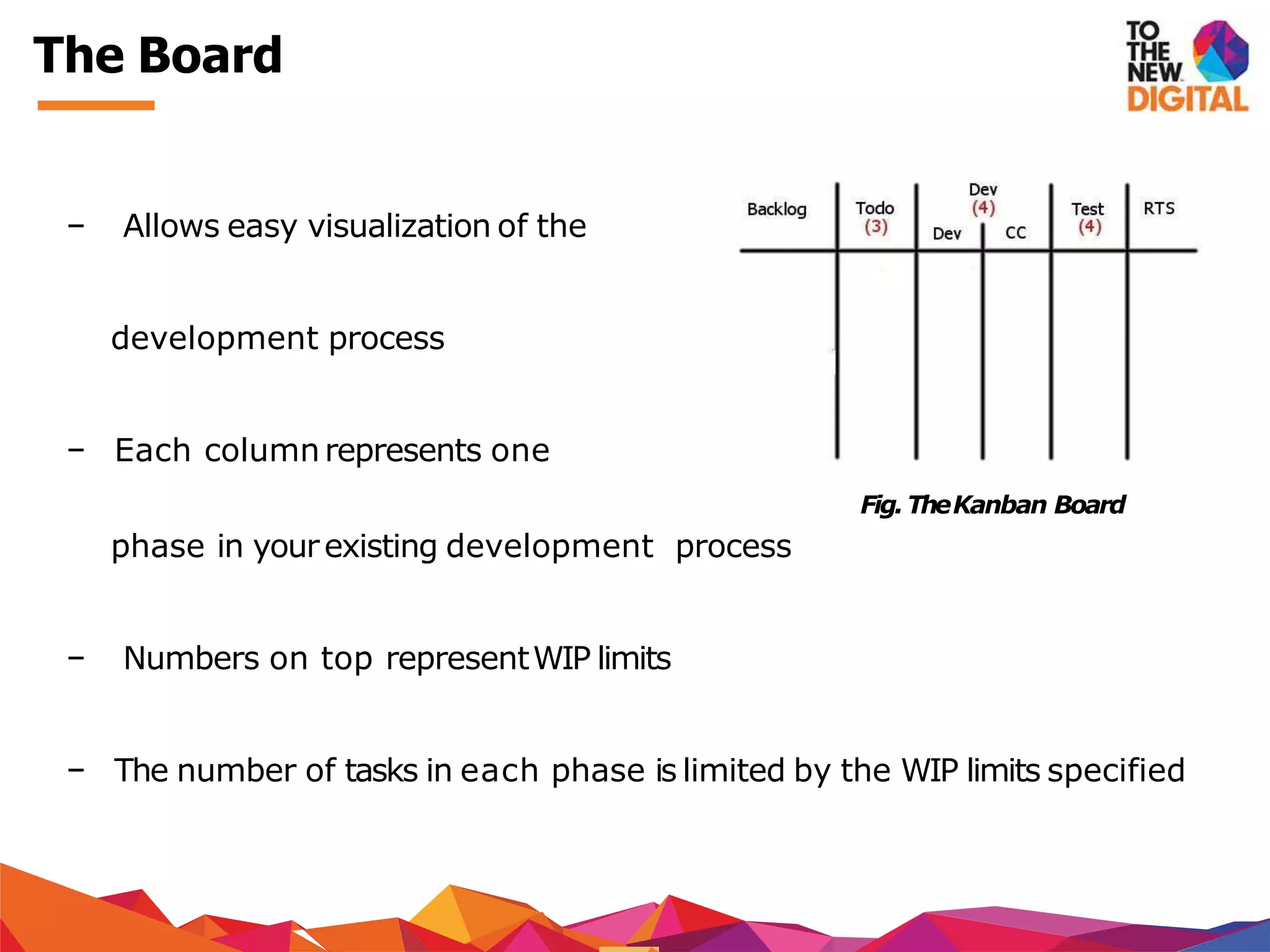
− Allows easy visualization of the
development process
− Each columnrepresents one
Fig.TheKanban Board
phase in yourexisting development process
− Numbers on top representWIP limits
− The number of tasks in each phase is limited by the WIP limits specified
The Board
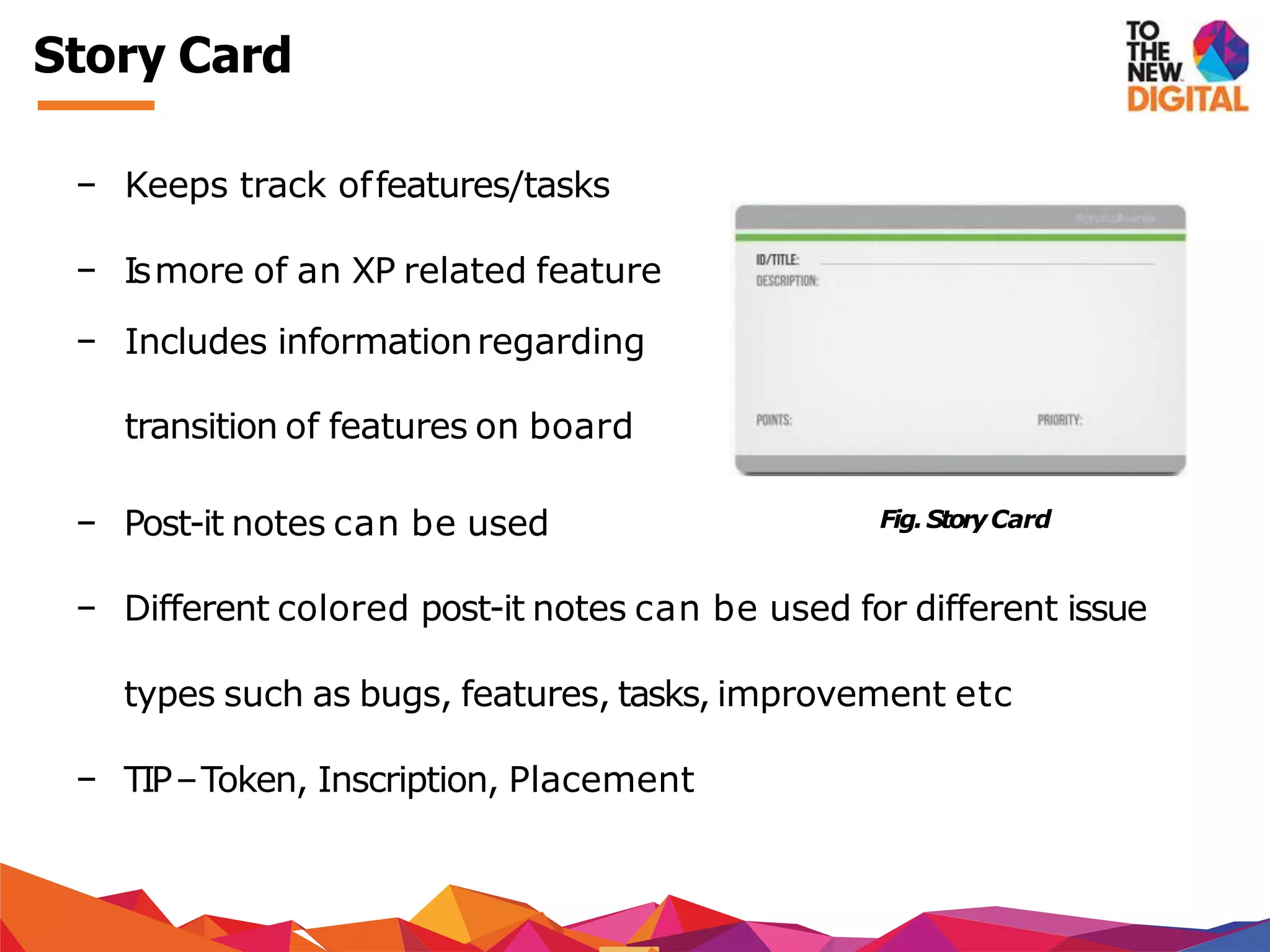
− Keeps track offeatures/tasks
− Ismore of an XP related feature
− Includes informationregarding
transition of features on board
− Post-it notes can be used
− Different colored post-it notes can be used for different issue
types such as bugs, features, tasks, improvement etc
− TIP–Token, Inscription, Placement
Fig.StoryCard
Story Card
− Measurement tools to measure the effectiveness of the system
− Every time card ispushed/pulled on/off the board, charts start
changing
− Can be used to interpret various important metrics like average time
taken for a task to be completed
− Can be used to identify the flow of work
− Also useful to identify the state of tasks in each phase of development
− Control Charts & Cumulative Flow Diagrams
Charts
Control Chart
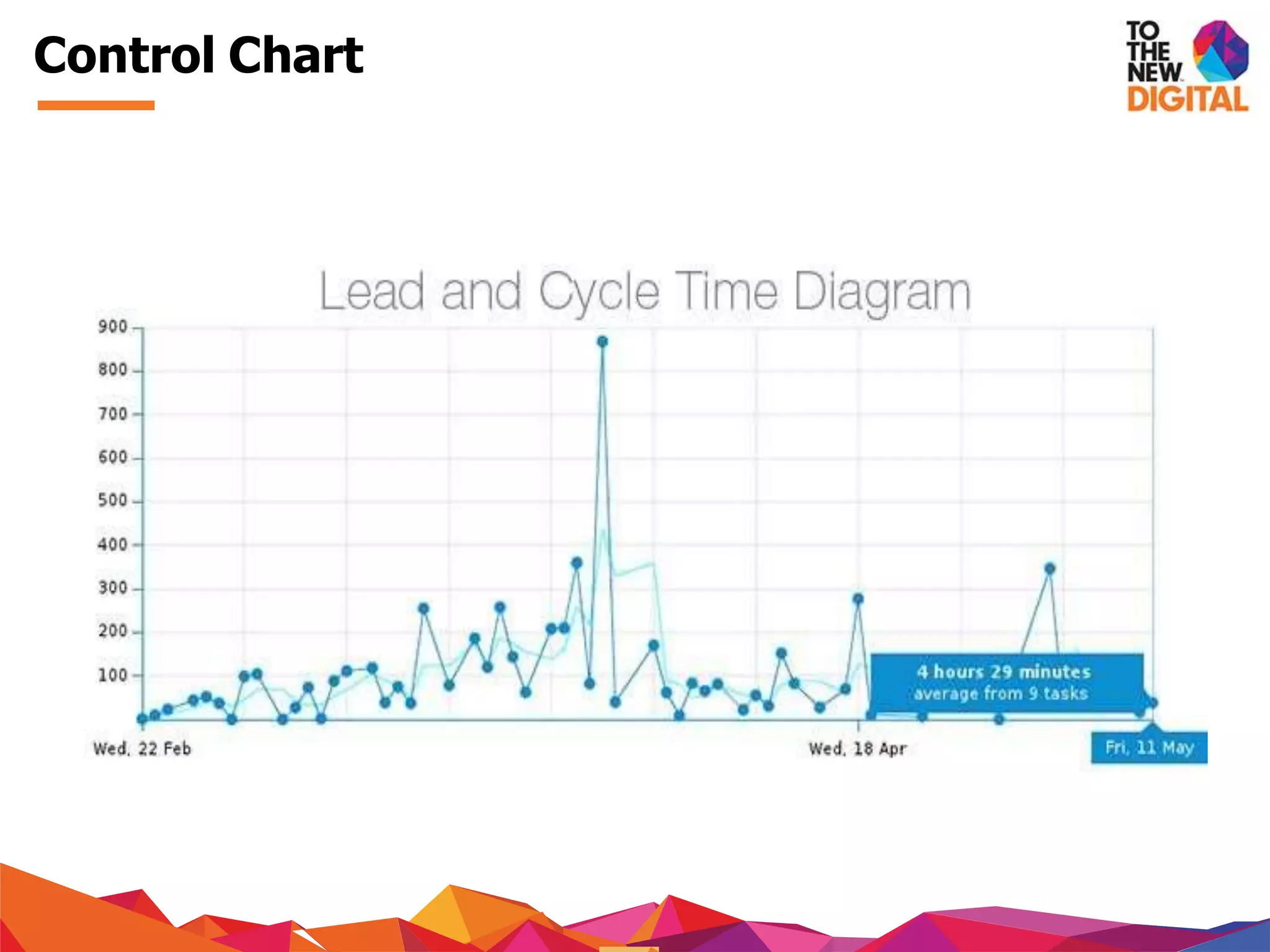
− Are used to measure the average time taken for a task to be
processed
− Lead time and cycle time is represented on a control chart
− Simplest charts that can be drawn
− The aim is to keep lead time and cycle time as low as possible
Control Chart
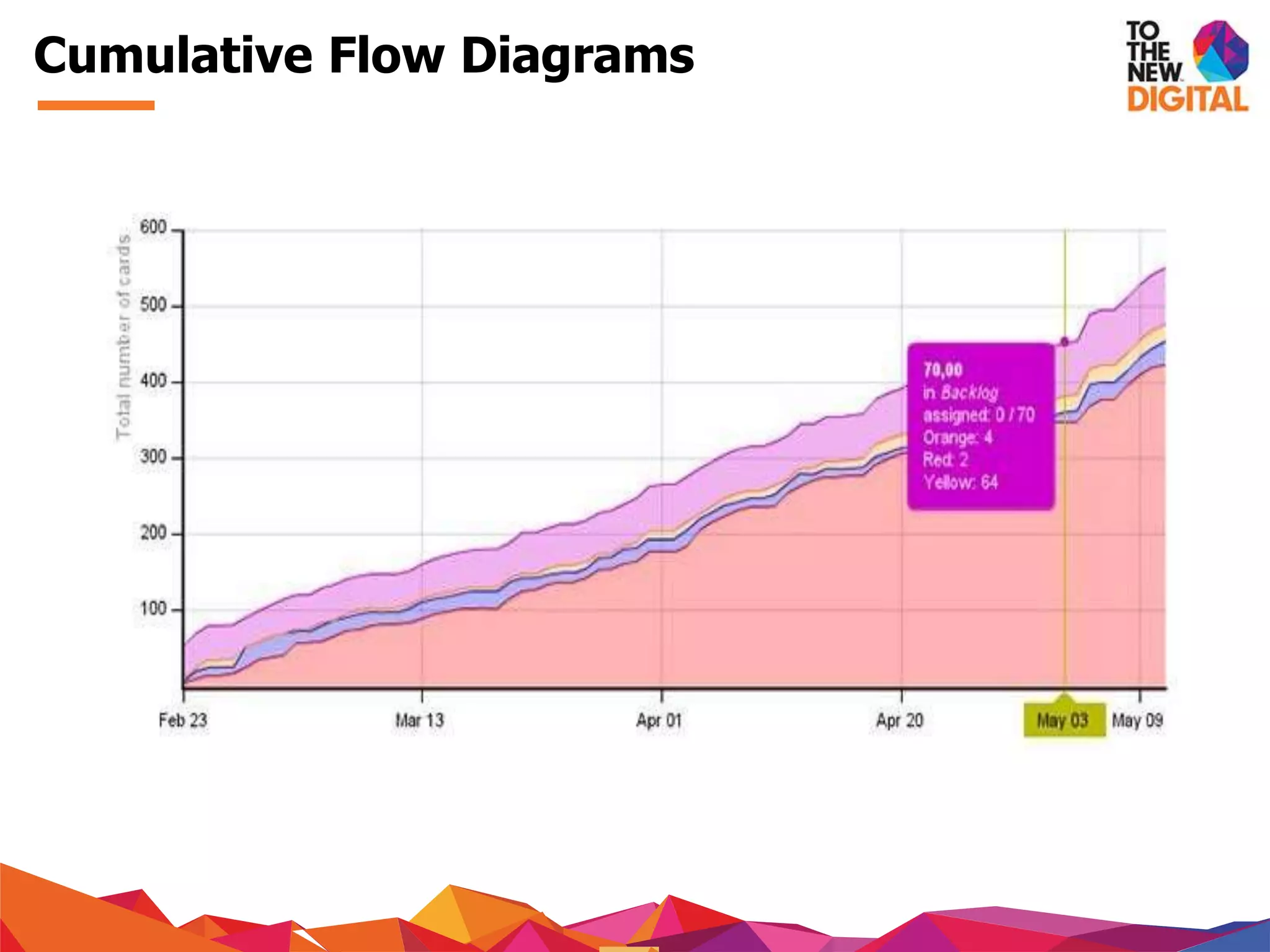
Cumulative Flow Diagrams
− Show relative amount of work for each stage
− Use of colored areas for each phase for easy identification of
bottlenecks
− Vertical distance of the chart shows how many tasks are on the board
and helps you set right WIP limits
− Horizontal distance allows you to monitor Cycle Time
− CFD should runsmoothly
− Large steps or horizontal lines indicate problems in flow
− Variations in gap/band indicate bottlenecks
− When the band gets too wide, it indicates problems in work finishing or
developers unable to handle amount of work
Cumulative Flow Diagrams
− Identifyyourdev process
− How are featuresdecided?
− What are the various steps involved in materializing it?
− Define startand end pointsforthe board
− Identify your boundaries
− Identify when a task enters the board
− Identify the end of its life cycle on the board
Let’s get started
− Agree
− Initial WIP limits and policies –can change later
− Prioritization and selectionpolicies
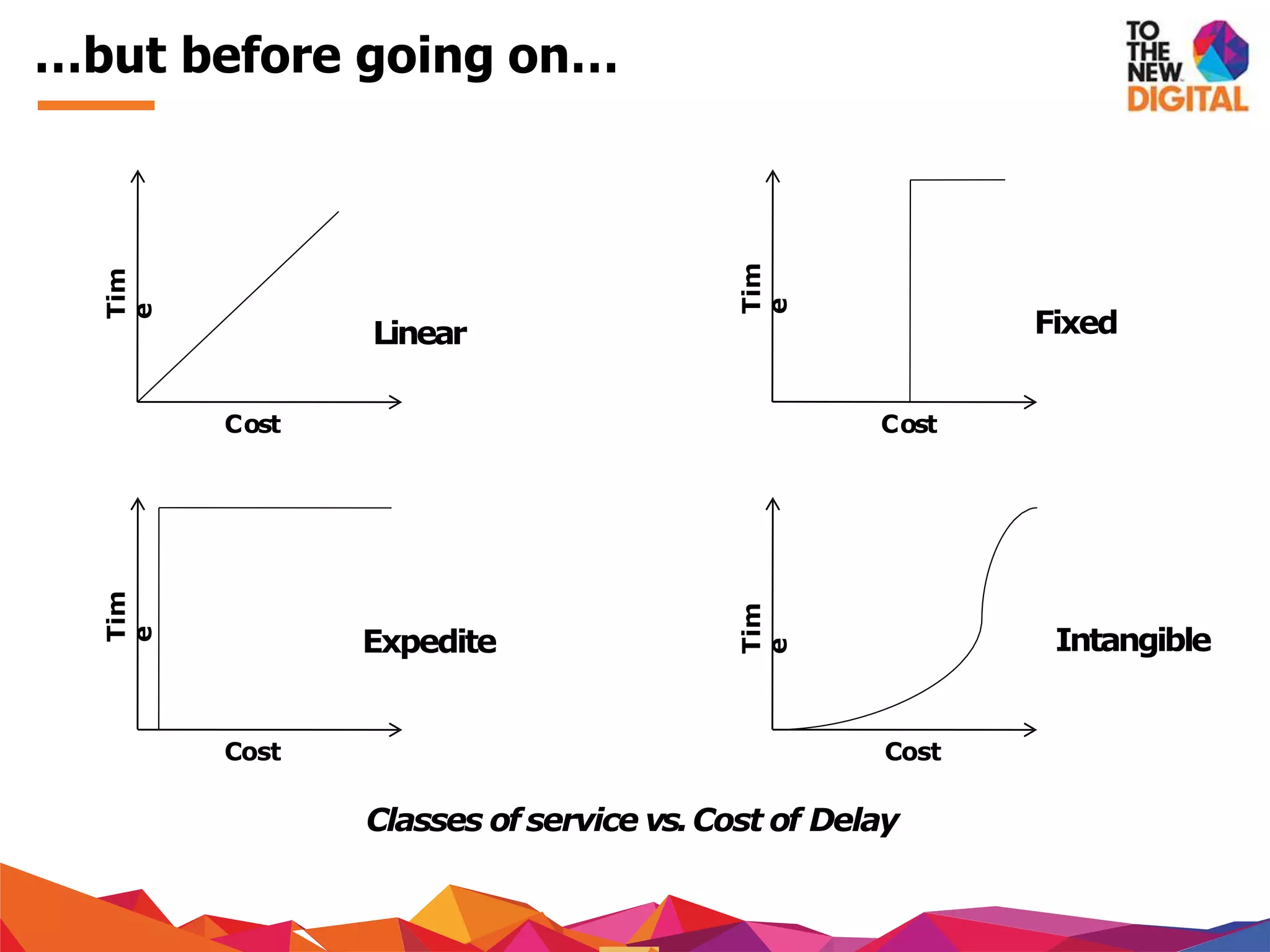
− Policies for different classes of service (expedite, standard, fixed
delivery date, intangible)
− Process review cycle time
Let’s get started (contd.)
Cost
Tim
e
Linear
Classes of service vs.Cost of Delay
Expedite
Tim
e
Cost
Fixed
Tim
e
Cost
Intangible
Tim
e
Cost
…but before going on…
Let’s get started
TheKanban
Principles
− Do not prescribe any new roles or responsibilities to implement the
new system
− No such thing as “Kanban Software Development Process”
− Implement Kanban with existingsystem
-David Anderson
Start with what you do now!
− Optimize what alreadyexists
− Agree to continuous, incremental and evolutionary change to
improve the system
− Keep experimenting to understand the effects of changes on the
system
− Make small changes rather than huge process changes
-David Anderson
Agree to pursue incremental, evolutionary
change
− Do not remove existing roles and titles
− This will eliminate fears in introducing the new system in the
organization
− Will help you get broader support in introducing the new system
− Kanban was designed to reduce resistance to change
-David Anderson
Respect the current process, roles,
responsibilities
− Empower the workforce to bring about change
− Swarm on a bottleneck for faster resolution
− Hold frequent discussions and process improvements
− Include everyone in these discussions and do not disregard anyone’s
viewpoint
-David Anderson
Leadership at all levels
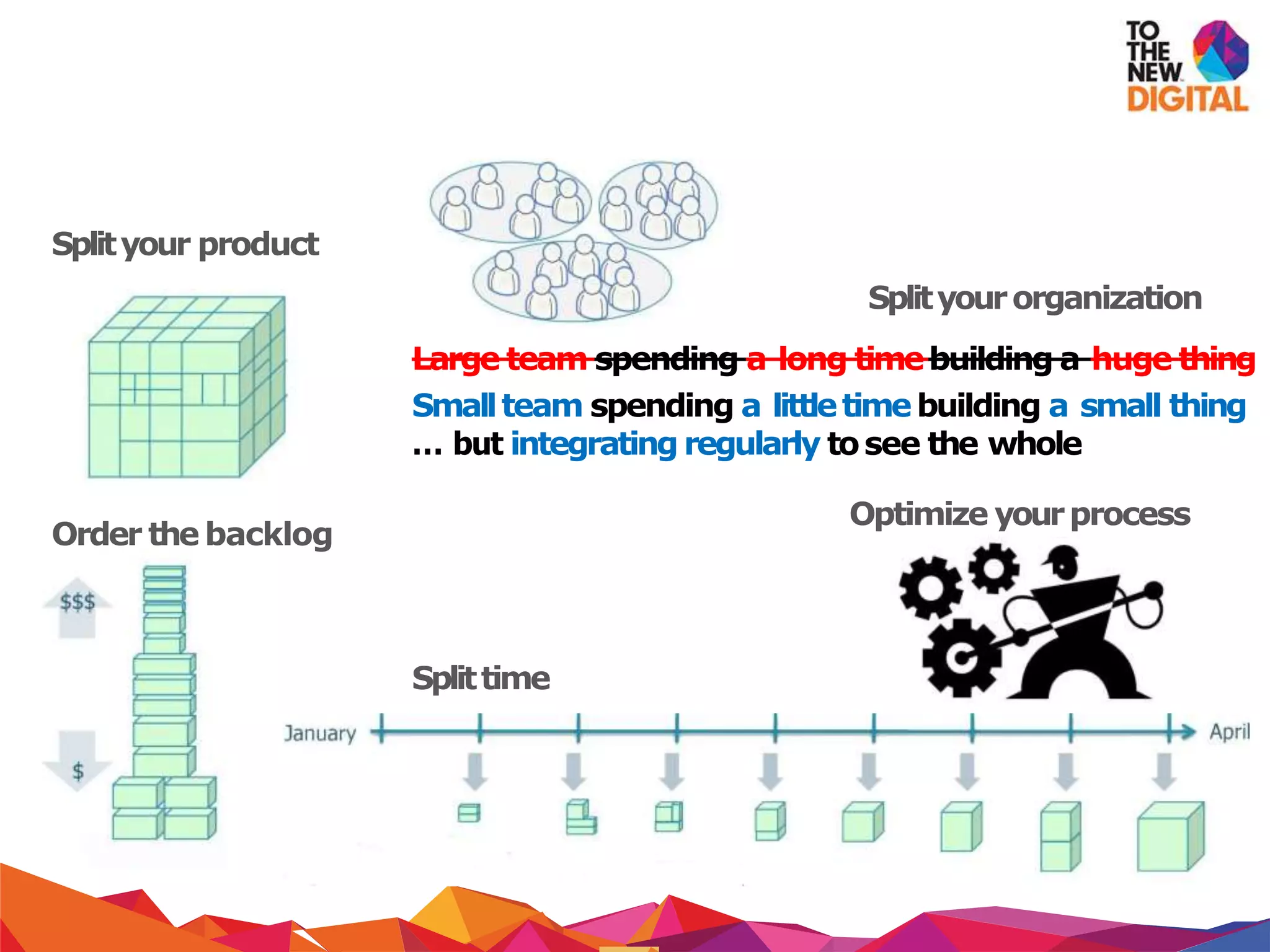
Scrumina nutshell
Splityour product
Splityourorganization
Large team spending a long timebuilding a huge thing
Smallteam spending a littletimebuilding a small thing
… but integrating regularly tosee the whole
Optimize yourprocess
Order the backlog
Splittime
Scrumvs Kanban
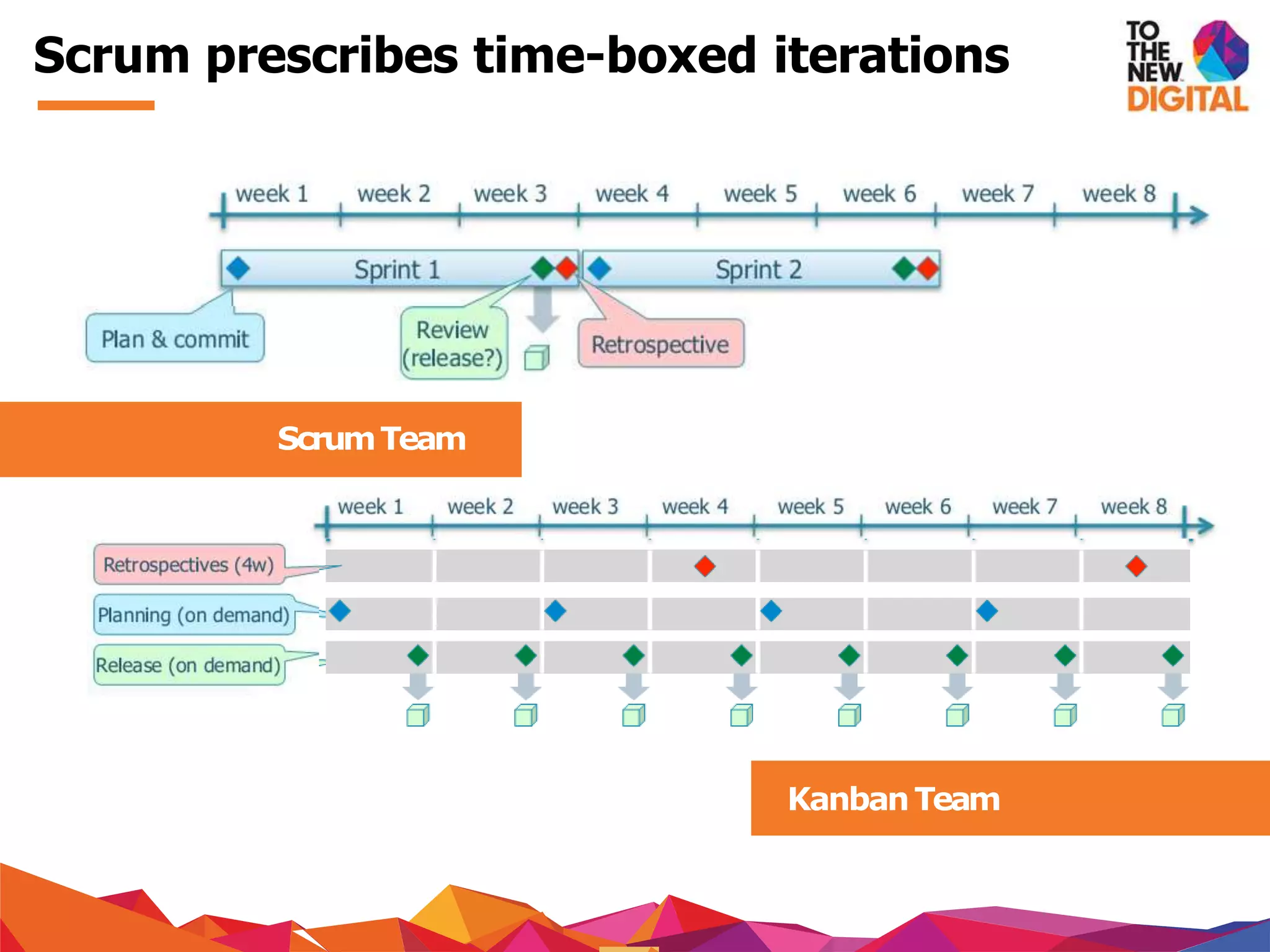
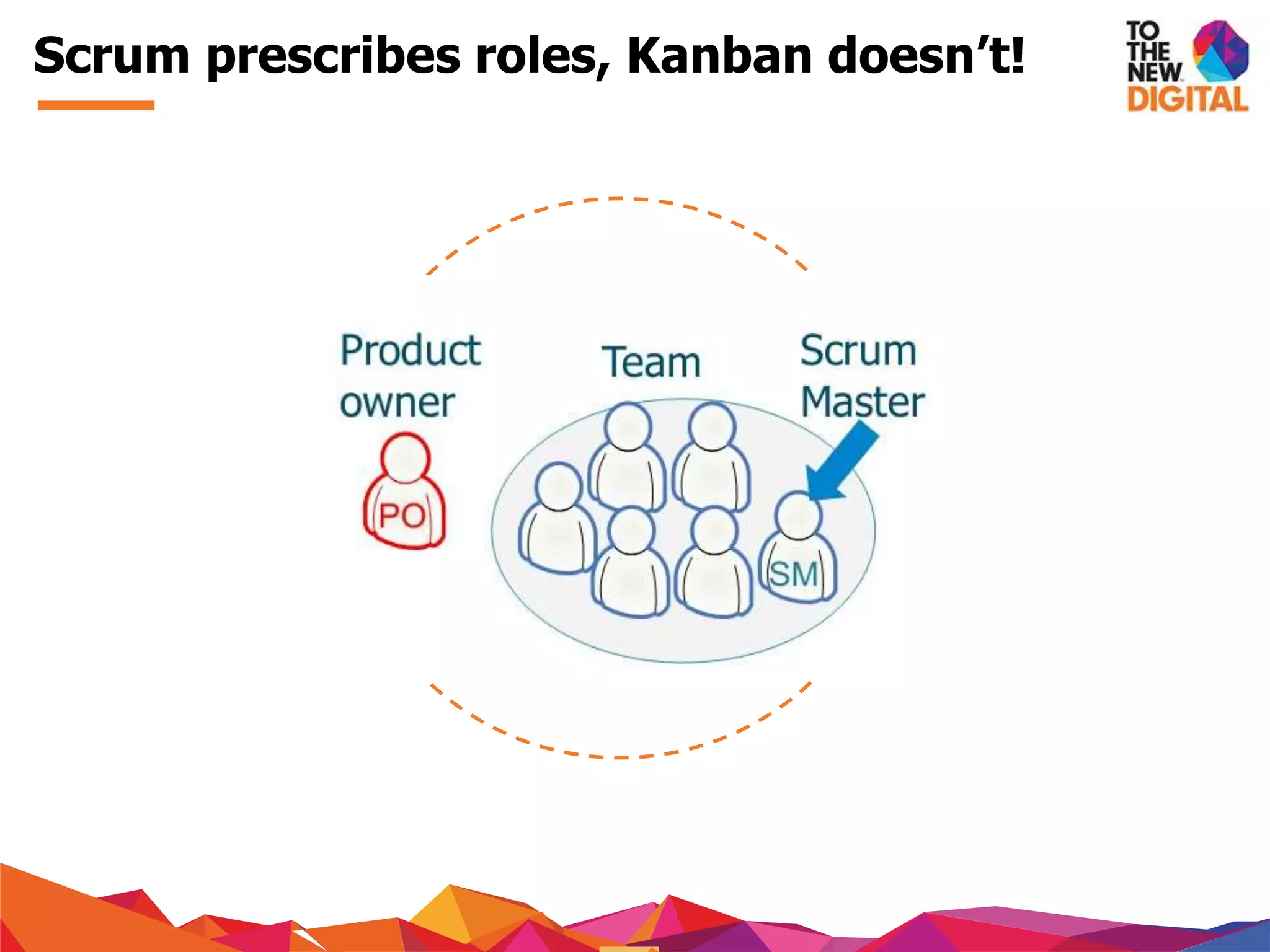
Scrum prescribes roles, Kanban doesn’t!
Scrum prescribes time-boxed iterations
KanbanTeam
ScrumTeam
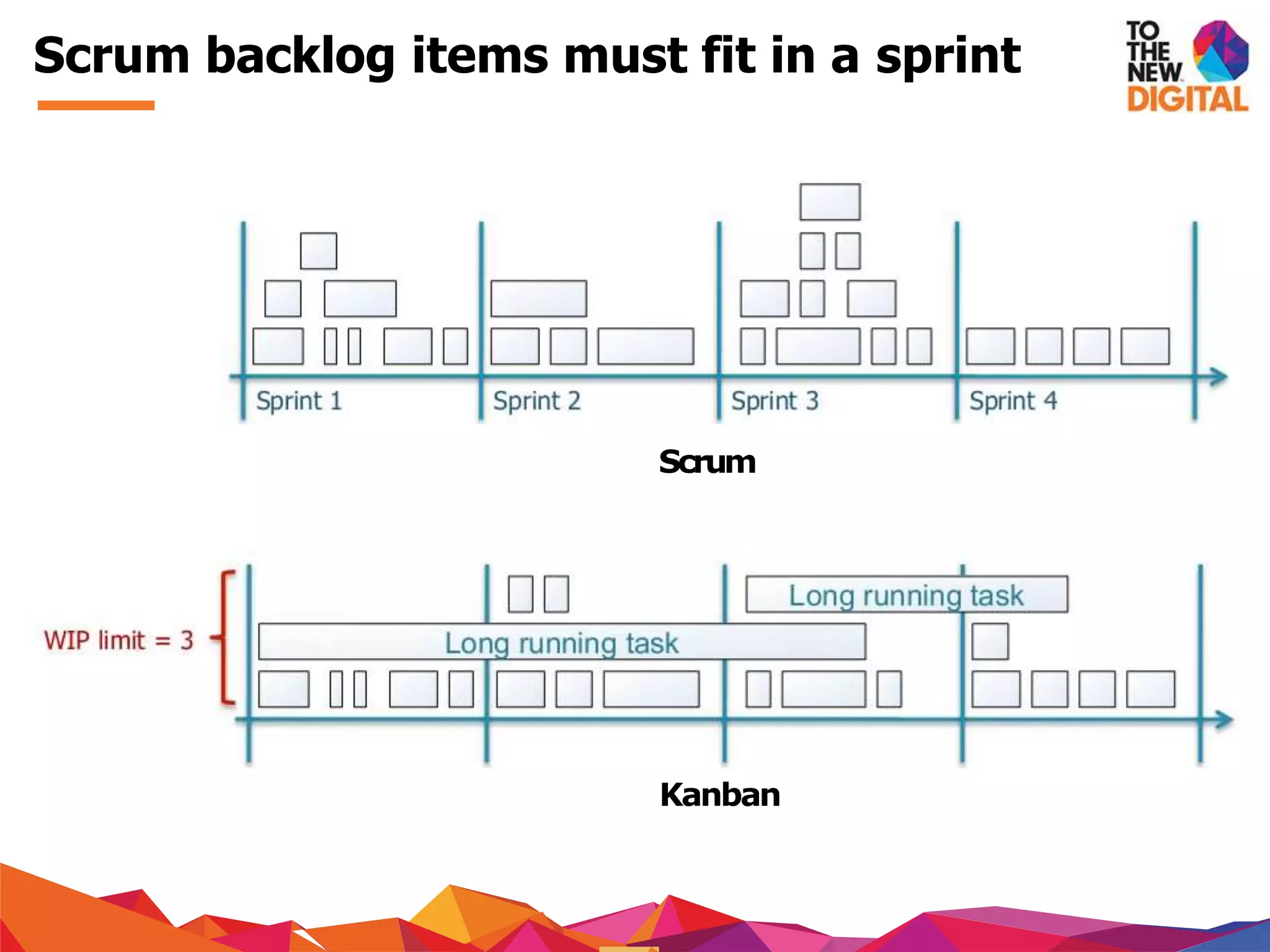
Scrum
Kanban
Scrum backlog items must fit in a sprint
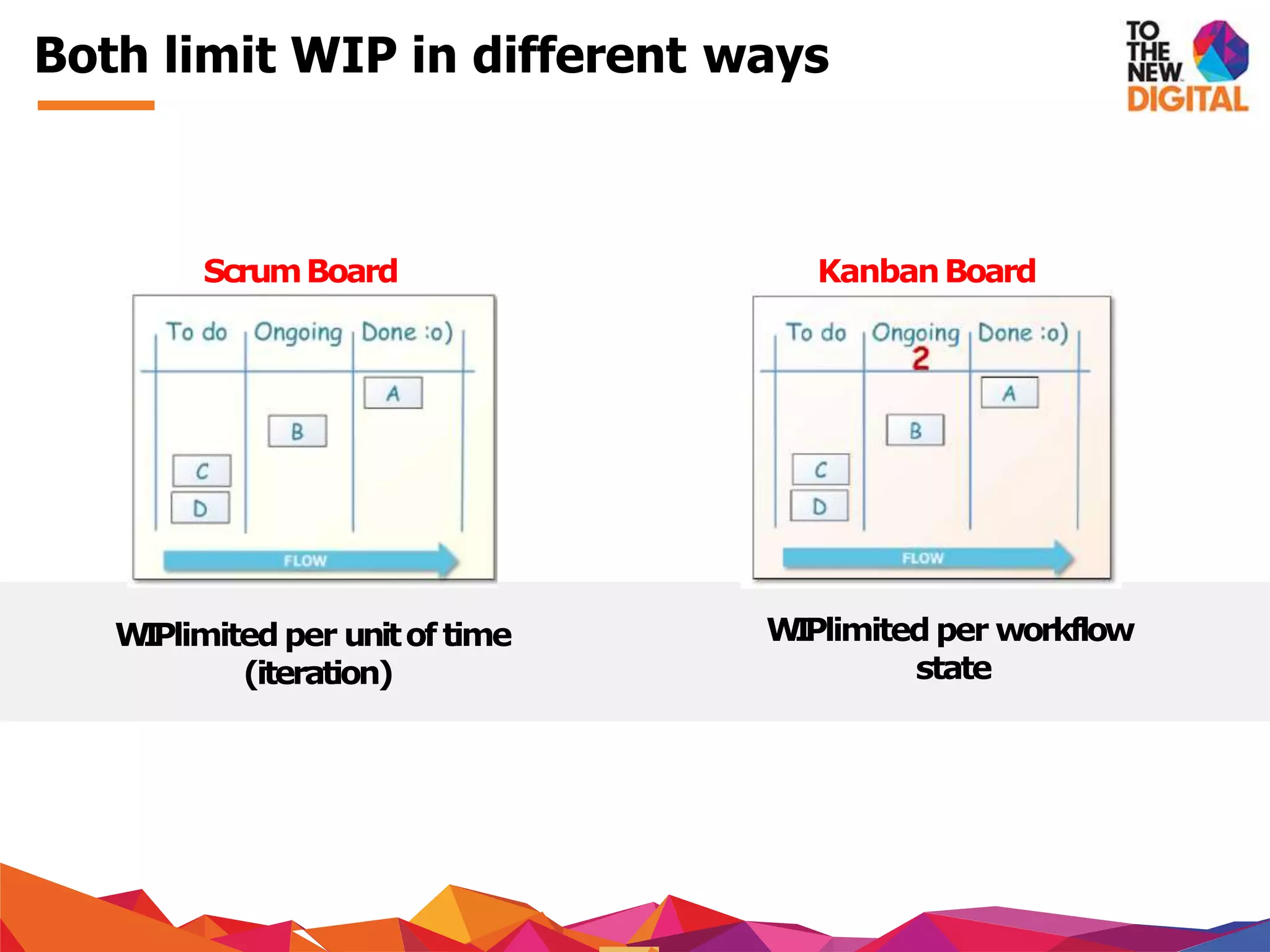
ScrumBoard KanbanBoard
WIPlimited per unitof time
(iteration)
WIPlimited per workflow
state
Both limit WIP in different ways
− Emphasis should be on the goal and not the tool. Becoming/agile
lean is not thegoal
− Don’t be dogmatic about your process
− There is no good or bad tool. Only good or bad decisions
− Keep experimenting for understanding and not judgment
− Process isnot important, improvingthe process is important
Does it matter?
roni@intelligrape.com
@ronicthomas
http://in.linkedin.com/in/ronicthomas/
Feedback
− David J Anderson, Kanban - Successful Evolutionary Change for your
Technology Business, 1st ed, Blue Hole Press,2010
− Henrik Kniberg, 2009, “Kanban and Scrum –Making the Most of
Both”, Online, Available: http://goo.gl/oiqPG
− Images from www.kanbantool.com/kanban-analytics-and-metrics
References
Thiswork islicensed under the Creative
Commons Attribution-Noncommercial-Share
Alike 3.0License
License
Contact us
Our Office
Client
Location
KANBAN practice is the
lifeline of any Software
development done at TO
THE NEW, explore our
Technology Services here:
Click Here To Know More!
Have more queries related to
TECHNOLOGY?
Talk To Our Experts

Introduction to Kanban

  • 2.
  • 3.
    1. What’s wrongwith the currentsystem? 2. History of Kanban 3. What isKanban? 4. Why Kanban? 5. Kanban Practices 6. Creating your firstboard 7. Kanban Principles 8. How is Scrum different fromKanban? Agenda
  • 4.
    − Burnout − Frequentbugs on production − Complaints about productivity − Low throughput − Leads to vaguesprint planning − Too much work stuffed into one sprint − Unidentified bottlenecks What’s wrong with the current system?
  • 5.
  • 6.
    − Developed byTaichi Ohno at Toyota in 1940's − Designed after the shelf-stocking techniques used by supermarkets − Demand controlled system where replenishment happened based on market conditions − Based on a pull based system rather than a push based one − Use of visual signals was essential to the system History of Kanban
  • 7.
    − Scheduling systemused in manufacturing to help companies improve their production process − Adopted by software co's for JITdelivery without burdening developers − “The Kanban Method” for software dev pioneered by David J. Anderson − WIP limited pull system which exposes system problemsthrough visualization What is Kanban?
  • 8.
    − In itssimplest form, a kanban system consists of a big board with story cards − Board represents the state of the project at any point − Different from other visualizations –implements WIPlimits − Tries to limit the amount of work at any stage − Easy identification of bottlenecks in system through visual boards − Aims atminimizing waste states What is Kanban? (contd.)
  • 9.
  • 10.
    … because … −it helps in visualising the system and expose problems − it allows us to evaluate the impacts of process changes − it allows us to identify bottlenecks and alleviate them − it allows us to establish trust in theprocess − it helps us to maintain a sustainable pace with a sustainable throughput − you need to relax and Kanban advocates just that! But why Kanban?
  • 11.
  • 12.
    − Workflow isinherently invisible − Visualization is core toKanban − Enables people to take a quick look at the state of the workflow − Use of story cards can be used − Development process is dividedinto columns − Each task is specified on a story card − Essentially cards move along the board to show workflow Visualize
  • 13.
    − Apply limitson WIP in each phase of development − Isthe basis for implementing a pull based system − Work is pulled into the next phase once capacity is available − Improves quality by giving greater focus to fewer tasks − Also reduces lead time for work by reducing the number of concerns for the developer Limit WIP
  • 14.
    − Because maximumutilization ofresources is not desirable contraryto popular belief − Brings in slack into the system –creates a more conducive work process − Get the most important things done, one by one, with a clear focus − Things get done faster, better than before, leading to lesser rework Limit WIP (contd.)
  • 15.
    − Workflow shouldbe closely monitored − Measurements must be made to identify problems in the system − Leads to better understanding of the system and helps inmaking educated improvements − Helps identify the positive and negative impact of changes introduced in thesystem Manage flow
  • 16.
    − All policiesrelated to workflow management should be explicit − For eg. WIP limits, basic workflow, rejection/acceptance flow, definition of donenessetc. − Helps in providing a basis for process improvement based on statistics − Allows for a more rational approach to process improvement by logical reasoning Make policies explicit
  • 17.
    − Through theuse of scientific models − Popular models: Theory ofConstraints (TOC) − Use of models allows a team to make predictions about a change − The expected and actual result can then be used effectively to improve the process − This approach leads to learning both at individual and organizational level Improve Collaboratively
  • 18.
    Thingsyou need: − Aboard − Lots of Post-it notes (preferably of different colors) − And lots of commitment (very important) − The next slides! Getting Started
  • 19.
    Importantterms: − Lead Time–time taken from request of feature to its completion − Cycle Time –time taken to finish the task − Throughput –essentially refers to productivity. Defined as the amount of work delivered in a time frame − WIP Limit Value Stream –this refers essentially to yourdevelopment process − Swarm(ing) –collaboration on a problem And some terms...
  • 20.
    − Allows easyvisualization of the development process − Each columnrepresents one Fig.TheKanban Board phase in yourexisting development process − Numbers on top representWIP limits − The number of tasks in each phase is limited by the WIP limits specified The Board
  • 21.
    − Keeps trackoffeatures/tasks − Ismore of an XP related feature − Includes informationregarding transition of features on board − Post-it notes can be used − Different colored post-it notes can be used for different issue types such as bugs, features, tasks, improvement etc − TIP–Token, Inscription, Placement Fig.StoryCard Story Card
  • 22.
    − Measurement toolsto measure the effectiveness of the system − Every time card ispushed/pulled on/off the board, charts start changing − Can be used to interpret various important metrics like average time taken for a task to be completed − Can be used to identify the flow of work − Also useful to identify the state of tasks in each phase of development − Control Charts & Cumulative Flow Diagrams Charts
  • 23.
  • 24.
    − Are usedto measure the average time taken for a task to be processed − Lead time and cycle time is represented on a control chart − Simplest charts that can be drawn − The aim is to keep lead time and cycle time as low as possible Control Chart
  • 25.
  • 26.
    − Show relativeamount of work for each stage − Use of colored areas for each phase for easy identification of bottlenecks − Vertical distance of the chart shows how many tasks are on the board and helps you set right WIP limits − Horizontal distance allows you to monitor Cycle Time − CFD should runsmoothly − Large steps or horizontal lines indicate problems in flow − Variations in gap/band indicate bottlenecks − When the band gets too wide, it indicates problems in work finishing or developers unable to handle amount of work Cumulative Flow Diagrams
  • 27.
    − Identifyyourdev process −How are featuresdecided? − What are the various steps involved in materializing it? − Define startand end pointsforthe board − Identify your boundaries − Identify when a task enters the board − Identify the end of its life cycle on the board Let’s get started
  • 28.
    − Agree − InitialWIP limits and policies –can change later − Prioritization and selectionpolicies − Policies for different classes of service (expedite, standard, fixed delivery date, intangible) − Process review cycle time Let’s get started (contd.)
  • 29.
    Cost Tim e Linear Classes of servicevs.Cost of Delay Expedite Tim e Cost Fixed Tim e Cost Intangible Tim e Cost …but before going on…
  • 30.
  • 31.
  • 32.
    − Do notprescribe any new roles or responsibilities to implement the new system − No such thing as “Kanban Software Development Process” − Implement Kanban with existingsystem -David Anderson Start with what you do now!
  • 33.
    − Optimize whatalreadyexists − Agree to continuous, incremental and evolutionary change to improve the system − Keep experimenting to understand the effects of changes on the system − Make small changes rather than huge process changes -David Anderson Agree to pursue incremental, evolutionary change
  • 34.
    − Do notremove existing roles and titles − This will eliminate fears in introducing the new system in the organization − Will help you get broader support in introducing the new system − Kanban was designed to reduce resistance to change -David Anderson Respect the current process, roles, responsibilities
  • 35.
    − Empower theworkforce to bring about change − Swarm on a bottleneck for faster resolution − Hold frequent discussions and process improvements − Include everyone in these discussions and do not disregard anyone’s viewpoint -David Anderson Leadership at all levels
  • 36.
  • 37.
    Splityour product Splityourorganization Large teamspending a long timebuilding a huge thing Smallteam spending a littletimebuilding a small thing … but integrating regularly tosee the whole Optimize yourprocess Order the backlog Splittime
  • 38.
  • 39.
    Scrum prescribes roles,Kanban doesn’t!
  • 40.
    Scrum prescribes time-boxediterations KanbanTeam ScrumTeam
  • 41.
  • 42.
    ScrumBoard KanbanBoard WIPlimited perunitof time (iteration) WIPlimited per workflow state Both limit WIP in different ways
  • 43.
    − Emphasis shouldbe on the goal and not the tool. Becoming/agile lean is not thegoal − Don’t be dogmatic about your process − There is no good or bad tool. Only good or bad decisions − Keep experimenting for understanding and not judgment − Process isnot important, improvingthe process is important Does it matter?
  • 44.
  • 45.
    − David JAnderson, Kanban - Successful Evolutionary Change for your Technology Business, 1st ed, Blue Hole Press,2010 − Henrik Kniberg, 2009, “Kanban and Scrum –Making the Most of Both”, Online, Available: http://goo.gl/oiqPG − Images from www.kanbantool.com/kanban-analytics-and-metrics References
  • 46.
    Thiswork islicensed underthe Creative Commons Attribution-Noncommercial-Share Alike 3.0License License
  • 47.
    Contact us Our Office Client Location KANBANpractice is the lifeline of any Software development done at TO THE NEW, explore our Technology Services here: Click Here To Know More! Have more queries related to TECHNOLOGY? Talk To Our Experts