KanBan
A simple & logical approach to
tasks & project management.
Inbound Sales & Marketing Consultancy
What you’ll learn
• What’s wrong? Why Kanban?
• What is Kanban & it’s origins
• How to use Kanban
• Possible ways to use Kanban
• Tools for KanBan
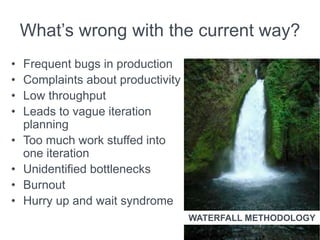
What’s wrong with the current way?
• Frequent bugs in production
• Complaints about productivity
• Low throughput
• Leads to vague iteration
planning
• Too much work stuffed into
one iteration
• Unidentified bottlenecks
• Burnout
• Hurry up and wait syndrome
WATERFALL METHODOLOGY
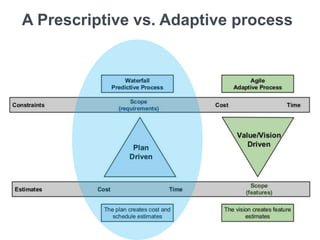
A Prescriptive vs. Adaptive process
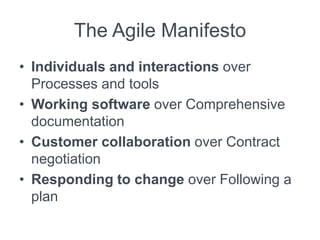
The Agile Manifesto
• Individuals and interactions over
Processes and tools
• Working software over Comprehensive
documentation
• Customer collaboration over Contract
negotiation
• Responding to change over Following a
plan
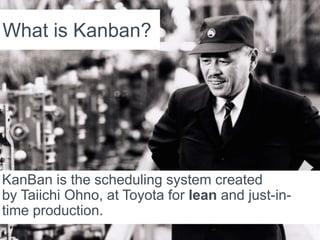
What is Kanban?
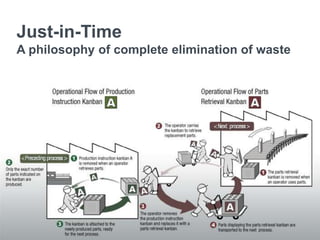
KanBan is the scheduling system created
by Taiichi Ohno, at Toyota for lean and just-in-
time production.
Just-in-Time
A philosophy of complete elimination of waste
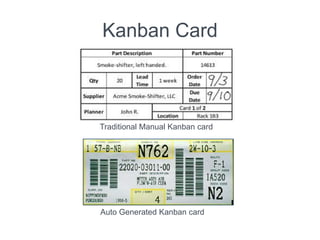
Kanban Card
Traditional Manual Kanban card
Auto Generated Kanban card
The basics of Kanban
• A board represents the state of the project
at any point
• WIP limited pull system which exposes
system problems through visualization
• Tries to limit the amount of work at any
stage
• Easy identification of bottlenecks in
system through visual boards
• Aims at minimizing waste states
Why Kanban?
• it helps in visualizing the work
• it allows us to evaluate the impacts of
changes
• it allows us to identify bottlenecks and
alleviate them
• it allows us to establish trust in the process
• it helps to maintain a sustainable pace with a
sustainable throughput
• it leads to learning both at individual and
organizational level
Kanban Practices
• Visualization is core to Kanban
• Work is inherently invisible on a board
• Work process divided into columns
• Use of story cards
• Cards move along the board columns to
show workflow.
• Enables a quick look a the state of the
work
Limit work in progress
• Apply limits on WIP in each phase of development
• Work is pulled into the next phase once capacity is
available
• Improves quality by giving greater focus to fewer tasks
• Also reduces lead time for work by reducing the
number of concerns for the developer
• Brings in slack into the system
• creates a more conducive work process
• Get the most important things done, one by one, with
a clear focus
• Things get done faster, better than before, leading to
lesser rework
Managing work flow
• Project workflow can closely monitored
• Leads to better understanding of the
system and helps in making educated
improvements
• Helps identify the positive and negative
impact of changes introduced in the
system
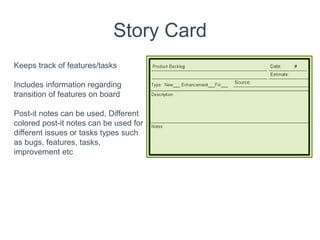
Story Card
Keeps track of features/tasks
Includes information regarding
transition of features on board
Post-it notes can be used, Different
colored post-it notes can be used for
different issues or tasks types such
as bugs, features, tasks,
improvement etc
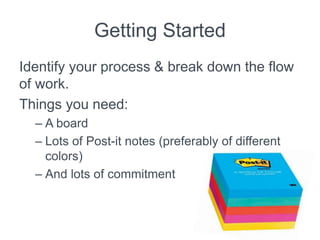
Getting Started
Identify your process & break down the flow
of work.
Things you need:
– A board
– Lots of Post-it notes (preferably of different
colors)
– And lots of commitment
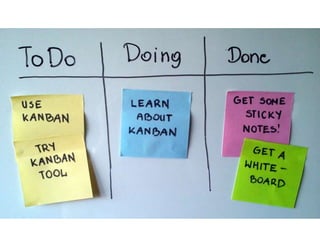
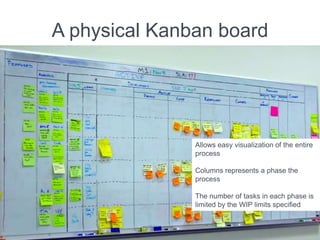
A physical Kanban board
Allows easy visualization of the entire
process
Columns represents a phase the
process
The number of tasks in each phase is
limited by the WIP limits specified
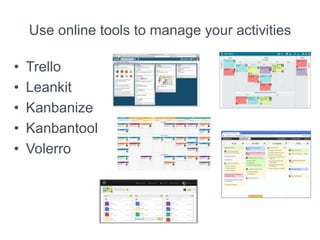
Use online tools to manage your activities
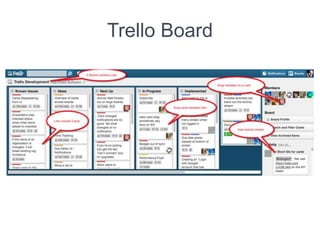
• Trello
• Leankit
• Kanbanize
• Kanbantool
• Volerro
Trello Board
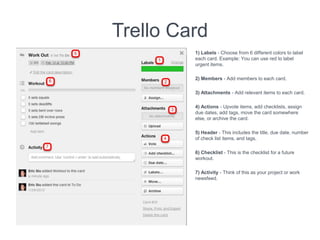
Trello Card
1) Labels - Choose from 6 different colors to label
each card. Example: You can use red to label
urgent items.
2) Members - Add members to each card.
3) Attachments - Add relevant items to each card.
4) Actions - Upvote items, add checklists, assign
due dates, add tags, move the card somewhere
else, or archive the card.
5) Header - This includes the title, due date, number
of check list items, and tags.
6) Checklist - This is the checklist for a future
workout.
7) Activity - Think of this as your project or work
newsfeed.
Ways to use Kanban
It’s not just for software development
• Marketing projects
• Software development
• Sales management
• Personal organization
• Wedding planning
• Design projects
• Blogging
• Vacation planning
• Client management
• Recruiting
• Finance projects
• Research projects
• Recipes
• Renovation Projects
and so much more…
Thank you
Inbound Sales & Marketing Consultancy

Kan ban

  • 1.
    KanBan A simple &logical approach to tasks & project management. Inbound Sales & Marketing Consultancy
  • 2.
    What you’ll learn •What’s wrong? Why Kanban? • What is Kanban & it’s origins • How to use Kanban • Possible ways to use Kanban • Tools for KanBan
  • 4.
    What’s wrong withthe current way? • Frequent bugs in production • Complaints about productivity • Low throughput • Leads to vague iteration planning • Too much work stuffed into one iteration • Unidentified bottlenecks • Burnout • Hurry up and wait syndrome WATERFALL METHODOLOGY
  • 5.
    A Prescriptive vs.Adaptive process
  • 6.
    The Agile Manifesto •Individuals and interactions over Processes and tools • Working software over Comprehensive documentation • Customer collaboration over Contract negotiation • Responding to change over Following a plan
  • 7.
    What is Kanban? KanBanis the scheduling system created by Taiichi Ohno, at Toyota for lean and just-in- time production.
  • 9.
    Just-in-Time A philosophy ofcomplete elimination of waste
  • 10.
    Kanban Card Traditional ManualKanban card Auto Generated Kanban card
  • 11.
    The basics ofKanban • A board represents the state of the project at any point • WIP limited pull system which exposes system problems through visualization • Tries to limit the amount of work at any stage • Easy identification of bottlenecks in system through visual boards • Aims at minimizing waste states
  • 13.
    Why Kanban? • ithelps in visualizing the work • it allows us to evaluate the impacts of changes • it allows us to identify bottlenecks and alleviate them • it allows us to establish trust in the process • it helps to maintain a sustainable pace with a sustainable throughput • it leads to learning both at individual and organizational level
  • 14.
    Kanban Practices • Visualizationis core to Kanban • Work is inherently invisible on a board • Work process divided into columns • Use of story cards • Cards move along the board columns to show workflow. • Enables a quick look a the state of the work
  • 15.
    Limit work inprogress • Apply limits on WIP in each phase of development • Work is pulled into the next phase once capacity is available • Improves quality by giving greater focus to fewer tasks • Also reduces lead time for work by reducing the number of concerns for the developer • Brings in slack into the system • creates a more conducive work process • Get the most important things done, one by one, with a clear focus • Things get done faster, better than before, leading to lesser rework
  • 16.
    Managing work flow •Project workflow can closely monitored • Leads to better understanding of the system and helps in making educated improvements • Helps identify the positive and negative impact of changes introduced in the system
  • 17.
    Story Card Keeps trackof features/tasks Includes information regarding transition of features on board Post-it notes can be used, Different colored post-it notes can be used for different issues or tasks types such as bugs, features, tasks, improvement etc
  • 18.
    Getting Started Identify yourprocess & break down the flow of work. Things you need: – A board – Lots of Post-it notes (preferably of different colors) – And lots of commitment
  • 19.
    A physical Kanbanboard Allows easy visualization of the entire process Columns represents a phase the process The number of tasks in each phase is limited by the WIP limits specified
  • 20.
    Use online toolsto manage your activities • Trello • Leankit • Kanbanize • Kanbantool • Volerro
  • 21.
  • 22.
    Trello Card 1) Labels- Choose from 6 different colors to label each card. Example: You can use red to label urgent items. 2) Members - Add members to each card. 3) Attachments - Add relevant items to each card. 4) Actions - Upvote items, add checklists, assign due dates, add tags, move the card somewhere else, or archive the card. 5) Header - This includes the title, due date, number of check list items, and tags. 6) Checklist - This is the checklist for a future workout. 7) Activity - Think of this as your project or work newsfeed.
  • 23.
    Ways to useKanban It’s not just for software development • Marketing projects • Software development • Sales management • Personal organization • Wedding planning • Design projects • Blogging • Vacation planning • Client management • Recruiting • Finance projects • Research projects • Recipes • Renovation Projects and so much more…
  • 24.
    Thank you Inbound Sales& Marketing Consultancy