MongoDB : NoSQL
- Bhagwat Kumar
Agenda
1. Introduction to NoSQLand
MongoDB
2. Installation
3. Queries
4. Indexing
5. Schema modeling
6. Aggregation
Introduction to NoSQL
• Not onlySQL
• Stores and retrieves data with less constrained consistency
model than RDBMS
• More scalable and have finer control over availability.
• Handle large volumes of structured/unstructured data.
• Efficient scale-out architecture.
• Highly optimized key-valuestores
NoSQL data models
• Document model
• Uses embedded data thus no joins
• MongoDB and couchDB
• Graphmodel
• Used where relationships are core to app.
• Neo4j and HyperGraphDB
• Key-value and wide column model
• Redis, Riak :Key-value
• Cassandra, BigTable :wide column model
• Popular NoSQLdatabases : http://nosql-database.org
MongoDB
• Open source
• Document data model
• Rich querymodel
• Full Index Support
• High performance with highavailability
• Horizontal scalability
• Map/Reduce
• Geospatial support
• Professional Support ByMongoDB
MongoDB Data Model
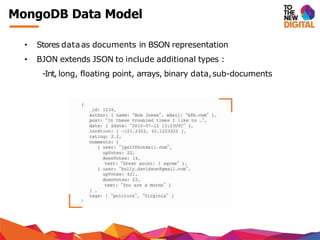
• Stores dataas documents in BSON representation
• BJON extends JSON to include additional types :
-Int, long, floating point, arrays, binary data,sub-documents
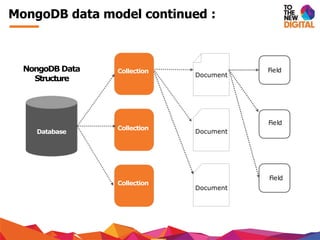
MongoDB data model continued :
Collection
Collection
Collection
Document
Document
Document
Field
Field
Field
Database
NongoDB Data
Structure
Compare RDBMS terms with MongoDB
RDBMS MongoDB
Database Database
Tables Collections
Rows Documents
Columns Key
MongoDB is schema-less. Each document can have different
number of keys(fields) and and store different types of data.
{name :‘Rajeev’, age :45, hobby :[“Cricket”, “Movies”]}
{name :42, age :45, profession : “Software engineer”}
Both the above documents can reside in same collection.
Getting Started: MongoDB
• Installing MongoDB
• sudo apt-get installmongodb
• Default directory formongodb data is /data/db
• StartMongoDB server
• mongod
• mongod--dbpath /var/mongo/backup
• mongod--port 12345 # default is27017
• mongod --fork –logpath /var/log/mongodb.log
• Startmongo shell
• mongo
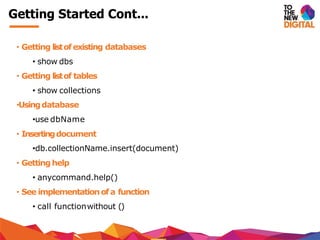
Getting Started Cont...
• Getting listof existing databases
• show dbs
• Getting listof tables
• show collections
•Usingdatabase
•use dbName
• Insertingdocument
•db.collectionName.insert(document)
• Gettinghelp
• anycommand.help()
• See implementationof a function
• call functionwithout ()
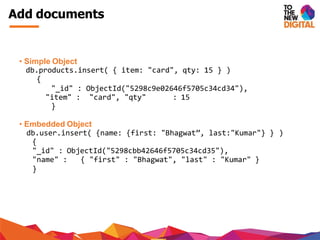
Add documents
• Simple Object
db.products.insert( { item: "card", qty: 15 } )
{
"_id" : ObjectId("5298c9e02646f5705c34cd34"),
"item" : "card", "qty" : 15
}
• Embedded Object
db.user.insert( {name: {first: "Bhagwat”, last:"Kumar"} } )
{
"_id" : ObjectId("5298cbb42646f5705c34cd35"),
"name" : { "first" : "Bhagwat", "last" : "Kumar" }
}
Insert document Cont...
• Document withsimple arrays
db.user.insert( {
name: “John”, ”hobbies":[“Cricket”, “Footbal”,“Reading”]
})
• Document withArraysof sub documents
db.users.insert({
name :‘Graeme Rocher’,
books :[
{name :‘Grails’, pages :300},
{name :‘Groovy’, pages :200}
]
})
Querying collections
• Selecting all documents
db.inventory.find( {})
• Findby example
db.inventory.find( {type: "snacks" })
db.inventory.find( {type: 'food', price: {$lt: 9.95 }})
• UseOR Condition
db.inventory.find( {$or:[{type : ‘food’}, {price :{$lte : 9.95}
}])
•Use AND Condition
db.inventory.find( {$and: [{type :‘food’}, {price :{$lte :
9.95}}])
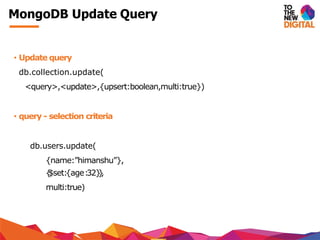
MongoDB Update Query
• Update query
db.collection.update(
<query>,<update>,{upsert:boolean,multi:true})
• query - selection criteria
db.users.update(
{name:”himanshu”},
{$set:{age:32}},
multi:true)
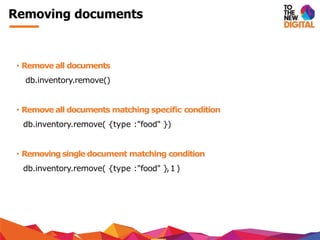
Removing documents
• Remove all documents
db.inventory.remove()
• Remove all documents matching specific condition
db.inventory.remove( {type :"food" })
• Removing single document matching condition
db.inventory.remove( {type :"food" },1)
Aggregation framework
• Aggregation operations processes data records and returns
computed results
• It group values from multiple documents together and can
perform a variety of operations on the grouped data to return
a single result
Aggregation samples
SELECTCOUNT(*)AScount FROM orders
db. orders.aggregate([{$group :{_id:null,total:{$sum:1}}}]);
SELECTSUM(price) AStotal FROMorders
db. orders.aggregate([{$group :{_id:null, total :{$sum:”$price”}}}]);
SELECTcust_id, SUM(price) AStotal FROMorders GROUPBYcust_id
db. orders.aggregate([{$group :{_id:“$cust_id”, total :{$sum:”$price”}}}]);
SELECTcust_id,SUM(price) AStFROMorders GROUPBYcust_id ORDERBYt
db. orders.aggregate([{
$group :{_id:“$cust_id”, t:{$sum: ”$price”}}},
{ $sort :{t:1}}]);
Speed up search and sorting : Index
• Without index MongoDB must scan every document in a collection
• No additional sort phase is executed if there exist corresponding index
• Results will be returned directly if projection includes only the index fields
• Affects the aggregation framework as well
• Supports variety of index types :geolocation, arrays etc.
Types of index
• Default by mongoDB_id
• Single field
db.friends.ensureIndex({“name” :1})
• Compound field
db.events.ensureIndex({“username” :1, date :-1
db.events.find().sort({username:1, date: -1}) #usesindx
db.events.find().sort({username: -1, date: 1})#uses index
db.event.find().sort({username: 1, date:1}) #index not used
Compound indexes support queries on any prefix of the index fields
• Multikey index
• For arrays by default
• Geospatial indexes
• Used by geospatial queries e.g. $near, $centerSphere, $within etc.
Schema design factors
• Rich documents
• Pre-join / Embed data
• No Mongo joins
• No constraints
• Atomic operations
• No declared schema
References
http://www.mongodb.com/learn/nosql
http://docs.mongodb.org/manual/core/introduction/
http://en.wikipedia.org/wiki/NoSQL
http://blog.nahurst.com/visual-guide-to-nosql-systems
http://www.slideshare.net/quipo/nosql-databases-why-what-and-when
http://www.slideshare.net/mongodb/webinar-data-processing-and-
aggregation-options
http://www.slideshare.net/mongodb/building-your-first-app-with-mongo-db-
28536013
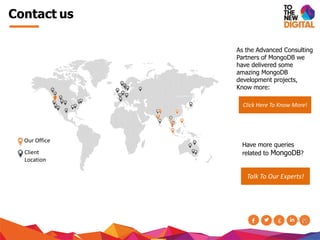
Contact us
As the Advanced Consulting
Partners of MongoDB we
have delivered some
amazing MongoDB
development projects,
Know more:
Click Here To Know More!
Have more queries
related to MongoDB?
Talk To Our Experts!
Our Office
Client
Location

MongoDb and NoSQL

  • 2.
    MongoDB : NoSQL -Bhagwat Kumar
  • 3.
    Agenda 1. Introduction toNoSQLand MongoDB 2. Installation 3. Queries 4. Indexing 5. Schema modeling 6. Aggregation
  • 4.
    Introduction to NoSQL •Not onlySQL • Stores and retrieves data with less constrained consistency model than RDBMS • More scalable and have finer control over availability. • Handle large volumes of structured/unstructured data. • Efficient scale-out architecture. • Highly optimized key-valuestores
  • 5.
    NoSQL data models •Document model • Uses embedded data thus no joins • MongoDB and couchDB • Graphmodel • Used where relationships are core to app. • Neo4j and HyperGraphDB • Key-value and wide column model • Redis, Riak :Key-value • Cassandra, BigTable :wide column model • Popular NoSQLdatabases : http://nosql-database.org
  • 6.
    MongoDB • Open source •Document data model • Rich querymodel • Full Index Support • High performance with highavailability • Horizontal scalability • Map/Reduce • Geospatial support • Professional Support ByMongoDB
  • 7.
    MongoDB Data Model •Stores dataas documents in BSON representation • BJON extends JSON to include additional types : -Int, long, floating point, arrays, binary data,sub-documents
  • 8.
    MongoDB data modelcontinued : Collection Collection Collection Document Document Document Field Field Field Database NongoDB Data Structure
  • 9.
    Compare RDBMS termswith MongoDB RDBMS MongoDB Database Database Tables Collections Rows Documents Columns Key MongoDB is schema-less. Each document can have different number of keys(fields) and and store different types of data. {name :‘Rajeev’, age :45, hobby :[“Cricket”, “Movies”]} {name :42, age :45, profession : “Software engineer”} Both the above documents can reside in same collection.
  • 10.
    Getting Started: MongoDB •Installing MongoDB • sudo apt-get installmongodb • Default directory formongodb data is /data/db • StartMongoDB server • mongod • mongod--dbpath /var/mongo/backup • mongod--port 12345 # default is27017 • mongod --fork –logpath /var/log/mongodb.log • Startmongo shell • mongo
  • 11.
    Getting Started Cont... •Getting listof existing databases • show dbs • Getting listof tables • show collections •Usingdatabase •use dbName • Insertingdocument •db.collectionName.insert(document) • Gettinghelp • anycommand.help() • See implementationof a function • call functionwithout ()
  • 12.
    Add documents • SimpleObject db.products.insert( { item: "card", qty: 15 } ) { "_id" : ObjectId("5298c9e02646f5705c34cd34"), "item" : "card", "qty" : 15 } • Embedded Object db.user.insert( {name: {first: "Bhagwat”, last:"Kumar"} } ) { "_id" : ObjectId("5298cbb42646f5705c34cd35"), "name" : { "first" : "Bhagwat", "last" : "Kumar" } }
  • 13.
    Insert document Cont... •Document withsimple arrays db.user.insert( { name: “John”, ”hobbies":[“Cricket”, “Footbal”,“Reading”] }) • Document withArraysof sub documents db.users.insert({ name :‘Graeme Rocher’, books :[ {name :‘Grails’, pages :300}, {name :‘Groovy’, pages :200} ] })
  • 14.
    Querying collections • Selectingall documents db.inventory.find( {}) db.inventory.find( {}) • Findby example db.inventory.find( {type: "snacks" }) db.inventory.find( {type: 'food', price: {$lt: 9.95 }}) • UseOR Condition db.inventory.find( {$or:[{type : ‘food’}, {price :{$lte : 9.95} }]) •Use AND Condition db.inventory.find( {$and: [{type :‘food’}, {price :{$lte : 9.95}}])
  • 15.
    MongoDB Update Query •Update query db.collection.update( <query>,<update>,{upsert:boolean,multi:true}) • query - selection criteria db.users.update( {name:”himanshu”}, {$set:{age:32}}, multi:true)
  • 16.
    Removing documents • Removeall documents db.inventory.remove() • Remove all documents matching specific condition db.inventory.remove( {type :"food" }) • Removing single document matching condition db.inventory.remove( {type :"food" },1)
  • 17.
    Aggregation framework • Aggregationoperations processes data records and returns computed results • It group values from multiple documents together and can perform a variety of operations on the grouped data to return a single result
  • 18.
    Aggregation samples SELECTCOUNT(*)AScount FROMorders db. orders.aggregate([{$group :{_id:null,total:{$sum:1}}}]); SELECTSUM(price) AStotal FROMorders db. orders.aggregate([{$group :{_id:null, total :{$sum:”$price”}}}]); SELECTcust_id, SUM(price) AStotal FROMorders GROUPBYcust_id db. orders.aggregate([{$group :{_id:“$cust_id”, total :{$sum:”$price”}}}]); SELECTcust_id,SUM(price) AStFROMorders GROUPBYcust_id ORDERBYt db. orders.aggregate([{ $group :{_id:“$cust_id”, t:{$sum: ”$price”}}}, { $sort :{t:1}}]);
  • 19.
    Speed up searchand sorting : Index • Without index MongoDB must scan every document in a collection • No additional sort phase is executed if there exist corresponding index • Results will be returned directly if projection includes only the index fields • Affects the aggregation framework as well • Supports variety of index types :geolocation, arrays etc.
  • 20.
    Types of index •Default by mongoDB_id • Single field db.friends.ensureIndex({“name” :1}) • Compound field db.events.ensureIndex({“username” :1, date :-1 db.events.find().sort({username:1, date: -1}) #usesindx db.events.find().sort({username: -1, date: 1})#uses index db.event.find().sort({username: 1, date:1}) #index not used Compound indexes support queries on any prefix of the index fields • Multikey index • For arrays by default • Geospatial indexes • Used by geospatial queries e.g. $near, $centerSphere, $within etc.
  • 21.
    Schema design factors •Rich documents • Pre-join / Embed data • No Mongo joins • No constraints • Atomic operations • No declared schema
  • 22.
  • 23.
    Contact us As theAdvanced Consulting Partners of MongoDB we have delivered some amazing MongoDB development projects, Know more: Click Here To Know More! Have more queries related to MongoDB? Talk To Our Experts! Our Office Client Location