Downloaded 49 times


![Sample Policy for Elastic Beanstalk
Allow the Admins group to use all Elastic Beanstalk and related service APIs
{
"Version": "2012-10-17",
"Statement": [
{
"Effect": "Allow",
"Action": [
"elasticbeanstalk:*",
"ec2:*",
"elasticloadbalancing:*",
"autoscaling:*",
"cloudwatch:*",
"s3:*",
"sns:*",
"rds:*",
"cloudformation:*"
],
"Resource": "*"
}
]
}](https://image.slidesharecdn.com/awselasticbeanstalk-160401114014/85/AWS-Elastic-Beanstalk-12-320.jpg)
![Sample Policy for Elastic Beanstalk
Allow the Developers group to do all actions except highly privileged operations such as creating
applications and environments
{
"Version": "2012-10-17",
"Statement":[
{
"Action":["elasticbeanstalk:CreateApplication",
"elasticbeanstalk:CreateEnvironment",
"elasticbeanstalk:DeleteApplication",
"elasticbeanstalk:RebuildEnvironment",
"elasticbeanstalk:SwapEnvironmentCNAMEs",
"elasticbeanstalk:TerminateEnvironment"],
"Effect":"Deny",
"Resource":"*"
},
{
"Action":["elasticbeanstalk:*",
"ec2:*",
"elasticloadbalancing:*",
"autoscaling:*",
"cloudwatch:*",
"s3:*",
"sns:*",
"rds:*",
"cloudformation:*"],
"Effect":"Allow",
"Resource":"*"
}
]
}](https://image.slidesharecdn.com/awselasticbeanstalk-160401114014/85/AWS-Elastic-Beanstalk-13-320.jpg)

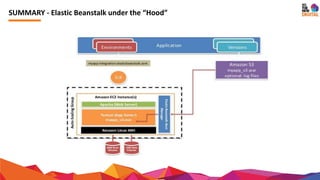

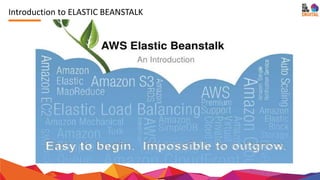
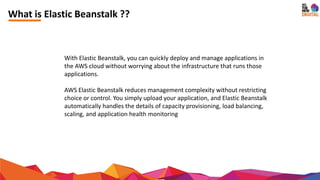
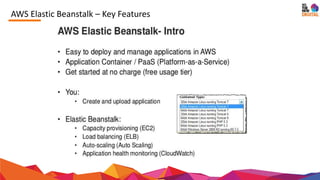
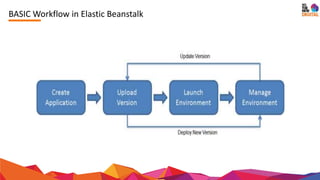
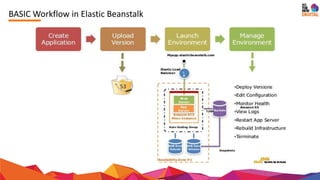
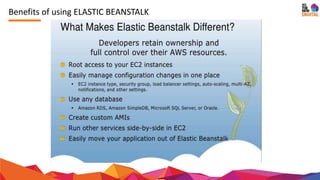
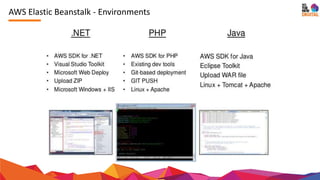
AWS Elastic Beanstalk is a platform that simplifies the deployment and management of applications in the AWS cloud, handling infrastructure concerns such as capacity and scaling automatically. It offers a range of features and permissions for different user groups, enhancing control while reducing complexity. The document also includes policy samples for managing user permissions related to Elastic Beanstalk and its integrated services.


![[AWS Builders] AWS 네트워크 서비스 소개 및 사용 방법 - 김기현, AWS 솔루션즈 아키텍트](https://cdn.slidesharecdn.com/ss_thumbnails/1network-191112092246-thumbnail.jpg?width=640&height=640&fit=bounds)


![Service Operation Marketing[1]](https://cdn.slidesharecdn.com/ss_thumbnails/serviceoperationmarketing1-100226052836-phpapp01-thumbnail.jpg?width=640&height=640&fit=bounds)


![process_and_operation_chemist[8]](https://cdn.slidesharecdn.com/ss_thumbnails/04aab2ee-cd92-4c9e-83f8-700e1d8b2262-161213030929-thumbnail.jpg?width=640&height=640&fit=bounds)


![[Jun AWS 201] Elastic Beanstalk for Startups](https://cdn.slidesharecdn.com/ss_thumbnails/aws201elasticbeanstalkforstartups-130708040156-phpapp02-thumbnail.jpg?width=640&height=640&fit=bounds)


![Getting Started with Apache Spark: Big Data Made Simple [Free Meetup]](https://cdn.slidesharecdn.com/ss_thumbnails/apachesparkgettingstarted-260203175547-8361bcc3-thumbnail.jpg?width=640&height=640&fit=bounds)


