Last update: 28 July, 2017
Chainer – a deep learning framework
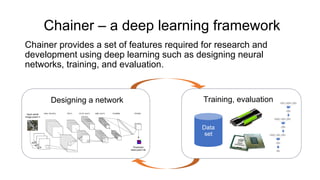
Chainer provides a set of features required for research and
development using deep learning such as designing neural
networks, training, and evaluation.
Designing a network Training, evaluation
Data
set
Features and Characteristics of Chainer
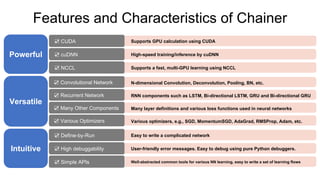
Powerful
☑ CUDA
☑ cuDNN
☑ NCCL
Versatile
☑ Convolutional Network
☑ Recurrent Network
☑ Many Other Components
☑ Various Optimizers
Intuitive
☑ Define-by-Run
☑ High debuggability
Supports GPU calculation using CUDA
High-speed training/inference by cuDNN
Supports a fast, multi-GPU learning using NCCL
N-dimensional Convolution, Deconvolution, Pooling, BN, etc.
RNN components such as LSTM, Bi-directional LSTM, GRU and Bi-directional GRU
Many layer definitions and various loss functions used in neural networks
Various optimizers, e.g., SGD, MomentumSGD, AdaGrad, RMSProp, Adam, etc.
Easy to write a complicated network
User-friendly error messages. Easy to debug using pure Python debuggers.
Well-abstracted common tools for various NN learning, easy to write a set of learning flows☑ Simple APIs
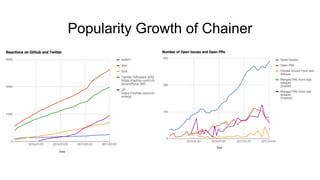
Popularity Growth of Chainer
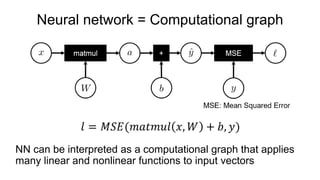
Neural network = Computational graph
NN can be interpreted as a computational graph that applies
many linear and nonlinear functions to input vectors
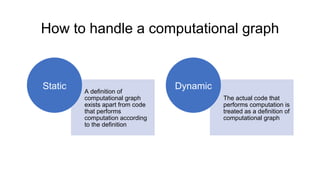
How to handle a computational graph
A definition of
computational graph
exists apart from code
that performs
computation according
to the definition
Static
The actual code that
performs computation is
treated as a definition of
computational graph
Dynamic
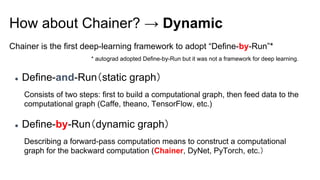
Chainer is the first deep-learning framework to adopt “Define-by-Run”*
How about Chainer? → Dynamic
● Define-and-Run(static graph)
Consists of two steps: first to build a computational graph, then feed data to the
computational graph (Caffe, theano, TensorFlow, etc.)
● Define-by-Run(dynamic graph)
Describing a forward-pass computation means to construct a computational
graph for the backward computation (Chainer, DyNet, PyTorch, etc.)
* autograd adopted Define-by-Run but it was not a framework for deep learning.
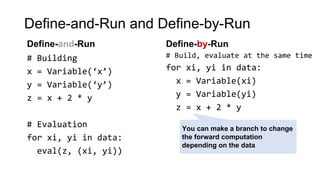
Define-and-Run and Define-by-Run
# Building
x = Variable(‘x’)
y = Variable(‘y’)
z = x + 2 * y
# Evaluation
for xi, yi in data:
eval(z, (xi, yi))
# Build, evaluate at the same time
for xi, yi in data:
x = Variable(xi)
y = Variable(yi)
z = x + 2 * y
You can make a branch to change
the forward computation
depending on the data
Define-and-Run Define-by-Run
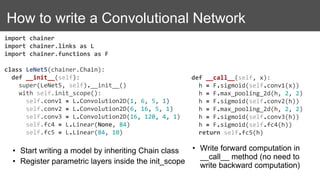
How to write a Convolutional Network
import chainer
import chainer.links as L
import chainer.functions as F
class LeNet5(chainer.Chain):
def __init__(self):
super(LeNet5, self).__init__()
with self.init_scope():
self.conv1 = L.Convolution2D(1, 6, 5, 1)
self.conv2 = L.Convolution2D(6, 16, 5, 1)
self.conv3 = L.Convolution2D(16, 120, 4, 1)
self.fc4 = L.Linear(None, 84)
self.fc5 = L.Linear(84, 10)
• Start writing a model by inheriting Chain class
• Register parametric layers inside the init_scope
• Write forward computation in
__call__ method (no need to
write backward computation)
def __call__(self, x):
h = F.sigmoid(self.conv1(x))
h = F.max_pooling_2d(h, 2, 2)
h = F.sigmoid(self.conv2(h))
h = F.max_pooling_2d(h, 2, 2)
h = F.sigmoid(self.conv3(h))
h = F.sigmoid(self.fc4(h))
return self.fc5(h)
Training models
model = LeNet5()
model = L.Classifier(model)
# Dataset is a list! ([] to access, having __len__)
dataset = [(x1, t1), (x2, t2), ...]
# iterator to return a mini-batch retrieved from dataset
it = iterators.SerialIterator(dataset, batchsize=32)
# Optimization methods (you can easily try various methods by changing SGD to
# MomentumSGD, Adam, RMSprop, AdaGrad, etc.)
opt = optimizers.SGD(lr=0.01)
opt.setup(model)
updater = training.StandardUpdater(it, opt, device=0) # device=-1 if you use CPU
trainer = training.Trainer(updater, stop_trigger=(100, 'epoch'))
trainer.run()
For more details, refer to official examples: https://github.com/pfnet/chainer/tree/master/examples
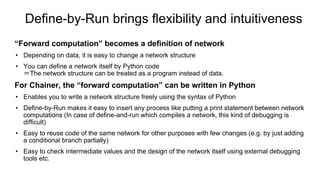
Define-by-Run brings flexibility and intuitiveness
“Forward computation” becomes a definition of network
• Depending on data, it is easy to change a network structure
• You can define a network itself by Python code
=The network structure can be treated as a program instead of data.
For Chainer, the “forward computation” can be written in Python
• Enables you to write a network structure freely using the syntax of Python
• Define-by-Run makes it easy to insert any process like putting a print statement between network
computations (In case of define-and-run which compiles a network, this kind of debugging is
difficult)
• Easy to reuse code of the same network for other purposes with few changes (e.g. by just adding
a conditional branch partially)
• Easy to check intermediate values and the design of the network itself using external debugging
tools etc.
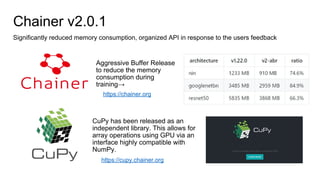
Chainer v2.0.1
Significantly reduced memory consumption, organized API in response to the users feedback
Aggressive Buffer Release
to reduce the memory
consumption during
training→
CuPy has been released as an
independent library. This allows for
array operations using GPU via an
interface highly compatible with
NumPy.
https://cupy.chainer.org
https://chainer.org
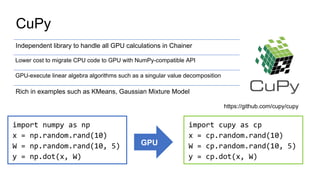
CuPy
Independent library to handle all GPU calculations in Chainer
Lower cost to migrate CPU code to GPU with NumPy-compatible API
GPU-execute linear algebra algorithms such as a singular value decomposition
Rich in examples such as KMeans, Gaussian Mixture Model
import numpy as np
x = np.random.rand(10)
W = np.random.rand(10, 5)
y = np.dot(x, W)
import cupy as cp
x = cp.random.rand(10)
W = cp.random.rand(10, 5)
y = cp.dot(x, W)
GPU
https://github.com/cupy/cupy
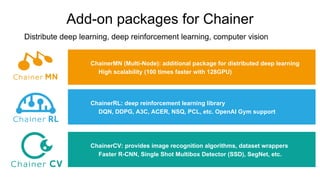
Add-on packages for Chainer
Distribute deep learning, deep reinforcement learning, computer vision
ChainerMN (Multi-Node): additional package for distributed deep learning
  High scalability (100 times faster with 128GPU)
ChainerRL: deep reinforcement learning library
  DQN, DDPG, A3C, ACER, NSQ, PCL, etc. OpenAI Gym support
ChainerCV: provides image recognition algorithms, dataset wrappers
  Faster R-CNN, Single Shot Multibox Detector (SSD), SegNet, etc.
ChainerMN
Chainer + Multi-Node
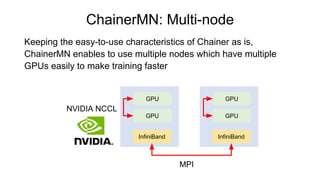
ChainerMN: Multi-node
Keeping the easy-to-use characteristics of Chainer as is,
ChainerMN enables to use multiple nodes which have multiple
GPUs easily to make training faster
GPU
GPU
InfiniBand
GPU
GPU
InfiniBand
MPI
NVIDIA NCCL
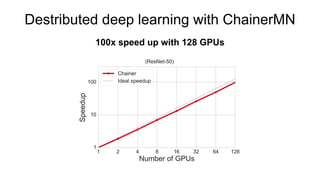
Destributed deep learning with ChainerMN
100x speed up with 128 GPUs
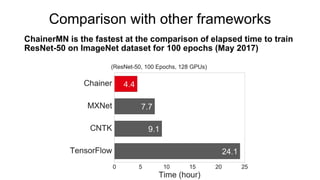
Comparison with other frameworks
ChainerMN is the fastest at the comparison of elapsed time to train
ResNet-50 on ImageNet dataset for 100 epochs (May 2017)
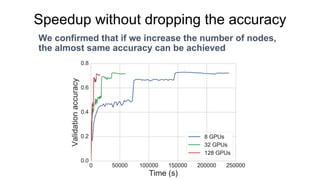
We confirmed that if we increase the number of nodes,
the almost same accuracy can be achieved
Speedup without dropping the accuracy
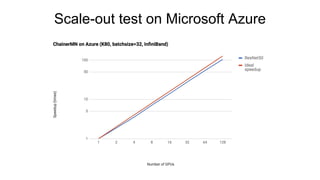
Scale-out test on Microsoft Azure
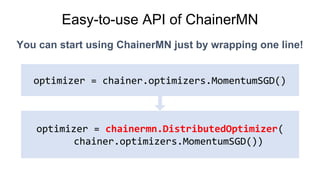
Easy-to-use API of ChainerMN
You can start using ChainerMN just by wrapping one line!
optimizer = chainer.optimizers.MomentumSGD()
optimizer = chainermn.DistributedOptimizer(
chainer.optimizers.MomentumSGD())
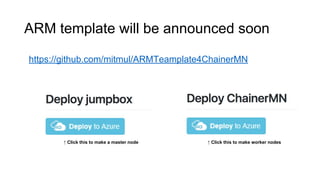
ARM template will be announced soon
https://github.com/mitmul/ARMTeamplate4ChainerMN
↑ Click this to make a master node ↑ Click this to make worker nodes
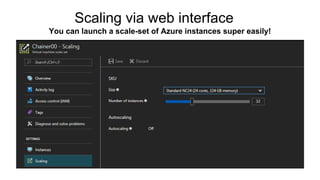
Scaling via web interface
You can launch a scale-set of Azure instances super easily!
ChainerRL
Chainer + Reinforcement Learning
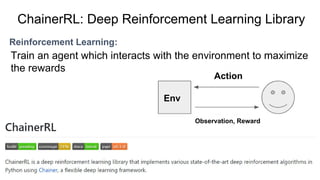
Reinforcement Learning:
ChainerRL: Deep Reinforcement Learning Library
Train an agent which interacts with the environment to maximize
the rewards
Action
Env
Observation, Reward
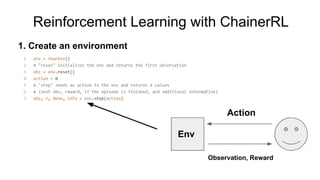
Reinforcement Learning with ChainerRL
1. Create an environment
Action
Env
Observation, Reward
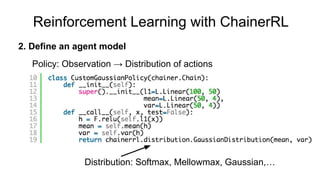
Distribution: Softmax, Mellowmax, Gaussian,…
Policy: Observation → Distribution of actions
2. Define an agent model
Reinforcement Learning with ChainerRL
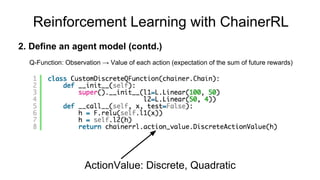
2. Define an agent model (contd.)
Q-Function: Observation → Value of each action (expectation of the sum of future rewards)
ActionValue: Discrete, Quadratic
Reinforcement Learning with ChainerRL
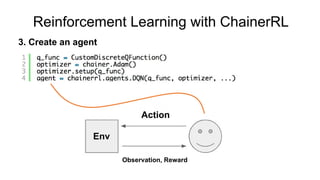
Action
Env
Observation, Reward
3. Create an agent
Reinforcement Learning with ChainerRL
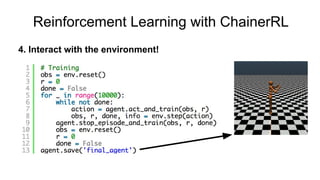
4. Interact with the environment!
Reinforcement Learning with ChainerRL
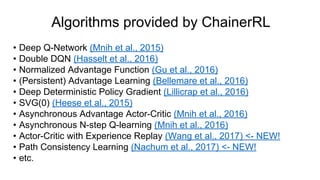
Algorithms provided by ChainerRL
• Deep Q-Network (Mnih et al., 2015)
• Double DQN (Hasselt et al., 2016)
• Normalized Advantage Function (Gu et al., 2016)
• (Persistent) Advantage Learning (Bellemare et al., 2016)
• Deep Deterministic Policy Gradient (Lillicrap et al., 2016)
• SVG(0) (Heese et al., 2015)
• Asynchronous Advantage Actor-Critic (Mnih et al., 2016)
• Asynchronous N-step Q-learning (Mnih et al., 2016)
• Actor-Critic with Experience Replay (Wang et al., 2017) <- NEW!
• Path Consistency Learning (Nachum et al., 2017) <- NEW!
• etc.
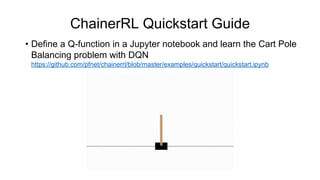
ChainerRL Quickstart Guide
• Define a Q-function in a Jupyter notebook and learn the Cart Pole
Balancing problem with DQN
https://github.com/pfnet/chainerrl/blob/master/examples/quickstart/quickstart.ipynb
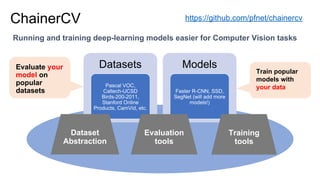
ChainerCV
Chainer + Computer Vision
Evaluate your
model on
popular
datasets
Running and training deep-learning models easier for Computer Vision tasks
ChainerCV https://github.com/pfnet/chainercv
Datasets
Pascal VOC,
Caltech-UCSD
Birds-200-2011,
Stanford Online
Products, CamVid, etc.
Models
Faster R-CNN, SSD,
SegNet (will add more
models!)
Training
tools
Evaluation
tools
Dataset
Abstraction
Train popular
models with
your data
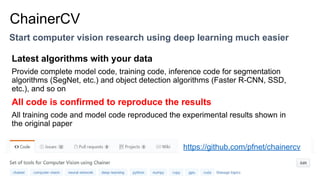
Start computer vision research using deep learning much easier
ChainerCV
Latest algorithms with your data
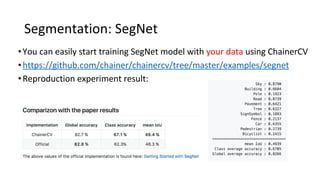
Provide complete model code, training code, inference code for segmentation
algorithms (SegNet, etc.) and object detection algorithms (Faster R-CNN, SSD,
etc.), and so on
All code is confirmed to reproduce the results
All training code and model code reproduced the experimental results shown in
the original paper
https://github.com/pfnet/chainercv
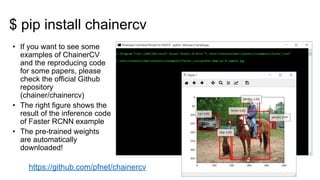
• If you want to see some
examples of ChainerCV
and the reproducing code
for some papers, please
check the official Github
repository
(chainer/chainercv)
• The right figure shows the
result of the inference code
of Faster RCNN example
• The pre-trained weights
are automatically
downloaded!
https://github.com/pfnet/chainercv
$ pip install chainercv
•
•
→
←
•
•
•
Intel Chainer
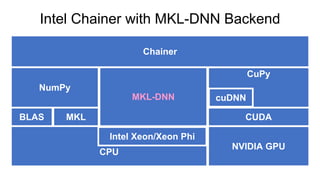
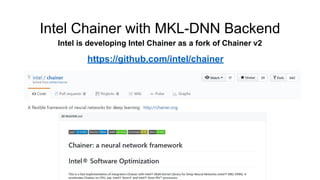
Intel Chainer with MKL-DNN Backend
CPU
CuPy
NVIDIA GPU
CUDA
cuDNN
BLAS
NumPy
Chainer
MKL-DNN
Intel Xeon/Xeon Phi
MKL
Intel Chainer with MKL-DNN Backend
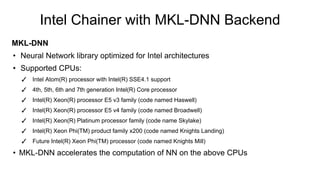
MKL-DNN
• Neural Network library optimized for Intel architectures
• Supported CPUs:
✓ Intel Atom(R) processor with Intel(R) SSE4.1 support
✓ 4th, 5th, 6th and 7th generation Intel(R) Core processor
✓ Intel(R) Xeon(R) processor E5 v3 family (code named Haswell)
✓ Intel(R) Xeon(R) processor E5 v4 family (code named Broadwell)
✓ Intel(R) Xeon(R) Platinum processor family (code name Skylake)
✓ Intel(R) Xeon Phi(TM) product family x200 (code named Knights Landing)

✓ Future Intel(R) Xeon Phi(TM) processor (code named Knights Mill)

• MKL-DNN accelerates the computation of NN on the above CPUs
Intel Chainer with MKL-DNN Backend
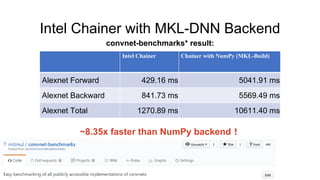
convnet-benchmarks* result:
Intel Chainer Chainer with NumPy (MKL-Build)
Alexnet Forward 429.16 ms 5041.91 ms
Alexnet Backward 841.73 ms 5569.49 ms
Alexnet Total 1270.89 ms 10611.40 ms
~8.35x faster than NumPy backend!
Intel Chainer with MKL-DNN Backend
Intel is developing Intel Chainer as a fork of Chainer v2
https://github.com/intel/chainer
Applications using Chainer
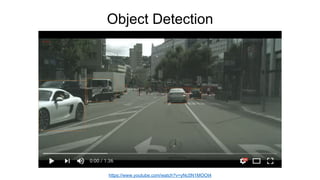
Object Detection
https://www.youtube.com/watch?v=yNc5N1MOOt4
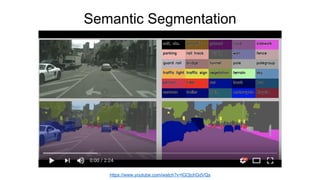
Semantic Segmentation
https://www.youtube.com/watch?v=lGOjchGdVQs
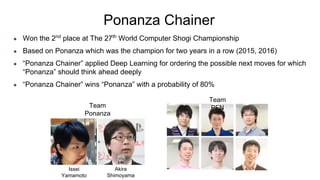
Ponanza Chainer
● Won the 2nd
place at The 27th
World Computer Shogi Championship
● Based on Ponanza which was the champion for two years in a row (2015, 2016)
● “Ponanza Chainer” applied Deep Learning for ordering the possible next moves for which
“Ponanza” should think ahead deeply
● “Ponanza Chainer” wins “Ponanza” with a probability of 80%
Team
PFN
Issei
Yamamoto
Akira
Shimoyama
Team
Ponanza
Paints Chainer
● Auto Sketch Colorization
● Train a neural network with
a large dataset of paintings
● It takes a line drawings as
input, and output a
colorized image!
● You can also give color hits
which indicates preferable
colors
https://paintschainer.preferred.tech
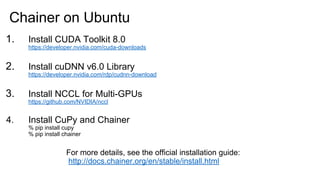
Installation of Chainer
1. Install CUDA Toolkit 8.0
https://developer.nvidia.com/cuda-downloads
2. Install cuDNN v6.0 Library
https://developer.nvidia.com/rdp/cudnn-download
3. Install NCCL for Multi-GPUs
https://github.com/NVIDIA/nccl
4. Install CuPy and Chainer
% pip install cupy
% pip install chainer
Chainer on Ubuntu
For more details, see the official installation guide:
http://docs.chainer.org/en/stable/install.html
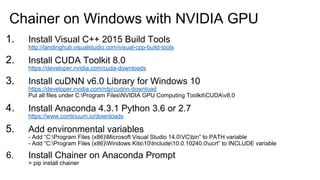
Chainer on Windows with NVIDIA GPU
1. Install Visual C++ 2015 Build Tools
http://landinghub.visualstudio.com/visual-cpp-build-tools
2. Install CUDA Toolkit 8.0
https://developer.nvidia.com/cuda-downloads
3. Install cuDNN v6.0 Library for Windows 10
https://developer.nvidia.com/rdp/cudnn-download
Put all files under C:Program FilesNVIDIA GPU Computing ToolkitCUDAv8.0
4. Install Anaconda 4.3.1 Python 3.6 or 2.7
https://www.continuum.io/downloads
5. Add environmental variables
- Add “C:Program Files (x86)Microsoft Visual Studio 14.0VCbin” to PATH variable
- Add “C:Program Files (x86)Windows Kits10Include10.0.10240.0ucrt” to INCLUDE variable
6. Install Chainer on Anaconda Prompt
> pip install chainer
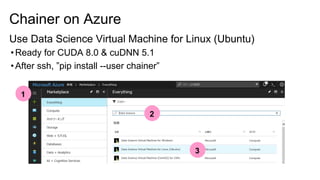
Chainer on Azure
Use Data Science Virtual Machine for Linux (Ubuntu)
•Ready for CUDA 8.0 & cuDNN 5.1
•After ssh, ”pip install --user chainer”
1
2
3
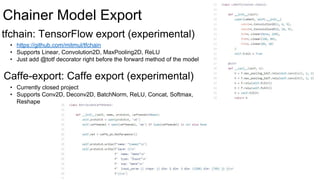
Chainer Model Export
tfchain: TensorFlow export (experimental)
Caffe-export: Caffe export (experimental)
• https://github.com/mitmul/tfchain
• Supports Linear, Convolution2D, MaxPooling2D, ReLU
• Just add @totf decorator right before the forward method of the model
• Currently closed project
• Supports Conv2D, Deconv2D, BatchNorm, ReLU, Concat, Softmax,
Reshape
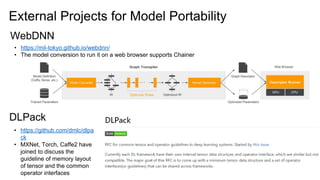
External Projects for Model Portability
DLPack
• https://mil-tokyo.github.io/webdnn/
• The model conversion to run it on a web browser supports Chainer
WebDNN
• https://github.com/dmlc/dlpa
ck
• MXNet, Torch, Caffe2 have
joined to discuss the
guideline of memory layout
of tensor and the common
operator interfaces
Companies supporting Chainer
Contributing to Chainer
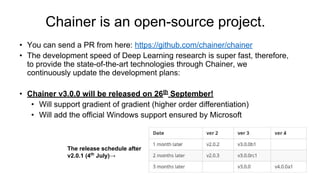
Chainer is an open-source project.
• You can send a PR from here: https://github.com/chainer/chainer
• The development speed of Deep Learning research is super fast, therefore,
to provide the state-of-the-art technologies through Chainer, we
continuously update the development plans:
• Chainer v3.0.0 will be released on 26th
September!
• Will support gradient of gradient (higher order differentiation)
• Will add the official Windows support ensured by Microsoft
The release schedule after
v2.0.1 (4th
July)→

Introduction to Chainer

  • 1.
    Last update: 28July, 2017
  • 2.
    Chainer – adeep learning framework Chainer provides a set of features required for research and development using deep learning such as designing neural networks, training, and evaluation. Designing a network Training, evaluation Data set
  • 3.
    Features and Characteristicsof Chainer Powerful ☑ CUDA ☑ cuDNN ☑ NCCL Versatile ☑ Convolutional Network ☑ Recurrent Network ☑ Many Other Components ☑ Various Optimizers Intuitive ☑ Define-by-Run ☑ High debuggability Supports GPU calculation using CUDA High-speed training/inference by cuDNN Supports a fast, multi-GPU learning using NCCL N-dimensional Convolution, Deconvolution, Pooling, BN, etc. RNN components such as LSTM, Bi-directional LSTM, GRU and Bi-directional GRU Many layer definitions and various loss functions used in neural networks Various optimizers, e.g., SGD, MomentumSGD, AdaGrad, RMSProp, Adam, etc. Easy to write a complicated network User-friendly error messages. Easy to debug using pure Python debuggers. Well-abstracted common tools for various NN learning, easy to write a set of learning flows☑ Simple APIs
  • 4.
  • 5.
    Neural network =Computational graph NN can be interpreted as a computational graph that applies many linear and nonlinear functions to input vectors
  • 6.
    How to handlea computational graph A definition of computational graph exists apart from code that performs computation according to the definition Static The actual code that performs computation is treated as a definition of computational graph Dynamic
  • 7.
    Chainer is thefirst deep-learning framework to adopt “Define-by-Run”* How about Chainer? → Dynamic ● Define-and-Run(static graph) Consists of two steps: first to build a computational graph, then feed data to the computational graph (Caffe, theano, TensorFlow, etc.) ● Define-by-Run(dynamic graph) Describing a forward-pass computation means to construct a computational graph for the backward computation (Chainer, DyNet, PyTorch, etc.) * autograd adopted Define-by-Run but it was not a framework for deep learning.
  • 8.
    Define-and-Run and Define-by-Run #Building x = Variable(‘x’) y = Variable(‘y’) z = x + 2 * y # Evaluation for xi, yi in data: eval(z, (xi, yi)) # Build, evaluate at the same time for xi, yi in data: x = Variable(xi) y = Variable(yi) z = x + 2 * y You can make a branch to change the forward computation depending on the data Define-and-Run Define-by-Run
  • 9.
    How to writea Convolutional Network import chainer import chainer.links as L import chainer.functions as F class LeNet5(chainer.Chain): def __init__(self): super(LeNet5, self).__init__() with self.init_scope(): self.conv1 = L.Convolution2D(1, 6, 5, 1) self.conv2 = L.Convolution2D(6, 16, 5, 1) self.conv3 = L.Convolution2D(16, 120, 4, 1) self.fc4 = L.Linear(None, 84) self.fc5 = L.Linear(84, 10) • Start writing a model by inheriting Chain class • Register parametric layers inside the init_scope • Write forward computation in __call__ method (no need to write backward computation) def __call__(self, x): h = F.sigmoid(self.conv1(x)) h = F.max_pooling_2d(h, 2, 2) h = F.sigmoid(self.conv2(h)) h = F.max_pooling_2d(h, 2, 2) h = F.sigmoid(self.conv3(h)) h = F.sigmoid(self.fc4(h)) return self.fc5(h)
  • 10.
    Training models model =LeNet5() model = L.Classifier(model) # Dataset is a list! ([] to access, having __len__) dataset = [(x1, t1), (x2, t2), ...] # iterator to return a mini-batch retrieved from dataset it = iterators.SerialIterator(dataset, batchsize=32) # Optimization methods (you can easily try various methods by changing SGD to # MomentumSGD, Adam, RMSprop, AdaGrad, etc.) opt = optimizers.SGD(lr=0.01) opt.setup(model) updater = training.StandardUpdater(it, opt, device=0) # device=-1 if you use CPU trainer = training.Trainer(updater, stop_trigger=(100, 'epoch')) trainer.run() For more details, refer to official examples: https://github.com/pfnet/chainer/tree/master/examples
  • 11.
    Define-by-Run brings flexibilityand intuitiveness “Forward computation” becomes a definition of network • Depending on data, it is easy to change a network structure • You can define a network itself by Python code =The network structure can be treated as a program instead of data. For Chainer, the “forward computation” can be written in Python • Enables you to write a network structure freely using the syntax of Python • Define-by-Run makes it easy to insert any process like putting a print statement between network computations (In case of define-and-run which compiles a network, this kind of debugging is difficult) • Easy to reuse code of the same network for other purposes with few changes (e.g. by just adding a conditional branch partially) • Easy to check intermediate values and the design of the network itself using external debugging tools etc.
  • 12.
    Chainer v2.0.1 Significantly reducedmemory consumption, organized API in response to the users feedback Aggressive Buffer Release to reduce the memory consumption during training→ CuPy has been released as an independent library. This allows for array operations using GPU via an interface highly compatible with NumPy. https://cupy.chainer.org https://chainer.org
  • 13.
    CuPy Independent library tohandle all GPU calculations in Chainer Lower cost to migrate CPU code to GPU with NumPy-compatible API GPU-execute linear algebra algorithms such as a singular value decomposition Rich in examples such as KMeans, Gaussian Mixture Model import numpy as np x = np.random.rand(10) W = np.random.rand(10, 5) y = np.dot(x, W) import cupy as cp x = cp.random.rand(10) W = cp.random.rand(10, 5) y = cp.dot(x, W) GPU https://github.com/cupy/cupy
  • 14.
    Add-on packages forChainer Distribute deep learning, deep reinforcement learning, computer vision ChainerMN (Multi-Node): additional package for distributed deep learning   High scalability (100 times faster with 128GPU) ChainerRL: deep reinforcement learning library   DQN, DDPG, A3C, ACER, NSQ, PCL, etc. OpenAI Gym support ChainerCV: provides image recognition algorithms, dataset wrappers   Faster R-CNN, Single Shot Multibox Detector (SSD), SegNet, etc.
  • 15.
  • 16.
    ChainerMN: Multi-node Keeping theeasy-to-use characteristics of Chainer as is, ChainerMN enables to use multiple nodes which have multiple GPUs easily to make training faster GPU GPU InfiniBand GPU GPU InfiniBand MPI NVIDIA NCCL
  • 17.
    Destributed deep learningwith ChainerMN 100x speed up with 128 GPUs
  • 18.
    Comparison with otherframeworks ChainerMN is the fastest at the comparison of elapsed time to train ResNet-50 on ImageNet dataset for 100 epochs (May 2017)
  • 19.
    We confirmed thatif we increase the number of nodes, the almost same accuracy can be achieved Speedup without dropping the accuracy
  • 20.
    Scale-out test onMicrosoft Azure
  • 21.
    Easy-to-use API ofChainerMN You can start using ChainerMN just by wrapping one line! optimizer = chainer.optimizers.MomentumSGD() optimizer = chainermn.DistributedOptimizer( chainer.optimizers.MomentumSGD())
  • 22.
    ARM template willbe announced soon https://github.com/mitmul/ARMTeamplate4ChainerMN ↑ Click this to make a master node ↑ Click this to make worker nodes
  • 23.
    Scaling via webinterface You can launch a scale-set of Azure instances super easily!
  • 24.
  • 25.
    Reinforcement Learning: ChainerRL: DeepReinforcement Learning Library Train an agent which interacts with the environment to maximize the rewards Action Env Observation, Reward
  • 26.
    Reinforcement Learning withChainerRL 1. Create an environment Action Env Observation, Reward
  • 27.
    Distribution: Softmax, Mellowmax,Gaussian,… Policy: Observation → Distribution of actions 2. Define an agent model Reinforcement Learning with ChainerRL
  • 28.
    2. Define anagent model (contd.) Q-Function: Observation → Value of each action (expectation of the sum of future rewards) ActionValue: Discrete, Quadratic Reinforcement Learning with ChainerRL
  • 29.
    Action Env Observation, Reward 3. Createan agent Reinforcement Learning with ChainerRL
  • 30.
    4. Interact withthe environment! Reinforcement Learning with ChainerRL
  • 31.
    Algorithms provided byChainerRL • Deep Q-Network (Mnih et al., 2015) • Double DQN (Hasselt et al., 2016) • Normalized Advantage Function (Gu et al., 2016) • (Persistent) Advantage Learning (Bellemare et al., 2016) • Deep Deterministic Policy Gradient (Lillicrap et al., 2016) • SVG(0) (Heese et al., 2015) • Asynchronous Advantage Actor-Critic (Mnih et al., 2016) • Asynchronous N-step Q-learning (Mnih et al., 2016) • Actor-Critic with Experience Replay (Wang et al., 2017) <- NEW! • Path Consistency Learning (Nachum et al., 2017) <- NEW! • etc.
  • 32.
    ChainerRL Quickstart Guide •Define a Q-function in a Jupyter notebook and learn the Cart Pole Balancing problem with DQN https://github.com/pfnet/chainerrl/blob/master/examples/quickstart/quickstart.ipynb
  • 33.
  • 34.
    Evaluate your model on popular datasets Runningand training deep-learning models easier for Computer Vision tasks ChainerCV https://github.com/pfnet/chainercv Datasets Pascal VOC, Caltech-UCSD Birds-200-2011, Stanford Online Products, CamVid, etc. Models Faster R-CNN, SSD, SegNet (will add more models!) Training tools Evaluation tools Dataset Abstraction Train popular models with your data
  • 35.
    Start computer visionresearch using deep learning much easier ChainerCV Latest algorithms with your data Provide complete model code, training code, inference code for segmentation algorithms (SegNet, etc.) and object detection algorithms (Faster R-CNN, SSD, etc.), and so on All code is confirmed to reproduce the results All training code and model code reproduced the experimental results shown in the original paper https://github.com/pfnet/chainercv
  • 36.
    • If youwant to see some examples of ChainerCV and the reproducing code for some papers, please check the official Github repository (chainer/chainercv) • The right figure shows the result of the inference code of Faster RCNN example • The pre-trained weights are automatically downloaded! https://github.com/pfnet/chainercv $ pip install chainercv
  • 37.
  • 38.
  • 39.
  • 40.
    Intel Chainer withMKL-DNN Backend CPU CuPy NVIDIA GPU CUDA cuDNN BLAS NumPy Chainer MKL-DNN Intel Xeon/Xeon Phi MKL
  • 41.
    Intel Chainer withMKL-DNN Backend MKL-DNN • Neural Network library optimized for Intel architectures • Supported CPUs: ✓ Intel Atom(R) processor with Intel(R) SSE4.1 support ✓ 4th, 5th, 6th and 7th generation Intel(R) Core processor ✓ Intel(R) Xeon(R) processor E5 v3 family (code named Haswell) ✓ Intel(R) Xeon(R) processor E5 v4 family (code named Broadwell) ✓ Intel(R) Xeon(R) Platinum processor family (code name Skylake) ✓ Intel(R) Xeon Phi(TM) product family x200 (code named Knights Landing) ✓ Future Intel(R) Xeon Phi(TM) processor (code named Knights Mill) • MKL-DNN accelerates the computation of NN on the above CPUs
  • 42.
    Intel Chainer withMKL-DNN Backend convnet-benchmarks* result: Intel Chainer Chainer with NumPy (MKL-Build) Alexnet Forward 429.16 ms 5041.91 ms Alexnet Backward 841.73 ms 5569.49 ms Alexnet Total 1270.89 ms 10611.40 ms ~8.35x faster than NumPy backend!
  • 43.
    Intel Chainer withMKL-DNN Backend Intel is developing Intel Chainer as a fork of Chainer v2 https://github.com/intel/chainer
  • 44.
  • 45.
  • 46.
  • 47.
    Ponanza Chainer ● Wonthe 2nd place at The 27th World Computer Shogi Championship ● Based on Ponanza which was the champion for two years in a row (2015, 2016) ● “Ponanza Chainer” applied Deep Learning for ordering the possible next moves for which “Ponanza” should think ahead deeply ● “Ponanza Chainer” wins “Ponanza” with a probability of 80% Team PFN Issei Yamamoto Akira Shimoyama Team Ponanza
  • 48.
    Paints Chainer ● AutoSketch Colorization ● Train a neural network with a large dataset of paintings ● It takes a line drawings as input, and output a colorized image! ● You can also give color hits which indicates preferable colors https://paintschainer.preferred.tech
  • 49.
  • 50.
    1. Install CUDAToolkit 8.0 https://developer.nvidia.com/cuda-downloads 2. Install cuDNN v6.0 Library https://developer.nvidia.com/rdp/cudnn-download 3. Install NCCL for Multi-GPUs https://github.com/NVIDIA/nccl 4. Install CuPy and Chainer % pip install cupy % pip install chainer Chainer on Ubuntu For more details, see the official installation guide: http://docs.chainer.org/en/stable/install.html
  • 51.
    Chainer on Windowswith NVIDIA GPU 1. Install Visual C++ 2015 Build Tools http://landinghub.visualstudio.com/visual-cpp-build-tools 2. Install CUDA Toolkit 8.0 https://developer.nvidia.com/cuda-downloads 3. Install cuDNN v6.0 Library for Windows 10 https://developer.nvidia.com/rdp/cudnn-download Put all files under C:Program FilesNVIDIA GPU Computing ToolkitCUDAv8.0 4. Install Anaconda 4.3.1 Python 3.6 or 2.7 https://www.continuum.io/downloads 5. Add environmental variables - Add “C:Program Files (x86)Microsoft Visual Studio 14.0VCbin” to PATH variable - Add “C:Program Files (x86)Windows Kits10Include10.0.10240.0ucrt” to INCLUDE variable 6. Install Chainer on Anaconda Prompt > pip install chainer
  • 52.
    Chainer on Azure UseData Science Virtual Machine for Linux (Ubuntu) •Ready for CUDA 8.0 & cuDNN 5.1 •After ssh, ”pip install --user chainer” 1 2 3
  • 53.
    Chainer Model Export tfchain:TensorFlow export (experimental) Caffe-export: Caffe export (experimental) • https://github.com/mitmul/tfchain • Supports Linear, Convolution2D, MaxPooling2D, ReLU • Just add @totf decorator right before the forward method of the model • Currently closed project • Supports Conv2D, Deconv2D, BatchNorm, ReLU, Concat, Softmax, Reshape
  • 54.
    External Projects forModel Portability DLPack • https://mil-tokyo.github.io/webdnn/ • The model conversion to run it on a web browser supports Chainer WebDNN • https://github.com/dmlc/dlpa ck • MXNet, Torch, Caffe2 have joined to discuss the guideline of memory layout of tensor and the common operator interfaces
  • 55.
  • 56.
  • 57.
  • 58.
    Chainer is anopen-source project. • You can send a PR from here: https://github.com/chainer/chainer • The development speed of Deep Learning research is super fast, therefore, to provide the state-of-the-art technologies through Chainer, we continuously update the development plans: • Chainer v3.0.0 will be released on 26th September! • Will support gradient of gradient (higher order differentiation) • Will add the official Windows support ensured by Microsoft The release schedule after v2.0.1 (4th July)→