Introduction to 
ICT/CALL 
*
ICT? CALL? 
* 
ICT 
(Information & Communication Technology) 
CALL 
(Computer-Assisted Language Learning) 
These two acronyms are used often in fields dealing with languages and technology. 
CALL specifically links computers and technology, whereas ICT includes the area 
of communication, though not specifically in language learning. However, whenever 
we use the acronym ICT, we are referring to ICT in language learning.
CALL? 
* 
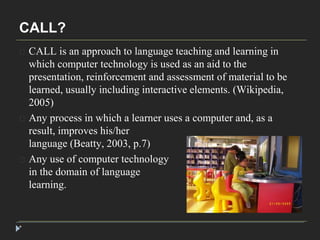
CALL is an approach to language teaching and learning in 
which computer technology is used as an aid to the 
presentation, reinforcement and assessment of material to be 
learned, usually including interactive elements. (Wikipedia, 
2005) 
Any process in which a learner uses a computer and, as a 
result, improves his/her 
language (Beatty, 2003, p.7) 
Any use of computer technology 
in the domain of language 
learning.
CALL? 
* 
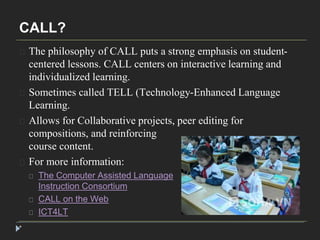
The philosophy of CALL puts a strong emphasis on student-centered 
lessons. CALL centers on interactive learning and 
individualized learning. 
Sometimes called TELL (Technology-Enhanced Language 
Learning. 
Allows for Collaborative projects, peer editing for 
compositions, and reinforcing 
course content. 
For more information: 
The Computer Assisted Language 
Instruction Consortium 
CALL on the Web 
ICT4LT
CALL programs 
* 
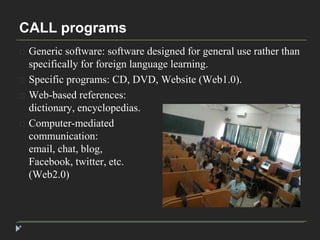
Generic software: software designed for general use rather than 
specifically for foreign language learning. 
Specific programs: CD, DVD, Website (Web1.0). 
Web-based references: 
dictionary, encyclopedias. 
Computer-mediated 
communication: 
email, chat, blog, 
Facebook, twitter, etc. 
(Web2.0)
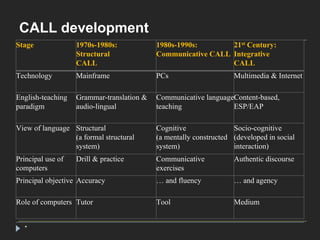
CALL development 
Stage 1970s-1980s: 
* 
Structural 
CALL 
1980s-1990s: 
Communicative CALL 
21st Century: 
Integrative 
CALL 
Technology Mainframe PCs Multimedia & Internet 
English-teaching 
paradigm 
Grammar-translation & 
audio-lingual 
Communicative language 
teaching 
Content-based, 
ESP/EAP 
View of language Structural 
(a formal structural 
system) 
Cognitive 
(a mentally constructed 
system) 
Socio-cognitive 
(developed in social 
interaction) 
Principal use of 
computers 
Drill & practice Communicative 
exercises 
Authentic discourse 
Principal objective Accuracy … and fluency … and agency 
Role of computers Tutor Tool Medium
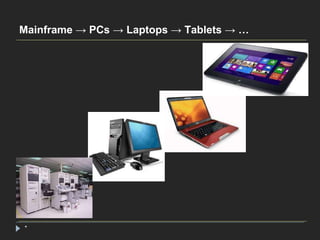
Mainframe → PCs → Laptops → Tablets → … 
*
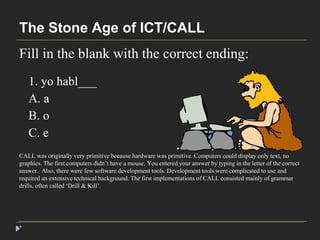
The Stone Age of ICT/CALL 
Fill in the blank with the correct ending: 
* 
1. yo habl___ 
A. a 
B. o 
C. e 
CALL was originally very primitive because hardware was primitive. Computers could display only text, no 
graphics. The first computers didn’t have a mouse, You entered your answer by typing in the letter of the correct 
answer. Also, there were few software development tools. Development tools were complicated to use and 
required an extensive technical background. The first implementations of CALL consisted mainly of grammar 
drills, often called ‘Drill & Kill’.
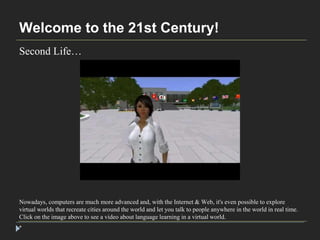
Welcome to the 21st Century! 
Second Life… 
Nowadays, computers are much more advanced and, with the Internet & Web, it's even possible to explore 
virtual worlds that recreate cities around the world and let you talk to people anywhere in the world in real time. 
Click on the image above to see a video about language learning in a virtual world. 
*
Some Random Things You Should Know 
About ICT/CALL 
When it comes to technology, things are always 
changing, and they always will. 
For this reason, you need to always be working at keeping up to date. You will often have to relearn old skills 
because of new tools or methods. Attend conferences and webinars. Google keywords to find Web sites that deal 
with relevant topics. Join professional organizations (see our Moodle site for a list) and read professional 
Journals (also listed on our Moodle site). 
*
Some Random Things You Should Know 
About ICT/CALL 
The most important skill in CALL is learning 
how to figure things out on your own. 
Autonomous learning!!!!!!!!!!! 
You will eventually reach a level of expertise where there are few people who can help you solve problems. It’s 
more likely that other people will turn to you for help. You have to develop trouble-shooting skills. For example, 
use HELP features found in software. These often include tutorials. Use a search engine to find information or 
tutorials. Check YouTube for tutorials. 
*
Some Random Things You Should Know 
About ICT/CALL 
Find out where to go or whom to ask to get the 
info that you need. 
You may have to go to many 
places and ask many people 
before you get the answer. 
By networking with other professionals, you can find the ones who can help you in certain areas. Check out 
online forums. You can find them using a search engine. Type in the word ‘forums’ and then enter the topic 
(forums powerpoint) 
*
Some Random Things You Should Know 
About ICT/CALL 
- Check the HELP features! 
- Use Google 
- Use YouTube 
- Search for Forums 
Learn how to use Google and other search engines in a methodical way. If you're looking for a particular 
phrase, use quotation marks. The two entries below will give you different results: 
computer language vs "computer language" 
*
Some Random Things You Should Know 
About ICT/CALL 
ICT / CALL requires a high tolerance for 
frustration! $#@&!! 
Whenever you work with technology, you can’t assume that things will always work the way they’re supposed 
to or the way you think they should. If you have a problem, try to break the problem down into small parts and 
then work on each part. Sometimes you just have to shut down the computer or quit the software and start up 
again. Sometimes the problem is the result of software bugs or viruses or hardware incompatibilities. Sometimes 
the problem exists because of knowledge gaps. Sometimes you’re just too tired to see things clearly. In that case, 
quit what you’re doing and get some sleep. The rest will make a difference. 
*
Some Random Things You Should Know 
About ICT/CALL 
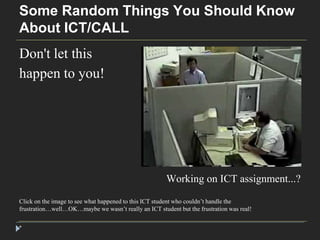
Don't let this 
happen to you! 
* 
Working on ICT assignment...? 
Click on the image to see what happened to this ICT student who couldn’t handle the 
frustration…well…OK…maybe we wasn’t really an ICT student but the frustration was real!
Some Random Things You Should Know 
About ICT/CALL 
* 
GOOGLE & YouTube are your best friends. 
(Well, maybe 2nd & 3rd best friends) 
That’s the third time I’ve mentioned this so it must be important! In short, the answer is out there. It may take 
time to find it but your Web mining skills may be the only resource you have for getting the information that 
you’re looking for.
Some Random Things You Should Know 
About ICT/CALL 
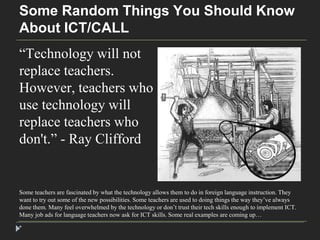
“Technology will not 
replace teachers. 
However, teachers who 
use technology will 
replace teachers who 
don't.” - Ray Clifford 
Some teachers are fascinated by what the technology allows them to do in foreign language instruction. They 
want to try out some of the new possibilities. Some teachers are used to doing things the way they’ve always 
done them. Many feel overwhelmed by the technology or don’t trust their tech skills enough to implement ICT. 
Many job ads for language teachers now ask for ICT skills. Some real examples are coming up… 
*
Some Random Things You Should Know 
About ICT/CALL 
“If you don't use PEDAGOGICAL CREATIVITY in CALL, 
all the technology in the world isn't going to serve you 
(or your students).” - Thom Thibeault 
I 
can’t overemphasize this. You can master the technology but your pedagogical creativity allows you to find 
innovative ways of implementing it…ways that will enrich the learning experience of your students. Most 
CALL technology is not generally ready to use out of the box. That’s why you have to think outside the box 
when preparing CALL materials for your students. 
*
Some Random Things You Should Know 
About ICT/CALL 
* 
Don’t use new technology with old paradigms!
Different ways to implement ICT/CALL 
* 
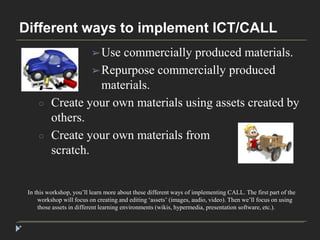
➢Use commercially produced materials. 
➢Repurpose commercially produced 
materials. 
○ Create your own materials using assets created by 
others. 
○ Create your own materials from 
scratch. 
In this workshop, you’ll learn more about these different ways of implementing CALL. The first part of the 
workshop will focus on creating and editing ‘assets’ (images, audio, video). Then we’ll focus on using 
those assets in different learning environments (wikis, hypermedia, presentation software, etc.).
Creating & editing assets 
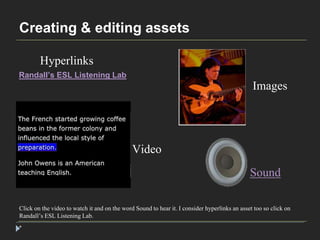
Hyperlinks 
Click on the video to watch it and on the word Sound to hear it. I consider hyperlinks an asset too so click on 
Randall’s ESL Listening Lab. 
* 
Images 
Video 
Sound 
Randall’s ESL Listening Lab
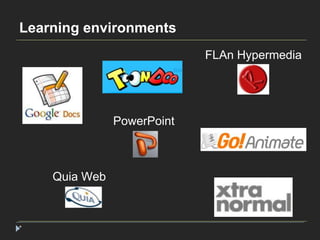
Learning environments 
* 
PowerPoint 
Quia Web 
FLAn Hypermedia
Online resources 
*

Introduction to CALL

  • 1.
  • 2.
    ICT? CALL? * ICT (Information & Communication Technology) CALL (Computer-Assisted Language Learning) These two acronyms are used often in fields dealing with languages and technology. CALL specifically links computers and technology, whereas ICT includes the area of communication, though not specifically in language learning. However, whenever we use the acronym ICT, we are referring to ICT in language learning.
  • 3.
    CALL? * CALLis an approach to language teaching and learning in which computer technology is used as an aid to the presentation, reinforcement and assessment of material to be learned, usually including interactive elements. (Wikipedia, 2005) Any process in which a learner uses a computer and, as a result, improves his/her language (Beatty, 2003, p.7) Any use of computer technology in the domain of language learning.
  • 4.
    CALL? * Thephilosophy of CALL puts a strong emphasis on student-centered lessons. CALL centers on interactive learning and individualized learning. Sometimes called TELL (Technology-Enhanced Language Learning. Allows for Collaborative projects, peer editing for compositions, and reinforcing course content. For more information: The Computer Assisted Language Instruction Consortium CALL on the Web ICT4LT
  • 5.
    CALL programs * Generic software: software designed for general use rather than specifically for foreign language learning. Specific programs: CD, DVD, Website (Web1.0). Web-based references: dictionary, encyclopedias. Computer-mediated communication: email, chat, blog, Facebook, twitter, etc. (Web2.0)
  • 6.
    CALL development Stage1970s-1980s: * Structural CALL 1980s-1990s: Communicative CALL 21st Century: Integrative CALL Technology Mainframe PCs Multimedia & Internet English-teaching paradigm Grammar-translation & audio-lingual Communicative language teaching Content-based, ESP/EAP View of language Structural (a formal structural system) Cognitive (a mentally constructed system) Socio-cognitive (developed in social interaction) Principal use of computers Drill & practice Communicative exercises Authentic discourse Principal objective Accuracy … and fluency … and agency Role of computers Tutor Tool Medium
  • 7.
    Mainframe → PCs→ Laptops → Tablets → … *
  • 8.
    The Stone Ageof ICT/CALL Fill in the blank with the correct ending: * 1. yo habl___ A. a B. o C. e CALL was originally very primitive because hardware was primitive. Computers could display only text, no graphics. The first computers didn’t have a mouse, You entered your answer by typing in the letter of the correct answer. Also, there were few software development tools. Development tools were complicated to use and required an extensive technical background. The first implementations of CALL consisted mainly of grammar drills, often called ‘Drill & Kill’.
  • 9.
    Welcome to the21st Century! Second Life… Nowadays, computers are much more advanced and, with the Internet & Web, it's even possible to explore virtual worlds that recreate cities around the world and let you talk to people anywhere in the world in real time. Click on the image above to see a video about language learning in a virtual world. *
  • 10.
    Some Random ThingsYou Should Know About ICT/CALL When it comes to technology, things are always changing, and they always will. For this reason, you need to always be working at keeping up to date. You will often have to relearn old skills because of new tools or methods. Attend conferences and webinars. Google keywords to find Web sites that deal with relevant topics. Join professional organizations (see our Moodle site for a list) and read professional Journals (also listed on our Moodle site). *
  • 11.
    Some Random ThingsYou Should Know About ICT/CALL The most important skill in CALL is learning how to figure things out on your own. Autonomous learning!!!!!!!!!!! You will eventually reach a level of expertise where there are few people who can help you solve problems. It’s more likely that other people will turn to you for help. You have to develop trouble-shooting skills. For example, use HELP features found in software. These often include tutorials. Use a search engine to find information or tutorials. Check YouTube for tutorials. *
  • 12.
    Some Random ThingsYou Should Know About ICT/CALL Find out where to go or whom to ask to get the info that you need. You may have to go to many places and ask many people before you get the answer. By networking with other professionals, you can find the ones who can help you in certain areas. Check out online forums. You can find them using a search engine. Type in the word ‘forums’ and then enter the topic (forums powerpoint) *
  • 13.
    Some Random ThingsYou Should Know About ICT/CALL - Check the HELP features! - Use Google - Use YouTube - Search for Forums Learn how to use Google and other search engines in a methodical way. If you're looking for a particular phrase, use quotation marks. The two entries below will give you different results: computer language vs "computer language" *
  • 14.
    Some Random ThingsYou Should Know About ICT/CALL ICT / CALL requires a high tolerance for frustration! $#@&!! Whenever you work with technology, you can’t assume that things will always work the way they’re supposed to or the way you think they should. If you have a problem, try to break the problem down into small parts and then work on each part. Sometimes you just have to shut down the computer or quit the software and start up again. Sometimes the problem is the result of software bugs or viruses or hardware incompatibilities. Sometimes the problem exists because of knowledge gaps. Sometimes you’re just too tired to see things clearly. In that case, quit what you’re doing and get some sleep. The rest will make a difference. *
  • 15.
    Some Random ThingsYou Should Know About ICT/CALL Don't let this happen to you! * Working on ICT assignment...? Click on the image to see what happened to this ICT student who couldn’t handle the frustration…well…OK…maybe we wasn’t really an ICT student but the frustration was real!
  • 16.
    Some Random ThingsYou Should Know About ICT/CALL * GOOGLE & YouTube are your best friends. (Well, maybe 2nd & 3rd best friends) That’s the third time I’ve mentioned this so it must be important! In short, the answer is out there. It may take time to find it but your Web mining skills may be the only resource you have for getting the information that you’re looking for.
  • 17.
    Some Random ThingsYou Should Know About ICT/CALL “Technology will not replace teachers. However, teachers who use technology will replace teachers who don't.” - Ray Clifford Some teachers are fascinated by what the technology allows them to do in foreign language instruction. They want to try out some of the new possibilities. Some teachers are used to doing things the way they’ve always done them. Many feel overwhelmed by the technology or don’t trust their tech skills enough to implement ICT. Many job ads for language teachers now ask for ICT skills. Some real examples are coming up… *
  • 18.
    Some Random ThingsYou Should Know About ICT/CALL “If you don't use PEDAGOGICAL CREATIVITY in CALL, all the technology in the world isn't going to serve you (or your students).” - Thom Thibeault I can’t overemphasize this. You can master the technology but your pedagogical creativity allows you to find innovative ways of implementing it…ways that will enrich the learning experience of your students. Most CALL technology is not generally ready to use out of the box. That’s why you have to think outside the box when preparing CALL materials for your students. *
  • 19.
    Some Random ThingsYou Should Know About ICT/CALL * Don’t use new technology with old paradigms!
  • 20.
    Different ways toimplement ICT/CALL * ➢Use commercially produced materials. ➢Repurpose commercially produced materials. ○ Create your own materials using assets created by others. ○ Create your own materials from scratch. In this workshop, you’ll learn more about these different ways of implementing CALL. The first part of the workshop will focus on creating and editing ‘assets’ (images, audio, video). Then we’ll focus on using those assets in different learning environments (wikis, hypermedia, presentation software, etc.).
  • 21.
    Creating & editingassets Hyperlinks Click on the video to watch it and on the word Sound to hear it. I consider hyperlinks an asset too so click on Randall’s ESL Listening Lab. * Images Video Sound Randall’s ESL Listening Lab
  • 22.
    Learning environments * PowerPoint Quia Web FLAn Hypermedia
  • 23.