Integrative CALL
• Steps toward integrative CALL:
• Multimedia
• Internet
• Typology of CALL programs and
applications (integrated CALL)
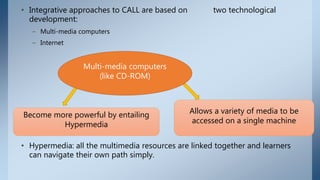
• Integrative approaches to CALL are based on two technological
development:
– Multi-media computers
– Internet
• Hypermedia: all the multimedia resources are linked together and learners
can navigate their own path simply.
Multi-media computers
(like CD-ROM)
Allows a variety of media to be
accessed on a single machine
Become more powerful by entailing
Hypermedia
Advantages of
hypermedia
1. Creation of a more authentic learning
environment (listening is combined with
seeing)
2. Easy integration of skills (variety of media, make the
combination of 4 skills natural in one activity)
3. Great control of students over their learning
(they go on their pace + on their individual path
+ going forward and backward + …)
4. Facilitation a principle focus on the content, without
loosing a secondary focus on language form or learning
strateggies
Disadvantages of multimedia
There is the question of quality of available programs. Most classroom teachers lack the
training to make simple program.
• Today's computer programs are not yet intelligent enough to be truly interactive.
• Program should be able to diagnose a student's problem with pronunciation, syntax,...
and decide options.
• There is no computer with this degree of intelligence.
• Artificial intelligence exist, but there is lack of funds for English classroom research.
Mutimedia technology as it currently exist, only partially contributes to integration CALL.
an example of how hypermedia can be used
for language learning
it is a simulation of a student arriving at the United
States airport.
developed by The Institute for Learning
Sciences at Northwestern University
the student must go through customs,
find transportation to the city and check in
at a hotel
At any time, the students can control the situation by:
- Asking what to do and what to say
- Asking to hear what was said
- Requesting for translation
- Controlling the level of difficulty of the lesson
Program Dustin
Dustin is an example of a simple simulator built to help
students learn a foreign language through learning by doing
Steps toward integrative CALL: Internet
• Computer-mediated communication (CMC) is probably the single
computer application to date with the greatest impact on language
teaching.
• Communication can be:
– Asynchronous (not- simultaneous): Through tools such as electronic mail
– Synchronous (real-time): Using programs such as MOOs allows people all around
the world to have a simultaneous conversation by typing at their keyboard.
• Another advantage of a CMC: allows users to share brief and
lengthy messages or documents.
• CMC facilitate collaborative writing, graphics,... .
Typology of CALL programs and
applications (Integrated CALL)
*** Collaborative writing
• The most popular tool among teachers 
Daedalus Integrated Writing Environment
(include module for real-time discussion + word
processing + electronic mail + brainstorming +
citation software +dictionary)
• Aspects
• MacCollaborator
• *** Reference:
– CD versions of encyclopedias and dictionaries:
– Encyclopedia ENCARTA
– Longman dictionary of American English.
• ***Internet:
– Email:
– Elm
– Pine
– Eudora program:
– Eudora Light (free version)
– Eudora Pro (commercial version)
– World Wide Web:
– Browsers:
– Netscape
– MOOs (multi-user domains object-oriented): allows for real time communication, simulation a role-playing of participants.
– some client software programs:
– TinyFugue (unix)
– MUDD weller (Mac)
– MUDwin (windows)
• Authoring:
• It allows the teachers to tailor software programs either by inserting
new text or by modifying the activities.
– Some of these programs  (allows teachers to insert their own text and make
program more relevant to their lesson):
– MacReader- Eclipse- Gapmaster- SuperCloze- TextTangles- Double Up
• Sometimes authoring system allows teachers to design their own
multimedia courseware.
• Some are designed for:
– language teachers (CALIS-DASHER)
– educator (Digital Chiseler)
– general Public (HyperCard- HyperStudio- SuperCard- ToolBook- Macromind-
Director)
Characteristics of integrated CALL:
• Technology  multimedia - internet
• English teaching paradigm  content-based, ESP/EAP
• View of language  socio-cognitive (developed in social interaction)
•
• Principal use of computers  authentic discourse
• Principal objective  accuracy + fluency + agency
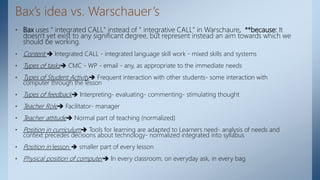
Bax’s idea vs. Warschauer’s
• Bax uses " integrated CALL" instead of " integrative CALL" in Warschaure, **because: It
doesn't yet exist to any significant degree, but represent instead an aim towards which we
should be working.
• Content  Integrated CALL - integrated language skill work - mixed skills and systems
• Types of tasks CMC - WP - email - any, as appropriate to the immediate needs
• Types of Student Activity Frequent interaction with other students- some interaction with
computer through the lesson
• Types of feedback Interpreting- evaluating- commenting- stimulating thought
• Teacher Role Facilitator- manager
• Teacher attitude Normal part of teaching (normalized)
• Position in curriculum Tools for learning are adapted to Learners need- analysis of needs and
context precedes decisions about technology- normalized integrated into syllabus
• Position in lesson  smaller part of every lesson
• Physical position of computer In every classroom, on everyday ask, in every bag
Integrated CALL and Normalization
• The clearest way of defining the end goal of CALL, is through the concept
of normalization.
• Normalization:
– Is relevant to any kinds of technological innovation
– It refers to the stage when their technology becomes invisible, embedded in
everyday practice and hence normalized.
• One criteria for successful CALL's integration: It ceases to exist as a
separate concept and field for discussion.
Stages of normalization in CALL:
1. Early adopters: A few teachers and schools adopt the technology out of curiosity
2. Ignorance/ skepticisms: Most people are skeptical or ignorant of its existence
3. Try once: people try it out, but reject it because of early problems. they can't see its
value.
4. Try again: Someone tells them it really works. They try again and see its value
(relative advantage)
5. Fear/awe: More people start to use it but still there is (a) fear, alternating with (b)
exaggerated expectation.
6. Normalizing: Gradually it is seen as something normal.
7. Normalization: The technology is so integrated into our lives that it becomes
invisible-" normalized"
The End
Thank you…

Integrative CALL.pptx

  • 1.
    Integrative CALL • Stepstoward integrative CALL: • Multimedia • Internet • Typology of CALL programs and applications (integrated CALL)
  • 2.
    • Integrative approachesto CALL are based on two technological development: – Multi-media computers – Internet • Hypermedia: all the multimedia resources are linked together and learners can navigate their own path simply. Multi-media computers (like CD-ROM) Allows a variety of media to be accessed on a single machine Become more powerful by entailing Hypermedia
  • 3.
    Advantages of hypermedia 1. Creationof a more authentic learning environment (listening is combined with seeing) 2. Easy integration of skills (variety of media, make the combination of 4 skills natural in one activity) 3. Great control of students over their learning (they go on their pace + on their individual path + going forward and backward + …) 4. Facilitation a principle focus on the content, without loosing a secondary focus on language form or learning strateggies
  • 4.
    Disadvantages of multimedia Thereis the question of quality of available programs. Most classroom teachers lack the training to make simple program. • Today's computer programs are not yet intelligent enough to be truly interactive. • Program should be able to diagnose a student's problem with pronunciation, syntax,... and decide options. • There is no computer with this degree of intelligence. • Artificial intelligence exist, but there is lack of funds for English classroom research. Mutimedia technology as it currently exist, only partially contributes to integration CALL.
  • 5.
    an example ofhow hypermedia can be used for language learning it is a simulation of a student arriving at the United States airport. developed by The Institute for Learning Sciences at Northwestern University the student must go through customs, find transportation to the city and check in at a hotel At any time, the students can control the situation by: - Asking what to do and what to say - Asking to hear what was said - Requesting for translation - Controlling the level of difficulty of the lesson Program Dustin Dustin is an example of a simple simulator built to help students learn a foreign language through learning by doing
  • 6.
    Steps toward integrativeCALL: Internet • Computer-mediated communication (CMC) is probably the single computer application to date with the greatest impact on language teaching. • Communication can be: – Asynchronous (not- simultaneous): Through tools such as electronic mail – Synchronous (real-time): Using programs such as MOOs allows people all around the world to have a simultaneous conversation by typing at their keyboard. • Another advantage of a CMC: allows users to share brief and lengthy messages or documents. • CMC facilitate collaborative writing, graphics,... .
  • 7.
    Typology of CALLprograms and applications (Integrated CALL) *** Collaborative writing • The most popular tool among teachers  Daedalus Integrated Writing Environment (include module for real-time discussion + word processing + electronic mail + brainstorming + citation software +dictionary) • Aspects • MacCollaborator
  • 8.
    • *** Reference: –CD versions of encyclopedias and dictionaries: – Encyclopedia ENCARTA – Longman dictionary of American English. • ***Internet: – Email: – Elm – Pine – Eudora program: – Eudora Light (free version) – Eudora Pro (commercial version) – World Wide Web: – Browsers: – Netscape – MOOs (multi-user domains object-oriented): allows for real time communication, simulation a role-playing of participants. – some client software programs: – TinyFugue (unix) – MUDD weller (Mac) – MUDwin (windows)
  • 9.
    • Authoring: • Itallows the teachers to tailor software programs either by inserting new text or by modifying the activities. – Some of these programs  (allows teachers to insert their own text and make program more relevant to their lesson): – MacReader- Eclipse- Gapmaster- SuperCloze- TextTangles- Double Up • Sometimes authoring system allows teachers to design their own multimedia courseware. • Some are designed for: – language teachers (CALIS-DASHER) – educator (Digital Chiseler) – general Public (HyperCard- HyperStudio- SuperCard- ToolBook- Macromind- Director)
  • 10.
    Characteristics of integratedCALL: • Technology  multimedia - internet • English teaching paradigm  content-based, ESP/EAP • View of language  socio-cognitive (developed in social interaction) • • Principal use of computers  authentic discourse • Principal objective  accuracy + fluency + agency
  • 11.
    Bax’s idea vs.Warschauer’s • Bax uses " integrated CALL" instead of " integrative CALL" in Warschaure, **because: It doesn't yet exist to any significant degree, but represent instead an aim towards which we should be working. • Content  Integrated CALL - integrated language skill work - mixed skills and systems • Types of tasks CMC - WP - email - any, as appropriate to the immediate needs • Types of Student Activity Frequent interaction with other students- some interaction with computer through the lesson • Types of feedback Interpreting- evaluating- commenting- stimulating thought • Teacher Role Facilitator- manager • Teacher attitude Normal part of teaching (normalized) • Position in curriculum Tools for learning are adapted to Learners need- analysis of needs and context precedes decisions about technology- normalized integrated into syllabus • Position in lesson  smaller part of every lesson • Physical position of computer In every classroom, on everyday ask, in every bag
  • 12.
    Integrated CALL andNormalization • The clearest way of defining the end goal of CALL, is through the concept of normalization. • Normalization: – Is relevant to any kinds of technological innovation – It refers to the stage when their technology becomes invisible, embedded in everyday practice and hence normalized. • One criteria for successful CALL's integration: It ceases to exist as a separate concept and field for discussion.
  • 13.
    Stages of normalizationin CALL: 1. Early adopters: A few teachers and schools adopt the technology out of curiosity 2. Ignorance/ skepticisms: Most people are skeptical or ignorant of its existence 3. Try once: people try it out, but reject it because of early problems. they can't see its value. 4. Try again: Someone tells them it really works. They try again and see its value (relative advantage) 5. Fear/awe: More people start to use it but still there is (a) fear, alternating with (b) exaggerated expectation. 6. Normalizing: Gradually it is seen as something normal. 7. Normalization: The technology is so integrated into our lives that it becomes invisible-" normalized"
  • 14.