Difference between CAD and BIM
Revit course
Faculty of fine arts - Architecture department
Name : Mariem Badr Hussien
Number : 149
Group : G - 6
Introduction
Now buildings are more complex than ever before, because today we have more telecom,
security, electrical, data and energy requirements. Earlier documentation sets were hundreds of
pages long. People who touched these sets of drawings had become huge, because they had to
produce them, evaluate them or use them to build the building. But the computer-based
technology has replaced pen and paper. Drawing and editing lines is faster and more efficient.
But these lines and text are not intelligent lines and text. They are still collections of manually
created.
Computer-aided design(CAD)
Computer-aided design (CAD) is the use of computer
technology for the design of real and virtual objects.
CAD is 2D technology that outputs a collection of lines
and text on a page. These lines have no inherent
meaning in the computer or on the printed sheet. Of
course, CAD has its advantages over pen and paper, but
it is still a digital modeling of the act of drafting. This
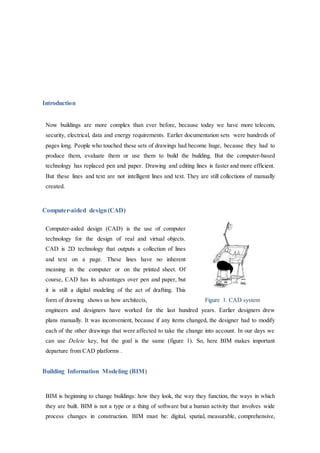
form of drawing shows us how architects, Figure 1. CAD system
engineers and designers have worked for the last hundred years. Earlier designers drew
plans manually. It was inconvenient, because if any items changed, the designer had to modify
each of the other drawings that were affected to take the change into account. In our days we
can use Delete key, but the goal is the same (figure 1). So, here BIM makes important
departure from CAD platforms .
Building Information Modeling (BIM)
BIM is beginning to change buildings: how they look, the way they function, the ways in which
they are built. BIM is not a type or a thing of software but a human activity that involves wide
process changes in construction. BIM must be: digital, spatial, measurable, comprehensive,
accessible and durable. In BIM all elements are loaded with data that describe not only
geometry, bur also material, fire rating, cost, manufacturer, count, and just about any other
metadata you can imagine.
Now we can have all disciplines involved with a project sharing a single database:
 Architecture, structure, mechanical, infrastructure and construction now can be
coordinate in ways, not to be together.
 Models can now be sent directly to fabrication machines.
 Energy analysis can be done at the outset of design.
 Construction costsare becoming more predictable.
BIM regards how designers and constructors look at the all building process: from
preliminary design through construction documentation, into actual construction and even into
postconstruction building management. With BIM usual 3D model is used to generate
traditional building abstractions: plans, sections, details, elevations and schedules. Drawings
produced using BIM are not just collections of lines and coordinates but interactive view of a
model.
A work with a model-based framework is easier and very convenient because it
guarantees that a change in one view will propagate to all other views of the model. If you
remove a window from the model, it simultaneously is removed from all views and your
window schedule is updated. If you move elements in plan, they change in elevation and
section.
How BIM is different from CAD
The biggest difference between BIM and CAD
is that a CAD system, especially 2D, uses many
separate documents to explain a building. For
example, the wall view is represented with two
parallel lines, and we can’t understand that those
lines represent the same wall in a section. BIM
assembles all information into one location. It
is a centralized database model. In the BIM all
documents are interdependent and share
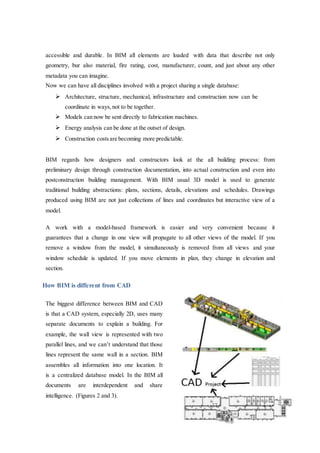
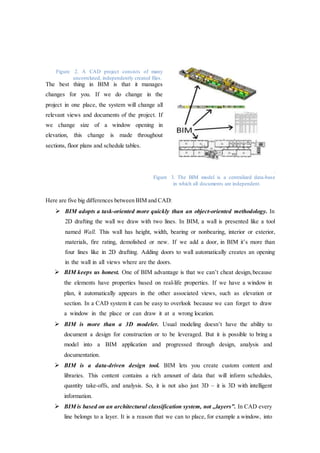
intelligence. (Figures 2 and 3).
Figure 2. A CAD project consists of many
uncorrelated, independently created files.
The best thing in BIM is that it manages
changes for you. If we do change in the
project in one place, the system will change all
relevant views and documents of the project. If
we change size of a window opening in
elevation, this change is made throughout
sections, floor plans and schedule tables.
.
Figure 3. The BIM model is a centralized data-base
in which all documents are independent.
Here are five big differences between BIM and CAD:
 BIM adopts a task-oriented more quickly than an object-oriented methodology. In
2D drafting the wall we draw with two lines. In BIM, a wall is presented like a tool
named Wall. This wall has height, width, bearing or nonbearing, interior or exterior,
materials, fire rating, demolished or new. If we add a door, in BIM it’s more than
four lines like in 2D drafting. Adding doors to wall automatically creates an opening
in the wall in all views where are the doors.
 BIM keeps us honest. One of BIM advantage is that we can’t cheat design, because
the elements have properties based on real-life properties. If we have a window in
plan, it automatically appears in the other associated views, such as elevation or
section. In a CAD system it can be easy to overlook because we can forget to draw
a window in the place or can draw it at a wrong location.
 BIM is more than a 3D modeler. Usual modeling doesn’t have the ability to
document a design for construction or to be leveraged. But it is possible to bring a
model into a BIM application and progressed through design, analysis and
documentation.
 BIM is a data-driven design tool. BIM lets you create custom content and
libraries. This content contains a rich amount of data that will inform schedules,
quantity take-offs, and analysis. So, it is not also just 3D – it is 3D with intelligent
information.
 BIM is based on an architectural classification system, not ,,layers”. In CAD every
line belongs to a layer. It is a reason that we can to place, for example a window, into
not correct layer. For example, in Revit, there is no way to accidentally place a
window into ‘wall’ layer.
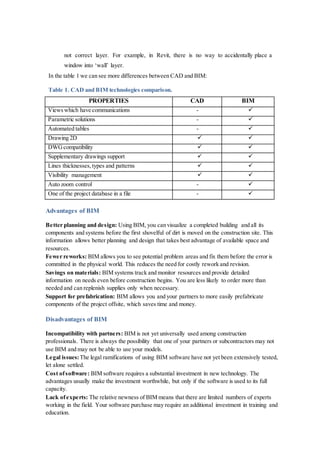
In the table 1 we can see more differences between CAD and BIM:
Table 1. CAD and BIM technologies comparison.
PROPERTIES CAD BIM
Viewswhich have communications - 
Parametric solutions - 
Automated tables - 
Drawing 2D  
DWGcompatibility  
Supplementary drawings support  
Lines thicknesses, types and patterns  
Visibility management  
Auto zoom control - 
One of the project database in a file - 
Advantages of BIM
Better planning and design: Using BIM, you can visualize a completed building and all its
components and systems before the first shovelful of dirt is moved on the construction site. This
information allows better planning and design that takes best advantage of available space and
resources.
Fewer reworks: BIM allows you to see potential problem areas and fix them before the error is
committed in the physical world. This reduces the need for costly rework and revision.
Savings on materials: BIM systems track and monitor resources and provide detailed
information on needs even before construction begins. You are less likely to order more than
needed and can replenish supplies only when necessary.
Support for prefabrication: BIM allows you and your partners to more easily prefabricate
components of the project offsite, which saves time and money.
Disadvantages of BIM
Incompatibility with partners: BIM is not yet universally used among construction
professionals. There is always the possibility that one of your partners or subcontractors may not
use BIM and may not be able to use your models.
Legal issues:The legal ramifications of using BIM software have not yet been extensively tested,
let alone settled.
Cost ofsoftware: BIM software requires a substantial investment in new technology. The
advantages usually make the investment worthwhile, but only if the software is used to its full
capacity.
Lack ofexperts: The relative newness of BIM means that there are limited numbers of experts
working in the field. Your software purchase may require an additional investment in training and
education.
Construction Monitor helps companies in the industry stay informed about how new technology
will affect all phases of the construction process. Contact us today for more information on how
BIM and general construction will continue to be a valuable and effective combination.
Difference between cad and bim

Difference between cad and bim

  • 1.
    Difference between CADand BIM Revit course Faculty of fine arts - Architecture department Name : Mariem Badr Hussien Number : 149 Group : G - 6
  • 2.
    Introduction Now buildings aremore complex than ever before, because today we have more telecom, security, electrical, data and energy requirements. Earlier documentation sets were hundreds of pages long. People who touched these sets of drawings had become huge, because they had to produce them, evaluate them or use them to build the building. But the computer-based technology has replaced pen and paper. Drawing and editing lines is faster and more efficient. But these lines and text are not intelligent lines and text. They are still collections of manually created. Computer-aided design(CAD) Computer-aided design (CAD) is the use of computer technology for the design of real and virtual objects. CAD is 2D technology that outputs a collection of lines and text on a page. These lines have no inherent meaning in the computer or on the printed sheet. Of course, CAD has its advantages over pen and paper, but it is still a digital modeling of the act of drafting. This form of drawing shows us how architects, Figure 1. CAD system engineers and designers have worked for the last hundred years. Earlier designers drew plans manually. It was inconvenient, because if any items changed, the designer had to modify each of the other drawings that were affected to take the change into account. In our days we can use Delete key, but the goal is the same (figure 1). So, here BIM makes important departure from CAD platforms . Building Information Modeling (BIM) BIM is beginning to change buildings: how they look, the way they function, the ways in which they are built. BIM is not a type or a thing of software but a human activity that involves wide process changes in construction. BIM must be: digital, spatial, measurable, comprehensive,
  • 3.
    accessible and durable.In BIM all elements are loaded with data that describe not only geometry, bur also material, fire rating, cost, manufacturer, count, and just about any other metadata you can imagine. Now we can have all disciplines involved with a project sharing a single database:  Architecture, structure, mechanical, infrastructure and construction now can be coordinate in ways, not to be together.  Models can now be sent directly to fabrication machines.  Energy analysis can be done at the outset of design.  Construction costsare becoming more predictable. BIM regards how designers and constructors look at the all building process: from preliminary design through construction documentation, into actual construction and even into postconstruction building management. With BIM usual 3D model is used to generate traditional building abstractions: plans, sections, details, elevations and schedules. Drawings produced using BIM are not just collections of lines and coordinates but interactive view of a model. A work with a model-based framework is easier and very convenient because it guarantees that a change in one view will propagate to all other views of the model. If you remove a window from the model, it simultaneously is removed from all views and your window schedule is updated. If you move elements in plan, they change in elevation and section. How BIM is different from CAD The biggest difference between BIM and CAD is that a CAD system, especially 2D, uses many separate documents to explain a building. For example, the wall view is represented with two parallel lines, and we can’t understand that those lines represent the same wall in a section. BIM assembles all information into one location. It is a centralized database model. In the BIM all documents are interdependent and share intelligence. (Figures 2 and 3).
  • 4.
    Figure 2. ACAD project consists of many uncorrelated, independently created files. The best thing in BIM is that it manages changes for you. If we do change in the project in one place, the system will change all relevant views and documents of the project. If we change size of a window opening in elevation, this change is made throughout sections, floor plans and schedule tables. . Figure 3. The BIM model is a centralized data-base in which all documents are independent. Here are five big differences between BIM and CAD:  BIM adopts a task-oriented more quickly than an object-oriented methodology. In 2D drafting the wall we draw with two lines. In BIM, a wall is presented like a tool named Wall. This wall has height, width, bearing or nonbearing, interior or exterior, materials, fire rating, demolished or new. If we add a door, in BIM it’s more than four lines like in 2D drafting. Adding doors to wall automatically creates an opening in the wall in all views where are the doors.  BIM keeps us honest. One of BIM advantage is that we can’t cheat design, because the elements have properties based on real-life properties. If we have a window in plan, it automatically appears in the other associated views, such as elevation or section. In a CAD system it can be easy to overlook because we can forget to draw a window in the place or can draw it at a wrong location.  BIM is more than a 3D modeler. Usual modeling doesn’t have the ability to document a design for construction or to be leveraged. But it is possible to bring a model into a BIM application and progressed through design, analysis and documentation.  BIM is a data-driven design tool. BIM lets you create custom content and libraries. This content contains a rich amount of data that will inform schedules, quantity take-offs, and analysis. So, it is not also just 3D – it is 3D with intelligent information.  BIM is based on an architectural classification system, not ,,layers”. In CAD every line belongs to a layer. It is a reason that we can to place, for example a window, into
  • 5.
    not correct layer.For example, in Revit, there is no way to accidentally place a window into ‘wall’ layer. In the table 1 we can see more differences between CAD and BIM: Table 1. CAD and BIM technologies comparison. PROPERTIES CAD BIM Viewswhich have communications -  Parametric solutions -  Automated tables -  Drawing 2D   DWGcompatibility   Supplementary drawings support   Lines thicknesses, types and patterns   Visibility management   Auto zoom control -  One of the project database in a file -  Advantages of BIM Better planning and design: Using BIM, you can visualize a completed building and all its components and systems before the first shovelful of dirt is moved on the construction site. This information allows better planning and design that takes best advantage of available space and resources. Fewer reworks: BIM allows you to see potential problem areas and fix them before the error is committed in the physical world. This reduces the need for costly rework and revision. Savings on materials: BIM systems track and monitor resources and provide detailed information on needs even before construction begins. You are less likely to order more than needed and can replenish supplies only when necessary. Support for prefabrication: BIM allows you and your partners to more easily prefabricate components of the project offsite, which saves time and money. Disadvantages of BIM Incompatibility with partners: BIM is not yet universally used among construction professionals. There is always the possibility that one of your partners or subcontractors may not use BIM and may not be able to use your models. Legal issues:The legal ramifications of using BIM software have not yet been extensively tested, let alone settled. Cost ofsoftware: BIM software requires a substantial investment in new technology. The advantages usually make the investment worthwhile, but only if the software is used to its full capacity. Lack ofexperts: The relative newness of BIM means that there are limited numbers of experts working in the field. Your software purchase may require an additional investment in training and education.
  • 6.
    Construction Monitor helpscompanies in the industry stay informed about how new technology will affect all phases of the construction process. Contact us today for more information on how BIM and general construction will continue to be a valuable and effective combination.