Revit Architecture
Purpose-built for Building Information Modeling (BIM), Autodesk® Revit® Architecture building design software works the way architects and designers think, enabling you to design freely and deliver efficiently.
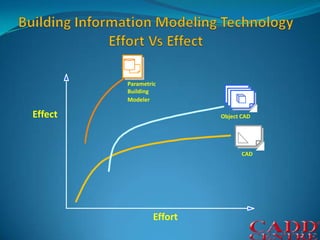
ParametricBuildingModelerObject CAD   CADBuilding Information Modeling Technology Effort Vs EffectEffectEffort
Bidirectional AssociativityA change anywhere is a change everywhere. In Revit® Architecture software, all model information is stored in one place. As a result, any information that gets changed is effectively changed throughout the model.
Parametric ComponentsParametric Components, also known as families, are the basis for all building components designed in Revit Architecture. They offer an open, graphical system for design thinking and form making as well as an opportunity to express design intent at increasingly detailed levels. Use Parametric Components for the most elaborate assemblies, such as cabinetry and equipment, as well as for the most elementary building parts, such as walls and columns. Best of all, no programming language or coding is required.
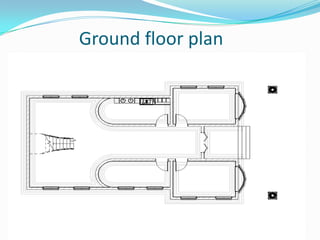
              Ground floor plan
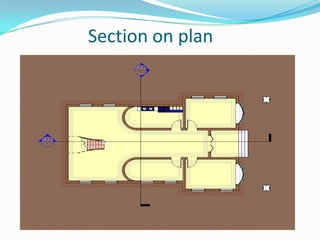
                Section on plan
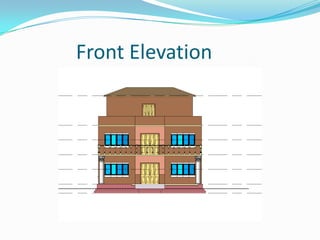
            Front Elevation
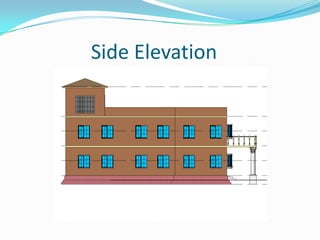
               Side Elevation
DetailingTake advantage of the extensive detail library and detailing tools provided with Revit Architecture. Presorted to align with the CSI format, detail libraries can be tailored to accommodate your office standards. Create, manage, and share your own detail library.
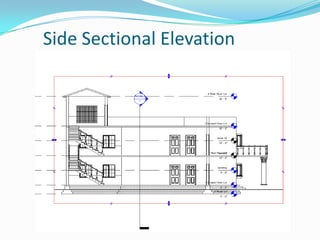
      Side Sectional Elevation
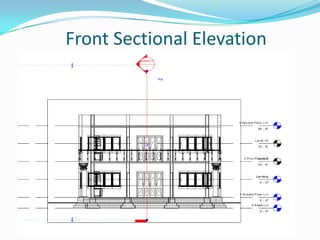
           Front Sectional Elevation
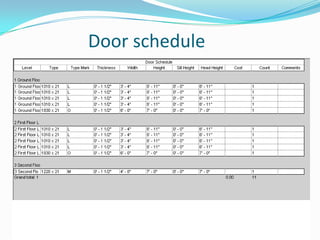
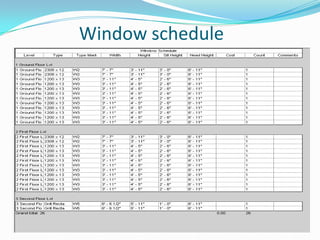
SchedulesSchedules are just another view of the Revit Architecture model. A change to a schedule view is automatically reflected in every other view and vice versa. Functionality includes associative split-schedule sections and selectable design elements via schedule views, formulas, and filtering.
                Door schedule
              Window schedule
Material TakeoffCalculate detailed material quantities with this new tool. Appropriate for sustainable design and checking material quantities in cost estimates, Material Takeoff simplifies the tracking of material quantities. The parametric change engine helps ensure that your material takeoffs are always accurate.
Design OptionsDevelop and study multiple simultaneous design alternatives to make key design decisions. Present multiple schemes to your clients easily. Substitute each option into the model for visualization, quantification, and other data analysis to inform decision making.
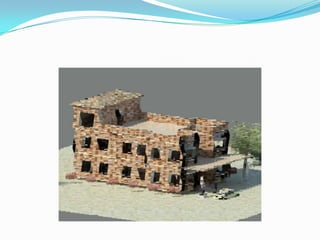
Design VisualizationCapture design ideas in a photorealistic state. With easy user interaction, high quality output and faster render times, mental ray® rendering engine enables superior design presentation.For more granular control over the rendered scene, use the Autodesk® FBX® format to import your designs into Autodesk 3ds Max®. You’ll get unmatched flexibility and control over how you visualize and present your work.
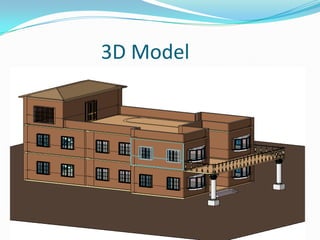
                 3D Model
Revit Architecture

Revit Architecture

  • 1.
  • 2.
    Purpose-built for BuildingInformation Modeling (BIM), Autodesk® Revit® Architecture building design software works the way architects and designers think, enabling you to design freely and deliver efficiently.
  • 3.
    ParametricBuildingModelerObject CAD CADBuilding Information Modeling Technology Effort Vs EffectEffectEffort
  • 4.
    Bidirectional AssociativityA changeanywhere is a change everywhere. In Revit® Architecture software, all model information is stored in one place. As a result, any information that gets changed is effectively changed throughout the model.
  • 5.
    Parametric ComponentsParametric Components,also known as families, are the basis for all building components designed in Revit Architecture. They offer an open, graphical system for design thinking and form making as well as an opportunity to express design intent at increasingly detailed levels. Use Parametric Components for the most elaborate assemblies, such as cabinetry and equipment, as well as for the most elementary building parts, such as walls and columns. Best of all, no programming language or coding is required.
  • 6.
    Ground floor plan
  • 7.
    Section on plan
  • 8.
    Front Elevation
  • 9.
    Side Elevation
  • 10.
    DetailingTake advantage ofthe extensive detail library and detailing tools provided with Revit Architecture. Presorted to align with the CSI format, detail libraries can be tailored to accommodate your office standards. Create, manage, and share your own detail library.
  • 11.
    Side Sectional Elevation
  • 12.
    Front Sectional Elevation
  • 13.
    SchedulesSchedules are justanother view of the Revit Architecture model. A change to a schedule view is automatically reflected in every other view and vice versa. Functionality includes associative split-schedule sections and selectable design elements via schedule views, formulas, and filtering.
  • 14.
    Door schedule
  • 15.
    Window schedule
  • 16.
    Material TakeoffCalculate detailedmaterial quantities with this new tool. Appropriate for sustainable design and checking material quantities in cost estimates, Material Takeoff simplifies the tracking of material quantities. The parametric change engine helps ensure that your material takeoffs are always accurate.
  • 17.
    Design OptionsDevelop andstudy multiple simultaneous design alternatives to make key design decisions. Present multiple schemes to your clients easily. Substitute each option into the model for visualization, quantification, and other data analysis to inform decision making.
  • 18.
    Design VisualizationCapture designideas in a photorealistic state. With easy user interaction, high quality output and faster render times, mental ray® rendering engine enables superior design presentation.For more granular control over the rendered scene, use the Autodesk® FBX® format to import your designs into Autodesk 3ds Max®. You’ll get unmatched flexibility and control over how you visualize and present your work.
  • 19.
    3D Model