
Internetworking
    Devices
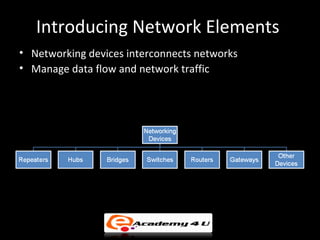
Introducing Network Elements
• Networking devices interconnects networks
• Manage data flow and network traffic
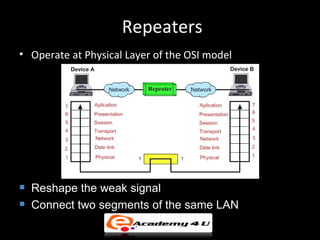
Repeaters
• Operate at Physical Layer of the OSI model


   Reshape the weak signal
   Connect two segments of the same LAN
Hubs - I
   Simplest and low cost device
   Also known as Multi-port Repeater
   Operates at Physical Layer like Repeater
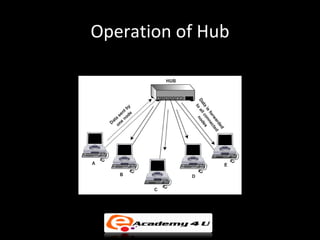
   Data transfer to all the ports
   Hub types:
       Active hub – Provides signal regeneration
       Passive hub – No signal regeneration
       Intelligent hub – Provides management of each port
Operation of Hub
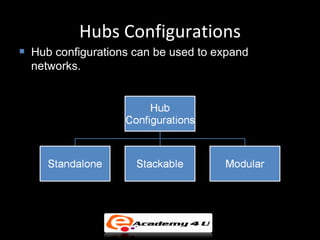
Hubs Configurations
   Hub configurations can be used to expand
    networks.
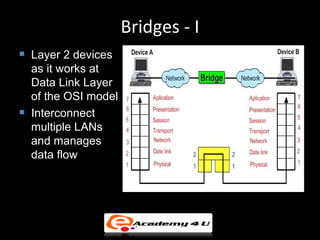
Bridges - I
   Layer 2 devices
    as it works at
    Data Link Layer
    of the OSI model
   Interconnect
    multiple LANs
    and manages
    data flow
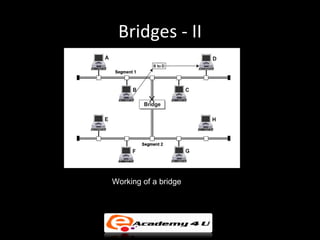
Bridges - II


Working of a bridge
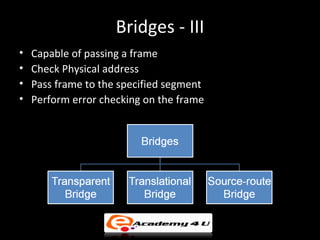
Bridges - III
•   Capable of passing a frame
•   Check Physical address
•   Pass frame to the specified segment
•   Perform error checking on the frame
Types of Bridge
• Transparent Bridge – common in ethernet
  network
• Translational bridge – used to connect two
  different network such as ethernet and token
  ring
• Source-route Bridge – found in token ring
  technology
Bridges - IV
• Features
  – Easy to use as just plug in device
  – Helps in network expansion
  – Divides large network into small segments
  – Used for increasing network reliability
  Disadvantages
  – Frames are buffered so provides network delay
  – During high traffic may overload network
  – Does not filter broadcast packets
  – Expensive than Repeaters
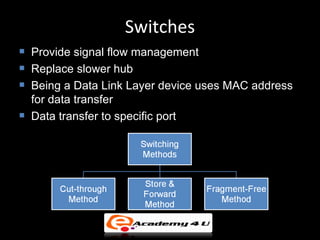
Switches
   Provide signal flow management
   Replace slower hub
   Being a Data Link Layer device uses MAC address
    for data transfer
   Data transfer to specific port
Multispeed Switches
• Having number of ports such as 100 Base T
  and one or two gigabit ports
• Port detects the speed of NIC and runs at that
  speed is called auto sensing
• Port runs at 10, 100 or gigabit is referred to as
  10/100/1000 port
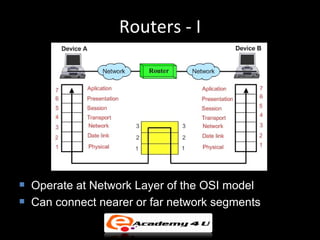
Routers - I


   Operate at Network Layer of the OSI model
   Can connect nearer or far network segments
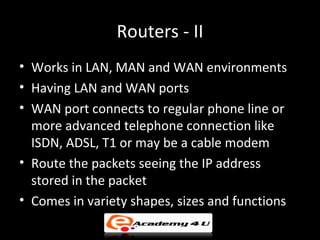
Routers - II
• Works in LAN, MAN and WAN environments
• Having LAN and WAN ports
• WAN port connects to regular phone line or
  more advanced telephone connection like
  ISDN, ADSL, T1 or may be a cable modem
• Route the packets seeing the IP address
  stored in the packet
• Comes in variety shapes, sizes and functions
Routers - III
   Decide the best route with the help of network layer
    address
   Responsible for Source to Destination delivery of
    packet
   For routing decisions routers use routing algoritm
   Router types:
       Static router – Routing tables are manually configured
       Dynamic router – Routing tables are automatically
        configured
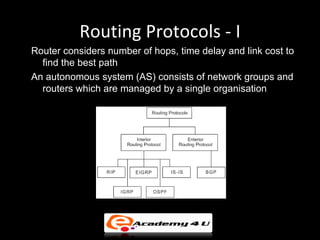
Routing Protocols - I
Router considers number of hops, time delay and link cost to
  find the best path
An autonomous system (AS) consists of network groups and
  routers which are managed by a single organisation
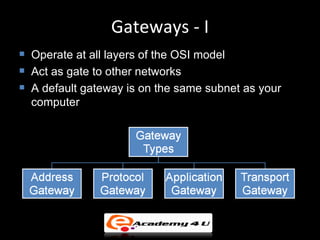
Gateways - I
   Operate at all layers of the OSI model
   Act as gate to other networks
   A default gateway is on the same subnet as your
    computer
Gateways - II

   Address Gateway – Interconnects same protocol
    networks
   Protocol Gateway – Interconnects different protocol
    networks
   Application Gateway – Connects two parts of
    applications
   Transport Gateway – Connects networks at
    transport layer
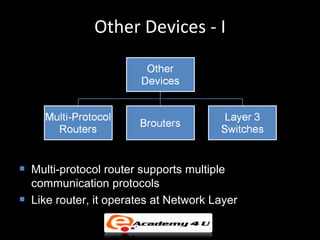
Other Devices - I


   Multi-protocol router supports multiple
    communication protocols
   Like router, it operates at Network Layer
Other Devices - II
   Brouter provides combined functions of Bridge and
    Router
   Works at two layers, Data Link and Network
   Can operate only as bridge or only as router
   High performance switch operating at network layer
    is Layer 3 Switch

Internetworking devices

  • 1.
  • 2.
    Introducing Network Elements •Networking devices interconnects networks • Manage data flow and network traffic
  • 3.
    Repeaters • Operate atPhysical Layer of the OSI model  Reshape the weak signal  Connect two segments of the same LAN
  • 4.
    Hubs - I  Simplest and low cost device  Also known as Multi-port Repeater  Operates at Physical Layer like Repeater  Data transfer to all the ports  Hub types:  Active hub – Provides signal regeneration  Passive hub – No signal regeneration  Intelligent hub – Provides management of each port
  • 5.
  • 6.
    Hubs Configurations  Hub configurations can be used to expand networks.
  • 7.
    Bridges - I  Layer 2 devices as it works at Data Link Layer of the OSI model  Interconnect multiple LANs and manages data flow
  • 8.
  • 9.
    Bridges - III • Capable of passing a frame • Check Physical address • Pass frame to the specified segment • Perform error checking on the frame
  • 10.
    Types of Bridge •Transparent Bridge – common in ethernet network • Translational bridge – used to connect two different network such as ethernet and token ring • Source-route Bridge – found in token ring technology
  • 11.
    Bridges - IV •Features – Easy to use as just plug in device – Helps in network expansion – Divides large network into small segments – Used for increasing network reliability Disadvantages – Frames are buffered so provides network delay – During high traffic may overload network – Does not filter broadcast packets – Expensive than Repeaters
  • 12.
    Switches  Provide signal flow management  Replace slower hub  Being a Data Link Layer device uses MAC address for data transfer  Data transfer to specific port
  • 13.
    Multispeed Switches • Havingnumber of ports such as 100 Base T and one or two gigabit ports • Port detects the speed of NIC and runs at that speed is called auto sensing • Port runs at 10, 100 or gigabit is referred to as 10/100/1000 port
  • 14.
    Routers - I  Operate at Network Layer of the OSI model  Can connect nearer or far network segments
  • 15.
    Routers - II •Works in LAN, MAN and WAN environments • Having LAN and WAN ports • WAN port connects to regular phone line or more advanced telephone connection like ISDN, ADSL, T1 or may be a cable modem • Route the packets seeing the IP address stored in the packet • Comes in variety shapes, sizes and functions
  • 16.
    Routers - III  Decide the best route with the help of network layer address  Responsible for Source to Destination delivery of packet  For routing decisions routers use routing algoritm  Router types:  Static router – Routing tables are manually configured  Dynamic router – Routing tables are automatically configured
  • 17.
    Routing Protocols -I Router considers number of hops, time delay and link cost to find the best path An autonomous system (AS) consists of network groups and routers which are managed by a single organisation
  • 18.
    Gateways - I  Operate at all layers of the OSI model  Act as gate to other networks  A default gateway is on the same subnet as your computer
  • 19.
    Gateways - II  Address Gateway – Interconnects same protocol networks  Protocol Gateway – Interconnects different protocol networks  Application Gateway – Connects two parts of applications  Transport Gateway – Connects networks at transport layer
  • 20.
    Other Devices -I  Multi-protocol router supports multiple communication protocols  Like router, it operates at Network Layer
  • 21.
    Other Devices -II  Brouter provides combined functions of Bridge and Router  Works at two layers, Data Link and Network  Can operate only as bridge or only as router  High performance switch operating at network layer is Layer 3 Switch