
SnapComms
• Over 1.3 million users
• Over 450+ customers in 45+ countries
• Used by Fortune 50 companies
• Enterprise platform, global usage
• Premium service and support
Customer Testimonials
“SnapComms enables us to reach more personnel
instantaneously where radios or pagers may lose
connectivity in some areas of the plant or may have been
disabled.” – Major Manufacturing Company
“We needed something that was flexible, easy to use,
that could target the whole organization, parts of it or
individuals. If they see an alert they know it is worth
reading.” – IT Service Management, Towers Watson
“It allows us to get a message out very easily.”
“It’s a very good tool. For me it’s a complete no-
brainer.” – Global Head of Marketing, Citi Bank
SnapComms Overview Video
(Double Click image below to play)
Positioning
SnapComms for:
• Urgent messages
• Important messages
• Where guaranteed readership is important
• Where readership reporting and acknowledgement is important
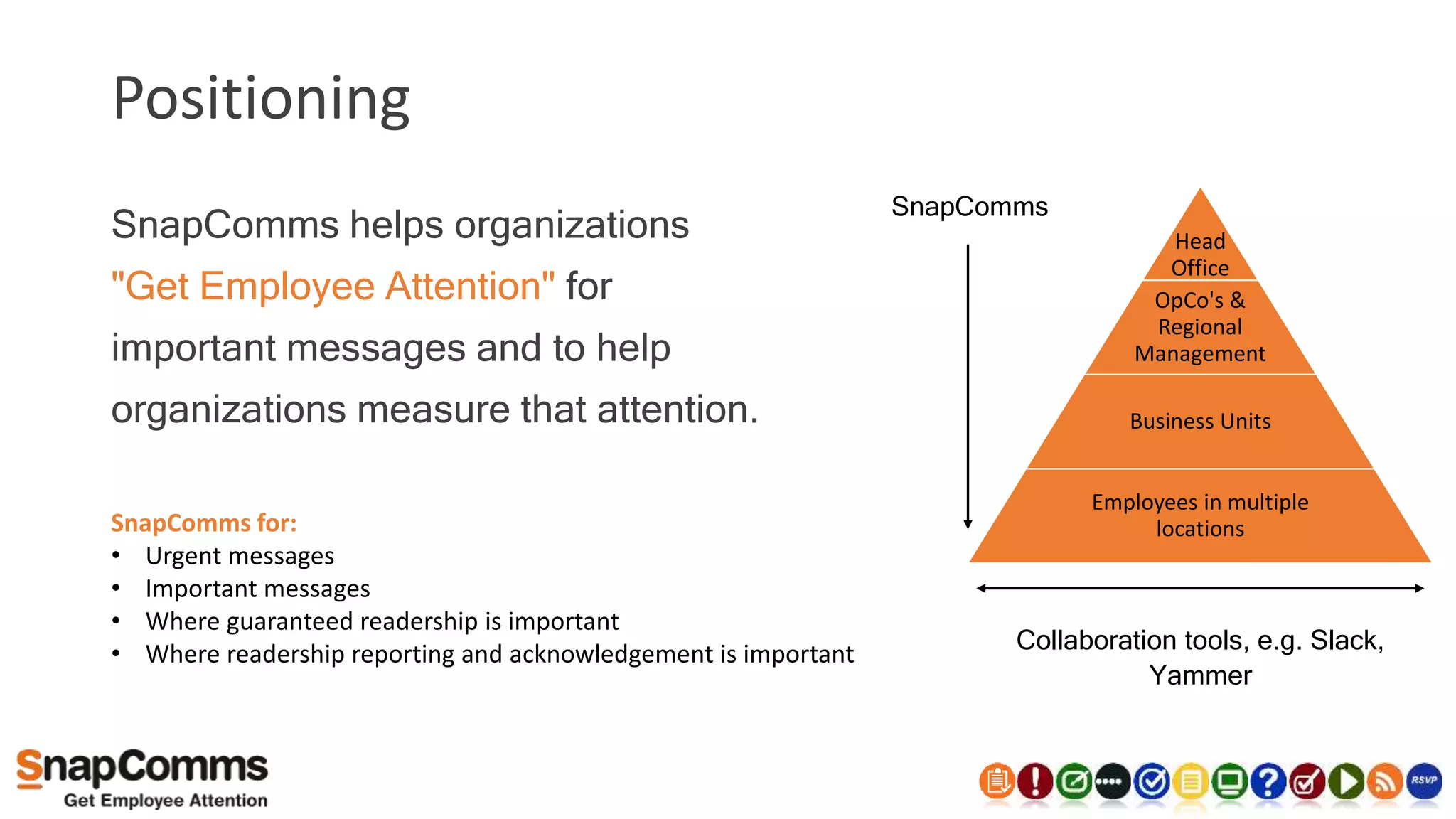
SnapComms helps organizations
"Get Employee Attention" for
important messages and to help
organizations measure that attention.
SnapComms
Head
Office
OpCo's &
Regional
Management
Business Units
Employees in multiple
locations
Collaboration tools, e.g. Slack,
Yammer
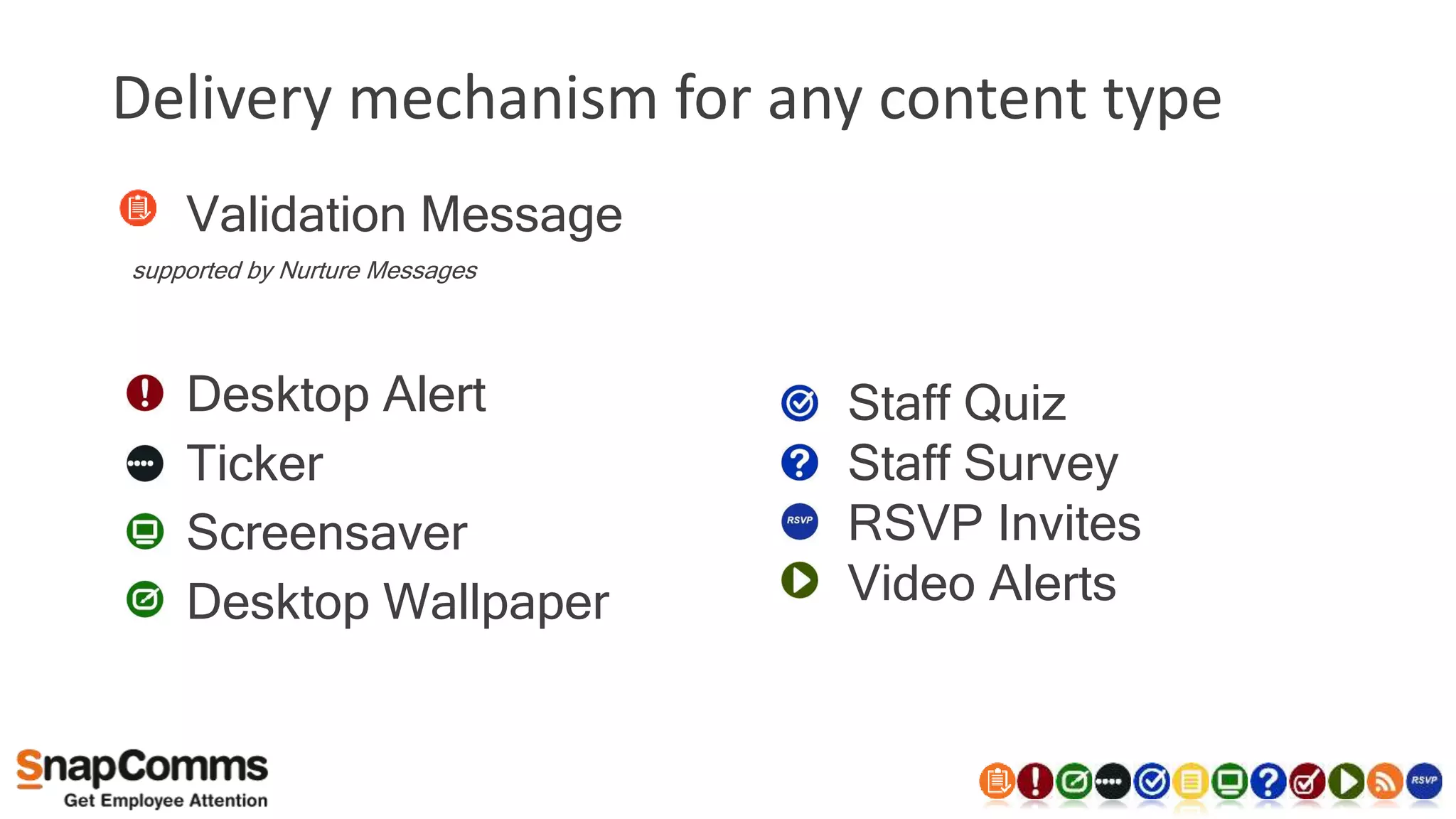
Delivery mechanism for any content type
• Validation Message
supported by Nurture Messages
• Desktop Alert
• Ticker
• Screensaver
• Desktop Wallpaper
• Staff Quiz
• Staff Survey
• RSVP Invites
• Video Alerts
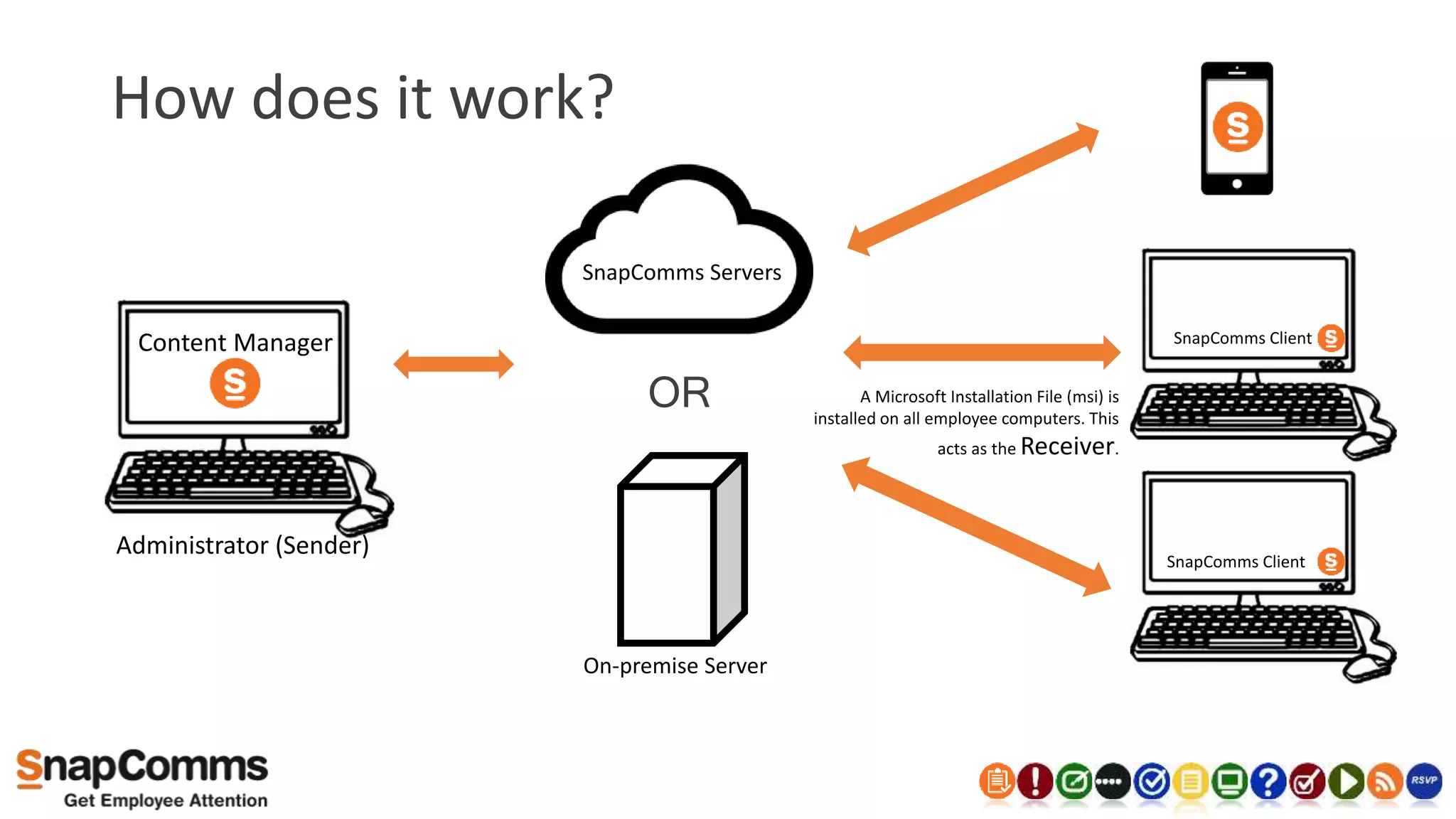
How does it work?
SnapComms Servers
Content Manager
Administrator (Sender)
SnapComms Client
SnapComms Client
A Microsoft Installation File (msi) is
installed on all employee computers. This
acts as the Receiver.
OR
On-premise Server
Key Product Attributes
• Different visual channels
• Targeted communications
• Recurrence and escalation
• Delivery to mobile devices
• Campaign tool with compliance
validation
• Detailed reporting
• Multiple delegated admins
• Cloud or on-premise
• Simple to deploy
• SMS, digital signage, email add-ons
• Comprehensive Knowledge Base
SnapComms
Helping Improve
Health & Safety Communication
Typical pain points for Health & Safety
• What else?
• Reaching all staff not on the network or working
remotely
Reach Remote Staff and Staff not on the
network
• No Need for email
• Reach Remote staff via
mobile Communication
Further Information
Typical pain points for Health & Safety
• What else?
• Reaching all staff not on the network or working
remotely
• Fast communication to all staff members at short
notice
• Ensuring staff are informed of H&S messages in a
timely manner.
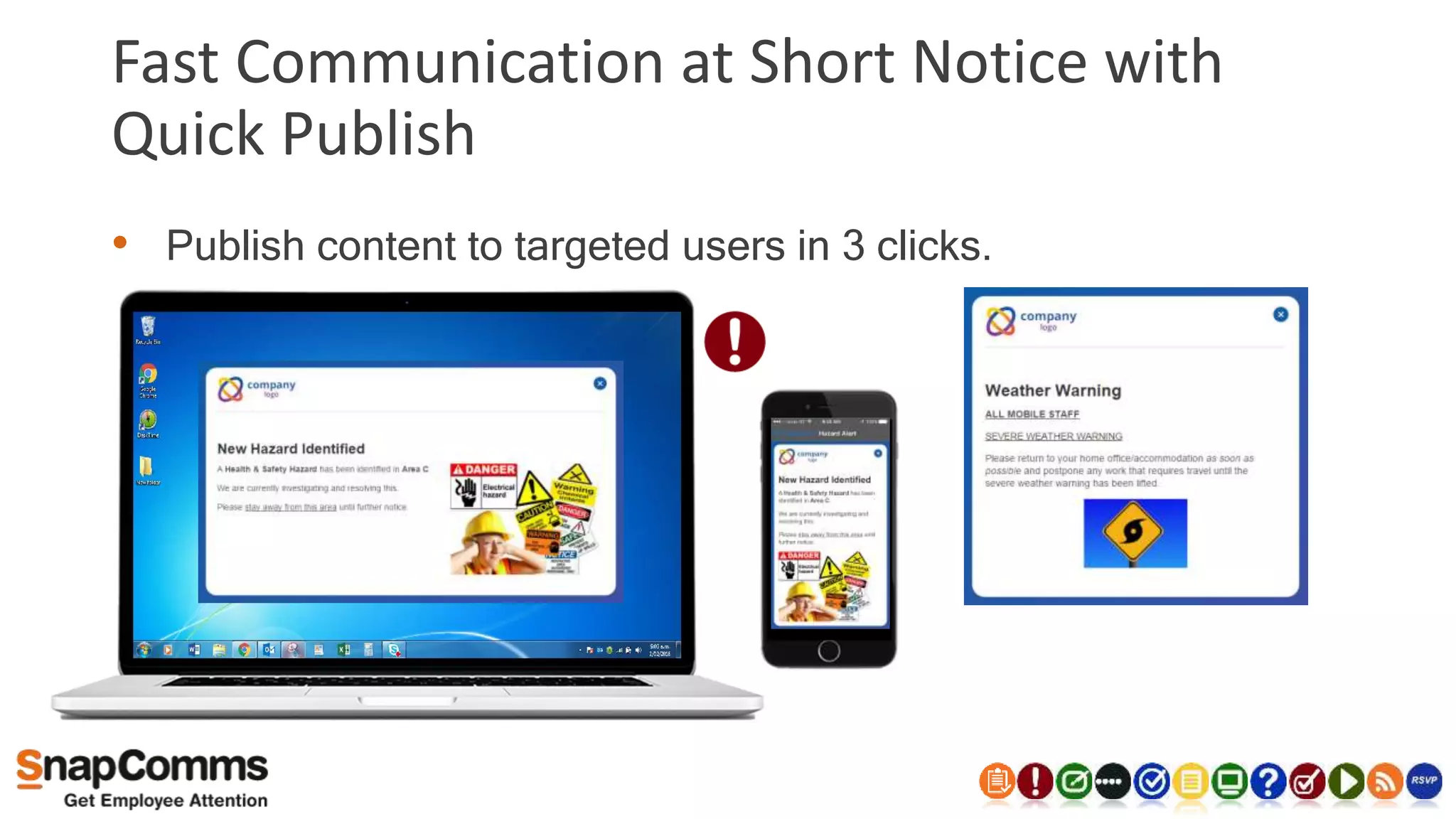
Fast Communication at Short Notice with
Quick Publish
• Publish content to targeted users in 3 clicks.
Typical pain points for Health & Safety
• What else?
• Reaching all staff not on the network or working
remotely
• Fast communication to all staff members at short
notice
• Ensuring staff are informed of H&S issues in a
timely manner.
• Attendance and reinforcement of training
sessions
Improve Attendance & Reinforce Training
• Quiz tool to reinforce training
• RSVP Alerts to encourage attendance
Further Information
Typical pain points for Health & Safety
• What else?
• Reaching all staff not on the network or working
remotely
• Fast communication to all staff members at short
notice
• Ensuring staff are informed of H&S issues in a
timely manner.
• Attendance and reinforcement of training
sessions
• Encouraging the adoption of new processes and
impacting the behaviour of staff around H&S.
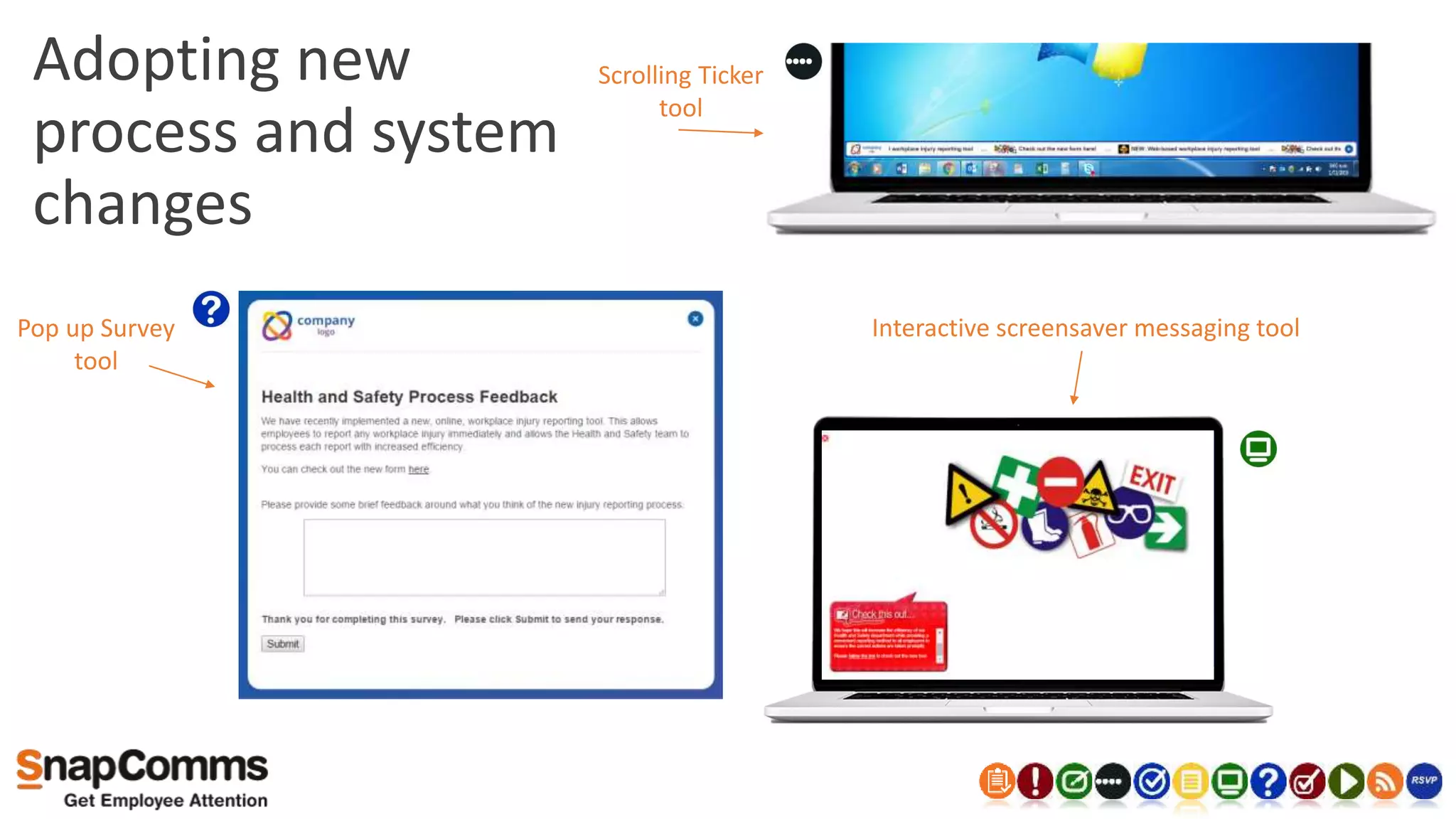
Adopting new
process and system
changes
Pop up Survey
tool
Scrolling Ticker
tool
Interactive screensaver messaging tool
Typical pain points for Health & Safety
• What else?
• Reaching all staff not on the network or working
remotely
• Fast communication to all staff members at short
notice
• Ensuring staff are informed of H&S issues in a
timely manner.
• Attendance and reinforcement of training
sessions
• Encouraging the adoption of new processes and
impacting the behaviour of staff around H&S.
• Ability to measure readership of H&S messages.
Measure Readership of Messages
• Learn and Improve Communications
• Quiz & Survey Results
Key Product Attribute Page
Add ons available:
• Digital signage extension
• Send to SMS
• Send to email
• API integration & with other systems Back to Key Product Attribute Page
Demonstration
Next steps
• Engage wider team
• IT discussion and approval
• Trial / proof of concept /
Customization
• Purchase and deploy
• On-boarding
• On-going training and world
class support
What is your usual process?
“I've received nothing but excellent support from the sales and
technical staff at SnapComms.”
“Product accomplished the tasks it was made to do. Support from
SnapComms is exceptional.”
“Leaving this feedback because I was extremely satisfied with the
SnapComms team and their response to the situation at hand. Thank
you SnapComms!”
“I appreciate the support I received today! It was a huge help in a tight
time frame.”
“I received a call from the Helpdesk today in the morning. Because of 13
hours time difference this was not expected from me. And they had
reviewed my questions before they called me and had a solution on
their hands”
Pricing
Pricing is available upon request.
Please email us – info@snapcomms.com
Value to other Departments
Internal Communications Manager
• Communicating with all employees.
• Attendance and reinforcement of training sessions.
• Drive and measure traffic to the intranet.
• Measuring communication effectiveness.
• The ability to gather real time employee feedback.
• Existing engagement channels offer limited appeal to employees.
• Achieving high attendance of “Town Hall” meetings and readership of
executive communication.
• Ability to communicate company wide scheduled and adhoc events.
• Achieving high readership of all corporate messages (Non IC).
Helpdesk Manager
• Reaching all staff not on the network or working remotely.
• Reaching all staff when email is unavailable.
• Fast communication to all staff members at short notice.
• Proactively communicate planned and unplanned system events to all staff.
• Impacting staff behaviour and awareness of security issues and system events.
• Attendance and reinforcement of training sessions.
• Establish positive interactions between IT and other staff/departments.
Product Manager
• Communicating with remote staff.
• Fast communication to all staff members at short notice (Product recall, product advisories).
• Attendance and reinforcement of training sessions
• Maintain consistent and regular product information organisation wide.
• Communicating product launch material
• Build awareness of impending product launches
• Communicate quick wins post launch.
• Ensuring consistent product knowledge (organization wide).
• Fast feedback/correction of organisation knowledge.
• Measured readership of executive and corporate communication.
Sales Manager
• Reaching all staff not on the network or working remotely
• Attendance and reinforcement of training sessions
• Maintaining a high level of product knowledge through the sales team.
• Communicating Project wins to all staff/sales staff
• Ensuring visibility of achievement versus target.
• Encouraging competition within the sales team.
• Organisation wide consistent sales message.
• Preparing and building sales team awareness prior to and during product launch phases.
• Measured readership of executive and corporate communication.
Contact us to learn more
• Click Here to sign up for our free 30 day trial.
• Click Here to see our contact details.
• Click Here to request a personalised demonstration.
Supporting Slides
Educate Staff
• 80% training forgotten if not reinforced
• SnapComms Quiz tool
• Collects responses
• Identify weak areas
Improve Attendance and Reinforce Training Page
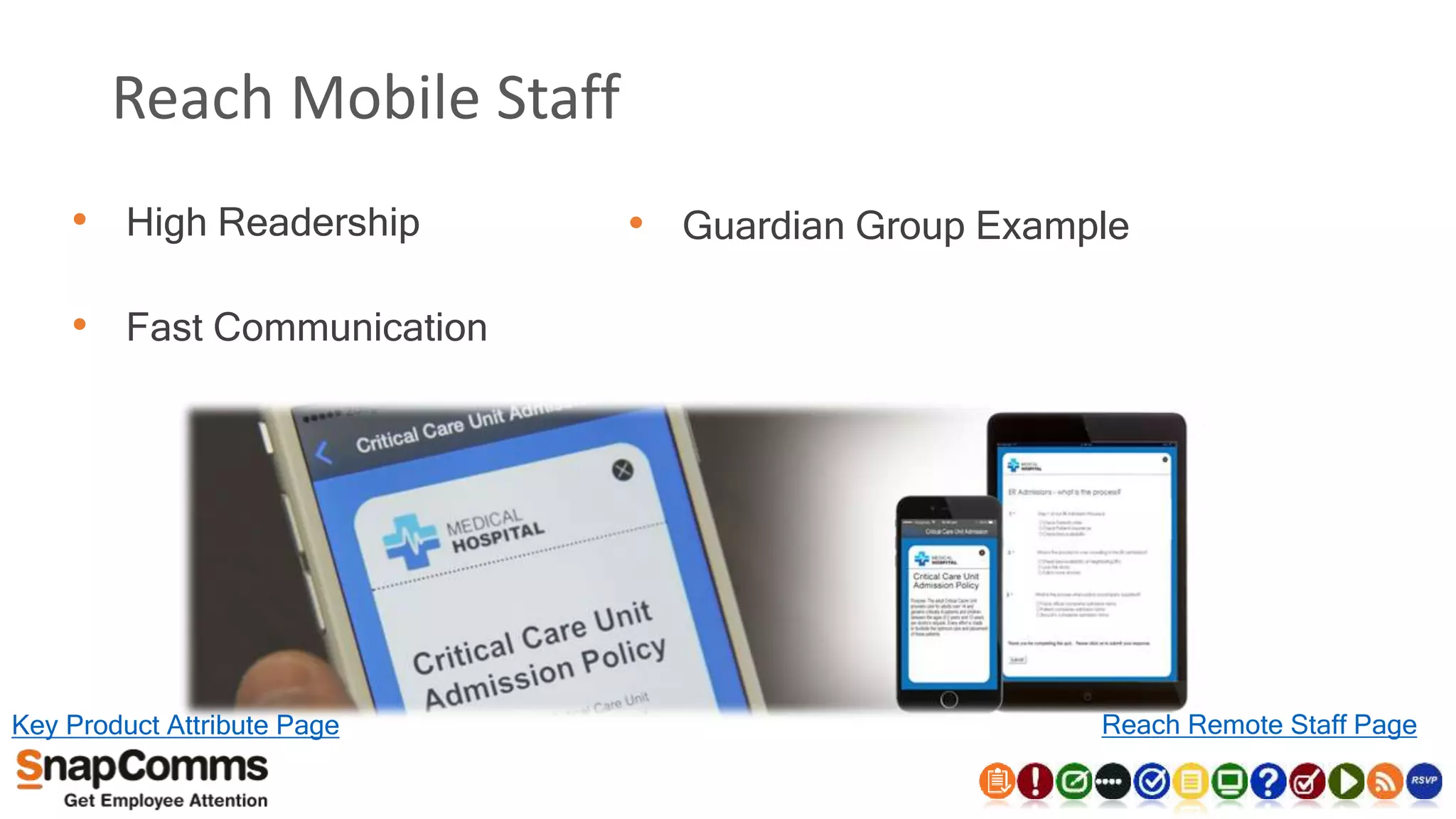
Reach Mobile Staff
• High Readership
• Fast Communication
• Guardian Group Example
Key Product Attribute Page Reach Remote Staff Page
Targeted Communications
• Target Office Departments, Mobile Staff, and certain individuals.
• Target Via
• Users & Groups
• Machine Based Targeting
• Naming Conventions
Back to Key Product Attribute Page
Why the SnapComms Campaign Tool?
• Customer feedback pointed us to develop a campaign based tool
• A campaign is a bundle of messages around the same compliance
topic - usually containing a validation item bundled with nurture
communications
• The nurture items deliver education and awareness messages
• The validation item requires the employee to comply, acknowledge
or validate understanding
• Compliance status of the targeted employees is available real-time
Key Product Attribute Page
Campaign Calendar
Day 1 Invitation
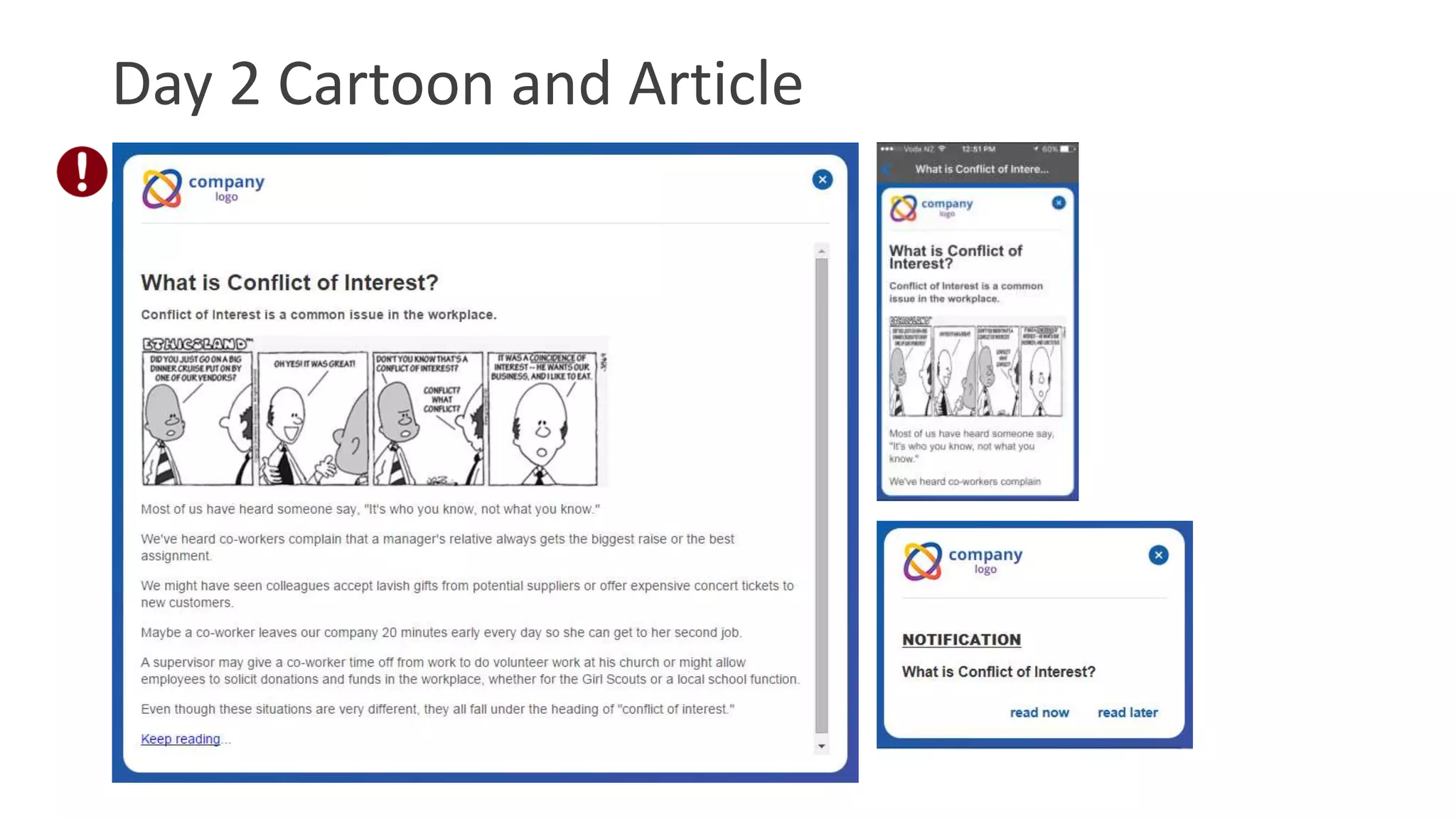
Day 2 Cartoon and Article
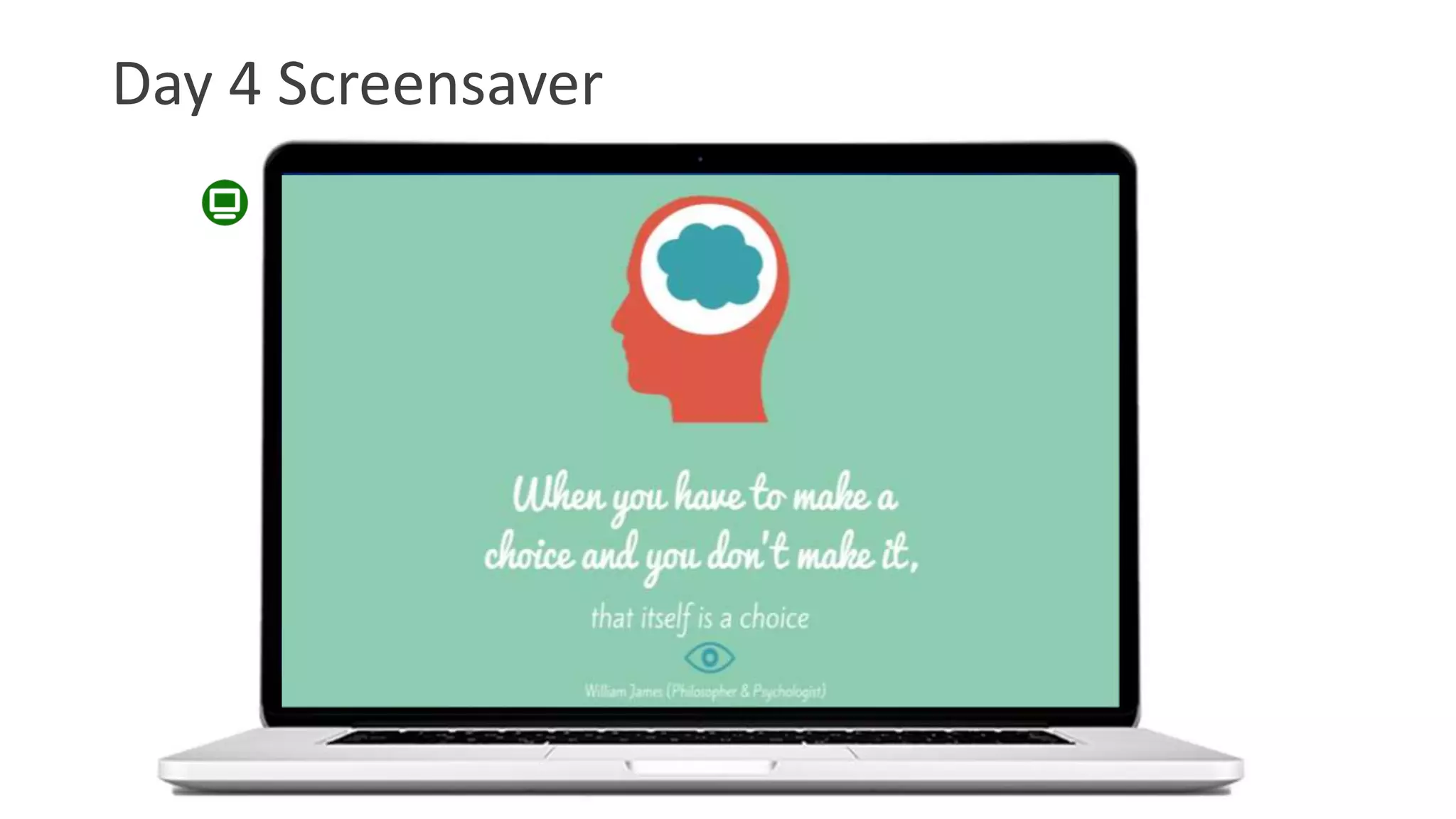
Day 4 Screensaver
Day 5 Video
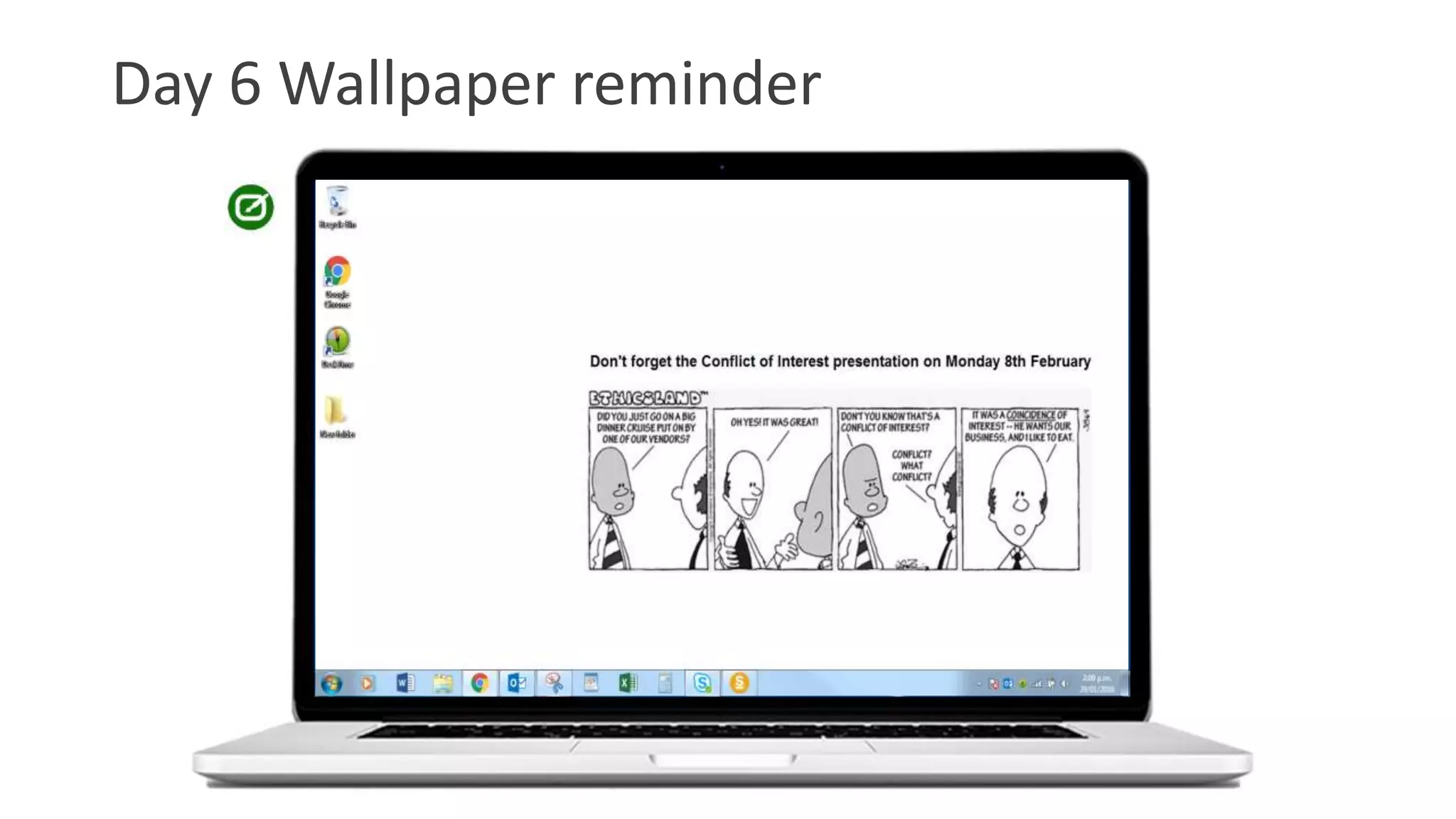
Day 6 Wallpaper reminder
Day 7 – 9am Ticker reminder
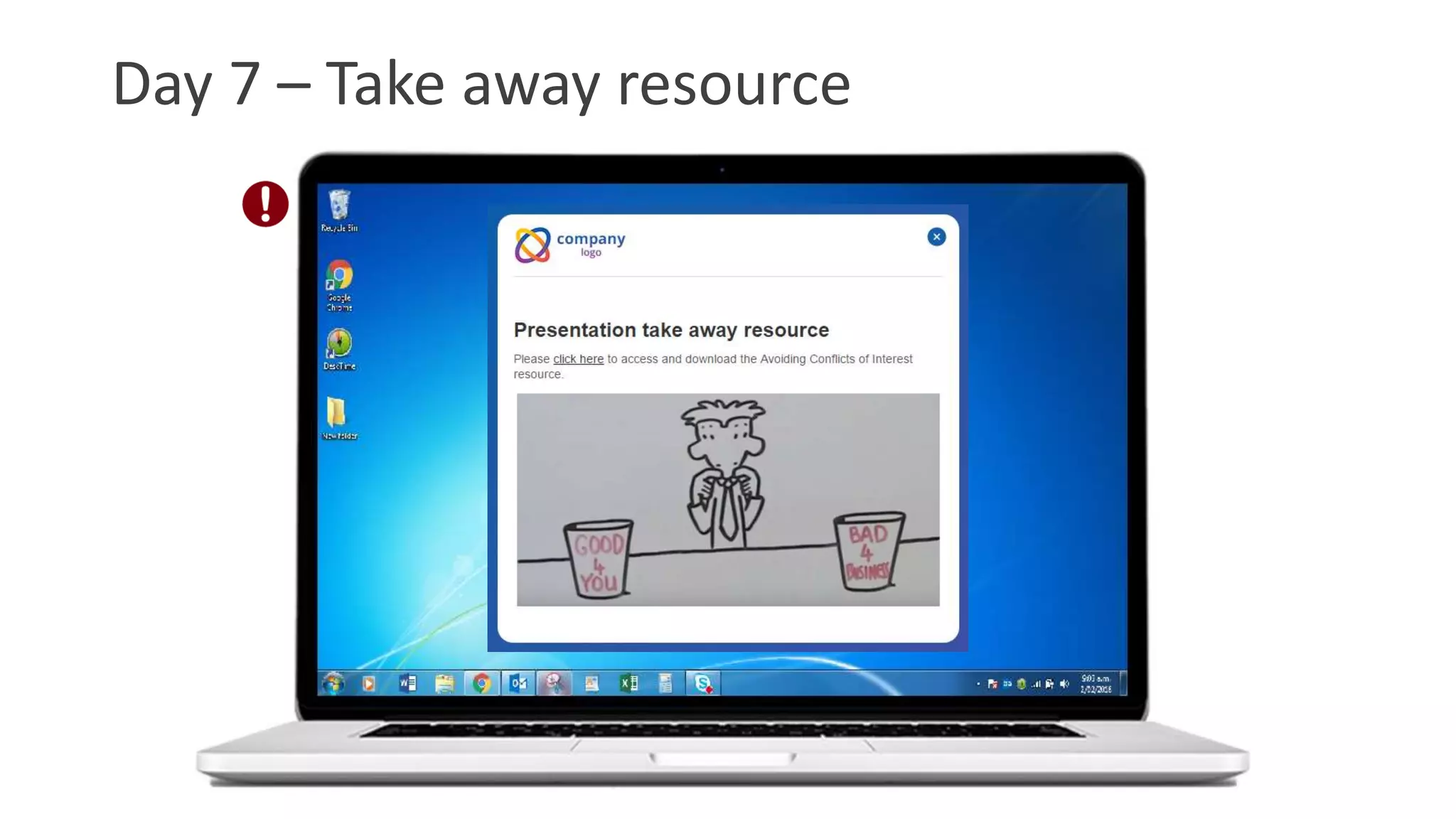
Day 7 – Take away resource
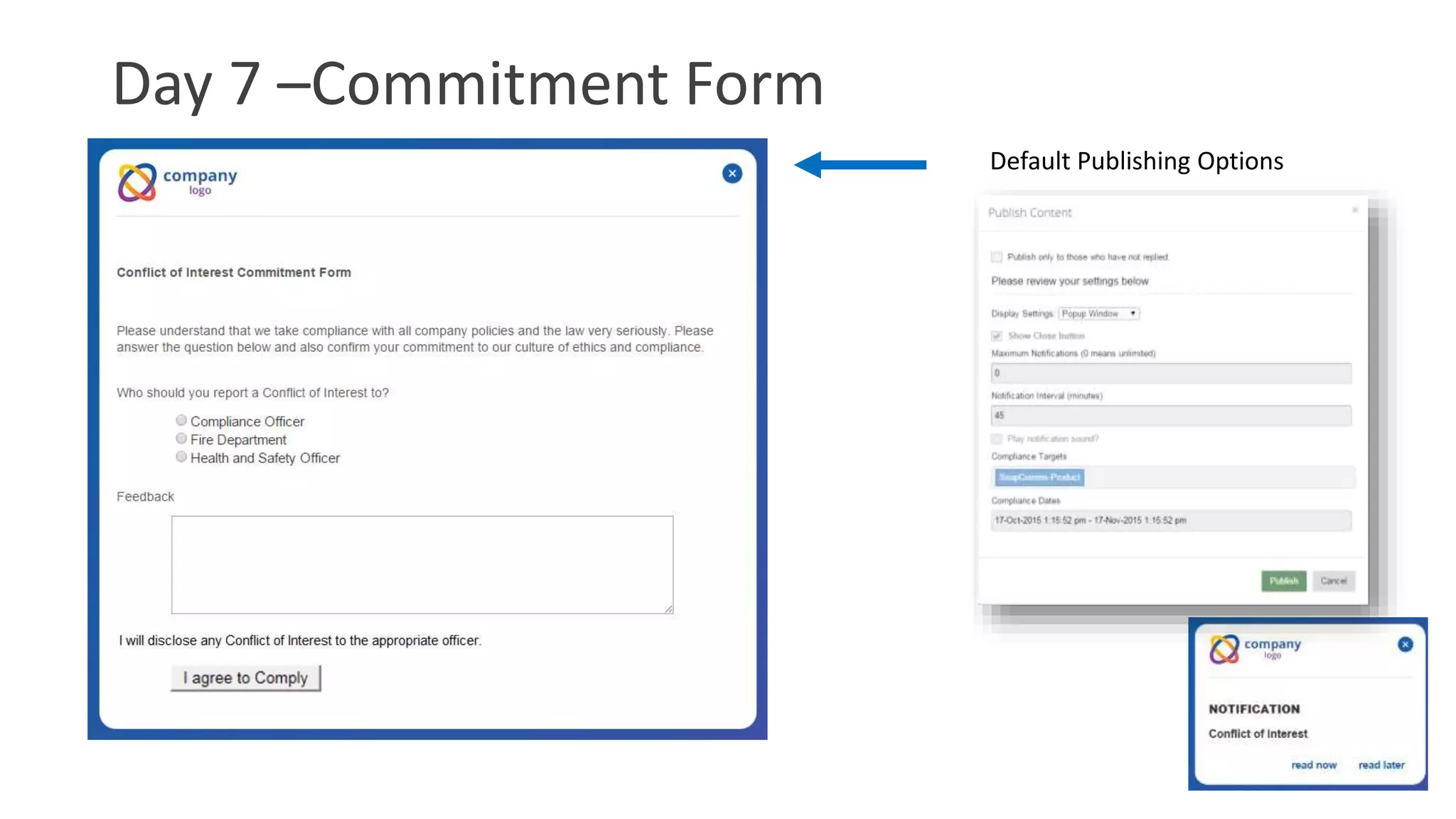
Day 7 –Commitment Form
Default Publishing Options
Day 8 – Campaign Results
Advanced Publishing Options
Escalate
Day 10 – Drip campaign - Screensaver
Day 10 – Drip campaign
SnapComms Campaign Tool - Screenshots
Campaigns
Create a Campaign
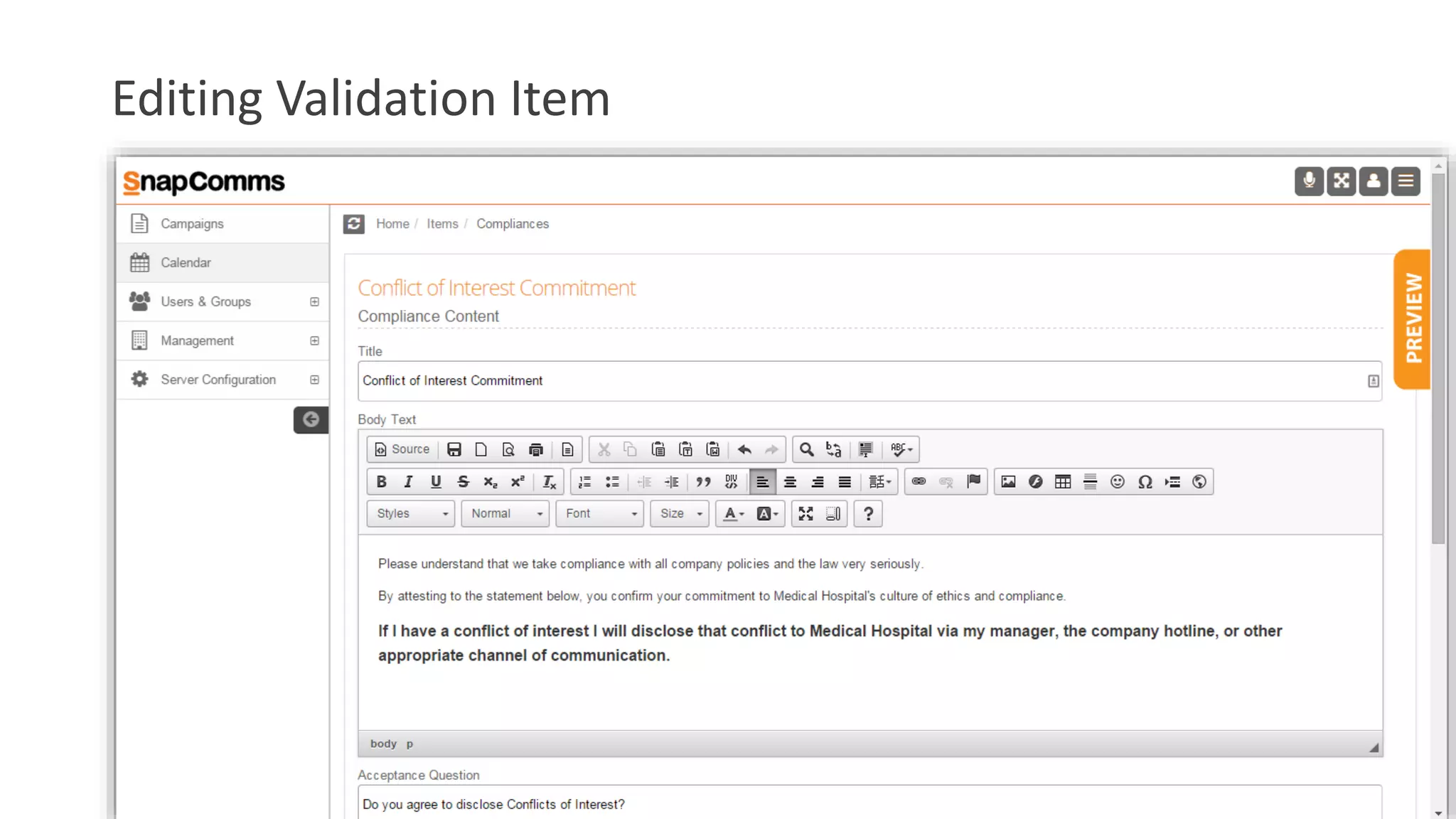
Editing Validation Item
Create Nurture Item
Campaign Items
Commercials
• Available as 3 or 6 tool package
+Any 2 Channels
+
+
+
+
Commercials
Validation
+All 5 ChannelsValidation +
Campaigns
• A Campaign consist of a set of messages:
• Typically one validation item – usually towards the end of the campaign
• Supported by numerous ‘nurture’ items
• 4 preconfigured campaign types based on certain scenarios
• Compulsory Comply – reader has no option but to agree / comply / acknowledge
• Option to Comply – reader can choose not to comply
• Validation – validate the reader’s knowledge and obtain commitment
• Nurture only – educational / informational communications
Campaign Planning
• Prepare and assemble your campaign content
• Determine your required outcome then select a Scenario to
match – Compulsory Comply, Option to Comply, Validate
Understanding or Information only?
• Determine you timeline – when does the campaign start and
end?
• Map your Campaign materials to a Calendar
• Upload your content to the SnapComms Content Manager
• Schedule and Publish
• Measure Compliance Status

Internal health and safety communication with SnapComms

  • 2.
    SnapComms • Over 1.3million users • Over 450+ customers in 45+ countries • Used by Fortune 50 companies • Enterprise platform, global usage • Premium service and support
  • 3.
    Customer Testimonials “SnapComms enablesus to reach more personnel instantaneously where radios or pagers may lose connectivity in some areas of the plant or may have been disabled.” – Major Manufacturing Company “We needed something that was flexible, easy to use, that could target the whole organization, parts of it or individuals. If they see an alert they know it is worth reading.” – IT Service Management, Towers Watson “It allows us to get a message out very easily.” “It’s a very good tool. For me it’s a complete no- brainer.” – Global Head of Marketing, Citi Bank SnapComms Overview Video (Double Click image below to play)
  • 4.
    Positioning SnapComms for: • Urgentmessages • Important messages • Where guaranteed readership is important • Where readership reporting and acknowledgement is important SnapComms helps organizations "Get Employee Attention" for important messages and to help organizations measure that attention. SnapComms Head Office OpCo's & Regional Management Business Units Employees in multiple locations Collaboration tools, e.g. Slack, Yammer
  • 5.
    Delivery mechanism forany content type • Validation Message supported by Nurture Messages • Desktop Alert • Ticker • Screensaver • Desktop Wallpaper • Staff Quiz • Staff Survey • RSVP Invites • Video Alerts
  • 6.
    How does itwork? SnapComms Servers Content Manager Administrator (Sender) SnapComms Client SnapComms Client A Microsoft Installation File (msi) is installed on all employee computers. This acts as the Receiver. OR On-premise Server
  • 7.
    Key Product Attributes •Different visual channels • Targeted communications • Recurrence and escalation • Delivery to mobile devices • Campaign tool with compliance validation • Detailed reporting • Multiple delegated admins • Cloud or on-premise • Simple to deploy • SMS, digital signage, email add-ons • Comprehensive Knowledge Base
  • 8.
  • 9.
    Typical pain pointsfor Health & Safety • What else? • Reaching all staff not on the network or working remotely
  • 10.
    Reach Remote Staffand Staff not on the network • No Need for email • Reach Remote staff via mobile Communication Further Information
  • 11.
    Typical pain pointsfor Health & Safety • What else? • Reaching all staff not on the network or working remotely • Fast communication to all staff members at short notice • Ensuring staff are informed of H&S messages in a timely manner.
  • 12.
    Fast Communication atShort Notice with Quick Publish • Publish content to targeted users in 3 clicks.
  • 13.
    Typical pain pointsfor Health & Safety • What else? • Reaching all staff not on the network or working remotely • Fast communication to all staff members at short notice • Ensuring staff are informed of H&S issues in a timely manner. • Attendance and reinforcement of training sessions
  • 14.
    Improve Attendance &Reinforce Training • Quiz tool to reinforce training • RSVP Alerts to encourage attendance Further Information
  • 15.
    Typical pain pointsfor Health & Safety • What else? • Reaching all staff not on the network or working remotely • Fast communication to all staff members at short notice • Ensuring staff are informed of H&S issues in a timely manner. • Attendance and reinforcement of training sessions • Encouraging the adoption of new processes and impacting the behaviour of staff around H&S.
  • 16.
    Adopting new process andsystem changes Pop up Survey tool Scrolling Ticker tool Interactive screensaver messaging tool
  • 17.
    Typical pain pointsfor Health & Safety • What else? • Reaching all staff not on the network or working remotely • Fast communication to all staff members at short notice • Ensuring staff are informed of H&S issues in a timely manner. • Attendance and reinforcement of training sessions • Encouraging the adoption of new processes and impacting the behaviour of staff around H&S. • Ability to measure readership of H&S messages.
  • 18.
    Measure Readership ofMessages • Learn and Improve Communications • Quiz & Survey Results Key Product Attribute Page
  • 19.
    Add ons available: •Digital signage extension • Send to SMS • Send to email • API integration & with other systems Back to Key Product Attribute Page
  • 20.
  • 21.
    Next steps • Engagewider team • IT discussion and approval • Trial / proof of concept / Customization • Purchase and deploy • On-boarding • On-going training and world class support What is your usual process? “I've received nothing but excellent support from the sales and technical staff at SnapComms.” “Product accomplished the tasks it was made to do. Support from SnapComms is exceptional.” “Leaving this feedback because I was extremely satisfied with the SnapComms team and their response to the situation at hand. Thank you SnapComms!” “I appreciate the support I received today! It was a huge help in a tight time frame.” “I received a call from the Helpdesk today in the morning. Because of 13 hours time difference this was not expected from me. And they had reviewed my questions before they called me and had a solution on their hands”
  • 22.
    Pricing Pricing is availableupon request. Please email us – info@snapcomms.com
  • 23.
    Value to otherDepartments
  • 24.
    Internal Communications Manager •Communicating with all employees. • Attendance and reinforcement of training sessions. • Drive and measure traffic to the intranet. • Measuring communication effectiveness. • The ability to gather real time employee feedback. • Existing engagement channels offer limited appeal to employees. • Achieving high attendance of “Town Hall” meetings and readership of executive communication. • Ability to communicate company wide scheduled and adhoc events. • Achieving high readership of all corporate messages (Non IC).
  • 25.
    Helpdesk Manager • Reachingall staff not on the network or working remotely. • Reaching all staff when email is unavailable. • Fast communication to all staff members at short notice. • Proactively communicate planned and unplanned system events to all staff. • Impacting staff behaviour and awareness of security issues and system events. • Attendance and reinforcement of training sessions. • Establish positive interactions between IT and other staff/departments.
  • 26.
    Product Manager • Communicatingwith remote staff. • Fast communication to all staff members at short notice (Product recall, product advisories). • Attendance and reinforcement of training sessions • Maintain consistent and regular product information organisation wide. • Communicating product launch material • Build awareness of impending product launches • Communicate quick wins post launch. • Ensuring consistent product knowledge (organization wide). • Fast feedback/correction of organisation knowledge. • Measured readership of executive and corporate communication.
  • 27.
    Sales Manager • Reachingall staff not on the network or working remotely • Attendance and reinforcement of training sessions • Maintaining a high level of product knowledge through the sales team. • Communicating Project wins to all staff/sales staff • Ensuring visibility of achievement versus target. • Encouraging competition within the sales team. • Organisation wide consistent sales message. • Preparing and building sales team awareness prior to and during product launch phases. • Measured readership of executive and corporate communication.
  • 28.
    Contact us tolearn more • Click Here to sign up for our free 30 day trial. • Click Here to see our contact details. • Click Here to request a personalised demonstration.
  • 29.
  • 30.
    Educate Staff • 80%training forgotten if not reinforced • SnapComms Quiz tool • Collects responses • Identify weak areas Improve Attendance and Reinforce Training Page
  • 31.
    Reach Mobile Staff •High Readership • Fast Communication • Guardian Group Example Key Product Attribute Page Reach Remote Staff Page
  • 32.
    Targeted Communications • TargetOffice Departments, Mobile Staff, and certain individuals. • Target Via • Users & Groups • Machine Based Targeting • Naming Conventions Back to Key Product Attribute Page
  • 33.
    Why the SnapCommsCampaign Tool? • Customer feedback pointed us to develop a campaign based tool • A campaign is a bundle of messages around the same compliance topic - usually containing a validation item bundled with nurture communications • The nurture items deliver education and awareness messages • The validation item requires the employee to comply, acknowledge or validate understanding • Compliance status of the targeted employees is available real-time Key Product Attribute Page
  • 34.
  • 35.
  • 36.
    Day 2 Cartoonand Article
  • 37.
  • 38.
  • 39.
  • 40.
    Day 7 –9am Ticker reminder
  • 41.
    Day 7 –Take away resource
  • 42.
    Day 7 –CommitmentForm Default Publishing Options
  • 43.
    Day 8 –Campaign Results
  • 44.
  • 45.
    Day 10 –Drip campaign - Screensaver
  • 46.
    Day 10 –Drip campaign
  • 47.
  • 48.
  • 49.
  • 50.
  • 51.
  • 52.
  • 53.
    Commercials • Available as3 or 6 tool package +Any 2 Channels + + + + Commercials Validation +All 5 ChannelsValidation +
  • 54.
    Campaigns • A Campaignconsist of a set of messages: • Typically one validation item – usually towards the end of the campaign • Supported by numerous ‘nurture’ items • 4 preconfigured campaign types based on certain scenarios • Compulsory Comply – reader has no option but to agree / comply / acknowledge • Option to Comply – reader can choose not to comply • Validation – validate the reader’s knowledge and obtain commitment • Nurture only – educational / informational communications
  • 55.
    Campaign Planning • Prepareand assemble your campaign content • Determine your required outcome then select a Scenario to match – Compulsory Comply, Option to Comply, Validate Understanding or Information only? • Determine you timeline – when does the campaign start and end? • Map your Campaign materials to a Calendar • Upload your content to the SnapComms Content Manager • Schedule and Publish • Measure Compliance Status

Editor's Notes

  • #6 5
  • #7 Your content is delivered to local software clients from central servers which can either be hosted by SnapComms data or locally hosted (in-house within your organization’s environment). Snap Servers – responsible for the creation, targeting and distribution of content out to the Snap Client. The Snap Servers consist of a SQL Server and Within an organization, authorized people, known as Administrators, have access to the Snap Servers via the Content Manager interface in order to create, target and publish content out to the Snap Clients. Snap Client – software that is installed locally on users’ PCs, initiates regular communications with the Snap Servers and downloads and manages the display of content onto the users’ computer screen. SQL Server relational database management system used for storing and retrieving data.
  • #19 Set the Scene = When communicating with staff it can be difficult to determine whether your piece of content or campaign was successfully communicated. With the SnapComms tools you are provided with live reporting that provides countless amounts of detail allowing you to see how successful your content was. Measure success of communications = As mentioned, it is often very difficult to measure whether your communication was successful or not. With the SnapComms tools you have the ability to measure how successful your communication was through the live reporting. Learn and Improve Communications = As you are provided with live reporting on the success of your message, you can see what has worked well and what has not worked then implement this knowledge into new messages you are sending out to staff. Quiz & Survey Results = The Quiz and Survey tools allow you to gather feedback from staff, reinforce training and identify areas that staff need further training. With the reporting functionality, all of this information is brought together for you to review the results. Included in the report Who has read the content When they read it How long was it open for How many recurrences did it take before being read? How many of the URL’s were clicked on? Response Rates Who responded, who didn’t respond .... And many others.
  • #22 Engage Wider Team – Speak with and demonstrate SnapComms software to the rest of the team involved in the decision making process. IT discussion and approval – Speak with IT to get their approval for SnapComms. (Can setup meeting with SnapComms team to discuss concerns and questions). Trial / proof of concept – Conduct a pilot testing that the software meets needs. Purchase and deploy – (With the assistance of Technical support if required) On-boarding – Accounts team will run through on boarding with you. On-going training and support – Account Management team will provide you with training around the software. Customer Support team will always be there for you if you require assistance.
  • #31 Educating staff is vastly important for any organisation but training sessions are not enough to achieve good results. Statistics show that 80% of what is learnt in training sessions is often forgotten if not reinforced. Quiz tool = Through the SnapComms Quiz tool you are able to ask staff multiple choice questions, yes or no questions as well as open answered questions; helping to reinforce Health and Safety messages and greater educate and train your staff. Collects Responses = Through the SnapComms software the reporting functionality will bring together all of the responses from your staff. This makes it incredibly easy to assess the results from the Quiz. Identify Weak areas = As the reporting functionality of the Quiz brings together the Quiz results you are able to assess the results and identify weak areas that staff need to improve their knowledge. You can also allow staff members to see their Quiz results so they are aware of the areas that they need to improve on. This enables you to improve the knowledge of staff around Health and Safety.
  • #32 Often very difficult to communicate Health & Safety messages with distributed staff members. They don’t regularly have access to emails, they may see the email when it is too late or know longer relevant and you are unsure whether they have read the email or not. Higher Readership = The majority of staff have regular access to their mobile devices, therefore sending a SnapComms message to the users mobile device is more likely to be read in comparison to sending an email. This will therefore raise the awareness of Health and Safety amongst out of office staff. Fast Communication = Through mobile communication you can communicate important information with field staff incredibly quickly. This keeps staff informed and up to date with company wide Health and Safety information. Guardian Group Example – Guardian Group is a financial services organization founded over 165 years ago with 2,800 staff distributed between seven countries. A number of the staff members speak different languages and 900 of the staff members are deemed as field agents. Through the SnapComms tools they were able to effectively communicate with their distributed staff keeping them up to date with information, increase readership of important content, reduce email volumes, develop internal campaigns motivating staff and communicating progress updates. (Case Study - http://www.snapcomms.com/case-studies/distributed-workforce-communication)
  • #33 With the SnapComms tools you can target users in a number of different methods, allowing you to target the exact users that you want to send content to. Targeting = with the SnapComms tools you can target users via… Users & Groups – You can target who you want to send content to via users and/or groups. This enables you to target staff based on department, mobile staff, area in the office or any other groups you wish. Machine Based Targeting – Along with targeting users you can also target machines. This enables you to send content to specific machines irrelevant of who is logged into the machine at the time. If a user is logged in then they will receive content that is relevant to them as a user as well as any content that is targeted to that specific machine. For example, if a Health and Safety message was relevant only to people on one level of the building then you can target just the machines on that level. Naming Conventions – You can also target who to send content to via naming conventions. This can prove especially valuable when machines and users throughout the organisation have a specific naming convention. For example, each individual departments devices may have their own naming convention of which you can target them by.
  • #34 Uses Communicate mission critical announcements – outages, security threats Send time sensitive announcements such as mergers, resignations, appointments Advertise an easy to ignore Intranet – signpost to new or important intranet content Tool for senior management to send messages to and stay connected front line staff who may be widely distributed geographically
  • #45 Uses Communicate mission critical announcements – outages, security threats Send time sensitive announcements such as mergers, resignations, appointments Advertise an easy to ignore Intranet – signpost to new or important intranet content Tool for senior management to send messages to and stay connected front line staff who may be widely distributed geographically