INSTAGRAM
MARKETING:
Product Promotion
Strategy
Gladys Beñan - Your Leading Edge Virtual Professional 1
You first need to
download these
powerful basic mobile
apps for your
instagram.
Gladys Beñan - Your Leading Edge Virtual Professional 2
These are usually free
apps that go well with
Instagram.
Gladys Beñan - Your Leading Edge Virtual Professional 3
For this demo, I have
used an android
phone and apps from
Google Play.
Gladys Beñan - Your Leading Edge Virtual Professional 4
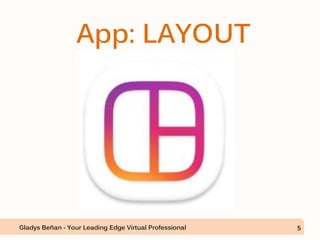
App: LAYOUT
Gladys Beñan - Your Leading Edge Virtual Professional 5
Layout creates
collages or mixing of
photos.
Gladys Beñan - Your Leading Edge Virtual Professional 6
App: BOOMERANG
Gladys Beñan - Your Leading Edge Virtual Professional 7
Boomerang creates
funny videos by
looping short ordinary
videos.
Gladys Beñan - Your Leading Edge Virtual Professional 8
App: HYPERLAPSE
Gladys Beñan - Your Leading Edge Virtual Professional 9
Hyperlapse captures
and shares moving
timelapse videos.
Gladys Beñan - Your Leading Edge Virtual Professional 10
App: LATER
Gladys Beñan - Your Leading Edge Virtual Professional 11
Later is for managing
and scheduling posts.
Gladys Beñan - Your Leading Edge Virtual Professional 12
App: REPOST
Gladys Beñan - Your Leading Edge Virtual Professional 13
Repost enables easier
reposting of photos
and videos.
Gladys Beñan - Your Leading Edge Virtual Professional 14
App: HYDRA
Gladys Beñan - Your Leading Edge Virtual Professional 15
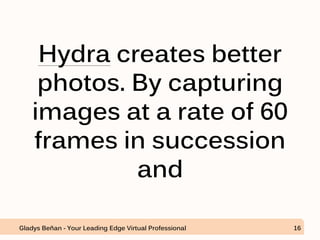
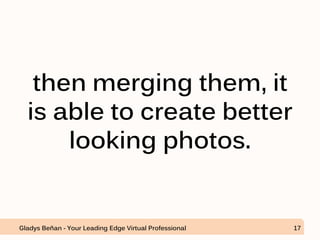
Hydra creates better
photos. By capturing
images at a rate of 60
frames in succession
and
Gladys Beñan - Your Leading Edge Virtual Professional 16
then merging them, it
is able to create better
looking photos.
Gladys Beñan - Your Leading Edge Virtual Professional 17
1. Get Followers on
Instagram.
Gladys Beñan - Your Leading Edge Virtual Professional 18
One way of doing that
is by adding popular
tags to your posts.
Gladys Beñan - Your Leading Edge Virtual Professional 19
Download
#TagsForLikes app.
Gladys Beñan - Your Leading Edge Virtual Professional 20
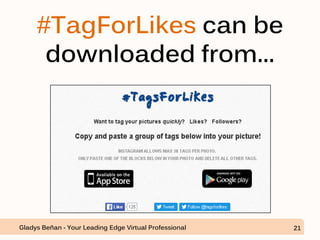
#TagForLikes can be
downloaded from...
Gladys Beñan - Your Leading Edge Virtual Professional 21
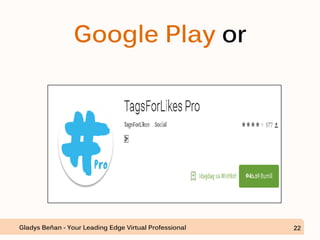
Google Play or
Gladys Beñan - Your Leading Edge Virtual Professional 22
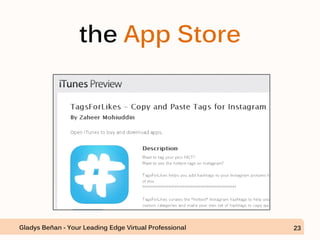
the App Store
Gladys Beñan - Your Leading Edge Virtual Professional 23
Let’s say that we get it
from Google Play.
Gladys Beñan - Your Leading Edge Virtual Professional 24
Open Google Play and
type “TagForLikes”.
Gladys Beñan - Your Leading Edge Virtual Professional 25
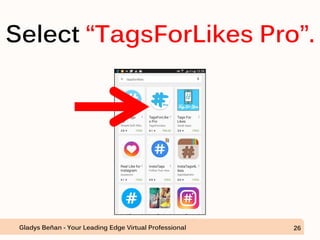
Select “TagsForLikes Pro”.
Gladys Beñan - Your Leading Edge Virtual Professional 26
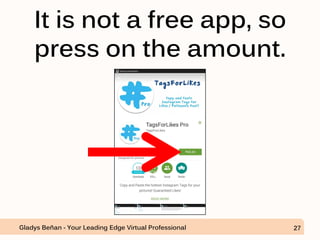
It is not a free app, so
press on the amount.
Gladys Beñan - Your Leading Edge Virtual Professional 27
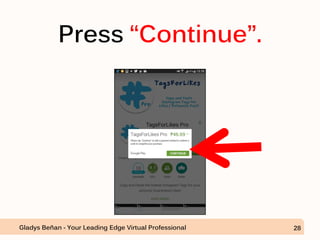
Press “Continue”.
Gladys Beñan - Your Leading Edge Virtual Professional 28
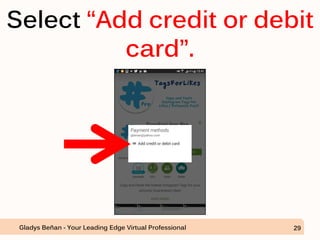
Select “Add credit or debit
card”.
Gladys Beñan - Your Leading Edge Virtual Professional 29
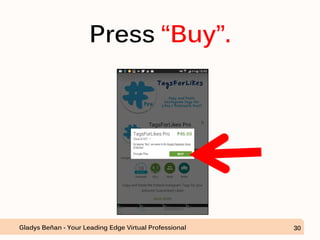
Press “Buy”.
Gladys Beñan - Your Leading Edge Virtual Professional 30
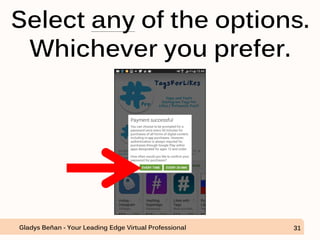
Select any of the options.
Whichever you prefer.
Gladys Beñan - Your Leading Edge Virtual Professional 31
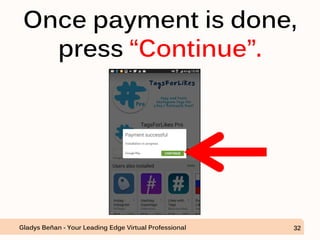
Once payment is done,
press “Continue”.
Gladys Beñan - Your Leading Edge Virtual Professional 32
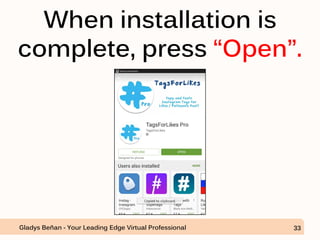
When installation is
complete, press “Open”.
Gladys Beñan - Your Leading Edge Virtual Professional 33
Gladys Beñan - Your Leading Edge Virtual Professional 34
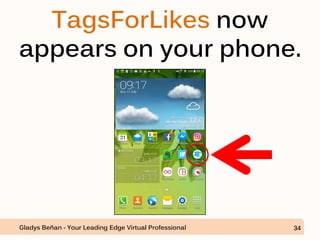
TagsForLikes now
appears on your phone.
Let’s proceed in
finding a suitable
photo for our
promotion.
Gladys Beñan - Your Leading Edge Virtual Professional 35
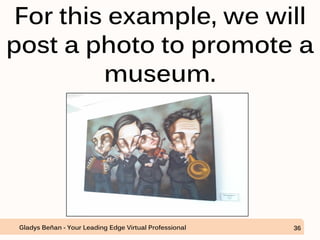
For this example, we will
post a photo to promote a
museum.
Gladys Beñan - Your Leading Edge Virtual Professional 36
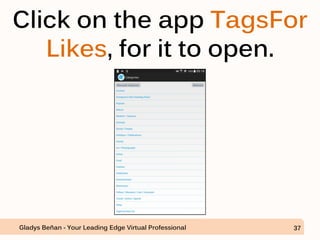
Click on the app TagsFor
Likes, for it to open.
Gladys Beñan - Your Leading Edge Virtual Professional 37
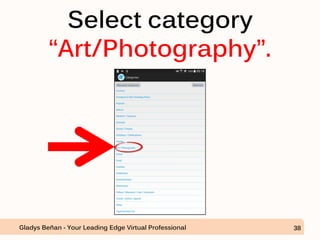
Select category
“Art/Photography”.
Gladys Beñan - Your Leading Edge Virtual Professional 38
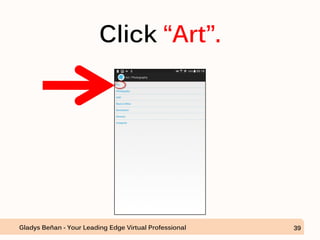
Click “Art”.
Gladys Beñan - Your Leading Edge Virtual Professional 39
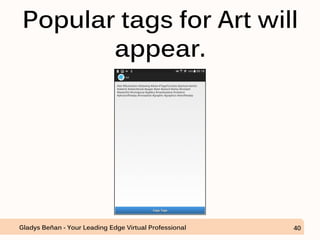
Popular tags for Art will
appear.
Gladys Beñan - Your Leading Edge Virtual Professional 40
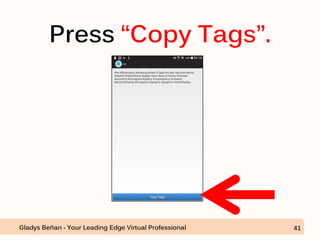
Press “Copy Tags”.
Gladys Beñan - Your Leading Edge Virtual Professional 41
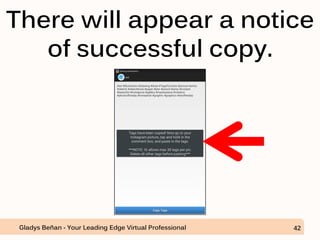
There will appear a notice
of successful copy.
Gladys Beñan - Your Leading Edge Virtual Professional 42
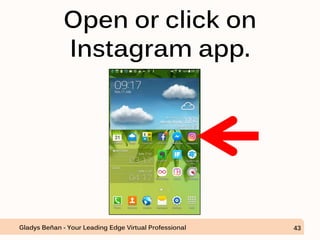
Open or click on
Instagram app.
Gladys Beñan - Your Leading Edge Virtual Professional 43
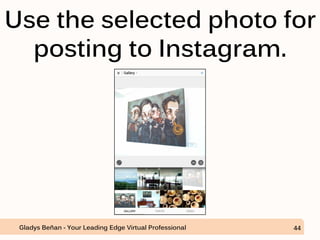
Use the selected photo for
posting to Instagram.
Gladys Beñan - Your Leading Edge Virtual Professional 44
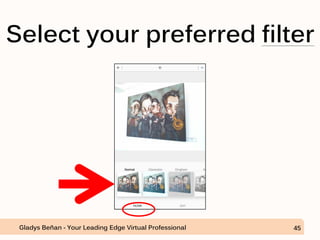
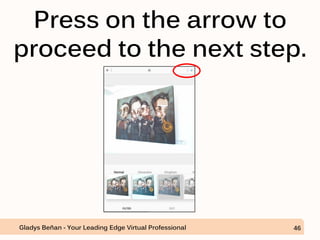
Select your preferred filter
Gladys Beñan - Your Leading Edge Virtual Professional 45
Press on the arrow to
proceed to the next step.
Gladys Beñan - Your Leading Edge Virtual Professional 46
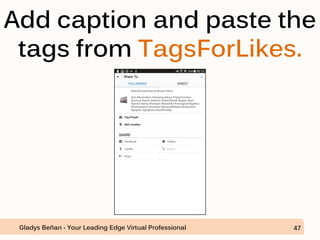
Add caption and paste the
tags from TagsForLikes.
Gladys Beñan - Your Leading Edge Virtual Professional 47
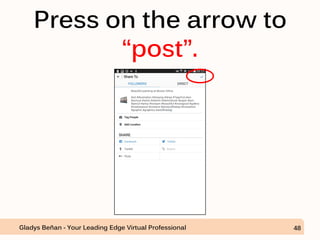
Press on the arrow to
“post”.
Gladys Beñan - Your Leading Edge Virtual Professional 48
But before posting in
Instagram
Gladys Beñan - Your Leading Edge Virtual Professional 49
make sure that you’re
using the client’s
instagram. Not your
personal instagram.
Gladys Beñan - Your Leading Edge Virtual Professional 50
Or you may create a
new Instagram
account for the
campaign.
Gladys Beñan - Your Leading Edge Virtual Professional 51
Privacy should be set
to “Open” to allow
future followers a
view of what your
account is all about.
Gladys Beñan - Your Leading Edge Virtual Professional 52
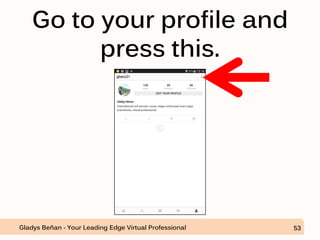
Go to your profile and
press this.
Gladys Beñan - Your Leading Edge Virtual Professional 53
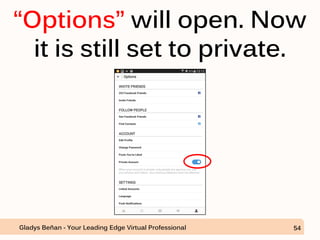
“Options” will open. Now
it is still set to private.
Gladys Beñan - Your Leading Edge Virtual Professional 54
At this point, posts are
not visible to non-
followers.
Gladys Beñan - Your Leading Edge Virtual Professional 55
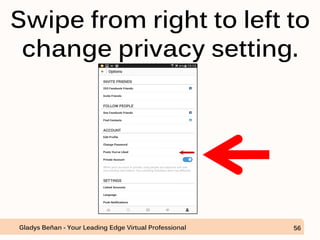
Swipe from right to left to
change privacy setting.
Gladys Beñan - Your Leading Edge Virtual Professional 56
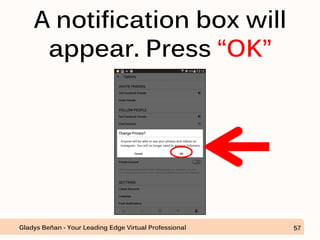
A notification box will
appear. Press “OK”
Gladys Beñan - Your Leading Edge Virtual Professional 57
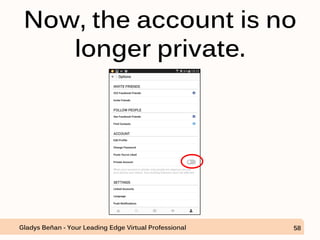
Now, the account is no
longer private.
Gladys Beñan - Your Leading Edge Virtual Professional 58
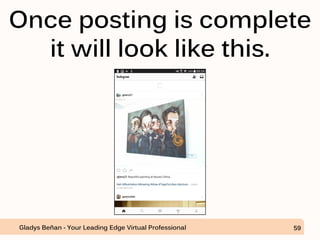
Once posting is complete
it will look like this.
Gladys Beñan - Your Leading Edge Virtual Professional 59
When checked in
email notifications
from Instagram after
1 day.
Gladys Beñan - Your Leading Edge Virtual Professional 60
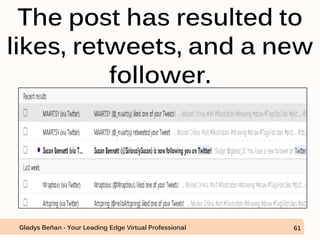
The post has resulted to
likes, retweets, and a new
follower.
Gladys Beñan - Your Leading Edge Virtual Professional 61
The effect has
extended to Twitter
because the post was
also sent to Twitter.
Gladys Beñan - Your Leading Edge Virtual Professional 62
So, the objective of
getting likes, and
followers was
achieved by using
“TagsForLikes”
Gladys Beñan - Your Leading Edge Virtual Professional 63
2. Workflow for
Instagram
Marketing
Gladys Beñan - Your Leading Edge Virtual Professional 64
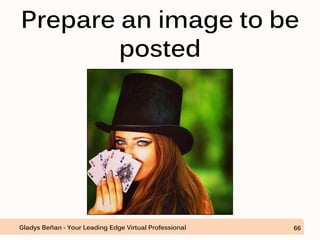
On our next example,
we will be promoting
a magic show.
Gladys Beñan - Your Leading Edge Virtual Professional 65
Prepare an image to be
posted
Gladys Beñan - Your Leading Edge Virtual Professional 66
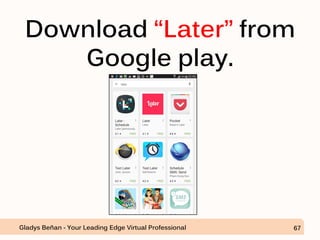
Download “Later” from
Google play.
Gladys Beñan - Your Leading Edge Virtual Professional 67
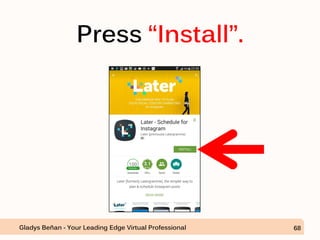
Press “Install”.
Gladys Beñan - Your Leading Edge Virtual Professional 68
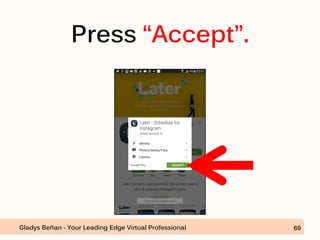
Press “Accept”.
Gladys Beñan - Your Leading Edge Virtual Professional 69
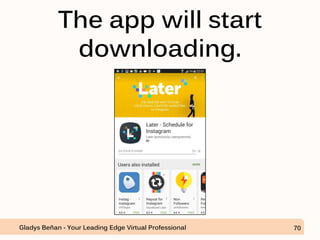
The app will start
downloading.
Gladys Beñan - Your Leading Edge Virtual Professional 70
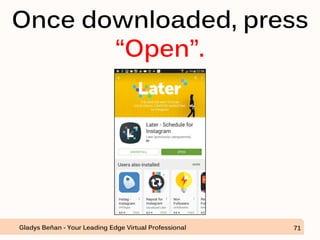
Once downloaded, press
“Open”.
Gladys Beñan - Your Leading Edge Virtual Professional 71
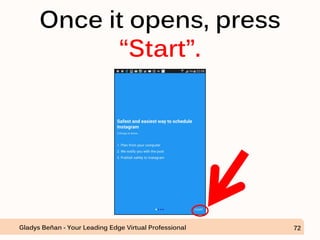
Once it opens, press
“Start”.
Gladys Beñan - Your Leading Edge Virtual Professional 72
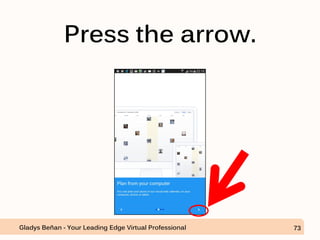
Press the arrow.
Gladys Beñan - Your Leading Edge Virtual Professional 73
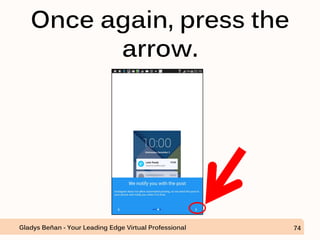
Once again, press the
arrow.
Gladys Beñan - Your Leading Edge Virtual Professional 74
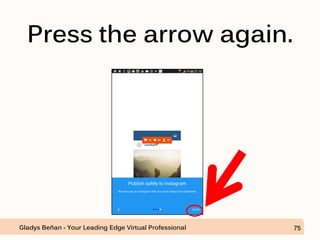
Press the arrow again.
Gladys Beñan - Your Leading Edge Virtual Professional 75
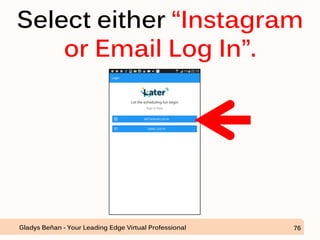
Select either “Instagram
or Email Log In”.
Gladys Beñan - Your Leading Edge Virtual Professional 76
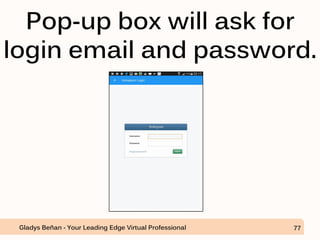
Pop-up box will ask for
login email and password.
Gladys Beñan - Your Leading Edge Virtual Professional 77
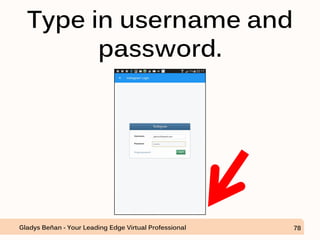
Type in username and
password.
Gladys Beñan - Your Leading Edge Virtual Professional 78
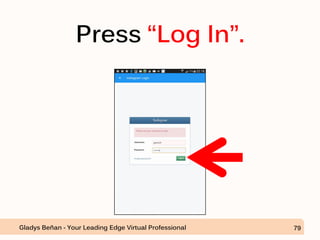
Press “Log In”.
Gladys Beñan - Your Leading Edge Virtual Professional 79
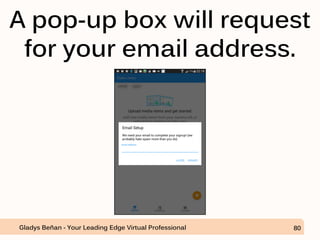
A pop-up box will request
for your email address.
Gladys Beñan - Your Leading Edge Virtual Professional 80
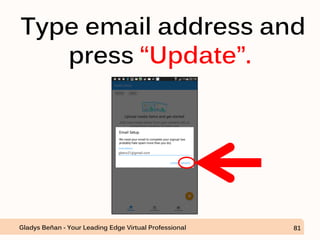
Type email address and
press “Update”.
Gladys Beñan - Your Leading Edge Virtual Professional 81
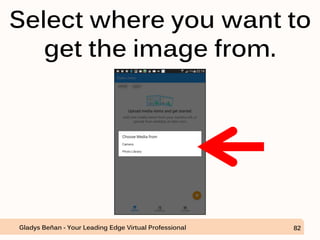
Select where you want to
get the image from.
Gladys Beñan - Your Leading Edge Virtual Professional 82
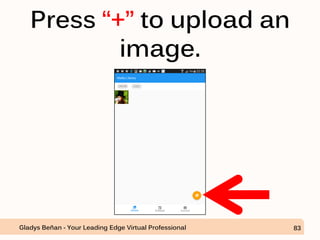
Press “+” to upload an
image.
Gladys Beñan - Your Leading Edge Virtual Professional 83
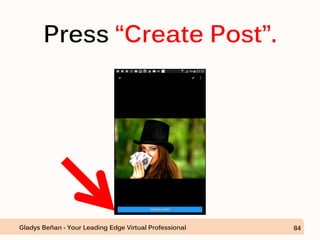
Press “Create Post”.
Gladys Beñan - Your Leading Edge Virtual Professional 84
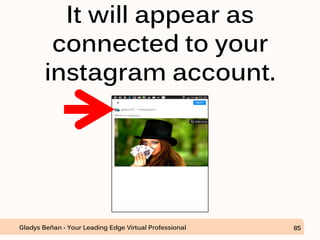
It will appear as
connected to your
instagram account.
Gladys Beñan - Your Leading Edge Virtual Professional 85
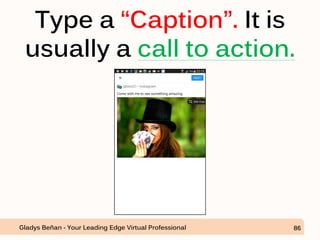
Type a “Caption”. It is
usually a call to action.
Gladys Beñan - Your Leading Edge Virtual Professional 86
Open TagsForLikes and
search for tags related to
the photo.
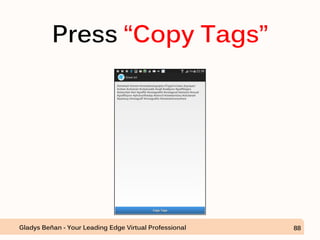
Gladys Beñan - Your Leading Edge Virtual Professional 87
Press “Copy Tags”
Gladys Beñan - Your Leading Edge Virtual Professional 88
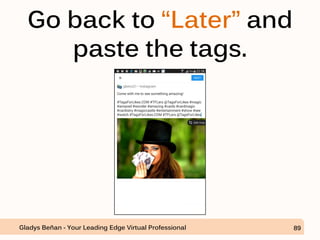
Go back to “Later” and
paste the tags.
Gladys Beñan - Your Leading Edge Virtual Professional 89
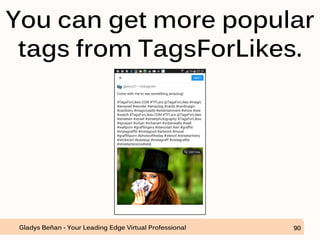
You can get more popular
tags from TagsForLikes.
Gladys Beñan - Your Leading Edge Virtual Professional 90
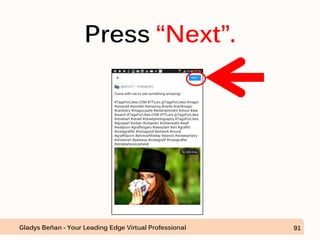
Press “Next”.
Gladys Beñan - Your Leading Edge Virtual Professional 91
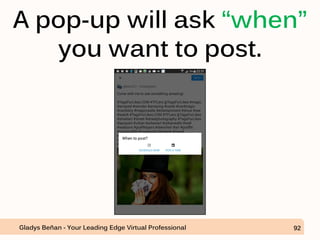
A pop-up will ask “when”
you want to post.
Gladys Beñan - Your Leading Edge Virtual Professional 92
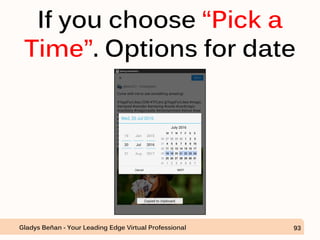
If you choose “Pick a
Time”. Options for date
Gladys Beñan - Your Leading Edge Virtual Professional 93
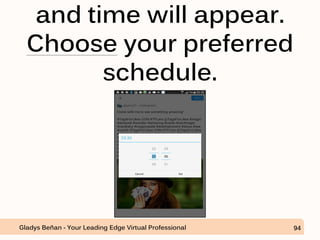
and time will appear.
Choose your preferred
schedule.
Gladys Beñan - Your Leading Edge Virtual Professional 94
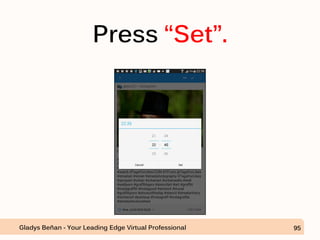
Press “Set”.
Gladys Beñan - Your Leading Edge Virtual Professional 95
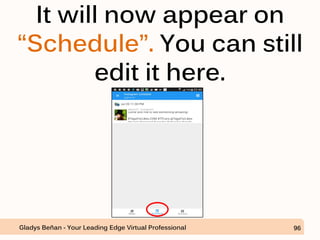
It will now appear on
“Schedule”. You can still
edit it here.
Gladys Beñan - Your Leading Edge Virtual Professional 96
Note: Posts done in
“Later” still need to be
manually posted or
pushed to
“Instagram”.
Gladys Beñan - Your Leading Edge Virtual Professional 97
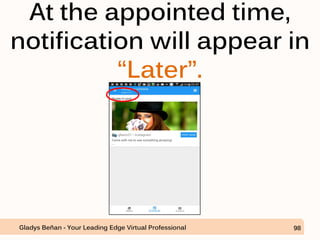
At the appointed time,
notification will appear in
“Later”.
Gladys Beñan - Your Leading Edge Virtual Professional 98
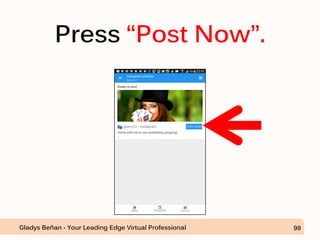
Press “Post Now”.
Gladys Beñan - Your Leading Edge Virtual Professional 99
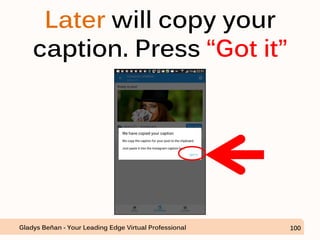
Later will copy your
caption. Press “Got it”
Gladys Beñan - Your Leading Edge Virtual Professional 100
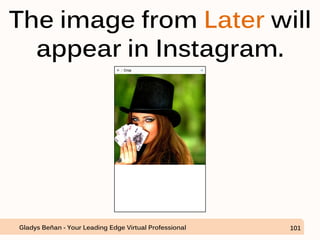
The image from Later will
appear in Instagram.
Gladys Beñan - Your Leading Edge Virtual Professional 101
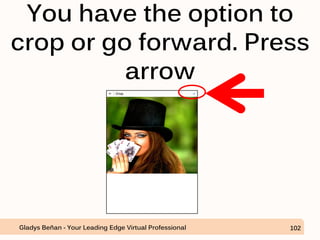
You have the option to
crop or go forward. Press
arrow
Gladys Beñan - Your Leading Edge Virtual Professional 102
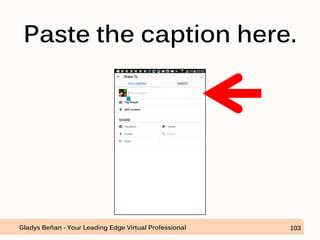
Paste the caption here.
Gladys Beñan - Your Leading Edge Virtual Professional 103
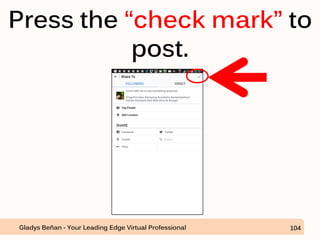
Press the “check mark” to
post.
Gladys Beñan - Your Leading Edge Virtual Professional 104
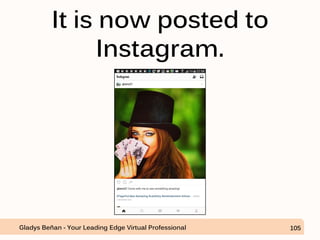
It is now posted to
Instagram.
Gladys Beñan - Your Leading Edge Virtual Professional 105
You may schedule
more posts at
consistent time
intervals.
Gladys Beñan - Your Leading Edge Virtual Professional 106
The objective is to get
more likes, followers
and, potential clients
Gladys Beñan - Your Leading Edge Virtual Professional 107
for your business.
Gladys Beñan - Your Leading Edge Virtual Professional 108
Have fun attracting
more awesome
clients!
Gladys Beñan - Your Leading Edge Virtual Professional 109
Gladys Beñan - Your Leading Edge Virtual Professional 110

Instagram Marketing

  • 1.
    INSTAGRAM MARKETING: Product Promotion Strategy Gladys Beñan- Your Leading Edge Virtual Professional 1
  • 2.
    You first needto download these powerful basic mobile apps for your instagram. Gladys Beñan - Your Leading Edge Virtual Professional 2
  • 3.
    These are usuallyfree apps that go well with Instagram. Gladys Beñan - Your Leading Edge Virtual Professional 3
  • 4.
    For this demo,I have used an android phone and apps from Google Play. Gladys Beñan - Your Leading Edge Virtual Professional 4
  • 5.
    App: LAYOUT Gladys Beñan- Your Leading Edge Virtual Professional 5
  • 6.
    Layout creates collages ormixing of photos. Gladys Beñan - Your Leading Edge Virtual Professional 6
  • 7.
    App: BOOMERANG Gladys Beñan- Your Leading Edge Virtual Professional 7
  • 8.
    Boomerang creates funny videosby looping short ordinary videos. Gladys Beñan - Your Leading Edge Virtual Professional 8
  • 9.
    App: HYPERLAPSE Gladys Beñan- Your Leading Edge Virtual Professional 9
  • 10.
    Hyperlapse captures and sharesmoving timelapse videos. Gladys Beñan - Your Leading Edge Virtual Professional 10
  • 11.
    App: LATER Gladys Beñan- Your Leading Edge Virtual Professional 11
  • 12.
    Later is formanaging and scheduling posts. Gladys Beñan - Your Leading Edge Virtual Professional 12
  • 13.
    App: REPOST Gladys Beñan- Your Leading Edge Virtual Professional 13
  • 14.
    Repost enables easier repostingof photos and videos. Gladys Beñan - Your Leading Edge Virtual Professional 14
  • 15.
    App: HYDRA Gladys Beñan- Your Leading Edge Virtual Professional 15
  • 16.
    Hydra creates better photos.By capturing images at a rate of 60 frames in succession and Gladys Beñan - Your Leading Edge Virtual Professional 16
  • 17.
    then merging them,it is able to create better looking photos. Gladys Beñan - Your Leading Edge Virtual Professional 17
  • 18.
    1. Get Followerson Instagram. Gladys Beñan - Your Leading Edge Virtual Professional 18
  • 19.
    One way ofdoing that is by adding popular tags to your posts. Gladys Beñan - Your Leading Edge Virtual Professional 19
  • 20.
    Download #TagsForLikes app. Gladys Beñan- Your Leading Edge Virtual Professional 20
  • 21.
    #TagForLikes can be downloadedfrom... Gladys Beñan - Your Leading Edge Virtual Professional 21
  • 22.
    Google Play or GladysBeñan - Your Leading Edge Virtual Professional 22
  • 23.
    the App Store GladysBeñan - Your Leading Edge Virtual Professional 23
  • 24.
    Let’s say thatwe get it from Google Play. Gladys Beñan - Your Leading Edge Virtual Professional 24
  • 25.
    Open Google Playand type “TagForLikes”. Gladys Beñan - Your Leading Edge Virtual Professional 25
  • 26.
    Select “TagsForLikes Pro”. GladysBeñan - Your Leading Edge Virtual Professional 26
  • 27.
    It is nota free app, so press on the amount. Gladys Beñan - Your Leading Edge Virtual Professional 27
  • 28.
    Press “Continue”. Gladys Beñan- Your Leading Edge Virtual Professional 28
  • 29.
    Select “Add creditor debit card”. Gladys Beñan - Your Leading Edge Virtual Professional 29
  • 30.
    Press “Buy”. Gladys Beñan- Your Leading Edge Virtual Professional 30
  • 31.
    Select any ofthe options. Whichever you prefer. Gladys Beñan - Your Leading Edge Virtual Professional 31
  • 32.
    Once payment isdone, press “Continue”. Gladys Beñan - Your Leading Edge Virtual Professional 32
  • 33.
    When installation is complete,press “Open”. Gladys Beñan - Your Leading Edge Virtual Professional 33
  • 34.
    Gladys Beñan -Your Leading Edge Virtual Professional 34 TagsForLikes now appears on your phone.
  • 35.
    Let’s proceed in findinga suitable photo for our promotion. Gladys Beñan - Your Leading Edge Virtual Professional 35
  • 36.
    For this example,we will post a photo to promote a museum. Gladys Beñan - Your Leading Edge Virtual Professional 36
  • 37.
    Click on theapp TagsFor Likes, for it to open. Gladys Beñan - Your Leading Edge Virtual Professional 37
  • 38.
    Select category “Art/Photography”. Gladys Beñan- Your Leading Edge Virtual Professional 38
  • 39.
    Click “Art”. Gladys Beñan- Your Leading Edge Virtual Professional 39
  • 40.
    Popular tags forArt will appear. Gladys Beñan - Your Leading Edge Virtual Professional 40
  • 41.
    Press “Copy Tags”. GladysBeñan - Your Leading Edge Virtual Professional 41
  • 42.
    There will appeara notice of successful copy. Gladys Beñan - Your Leading Edge Virtual Professional 42
  • 43.
    Open or clickon Instagram app. Gladys Beñan - Your Leading Edge Virtual Professional 43
  • 44.
    Use the selectedphoto for posting to Instagram. Gladys Beñan - Your Leading Edge Virtual Professional 44
  • 45.
    Select your preferredfilter Gladys Beñan - Your Leading Edge Virtual Professional 45
  • 46.
    Press on thearrow to proceed to the next step. Gladys Beñan - Your Leading Edge Virtual Professional 46
  • 47.
    Add caption andpaste the tags from TagsForLikes. Gladys Beñan - Your Leading Edge Virtual Professional 47
  • 48.
    Press on thearrow to “post”. Gladys Beñan - Your Leading Edge Virtual Professional 48
  • 49.
    But before postingin Instagram Gladys Beñan - Your Leading Edge Virtual Professional 49
  • 50.
    make sure thatyou’re using the client’s instagram. Not your personal instagram. Gladys Beñan - Your Leading Edge Virtual Professional 50
  • 51.
    Or you maycreate a new Instagram account for the campaign. Gladys Beñan - Your Leading Edge Virtual Professional 51
  • 52.
    Privacy should beset to “Open” to allow future followers a view of what your account is all about. Gladys Beñan - Your Leading Edge Virtual Professional 52
  • 53.
    Go to yourprofile and press this. Gladys Beñan - Your Leading Edge Virtual Professional 53
  • 54.
    “Options” will open.Now it is still set to private. Gladys Beñan - Your Leading Edge Virtual Professional 54
  • 55.
    At this point,posts are not visible to non- followers. Gladys Beñan - Your Leading Edge Virtual Professional 55
  • 56.
    Swipe from rightto left to change privacy setting. Gladys Beñan - Your Leading Edge Virtual Professional 56
  • 57.
    A notification boxwill appear. Press “OK” Gladys Beñan - Your Leading Edge Virtual Professional 57
  • 58.
    Now, the accountis no longer private. Gladys Beñan - Your Leading Edge Virtual Professional 58
  • 59.
    Once posting iscomplete it will look like this. Gladys Beñan - Your Leading Edge Virtual Professional 59
  • 60.
    When checked in emailnotifications from Instagram after 1 day. Gladys Beñan - Your Leading Edge Virtual Professional 60
  • 61.
    The post hasresulted to likes, retweets, and a new follower. Gladys Beñan - Your Leading Edge Virtual Professional 61
  • 62.
    The effect has extendedto Twitter because the post was also sent to Twitter. Gladys Beñan - Your Leading Edge Virtual Professional 62
  • 63.
    So, the objectiveof getting likes, and followers was achieved by using “TagsForLikes” Gladys Beñan - Your Leading Edge Virtual Professional 63
  • 64.
    2. Workflow for Instagram Marketing GladysBeñan - Your Leading Edge Virtual Professional 64
  • 65.
    On our nextexample, we will be promoting a magic show. Gladys Beñan - Your Leading Edge Virtual Professional 65
  • 66.
    Prepare an imageto be posted Gladys Beñan - Your Leading Edge Virtual Professional 66
  • 67.
    Download “Later” from Googleplay. Gladys Beñan - Your Leading Edge Virtual Professional 67
  • 68.
    Press “Install”. Gladys Beñan- Your Leading Edge Virtual Professional 68
  • 69.
    Press “Accept”. Gladys Beñan- Your Leading Edge Virtual Professional 69
  • 70.
    The app willstart downloading. Gladys Beñan - Your Leading Edge Virtual Professional 70
  • 71.
    Once downloaded, press “Open”. GladysBeñan - Your Leading Edge Virtual Professional 71
  • 72.
    Once it opens,press “Start”. Gladys Beñan - Your Leading Edge Virtual Professional 72
  • 73.
    Press the arrow. GladysBeñan - Your Leading Edge Virtual Professional 73
  • 74.
    Once again, pressthe arrow. Gladys Beñan - Your Leading Edge Virtual Professional 74
  • 75.
    Press the arrowagain. Gladys Beñan - Your Leading Edge Virtual Professional 75
  • 76.
    Select either “Instagram orEmail Log In”. Gladys Beñan - Your Leading Edge Virtual Professional 76
  • 77.
    Pop-up box willask for login email and password. Gladys Beñan - Your Leading Edge Virtual Professional 77
  • 78.
    Type in usernameand password. Gladys Beñan - Your Leading Edge Virtual Professional 78
  • 79.
    Press “Log In”. GladysBeñan - Your Leading Edge Virtual Professional 79
  • 80.
    A pop-up boxwill request for your email address. Gladys Beñan - Your Leading Edge Virtual Professional 80
  • 81.
    Type email addressand press “Update”. Gladys Beñan - Your Leading Edge Virtual Professional 81
  • 82.
    Select where youwant to get the image from. Gladys Beñan - Your Leading Edge Virtual Professional 82
  • 83.
    Press “+” toupload an image. Gladys Beñan - Your Leading Edge Virtual Professional 83
  • 84.
    Press “Create Post”. GladysBeñan - Your Leading Edge Virtual Professional 84
  • 85.
    It will appearas connected to your instagram account. Gladys Beñan - Your Leading Edge Virtual Professional 85
  • 86.
    Type a “Caption”.It is usually a call to action. Gladys Beñan - Your Leading Edge Virtual Professional 86
  • 87.
    Open TagsForLikes and searchfor tags related to the photo. Gladys Beñan - Your Leading Edge Virtual Professional 87
  • 88.
    Press “Copy Tags” GladysBeñan - Your Leading Edge Virtual Professional 88
  • 89.
    Go back to“Later” and paste the tags. Gladys Beñan - Your Leading Edge Virtual Professional 89
  • 90.
    You can getmore popular tags from TagsForLikes. Gladys Beñan - Your Leading Edge Virtual Professional 90
  • 91.
    Press “Next”. Gladys Beñan- Your Leading Edge Virtual Professional 91
  • 92.
    A pop-up willask “when” you want to post. Gladys Beñan - Your Leading Edge Virtual Professional 92
  • 93.
    If you choose“Pick a Time”. Options for date Gladys Beñan - Your Leading Edge Virtual Professional 93
  • 94.
    and time willappear. Choose your preferred schedule. Gladys Beñan - Your Leading Edge Virtual Professional 94
  • 95.
    Press “Set”. Gladys Beñan- Your Leading Edge Virtual Professional 95
  • 96.
    It will nowappear on “Schedule”. You can still edit it here. Gladys Beñan - Your Leading Edge Virtual Professional 96
  • 97.
    Note: Posts donein “Later” still need to be manually posted or pushed to “Instagram”. Gladys Beñan - Your Leading Edge Virtual Professional 97
  • 98.
    At the appointedtime, notification will appear in “Later”. Gladys Beñan - Your Leading Edge Virtual Professional 98
  • 99.
    Press “Post Now”. GladysBeñan - Your Leading Edge Virtual Professional 99
  • 100.
    Later will copyyour caption. Press “Got it” Gladys Beñan - Your Leading Edge Virtual Professional 100
  • 101.
    The image fromLater will appear in Instagram. Gladys Beñan - Your Leading Edge Virtual Professional 101
  • 102.
    You have theoption to crop or go forward. Press arrow Gladys Beñan - Your Leading Edge Virtual Professional 102
  • 103.
    Paste the captionhere. Gladys Beñan - Your Leading Edge Virtual Professional 103
  • 104.
    Press the “checkmark” to post. Gladys Beñan - Your Leading Edge Virtual Professional 104
  • 105.
    It is nowposted to Instagram. Gladys Beñan - Your Leading Edge Virtual Professional 105
  • 106.
    You may schedule moreposts at consistent time intervals. Gladys Beñan - Your Leading Edge Virtual Professional 106
  • 107.
    The objective isto get more likes, followers and, potential clients Gladys Beñan - Your Leading Edge Virtual Professional 107
  • 108.
    for your business. GladysBeñan - Your Leading Edge Virtual Professional 108
  • 109.
    Have fun attracting moreawesome clients! Gladys Beñan - Your Leading Edge Virtual Professional 109
  • 110.
    Gladys Beñan -Your Leading Edge Virtual Professional 110