Page 1 Solutions 
HOW TO SETUP 
Instagram 
FOR YOUR BUSINESS 
Page 1 Solutions
TABLE OF CONTENTS 
1 
Introduction 
4 
Getting Started: First things First 
8 
Getting Familiar: What to Expect 
13 
What Now? Posting & Sharing 
16 
Take a Look: Top 5 Brands on Instagram 
23 
Take a Look: Successful Small Businesses on Instagram 
Page 1 Solutions
INTRODUCTION 
Why do you need Instagram? 
1 
Page 1 Solutions
Why do you need an Instagram? 
As an Instagram user, you can edit and share photos that represent your business with more than 80 million users and counting. Instagram is a great way to humanize your brand and cross- promote your products or services. Now that images have become a key part of a company's marketing strategy, Instagram is a must-have social platform for your business. 
2 
Page 1 Solutions
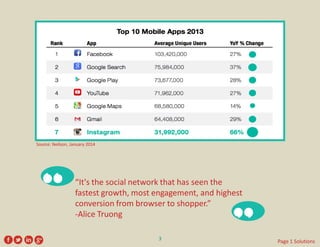
“It's thesocial networkthat has seen the fastest growth, most engagement, and highest conversion from browser to shopper.” 
-Alice Truong 
“ 
” 
Source: Neilson, January 2014 
3 
Page 1 Solutions
GETTING STARTED 
First things First 
4 
Page 1 Solutions
Getting Started 
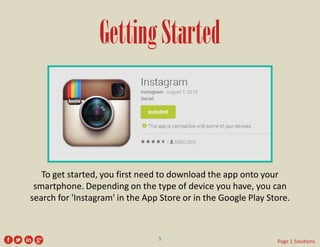
To get started, you first need to download the app onto your smartphone. Depending on the type of device you have, you can search for 'Instagram' in the App Store or in the Google Play Store. 
5 
Page 1 Solutions
Getting Started 
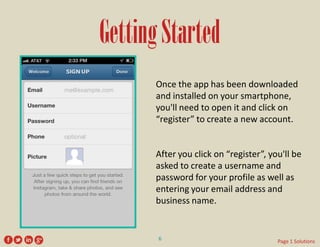
Once the app has been downloaded and installed on your smartphone, you'll need to open it and click on “register” to create a new account. 
After you click on “register”, you'll be asked to create a username and password for your profile as well as entering your email address and business name. 
6 
Page 1 Solutions
Getting Started 
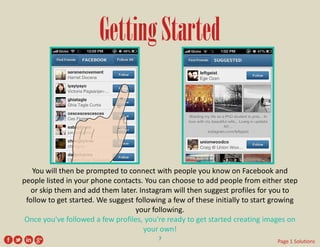
You will then be prompted to connect with people you know on Facebook and people listed in your phone contacts. You can choose to add people from either step or skip them and add them later. Instagram will then suggest profiles for you to follow to get started. We suggest following a few of these initially to start growing your following. 

Once you've followed a few profiles, you're ready to get started creating images on your own! 
7 
Page 1 Solutions
GETTING FAMILIAR 
What to Expect 
Before we show you how to create your first image, we want to walk you around the platform a bit. 
8 
Page 1 Solutions
Getting Familiar 
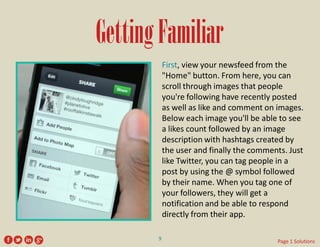
First, view your newsfeed from the "Home" button. From here, you can scroll through images that people you're following have recently posted as well as like and comment on images. Below each image you'll be able to see a likes count followed by an image description with hashtags created by the user and finally the comments. Just like Twitter, you can tag people in a post by using the @ symbol followed by their name. When you tag one of your followers, they will get a notification and be able to respond directly from their app. 
9 
Page 1 Solutions
Getting Familiar 
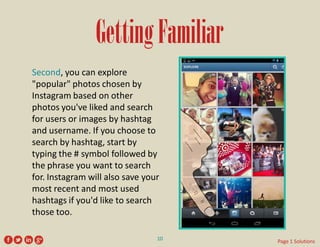
Second, you can explore "popular" photos chosen by Instagram based on other photos you've liked and search for users or images by hashtag and username. If you choose to search by hashtag, start by typing the # symbol followed by the phrase you want to search for. Instagram will also save your most recent and most used hashtags if you'd like to search those too. 
10 
Page 1 Solutions
Getting Familiar 
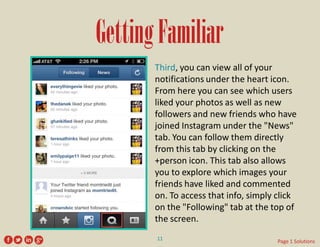
Third, you can view all of your notifications under the heart icon. From here you can see which users liked your photos as well as new followers and new friends who have joined Instagram under the "News" tab. You can follow them directly from this tab by clicking on the +person icon. This tab also allows you to explore which images your friends have liked and commented on. To access that info, simply click on the "Following" tab at the top of the screen. 
11 
Page 1 Solutions
Getting Familiar 
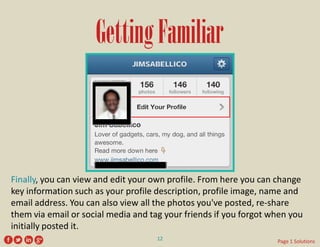
Finally, you can view and edit your own profile. From here you can change key information such as your profile description, profile image, name and email address. You can also view all the photos you've posted, re-share them via email or social media and tag your friends if you forgot when you initially posted it. 
12 
Page 1 Solutions
WHAT NOW? 
Posting & Sharing 
13 
Page 1 Solutions
What Now? 
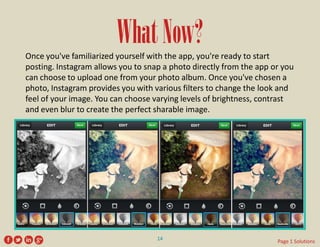
Once you've familiarized yourself with the app, you're ready to start posting. Instagram allows you to snap a photo directly from the app or you can choose to upload one from your photo album. Once you've chosen a photo, Instagram provides you with various filters to change the look and feel of your image. You can choose varying levels of brightness, contrast and even blur to create the perfect sharable image. 
14 
Page 1 Solutions
What Now? 
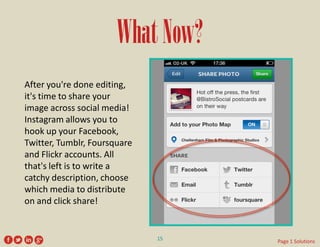
After you're done editing, it's time to share your image across social media! Instagram allows you to hook up your Facebook, Twitter, Tumblr, Foursquare and Flickr accounts. All that's left is to write a catchy description, choose which media to distribute on and click share! 
15 
Page 1 Solutions
TAKE A LOOK 
Top 5 Brands on Instagram 
16 
Page 1 Solutions
What Makes These Work? 
These Successful Brands Follow These Tips: 
• 
Feature customers using their products 
• 
Take fans behind the scenes 
• 
Hosts contests and projects 
• 
Mimic their fans 
• 
Promote new products 
• 
Use hashtags 
• 
Images are visually pleasing and eye-catching 
• 
Showcase products in creative ways 
17 
Page 1 Solutions
Starbucks 
http://instagram.com/starbucks 
2,794,737 followers 
18 
Page 1 Solutions
Sharpie 
http://instagram.com/sharpie 
117,389 followers 
19 
Page 1 Solutions
Red Bull 
http://instagram.com/redbull 
1,523,440 followers 
20 
Page 1 Solutions
Puma 
http://instagram.com/puma 
474,042 followers 
21 
Page 1 Solutions
Ben & Jerry’s 
http://instagram.com/benandjerrys 
408,681 followers 
22 
Page 1 Solutions
TAKE A LOOK 
Successful Small Businesses 
on Instagram 
23 
Page 1 Solutions
What Makes These Work? 
These Successful Small Businesses Follow These Tips: 
• 
Balance fun images with pictures from your business 
• 
Use Instagram videos 
• 
Cultivate a strong following 
• 
Use a variety of filters 
• 
Promote contests, deals, and specials 
• 
Showcase employees and staff 
• 
Images are visually pleasing and eye-catching 
• 
Use industry-related hashtags 
• 
Stay relatable and connected with followers 
24 
Page 1 Solutions
Pacific Plastic Surgery 
http://instagram.com/pacificplasticsurgery 
108 followers 
31 
Page 1 Solutions
Davis Plastic Surgery 
http://instagram.com/davisplasticsurgery 
876 followers 
26 
Page 1 Solutions
Law Offices of Jack J. Kramer 
http://instagram.com/jstandsforjustice 
2,195 followers 
33 
Page 1 Solutions
Gary Login, DMD 
http://instagram.com/garyrlogindmd 
133 followers 
28 
Page 1 Solutions
Amy Vermillion Interiors 
http://instagram.com/amyvermillioninteriors 
2,430 followers 
25 
Page 1 Solutions
Maria’s Cupcakes 
http://instagram.com/mariascupcakes 
12,360 followers 
30 
Page 1 Solutions
Surf Organic 
http://instagram.com/surforganic 
2,176 followers 
27 
Page 1 Solutions
Ibis Cycles 
http://instagram.com/ibiscycles 
4,549 followers 
32 
Page 1 Solutions
Slingshot, LLC 
http://instagram.com/slingshot 
576 followers 
29 
Page 1 Solutions
Take it From Here 
We encourage you to have fun with the app and try out the different filters and features. As a business, you can post images of your staff hard at work, new products you're offering, products you support and even a few selfies. Thank you for viewing this EBook, we hope it was helpful in getting you started. If you have any further questions or comments, contact 
Page 1 Solutions. 
34 
Page 1 Solutions
THANK YOU 
Enjoy Your New Instagram! 
35 
Page 1 Solutions

How To Setup Instagram For Your Business

  • 1.
    Page 1 Solutions HOW TO SETUP Instagram FOR YOUR BUSINESS Page 1 Solutions
  • 2.
    TABLE OF CONTENTS 1 Introduction 4 Getting Started: First things First 8 Getting Familiar: What to Expect 13 What Now? Posting & Sharing 16 Take a Look: Top 5 Brands on Instagram 23 Take a Look: Successful Small Businesses on Instagram Page 1 Solutions
  • 3.
    INTRODUCTION Why doyou need Instagram? 1 Page 1 Solutions
  • 4.
    Why do youneed an Instagram? As an Instagram user, you can edit and share photos that represent your business with more than 80 million users and counting. Instagram is a great way to humanize your brand and cross- promote your products or services. Now that images have become a key part of a company's marketing strategy, Instagram is a must-have social platform for your business. 2 Page 1 Solutions
  • 5.
    “It's thesocial networkthathas seen the fastest growth, most engagement, and highest conversion from browser to shopper.” -Alice Truong “ ” Source: Neilson, January 2014 3 Page 1 Solutions
  • 6.
    GETTING STARTED Firstthings First 4 Page 1 Solutions
  • 7.
    Getting Started Toget started, you first need to download the app onto your smartphone. Depending on the type of device you have, you can search for 'Instagram' in the App Store or in the Google Play Store. 5 Page 1 Solutions
  • 8.
    Getting Started Oncethe app has been downloaded and installed on your smartphone, you'll need to open it and click on “register” to create a new account. After you click on “register”, you'll be asked to create a username and password for your profile as well as entering your email address and business name. 6 Page 1 Solutions
  • 9.
    Getting Started Youwill then be prompted to connect with people you know on Facebook and people listed in your phone contacts. You can choose to add people from either step or skip them and add them later. Instagram will then suggest profiles for you to follow to get started. We suggest following a few of these initially to start growing your following. Once you've followed a few profiles, you're ready to get started creating images on your own! 7 Page 1 Solutions
  • 10.
    GETTING FAMILIAR Whatto Expect Before we show you how to create your first image, we want to walk you around the platform a bit. 8 Page 1 Solutions
  • 11.
    Getting Familiar First,view your newsfeed from the "Home" button. From here, you can scroll through images that people you're following have recently posted as well as like and comment on images. Below each image you'll be able to see a likes count followed by an image description with hashtags created by the user and finally the comments. Just like Twitter, you can tag people in a post by using the @ symbol followed by their name. When you tag one of your followers, they will get a notification and be able to respond directly from their app. 9 Page 1 Solutions
  • 12.
    Getting Familiar Second,you can explore "popular" photos chosen by Instagram based on other photos you've liked and search for users or images by hashtag and username. If you choose to search by hashtag, start by typing the # symbol followed by the phrase you want to search for. Instagram will also save your most recent and most used hashtags if you'd like to search those too. 10 Page 1 Solutions
  • 13.
    Getting Familiar Third,you can view all of your notifications under the heart icon. From here you can see which users liked your photos as well as new followers and new friends who have joined Instagram under the "News" tab. You can follow them directly from this tab by clicking on the +person icon. This tab also allows you to explore which images your friends have liked and commented on. To access that info, simply click on the "Following" tab at the top of the screen. 11 Page 1 Solutions
  • 14.
    Getting Familiar Finally,you can view and edit your own profile. From here you can change key information such as your profile description, profile image, name and email address. You can also view all the photos you've posted, re-share them via email or social media and tag your friends if you forgot when you initially posted it. 12 Page 1 Solutions
  • 15.
    WHAT NOW? Posting& Sharing 13 Page 1 Solutions
  • 16.
    What Now? Onceyou've familiarized yourself with the app, you're ready to start posting. Instagram allows you to snap a photo directly from the app or you can choose to upload one from your photo album. Once you've chosen a photo, Instagram provides you with various filters to change the look and feel of your image. You can choose varying levels of brightness, contrast and even blur to create the perfect sharable image. 14 Page 1 Solutions
  • 17.
    What Now? Afteryou're done editing, it's time to share your image across social media! Instagram allows you to hook up your Facebook, Twitter, Tumblr, Foursquare and Flickr accounts. All that's left is to write a catchy description, choose which media to distribute on and click share! 15 Page 1 Solutions
  • 18.
    TAKE A LOOK Top 5 Brands on Instagram 16 Page 1 Solutions
  • 19.
    What Makes TheseWork? These Successful Brands Follow These Tips: • Feature customers using their products • Take fans behind the scenes • Hosts contests and projects • Mimic their fans • Promote new products • Use hashtags • Images are visually pleasing and eye-catching • Showcase products in creative ways 17 Page 1 Solutions
  • 20.
  • 21.
    Sharpie http://instagram.com/sharpie 117,389followers 19 Page 1 Solutions
  • 22.
    Red Bull http://instagram.com/redbull 1,523,440 followers 20 Page 1 Solutions
  • 23.
    Puma http://instagram.com/puma 474,042followers 21 Page 1 Solutions
  • 24.
    Ben & Jerry’s http://instagram.com/benandjerrys 408,681 followers 22 Page 1 Solutions
  • 25.
    TAKE A LOOK Successful Small Businesses on Instagram 23 Page 1 Solutions
  • 26.
    What Makes TheseWork? These Successful Small Businesses Follow These Tips: • Balance fun images with pictures from your business • Use Instagram videos • Cultivate a strong following • Use a variety of filters • Promote contests, deals, and specials • Showcase employees and staff • Images are visually pleasing and eye-catching • Use industry-related hashtags • Stay relatable and connected with followers 24 Page 1 Solutions
  • 27.
    Pacific Plastic Surgery http://instagram.com/pacificplasticsurgery 108 followers 31 Page 1 Solutions
  • 28.
    Davis Plastic Surgery http://instagram.com/davisplasticsurgery 876 followers 26 Page 1 Solutions
  • 29.
    Law Offices ofJack J. Kramer http://instagram.com/jstandsforjustice 2,195 followers 33 Page 1 Solutions
  • 30.
    Gary Login, DMD http://instagram.com/garyrlogindmd 133 followers 28 Page 1 Solutions
  • 31.
    Amy Vermillion Interiors http://instagram.com/amyvermillioninteriors 2,430 followers 25 Page 1 Solutions
  • 32.
    Maria’s Cupcakes http://instagram.com/mariascupcakes 12,360 followers 30 Page 1 Solutions
  • 33.
    Surf Organic http://instagram.com/surforganic 2,176 followers 27 Page 1 Solutions
  • 34.
    Ibis Cycles http://instagram.com/ibiscycles 4,549 followers 32 Page 1 Solutions
  • 35.
    Slingshot, LLC http://instagram.com/slingshot 576 followers 29 Page 1 Solutions
  • 36.
    Take it FromHere We encourage you to have fun with the app and try out the different filters and features. As a business, you can post images of your staff hard at work, new products you're offering, products you support and even a few selfies. Thank you for viewing this EBook, we hope it was helpful in getting you started. If you have any further questions or comments, contact Page 1 Solutions. 34 Page 1 Solutions
  • 37.
    THANK YOU EnjoyYour New Instagram! 35 Page 1 Solutions