Information Networks
Dr. Kamal Gulati
Information Networks (Topics Covered)
•Networked Enterprise
Components: Types of networks,
Advantages of Network
Environment
• Business Uses of Internet
• Intranet and Extranet
• Distributed/Cloud Computing
Detailed Topics
• 1. Networking – Usage & Meaning
• 2. Computer Network – Advantages &
Disadvantages.
• 3. Shared Resources & Services (Printers,
Fax Machine, Modems, Files & Folders-Database,
Email, Internet)
• 4. Elements of Communication System
(Sender, Medium, Receiver)
• 5. Data Transmission Modes
(Simplex, Half-Duplex, Full-Duplex)
• 6. Transmission of Data Signals
(Digital, Analog Transmission)
• 7. Data Transmission through
Medium (Asynchronous transmission
or Synchronous transmission)
• 8. Types of Network Models -
Domain Vs Workgroup / Peer to Peer
Vs Server Based.
• 9. Network Classification
(Types of Network): LAN, MAN,
WAN, PAN, SAN, CAN, VAN, DAN.
• 10. Basic Networking Terms:
WWW (URL), IP Address, IPv4, IPv6
• 11. Application of Networks
• 12. Network Topology
• 13. Types of Network Topology
– Logical and Physical Topology
• 14. Types of Physical Topology
– Bus, Ring, Tree, Star, Mesh, Hybrid
• 15. Network Components -
Physical Media, Interconnecting Devices,
Computers, Networking Software,
Applications.
• 16. Network Media – (Bounded /
Unbounded) Wired Vs Wireless
• 17. Wired: Different Types of Cables
used in Networking based on Speed,
Security, Size and Cost. - Twisted Paid
Cable (STP / UTP), Coaxial Cable, Fiber
Optic Cable
• 18. Wireless: RF, Microwave Signals,
FM, TM, Satellite Communication.
• 19. Networking Devices – HUB,
Repeater, Switch, Router, WLAN
Card, LAN Card, ADSL, Modems,
Bridge, Gateway, Firewall, NIC
• 20. Networking Components –
Client & Servers.
• 21. Networking Software – DU Meter,
NetMeeting, Remote Sharing Software
etc.
• 22. Networking Applications – VOIP,
Chat Groups, Instant Messengers, News
Group, E-Commerce Apps etc.
• 23. Internetwork – Connection of two
or more computer network via common
routing technology. (Intranet, Extranet,
Internet)
• 24. Networking Protocols –
TCP/IP, IPX/SPX, NeteBUI, DHCP,
DNS, FTP
• 25. Networking Server – Proxy
Server, IIS, File Server, Printer
Server, Ms Exchange Server, ISP.
• 26. Cloud Computing - Services,
Layers, Future of CC, Advantages &
Disadvantages.
• 27. Distributing Computing –
Architecture, Applications, Used in Mobile,
Categories, Advantages & Disadvantages.
• 28. Use of Cloud Computing - in
Insurance, Banking Sector and
Financial Services.
• 29. GPRS, GSM & CDMA
• 30. Firewall – Hardware & Software
with Types & Difference.
Computer Networks
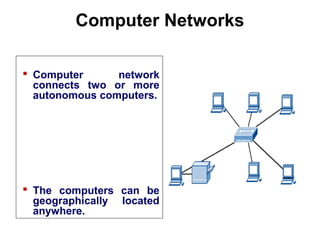
 Computer network
connects two or more
autonomous computers.
 The computers can be
geographically located
anywhere.
Introduction to Computer Networks
LAN, MAN & WAN
 Network in small geographical Area (Room, Building
or a Campus) is called LAN (Local Area Network)
 Network in a City is call MAN (Metropolitan Area
Network)
 Network spread geographically (Country or across
Globe) is called WAN (Wide Area Network)
Applications of Networks
Introduction to Computer Networks
 Resource Sharing
 Hardware (computing resources, disks, printers)
 Software (application software)
 Information Sharing
 Easy accessibility from anywhere (files, databases)
 Search Capability (WWW)
 Communication
 Email
 Message broadcast
 Remote computing
 Distributed processing
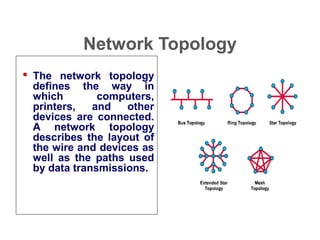
Network Topology
 The network topology
defines the way in
which computers,
printers, and other
devices are connected.
A network topology
describes the layout of
the wire and devices as
well as the paths used
by data transmissions.
Introduction to Computer Networks
Network Topology
– Logical layout of wires and equipment
– Choice affects
• Network performance
• Network size
• Network collision detection
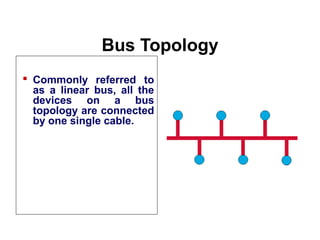
Bus Topology
 Commonly referred to
as a linear bus, all the
devices on a bus
topology are connected
by one single cable.
Introduction to Computer Networks
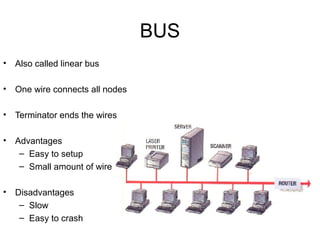
BUS
• Also called linear bus
• One wire connects all nodes
• Terminator ends the wires
• Advantages
– Easy to setup
– Small amount of wire
• Disadvantages
– Slow
– Easy to crash
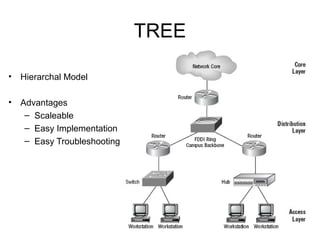
Star & Tree Topology
Introduction to Computer Networks
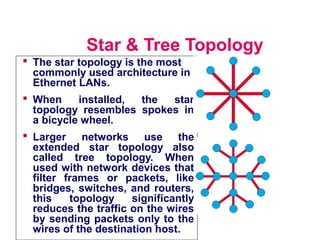
 The star topology is the most
commonly used architecture in
Ethernet LANs.
 When installed, the star
topology resembles spokes in
a bicycle wheel.
 Larger networks use the
extended star topology also
called tree topology. When
used with network devices that
filter frames or packets, like
bridges, switches, and routers,
this topology significantly
reduces the traffic on the wires
by sending packets only to the
wires of the destination host.
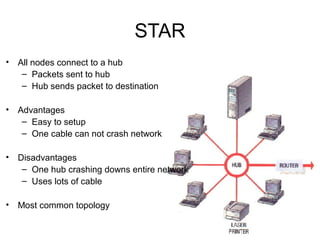
STAR
• All nodes connect to a hub
– Packets sent to hub
– Hub sends packet to destination
• Advantages
– Easy to setup
– One cable can not crash network
• Disadvantages
– One hub crashing downs entire network
– Uses lots of cable
• Most common topology
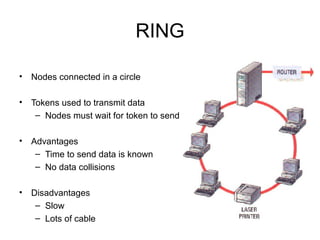
Ring Topology
Introduction to Computer Networks
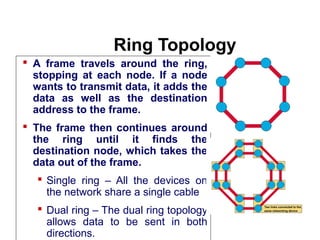
 A frame travels around the ring,
stopping at each node. If a node
wants to transmit data, it adds the
data as well as the destination
address to the frame.
 The frame then continues around
the ring until it finds the
destination node, which takes the
data out of the frame.
 Single ring – All the devices on
the network share a single cable
 Dual ring – The dual ring topology
allows data to be sent in both
directions.
RING
• Nodes connected in a circle
• Tokens used to transmit data
– Nodes must wait for token to send
• Advantages
– Time to send data is known
– No data collisions
• Disadvantages
– Slow
– Lots of cable
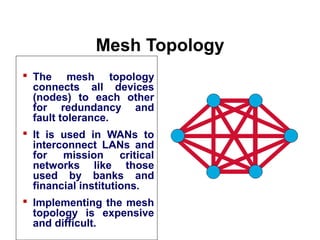
Mesh Topology
 The mesh topology
connects all devices
(nodes) to each other
for redundancy and
fault tolerance.
 It is used in WANs to
interconnect LANs and
for mission critical
networks like those
used by banks and
financial institutions.
 Implementing the mesh
topology is expensive
and difficult.
Introduction to Computer Networks
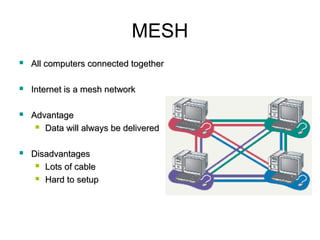
MESH
 All computers connected togetherAll computers connected together
 Internet is a mesh networkInternet is a mesh network
 AdvantageAdvantage
 Data will always be deliveredData will always be delivered
 DisadvantagesDisadvantages
 Lots of cableLots of cable
 Hard to setupHard to setup
TREE
• Hierarchal Model
• Advantages
– Scaleable
– Easy Implementation
– Easy Troubleshooting
Network Components
Introduction to Computer Networks
 Physical Media
 Interconnecting Devices
 Computers
 Networking Software
 Applications
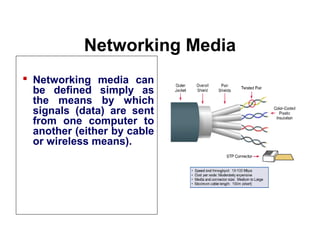
Networking Media
 Networking media can
be defined simply as
the means by which
signals (data) are sent
from one computer to
another (either by cable
or wireless means).
Introduction to Computer Networks
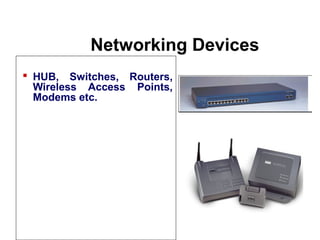
Networking Devices
Introduction to Computr Networks
 HUB, Switches, Routers,
Wireless Access Points,
Modems etc.
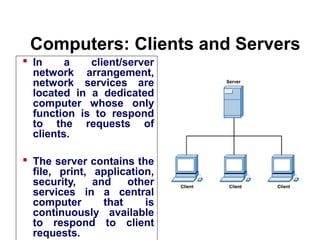
Computers: Clients and Servers
 In a client/server
network arrangement,
network services are
located in a dedicated
computer whose only
function is to respond
to the requests of
clients.
 The server contains the
file, print, application,
security, and other
services in a central
computer that is
continuously available
to respond to client
requests.
Introduction to Computer Networks
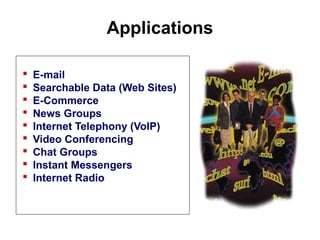
Applications
 E-mail
 Searchable Data (Web Sites)
 E-Commerce
 News Groups
 Internet Telephony (VoIP)
 Video Conferencing
 Chat Groups
 Instant Messengers
 Internet Radio
Introduction to Computer Networks
Network Classification
• By Size or Scale
– LAN
– WAN
– MAN
– CAN
– PAN
Local Area Network
• Contains printers, servers and computers
• Systems are close to each other
• Contained in one office or building
• Organizations often have several LANS
Wide Area Networks (WAN)
• Two or more LANs connected
• Over a large geographic area
• Typically use public or leased lines
– Phone lines
– Satellite
• The Internet is a WAN
Metropolitan Area Network (MAN)
• Large network that connects different
organizations
• Shares regional resources
• A network provider sells time
Campus Area Networks (CAN)
• A LAN in one large geographic area
• Resources related to the same
organization
• Each department shares the LAN
Personal Area Network (PAN)
• Very small scale network
• Range is less than 2 meters
• Cell phones, PDAs, MP3 players
Network Classification
• By Structure / Functional Relationship
– Client / Server
– Peer to Peer (P2PN)
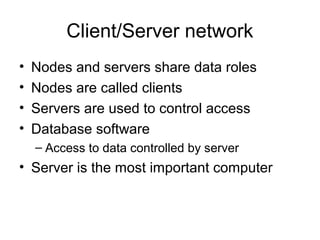
Client/Server network
• Nodes and servers share data roles
• Nodes are called clients
• Servers are used to control access
• Database software
– Access to data controlled by server
• Server is the most important computer
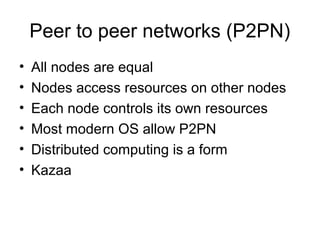
Peer to peer networks (P2PN)
• All nodes are equal
• Nodes access resources on other nodes
• Each node controls its own resources
• Most modern OS allow P2PN
• Distributed computing is a form
• Kazaa
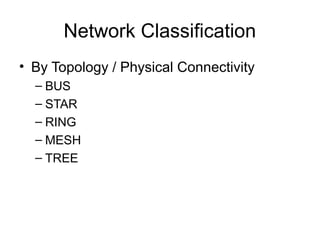
Network Classification
• By Topology / Physical Connectivity
– BUS
– STAR
– RING
– MESH
– TREE
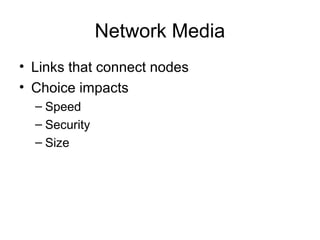
Network Media
• Links that connect nodes
• Choice impacts
– Speed
– Security
– Size
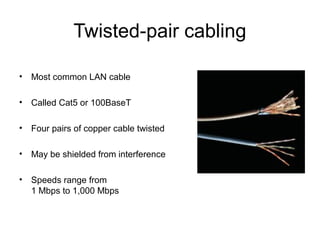
Twisted-pair cabling
• Most common LAN cable
• Called Cat5 or 100BaseT
• Four pairs of copper cable twisted
• May be shielded from interference
• Speeds range from
1 Mbps to 1,000 Mbps
Coaxial cable
• Similar to cable TV wire
• One wire runs through cable
• Shielded from interference
• Speeds up to 10 Mbps
• Nearly obsolete
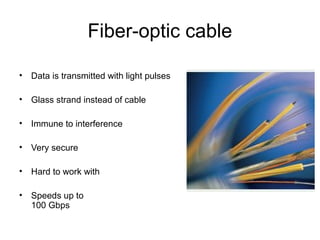
Fiber-optic cable
• Data is transmitted with light pulses
• Glass strand instead of cable
• Immune to interference
• Very secure
• Hard to work with
• Speeds up to
100 Gbps
Wireless Media
• Data transmitted through the air
• LANs use radio waves
• WANs use microwave signals
• Easy to setup
• Difficult to secure
Internetwork
• An Internetwork is the connection of two or more
distinct computer networks or network segments
via a common routing technology.
• Any interconnection among or between public,
private, commercial, industrial, or governmental
networks may also be defined as an
internetwork.
Internetwork
• Intranet
– An intranet is a set of networks, using the Internet Protocol and IP-based tools
such as web browsers and file transfer applications, that is under the control of a
single administrative entity.
– Most commonly, an intranet is the internal network of an organization
• Extranet
– An extranet is a network or internetwork that is limited in scope to a single
organization or entity but which also has limited connections to the networks of one
or more other usually, but not necessarily, trusted organizations or entities
– by definition, an extranet cannot consist of a single LAN; it must have at least one
connection with an external network.
• Internet
– The Internet consists of a worldwide interconnection of governmental, academic,
public, and private networks based upon the networking technologies of the
Internet Protocol Suite.
– It is the successor of the Advanced Research Projects Agency Network
(ARPANET) developed by DARPA of the U.S. Department of Defense.
– The Internet is also the communications backbone underlying the World Wide Web
(WWW).
Dr. Kamal Gulati
Associate Professor |
University Quality Support Head |
Mentoring Programme Coordinator
[Ph. D., M.Sc. (Computer Science), M.C.A., M.B.A]
Professional Certifications:
•Certified Microsoft Innovative Educator
•Data Science 101 Certification from Big Data University
•R Language 101 Certification from Big Data University
•SQL Certification from SOLOLEARN.com
•Certified IBM Big Data 101 from Big Data University
•R Program & Python Certified from DataCamp
•Wiley Certified Big Data Analyst [WCBDA]
•Certification on DBMS from IIT Mumbai
•Certified Cisco Certified Network Associate [CCNA]
•Certified Microsoft Certified Professional [MCP]
•Certified Brainbench in Computer Fundamentals, Microsoft Access, MySQL 5.7 Administration &
Microsoft Project
• Worked as Visiting Professor with Stratford University, USA for six months from
Jan’2016 to June’2016.
• Also worked at Bahrain University in Kingdom of Bahrain Sr. I.T. Faculty
(Computer Science Department) for Period of 2 Years.
• Have rich experience in the field of teaching and research in Computer Science
and Information Technology for almost 15+ years in Academia.
• Having experience of working with both private and public institutions and
universities as the lecturer and self-instruction material writer for Information
Technology courses.
• Had number of research papers published in national and international journals
and conference proceedings in IEEE and Scopus Index.
• Also chaired various National and International Conferences of repute and
associated with various International Journals as Editorial Board Member for
International and National, Academic Adviser and Research Paper Reviewer.
• My current area of interest: Big Data Analytics, R Software, Management
Information System, IT Project Management, Decision Support System,
Business Analytics, Database Management System, Data Networking and
Advanced Excel with Visual Basic Macros.
• Country Visited: USA, Canada, UK, UAE, Bahrain, Oman (Mostly for Teaching
and Research Purpose)
Profile of Dr. Kamal Gulati
• Technical Program Committee for International Conference on Data, Engineering and Applications
2017 (IDEA-2k17) which would be on October 28-29, 2017 at Bhopal.
http://www.ideaconference.in
• Advisory Board Committee Member for International Conference on Energy, Communication, Data
Analytics and Soft Computing (ICECDS) which would be on 1-2 August 2017 at SKR Engineering
College, Poonamallee, Tamil Nadu, India. http://ecds.org.in
• Advisory Committee Member for International Conference on Innovative Research in Engineering
and Science which would be on 16-17 June 2017 at Asian Institute of Technology Conference
Center Thailand. http://www.iresconf.org
• Advisory Committee Member for International Conference on Cloud Computing and Internet of
everything which held on 10-11 Feb’2016 at Delhi-NCR. http://www.ccioet.org
• Technical Committee member for InCITe-2016 (International Conference on Information
Technology) Theme - Internet of Things: Connect Your Worlds, IT Summit, Amity University 2016
which held on 06-07 Oct, 2016. http://www.amity.edu/incite2016
• Technical Speaker for Global perspective on IT business “The Changing Scenario” – Big Data on
International Students Conference New Delhi (ISCND) which held on 14-15 Oct, 2016
http://iscnd.com
• Advisory Committee Member for International Conference on Sustainable Computing Techniques
in Engineering, Science and Management which has held on 09-10 Sep’2016 at Delhi-NCR.
http://www.scesm.org
• Technical Program Committee Member for Program Committee Member for International
Conference on Recent Trends IN ICT, Jaipur, India, Aug 18-19, 2017 http://rtict.org
• Program Committee Member for International Conference on Recent Advancement in Computer
and Communication Bhopal, India, (IC-RAC-2017) May 26-27, 2017 http://www.icrac.co.in
Profile Contd….
• Editorial Board member for the following International Journals:
– International Journal of Computer Science and Innovation
http://www.infinitysciences.org
– International Journal of Latest Research in Engineering and
Technology http://www.ijlret.com
– International Journal of Latest Trends in Engineering and Technology
http://www.ijltet.org
– International Journal of Application or Innovation
in Engineering & Management http://www.ijaiem.org
– International Journal for Management http://www.ijm-apm.com
– ITM International Journal of Innovations in Science, Engineering &
Management www.iijisem.org
– The International Journal of Emerging Engineering and Embedded
Systems http://www.ijeees.org
– Conference Info http://conferenceinfo.org/tpc.php
– International Journal of Computer Engineering in Research Trends
(IJCERT) http://www.ijcert.org
• Expert Speaker for Program “Insurance Beyond Doubt” Presented by Oriental Insurance Co
Ltd. https://www.youtube.com/watch?v=GrvJkN_Zn3Q
Profile Contd….
BOOK, CHAPTER, and CASE STUDY Published
• Published Book on “A Study of Changing Trends in E-CRM of
Indian Insurance Industry” Published by LAP Lambert Academic
Publishing, one of the top researchers and renowned scientists of
Germany with ISBN: 3330009543, 9783330009547. The Book
available at Amazon.com.
• Published Real Case Study on “IoT Security Considerations for
Higher Education” published on Business Cases - RENVOI 2017
BOOK (The Case Centre, UK) with ISBN: 978-1-4828-8840-9,
Page 63-70. The Book available at the various online website:
Amazon, AbeBooks, Chegg, Barnes & Noble.
• Published Chapter on "Role of eWorld in Insurance Innovation"
Published by Insurance Institute of India (III), 60 Years Diamond
Jubilee, Compendium, Nov 2016 – (Magazine) – One of the
premium Insurance Institute of India.
Contact Details
• Email : drkamalgulati@gmail.com
Website : http://mybigdataanalytics.in
• LinkedIn : https://in.linkedin.com/in/drkamalgulati

Information Networks - (Covered all the Important Topics)

  • 1.
  • 2.
    Information Networks (TopicsCovered) •Networked Enterprise Components: Types of networks, Advantages of Network Environment • Business Uses of Internet • Intranet and Extranet • Distributed/Cloud Computing
  • 3.
    Detailed Topics • 1.Networking – Usage & Meaning • 2. Computer Network – Advantages & Disadvantages. • 3. Shared Resources & Services (Printers, Fax Machine, Modems, Files & Folders-Database, Email, Internet) • 4. Elements of Communication System (Sender, Medium, Receiver)
  • 4.
    • 5. DataTransmission Modes (Simplex, Half-Duplex, Full-Duplex) • 6. Transmission of Data Signals (Digital, Analog Transmission) • 7. Data Transmission through Medium (Asynchronous transmission or Synchronous transmission) • 8. Types of Network Models - Domain Vs Workgroup / Peer to Peer Vs Server Based.
  • 5.
    • 9. NetworkClassification (Types of Network): LAN, MAN, WAN, PAN, SAN, CAN, VAN, DAN. • 10. Basic Networking Terms: WWW (URL), IP Address, IPv4, IPv6 • 11. Application of Networks • 12. Network Topology • 13. Types of Network Topology – Logical and Physical Topology
  • 6.
    • 14. Typesof Physical Topology – Bus, Ring, Tree, Star, Mesh, Hybrid • 15. Network Components - Physical Media, Interconnecting Devices, Computers, Networking Software, Applications. • 16. Network Media – (Bounded / Unbounded) Wired Vs Wireless
  • 7.
    • 17. Wired:Different Types of Cables used in Networking based on Speed, Security, Size and Cost. - Twisted Paid Cable (STP / UTP), Coaxial Cable, Fiber Optic Cable • 18. Wireless: RF, Microwave Signals, FM, TM, Satellite Communication. • 19. Networking Devices – HUB, Repeater, Switch, Router, WLAN Card, LAN Card, ADSL, Modems, Bridge, Gateway, Firewall, NIC
  • 8.
    • 20. NetworkingComponents – Client & Servers. • 21. Networking Software – DU Meter, NetMeeting, Remote Sharing Software etc. • 22. Networking Applications – VOIP, Chat Groups, Instant Messengers, News Group, E-Commerce Apps etc. • 23. Internetwork – Connection of two or more computer network via common routing technology. (Intranet, Extranet, Internet)
  • 9.
    • 24. NetworkingProtocols – TCP/IP, IPX/SPX, NeteBUI, DHCP, DNS, FTP • 25. Networking Server – Proxy Server, IIS, File Server, Printer Server, Ms Exchange Server, ISP. • 26. Cloud Computing - Services, Layers, Future of CC, Advantages & Disadvantages.
  • 10.
    • 27. DistributingComputing – Architecture, Applications, Used in Mobile, Categories, Advantages & Disadvantages. • 28. Use of Cloud Computing - in Insurance, Banking Sector and Financial Services. • 29. GPRS, GSM & CDMA • 30. Firewall – Hardware & Software with Types & Difference.
  • 11.
    Computer Networks  Computernetwork connects two or more autonomous computers.  The computers can be geographically located anywhere. Introduction to Computer Networks
  • 12.
    LAN, MAN &WAN  Network in small geographical Area (Room, Building or a Campus) is called LAN (Local Area Network)  Network in a City is call MAN (Metropolitan Area Network)  Network spread geographically (Country or across Globe) is called WAN (Wide Area Network)
  • 13.
    Applications of Networks Introductionto Computer Networks  Resource Sharing  Hardware (computing resources, disks, printers)  Software (application software)  Information Sharing  Easy accessibility from anywhere (files, databases)  Search Capability (WWW)  Communication  Email  Message broadcast  Remote computing  Distributed processing
  • 14.
    Network Topology  Thenetwork topology defines the way in which computers, printers, and other devices are connected. A network topology describes the layout of the wire and devices as well as the paths used by data transmissions. Introduction to Computer Networks
  • 15.
    Network Topology – Logicallayout of wires and equipment – Choice affects • Network performance • Network size • Network collision detection
  • 16.
    Bus Topology  Commonlyreferred to as a linear bus, all the devices on a bus topology are connected by one single cable. Introduction to Computer Networks
  • 17.
    BUS • Also calledlinear bus • One wire connects all nodes • Terminator ends the wires • Advantages – Easy to setup – Small amount of wire • Disadvantages – Slow – Easy to crash
  • 18.
    Star & TreeTopology Introduction to Computer Networks  The star topology is the most commonly used architecture in Ethernet LANs.  When installed, the star topology resembles spokes in a bicycle wheel.  Larger networks use the extended star topology also called tree topology. When used with network devices that filter frames or packets, like bridges, switches, and routers, this topology significantly reduces the traffic on the wires by sending packets only to the wires of the destination host.
  • 19.
    STAR • All nodesconnect to a hub – Packets sent to hub – Hub sends packet to destination • Advantages – Easy to setup – One cable can not crash network • Disadvantages – One hub crashing downs entire network – Uses lots of cable • Most common topology
  • 20.
    Ring Topology Introduction toComputer Networks  A frame travels around the ring, stopping at each node. If a node wants to transmit data, it adds the data as well as the destination address to the frame.  The frame then continues around the ring until it finds the destination node, which takes the data out of the frame.  Single ring – All the devices on the network share a single cable  Dual ring – The dual ring topology allows data to be sent in both directions.
  • 21.
    RING • Nodes connectedin a circle • Tokens used to transmit data – Nodes must wait for token to send • Advantages – Time to send data is known – No data collisions • Disadvantages – Slow – Lots of cable
  • 22.
    Mesh Topology  Themesh topology connects all devices (nodes) to each other for redundancy and fault tolerance.  It is used in WANs to interconnect LANs and for mission critical networks like those used by banks and financial institutions.  Implementing the mesh topology is expensive and difficult. Introduction to Computer Networks
  • 23.
    MESH  All computersconnected togetherAll computers connected together  Internet is a mesh networkInternet is a mesh network  AdvantageAdvantage  Data will always be deliveredData will always be delivered  DisadvantagesDisadvantages  Lots of cableLots of cable  Hard to setupHard to setup
  • 24.
    TREE • Hierarchal Model •Advantages – Scaleable – Easy Implementation – Easy Troubleshooting
  • 25.
    Network Components Introduction toComputer Networks  Physical Media  Interconnecting Devices  Computers  Networking Software  Applications
  • 26.
    Networking Media  Networkingmedia can be defined simply as the means by which signals (data) are sent from one computer to another (either by cable or wireless means). Introduction to Computer Networks
  • 27.
    Networking Devices Introduction toComputr Networks  HUB, Switches, Routers, Wireless Access Points, Modems etc.
  • 28.
    Computers: Clients andServers  In a client/server network arrangement, network services are located in a dedicated computer whose only function is to respond to the requests of clients.  The server contains the file, print, application, security, and other services in a central computer that is continuously available to respond to client requests. Introduction to Computer Networks
  • 29.
    Applications  E-mail  SearchableData (Web Sites)  E-Commerce  News Groups  Internet Telephony (VoIP)  Video Conferencing  Chat Groups  Instant Messengers  Internet Radio Introduction to Computer Networks
  • 30.
    Network Classification • BySize or Scale – LAN – WAN – MAN – CAN – PAN
  • 31.
    Local Area Network •Contains printers, servers and computers • Systems are close to each other • Contained in one office or building • Organizations often have several LANS
  • 32.
    Wide Area Networks(WAN) • Two or more LANs connected • Over a large geographic area • Typically use public or leased lines – Phone lines – Satellite • The Internet is a WAN
  • 33.
    Metropolitan Area Network(MAN) • Large network that connects different organizations • Shares regional resources • A network provider sells time
  • 34.
    Campus Area Networks(CAN) • A LAN in one large geographic area • Resources related to the same organization • Each department shares the LAN
  • 35.
    Personal Area Network(PAN) • Very small scale network • Range is less than 2 meters • Cell phones, PDAs, MP3 players
  • 36.
    Network Classification • ByStructure / Functional Relationship – Client / Server – Peer to Peer (P2PN)
  • 37.
    Client/Server network • Nodesand servers share data roles • Nodes are called clients • Servers are used to control access • Database software – Access to data controlled by server • Server is the most important computer
  • 38.
    Peer to peernetworks (P2PN) • All nodes are equal • Nodes access resources on other nodes • Each node controls its own resources • Most modern OS allow P2PN • Distributed computing is a form • Kazaa
  • 39.
    Network Classification • ByTopology / Physical Connectivity – BUS – STAR – RING – MESH – TREE
  • 40.
    Network Media • Linksthat connect nodes • Choice impacts – Speed – Security – Size
  • 41.
    Twisted-pair cabling • Mostcommon LAN cable • Called Cat5 or 100BaseT • Four pairs of copper cable twisted • May be shielded from interference • Speeds range from 1 Mbps to 1,000 Mbps
  • 42.
    Coaxial cable • Similarto cable TV wire • One wire runs through cable • Shielded from interference • Speeds up to 10 Mbps • Nearly obsolete
  • 43.
    Fiber-optic cable • Datais transmitted with light pulses • Glass strand instead of cable • Immune to interference • Very secure • Hard to work with • Speeds up to 100 Gbps
  • 44.
    Wireless Media • Datatransmitted through the air • LANs use radio waves • WANs use microwave signals • Easy to setup • Difficult to secure
  • 45.
    Internetwork • An Internetworkis the connection of two or more distinct computer networks or network segments via a common routing technology. • Any interconnection among or between public, private, commercial, industrial, or governmental networks may also be defined as an internetwork.
  • 46.
    Internetwork • Intranet – Anintranet is a set of networks, using the Internet Protocol and IP-based tools such as web browsers and file transfer applications, that is under the control of a single administrative entity. – Most commonly, an intranet is the internal network of an organization • Extranet – An extranet is a network or internetwork that is limited in scope to a single organization or entity but which also has limited connections to the networks of one or more other usually, but not necessarily, trusted organizations or entities – by definition, an extranet cannot consist of a single LAN; it must have at least one connection with an external network. • Internet – The Internet consists of a worldwide interconnection of governmental, academic, public, and private networks based upon the networking technologies of the Internet Protocol Suite. – It is the successor of the Advanced Research Projects Agency Network (ARPANET) developed by DARPA of the U.S. Department of Defense. – The Internet is also the communications backbone underlying the World Wide Web (WWW).
  • 47.
    Dr. Kamal Gulati AssociateProfessor | University Quality Support Head | Mentoring Programme Coordinator [Ph. D., M.Sc. (Computer Science), M.C.A., M.B.A] Professional Certifications: •Certified Microsoft Innovative Educator •Data Science 101 Certification from Big Data University •R Language 101 Certification from Big Data University •SQL Certification from SOLOLEARN.com •Certified IBM Big Data 101 from Big Data University •R Program & Python Certified from DataCamp •Wiley Certified Big Data Analyst [WCBDA] •Certification on DBMS from IIT Mumbai •Certified Cisco Certified Network Associate [CCNA] •Certified Microsoft Certified Professional [MCP] •Certified Brainbench in Computer Fundamentals, Microsoft Access, MySQL 5.7 Administration & Microsoft Project
  • 48.
    • Worked asVisiting Professor with Stratford University, USA for six months from Jan’2016 to June’2016. • Also worked at Bahrain University in Kingdom of Bahrain Sr. I.T. Faculty (Computer Science Department) for Period of 2 Years. • Have rich experience in the field of teaching and research in Computer Science and Information Technology for almost 15+ years in Academia. • Having experience of working with both private and public institutions and universities as the lecturer and self-instruction material writer for Information Technology courses. • Had number of research papers published in national and international journals and conference proceedings in IEEE and Scopus Index. • Also chaired various National and International Conferences of repute and associated with various International Journals as Editorial Board Member for International and National, Academic Adviser and Research Paper Reviewer. • My current area of interest: Big Data Analytics, R Software, Management Information System, IT Project Management, Decision Support System, Business Analytics, Database Management System, Data Networking and Advanced Excel with Visual Basic Macros. • Country Visited: USA, Canada, UK, UAE, Bahrain, Oman (Mostly for Teaching and Research Purpose) Profile of Dr. Kamal Gulati
  • 49.
    • Technical ProgramCommittee for International Conference on Data, Engineering and Applications 2017 (IDEA-2k17) which would be on October 28-29, 2017 at Bhopal. http://www.ideaconference.in • Advisory Board Committee Member for International Conference on Energy, Communication, Data Analytics and Soft Computing (ICECDS) which would be on 1-2 August 2017 at SKR Engineering College, Poonamallee, Tamil Nadu, India. http://ecds.org.in • Advisory Committee Member for International Conference on Innovative Research in Engineering and Science which would be on 16-17 June 2017 at Asian Institute of Technology Conference Center Thailand. http://www.iresconf.org • Advisory Committee Member for International Conference on Cloud Computing and Internet of everything which held on 10-11 Feb’2016 at Delhi-NCR. http://www.ccioet.org • Technical Committee member for InCITe-2016 (International Conference on Information Technology) Theme - Internet of Things: Connect Your Worlds, IT Summit, Amity University 2016 which held on 06-07 Oct, 2016. http://www.amity.edu/incite2016 • Technical Speaker for Global perspective on IT business “The Changing Scenario” – Big Data on International Students Conference New Delhi (ISCND) which held on 14-15 Oct, 2016 http://iscnd.com • Advisory Committee Member for International Conference on Sustainable Computing Techniques in Engineering, Science and Management which has held on 09-10 Sep’2016 at Delhi-NCR. http://www.scesm.org • Technical Program Committee Member for Program Committee Member for International Conference on Recent Trends IN ICT, Jaipur, India, Aug 18-19, 2017 http://rtict.org • Program Committee Member for International Conference on Recent Advancement in Computer and Communication Bhopal, India, (IC-RAC-2017) May 26-27, 2017 http://www.icrac.co.in Profile Contd….
  • 50.
    • Editorial Boardmember for the following International Journals: – International Journal of Computer Science and Innovation http://www.infinitysciences.org – International Journal of Latest Research in Engineering and Technology http://www.ijlret.com – International Journal of Latest Trends in Engineering and Technology http://www.ijltet.org – International Journal of Application or Innovation in Engineering & Management http://www.ijaiem.org – International Journal for Management http://www.ijm-apm.com – ITM International Journal of Innovations in Science, Engineering & Management www.iijisem.org – The International Journal of Emerging Engineering and Embedded Systems http://www.ijeees.org – Conference Info http://conferenceinfo.org/tpc.php – International Journal of Computer Engineering in Research Trends (IJCERT) http://www.ijcert.org • Expert Speaker for Program “Insurance Beyond Doubt” Presented by Oriental Insurance Co Ltd. https://www.youtube.com/watch?v=GrvJkN_Zn3Q Profile Contd….
  • 51.
    BOOK, CHAPTER, andCASE STUDY Published • Published Book on “A Study of Changing Trends in E-CRM of Indian Insurance Industry” Published by LAP Lambert Academic Publishing, one of the top researchers and renowned scientists of Germany with ISBN: 3330009543, 9783330009547. The Book available at Amazon.com. • Published Real Case Study on “IoT Security Considerations for Higher Education” published on Business Cases - RENVOI 2017 BOOK (The Case Centre, UK) with ISBN: 978-1-4828-8840-9, Page 63-70. The Book available at the various online website: Amazon, AbeBooks, Chegg, Barnes & Noble. • Published Chapter on "Role of eWorld in Insurance Innovation" Published by Insurance Institute of India (III), 60 Years Diamond Jubilee, Compendium, Nov 2016 – (Magazine) – One of the premium Insurance Institute of India.
  • 52.
    Contact Details • Email: drkamalgulati@gmail.com Website : http://mybigdataanalytics.in • LinkedIn : https://in.linkedin.com/in/drkamalgulati

Editor's Notes