Peer to Peer Networking
2021 - 2022
Supervised By:
Mr. Ababakr Ibarhim
Prepared By:
1. Salm Ibrahim
2. Khayam Sherzad
3. Peshawa Jamal
4. Diyar Rasool
Topics
• What is the Network ?
• What is P2P Networking ?
• What is Client-Server ?
• What are the deference between P2P Networking & Client-Server?
• P2P Networking Architecture
• P2P Networking Characteristics
• P2P Networking – Applications
• P2P Advantages
• P2P Disadvantages
• What can we share on our network ?
What is the Network ?
A network consists of two or more computers that are linked in order
to share resources (such as printers and CDs), exchange files, or allow
electronic communications. The computers on a network may be
linked through cables, telephone lines, radio waves, satellites.
5/23/2022 3
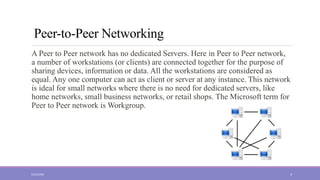
Peer-to-Peer Networking
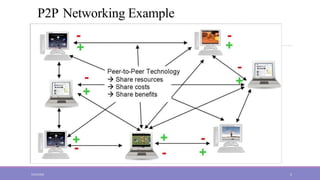
A Peer to Peer network has no dedicated Servers. Here in Peer to Peer network,
a number of workstations (or clients) are connected together for the purpose of
sharing devices, information or data. All the workstations are considered as
equal. Any one computer can act as client or server at any instance. This network
is ideal for small networks where there is no need for dedicated servers, like
home networks, small business networks, or retail shops. The Microsoft term for
Peer to Peer network is Workgroup.
5/23/2022 4
P2P Networking Example
5/23/2022 5
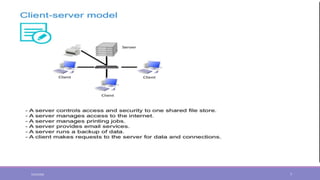
Client-Server
The Client-Server network model is widely used network
model. Here, Server is a powerful system that stores the data
or information in it. On the other hands, the Client is the
machine which let the users access the data on the remote
server.
5/23/2022 6
5/23/2022 7
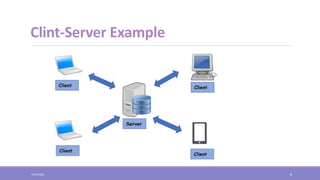
Clint-Server Example
5/23/2022 8
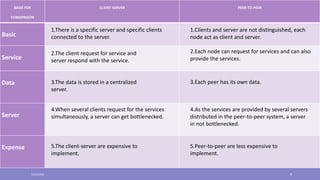
BASIS FOR
COMAPAISON
CLIENT-SERVER PEER-TO-PEER
Basic
Service
Data
Server
Expense
1.There is a specific server and specific clients
connected to the server.
1.Clients and server are not distinguished, each
node act as client and server.
2.The client request for service and
server respond with the service.
2.Each node can request for services and can also
provide the services.
3.The data is stored in a centralized
server.
3.Each peer has its own data.
4.When several clients request for the services
simultaneously, a server can get bottlenecked.
4.As the services are provided by several servers
distributed in the peer-to-peer system, a server
in not bottlenecked.
5.The client-server are expensive to
implement.
5.Peer-to-peer are less expensive to
implement.
5/23/2022 9
P2P Networking - Architecture
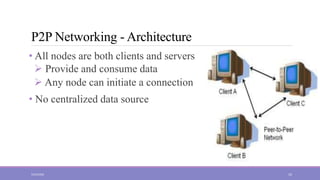
• All nodes are both clients and servers
 Provide and consume data
 Any node can initiate a connection
• No centralized data source
5/23/2022 10
P2P Network Characteristics
• Clients are also servers and routers
 P2P systems share resources, storage, files.
 Nodes are autonomous (no administrative authority)
• Its data is flowing one side.
• It does not need any central repository for managing their content
because all nodes in P2P network are autonomous in nature.
• Nodes have widely varying capabilities
5/23/2022 11
P2P Networking – Applications
There are various areas where to use P2P network, such as –
• File sharing
• Instant messaging
• Voice Communication
• Collaboration
• High Performance Computing
• Others
5/23/2022 12
P2PAdvantages
• Easy to set up
• Less Complexity
• Lower cost since network devices and dedicated servers may not be required
• Can be used for simple tasks such as transferring files and sharing printers
• Efficient use of resources
 Unused bandwidth, storage, processing power at the edge of the network
• Reliability
 Replicas
 Geographic distribution
 No single point of failure
5/23/2022 13
P2P Disadvantages
 No centralized administration
 Not scalable
 Data recovery or backup is very difficult. Each computer should have its
own back-up system
 Security in this system is very less viruses, spywares, trojans, etc.
malwares can easily transmit over this P-2-P architecture.
5/23/2022 14
What can we share on our network?
Profile is designed for users in a network environment as well as those on stand-
alone workstations. On a network you may choose any or all of these options:
• Share the same ProFile program loaded on a network drive,
• Share a single database to manage and query client files stored anywhere on the
network.
• Share a server folder for storing all client data files in one location,
• Share common option settings between all or some users,
5/23/2022 15
THANK YOU
5/23/2022 16
Question ?
5/23/2022 17

P2P-Network.ppt

  • 1.
    Peer to PeerNetworking 2021 - 2022 Supervised By: Mr. Ababakr Ibarhim Prepared By: 1. Salm Ibrahim 2. Khayam Sherzad 3. Peshawa Jamal 4. Diyar Rasool
  • 2.
    Topics • What isthe Network ? • What is P2P Networking ? • What is Client-Server ? • What are the deference between P2P Networking & Client-Server? • P2P Networking Architecture • P2P Networking Characteristics • P2P Networking – Applications • P2P Advantages • P2P Disadvantages • What can we share on our network ?
  • 3.
    What is theNetwork ? A network consists of two or more computers that are linked in order to share resources (such as printers and CDs), exchange files, or allow electronic communications. The computers on a network may be linked through cables, telephone lines, radio waves, satellites. 5/23/2022 3
  • 4.
    Peer-to-Peer Networking A Peerto Peer network has no dedicated Servers. Here in Peer to Peer network, a number of workstations (or clients) are connected together for the purpose of sharing devices, information or data. All the workstations are considered as equal. Any one computer can act as client or server at any instance. This network is ideal for small networks where there is no need for dedicated servers, like home networks, small business networks, or retail shops. The Microsoft term for Peer to Peer network is Workgroup. 5/23/2022 4
  • 5.
  • 6.
    Client-Server The Client-Server networkmodel is widely used network model. Here, Server is a powerful system that stores the data or information in it. On the other hands, the Client is the machine which let the users access the data on the remote server. 5/23/2022 6
  • 7.
  • 8.
  • 9.
    BASIS FOR COMAPAISON CLIENT-SERVER PEER-TO-PEER Basic Service Data Server Expense 1.Thereis a specific server and specific clients connected to the server. 1.Clients and server are not distinguished, each node act as client and server. 2.The client request for service and server respond with the service. 2.Each node can request for services and can also provide the services. 3.The data is stored in a centralized server. 3.Each peer has its own data. 4.When several clients request for the services simultaneously, a server can get bottlenecked. 4.As the services are provided by several servers distributed in the peer-to-peer system, a server in not bottlenecked. 5.The client-server are expensive to implement. 5.Peer-to-peer are less expensive to implement. 5/23/2022 9
  • 10.
    P2P Networking -Architecture • All nodes are both clients and servers  Provide and consume data  Any node can initiate a connection • No centralized data source 5/23/2022 10
  • 11.
    P2P Network Characteristics •Clients are also servers and routers  P2P systems share resources, storage, files.  Nodes are autonomous (no administrative authority) • Its data is flowing one side. • It does not need any central repository for managing their content because all nodes in P2P network are autonomous in nature. • Nodes have widely varying capabilities 5/23/2022 11
  • 12.
    P2P Networking –Applications There are various areas where to use P2P network, such as – • File sharing • Instant messaging • Voice Communication • Collaboration • High Performance Computing • Others 5/23/2022 12
  • 13.
    P2PAdvantages • Easy toset up • Less Complexity • Lower cost since network devices and dedicated servers may not be required • Can be used for simple tasks such as transferring files and sharing printers • Efficient use of resources  Unused bandwidth, storage, processing power at the edge of the network • Reliability  Replicas  Geographic distribution  No single point of failure 5/23/2022 13
  • 14.
    P2P Disadvantages  Nocentralized administration  Not scalable  Data recovery or backup is very difficult. Each computer should have its own back-up system  Security in this system is very less viruses, spywares, trojans, etc. malwares can easily transmit over this P-2-P architecture. 5/23/2022 14
  • 15.
    What can weshare on our network? Profile is designed for users in a network environment as well as those on stand- alone workstations. On a network you may choose any or all of these options: • Share the same ProFile program loaded on a network drive, • Share a single database to manage and query client files stored anywhere on the network. • Share a server folder for storing all client data files in one location, • Share common option settings between all or some users, 5/23/2022 15
  • 16.
  • 17.